2018 SUBARU WRX brake light
[x] Cancel search: brake lightPage 159 of 578

(164,1)
北米Model "A1700BE-B" EDITED: 2017/ 10/ 11
!Brake fluid level warning
This light illuminates when the brake fluid
level has dropped to near the“MIN”level of
the brake fluid reservoir with the ignition
switch in the“ON”position and with the
parking brake fully released.
If the brake system warning light should
illuminate while driving (with the parking
brake fully released and with the ignition
switch positioned in“ON”), it could be an
indication of leaking of brake fluid or worn
brake pads. If this occurs, immediately
stop the vehicle at the nearest safe place
and check the brake fluid level. If the fluid
level is below the“MIN”mark in the
reservoir, do not drive the vehicle. Have
the vehicle towed to the nearest SUBARU
dealer for repair.
!Electronic Brake Force Distribution
(EBD) system warning
The brake system warning light also
illuminates if a malfunction occurs in the
EBD system. In that event, it illuminates
together with the ABS warning light.
The EBD system may be malfunctioning if
the brake system warning light and ABS
warning light illuminate simultaneously
while driving.
Even if the EBD system fails, the conven-
tional braking system will still function.
However, the rear wheels will be moreprone to locking when the brakes are
applied harder than usual and the vehicle’s
motion may therefore become somewhat
harder to control.
If the brake system warning light and ABS
warning light illuminate simultaneously,
take the following steps.
1. Stop the vehicle in the nearest safe, flat
place.
2. Shut down the engine, apply the
parking brake and then restart it.
3. Release the parking brake. If both
warning lights turn off, the EBD system
may be malfunctioning. Drive carefully to
the nearest SUBARU dealer and have the
system inspected.
4. If both warning lights illuminate again
and remain illuminated after the engine
has been restarted, shut down the engine
again, apply the parking brake, and check
the brake fluid level.
5. If the brake fluid level is not below the
“MIN”mark, the EBD system may be
malfunctioning. Drive carefully to the
nearest SUBARU dealer and have the
system inspected.
6. If the brake fluid level is below the
“MIN”mark, DO NOT drive the vehicle.
Instead, have the vehicle towed to the
nearest SUBARU dealer for repair.!Electronic parking brake system
warning (models with electronic
parking brake system)
The brake system warning light illuminates
when the electronic parking brake system
is malfunctioning. If the warning light
illuminates, promptly park in a safe loca-
tion as soon as possible and contact your
SUBARU dealer.
The brake system warning light remains
illuminated when the parking brake cannot
be released even if the parking brake
switch is pushed. For details, refer to
“Electronic parking brake (models with
electronic parking brake system)”F7-43.
!Frequent operation warning
The brake system warning light illuminates
and a chirp sound will be heard if the
parking brake switch is operated too
frequently. In this case, the operation of
the parking brake switch is restricted to
protect the electronic parking brake sys-
tem.
!Vacuum pump system warning (ex-
cept STI)
This light illuminates when a malfunction is
detected in the vacuum pump system.
NOTEThe vacuum pump system assists the
boost pressure when driving at high
Instruments and controls/Warning and indicator lights
3-22
Page 160 of 578

(165,1)
北米Model "A1700BE-B" EDITED: 2017/ 10/ 11
altitudes while the engine is cold.&Electronic parking
brake indicator light
(models with electronic
parking brake system)!Parking brake indicator
The light illuminates with the parking brake
applied while the ignition switch is in the
“ON”position. It turns off when the parking
brake is fully released.
!Electronic parking brake system
warning
WARNING
.When you release the electronic
parking brake while the engine is
running, the electronic parking
brake indicator light will turn off.
However, if the light still illumi-
nates, stop the vehicle in a safe
place immediately and have the
system inspected by a SUBARU
dealer.
.If at all in doubt about whether the
brakes are operating properly, do
not drive the vehicle. Have your
vehicle towed to the nearest
SUBARU dealer for repair..If the electronic parking brake
indicator light flashes, the elec-
tronic parking brake system may
be malfunctioning. Immediately
stop your vehicle in a safe loca-
tion, use tire stops under the tires
to prevent the vehicle from mov-
ing and contact your SUBARU
dealer. For details, refer to“Elec-
tronic parking brake (models with
electronic parking brake sys-
tem)”F7-43.
NOTE.When the ignition switch is turned to
the“LOCK”/“OFF”position with the
electronic parking brake applied, the
electronic parking brake indicator light
remains illuminated for approximately
30 seconds and then turns off.
.When the electronic parking brake
switch is pulled to apply the electronic
parking brake while the ignition switch
is in the“LOCK”/“OFF”position, the
electronic parking brake indicator light
illuminates, remains illuminated for
approximately 30 seconds and then
turns off.
.Even if the electronic parking brake
indicator light flashes, if the warning
light behavior is as described in the
following examples, the electronicparking brake system is not malfunc-
tioning.
–The indicator light turns off when
the electronic parking brake is re-
leased.
.The electronic parking brake indica-
tor light may flash immediately after the
engine is started. However, it is not
malfunctioning if the indicator light
turns off after the electronic parking
brake is released.
.The electronic parking brake indica-
tor light may flash after the electronic
parking brake is frequently applied and
released. However, the electronic park-
ing brake system is not malfunctioning
if the light turns off for a short period of
time.
The electronic parking brake indicator light
flashes when the electronic parking brake
system is malfunctioning. If the indicator
light flashes, promptly park in a safe
location as soon as possible and contact
your SUBARU dealer.
The electronic parking brake indicator light
remains illuminated when the parking
brake cannot be released even if the
parking brake switch is pushed. For de-
tails, refer to“Electronic parking brake
(models with electronic parking brake
system)”F7-43.
–CONTINUED–
Instruments and controls/Warning and indicator lights
3-23
3
Page 161 of 578

(166,1)
北米Model "A1700BE-B" EDITED: 2017/ 10/ 11
!Parking brake apply inhibit warn-
ing
The electronic parking brake indicator light
flashes for 10 seconds and a chirp sound
will be heard if the parking brake switch is
operated when the parking brake cannot
be applied.
!Frequent operation warning
The electronic parking brake indicator light
flashes for 10 seconds and a chirp sound
will be heard if the parking brake switch is
operated too frequently. In this case, the
operation of the parking brake switch is
restricted to protect the electronic parking
brake system.
NOTEWait until the indicator light turns off.&Low fuel warning lightThe low fuel warning light illuminates when
the tank is nearly empty, at approximately
2.6 US gal (10.0 liters, 2.2 Imp gal). It only
operates when the ignition switch is in the
“ON”position.
CAUTION
Promptly put fuel in the tank when-
ever the low fuel warning light
illuminates. Engine misfires as aresult of an empty tank could cause
damage to the engine.
&Hill start assist warning
light/Hill start assist
OFF indicator light
(models without electro-
nic parking brake sys-
tem)!Hill start assist warning light
While the engine is running, if there are
any malfunctions in the Hill start assist
system, the warning light will illuminate.
WARNING
When the Hill start assist warning
light illuminates, have the vehicle
inspected at an authorized SUBARU
dealer.
!Hill start assist OFF indicator light
While the Hill start assist system is
deactivated, the Hill start assist OFF
indicator light illuminates continuously to
inform the driver that the Hill start assist
system is not operational.
&Auto Vehicle Hold ON
indicator light (models
with electronic parking
brake system)
CAUTION
If the Auto Vehicle Hold ON indicator
light does not illuminate even when
the Auto Vehicle Hold switch is
pressed to activate the Auto Vehicle
Hold function, the electronic parking
brake system may be malfunction-
ing. Immediately stop the vehicle in
a safe location and contact your
SUBARU dealer.
This indicator light illuminates when the
Auto Vehicle Hold is activated. For details,
refer to“To turn on/off the Auto Vehicle
Hold function”F7-47.&Auto Vehicle Hold op-
eration indicator light
(models with electronic
parking brake system)This indicator light illuminates while the
vehicle is stopped by the Auto Vehicle Hold
function. For details, refer to“To operate
the Auto Vehicle Hold function”F7-48.
Instruments and controls/Warning and indicator lights
3-24
Page 163 of 578

(168,1)
北米Model "A1700BE-B" EDITED: 2017/ 10/ 11
&Vehicle Dynamics Con-
trol warning light/Vehicle
Dynamics Control op-
eration indicator light!Vehicle Dynamics Control warning
light
CAUTION
The Vehicle Dynamics Control sys-
tem provides its ABS control
through the electrical circuit of the
ABS. Accordingly, if the ABS is
inoperative, the Vehicle Dynamics
Control system becomes unable to
provide ABS control. As a result, the
Vehicle Dynamics Control system
also becomes inoperative, causing
the warning light to illuminate.
Though both the Vehicle Dynamics
Control and ABS are inoperative in
this case, the ordinary functions of
the brake system are still available.
You will be safe while driving with
this condition, but drive carefully
and have your vehicle checked at a
SUBARU dealer as soon as possi-
ble.
NOTE.If the electrical circuit of the Vehicle
Dynamics Control system itself mal-
functions, the warning light only illumi-
nates. At this time, the ABS (Anti-lock
Brake System) remains fully opera-
tional.
.The warning light illuminates when
the electronic control system of the
ABS/Vehicle Dynamics Control system
malfunctions.
The Vehicle Dynamics Control system is
probably inoperative under any of the
following conditions. Have your vehicle
checked at a SUBARU dealer immedi-
ately.
.The warning light does not illuminate
when the ignition switch is turned to the
“ON”position.
.The warning light illuminates while the
vehicle is running.
NOTEIf the warning light behavior is as
described in the following examples,
the Vehicle Dynamics Control system
may be considered normal.
.The warning light illuminates when
the ignition switch is turned to the“ON”
position and turns off approximately 2
seconds after the engine has started.
.The warning light illuminates right
after the engine is started but turns off
immediately, remaining off.
.The warning light illuminates after
the engine has started and turns off
while the vehicle is subsequently being
driven.
.The warning light illuminates while
driving, but it turns off immediately and
remains off.
.The warning light illuminates when
the engine has stalled and continues to
illuminate after the engine has been
restarted. However, it will turn off once
the vehicle starts moving.
Instruments and controls/Warning and indicator lights
3-26
Page 169 of 578
(174,1)
北米Model "A1700BE-B" EDITED: 2017/ 10/ 11
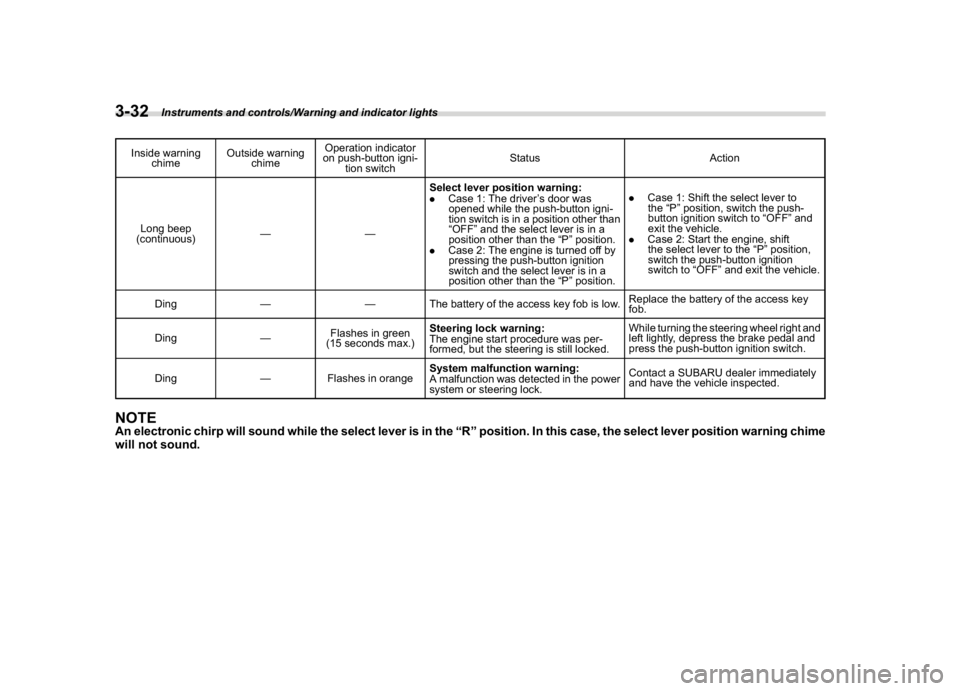
Inside warning
chimeOutside warning
chimeOperation indicator
on push-button igni-
tion switchStatus Action
Long beep
(continuous)——Select lever position warning:
.Case 1: The driver’s door was
opened while the push-button igni-
tion switch is in a position other than
“OFF”and the select lever is in a
position other than the“P”position.
.Case 2: The engine is turned off by
pressing the push-button ignition
switch and the select lever is in a
position other than the“P”position..Case 1: Shift the select lever to
the“P”position, switch the push-
button ignition switch to“OFF”and
exit the vehicle.
.Case 2: Start the engine, shift
the select lever to the“P”position,
switch the push-button ignition
switch to“OFF”and exit the vehicle.
Ding——The battery of the access key fob is low.Replace the battery of the access key
fob.
Ding—Flashes in green
(15 seconds max.)Steering lock warning:
The engine start procedure was per-
formed, but the steering is still locked.While turning the steering wheel right and
left lightly, depress the brake pedal and
press the push-button ignition switch.
Ding—Flashes in orangeSystem malfunction warning:
A malfunction was detected in the power
system or steering lock.Contact a SUBARU dealer immediately
and have the vehicle inspected.
NOTEAn electronic chirp will sound while the select lever is in the“R”position. In this case, the select lever position warning chime
will not sound.
Instruments and controls/Warning and indicator lights
3-32
Page 206 of 578

(211,1)
北米Model "A1700BE-B" EDITED: 2017/ 10/ 11
&Daytime running light system
WARNING
When the daytime running lights are
illuminated, the tail lights do not
illuminate. When it becomes dark
outside, turn the light switch to the
“
”position to illuminate the head-
lights and tail lights. This will im-
prove visibility and allow other dri-
vers to see your vehicle more easily.
The daytime running lights will automati-
cally illuminate when the following condi-
tions are fulfilled.
.The engine is running.
.The parking brake is fully released.
.The light control switch is in the“AUTO”
(if equipped),“
”or off position.
.For CVT models, the select lever is in a
position other than the“P”position.
NOTEWhen the light switch is in the“
”
position, the instrument panel illumina-
tion, front side marker lights, tail lights
and license plate lights are also illumi-
nated.
Steering Responsive Head-
light (SRH) (if equipped)1) The target area of illumination when SRH
is activated
2) The target area of illumination when SRH
is not activatedSRH is a function that automatically moves
the headlight beam to the left or right in
accordance with the steering angle and
vehicle speed. This function helps to
improve the visibility at night by illuminat-
ing the road ahead at corners and inter-
sections.NOTESRH only activates when the vehicle is
traveling forward at the speed of ap-
proximately 5 mph (8 km/h) and over.
&To turn on/off the SRHOperate the combination meter display
(color LCD) to turn on/off the SRH. For
details, refer to“SRH”F3-43.SRH OFF indicatorThe SRH OFF indicator on the combina-
tion meter turns off when SRH is turned on.
The SRH OFF indicator on the combina-
tion meter illuminates when SRH is turned
off.
If SRH is malfunctioning, a message
appears on the warning screen when the
ignition switch is in the“ON”position. It
indicates that SRH has been deactivated.
Contact a SUBARU dealer for an inspec-
tion.
–CONTINUED–
Instruments and controls/Steering Responsive Headlight (SRH)
3-69
3
Page 249 of 578
(258,1)
北米Model "A1700BE-B" EDITED: 2017/ 10/ 11
&Basic information before use
WARNING
When the vehicle is stopped with the
engine running, always apply the
parking brake for safety. Failure to
do so may result in loss of control of
your vehicle and cause an accident
or serious injury.
CAUTION
.To prevent damaging the screen,
touch the screen keys with your
finger lightly.
.Wipe off fingerprints using a
glass cleaning cloth. Do not use
chemical cleaners to clean the
screen, as they may damage the
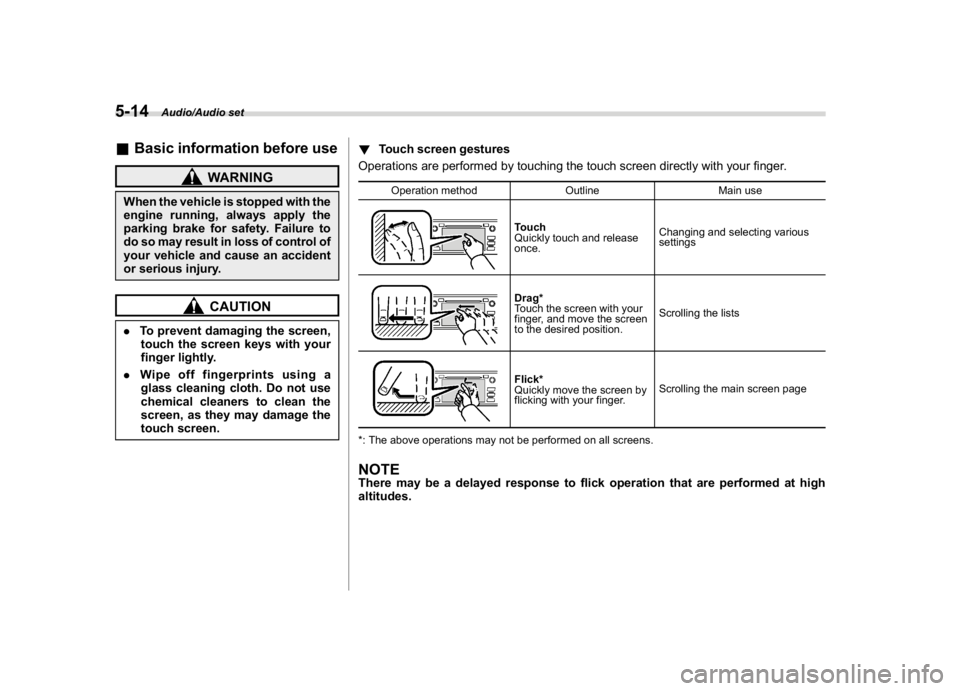
touch screen.!Touch screen gestures
Operations are performed by touching the touch screen directly with your finger.
Operation method Outline Main use
Touch
Quickly touch and release
once.Changing and selecting various
settingsDrag*
Touch the screen with your
finger, and move the screen
to the desired position.Scrolling the listsFlick*
Quickly move the screen by
flicking with your finger.Scrolling the main screen page
*: The above operations may not be performed on all screens.
NOTEThere may be a delayed response to flick operation that are performed at high
altitudes.
Audio/Audio set
5-14
Page 259 of 578

(268,1)
北米Model "A1700BE-B" EDITED: 2017/ 10/ 11
!Display settings
Touch the
tab to set display.
Item Function
Day/Night
ModeThe“Auto”,“Day”or“Night”key
can be selected on the pop-up
screen.
When the“Auto”key is selected,
the screen changes to day or
night mode depending on the
position of the headlight switch.
BrightnessTouch“+”or“”to adjust the
brightness.
NOTE.When the screen is viewed through
polarized sunglasses, a rainbow pat-
tern may appear on the screen due to
optical characteristics of the screen. If
this is disruptive, please operate thescreen without polarized sunglasses.
.If the screen is set to“Day”mode
with the headlight switch turned on,
this condition is memorized even with
the engine turned off.
!How to adjust the rear view image
In the camera display, the brightness, tint,
color and black level of the screen can be
adjusted.
1. Depress the brake pedal fully and stop
the vehicle.
2. While the vehicle is stopped, set the
shift lever (MT models) or select lever
(CVT models) in the“R”position, and then
touch the display.
3. Touch the“Display Adjustment”key.
4. Touch the items to adjust the rear
camera screen.
Camera display
WARNING
When adjusting camera display
screen, make sure to depress the
brake pedal fully to avoid the vehicle
from moving. Failure to do so may
lead to a serious accident.NOTEThe camera display can be accessed
when the rear camera monitor is dis-
played.
Audio/Audio set
5-24