2018 Peugeot 308 light
[x] Cancel search: lightPage 30 of 324

28
Total distance recorder
It measures the total distance travelled by the
vehicle since its first registration.
Trip distance recorder
It measures the distance travelled since it was
reset by the driver.
F
W
ith the ignition on, press the button until
zeroes appear.
Lighting dimmer
For the manual adjustment of the brightness of
the instrument panel and the touch screen.
Operates only when the vehicle's exterior
lighting is on.
Instrument panel
With the exterior lighting on, press this button
to adjust the brightness of the dashboard
lighting, the touch screen and the ambient
lighting. Release the button when the desired
level is reached.
Touch screen
F Press on the Vehicle/Driving menu.
F I n this menu, select the Vehicle settings
tab, then Comfort lighting .
F
A
djust the brightness (only for the touch
screen) by pressing on the " +" or " -" buttons.
Trip computer
Information displayed about the current journey
(range, current fuel consumption, average fuel
consumption, etc.).
Data displays
With display screen 1 and the audio system:
With display screen
2:
Instruments
Page 36 of 324
34
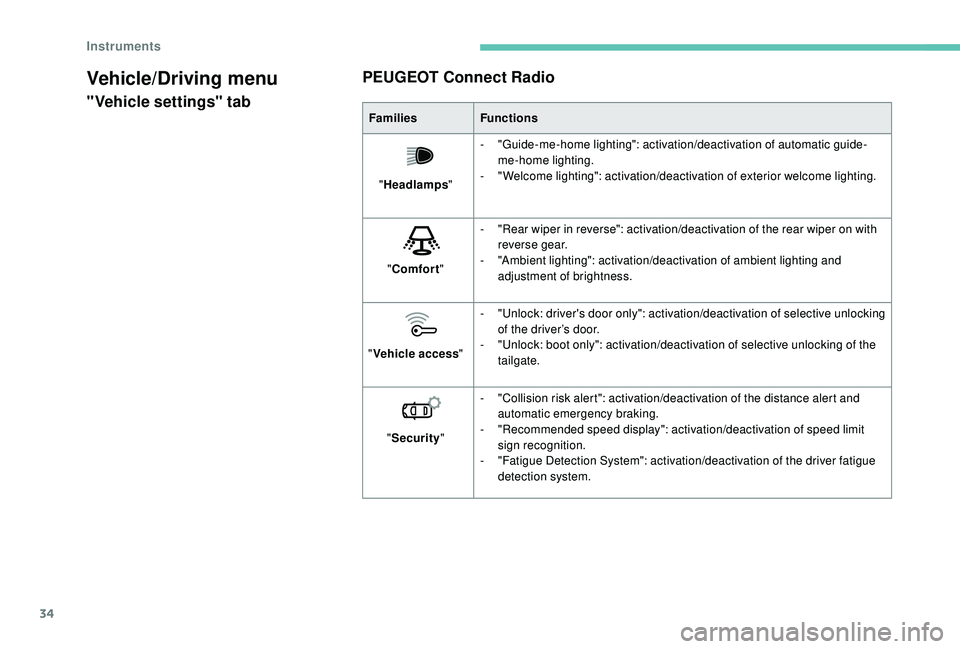
Vehicle/Driving menu
"Vehicle settings" tabPEUGEOT Connect RadioFamilies
Functions
" Headlamps "-
"
Guide-me-home lighting": activation/deactivation of automatic guide-
me-home lighting.
-
"
Welcome lighting": activation/deactivation of exterior welcome lighting.
" Comfort "-
"
Rear wiper in reverse": activation/deactivation of the rear wiper on with
reverse gear.
-
"
Ambient lighting": activation/deactivation of ambient lighting and
adjustment of brightness.
" Vehicle access "-
"
Unlock: driver's door only": activation/deactivation of selective unlocking
of the driver’s door.
-
"
Unlock: boot only": activation/deactivation of selective unlocking of the
tailgate.
" Security "-
"
Collision risk alert": activation/deactivation of the distance alert and
automatic emergency braking.
-
"
Recommended speed display": activation/deactivation of speed limit
sign recognition.
-
"
Fatigue Detection System": activation/deactivation of the driver fatigue
detection system.
Instruments
Page 37 of 324
35
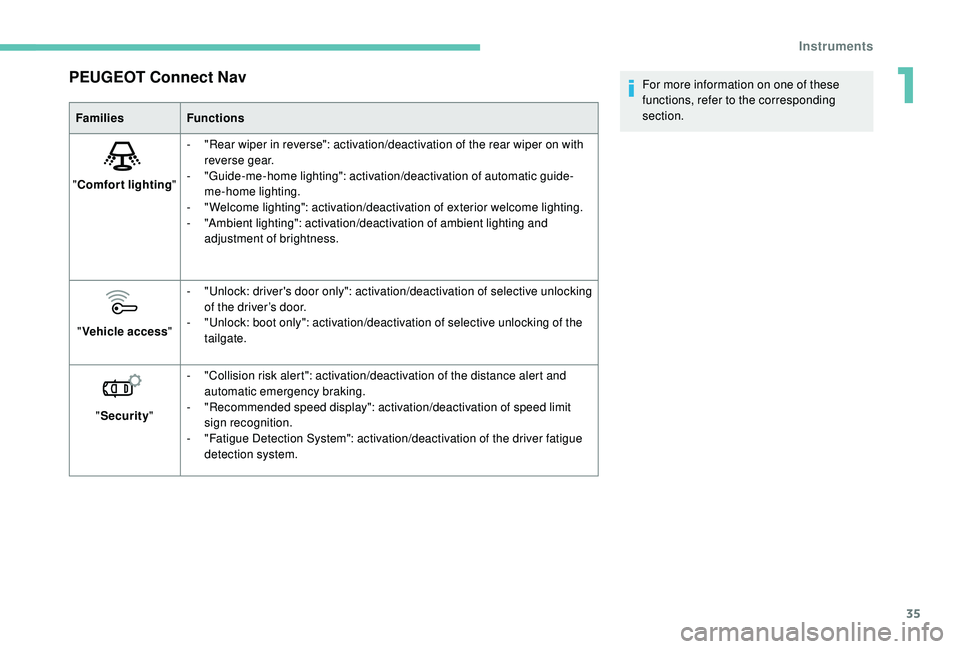
PEUGEOT Connect Nav
FamiliesFunctions
" Comfort lighting "-
"
Rear wiper in reverse": activation/deactivation of the rear wiper on with
reverse gear.
-
"
Guide-me-home lighting": activation/deactivation of automatic guide-
me-home lighting.
-
"
Welcome lighting": activation/deactivation of exterior welcome lighting.
-
"
Ambient lighting": activation/deactivation of ambient lighting and
adjustment of brightness.
" Vehicle access "-
"
Unlock: driver's door only": activation/deactivation of selective unlocking
of the driver’s door.
-
"
Unlock: boot only": activation/deactivation of selective unlocking of the
tailgate.
" Security "-
"
Collision risk alert": activation/deactivation of the distance alert and
automatic emergency braking.
-
"
Recommended speed display": activation/deactivation of speed limit
sign recognition.
-
"
Fatigue Detection System": activation/deactivation of the driver fatigue
detection system. For more information on one of these
functions, refer to the corresponding
section.
1
Instruments
Page 39 of 324
37
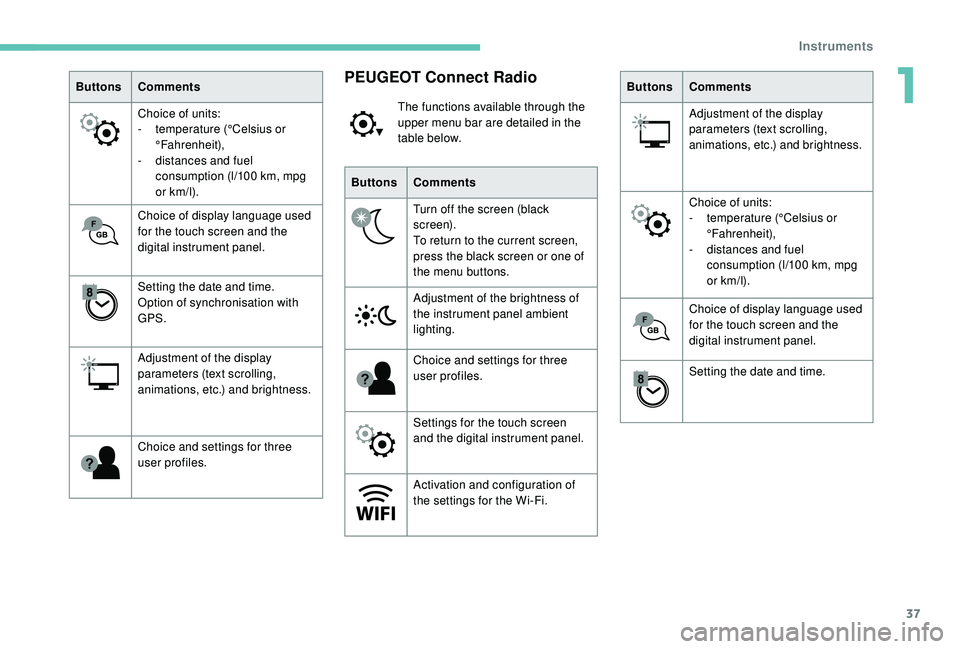
ButtonsComments
Choice of units:
-
t
emperature (°Celsius or
°Fahrenheit),
-
d
istances and fuel
consumption (l/100
km, mpg
or km/l).
Choice of display language used
for the touch screen and the
digital instrument panel.
Setting the date and time.
Option of synchronisation with
GPS.
Adjustment of the display
parameters (text scrolling,
animations, etc.) and brightness.
Choice and settings for three
user profiles.PEUGEOT Connect Radio
The functions available through the
upper menu bar are detailed in the
table below.
Buttons Comments
Turn off the screen (black
screen).
To return to the current screen,
press the black screen or one of
the menu buttons.
Adjustment of the brightness of
the instrument panel ambient
lighting.
Choice and settings for three
user profiles.
Settings for the touch screen
and the digital instrument panel.
Activation and configuration of
the settings for the Wi-Fi. Buttons
Comments
Adjustment of the display
parameters (text scrolling,
animations, etc.) and brightness.
Choice of units:
-
t
emperature (°Celsius or
°Fahrenheit),
-
d
istances and fuel
consumption (l/100
km, mpg
or km/l).
Choice of display language used
for the touch screen and the
digital instrument panel.
Setting the date and time.
1
Instruments
Page 41 of 324

39
Remote control and key
Remote control function
The remote control includes a simple key that
allows the central locking or unlocking of the
vehicle using the door lock and starting and
switching off the engine.
Under normal operating conditions, it is
preferable to use the remote control.battery, etc. For more information on the Back-
up procedures
, refer to the corresponding
section.
Integral key
The key built into the remote control can be
used for the following operations (depending
on version):
-
u
nlocking/locking/deadlocking the vehicle.
-
a
ctivation/deactivation of the mechanical
child lock.
-
a
ctivation/deactivation of the front
passenger airbag.
-
b
ack-up door locking.
-
s
witching on the ignition and starting/
switching off the engine.
The remote control can be used for the
following functions, depending on version:
-
u
nlocking/locking/deadlocking the vehicle,
-
r
emote switching on of the lighting,
-
a
ctivation/deactivation of the alarm,
-
l
ocating the vehicle,
-
v
ehicle immobiliser.
Back-up procedures allow the vehicle to be
locked or unlocked in the event of a failure of
the remote control, the central locking, the Without Keyless Entr y and Star ting With Keyless Entr y and Star ting
F
T
o unfold or fold the key, press the button. F
T
o eject the key or put it back in place, pull
and hold the button.
Unlocking/locking is confirmed by rapid
flashing of the direction indicators for
approximately two seconds.
At the same time, depending on your
version, the door mirrors unfold/fold.
If fitted to your vehicle, the alarm is
deactivated when the vehicle is unlocked.
2
Access
Page 42 of 324
40
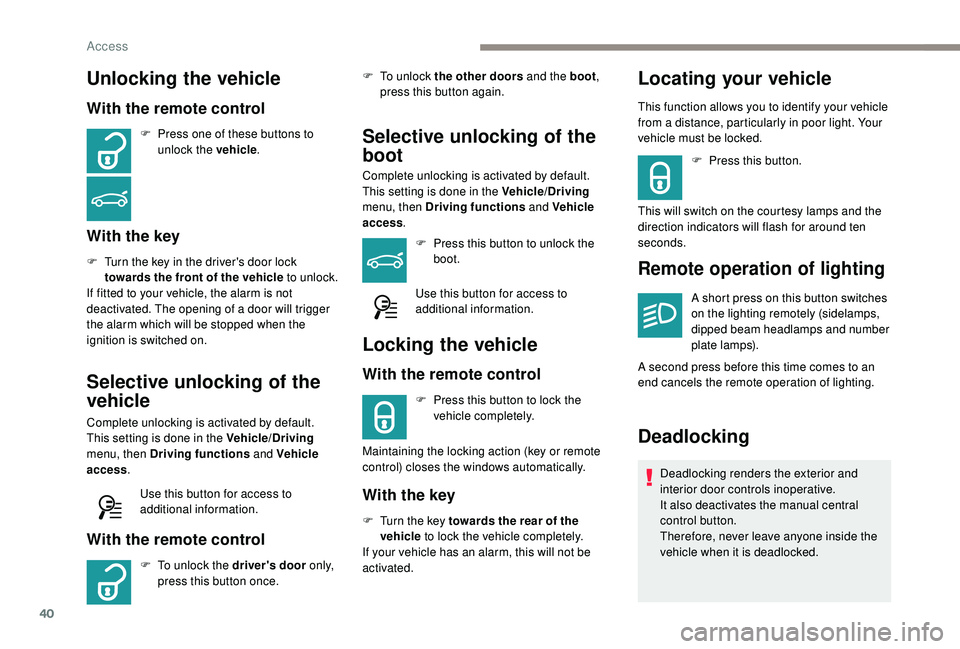
Unlocking the vehicle
With the remote control
F Press one of these buttons to unlock the vehicle .
With the key
F Turn the key in the driver's door lock
towards the front of the vehicle to unlock.
If fitted to your vehicle, the alarm is not
deactivated. The opening of a door will trigger
the alarm which will be stopped when the
ignition is switched on.
Selective unlocking of the
vehicle
Complete unlocking is activated by default.
This setting is done in the Vehicle/Driving
menu, then Driving functions and Vehicle
access .
Use this button for access to
additional information.
With the remote control
F To unlock the driver's door o n l y,
press this button once. F
T
o unlock the other doors and the boot
,
press this button again.
Selective unlocking of the
boot
Complete unlocking is activated by default.
This setting is done in the Vehicle/Driving
menu, then Driving functions and Vehicle
access .
F
P
ress this button to unlock the
boot.
Use this button for access to
additional information.
Locking the vehicle
With the remote control
F Press this button to lock the vehicle completely.
Maintaining the locking action (key or remote
control) closes the windows automatically.
With the key
F Turn the key towards the rear of the vehicle to lock the vehicle completely.
If your vehicle has an alarm, this will not be
activated.
Locating your vehicle
This function allows you to identify your vehicle
from a distance, particularly in poor light. Your
vehicle must be locked.
F
P
ress this button.
This will switch on the courtesy lamps and the
direction indicators will flash for around ten
seconds.
Remote operation of lighting
A short press on this button switches
on the lighting remotely (sidelamps,
dipped beam headlamps and number
plate lamps).
A second press before this time comes to an
end cancels the remote operation of lighting.
Deadlocking
Deadlocking renders the exterior and
interior door controls inoperative.
It also deactivates the manual central
control button.
Therefore, never leave anyone inside the
vehicle when it is deadlocked.
Access
Page 47 of 324
45
Central locking not
functioning
Use these procedures in the following cases:
- c entral locking fault,
-
b
attery disconnected or discharged.
In the event of a malfunction with the
central locking system, the battery must
be disconnected to lock the boot and thus
ensure that the vehicle is locked fully.
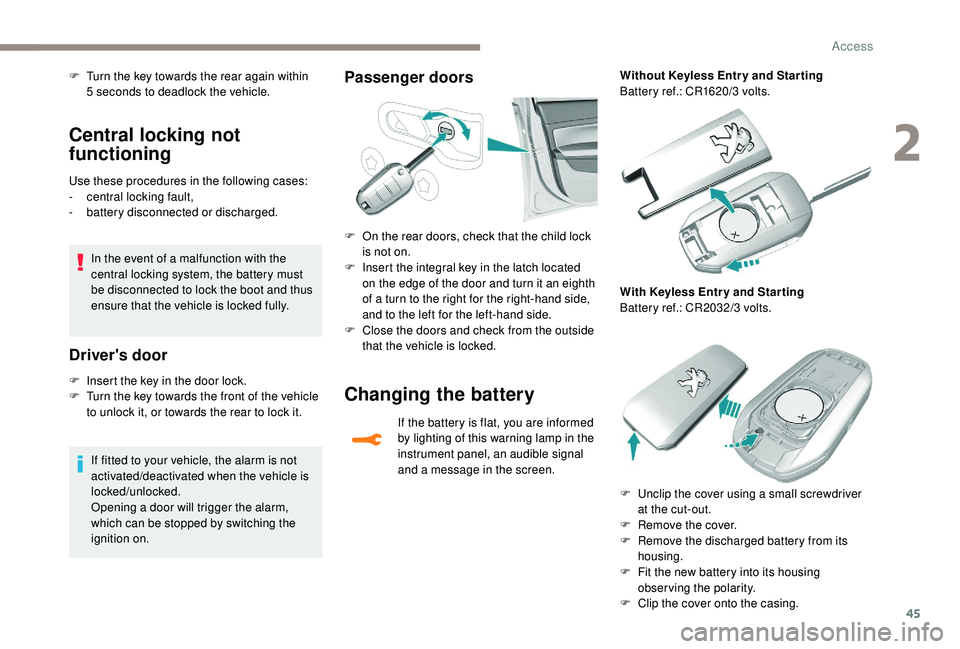
Driver's door
F Insert the key in the door lock.
F T urn the key towards the front of the vehicle
to unlock it, or towards the rear to lock it.
If fitted to your vehicle, the alarm is not
activated/deactivated when the vehicle is
locked/unlocked.
Opening a door will trigger the alarm,
which can be stopped by switching the
ignition on.
Passenger doorsF Turn the key towards the rear again within 5 seconds to deadlock the vehicle.
F
O
n the rear doors, check that the child lock
is not on.
F
I
nsert the integral key in the latch located
on the edge of the door and turn it an eighth
of a turn to the right for the right-hand side,
and to the left for the left-hand side.
F
C
lose the doors and check from the outside
that the vehicle is locked.
Changing the battery
If the battery is flat, you are informed
by lighting of this warning lamp in the
instrument panel, an audible signal
and a message in the screen. Without Keyless Entr y and Star ting
Battery ref.: CR1620/3 volts.
With Keyless Entr y and Star ting
Battery ref.: CR2032/3 volts.
F
U
nclip the cover using a small screwdriver
at the cut-out.
F
R
emove the cover.
F
R
emove the discharged battery from its
housing.
F
F
it the new battery into its housing
observing the polarity.
F
C
lip the cover onto the casing.
2
Access
Page 58 of 324

56
The folding and unfolding of the door
mirrors using the remote control can be
deactivated by a PEUGEOT dealer or a
qualified workshop.
If necessary, the mirrors can be folded
manually.
Rear view mirror
Equipped with an anti-dazzle system, which
darkens the mirror glass and reduces the
nuisance to the driver caused by the sun, the
headlamps of other vehicles, etc.
Manual model
Adjustment
F A djust the mirror so that the mirror is
directed correctly in the "day" position.
Day/night position
Automatic "electrochrome"
model
This system automatically and progressively
changes between day and night use by means
of a sensor measuring the light coming from the
rear of the vehicle.
In order to ensure optimum visibility during
your manoeuvres, the mirror lightens
automatically when reverse gear is
engaged.
Rear seats (hatchback)
Bench seat with fixed one-piece cushion and
folding backrest (1/3 – 2/3), which can be
folded to adapt the loading space in the boot.
Folding the backrest
When folding the seat, the centre seat belt
should not be buckled but laid out flat on
the seat.
The rear seat cushion does not fold:, to
increase the load volume in the boot, only
the backrest folds.
F
P
ull the lever to change to the "night" anti-
dazzle position.
F
P
ush the lever to change to the normal
"day" position. F
M
ove the corresponding front seat for wards
if necessary. F
P
osition the corresponding outer seat belt
against the backrest and buckle it.
F
P
lace the head restraints in the low position.
F
P
ress control 1 to release seat backrest 2
.
F
F
old seat backrest 2 onto cushion 3
.
Ease of use and comfort