2018 MERCEDES-BENZ CLA COUPE brakes
[x] Cancel search: brakesPage 128 of 326
Important safety notes
GWARNING
If th eengineiss witched off automatically and
you exit th evehicle, th eengineisr estarte d
automatically. The vehicl emay begi nmoving .
Ther eisar iskofa cciden tand injury.
If you wish to exit th evehicle, always tur noff
th ei gnition and secure th evehicl eagainst
rollin gaway.
General notes
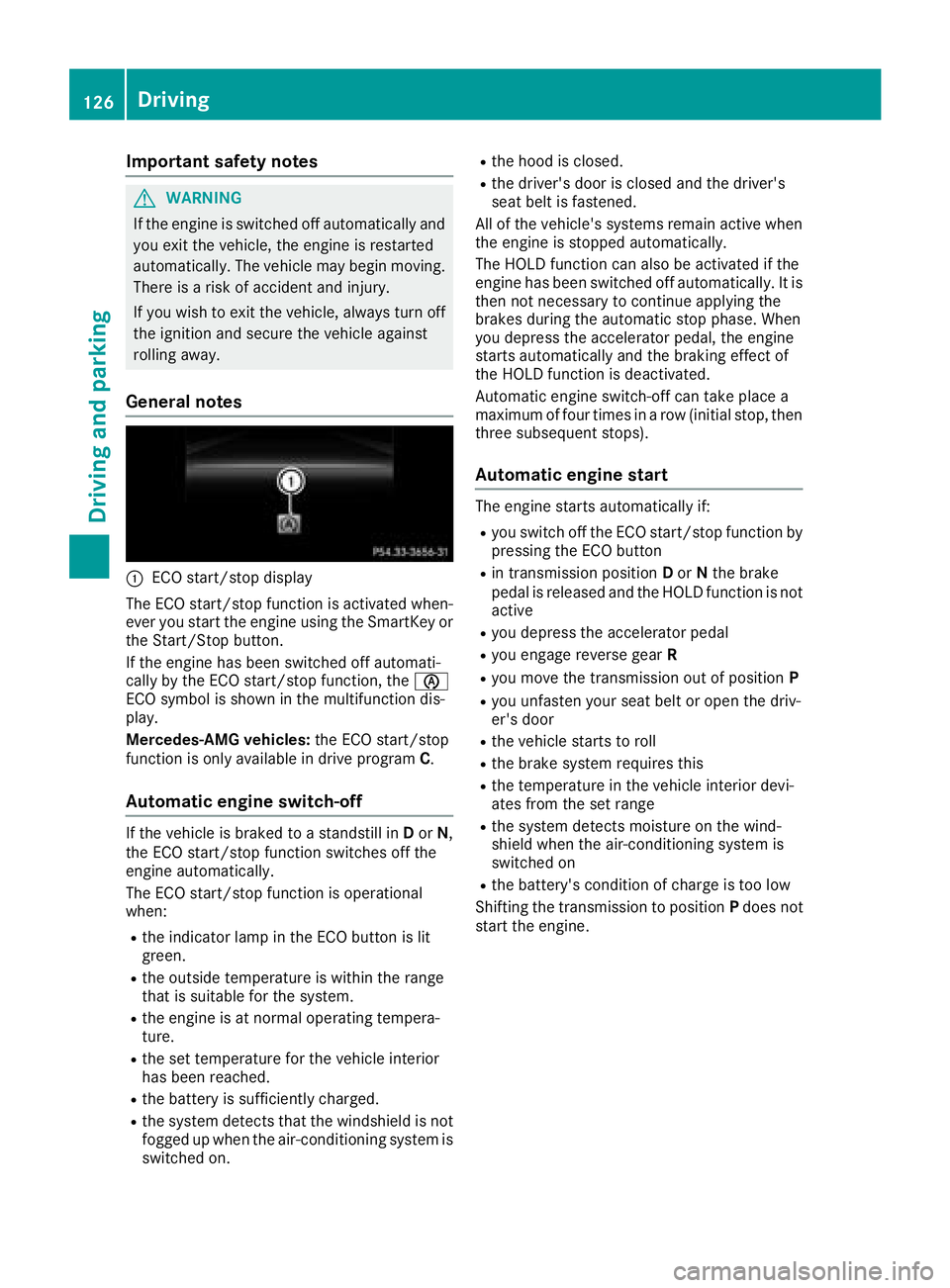
:ECO start/sto pdisplay
The ECO start/sto pfunction is activated when -
eve ryou start th eengineu singthe SmartKey or
th eS tart/Sto pbutton.
If th eengineh as been switched off automati-
call ybyt heECO start/sto pfunction ,the è
ECO symbol is shown in th emultifunction dis-
play.
Mercedes-AM Gvehicles: theE CO start/sto p
function is only available in driv eprogram C.
Automati cengines witch-off
If thevehicl eisb raked to astandstill in Dor N,
th eE CO start/sto pfunction switches off th e
engin eautomatically.
The ECO start/sto pfunction is operational
when :
Rthei ndicator lamp in th eECO butto nislit
green .
Rtheo utside temperature is within th erange
that is suitable for th esystem.
Rthee ngineisatn ormaloperating tempera-
ture.
Rth es et temperature for th evehicl einterior
has been reached.
Rth eb attery is sufficientl ycharged.
Rthes ystem detects that th ewindshield is no t
fogged up when th eair-conditioning system is
switched on .
Rtheh oodisc losed.
Rthed river' sdoor is closed and th edriver' s
seat belt is fastened.
All of th evehicle's systems remain active when
th ee ngineiss toppe dautomatically.
The HOLD function can also be activated if th e
engin ehas been switched off automatically. It is
then no tneces sarytoc ontin ue applyin gthe
brakes during th eautomatic stop phase. When
you depress th eaccelerato rpedal ,the engin e
start sautomatically and th ebraking effec tof
th eH OLDf unction is deactivated.
Automatic engin eswitch-off can tak eplacea
maximum of four times in arow (initial stop, then
three subsequen tstops).
Automati cengines t art
The enginestartsa utomatically if:
Ryou switch off th eECO start/sto pfunction by
pressin gthe ECO butto n
Rin transmission position Dor Ntheb rak e
pedal is release dand th eHOLDfunction is no t
active
Ryou depress th eaccelerato rpedal
Ryou engage revers egear R
Ryou mov ethe transmission out of position P
Ryou unfasten your seat belt or open th edriv-
er' sd oor
Rthev ehicl estartstor oll
Rth eb rak esystem require sthis
Rth et em perature in th evehicl einterior devi-
ate sfromt heset range
Rthes ystem detects moisture on th ewind-
shield when th eair-conditioning system is
switched on
Rth eb attery's condition of charge is to olow
Shifting th etransmission to position Pdoes no t
start th eengine.
126Driving
Driving and parking
Page 135 of 326
Transmission positions
BPark position
Thisprevents the vehicl efromr olling
away when stopped.
Onlys hift the transmission to posi-
tion jwhen the vehicl eisstation-
ary. The parkin gloc ks houl dnot be
used as abrake when parking.
Alway sapply the electronic parking
brake in additio ntothe parkin gloc k
in order to secur ethe vehicle.
In the event of amalfunctio nofthe
vehicle's electronics ,the transmis-
sion mayl ockinp osition j.H ave
the vehicl eelectronics checked
immediatel yataqualified specialist
workshop.
Park position jis automatically
engaged if:
Ryo us witch off the engine using the
SmartKeya nd remove the Smart-
Key
Ryo us witch off the engine using the
SmartKeyoru sing the Start/Stop
button and open the driver's door
or front-passenge rdoor
Ryouo pent he driver's door when
the vehicl eisstationar yorwhen
drivin gatav eryl ow spee dand the
transmission is in position hor
k
CRevers egear
Onlys hift the transmission into posi-
tion kwhen the vehicl eisstation-
ary.
ANeutral
Do not shift the transmission to i
whil edriving. The automatic trans-
mission could otherwis ebedam-
aged.
No powe ristransmitted fromt he
engine to the drive wheels.
Releasing the brakes will allo wyouto
mov ethe vehicl efreely, e.g .topush
it or tow it.
If ESP
®is deactivated or faulty: shift
the transmission to position iif the
vehicl eisind angerofs kidding,e.g.
on icy roads.
If yo uswitch the engine off with the
transmission in position korh,
the automatic transmission shifts to
i automatically.
!Coasting in neutral imay
cause damage to the drive train.
7Drive
The automatic transmission changes
gear automatically. All forward gears
ar ea vailable.
Driving tips
Changin ggear
The automatic transmission shifts throug hthe
individual gear sautomaticall ywhenitisint rans-
mission position h.Thisa utomatic gear shift-
ing behavio risdetermine dby:
Rthe selecte ddrive program
Rthe positio nofthe accelerator pedal
Rthe roa dspeed
Accelerator peda lposition
Your style of drivin ginfluences how the auto-
matic transmission shifts gear:
Rlittle throttle :early upshifts
Rmor ethrottle :lat eu pshifts
Automati ctransmission133
Driving an dparking
Z
Page 147 of 326
ECO display
The ECO display showsyou how economical
your driving style is. The ECO display assists you
in achievin gthe mos teconomical driving style
for th eselecte dsettings and prevailingc ondi-
tions .Your driving style can significantly influ-
enc ethe vehicle's consumption.
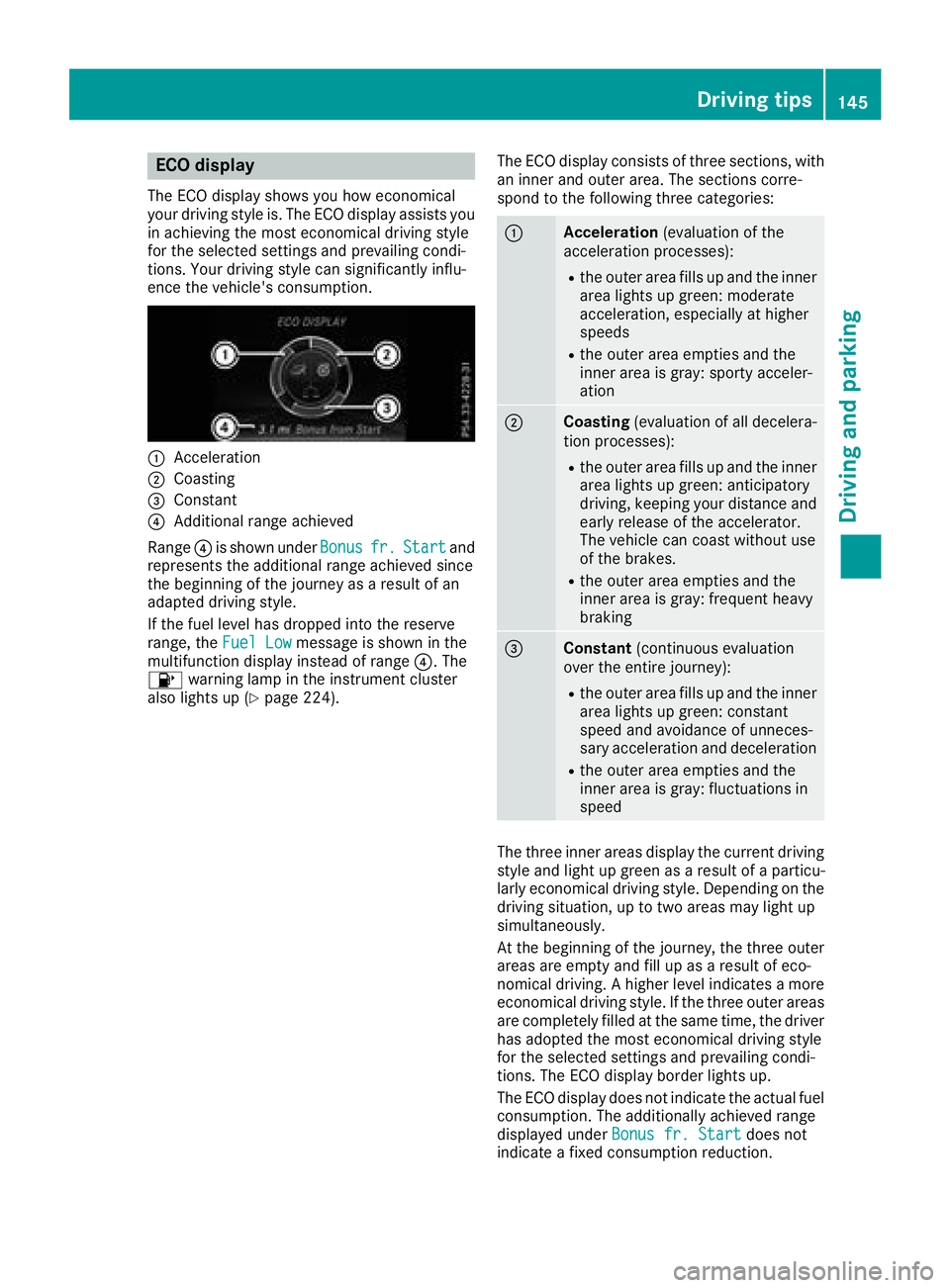
:Acceleration
;Coasting
=Constant
?Additional range achieved
Range ?is shownu nderBonus
fr.Startand
represents th eadditional range achieve dsince
th eb eginnin gofthejourney as aresult of an
adapted driving style.
If th efuel leve lhas dropped int othe reserve
range, the FuelLow
message is shownint he
multifunction display instead of range ?.The
8 warning lamp in th einstrumen tcluster
also lightsup(
Ypage 224). The ECO display consistsoft
hree sections ,with
an inner and outer area. The sections corre-
spondtot hefollowingt hree categories:
:Acceleration (evaluationofthe
acceleratio nprocesses):
Rtheo uter area fills up and th einner
area lightsupg reen: moderate
acceleration, especiall yathigher
speeds
Rth eo uter area empties and the
inner area is gray: sporty acceler-
ation
;Coasting (evaluationofall decelera-
tio np rocesses):
Rtheo uter area fills up and th einner
area lightsupg reen: anticipatory
driving ,kee pingy our distanc eand
early release of th eaccelerator.
The vehicle can coas twithout use
of th ebrakes.
Rtheo uter area empties and the
inner area is gray: frequenth eavy
braking
=Constant (continuous evaluation
ove rthe entire journey):
Rtheo uter area fills up and th einner
area lightsupg reen: constant
speeda nd avoidanc eofunneces-
sary acceleratio nand deceleration
Rtheo uter area empties and the
inner area is gray: fluctuationsi n
speed
The three inner areas display th ecurren tdriving
style and light up green as aresult of aparticu-
larly economical driving style. Dependingont he
driving situation, up to two areas may light up
simultaneously.
At th ebeginnin gofthejourney, th ethree outer
areas are emptya nd fill up asaresult of eco-
nomical driving .Ahigher leve lindicates amore
economical driving style. If th ethree outer areas
are completely fille datthesame time, th edriver
has adopted th emoste conomical driving style
for th eselecte dsettings and prevailingc ondi-
tions .The ECO display border lightsu p.
The ECO display does no tindicat ethe actual fuel
consumption. The additionally achieve drange
displayed under Bonus fr. Start
does not
indicat eafixed consumptio nreduction.
Driving tips145
Driving and parking
Z
Page 148 of 326
In addition to driving style, the actual consump-
tion is affected by other factors, such as:
RLoad
RTire pressure
RCold start
RChoice of route
RActive electrical consumers
These factors are not includedint he ECO dis-
play.
An economical driving style specially requires
driving at moderate engine speeds.
Achieving ahigher valu einthe categories
"Acceleration" and "Constant":
Robserve the gearshift recommendations.
Rdrive the vehicle in drive program Cor E
(vehicles with aDYNAMIC SELECT button).
On long journeys at aconstant speed,e .g. on the
highway, only the outer area for "constant" will
change.
The ECO display summarizes the driving style
from the start of the journey to its completion.
Therefore, there are more marked changes in
the outer areasatt he start ofajourney. On lon-
ger journeys, there are fewer changes. For more
marked changes, perform amanua lrest
(
Ypage 181).
For more information on the ECO display, see
(
Ypage 180).
Braking
Important safety notes
GWARNING
If you shift down on aslippery road surface in
an attempt to increase the engine's braking
effect, the drive wheelsc ould lose their grip.
There is an increased danger of skidding and
accidents.
Do not shift down for additional engine brak-
ing on aslippery road surface.
Downhill gradients
!On long and steep gradients, you must
reduce the load on the brakes by shifting to a
lowerg ear in good time. This allows you to
take advantage of engine braking. For this you
must first activate manua lgearshifting. This helps you to avoid overheating the brakes and
wearing them out excessively.
When you take advantage of engine braking, it
is possible that
adrive wheel willn ot rotate for
some time, e.g. on aslippery road surface.
This could cause damage to the drive train.
This type of damage is not covered by the
Mercedes-Benz warranty.
Briefly depressing the accelerator pedalo n
downhill gradients whilet he manualdrive pro-
gram Mis temporarilya ctivated: the automatic
transmission may switch to the last active auto-
matic drive program Eor S.T he automatic trans-
missionm ay shift to ahigherg ear. This can
reduce the engine's braking effect.
Heavy and light loads
GWARNING
If you rest you rfoot on the brake pedalw hile
driving, the braking system can overheat. This increases the stopping distance and can even
cause the braking system to fail.T here is a
risk of an accident.
Never use the brake pedalasaf ootrest. Never
depresst he brake pedala nd the accelerator
pedalatt he same time.
!Depressing the brake pedalc onstantly
results in excessive and premature weart o
the brake pads.
If the brakes have been subjected to aheavy
load,don ot stop the vehicle immediately.D rive
on for ashort while. This allows the airflow to
cool the brakes more quickly.
Wet roads
If you have driven for along time in heavy rain
withoutb raking, there may be adelayed reac-
tion from the brakes when braking for the first
time. This may also occur after the vehicle has
been washed or driven through deep water.
You have to depresst he brake pedalmore
firmly.M aintainagreater distance from the
vehicle in front.
After driving on awet road or having the vehicle
washed, brake firmly whilep aying attention to
the traffic conditions. This willw arm up the
brake discs, thereby drying them more quickly
and protecting them against corrosion.
146Driving tips
Driving and parking
Page 149 of 326
Limited braking performance on salt-
treated roads
If you driveonsalted roads,alayer of salt resi-
due may for monthebraked iscsand brake
pads. This can result in asignificantly longer
braking distance.
RIn ordertop revent any salt build-up, apply the
brakes occasionally while paying attention to th et raffic conditions.
RCarefully depress th ebrakep edal and the
beginnin gand end of ajou rney.
RMaintain agreater distanc etothevehicle
ahead.
Servicing th ebrakes
!The brakef luid level may be to olow, if:
Rif th ered brakew arning lamp lightsupi n
th ei nstrumentc luster and
Ryou hearawarning tone while th eengine is
running
Observe additional warning messages in the
multifunction display.
The brakef luid level may be to olow due to
brak epad wear or leaking brak elines.
Hav ethe brakes ystem checked immediately.
Consult aqualifie dspecialist workshop to
arrange this.
!Af unction or performanc etests hould only
be carried out on a2-axle dynamometer. If
you wish to operate th evehicle on such a
dynamometer, please consult aqualifie dspe-
cialis tworkshop in advance. You could oth-
erwis edamage th edrivet rain or th ebrake
system.
!As th eESP®system operates automatically,
th ee ngine and th eignitio nmust be switched
off (th eSmartKey must be in position uor
1 in th eignitio nlock), if th eelectric parking
brakeist ested onabraking dynamometer
(maximum 10 seconds).
Brakin gtriggered automatically by ESP
®may
cause severe damage to th ebrakes ystem.
All check sand maintenanc ework on th ebrake
system must be carried out at aqualifie dspe-
cialis tworkshop.
Hav ebrakep ads installe dand brakef luid
replaced at aqualifie dspecialist workshop. If th
ebrakes ystem has onl ybeen subject to
moderatel oads, you should tes tthe functional-
ity of your brakes at regular intervals.
You can fin dadescription of Brake Assist (BAS
)
on (Ypage 61).
Mercedes-Ben zrecommend stha tyou onl yhave
brak epads/linings installe donyour vehicle
whichh ave been approved for Mercedes-Benz
vehicle sorwhichcorrespondtoane quivalent
qualitys tandard. Brake pads/linings whichh ave
not been approved for Mercedes-Ben zvehicles
or whicha re not of an equivalent qualityc ould
affect your vehicle's operatin gsafety.
Mercedes-Ben zrecommend sthaty ou onl yuse
brakef luid that has been specially approved for
your vehicle by Mercedes-Benz, or whichc orre-
sponds to an equivalent qualitys tandard. Brake
fluid whichh as not been approved for
Mercedes-Ben zvehicle sorw hichisn ot of an
equivalent qualityc ould affect your vehicle's
operatin gsafety.
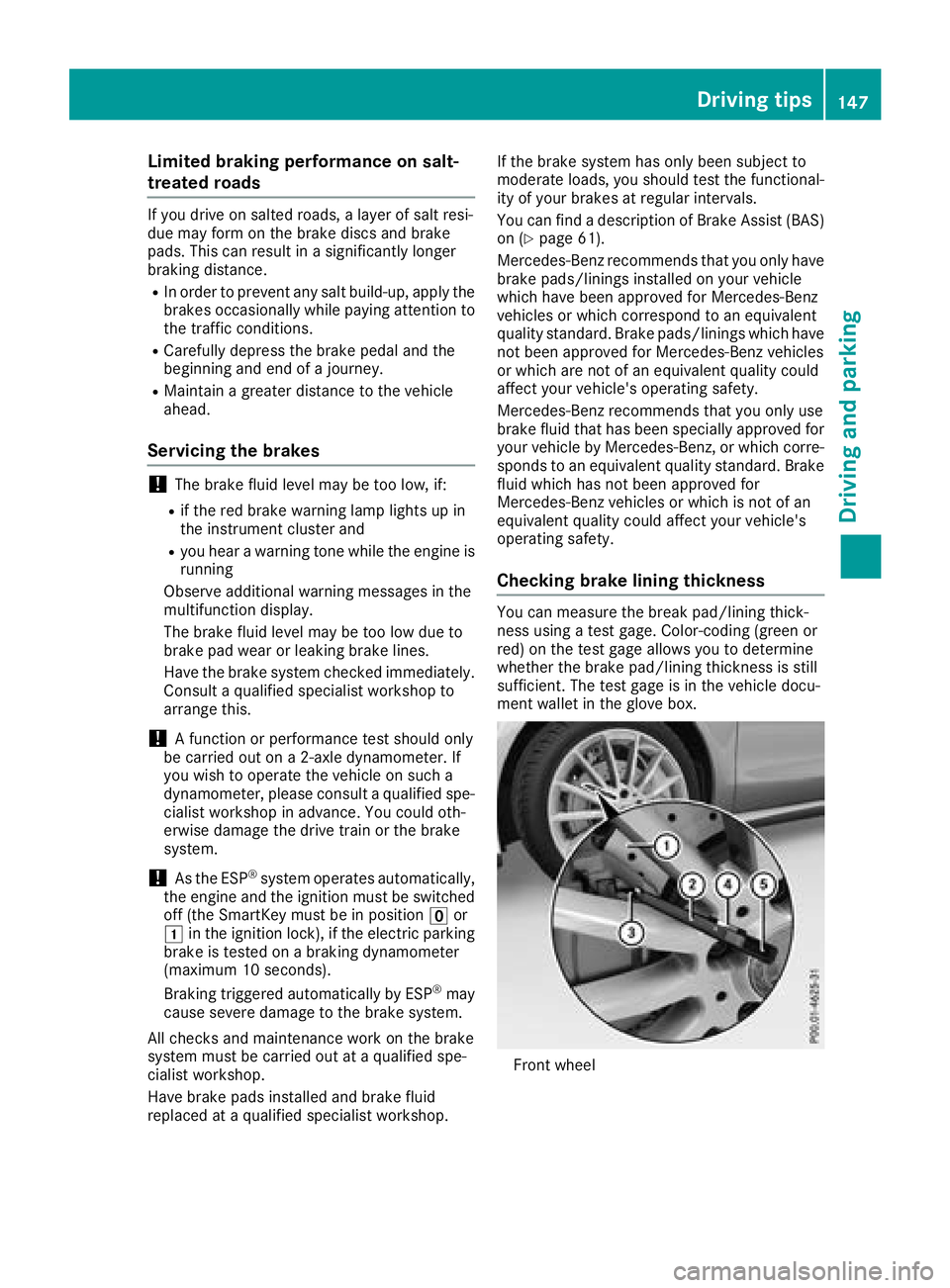
Checkingb rake lining thickness
You can measure th ebreak pad/linin gthick-
nes susingat estg age. Color-coding( green or
red) on th etestg age allows you to determine
whether th ebrakep ad/linin gthicknes sisstill
sufficient .The tes tgage is in th evehicle docu-
mentw allet in th egloveb ox.
Front wheel
Driving tips147
Driving and parking
Z
Page 151 of 326

If you leave the engine or the auxiliary heatingrunning, make sure the exhaust pipe and area
around the vehicle are clear of snow. To
ensure an adequate supply of fresh air, open a
window on the side of the vehicle that is not
facing into the wind.
Have you rvehicle winter-proofed at aqualified
specialist workshop at the onset of winter.
Drive particularly carefully on slippery road sur-
faces. Avoid sudden acceleration, steering and
braking maneuvers. Do not use cruise control or Distance PilotD ISTRONIC.
If the vehicle threatens to skid or cannot be
stopped when moving at low speed:
XShift the transmission to position N.
XTry to bring the vehicle under control using
corrective steering.
The outsidet emperature indicator is not
designed to serve as an ice-warning device and is therefore unsuitable for that purpose.
Changes in the outsidet emperature are dis-
played after ashort delay.
Indicated temperature sjust above the freezing
point do not guarantee that the road surface is
free of ice. The road may still be icy, especially in
woodeda reasoronb ridges.
You shoul dpay speciala ttention to road condi-
tions when temperature sare around freezing
point.
For more information on driving with snow
chains, see (
Ypage 290).
For more information on driving with summer
tires, see (
Ypage 289).
Observe the notes in the "Winter operation" sec-
tion (
Ypage 289).
Drivin gsystems
Cruise control
General notes
Cruise control maintains aconstant road speed
for you .Itbrakes automatically in order to avoid
exceeding the set speed.Onl ong and steep
downhill gradients, especially if the vehicle is
laden, you must select alow gear in good time.
You need to shift manually using the steering
wheel paddle shifters beforehand. By doing so,
you willm ake use of the braking effect of the engine. This relieves the load on the brake sys-
tem and prevents the brakes from overheating
and wearing too quickly.
When the engine is running, you can use the
cruise control lever to limitt
he speed to any
speed between20m ph (30 km/h)and the tech-
nicallyp ermitted maximum speed of the vehicle.
Use cruise control only if road and traffic con-
ditions make it appropriate to maintain asteady
speed for aprolongedp eriod.
The speed indicated in the speedometer may
differ slightly from the speed stored.
Important safety notes
If you fail to adapt you rdriving style, cruise con-
trol can neither reduce the risk of an accident
nor override the lawsofp hysics. Cruise control
cannot take into account the road, traffic and
weather conditions. Cruise control is only an
aid.Y ou are responsible for the distance to the
vehicle in front, for vehicle speed,f or braking in
good time and for staying in you rlane.
Do not use cruise control:
Rin road and traffic conditions which do not
allow you to maintain aconstant speed,e .g. in
heavy traffic or on winding roads
Ron slippery road surfaces .Braking or accel-
erating could cause the drive wheelstol ose
traction and the vehicle could then skid
Rin poor visibility, e.g. due to fog, heavy rain or
snow
If there is achange of drivers, advise the new
driver of the speed stored.
Cruise control lever
:Activates or increases speed
;Activates or reduces speed
Driving systems149
Driving and parking
Z
Page 152 of 326
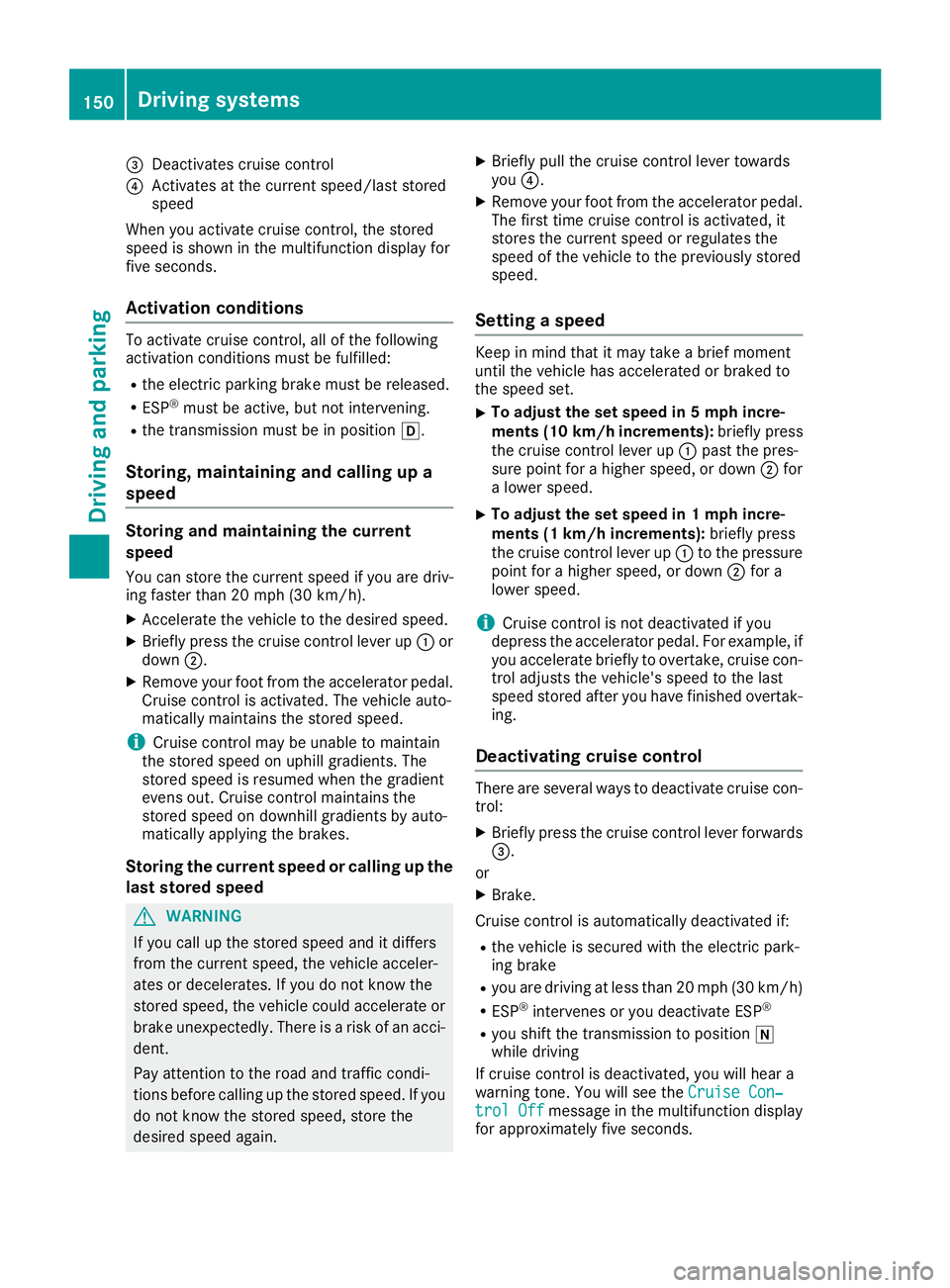
=Deactivatescruis econtrol
?Activate satthe current speed/las tstored
speed
When yo uactivate cruis econtrol, the stored
spee diss hown in the multifunctio ndisplay for
fiv es econds.
Activatio nconditions
To activate cruis econtrol, al lofthe following
activatio nconditions must be fulfilled:
Rthe electri cparkin gb rake must be released.
RESP®must be active, bu tnot intervening.
Rthe transmission must be in position h.
Storing, maintainingand callin gupa
speed
Storin gand maintainin gthe current
speed
Yo uc an stor ethe current spee difyouared riv-
ing faster than20m ph (30 km/h).
XAccelerate the vehicl etothe desired speed.
XBrieflypress the cruis econtro llev er up :or
down ;.
XRemov eyourfoo tfromt he accelerator pedal.
Cruise contro lisactivated .The vehicl eauto-
maticall ymaintains the stored speed.
iCruise contro lmaybe unabl etomaintain
the stored spee donuphillgradients .The
stored spee disresumed when the gradient
evens out. Cruise contro lmaintains the
stored spee dondownhil lgradients by auto-
maticall yapplyin gthe brakes.
Storin gthe curren tspeed or callin gupthe
las tstored speed
GWARNING
If yo ucallupt he stored spee dand it differs
fromt he current speed, the vehicl eacceler-
ate sord ecelerates. If yo udonot know the
stored speed, the vehicl ecould accelerate or
brake unexpectedly .There is ariskofana cci-
dent.
Pa ya ttentio ntothe roa dand trafficc ondi-
tions beforec alling up the stored speed. If you
do not know the stored speed, stor ethe
desired spee dagain .
XBriefl ypullt he cruis econtro llev er towards
you ?.
XRemov eyourfoo tfromt he accelerator pedal.
The first time cruis econtro lisactivated ,it
stores the current spee dorregulate sthe
spee doft he vehicl etothe previously stored
speed.
Settin gaspeed
Keepinm indt hatitm aytake abrief moment
unti lthe vehicl ehasaccelerated or braked to
the spee dset.
XTo adjustt he setspeed in 5mph incre-
ments (10k m/h increments): briefly press
the cruise control lever up :past the pres-
sure point for ahigher speed, or down ;for
al ower speed.
XTo adjust the set speed in 1mphincre-
ments (1 km/h increments): briefly press
the cruise control lever up :to the pressure
point for ahigher speed, or down ;for a
lower speed.
iCruise control is not deactivated if you
depress the accelerator pedal. For example, if
you accelerateb riefly to overtake, cruise con-
trol adjusts the vehicle's speed to the last
speed stored after you have finished overtak-
ing.
Deactivating cruise control
There are several ways to deactivate cruise con-
trol:
XBriefly press the cruise control lever forwards
=.
or
XBrake.
Cruise control is automatically deactivated if:
Rthe vehicle is secured with the electric park-
ing brake
Ryou are driving at less than 20 mph (3 0km/ h)
RESP®intervenes or yo udeactivate ESP®
Ryous hift the transmission to position i
whil edriving
If cruis econtro lisdeactivated ,you will hear a
warning tone.Y ouwill see the Cruise Con‐
trolOffmessage in the multifunctio ndisplay
for approximately fiv eseconds.
150Driving system s
Driving an dparking
Page 153 of 326
iWhen you switch off the engine, the last
speed stored is cleared.
Distance Pilot DISTRONIC
General notes
Distance Pilot DISTRONIC regulates the speed
and automatically helps you maintain the dis-
tanc etot he vehicle detected in front. Vehicles
are detected with the aid of the radar sensor
system. Distance Pilot DISTRONIC brakes auto-
matically to avoid exceedingt he set speed or to
maintain the designated distanc efrom the vehi-
cle in front.
If Distance Pilot DISTRONIC detect sthat there is
ar isk of acollision, you will be warned visually
and acoustically. Without your intervention, Dis-
tanc ePilot DISTRONIC cannot prevent acolli-
sion. An intermittent warning ton ewill then
sound and the distanc ewarning lamp will light
up in the instrument cluster. Brake immediately
in order to increase the distanc etothe vehicle in
frontort ake evasive action provided it is safe to
do so.
Distance Pilot DISTRONIC operates in the range
between 0mph (0 km/h) and 120 mph
(200 km/h).
Change into alower gear in good time on long
and steep downhill gradients .This is especially
importan tifthe vehicle is laden. By doing so, you
will make use of the braking effect of the engine.
This relieves the load on the brake system and
preventst he brakes from overheatin gand wear-
ing too quickly.
Do not use Distance Pilot DISTRONIC on roads
with steep gradients.
For Distance Pilot DISTRONIC to assist you
when driving, the radar sensor system must be
operational.
Sinc eDistance Pilot DISTRONIC transmits radar
waves, it can resemble the radar detectors of
the responsible authorities. You can refer to the
relevant chapter in the Operator' sManual if
questions are asked about this.
iUSA only: This device has been approved by
the FCC as a"Vehicular Radar System". The
radar sensor is intended for use in an auto-
motive radar system only. Removal, tamper-
ing, or altering of the device will void any war-
ranties, and is not permitted by the FCC. Do not tamper with, alter, or use in any non-
approved way.
An
yu nauthorized modification to this device
could void the user's authority to operate the
equipment.
iCanada only: This device complies wit h
RSS-210 of Industry Canada. Operation is
subject to the following two conditions:
1. This device may not cause interference,
and
2. This device must accept any interference
received, including interference that may
cause undesired operation of the device.
Removal, tampering, or altering of the device
will void any warranties, and is not permitted. Do not tamper with, alter, or use in any non-
approved way.
An yu nauthorized modification to this device
could void the user's authority to operate the
equipment.
Important safety notes
GWARNING
Distance Pilot DISTRONIC does not react to:
Rpeople or animals
Rstationary object sonthe road, e.g. stopped
or parked vehicles
Roncoming vehicles and crossingt raffic
As aresult, Distance Pilot DISTRONIC may
neither give warnings nor intervene in such
situations. There is arisk of an accident.
Always pay careful attention to the traffic sit- uation and be ready to brake.
GWARNING
Distance Pilot DISTRONIC cannot always
clearly identif yother road users and complex
traffic situations.
In such cases, Distance Pilot DISTRONIC may:
Rgive an unnecessary warning and then
brake the vehicle
Rneither give awarning nor intervene
Raccelerateorb rake unexpectedly
There is arisk of an accident.
Driving systems151
Driving and parking
Z