2018 MERCEDES-BENZ CLA COUPE turn signal bulb
[x] Cancel search: turn signal bulbPage 13 of 326
Grade (gasoline) ............................ 316
Importantsafety note s................. .316
Problem (malfunction) .................. .140
Refueling ........................................ 138
Tank content/reserve fuel ............. 316
Fue lfiller flap
Opening ......................................... 139
Fue llevel
Calling up the range (on-board
computer) ...................................... 180
Fue ltank
Capacity ........................................ 316
Problem (malfunction) ................... 140
Fuses
Allocation chart .............................2 85
Before changing .............................2 84
Fuse box in the engine compart-
ment .............................................. 285
Fuse box in the front-passenger
footwell .......................................... 285
Important safety notes .................. 284
G
Garage door opener
Clearing the memory ..................... 254
General notes ................................ 252
Important safety notes .................. 252
Opening/closing the garage door .. 254
Problems whe nprogramming ........2 54
Programming (button in the rear-
view mirror) ................................... 252
Synchronizing the rolling code ....... 253
Gasoline ............................................. 316
Gear indicator (on-board com-
puter, Mercedes-AMG vehicles) ....... 188
Genuine parts ...................................... 24
Glove box ...........................................2 38
Google™L ocal Search
see also Digita lOperator's Man-
ua l..................................................2 29
H
Handbrake
see Parking brake
HANDS-FRE EACCES S.......................... 79 Hazard warning lamps
Display message ............................ 216
Switching on/off ........................... 102
Head restraints
Adjusting ......................................... 92
Adjusting (manually). ....................... 93
Adjusting (rear) ................................ 93
Headlamps
Fogging up ..................................... 103
see Automatic headlamp mode
Heating
see Climate control
High beam flasher .............................1 01
High-beam headlamps
Adaptive Highbeam Assist ............. 102
Display message ............................ 203
Replacing bulbs .............................1 06
Switching on/off ........................... 101
Hill start assist .................................. 125
HOLD function
Activating ....................................... 157
Activatio nconditions ..................... 157
Deactivating ................................... 157
Display message ............................ 207
Function/notes .............................1 57
Home address
see also Digita lOperator's Man-
ua l..................................................2 29
Hood
Closing ...........................................2 58
Display message ............................ 215
Important safety notes .................. 257
Opening ......................................... 257
Horn ...................................................... 32
Hydroplaning ..................................... 148
I
Ignitionlock
see Key positions
Immobilizer .......................................... 68
Indicator lamp
Replacing bulbs (rear) .................... 106
Indicator lamps
see Warning and indicator lamps
Indicators
see Turn signals
Index11
Page 14 of 326

Instrumentcluster
Overview .......................................... 33
Setting s......................................... 18 6
Warn inga nd indicator lamps ........... 33
Instrument cluster lighting .............. 176
Interior lighting
Control ...........................................1 04
Overview ........................................ 103
Reading lamp ................................. 103
iPod
®
see also Digita lOperator's Man-
ua l..................................................2 29
J
Jack
Storage location ............................ 270
Using ............................................. 309
Jump starting (engine) ......................278
K
Keyp ositions
Start/Stop button .......................... 122
KEYLESS-GO
Convenience closing feature ............ 83
Deactivation ..................................... 71
Locking ............................................ 71
Unlocking ......................................... 71
Kickdown
Driving tips ....................................1 34
Manual gearshifting ....................... 138
Kne ebag.............................................. 46
L
Lamps
see Warning and indicator lamps
Lane Keepin gAssist
Activating/deactivating (on-
board computer) ............................ 186
Display message ............................ 208
Function/informatio n.................... 174
Lan eTracking package ..................... 172
Lap time (RACETIMER) ...................... 189
LATCH-type (ISOFIX )child seat
anchors ................................................ 57
License plate lamp (display mes-
sage) ................................................... 203 Light senso
r(display message) ....... 204
Lights
Adaptive Highbeam Assist ............. 102
Automati cheadlamp mode. ........... 100
Fogged up headlamp s.................... 103
Hazard warning lamps ................... 102
Hig hbeamf lasher. ......................... 101
High-beam headlamp s................... 101
Light switch ................................... 100
Low-bea mheadlamp s.................... 101
Parking lamps ................................ 101
Rear fog lamp ................................ 101
Setting exterio rlighting ................. 100
Standing lamps .............................. 101
Switching the daytime running
lamps on/off( on-board com-
puter) ............................................. 187
Turn signal s................................... 101
Loadin gguidelines ............................ 237
Locking
see Central locking
Locking (doors)
Automati c........................................ 77
Emergency locking ........................... 77
From inside (central locking but-
ton) .................................................. 76
Locking centrally
see Central locking
Locking verification signal (on-
board computer) ............................... 187
Low-beam headlamps
Displa ymessage ............................ 202
Replacing bulb s............................. 105
Switching on/off. .......................... 101
Lumbar support
Adjusting the 4-wa ylum bars up-
por t.................................................. 93
M
M+S tires ............................................ 289
Malfunctio nmessage
see Displa ymessages
Matte finis h(clea ning instruc-
tions) .................................................. 264
mbrace
Call priority .................................... 248
Displa ymessage ............................ 197
12Index
Page 18 of 326
Remote controlGarag edooro pener ....................... 252
Programming (garag edoor
opener) .......................................... 252
Replacing bulbs
Brake lamp .................................... 106
High-beam headlamp s................... 106
Important safety notes .................. 104
Installing/removing the cover
(front wheela rch).......................... 105
Low-bea mheadlamp s.................... 105
Overview of bulb types .................. 104
Rear fog lamp ................................ 106
Turn signal s(front) ......................... 106
Turn signal s(rear) .......................... 106
Reporting safety defects .................... 28
Rescue card ......................................... 29
Reserve (fuel tank)
see Fuel
Reserve fuel
Displa ymessage ............................ 206
Warning lamp ................................. 224
see Fuel
Residual hea t(clim ate control) ........ 119
Restrain tsystem
Displa ymessage ............................ 198
Introduction ..................................... 40
Warning lamp ................................. 224
Warning lamp (function) ................... 41
Revers egear(selecto rlever )........... 132
Reversin gfeature
Roller sunblind ................................. 87
Sid ew indow s................................... 82
Roadside Assistance (breakdown) .... 26
Rolle rsunblind
Panorama roofw ithp ower tilt/
sliding panel ..................................... 87
Roo fcarrier ........................................ 241
Roo flinin gand carpets (cleaning
guidelines) ......................................... 268
Roo floa d( maximum) ........................ 320
Route guidance
see also Digital Operator's Man-
ual.................................................. 229S
Safety
Childre ninthe vehicl e..................... 54
see Occupant safety
Safety system
see Driving safety systems
SD card
Inserting ........................................ 235
Inserting/removing ........................ 235
Removing ....................................... 235
SD memory card
see also Digital Operator's Man-
ual.................................................. 229
Search &Send
see also Digital Operator's Man-
ua l.................................................. 229
Seat
Correct driver'ss eatposition ........... 90
Seat belts
Adjusting the height ......................... 44
Cleaning ......................................... 267
Correct usag e.................................. 43
Fastening ......................................... 44
Important safety guideline s............. 42
Introduction ..................................... 41
Releasing ......................................... 44
Warning lamp ................................. 218
Warning lamp (function) ................... 44
Seats
Adjusting (electrically) ..................... 92
Adjusting (manually) ........................ 91
Adjusting (Performance Seat) .......... 94
Adjusting the 4-wa ylum bars up-
por t.................................................. 93
Adjusting the headr estraint ............ 92
Cleaning the cover. ........................ 267
Folding the backrest( rear com-
partment) forwards/back .............. 240
Important safety notes .................... 90
Seath eating problem ...................... 95
Storing settings (memory func-
tion) ................................................. 99
Switching seath eating on/off......... 94
Securing cargo .................................. 241
Selecto rlever
Cleaning ......................................... 267
Sensors (cleaning instructions) ....... 265
16Index
Page 22 of 326
Traction (definition)....................... 307
Tread wear .....................................3 01
Uniform Tire Quality Grading
Standard s...................................... 301
Uniform Tire Quality Grading
Standard s(definition) .................... 306
Weari ndicator (definition) ............. 307
Wheelr im (definition) .................... 306
see Flat tire
Top Tether ............................................ 57
Tow-starting
Emergency engine starting ............ 284
Important safety notes .................. 281
Installing the towing eye. ............... 282
Removing the towing eye. ..............282
Towing atrailer
ESP
®(ElectronicS tability Pro-
gram) ............................................... 67
Towing away
Important safety guidelines ........... 281
Installing the towing eye. ............... 282
Notes for 4MATIC vehicles ............ 284
Removing the towing eye. ..............282
Transporting the vehicle ................ 283
With both axle sonthe ground ....... 283
With front axle raised ..................... 282
Towing eye ......................................... 270
Traffic reports
see also Digita lOperator's Man-
ua l..................................................2 29
Transmission
see Automatic transmission
Transmission position display
(DIRECT SELEC Tlever) ......................1 30
Transporting the vehicle .................. 283
Trim pieces (cleaning instruc-
tions) ..................................................2 67
Trip computer (on-board com-
puter) ..................................................1 80
Trip odometer
Calling up ....................................... 180
Resetting (on-board computer) ...... 181
Trunk
Emergency release .......................... 81
Emergency release button ...............8 1
Important safety notes .................... 78 Opening (automaticall
yfrom out-
side) .................................................7 9
Opening (from outside the vehi-
cle, HANDS-F REE ACCESS) ...
........... 79
Opening automaticallyf rom
inside ............................................... 80
Opening/closing (manually from
outside) ............................................ 78
Trunk lid
Display message ............................2 15
Opening dimensions ......................3 20
Trunk load (maximum) ......................320
Turn signals
Display message ............................ 202
Replacing bulbs (front) ................... 106
Switching on/off ........................... 101
Two-way radio
Frequencies ................................... 313
Installatio n..................................... 313
Transmissiono utput (maximum ).... 313
Type identification plate
see Vehicle identification plate
U
UnlockingEmergency unlocking ....................... 77
From insid ethe vehicle (central
unlocking button) .............................7 6
Upshifti ndicator (on-boardc om-
puter, Mercedes-AMG vehicles) .......188
USB devices
Connecting to the MediaI nter-
face ............................................... 236
V
Vanity mirror (in the sun visor) ........244
Vehicle
Correct use ...................................... 28
Data acquisition ............................... 29
Display message ............................ 213
Equipment ....................................... 25
Individua lsettings .......................... 186
Limited Warranty .............................2 9
Loading .......................................... 298
Locking (in an emergency) ............... 77
Locking (SmartKey) .......................... 70
20Index
Page 107 of 326
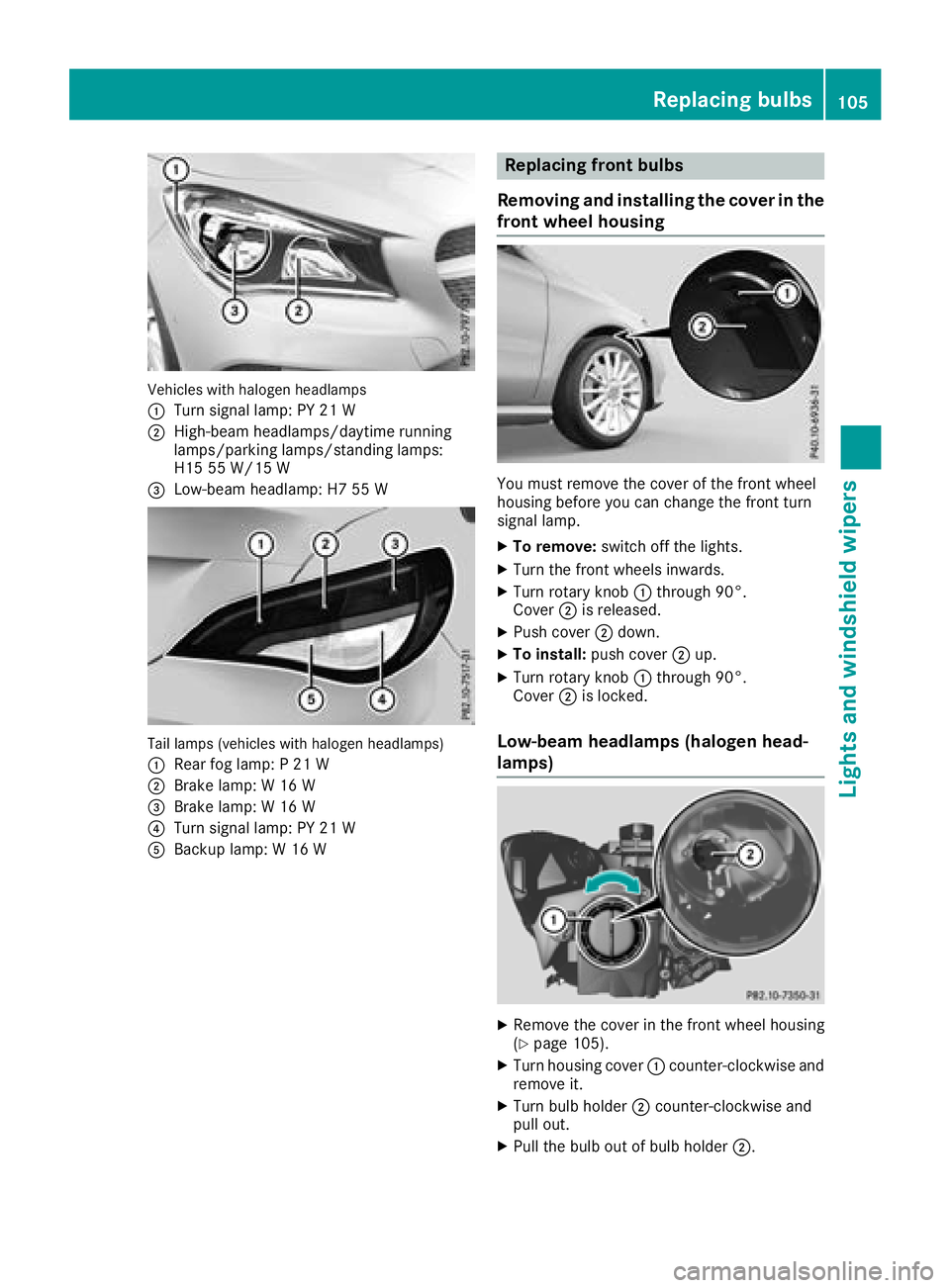
Vehicles with halogenheadlamps
:
Turn signal lamp: PY 21 W
;High-beam headlamps/daytime running
lamps/parking lamps/standing lamps:
H15 55 W/15 W
=Low-beam headlamp: H7 55 W
Tail lamps (vehicles with halogenh eadlamps)
:
Rearf og lamp: P21W
;Brake lamp: W16W
=Brake lamp:W16W
?Turn signal lamp: PY 21 W
ABackup lamp: W16W
Replacing front bulbs
Removing and installingt he coverinthe
front wheelh ousing
You must remove the cover of the front wheel
housing before you can change the front turn
signal lamp.
XTo remove:switch off the lights.
XTurn the front wheelsi nwards.
XTurn rotary knob:through 90°.
Cover ;is released.
XPush cover ;down.
XTo install: push cover ;up.
XTurn rotary knob :through 90°.
Cover ;is locked.
Low-beam headlamps (halogenh ead-
lamps)
XRemove the cover in the front wheel housing
(Ypage 105).
XTurn housing cover :counter-clockwise and
remove it.
XTurn bulb holder ;counter-clockwise and
pull out.
XPull the bulb out of bulb holder ;.
Replacing bulbs105
Lights and windshieldwipers
Z
Page 108 of 326
XInsert the new bulbinto bulbholder;.
XInsert bulbh older;and turn it clockwise.
XPress on housing cover :and turn it to the
right.
XReplace the cover in the front wheel housing
(Ypage 105).
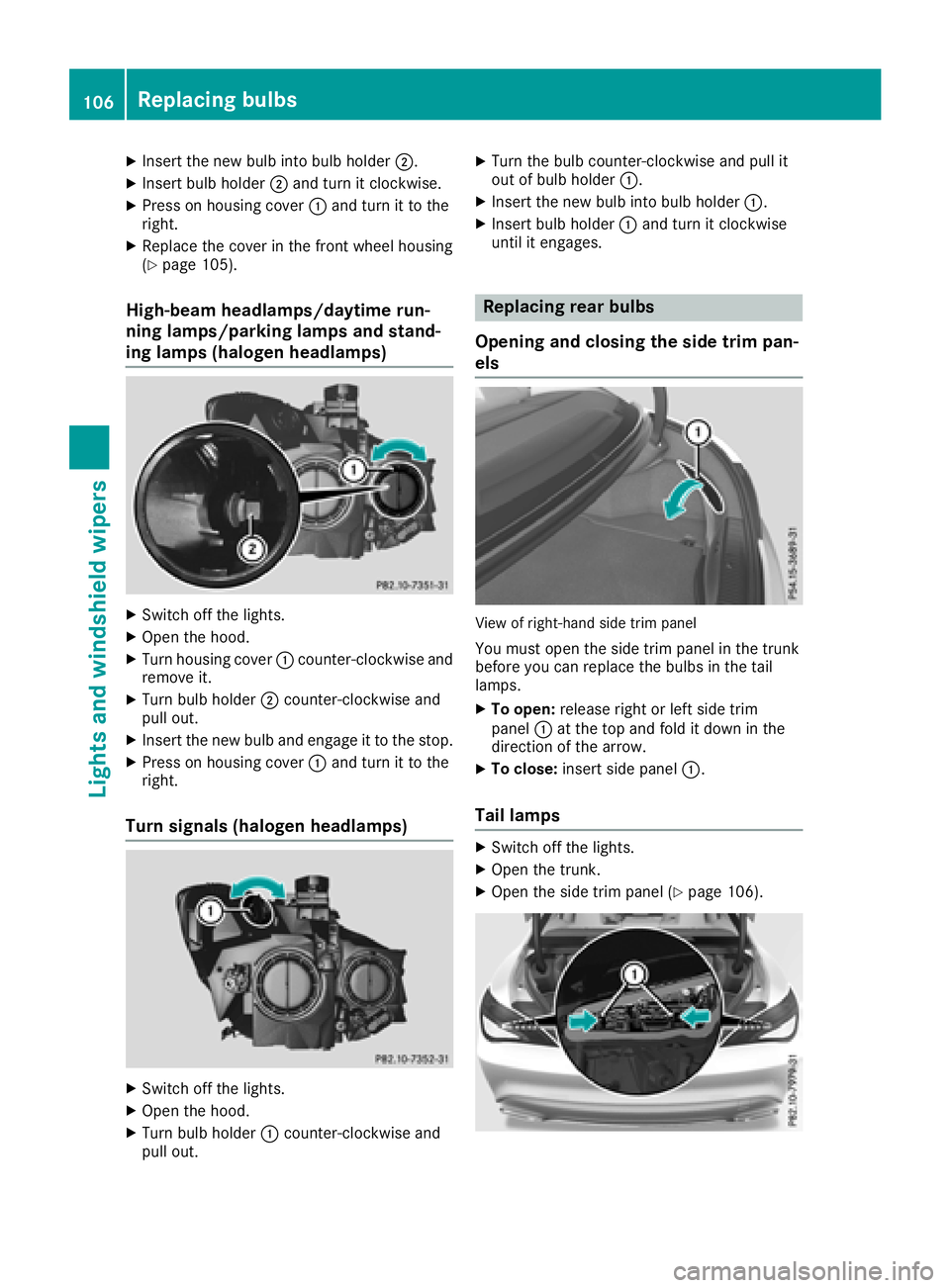
High-beam headlamps/daytime run-
ning lamps/parking lamps and stand-
ing lamps (halogen headlamps)
XSwitch off the lights.
XOpen the hood.
XTurn housing cover :counter-clockwise and
remove it.
XTurn bulbh older;counter-clockwise and
pullo ut.
XInsert the new bulba nd engage it to the stop.
XPress on housing cover :and turn it to the
right.
Turn signals (halogen headlamps)
XSwitch off the lights.
XOpen the hood.
XTurn bulbh older:counter-clockwise and
pullo ut.
XTurn the bulbc ounter-clockwise and pulli t
out of bulbh older:.
XInsert the new bulbi nto bulbholder:.
XInsert bulbh older:and turn it clockwise
until it engages.
Replacing rear bulbs
Openinga nd closing the side trim pan-
els
View of right-hand side trim panel
You must open the side trim panel in the trunk
before you can replace the bulbs in the tail
lamps.
XTo open: release right or left side trim
panel :at the top and fold it down in the
direction of the arrow.
XTo close: insert side panel :.
Tail lamps
XSwitch off the lights.
XOpen the trunk.
XOpen the side trim panel (Ypage 106).
106Replacing bulbs
Lights and windshield wipers
Page 109 of 326

XPress retainingclips :at the same time in
the direction of the arrows.
XCarefully remove the bulb holder together
with the connected plug and the bulbs.
Bulb holder
;
Brake lamp
=Brake lamp
?Rear fog lamp
ABackup lamp
BTurn signals
XBrake lamp and backup lamp: remove the
corresponding bulb from the bulb holder.
XInsert the new bulb into the bulb holder.
XRear fog lamp and turns ignal:press the
bulb gently into the bulb holder, turn it coun-
ter-clockwise and remove it from the bulb
holder.
XInsert the new bulb into the bulb holder and
turn it clockwise.
XReinsert the bulb holder and engage on
retainin gclips :.
XClose the side trim panel (Ypage 106).
Windshield wipers
Switching the windshield wipers
on/off
!
Do not operate the windshield wipers when
the windshield is dry, as this could damage
the wiper blades. Moreover, dust that has col-
lected on the windshield can scratch the glass
if wiping takes place when the windshield is
dry.
If it is necessary to switch on the windshield
wipers in dry weather conditions, alwaysu se
washer fluid when operating the windshield
wipers.
!If the windshield wipers leave smears on the
windshield after the vehicle has been washed
in an automatic car wash, wax or other resi-
dues may be the reason for this. Clean the
windshield using washer fluid after washing
the vehicle in an automatic car wash.
Combination switch
1
$ Windshield wiper off
2ÄIntermittent wipe, low (rain sensor set
to low sensitivity)
3Å Intermittent wipe, high (rain sensor
set to high sensitivity)
4° Continuous wipe, slow
5¯Continuous wipe, fast
BíSingle wipe/î Wipes the wind-
shield using washer fluid
XSwitc hont he ignition.
XTurn the combination switch to the corre-
sponding position.
!Vehicles with arain sensor: if the windshield
becomes dirty in dry weather conditions, the
windshield wipers may be activated inadver-
tently. This could then damage the windshield
wiper blades or scratch the windshield.
For this reason, you should alwayss witch off
the windshield wipers in dry weather.
Vehicles with arain sensor: in the ÄorÅ
position, the appropriate wiping frequency is
automatically set accordingtot he intensity of
the rain. In the Åposition, the rain sensor is
more sensitive than in the Äposition, caus-
ing the windshield wiper to wipe more fre-
quently.
If the wiper blades are worn, the windshield will
no longer be wiped properly. This could prevent
you from observing the traffic conditions.
Windshield wipers107
Lights and windshield wipers
Z
Page 204 of 326
Display messagesPossible causes/consequences andMSolutions
If theconditi onsa re no tfulfilled ,the system is no toperating correctly.
XVisit aqualified specialist workshop immediately.
Fo rfurther information about th eOccupant Classification System, see
(
Ypage 48).
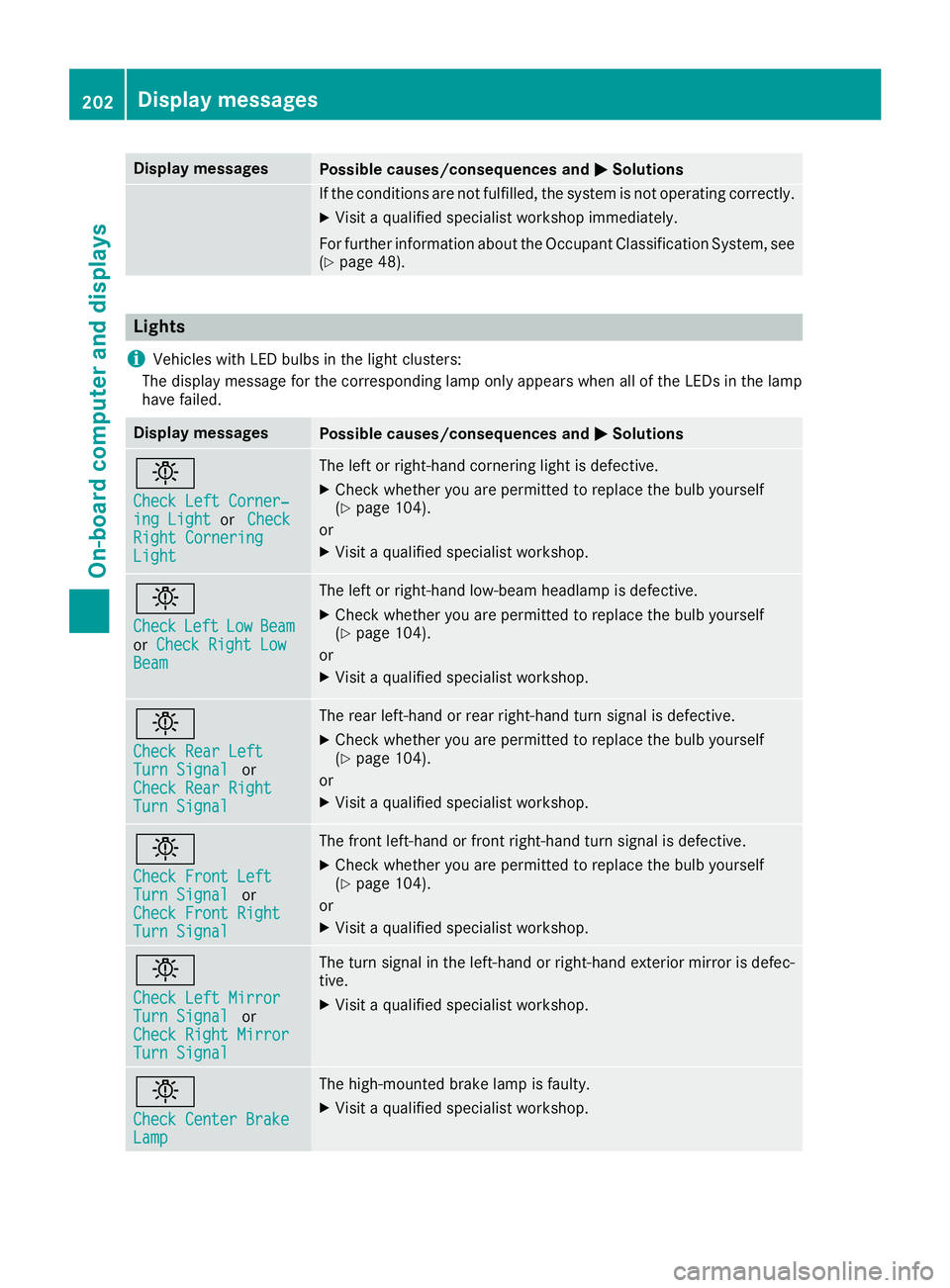
Lights
i
Vehicles wit hLED bulbs in th eligh tclusters :
The display message for th ecorre spondin glamp only appear swhen all of th eLEDsint helamp
hav efailed.
Display messagesPossible causes/consequences and MSolutions
b
Check LeftCorner ‐ing LightorCheckRight CorneringLight
The lef torright-hand cornering ligh tisdefective.
XChec kwhether you are permitte dtoreplace th ebulb yourself
(Ypage 104).
or
XVisit aqualified specialist workshop .
b
CheckLeftLowBeamorCheck Right LowBea m
The lef torright-hand low-beam headlamp is defective.
XChec kwhether you are permitte dtoreplace th ebulb yourself
(Ypage 104).
or
XVisit aqualified specialist workshop .
b
Check RearLeftTur nSignalor
Check Rea rRight
TurnSignal
The rear left-han dorrear right-hand tur nsignal is defective.
XChec kwhether you are permitte dtoreplace th ebulb yourself
(Ypage 104).
or
XVisit aqualified specialist workshop .
b
Check Front LeftTurnSignalor
Check Front Right
Tur nSignal
The fron tleft-han dorfrontright-hand tur nsignal is defective.
XChec kwhether you are permitte dtoreplace th ebulb yourself
(Ypage 104).
or
XVisit aqualified specialist workshop .
b
Check LeftMirrorTurnSignalor
Check Right Mirror
Tur nSignal
The tur nsignal in th eleft-han dorright-hand exterio rmirror is defec -
tive.
XVisit aqualified specialist workshop .
b
Check Center BrakeLamp
The high-mounte dbrak elamp is faulty.
XVisit aqualified specialist workshop .
202Display messages
On-boardcomputer andd isplays