2018 MERCEDES-BENZ CLA COUPE turn signal
[x] Cancel search: turn signalPage 13 of 326
Grade (gasoline) ............................ 316
Importantsafety note s................. .316
Problem (malfunction) .................. .140
Refueling ........................................ 138
Tank content/reserve fuel ............. 316
Fue lfiller flap
Opening ......................................... 139
Fue llevel
Calling up the range (on-board
computer) ...................................... 180
Fue ltank
Capacity ........................................ 316
Problem (malfunction) ................... 140
Fuses
Allocation chart .............................2 85
Before changing .............................2 84
Fuse box in the engine compart-
ment .............................................. 285
Fuse box in the front-passenger
footwell .......................................... 285
Important safety notes .................. 284
G
Garage door opener
Clearing the memory ..................... 254
General notes ................................ 252
Important safety notes .................. 252
Opening/closing the garage door .. 254
Problems whe nprogramming ........2 54
Programming (button in the rear-
view mirror) ................................... 252
Synchronizing the rolling code ....... 253
Gasoline ............................................. 316
Gear indicator (on-board com-
puter, Mercedes-AMG vehicles) ....... 188
Genuine parts ...................................... 24
Glove box ...........................................2 38
Google™L ocal Search
see also Digita lOperator's Man-
ua l..................................................2 29
H
Handbrake
see Parking brake
HANDS-FRE EACCES S.......................... 79 Hazard warning lamps
Display message ............................ 216
Switching on/off ........................... 102
Head restraints
Adjusting ......................................... 92
Adjusting (manually). ....................... 93
Adjusting (rear) ................................ 93
Headlamps
Fogging up ..................................... 103
see Automatic headlamp mode
Heating
see Climate control
High beam flasher .............................1 01
High-beam headlamps
Adaptive Highbeam Assist ............. 102
Display message ............................ 203
Replacing bulbs .............................1 06
Switching on/off ........................... 101
Hill start assist .................................. 125
HOLD function
Activating ....................................... 157
Activatio nconditions ..................... 157
Deactivating ................................... 157
Display message ............................ 207
Function/notes .............................1 57
Home address
see also Digita lOperator's Man-
ua l..................................................2 29
Hood
Closing ...........................................2 58
Display message ............................ 215
Important safety notes .................. 257
Opening ......................................... 257
Horn ...................................................... 32
Hydroplaning ..................................... 148
I
Ignitionlock
see Key positions
Immobilizer .......................................... 68
Indicator lamp
Replacing bulbs (rear) .................... 106
Indicator lamps
see Warning and indicator lamps
Indicators
see Turn signals
Index11
Page 14 of 326

Instrumentcluster
Overview .......................................... 33
Setting s......................................... 18 6
Warn inga nd indicator lamps ........... 33
Instrument cluster lighting .............. 176
Interior lighting
Control ...........................................1 04
Overview ........................................ 103
Reading lamp ................................. 103
iPod
®
see also Digita lOperator's Man-
ua l..................................................2 29
J
Jack
Storage location ............................ 270
Using ............................................. 309
Jump starting (engine) ......................278
K
Keyp ositions
Start/Stop button .......................... 122
KEYLESS-GO
Convenience closing feature ............ 83
Deactivation ..................................... 71
Locking ............................................ 71
Unlocking ......................................... 71
Kickdown
Driving tips ....................................1 34
Manual gearshifting ....................... 138
Kne ebag.............................................. 46
L
Lamps
see Warning and indicator lamps
Lane Keepin gAssist
Activating/deactivating (on-
board computer) ............................ 186
Display message ............................ 208
Function/informatio n.................... 174
Lan eTracking package ..................... 172
Lap time (RACETIMER) ...................... 189
LATCH-type (ISOFIX )child seat
anchors ................................................ 57
License plate lamp (display mes-
sage) ................................................... 203 Light senso
r(display message) ....... 204
Lights
Adaptive Highbeam Assist ............. 102
Automati cheadlamp mode. ........... 100
Fogged up headlamp s.................... 103
Hazard warning lamps ................... 102
Hig hbeamf lasher. ......................... 101
High-beam headlamp s................... 101
Light switch ................................... 100
Low-bea mheadlamp s.................... 101
Parking lamps ................................ 101
Rear fog lamp ................................ 101
Setting exterio rlighting ................. 100
Standing lamps .............................. 101
Switching the daytime running
lamps on/off( on-board com-
puter) ............................................. 187
Turn signal s................................... 101
Loadin gguidelines ............................ 237
Locking
see Central locking
Locking (doors)
Automati c........................................ 77
Emergency locking ........................... 77
From inside (central locking but-
ton) .................................................. 76
Locking centrally
see Central locking
Locking verification signal (on-
board computer) ............................... 187
Low-beam headlamps
Displa ymessage ............................ 202
Replacing bulb s............................. 105
Switching on/off. .......................... 101
Lumbar support
Adjusting the 4-wa ylum bars up-
por t.................................................. 93
M
M+S tires ............................................ 289
Malfunctio nmessage
see Displa ymessages
Matte finis h(clea ning instruc-
tions) .................................................. 264
mbrace
Call priority .................................... 248
Displa ymessage ............................ 197
12Index
Page 15 of 326
Downloading destinations
(COMAND) .....................................248
Downloading route s....................... 251
Emergency call .............................. 246
General notes ................................ 245
Geo fencing ................................... 251
Locating astolenv ehicle ...............2 50
MB info call button ........................ 247
Remote fault diagnosis. ................. 250
Remote vehicl eloc king .................. 250
Roadsid eassistance button ........... 247
Search &Send ............................... 249
Self-test ......................................... 245
Speed alert .................................... 251
System .......................................... 245
Triggering the vehicl ealarm ........... 252
Vehicl eremote unlocking .............. 249
Mechanical key
Function/note s................................ 72
Inserting .......................................... 72
Locking vehicl e................................ 77
Removing ......................................... 72
Unlocking the driver'sd oor.............. 77
Memory card (audio) ......................... 183
Memory function ................................. 98
Messagem emory (on-board com-
puter) .................................................. 191
Messages
see Displa ymessages
Mirro rturn signal
Cleaning ......................................... 265
Mirrors
see Exterior mirrors
see Rear-vie wmirror
see Vanity mirror (i nthe sunv isor)
Mobil ephone
Connecting (Bluetooth
®inter-
face ).............................................. 233
Connecting (device manager )........ 234
Frequencie s................................... 313
Installation ..................................... 313
Menu (on-board computer) ............ 183
Transmission output( maximum) .... 313
Modifying the programming
(SmartKey) ........................................... 72
MOExtendedt ires.............................. 271 Mounting wheels
Lowering the vehicl e...................... 311
Mounting anew wheel. .................. 310
Preparing the vehicl e..................... 308
Raising the vehicl e......................... 309
Removing awheel .......................... 310
Securing the vehicl eagains troll-
ing away ........................................ 309
MP3
Operation ....................................... 183
se
e also Digital Operator's Man-
ua l.................................................. 229
Multifunctio ndisplay
Function/note s............................. 179
Permanent display ......................... 187
Multifunctio nsteering wheel
Operating the on-board compute r..1 77
Overview .......................................... 34
Multimedia system
Switching on and off ......................2 30
Music files
see also Digita lOperator's Man-
ua l..................................................2 29
N
Navigation
Entering adestination .................... 231
Menu (on-board computer) ............ 181
see also Digita lOperator's Man-
ua l..................................................2 29
Notes on breaking-inan ew vehi-
cle ....................................................... 121
O
Occupant Classification System
(OCS)
Conditions ....................................... 48
Faults ............................................... 51
Operation ......................................... 48
System self-test ............................... 50
Occupant safety
Air bag s...........................................4 5
Automatic measures after an acci-
dent ................................................. 54
Bel twarning ..................................... 44
Childre ninthe vehicl e..................... 54
Important safety notes. ................... 40
Index13
Page 18 of 326
Remote controlGarag edooro pener ....................... 252
Programming (garag edoor
opener) .......................................... 252
Replacing bulbs
Brake lamp .................................... 106
High-beam headlamp s................... 106
Important safety notes .................. 104
Installing/removing the cover
(front wheela rch).......................... 105
Low-bea mheadlamp s.................... 105
Overview of bulb types .................. 104
Rear fog lamp ................................ 106
Turn signal s(front) ......................... 106
Turn signal s(rear) .......................... 106
Reporting safety defects .................... 28
Rescue card ......................................... 29
Reserve (fuel tank)
see Fuel
Reserve fuel
Displa ymessage ............................ 206
Warning lamp ................................. 224
see Fuel
Residual hea t(clim ate control) ........ 119
Restrain tsystem
Displa ymessage ............................ 198
Introduction ..................................... 40
Warning lamp ................................. 224
Warning lamp (function) ................... 41
Revers egear(selecto rlever )........... 132
Reversin gfeature
Roller sunblind ................................. 87
Sid ew indow s................................... 82
Roadside Assistance (breakdown) .... 26
Rolle rsunblind
Panorama roofw ithp ower tilt/
sliding panel ..................................... 87
Roo fcarrier ........................................ 241
Roo flinin gand carpets (cleaning
guidelines) ......................................... 268
Roo floa d( maximum) ........................ 320
Route guidance
see also Digital Operator's Man-
ual.................................................. 229S
Safety
Childre ninthe vehicl e..................... 54
see Occupant safety
Safety system
see Driving safety systems
SD card
Inserting ........................................ 235
Inserting/removing ........................ 235
Removing ....................................... 235
SD memory card
see also Digital Operator's Man-
ual.................................................. 229
Search &Send
see also Digital Operator's Man-
ua l.................................................. 229
Seat
Correct driver'ss eatposition ........... 90
Seat belts
Adjusting the height ......................... 44
Cleaning ......................................... 267
Correct usag e.................................. 43
Fastening ......................................... 44
Important safety guideline s............. 42
Introduction ..................................... 41
Releasing ......................................... 44
Warning lamp ................................. 218
Warning lamp (function) ................... 44
Seats
Adjusting (electrically) ..................... 92
Adjusting (manually) ........................ 91
Adjusting (Performance Seat) .......... 94
Adjusting the 4-wa ylum bars up-
por t.................................................. 93
Adjusting the headr estraint ............ 92
Cleaning the cover. ........................ 267
Folding the backrest( rear com-
partment) forwards/back .............. 240
Important safety notes .................... 90
Seath eating problem ...................... 95
Storing settings (memory func-
tion) ................................................. 99
Switching seath eating on/off......... 94
Securing cargo .................................. 241
Selecto rlever
Cleaning ......................................... 267
Sensors (cleaning instructions) ....... 265
16Index
Page 22 of 326
Traction (definition)....................... 307
Tread wear .....................................3 01
Uniform Tire Quality Grading
Standard s...................................... 301
Uniform Tire Quality Grading
Standard s(definition) .................... 306
Weari ndicator (definition) ............. 307
Wheelr im (definition) .................... 306
see Flat tire
Top Tether ............................................ 57
Tow-starting
Emergency engine starting ............ 284
Important safety notes .................. 281
Installing the towing eye. ............... 282
Removing the towing eye. ..............282
Towing atrailer
ESP
®(ElectronicS tability Pro-
gram) ............................................... 67
Towing away
Important safety guidelines ........... 281
Installing the towing eye. ............... 282
Notes for 4MATIC vehicles ............ 284
Removing the towing eye. ..............282
Transporting the vehicle ................ 283
With both axle sonthe ground ....... 283
With front axle raised ..................... 282
Towing eye ......................................... 270
Traffic reports
see also Digita lOperator's Man-
ua l..................................................2 29
Transmission
see Automatic transmission
Transmission position display
(DIRECT SELEC Tlever) ......................1 30
Transporting the vehicle .................. 283
Trim pieces (cleaning instruc-
tions) ..................................................2 67
Trip computer (on-board com-
puter) ..................................................1 80
Trip odometer
Calling up ....................................... 180
Resetting (on-board computer) ...... 181
Trunk
Emergency release .......................... 81
Emergency release button ...............8 1
Important safety notes .................... 78 Opening (automaticall
yfrom out-
side) .................................................7 9
Opening (from outside the vehi-
cle, HANDS-F REE ACCESS) ...
........... 79
Opening automaticallyf rom
inside ............................................... 80
Opening/closing (manually from
outside) ............................................ 78
Trunk lid
Display message ............................2 15
Opening dimensions ......................3 20
Trunk load (maximum) ......................320
Turn signals
Display message ............................ 202
Replacing bulbs (front) ................... 106
Switching on/off ........................... 101
Two-way radio
Frequencies ................................... 313
Installatio n..................................... 313
Transmissiono utput (maximum ).... 313
Type identification plate
see Vehicle identification plate
U
UnlockingEmergency unlocking ....................... 77
From insid ethe vehicle (central
unlocking button) .............................7 6
Upshifti ndicator (on-boardc om-
puter, Mercedes-AMG vehicles) .......188
USB devices
Connecting to the MediaI nter-
face ............................................... 236
V
Vanity mirror (in the sun visor) ........244
Vehicle
Correct use ...................................... 28
Data acquisition ............................... 29
Display message ............................ 213
Equipment ....................................... 25
Individua lsettings .......................... 186
Limited Warranty .............................2 9
Loading .......................................... 298
Locking (in an emergency) ............... 77
Locking (SmartKey) .......................... 70
20Index
Page 35 of 326

Instrumentcluster
FunctionPag e
:Speedometer wit hsegments176
Warning and indicator lamps:
L Low-beam headlamps101
T Parking lamp s101
K High-beam headlamps101
÷ ESP®22 1
Electric parking brak e
applie d(red)
F (USAonly)
! (Canada only)224
! Electric parking brak e
(yellow)22 4
· Distanc ewarning227
å ESP®OF F221
! ABSm alfunctioning220
Brake s219
$ (USAonly)
J (Canada only)
FunctionPage
;#! Turn signals101
=Multifunction display179
?Tachometer176
6 Restrain tsystem41
ü Seat belt no tfastene d218
M SPORT handlin gmode
(Mercedes-AM Gvehicles)222
R Rear fog lamp101
; CheckEngine22 4
h Tirep ressur emonitor228
ACoolan ttem perature gauge177
Warning and indicator lamps:
? Coolan ttoo hot/cold225
BFue llevel indicator
Warning and indicator lamps:
æ Reserve fuel224
Instrument cluster33
At ag lance
Page 72 of 326

SmartKey
Important safety notes
GWARNING
If children are left unsupervised in the vehicle,
they could:
Ropen the doors, thus endangering other
people or road users.
Rget out and disrupt traffic.
Roperate the vehicle's equipment.
Additionally, children could set the vehicle in
motion if, for example, they:
Rrelease the parking brake.
Rshifting the automatic transmission out of
park position P
RStart the engine.
There is arisk of an accident and injury.
When leaving the vehicle, always take the
SmartKey with you and lock the vehicle. Never
leave children or animals unattended in the
vehicle. Always keep the SmartKey out of
reach of children.
GWARNING
If you attach heavy or large object stothe
SmartKey, the SmartKey could be uninten-
tionally turned in the ignition lock. This could
cause the engine to be switched off. There is a risk of an accident.
Do not attach any heavy or large object stothe
SmartKey. Remove any bulky key rings before
insertingt he SmartKey into the ignition lock.
!Keep the SmartKey away from stron gmag-
netic fields. Otherwise, the remote control
function could be affected.
Strong magnetic fields can occur in the vicin-
ity of powerful electrical installations.
Do not keep the SmartKey:
Rwith electronic devices, e.g. amobile phone
or another SmartKey.
Rwith metallic objects, e.g. coins or metal foil.
Rinside metallic objects, e.g. ametal case
Vehicles with KEYLESS-GO startf unction:do
not keep the SmartKey in the trunk.O therwise,the SmartKey may not be detected, e.g. when
startin
gthe engine using the Start/Stop button.
SmartKey functions
:& To lock the vehicle
;FTo open the trunk lid
=%To unlock the vehicle
If you do not open the vehicle within approx-
imately 40 seconds of unlocking:
Rthe vehicle is locked again.
Ranti-theft protection is reactivated.
XTo lock: press the &button.
The SmartKey centrally locks/unlocks:
Rthe doors
Rthe trunk lid
Rthe fuel filler flap
The turn signals flash once when unlocking and
three times when locking.
When the locator lighting is activated via the
multimedia system, it lights up when it is dark
after the vehicle is unlocked with the remote
control (see the separate operating instruc-
tions).
You can also set an audible signal to confirm
that the vehicle has been locked. The audible
signal can be activated and deactivated using
the on-board computer (
Ypage 187).
XTo open the trunk lid automatically: press
and hold the Fbutton until the trunk lid
opens (
Ypage 79).
70SmartKey
Opening and closing
Page 104 of 326
XTo switchoff the high-beam headlamps:
move the combinatio nswitch back to its nor-
malp osition.
The blue Kindicator lamp in the instru-
ment cluster goe sout.
Vehicles with Adaptive Highbeam Assist:
when Adaptive Highbeam Assist is active, it
controls activation and deactivation of the
high-bea mheadlamps (
Ypage 102).
XTo switc honthe high-beam flasher: pull
the combinatio nswitch in the direction of
arrow =.
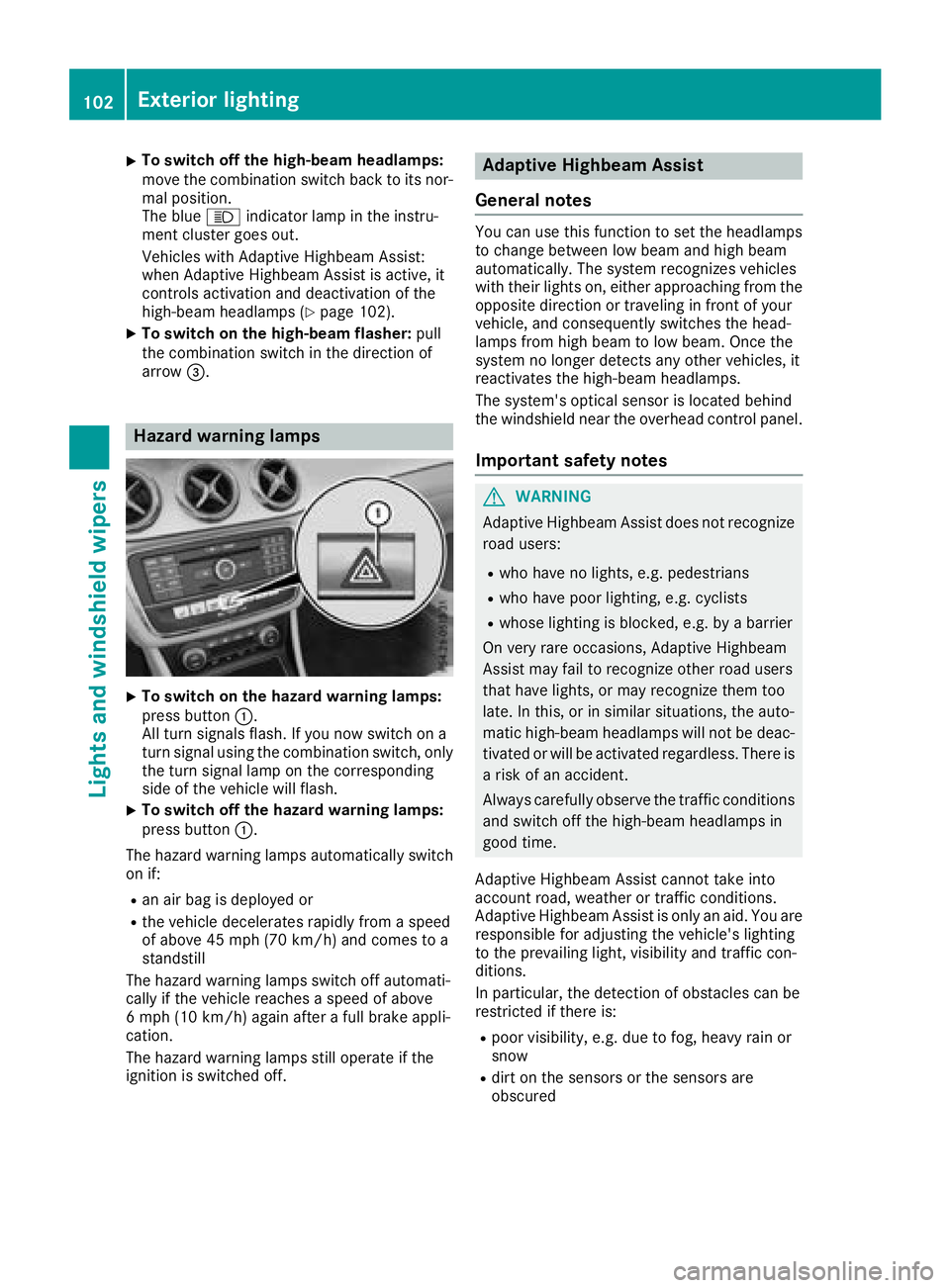
Hazard warning lamps
XTo switc honthe hazard warning lamps:
press button :.
All turn signals flash. If yo unow switch on a
turn signalu sing the combinatio nswitch ,only
the turn signall ampont he corresponding
side of the vehicl ewillf lash.
XTo switc hoff the hazard warning lamps:
press button :.
The hazard warning lamps automaticall yswitch
on if:
Ran ai rbag is deployed or
Rthe vehicl edecelerates rapidly from aspeed
of above 45 mph (70 km/h )and comestoa
standstill
The hazard warning lamps switch off automati-
cally if the vehicl ereachesas peed of above
6m ph (10 km/h )again afteraf ullb rake appli-
cation.
The hazard warning lamps stil lope rate if the
ignition is switched off.
Adaptiv eHighbeam Assist
General notes
Yo uc an us ethisf unctio ntoset the headlamps
to change between lo wbeama nd high beam
automatically. The system recognizes vehicles
with thei rlights on, either approaching from the
opposite direction or traveling in front of your
vehicle, and consequentlys witches the head-
lamps from high beam to lo wbeam. Once the
system no longer detects any otherv ehicles, it
reactivates the high-bea mheadlamps.
The system's optica lsensor is locate dbehin d
the windshield nea rthe overhead controlp anel.
Important safety notes
GWARNING
Adaptive Highbeam Assist does not recognize
roadu sers:
Rwh oh avenol ights ,e.g.p edes trians
Rwhoh avep oorlighting, e.g .cyclists
Rwhose lighting is blocked, e.g .byab arrier
On very rar eoccasions, Adaptive Highbeam
Assist mayf ailtor ecognize othe rroadu sers
thath avel ights ,orm ayrecognize them too
late. In this, or in similar situations, the auto-
matic high-bea mheadlamps will not be deac-
tivated or will be activate dregardless. There is
ar iskofana ccident.
Alway scarefull yobserve the traffic conditions
and switch off the high-bea mheadlamps in
goo dtime.
Adaptive Highbeam Assist canno ttake into
account road, weather or traffic conditions.
Adaptive Highbeam Assist is onlyana id.Y ou are
responsibl efor adjusting the vehicle's lighting
to the prevailing light, visibility and traffic con-
ditions.
In particular, the detection of obstacle scan be
restricte difthereis:
Rpoor visibility ,e.g.d ue to fog,h eavy rainor
snow
Rdirt on the sensors or the sensors are
obscured
102Exterior lighting
Lights and windshield wiper s