2017 MERCEDES-BENZ G-Class steering
[x] Cancel search: steeringPage 116 of 286
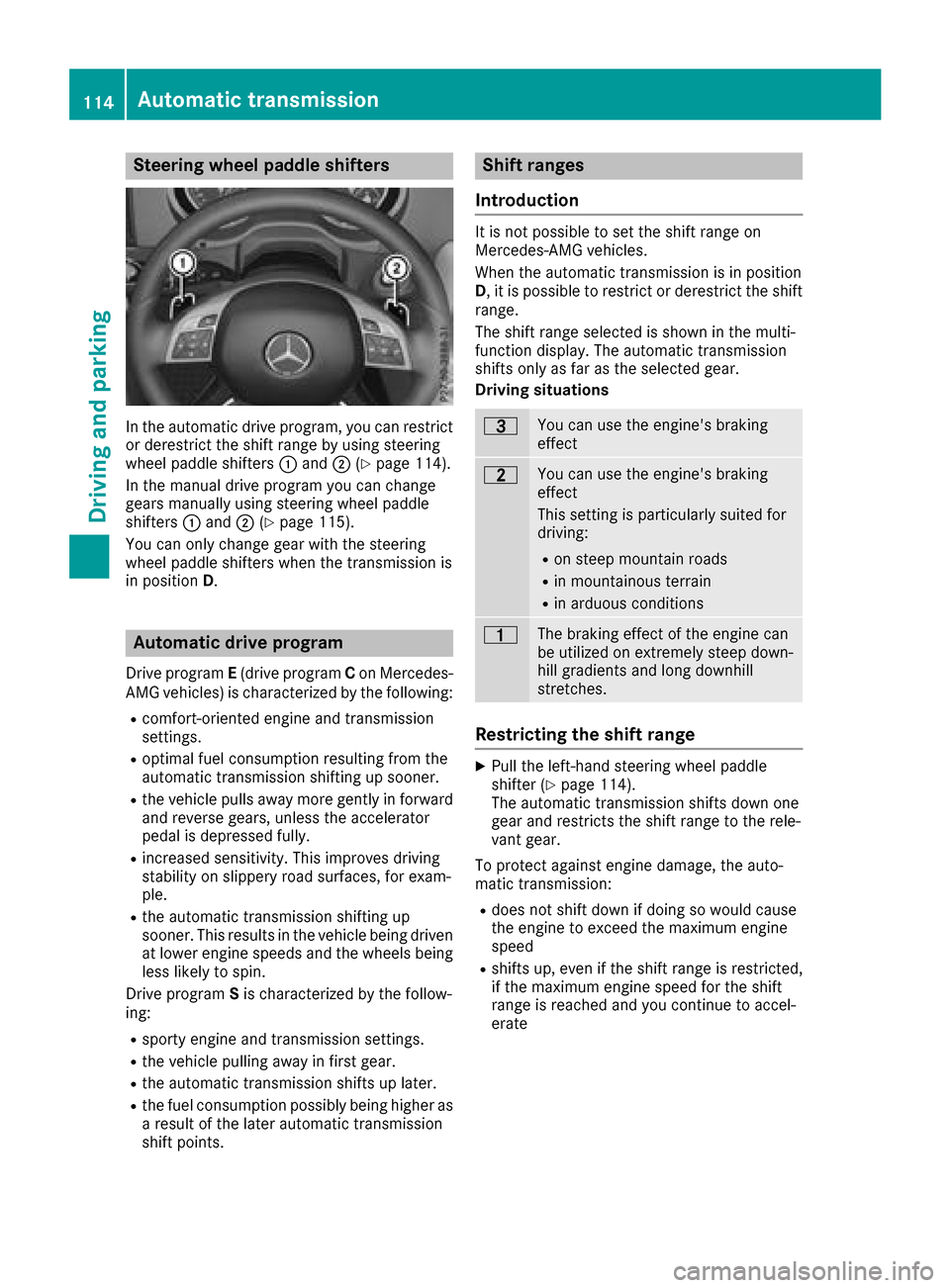
Steering wheel paddle shifters
In the automatic drive program, you can restrict
or derestrict the shift range by using steering
wheel paddle shifters:and ;(
Ypage 114).
In the manual drive program you can change
gears manually using steering wheel paddle
shifters :and ;(
Ypage 115).
You can only change gear with the steering
wheel paddle shifters when the transmission is
in position D.
Automatic drive program
Drive program E(drive program Con Mercedes-
AMG vehicles) is characterized by the following:
Rcomfort-oriented engine and transmission
settings.
Roptimal fuel consumption resulting from the
automatic transmission shifting up sooner.
Rthe vehicle pulls away more gently in forward
and reverse gears, unless the accelerator
pedal is depressed fully.
Rincreased sensitivity. This improves driving
stability on slippery road surfaces, for exam-
ple.
Rthe automatic transmission shifting up
sooner. This results in the vehicle being driven
at lower engine speeds and the wheels being
less likely to spin.
Drive program Sis characterized by the follow-
ing:
Rsporty engine and transmission settings.
Rthe vehicle pulling away in first gear.
Rthe automatic transmission shifts up later.
Rthe fuel consumption possibly being higher as
ar esult of the later automatic transmission
shift points.
Shift ranges
Introduction
It is not possible to set the shift range on
Mercedes-AMG vehicles.
When the automatic transmission is in position
D,itisp ossible to restrict or derestrict the shift
range.
The shift range selected is shown in the multi-
function display.T he automatic transmission
shifts only as far as the selected gear.
Driving situations
=You can use the engine's braking
effect
5You can use the engine's braking
effect
This settingisp articularly suited for
driving:
Ron steep mountain roads
Rin mountainous terrain
Rin arduous conditions
4The braking effect of the engine can
be utilized on extremely steep down-
hill gradients and long downhill
stretches.
Restricting the shift range
XPull the left-hand steering wheel paddle
shifter (Ypage 114).
The automatic transmission shifts down one
gear and restrictst he shift range to the rele-
vant gear.
To protect against engine damage, the auto-
matic transmission:
Rdoes not shift down if doing so would cause
the engine to exceed the maximum engine
speed
Rshifts up, even if the shift range is restricted,
if the maximum engine speed for the shift
range is reached and you continue to accel-
erate
114Automatic transmission
Driving and parking
Page 117 of 286
Derestricting theshift range
XPull th eright-hand steerin gwhee lpaddle
shifter (Ypage 114).
The automatic transmissio nshift supo ne
gear and restricts th eshift range to th erele-
van tgear .
Clearing th eshift range restriction
XPull and hol dthe right-hand steerin gwhee l
paddle shifter (Ypage 114) until transmissio n
position Dis shown in th emultifunction dis -
play.
The automatic transmissio nshift sfromt he
curren tshift range directl ytoD.
Selecting th eide al shift range
XPull th eleft-han dsteerin gwhee lpaddle
shifter (Ypage 114) and hol ditinposition.
The automatic transmissio nshift stot hegear
whic hallow soptimum acceleration and
deceleration .Todothis, th eautomatic trans -
missio nshift sdown on eormoreg ears.
The automatic transmissio ncanno tshift down
beyond secon dgear .Tos hift to first gear ,you
hav etop ull thelefts teerin gwhee lpaddle
shifter.
Manual gea rshifting
Temporar ysetting
XTo activate :shift th eselecto rlever to posi-
tion P.
XPull steerin gwhee lpaddle shifter :or;.
Temporary setting will be active fo racertai n
amount of time. Under certain condition sthe
minimum amount of time is extended, e.g. in th ecas
eofl atera lacceleration ,durin gano verrun
phas eorw hen drivin gonsteep terrain .
XTo deactivate :pull steerin gwhee lpaddle
shifter ;and hol ditinp lace.
or
XUse th elever to switch th etransmissio nposi-
tion .
or
XChange th edrive program.
Shifting gears
!In manual mode, th eautomatic transmis -
sio nd oesn otshift up automatically eve n
when th eenginel imitin gspeed fo rthe curren t
gear is reached. Whe nthe engin elimitin g
speed is reached, th efuelsupply is cut to
preven tthe engin efromo verrevving. Always
mak esuret hatthe engin espeed doe snot
reach th ered are aofthetachometer. There is
otherwise ariskofe ngined amage.
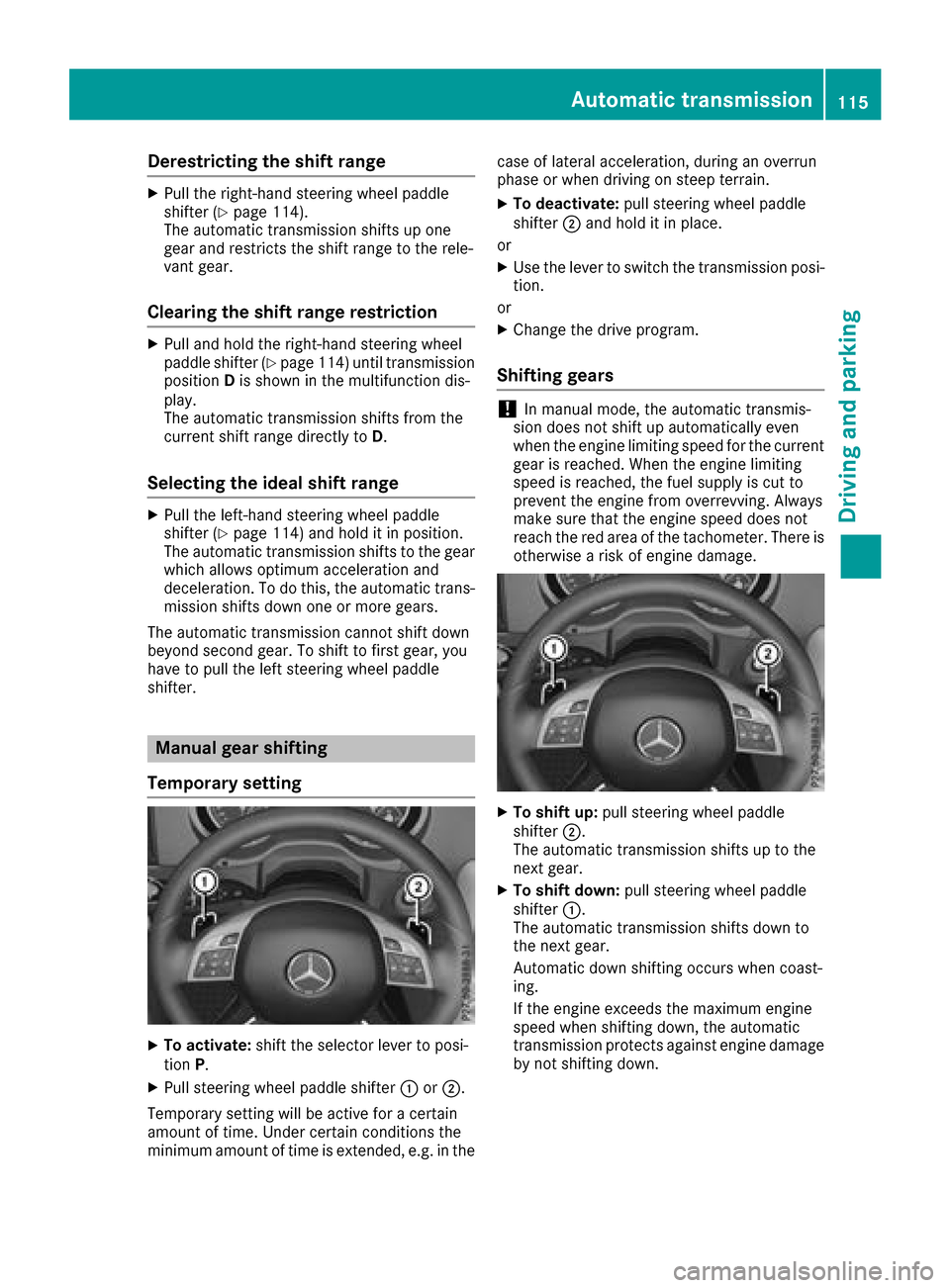
XTo shift up :pull steerin gwhee lpaddle
shifter ;.
The automatic transmissio nshift suptot he
next gear .
XTo shift down: pull steeringwhee lpaddle
shifter :.
The automatic transmissio nshift sdown to
th en extg ear .
Automatic down shiftin goccursw hen coast -
ing.
If th eenginee xcee ds th emaximum engin e
speed when shiftin gdown ,the automatic
transmissio nprotect sagainst engin edamage
by no tshiftin gdown .
Automatic transmission115
Driving an dpark ing
Z
Page 118 of 286
Shift recommendation
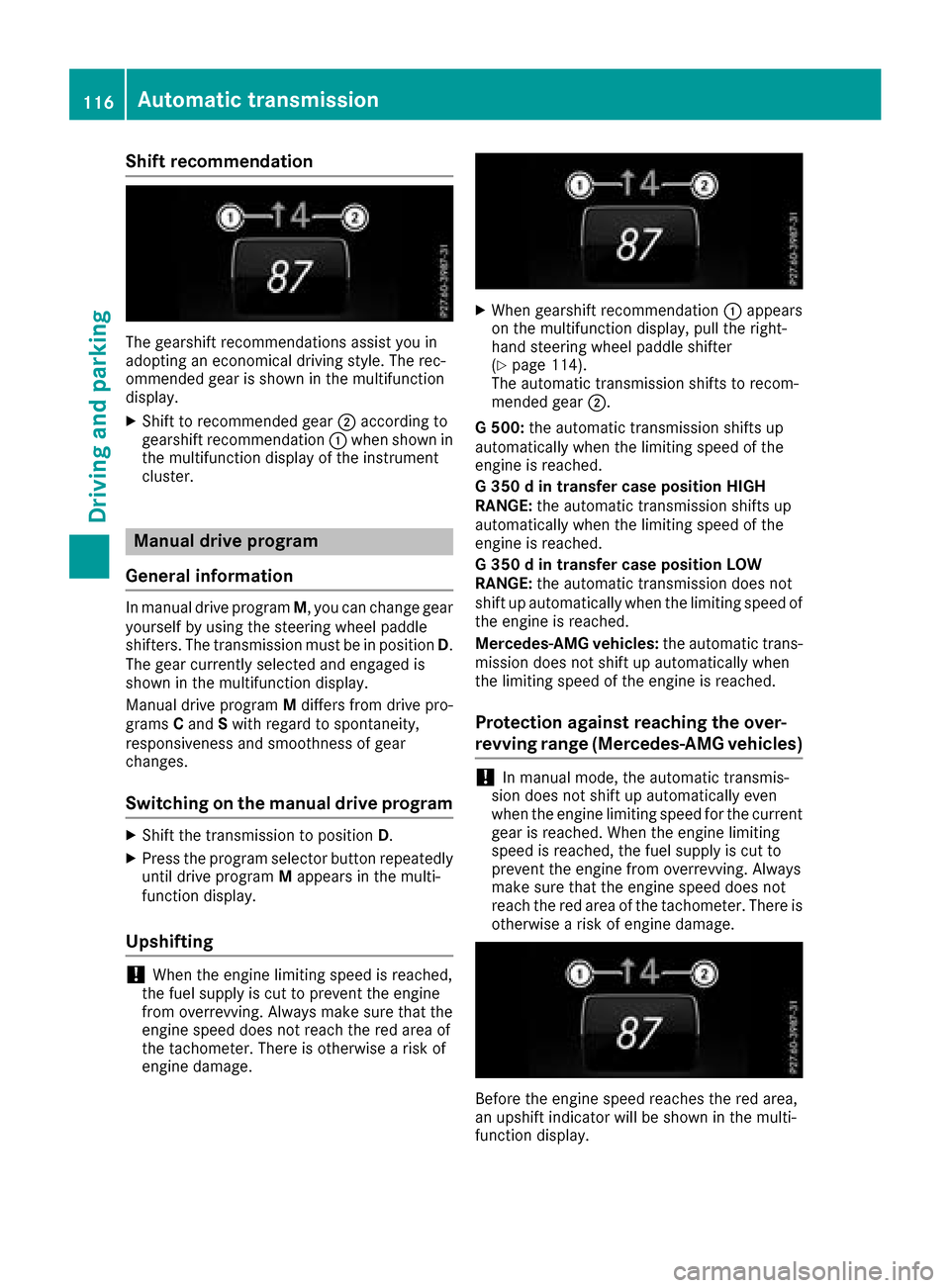
The gearshift recommendations assist you in
adopting an economical driving style. The rec-
ommended gear is shown in the multifunction
display.
XShift to recommended gear;according to
gearshift recommendation :when shown in
the multifunction display of the instrument
cluster.
Manual drive program
General information
In manual drive program M,you can change gear
yourself by using the steering wheel paddle
shifters. The transmission must be in position D.
The gear currently selected and engaged is
shown in the multifunction display.
Manual drive program Mdiffers from drive pro-
grams Cand Swith regard to spontaneity,
responsiveness and smoothness of gear
changes.
Switching on the manuald rive program
XShift the transmission to position D.
XPress the program selector button repeatedly
until drive program Mappears in the multi-
function display.
Upshifting
!When the engine limiting speed is reached,
the fuel supply is cut to prevent the engine
from overrevving. Always make sure that the
engine speed does not reach the red area of
the tachometer. There is otherwise arisk of
engine damage.
XWhen gearshift recommendation :appears
on the multifunction display,p ull the right-
hand steering wheel paddle shifter
(
Ypage 114).
The automatic transmission shifts to recom-
mended gear ;.
G5 00: the automatic transmission shifts up
automatically when the limiting speed of the
engine is reached.
G3 50dint ransfer case position HIGH
RANGE: the automatic transmission shifts up
automatically when the limiting speed of the
engine is reached.
G3 50dint ransfer case position LOW
RANGE: the automatic transmission does not
shift up automatically when the limiting speed of
the engine is reached.
Mercedes-AMG vehicles: the automatic trans-
mission does not shift up automatically when
the limiting speed of the engine is reached.
Protection against reaching the over-
revving range (Mercedes-AMG vehicles)
!In manual mode, the automatic transmis-
sion does not shift up automatically even
when the engine limiting speed for the current
gear is reached. When the engine limiting
speed is reached, the fuel supply is cut to
prevent the engine from overrevving. Always
make sure that the engine speed does not
reach the red area of the tachometer. There is
otherwise arisk of engine damage.
Before the engine speed reaches the red area,
an upshift indicator will be shown in the multi-
function display.
116Automatic transmission
Driving and parking
Page 123 of 286
To ensure that the vehicle is safeguarded
against rolling away unintentionally:
Rthe parking brake must be applied.
Rthe transmission must be in positionPand the
SmartKey must be removed from the ignition
lock
Rthe transfer case must not be in the neutral
position
Rthe front wheels must be turned towards the
curb on steep uphill or downhill gradients
Rthe empty vehicle must be secured at the
front axle with awheel chock or similar
object ,for example, on uphill or downhill gra-
dients
Ral aden vehicle must also be secured at the
rear axle with awheel chock or similar object,
for example, on uphill or downhill gradients
Switching off the engine
GWARNING
The automatic transmission switches to neu-
tral position Nwhen you switch off the engine.
The vehicle may roll away.T here isarisk of an
accident.
After switching off the engine, alwayss witch
to parking position P.Prevent the parked vehi-
cle from rolling away by applying the parking
brake.
XShift the automatic transmission to position
P.
XTurn the SmartKey to position 0in the ignition
lock and remove it.
The immobilizer is activated.
XApply the parking brake firmly.
XTurn the steerin gwheel until the steering
wheel lock engages.
If you switch the engine off with the transmis-
sion in position Ror D,t he automatic transmis-
sion shifts to Nautomatically.
If you then open the driver's door or the front-
passenger door or remove the SmartKey from
the ignition ,the automatic transmission shifts
to Pautomatically.
If you switch off the engine while the transmis-
sion is in position N,t he automatic transmission
remains in Neven if adoor is opened. The auto-
matic transmission only automatically shifts into neutral
Nwhen you switch off the engine
using the SmartKey.
Parking brake
GWARNING
If you must brake the vehicle with the parking brake, the braking distance is considerably
longer and the wheels could lock. There is an
increased danger of skidding and accidents.
Only use the parking brake to brake the vehi-
cle when the service brake is faulty. Do not
apply the parking brake too firmly. If the
wheels lock, release the parking brake until
the wheels begin turnin gagain.
GWARNING
If you leave children unsupervised in the vehi-
cle, they could set it in motion by, for example:
Rrelease the parking brake.
Rshift the automatic transmission out of the
parking position P.
Rstart the engine.
In addition, they may operate vehicle equip-
ment and become trapped. There is arisk of
an accident and injury.
When leaving the vehicle, alwayst ake the
SmartKey with you and lock the vehicle. Never
leave children unsupervised in the vehicle.
If you brake the vehicle with the parking brake,
the brake lamps will not light up.
If you pull away with the parking brake applied,
aw arning ton esounds.
Parking121
Driving and parking
Z
Page 124 of 286

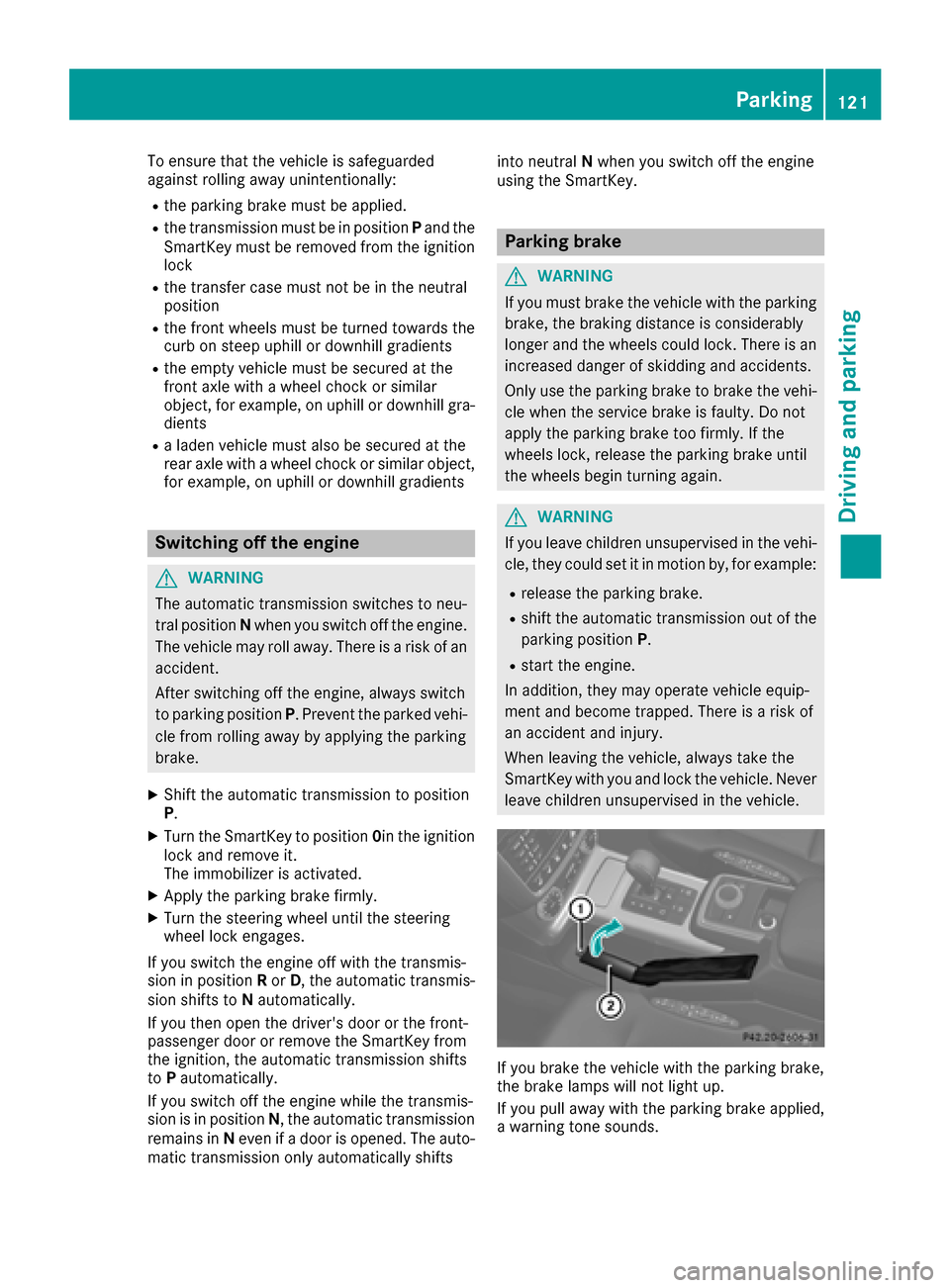
XTo apply:pull parking brake lever ;up
firmly.
Whe nthe ignition is switched on, the F
(US Aonly) or J(Canada only) indicator
lamp in the instrument cluster lights up.
XTo release: pull parking brake lever ;
slightly.
XPress release button :and guid eparking
brake ;down to the stop.
The F (USAonly) or !(Canada only)
indicator lamp in the instrument cluster goes
out.
The vehicl ecan also be braked during an emer-
genc ybyu sing the parking brake.
XTo brake in an emergency: press and hold
release button :and carefull ypullp arking
brake lever ;upwards.
If yo udrive on we troads or dirt-covered surfa-
ces, roads alta nd/or dirt could get into the
parking brake.
In order to prevent corrosion and areduction in
the braking powe rofthe parking brake, observe
the following:
Rpull the parking brake up with release but-
ton :depressedf rom time to time before
beginning ajourney.
Rdrive for approximately1 10 yds(100 m) at a
maximu mspeed of 12 mph (20 km/h)
Parking the vehicle for alon gp eriod
If yo uleave the vehicl eparked for longer than
fourw eeks, the battery maybed amaged by
exhaustive discharging.
If yo ulea ve the vehicl eparked for longer thans ix
weeks, the vehicl emaysuffer damage as a
resul toflackofu se.
XVisit aquali fied specialist workshop and seek
advice.
iYo uc an obtai ninformatio nabout trickle
chargers from aquali fied specialist work-
shop.
Driving tips
General driving tips
Important safety notes
GWARNING
If yo uswitch off the ignition whil edriving,
safety-relevant functions are onlya vailable
with limitations, or not at all. Thi scould affect,
for example, the powe rsteering and the brake
boosting effect. Yo uwillr equire considerably
more effort to steera nd brake. There isarisk
of an accident.
Do not switch off the ignition whil edriving.
GWARNING
If yo uoperate mobil ecommunication equip-
ment whil edriving ,you will be distracted from
traffic conditions. Yo ucould also lose control
of the vehicle. There is ariskofana ccident.
Onlyo perate thise quipment when the vehicle
is stationary.
Observe the legalr equirements for the country
in which yo uare driving .Some jurisdictions pro-
hibi tthe driver from using amobilephone while
driving avehicle.
If yo umakeac allw hile driving ,alway suse
hands-free mode. Onlyo perate the telephone
when the traffic situatio npermits. If yo uare
unsure, pull overtoas afel oc ation and stop
before operating the telephone.
Bea rinm ind thatata speed of only30m ph
(approximately50k m/h), the vehiclecovers a
distance of 44 ft (approximately1 4m)per sec-
ond.
Drive sensibly –save fuel
Observe the following tips to save fuel:
XThe tires should always be inflated to the rec-
ommended tire pressure.
XRemove unnecessary loads.
XRemove roof carriersw hen they are not nee-
ded.
XWarm up the engin eatlow engin espeeds.
XAvoid frequenta cceleration or braking.
XHave all servicea nd maintenancework car-
ried out at the specified intervals.
122Driving tips
Driving and parking
Page 127 of 286
For safety reasons, Mercedes-Benz recom-
mends only installing the following brake disks
and brake pads/linings:
Rbrake disks that havebeena pproved by
Mercedes-Benz
Rbrake pads/lining sthat hav ebeena pproved
by Mercedes-Benz or that are of an equivalent
standard of quality
Other brake disks or brake pads/lining scan
compromise the safety of your vehicle.
Alway sreplace al lbrake disks and brake pads/
linings on an axl eatthe sam etime. Always
install new brake pads/lining swhenr eplacing
brake disks.
The vehicle is equipped with lightweight brake
disks to which the wheel assembly with rim and
threaded connectio nismatched.
The use of brake discs other than those
approved by Mercedes-Benz may alter track
width and is subject to approval ,ifapplicable.
Shock-typ eloads whe nhandling the brake
discs, such as whe nchanging wheels ,can lead
to areduction in comfortw hend riving with light-
weigh tbrake discs. Avoid shock-type loads on
the lightweight brake disks, particularly on the
brake plate.
Mercedes-Benz recommends that yo uonly use
brake fluid that has bee nspeciall yapproved for
your vehicle by Mercedes-Benz, or which corre-
sponds to an equivalent quality standard .Brake
fluid which has not bee napproved for
Mercedes-Benz vehicles or which is not of an
equivalent quality could affect your vehicle's
operating safety.
High-performance brake (Mercedes-
AMG vehicles)
The AMG brake systems are designe dfor heavy
loads. Thism ay leadtonoisew henb raking.
Thisw illd epend on:
RSpeed
RBraking force
RAmbient conditions, e.g. temperature and
humidity
The wear of individua lbrake system compo-
nents such as the brake pads/lining sorbrake
discs depends on individua ldriving styl eand
operating conditions.
For this reason, it is impossible to state amile-
ag ethat will be valid under al lcircumstances. An
aggressive driving styl ewilll ea dtoh ighw ear. You can obtain more information on this from a
qualified specialist workshop.
New and replaced brake pads and discs only
reach theiro
ptimum braking effect afte rseveral
hundred kilometers of driving. Compensate for
this by applying greater force to the brake pedal. Keept his in mind ,and adap tyou rd riving and
braking accordingly during this break-in period.
Excessive heavy braking results in correspond-
ingl yhighb rake wear. If the brake pads/linings
hav ereached theirw earlim it, the multifunction
displa yshowsac orresponding message. Espe-
ciall yfor hig hperformance driving, it is impor-
tant to maintain and hav ethe brake system
checked regularly.
Drivingons lippery surfaces
!
Where possible, avoid spinning the drive
wheels whe npulling away on slippery roads.
You could otherwise damag ethe drive train.
Thist ypeofd amageisn ot covered by the
terms of the Mercedes-Benz warranty.
!If possible, do not let the drive wheels spin.
Otherwise ,you could damag ethe drive train.
XEngag ethe differential locks if necessary
(Ypage 148).
Drivingonw etroads
Hydroplaning
If water has accumulated to acertain depth on
the roads urface,there is adanger of hydro-
planing occurring, even if:
Ryo ud rive at low speeds
Rthe tires hav eadequate treadd epth
For this reason, in the event of heavy rai norin
conditions in which hydroplaning may occur,
yo um ustd rive in the following manner:
Rlower your speed
Ravoid ruts
Ravoid sudden steering movements
Rbrake carefully
Drivingonf loodedroads
!Do not drive through floodeda reas. Check
the depth of any water before driving through
it. Drive slowl ythrough standing water. Oth-
Drivin gtips125
Drivin gand parking
Z
Page 131 of 286

Checklist after driving off-road
!If you detect damagetothevehicle after
driving off-road, have th evehicle checked
immediately at aqualified specialist work-
shop.
Drivin goverroug hterra in places greater
demands on your vehicle than driving on normal
roads. Afte rdriving off-road, check th evehicle.
This allows you to detect damag epromptly and
reduc ethe riskofana ccidenttoy ourself and
other road users.
XShift th etransfer cas etotheon-road position
HIG HRANGE (Ypage 146).
XDisengage th edifferential locks
(Ypage 149).
XClean th eheadlamps and rear lightsa nd
check for damage.
XClean th efront and rear licens eplates.
XClean th ewheelsa nd tires withaw aterjet
and remove any foreign objects.
XClean th ewheels, wheel housing sand the
vehicle underside withaw aterjet;c he ck for
any foreign object sand damage.
XCheckw hether twigs or other part sofplants
have become trapped. Thesei ncreasethe risk
of fir eand can damag efuel pipes,b rake
hoses or th erubbe rbellows of th eaxle joints
and propeller shafts.
XAfte rthe trip, examin ewithout fail th eentire
undercarriage, wheels, tires, brakes, body-
work structure, steering ,cha ssis and exhaust
system for damage.
XAfte rdriving in sand, mud, gravel, wate ror
similar dirt yconditions, have th efollowing
checked and cleaned:
Rbrak ediscs
Rwheels
Rbrak epads
Raxle joints
XIf you notic estron gv ibrations after off-road
driving ,che ck for foreign object sinthe
wheelsa nd drivetrain and ,ifnecessary,
remove them. Foreign object scan disturb the
balance and caus evibrations.
XCarr youtab rak etest.
Driving on sand
Observ ethe followingr ules when driving on
sand:
RShift th etransfer cas etotheoff-road driving
position LOW RANGE (Ypage 146).
RAvoid high engines peeds.
RShift theautomatic transmission to alow
gear.
RDrive quickly to overcome th erolling resist-
ance. Otherwise th evehicle's wheelsc ould
become stuck in looseg round.
RDrive in thetrack sofo ther vehicle sifpossi-
ble. When doings o, makesure that:
-thet irer utsa re no ttoo deep
-thes andiss ufficiently firm
-your vehicle has sufficient ground clear-
ance
Tirer utsa nd grave lroads
!Checkt hatthe rutsa re no ttoo deep and
that your vehicle has sufficient clearance.
Otherwise, your vehicle coul dbedamaged or
botto mout and get stuck.
Observ ethe followingr ules when driving along
rut sino ff-road terrain or on road swithl oose
gravel:
RShift th etransfer cas etotheoff-road driving
position LOW RANGE (Ypage 146).
RAvoid high engines peeds.
RObservethe safety note s(Ypage 127) and
th eg eneral note s(Ypage 127) on off-road
driving.
RShift th eautomatic transmission to alow
gear.
RDrive slowly.
RWherer utsa re to odeep, driv ewitht he
wheelsofo neside on th ecente rgrassy area,
if possible.
Driving over obstacles
!Obstacle scoul dd amag ethe floo roft he
vehicle or components of th echassis.A sk
passengersf or guidance when driving over
large obstacles. The passenger should always
keep asafe distanc efromt hevehicle when
doingsoino rder to avoid injury as aresult of
unexpected vehicle movements. Afte rdriving
off-road or ove robstacles, check th evehicle
Driving tips129
Driving and parking
Z
Page 133 of 286

sufficient, brake gently. When doing so, make
sure that the vehicle is facing in the direction
of the line of fall.
RObserve the notes on driving in mountainous
terrain (Ypage 130).
RCheck that the service brake is working nor-
mally after along downhill stretch.
When driving at speeds below 37 mph
(60 km/h), off-road ABS is activated and the
front wheels lock cyclically during braking. The
digging-in effect achieved in the process
reduces the stopping distance on off-road ter-
rain. This limits steering capability.
Driving systems
Cruise control
General notes
Cruise control maintains aconstant road speed
for you. It brakes automatically in order to avoid
exceeding the set speed. Change into alower
gear in good time on long and steep downhill
gradients.
This is especiallyi mportant if the vehicle is
laden. By doing so, you will make use of the
braking effect of the engine. This relieves the
load on the brake system and prevents the
brakes from overheating and wearing too
quickly.
Use cruise control only if road and traffic con-
ditions make it appropriate to maintain asteady
speed for aprolonged period. You can store any
road speed above 20 mph (30 km/h).
Do not activate cruise control on off-road jour-
neys.
Important safety notes
Cruise control can neither reduce the risk of an
accident if you fail to adapty our driving style nor
override the laws of physics. Cruise control can-
not take into account the road, traffic and
weather conditions. Cruise control is only an
aid. You are responsible for maintaining asafe
distance to the vehicle in front,f or vehicle
speed, for braking in good time and for staying in
lane.
Do not use cruise control:
Rin road and traffic conditions that do not allow
you to maintain aconstant speed, e.g. in heavy traffic, on winding roads or on rough
terrain
Ron slippery road surfaces. Braking or accel-
erating could cause the drive wheels to lose
traction and the vehicle could then skid
Rin poor visibility, e.g. due to fog, heavy rain or
snow
If there is achange of drivers, advise the new
driver of the speed stored.
iThe speed indicated in the speedometer
may differ slightly from the speed stored.
Cruise control lever
:Activates or increases speed
;Activates or reduces speed
=Deactivates cruise control
?Activates at the current speed/last stored
speed
When you activate cruise control, the stored
speed is shown in the multifunction displayf or
five seconds.
Speedometer with segments: when cruise
control is activated, the segments from the
stored speed to the end of the scale light up.
Storing, maintaining and callingupa
speed
Storing and maintaining the current
speed
You can store the current speed if you are driv-
ing faster than 20 mph (30 km/h).
XAccelerate the vehicle to the desired speed.
XBriefly press the cruise control lever up :or
down ;.
XRemove your foot from the accelerator pedal.
Cruise control is activated. The vehicle auto-
matically maintains the stored speed.
Driving systems131
Driving and parking
Z