2017 MERCEDES-BENZ E-CLASS SALOON trailer
[x] Cancel search: trailerPage 220 of 497

Ve
hicles with Active Parking Assist without a 360°
Camera Ve
hicles with Active Parking Assist and a 360°
Camera Sy
stem limitations
Pa rking Assist PARKTRONIC does not necessa‐
ri ly tak e into account thefo llowing obs tacles:
R Obs tacles bel owthe de tection range, e.g.
pe rsons, animals or objects.
R Obs tacles ab oveth e de tection range, e.g.
ov erhanging loads, overhangs or loading
ra mp s of lor ries.
The sensors must be free of dirt, ice and slush.
Otherwise, they may not function cor rectly.
Clean the sensors regularly, taking care not to
scratch or damage them.
Ve hicles with trailer hitch: Parking Assist
PA RKTRONIC is deacti vatedfo rth ere ar zone
when you es tablish an elect rical connection
between your vehicle and a trailer.
Fu nction of the passive side impact pr otec‐
tion
Pa ssive side impact pr otection is an additional
Pa rking Assist PARKTRONIC function which
wa rnsth e driver about obs tacles at the side of
th eve hicle. A warning is issued when obs tacles
are de tected between the front and rear de tec‐ tion
range. In order for an object tobe de tected,
th e sensors in the front and rear bumper must
de tect the object while you are driving past it.
During the parking procedure or manoeuvring,
objects are de tected as theve hicle drives past.
If yo usteer in the direction of a de tected obs ta‐
cle and there is a risk of a lateral collision, a
wa rning is issued. The lateral segments light up
orange or red, depending on the dis tance tothe
obs tacle.
Segment colour depending on distance Colour Lateral distance in
cm
Re dA pprox. < 30
Orang eA pprox30 - 60 In order
for lateral front or rear segments tobe
displa yed, theve hicle must firs t tr ave l a dis tance
of at least half of theve hicle length. Once the
ve hicle has tr avelled the length of theve hicle, all
of the lateral front and rear segments can be dis‐
pla yed. Driving and parking
217
Page 223 of 497
Re
versing camera Fu
nction of there ve rsing camera If
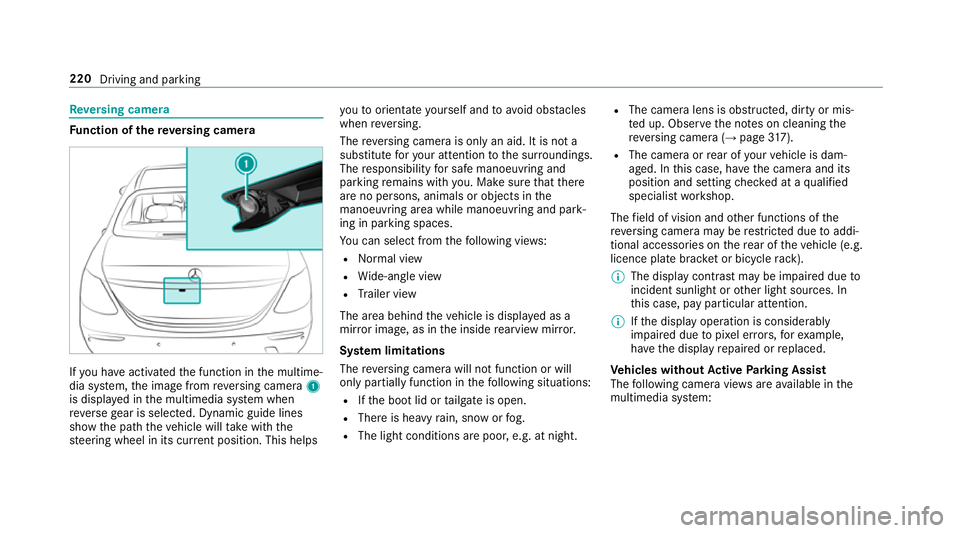
yo u ha veactivated the function in the multime‐
dia sy stem, the image from reve rsing camera 1
is displa yed in the multimedia sy stem when
re ve rsege ar is selec ted. Dynamic guide lines
show the path theve hicle will take with the
st eering wheel in its cur rent position. This helps yo
uto orientate yourself and toavo id obs tacles
when reve rsing.
The reve rsing camera is only an aid. It is not a
substitute foryo ur attention tothe sur roundings.
The responsibility for safe manoeuvring and
parking remains with you. Make sure that there
are no persons, animals or objects in the
manoeuvring area while manoeuvring and park‐
ing in parking spaces.
Yo u can select from thefo llowing vie ws:
R Normal view
R Wide-angle view
R Trailer view
The area behind theve hicle is displa yed as a
mir ror image, as in the inside rearview mir ror.
Sy stem limitations
The reve rsing camera will not function or will
only partially function in thefo llowing situations:
R Ifth e boot lid or tailgate is open.
R There is heavy rain, snow or fog.
R The light conditions are poor, e.g. at night. R
The camera lens is obstructed, dirty or mis‐
te d up. Obser vethe no tes on cleaning the
re ve rsing camera (→ page317).
R The camera or rear of your vehicle is dam‐
aged. In this case, ha vethe camera and its
position and setting checked at a qualified
specialist workshop.
The field of vision and other functions of the
re ve rsing camera may be restricted due toaddi‐
tional accesso ries on there ar of theve hicle (e.g.
licence plate brac ket or bicycle rack ).
% The display contrast may be impaired due to
incident sunlight or other light sources. In
th is case, pay particular attention.
% Ifth e display operation is considerably
impaired due topixel er rors,fo rex ample,
ha ve the display repaired or replaced.
Ve hicles without Active Parking Assist
The following camera vie wsare available in the
multimedia sy stem: 220
Driving and parking
Page 224 of 497

Normal view
1 Yellow guide line, vehicle width (driven sur‐
fa ce) depending on the cur rent steering
wheel angle (dynamic)
2 Yellow lane marking the course the tyres will
ta ke atthe cur rent steering wheel angle
(dynamic)
3 Yellow guide line at a dis tance of appr ox‐
imately 1.0 m from there ar area
4 Bumper
5 Red guide line at a dis tance of appr oximately
0.3 m from there ar area Wi
de-angle view Vi
ew of trailer (if trailer hitch is fitted)
1 Yellow guide line, locating aid 2
Red guide line at a dis tance of appr oximately
0.3 m tothe ball head of the trailer hitch
3 Ball head of the trailer hitch
Ve hicles with Active Parking Assist
The following camera vie wsare available in the
multimedia sy stem: Normal view
1 Yellow lane marking the course the tyres will
ta ke atthe cur rent steering wheel angle
(dynamic)
2 Yellow guide line, vehicle width (driven sur‐
fa ce) depending on the cur rent steering
wheel angle (dynamic) Driving and parking
221
Page 225 of 497
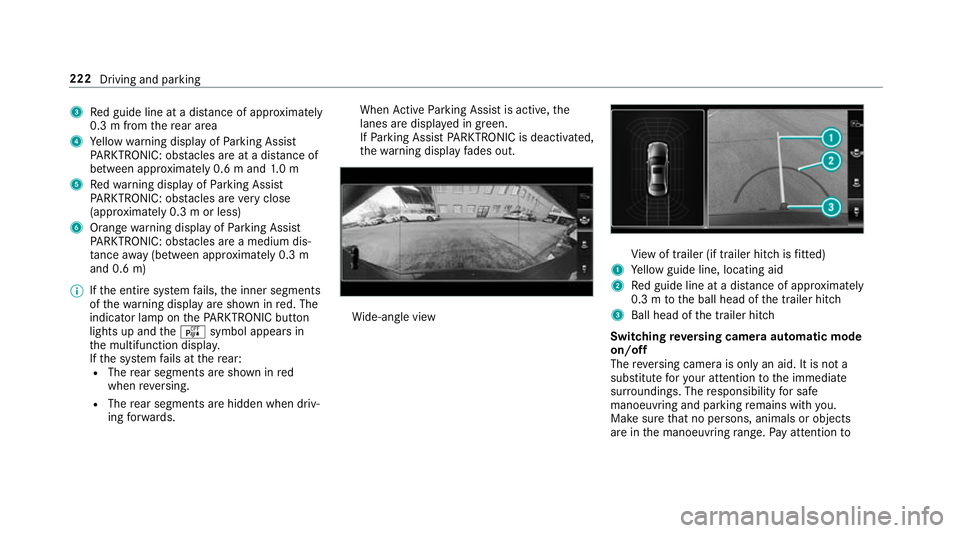
3
Red guide line at a dis tance of appr oximately
0.3 m from there ar area
4 Yellow warning display of Parking Assist
PA RKTRONIC: obstacles are at a dis tance of
between appr oximately 0.6 m and 1.0 m
5 Redwa rning display of Parking Assist
PA RKTRONIC: obstacles are very close
(appr oximately 0.3 m or less)
6 Orange warning display of Parking Assist
PA RKTRONIC: obstacles are a medium dis‐
ta nce away (between appr oximately 0.3 m
and 0.6 m)
% Ifth e entire sy stem fails, the inner segments
of thewa rning display are shown in red. The
indicator lamp on thePA RKTRONIC but ton
lights up and theé symbol appears in
th e multifunction displa y.
If th e sy stem fails at there ar:
R The rear segments are shown in red
when reve rsing.
R The rear segments are hidden when driv‐
ing forw ards. When
Active Parking Assist is active, the
lanes are displa yed in green.
If Pa rking Assist PARKTRONIC is deacti vated,
th ewa rning display fades out. Wi
de-angle view Vi
ew of trailer (if trailer hitch is fitted)
1 Yellow guide line, locating aid
2 Red guide line at a dis tance of appr oximately
0.3 m tothe ball head of the trailer hitch
3 Ball head of the trailer hitch
Switching reve rsing camera automatic mode
on/off
The reve rsing camera is only an aid. It is not a
substitute foryo ur attention tothe immediate
sur roundings. The responsibility for safe
manoeuvring and parking remains with you.
Make sure that no persons, animals or objects
are in the manoeuvring range. Pay attention to 222
Driving and parking
Page 226 of 497
yo
ur sur roundings and be ready tobrake at all
times.
Multimedia sy stem:
, Vehicle .
System settings .
Rear view
camera .
Activation by R gear #
Activate Oor deacti vate ª the function.
If yo u ha veactivated theActivation by R gear
function, the image from there ve rsing cam‐
era is displa yed in the multimedia sy stem
when you select reve rsege ar.
Opening the camera co ver of the reve rsing
camera
Multimedia sy stem:
, Vehicle .
System settings .
Active
Parking Assist .
Open camera cover #
Activate or deacti vate the function. 360° Camera
Fu
nction of the 360° Camera
The 360° Camera is a sy stem that consists of
fo ur cameras. The cameras co verth e immediate
ve hicle sur roundings. The sy stem supports you, e.g. when parking or at
exits with reduced visibil‐
ity.
The 360° Camera is only an aid. It is not a sub‐
st itute foryo ur attention tothe sur roundings.
The responsibility for safe manoeuvring and
parking remains with you. Make sure that there
are no persons, animals or objects in the
manoeuvring area while manoeuvring and park‐
ing in parking spaces.
The sy stem evaluates images from thefo llowing
cameras:
R Reversing camera
R Front camera
R Two side cameras in the outside mir rors
Vi ew s of the 360° Camera
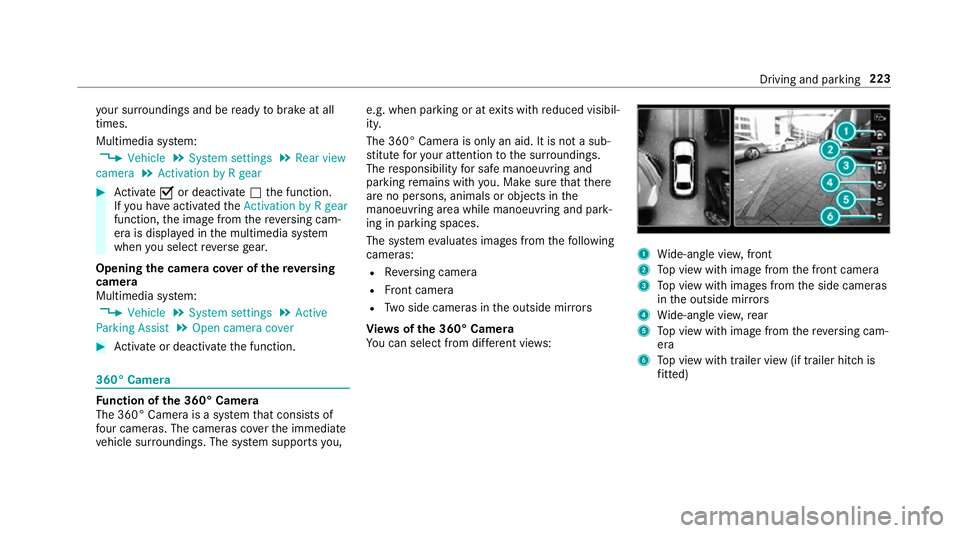
Yo u can select from dif fere nt vie ws: 1
Wide-angle vie w,front
2 Top view with image from the front camera
3 Top view with images from the side cameras
in the outside mir rors
4 Wide-angle vie w,rear
5 Top view with image from there ve rsing cam‐
era
6 Top view with trailer view (if trailer hitch is
fi tted) Driving and pa
rking 223
Page 228 of 497

The guide lines in
the multimedia sy stem dis‐
play show the dis tances toyour vehicle. The
dis tances only apply toroad le vel.
In trailer mode, the guide lines are shown at
th e le vel of the trailer hitch.
Tr ailer view (if trailer hitch is fitted)
If yo u select trailer view and no trailer is connec‐
te dto theve hicle, thefo llowing display appears: 1
Yellow guide line, locating aid
2 Red guide line at a dis tance of appr oximately
0.3 m tothe ball head of the trailer hitch
3 Ball head of the trailer hitch When
the electrical connection is es tablished
between theve hicle and the trailer, the display
ch anges toside camera view 1.
This view supports manoeuvring procedures with
a trailer.
Side view of the mir ror cameras
The sides of theve hicle can be seen in this vie w. 1
Guide line of extern al vehicle dimensions
with outside mir rors folded out
2 Marker of the wheel conta ct points
Sy stem limitations
The 360° Camera will not function or will only
partially function in thefo llowing situations:
R Ifth e doors are open.
R The side mir rors are folded in.
R Ifth e boot lid or tailgate is open.
R There is heavy rain, snow or fog.
R The light conditions are poor, e.g. at night. Driving and parking
225
Page 230 of 497
The parking space and, if necessar
y,the parking
direction can be selected as desired. Active
Pa rking Assist calculates a suitable vehicle path
and assists you in parking and exiting the park‐
ing space.
Ve hicles with automatic transmission: Active
Pa rking Assist changes gear, accelerates, brakes
and steers theve hicle.
Ve hicles with manual transmission: Active
Pa rking Assist supports youby inter vening
acti velyin thesteering.
% The active brake application and automatic
gear change is on lyavailable on vehicles
with automatic transmission.
Ac tive Parking Assist is only an aid. It is not a
substitute foryo ur attention tothe sur roundings.
The responsibility for safe manoeuvring and
parking remains with you. Make sure that no
persons, animals or objects etc. are in the
manoeuvring range.
Ac tive Parking Assist is cancelled if, among
ot her things, one of thefo llowing actions is car‐
ri ed out:
R You deactivate Parking Assist PARKTRONIC. R
You deactivate Active Parking Assist.
R You begin steering.
R You apply the parking brake.
R You en gage j.
R ESP ®
inter venes.
R You open theta ilgate.
Sy stem limitations of Active Park ing Assist
Objects located abo veor below the de tection
ra nge of Active Parking Assist are not de tected
when the parking space is being measured.
These are also not take n into account when the
parking manoeuvre is calculated, e.g. overhang‐
ing loads, overhangs or loading ramp s of lor ries
or the boundaries of parking spaces. In some cir‐
cums tances, Active Parking Assist may therefore
guide you into the parking space prematurel y. &
WARNING Risk of accident due to
objects located abo veor below the
de tection range of Active Parking Assist
If th ere are objects abo veor below the
de tection range, thefo llowing situations may
arise:
R Active Parking Assist may steer too ear ly.
R Vehicles with automatic transmis‐
sion: Thevehicle may not stop in front of
th ese objects.
This could cause a collision. #
Inthese situations, do not use Active
Pa rking Assist. Sn
owfa ll or heavy rain may lead toa parking
space being measured inaccuratel y.Pa rking
spaces that are partial lyoccupied bytrailer
dr aw bars might not be identified as such or be
measured incor rectly. Only use Active Parking
Assist on le vel, high-grip ground. Dr
iving and parking 227
Page 235 of 497
If
th e connection between theve hicle and the
mobile phone is inter rupte d while a parking
manoeuvre is being per form ed, the manoeuvre
can be continued if the connection is re-es tab‐
lished within about two minutes.
The following scenarios are suppor ted:
R Parking in a parking space parallel tothe
direction of tra vel.
R Parking in a parking space at right angles to
th e direction of tra vel.
R Exiting a parking space at right angles tothe
direction of tra vel (exploration mode).
R Parking in a stra ight-ahead position, e.g. into
a ga rage or carport (exploration mode).
R Exiting a parking space in a stra ight-ahead
position, e.g. from a garage or carport (explo‐
ra tion mode).
If a malfunction or a sy stem limitation is de tec‐
te d while parking or manoeuvring (e.g. the per‐
mitted downhill gradient is exceeded), thefo l‐
lowing actions are per form ed automatically:
R The parking manoeuvre is cancelled.
R The vehicle is brought toast andstill. R
Transmission position jis engaged.
R theve hicle is switched off.
R The vehicle remains loc ked.
If th e parking manoeuvre is cancelled, a cor re‐
sponding message is displa yed on the mobile
phone. You can then take ove r and manoeuvre
th eve hicle into the parking space yourself. Alter‐
nativel y,yo u can mo vetheve hicle back toits
original position, if necessar y.
Yo u can inter rupt the parking procedure with
Ac tive Parking Assist in order totake control of
th eve hicle with Remo teParking Assist and
manoeuvre it into its final position.
% You can find fur ther information in the oper‐
ating instructions forth eRe mo teParking
Assist app http://www.me rcedes.me.
Sy stem limitations
Sn owfa ll or heavy rain may lead toa parking
space being measured inaccurately or, in cer tain
cases, toconnection problems wi th the mobile
phone. Parking spaces that are partial ly occu‐
pied bytrailer dr awbars might not be identified
as such or be measured incor rectl y.Only use Re
mo teParking Assist on a le vel, high- grip sur‐
fa ce. The pa rking space must be at least 0.60 m
wider than theve hicle without the outside mir‐
ro rs.
Do not use Remo teParking Assist in thefo llow‐
ing situations:
R Inextreme weather conditions such as ice,
pac ked snow or heavy rain.
R Ifyo u are transporting a load that pr otru des
be yond theve hicle.
R Ifyo u ha veins talled snow chains.
R Ifth e parking space is on a downhill or uphill
incline.
Re mo teParking Assist is cancelled if, among
ot her things, one of thefo llowing actions is car‐
ri ed out:
R You deactivate Active Parking Assist.
R You press a but ton on thekey.
R ESP ®
inter venes.
During the parking procedure, you should not
st and more than appr ox. 3.0 maw ay from the
ve hicle. Atgreater dis tances, the procedure will 232
Driving and parking