2017 MERCEDES-BENZ E-CLASS SALOON trailer
[x] Cancel search: trailerPage 240 of 497

R
Ifth e wrong gear is selec ted.
The Drive AwayAssi stfunction is active under
th efo llowing conditions:
R IfPa rking Assist PARKTRONIC is activated.
R Every time thege ar is changed tok orh
when theve hicle is at a standstill.
R Ifth e de tected obs tacle is less than appr ox.
1. 0 m away.
R Ifth e manoeuvring assis tance function is
acti vated in the multimedia sy stem.
Sy stem limitations
Drive AwayAssi stis not available on inclines and
when driving with a trailer.
Fu nction of Cross Traf fic Alert
% Also read the instructions on Blind Spot
Assist (→ page 239).
Ve hicles with Blind Spot Assis t:drivers can
also be warned of any crossing traf fic when
re ve rsing out of a parking space. If a critical sit‐
uation is de tected, a warning symbol appears on
th e camera image of the multimedia sy stem. If
th e driver does not respond tothewa rning, the ve
hicle's brakes can be applied automaticall y.To
do this, the function uses thera dar sensors in
th e bumper. The area adjacent totheve hicle is
continually monitored.
If th era dar sensors are obstructed byvehicles
or other objects, de tection is not possible.
The Cross Traf fic Alert function is acti veunder
th efo llowing conditions:
R If Blind Spot Assist is activated.
R Ifth eve hicle is reve rsing at walking pace.
R Ifth e manoeuvring assis tance function is
acti vated in the multimedia sy stem.
The Cross Traf fic Alert function is not available
on inclines and when driving with a trailer.
Deactivating/activating manoeuv ring assis‐
tance
Multimedia sy stem:
, Vehicle .
System settings .
Active
Parking Assist .
Manoeuvring assistance #
Activate Oor deacti vate ª the function. AT
TENTION ASSI ST Fu
nction of ATTENTION ASSI ST
AT TENTION ASSIST assists you on long, mon oto‐
nous journe ys, e.g. on mo torw ays and trunk
ro ads. If ATTENTION ASSIST de tects indicators
of fatigue or increasing lapses in concentration
on the part of the driver, it suggests taking a
brea k.
AT TENTION ASSIST is only an aid. It cannot
alw ays de tect fatigue or lapses in concentration
until too late. The sy stem is not a substitute for a
we ll-res ted and attentive driver. On long jour‐
ne ys,ta ke regular breaks in good time that allow
fo r adequ aterecuperation.
Yo u can choose between two settings.
R Standard: normal sy stem sensitivity.
R Sensitive: higher system sensitivity. The
driver is warned earlier and the attention
le ve l de tected byATTENTION ASSIST is adap‐
te d according ly.
If dr owsiness or increasing lapses in concentra‐
tion are de tected, theATTENTION ASSIST: Take
a break! warning appears in the Instrument Dis‐ Driving and parking
237
Page 243 of 497
&
WARNING Risk of accident despi te
brake application of Active Blind Spot
Assi st
A cou rse-co rrecting brake application cann ot
alw ays pr event a collision. #
Alw aysst eer, brake or accelera teyour‐
self, especially if Active Blind Spot
Assi stwa rnsyo u or makes a course-
co rrecting brake application. #
Alw ays maintain a safe dis tance at the
sides. &
WARNING Risk of accident despi te
Ac tive Blind Spot Assi st
Ac tive Blind Spot Assi stdoes not react tothe
fo llowing:
R Over taking vehicles closely on the side,
placing them in the blind spot area.
R Vehicles approaching and overtaking you
at a very differe nt speed. As a
result, Active Blind Spot Assi stmay nei‐
th er give warnings nor inter vene in su chsit‐
uations. #
Alw ays pay careful attention tothe traf‐
fi c situation and maintain a safe dis‐
ta nce at the side of theve hicle. If a course-cor
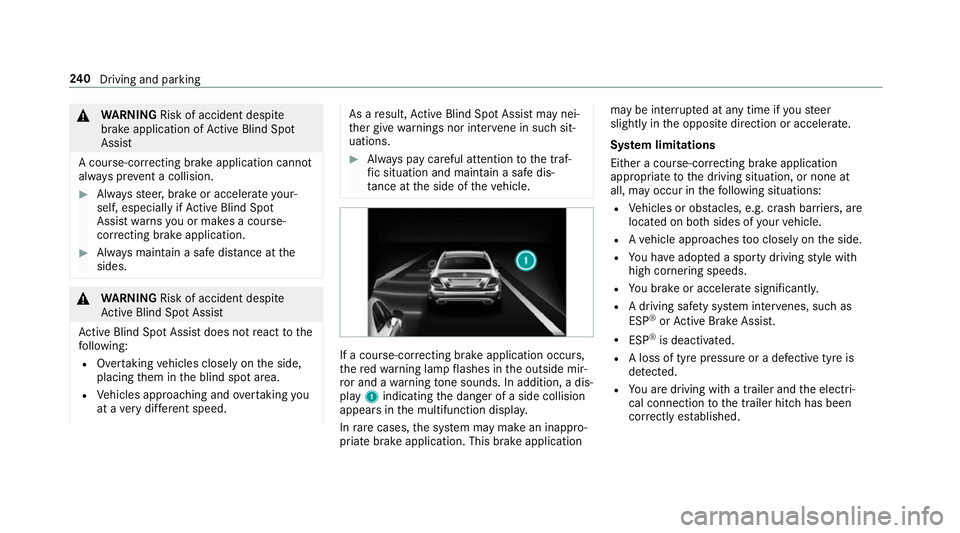
recting brake application occu rs,
th ere dwa rning lamp flashes in the outside mir‐
ro r and a warning tone sounds. In addition, a dis‐
pl ay 1 indicating the danger of a side collision
appears in the multifunction displa y.
In rare cases, the sy stem may make an inappro‐
priate brake application. This brake application may be inter
rupte d at any time if yousteer
slightly in the opposite direction or accelera te.
Sy stem limitations
Either a course-cor recting brake application
appropria teto the driving situation, or none at
all, may occur in thefo llowing situations:
R Vehicles or obs tacles, e.g. crash ba rriers, are
located on bo thsides of your vehicle.
R Ave hicle approaches too closely on the side.
R You ha veadop ted a sporty driving style with
high cornering speeds.
R You brake or accelerate significantl y.
R A driving sa fety sy stem inter venes, su chas
ESP ®
or Active Brake Assi st.
R ESP ®
is deacti vated.
R A loss of tyre pressure or a defective tyre is
detected.
R You are driving with a trailer and the electri‐
cal connection tothe trailer hitch has been
cor rectly es tablished. 240
Driving and pa rking
Page 245 of 497
ve
hicle in front, forve hicle speed, for braking in
good time and forst ay ing in lane.
Ve hicles with Lane Tracking pac kage:if the
lane markings are solid lines and you do not
re act tothewa rning, a lane-cor recting brake
application can bring theve hicle back into the
original lane.
Ve hicles with Driving Assistance pac kageor
Driving Assistance Plus pa ckage: ifyo u do not
re act tothewa rning, a lane-cor recting brake
application can bring theve hicle back into the
original lane. In the case of a broken lane mark‐
ing being de tected, a brake application will only
be made if a vehicle has been de tected in the
adjacent lane. Oncoming vehicles, overtaking
ve hicles and vehicles in adjacent lanes can be
de tected.
The brake application is available in the speed
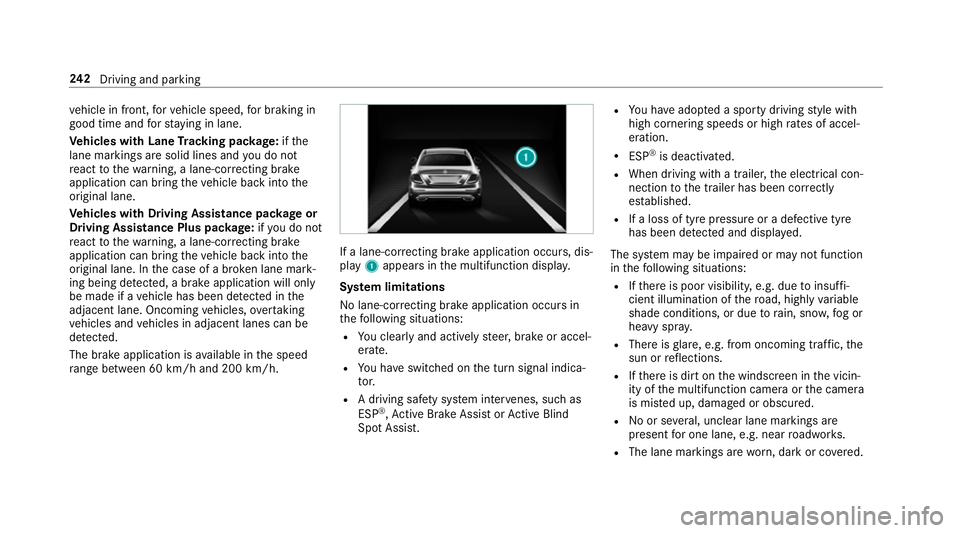
ra nge between 60 km/h and 200 km/h. If a lane-co
rrecting brake application occurs, dis‐
play 1appears in the multifunction displa y.
Sy stem limitations
No lane-cor recting brake application occu rsin
th efo llowing situations:
R You clear lyand actively steer, brake or accel‐
erate.
R You ha veswitched on the turn signal indica‐
to r.
R A driving sa fety sy stem inter venes, su chas
ESP ®
,Ac tive Brake Assi stor Active Blind
Spot Assi st. R
You ha veadop ted a sporty driving style with
high cornering speeds or high rates of accel‐
eration.
R ESP ®
is deactivated.
R When driving with a trailer, the electrical con‐
nection tothe trailer has been cor rectly
es tablished.
R If a loss of tyre pressure or a defective tyre
has been de tected and displ ayed.
The sy stem may be impaired or may not function
in thefo llowing situations:
R Ifth ere is poor visibility, e.g. due toinsuf fi‐
cient illumination of thero ad, high lyvariable
shade conditions, or due torain, sno w,fog or
heavy spr ay.
R There is glare, e.g. from oncoming traf fic, the
sun or reflections.
R Ifth ere is dirt on the windscreen in the vicin‐
ity of the multifunction camera or the camera
is mis ted up, damaged or obscured.
R Noor se veral, unclear lane markings are
present for one lane, e.g. near roadwor ks.
R The lane markings are worn, dark or co vered. 242
Driving and pa rking
Page 247 of 497
#
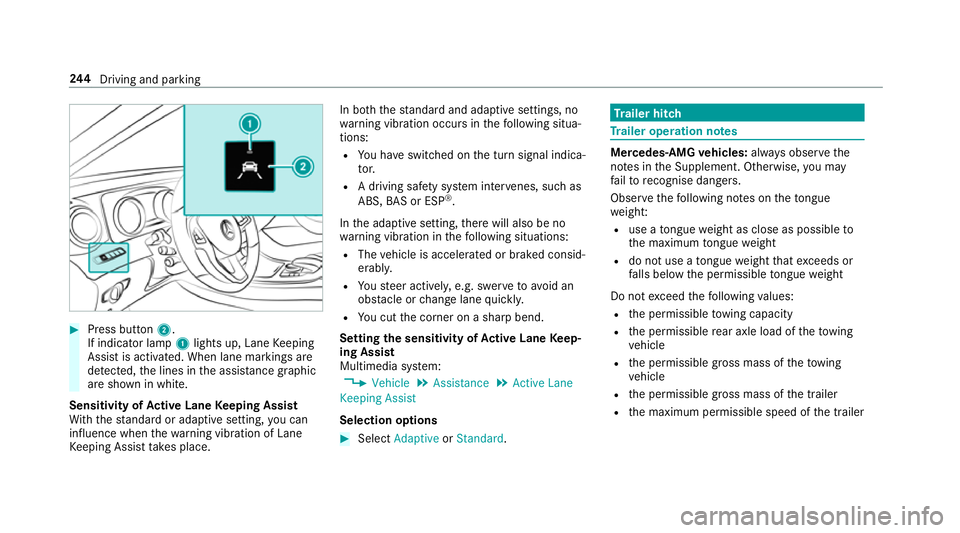
Press button 2.
If indicator lamp 1lights up, Lane Keeping
Assist is activated. When lane markings are
de tected, the lines in the assis tance graphic
are shown in white.
Sensitivity of Active Lane Keeping Assist
Wi th th est andard or adaptive setting, you can
influence when thewa rning vibration of Lane
Ke eping Assist take s place. In bo
th thest andard and adaptive settings, no
wa rning vibration occurs in thefo llowing situa‐
tions:
R You ha veswitched on the turn signal indica‐
to r.
R A driving sa fety sy stem inter venes, su chas
ABS, BAS or ESP ®
.
In the adaptive setting, there will also be no
wa rning vibration in thefo llowing situations:
R The vehicle is accelerated or braked consid‐
erably.
R Yousteer actively, e.g. swer vetoavo id an
obs tacle or change lane quickl y.
R You cut the corner on a sharp bend.
Setting the sensitivity of Active Lane Keep‐
ing Assist
Multimedia sy stem:
, Vehicle .
Assistance .
Active Lane
Keeping Assist
Selection options #
Select Adaptive orStandard. Tr
ailer hitch Tr
ailer operation no tes Mercedes‑AMG
vehicles: always obser vethe
no tes in the Supplement. Otherwise, you may
fa ilto recognise dangers.
Obser vethefo llowing no tes on theto ngue
we ight:
R use a tongue weight as close as possible to
th e maximum tongue weight
R do not use a tongue weight that exc eeds or
fa lls below the permissible tongue weight
Do not exceed thefo llowing values:
R the permissible towing capacity
R the permissible rear axle load of theto wing
ve hicle
R the permissible gross mass of theto wing
ve hicle
R the permissible gross mass of the trailer
R the maximum permissible speed of the trailer 244
Driving and pa rking
Page 248 of 497

Make sure of
thefo llowing before starting a jour‐
ney:
R the tyre pressure on there ar axle of theto w‐
ing vehicle is set for a maximum load
R the lighting of the connected trailer is opera‐
tional
R Vehicles without LED headlamps or MUL‐
TIBEAM LED headlamps: The headlamps
ha ve been set cor rectl y.
In theeve nt of increased rear axle load, the car/
trailer combination may not exceed a maximum
speed of 100 km/h forre asons concerning the
operating permit. This also applies in countri es
in which the permissible maximum speed for
car/trailer combinations is ab ove100 km/h. Extending/
retracting the ball ne ckfully elec‐
trically &
WARNING Risk of accident due tothe
ball neck not being engaged
If th e ball neck is not engaged, the trailer
may come loose. #
Make sure that the ball neck securely
engages and loc ksinto place. *
NO
TEDama getothe full y-electric trailer
hitch The fully-elect
ric trailer hitch could be
mechanically damaged byapplying additional
pressure when the ball neck is being exten‐
ded or retracted. #
Do not ma kethe ball neck extend/
re tract faster by applying additional
pressure. Re
quirements:
Make sure of thefo llowing before extending/
re tracting the ball neck fully electrically:
R Shift the transmission toposition jori.
R The range of mo vement is clear.
R Only when retracting: remo vethe trailer
cables or adap ter plugs. Extending/r
etra cting the ball neck fully elec‐
trically #
Pull swit ch2.
Indicator lamp 1flashes and theTrailer
coupling extending… display message
appears on the multifunction displa y.
The ball neck extends fully electrically. Driving and pa
rking 245
Page 249 of 497
#
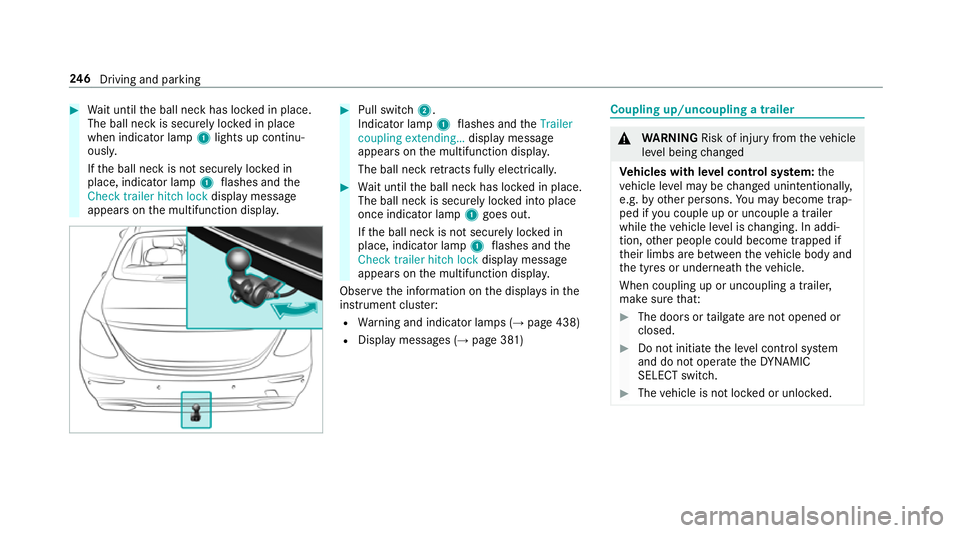
Wait until the ball neck has loc ked in place.
The ball neck is securely loc ked in place
when indicator lamp 1lights up continu‐
ousl y.
If th e ball neck is not securely loc ked in
place, indicator lamp 1flashes and the
Check trailer hitch lock displaymessa ge
appears on the multifunction displa y. #
Pull switch 2.
Indicator lamp 1flashes and theTrailer
coupling extending… display message
appears on the multifunction displa y.
The ball neck retracts fully electrically. #
Wait until the ball neck has loc ked in place.
The ball neck is securely loc ked into place
once indicator lamp 1goes out.
If th e ball neck is not securely loc ked in
place, indicator lamp 1flashes and the
Check trailer hitch lock displaymessa ge
appears on the multifunction displa y.
Obser vethe information on the displa ysinthe
instrument clus ter:
R Warning and indicator lamps (→ page 438)
R Display messages (→ page 381) Coupling up/uncoupling a trailer
&
WARNING Risk of inju ryfrom theve hicle
le ve l being changed
Ve hicles with le vel control sy stem: the
ve hicle le vel may be changed unin tentional ly,
e.g. by ot her persons. You may become trap‐
ped if you couple up or uncouple a trailer
while theve hicle le vel is changing. In addi‐
tion, other people could become trapped if
th eir limbs are between theve hicle body and
th e tyres or underneath theve hicle.
When coupling up or uncoupling a trailer,
make sure that: #
The doors or tailgate are not opened or
closed. #
Do not initiate the le vel control sy stem
and do not operate theDY NA MIC
SELECT switch. #
The vehicle is not loc ked or unloc ked. 246
Driving and pa rking
Page 250 of 497
Re
quirements:
R the ball neck must be extended fully electri‐
cal lyand engaged in the securely loc ked
position.
Tr ailers with a 7-pin plug can be connec tedto
th eve hicle with thefo llowing adap ters:
R adap ter plug
R adapte r cable
The trailer will be cor rectly de tected bytheve hi‐
cle only if thefo llowing conditions are me t:
R the trailer is connected cor rectly
R the trailer lighting sy stem is in working order
The operation of thefo llowing sy stems depends
on the trailer being connected cor rectly:
R Active Lane Keeping Assist
R ESP ®
R Parking Assist PARKTRONIC
R Active Parking Assist
R Blind Spot Assist or Active Blind Spot Assi stCoupling up a trailer
* NO
TEDama getothe battery due tofull
discharge Charging
the trailer battery using the po wer
supply of the trailer can damage the batter y. #
Do not use the po wer supp lyto charge
th e trailer batter y. #
Remo vethe co ver from the ball head and
st ore it in a safe place (→ page107). #
Position the trailer on a le vel sur face behind
th eve hicle and couple it up totheve hicle. #
Open the soc ket co ver. #
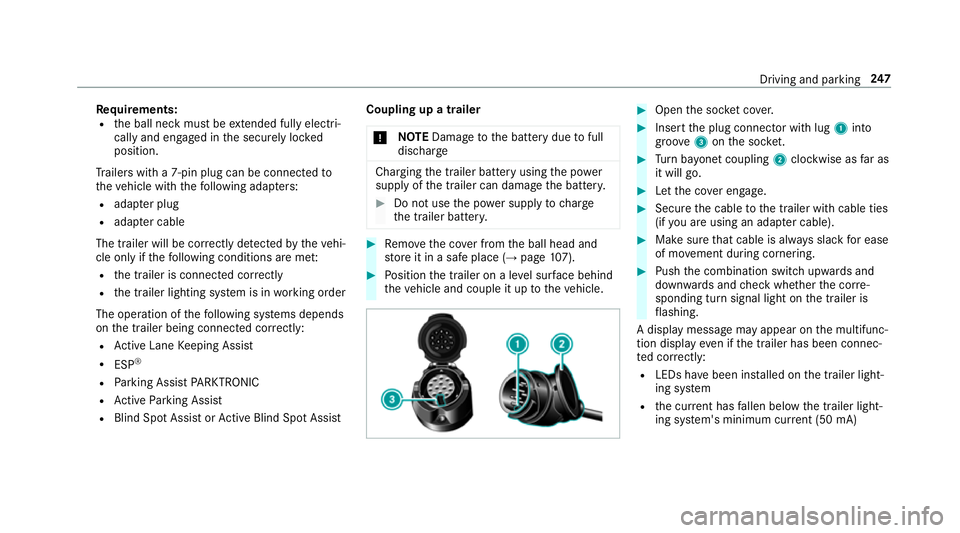
Insert the plug connector with lug 1into
groo ve3 onthe soc ket. #
Turn bayonet coupling 2clockwise as far as
it will go. #
Let the co ver engage. #
Secure the cable tothe trailer with cable ties
(if you are using an adap ter cable). #
Make sure that cable is alw ays slack for ease
of mo vement during cornering. #
Push the combination switch upwards and
down wards and check whe ther the cor re‐
sponding turn signal light on the trailer is
fl ashing.
A display message may appear on the multifunc‐
tion display even if the trailer has been connec‐
te d cor rectly:
R LEDs ha vebeen ins talled on the trailer light‐
ing sy stem
R the cur rent has fallen below the trailer light‐
ing sy stem's minimum cur rent (50 mA) Driving and pa
rking 247
Page 251 of 497
%
Accessories can be connected tothe perma‐
nent po wer supp lyup to180W, and tothe
po we r supp lythat is swit ched on via the igni‐
tion loc k.
Un coupling a trailer &
WARNING Risk of being crushed and
becoming trapped when uncoupling a
trailer
When uncoupling a trailer wi than engaged
ine rtia-activated brake, your hand may
become trapped between theve hicle and the
trailer dr awbar. #
Do not uncouple trailers with an
engaged overrun brake. &
WARNING Risk of becoming trapped
when disconnecting the trailer cable
Ve hicles with le vel control sy stem: the
ve hicle lo werswhen the trailer cable is dis‐
connected. This could
result in you or other people
becoming trapped if your or their limbs are
between theve hicle body and the tyres or
underneath theve hicle. #
Make sure nobody is underneath the
ve hicle or in the immediate vicinity of
th e wheel ar ches when you disconnect
th e trailer cable. *
NO
TEDama getothere ar bumper from
ins talling adap ter cables or adapte r plugs The
following parts could be damaged when
re tracting the ball neck fully electrically:
R bumper
R adap ter cable
R adapte r plug #
Alw aysre mo vethe adap ter cable or
adapte r plug before retracting the ball
neck fully electrically. #
Safeguard the trailer against rolling away. #
Disconnect the electrical connection
between theve hicle and the trailer. #
Uncouple the trailer. #
Place the co ver on the ball head. Bicycle
rack &
WARNING Risk of an accident when
using the bicycle rack incor rectly
The bicycle rack may become de tach ed from
th eve hicle in thefo llowing cases:
R the permissible load capacity of the
trailer hitch is exceeded.
R the bicycle rack is used incor rectl y.
R the bicycle rack is secured tothe ball
neck beneath the ball head.
Obser vethefo llowing foryo ur ow n sa fety
and that of other road users:
R always adhere tothe permissible load
capacity of the trailer hitch. 248
Driving and pa rking