2017 MERCEDES-BENZ E-CLASS ESTATE service
[x] Cancel search: servicePage 187 of 585
Ad
Blue ®
(diesel engine vehicles only) Note
sonA dBlue®
* NOTEWhe nyou open theA dBlue ®
tank,
small amounts of ammoni avapour may
escape. #
OnlyfilltheA dBlue ®
tank in well-venti‐
lated areas. #
Do no tlet Ad Blue ®
come int ocontact
wi th skin, eyes or clo thes. #
Keep AdBlue ®
aw ay from children. *
NOTEDo no tinges tAdBlue ®
. If
Ad Blue ®
is swallo wed: #
Immediatel yrins eo utyour mout hthor‐
oughl y. #
Drink plenty of water. #
Seek medica lattentio nimmediately. Please also obser
vethen otes on service prod‐
ucts and fuels (→ page452). Ad
Blue ®
is af luid urea solution fore xhau stgas
af te rtre atment of diese lengines. In order fort he
ex haus tgas af tertre atment tofunction properly,
only use AdBlue ®
in accordance wi thISO 222 41 .
Ad Blue ®
is ch aracterised bythef ollowing:
R non-t oxic
R colourless and odourless
R non-flammable
Ad Blue ®
av ailability:
R AdBlue ®
ma ybet opped up byfast service at
aq ualified specialis tworks hop, e.g. a
Mercedes-Benz Service Centre.
R AdBlue ®
is available at man yfilling stations
from AdBlue ®
filling pumps.
R Alternativel y,Ad Blue ®
is available at qualified
specialis tworks hops, e.g. Mercedes-Benz
Service Centres, and at man yfilling stations
in Ad Blue ®
re fill canis ters or AdBlue ®
re fill
bottles. %
Ensur ethe connection between ther efill
conta iner and vehicle filler nec kdoes not
drip.
To pping up AdBlue ®
* NOTEEngine dama gedue toAd Blue ®
in
th ef uel #
AdBlue ®
mus tnotbe use dtofillthe
fuel tank. #
Only us eAdBlue ®
to fill th eA dBlue ®
ta nk. #
Do no toverfill theA dBlue ®
tank. *
NO
TEContaminatio nofthevehicle inte‐
ri or due toAd Blue ®
lea kage #
Aftert opping up, carefully close the
Ad Blue ®
re fill con tainer. #
Avoid car rying AdBlue ®
re fill con tainers
permanently in thev ehicle. Re
quirements:
R unloc kthe vehicle. 184
Driving and pa rking
Page 197 of 585
R
thee lectric parking brak eisnotapplied
Information on Mercedes me connect and other
services: http://www.mercedes.me. Note
sonp arking up thev ehicle If
yo ul eave thev ehicle par kedupf or longer than
fo ur we eks, thed isconnected batter ymaybe
damaged bydeep dischar ge.
If yo ul eave thev ehicle par kedupf or longer than
six weeks, it ma ysufferd ama geasaresult of
lac kofu se.
% Further information can be obtained at a
qu alified specialis tworks hop. St
andb ymode (extension of the star terb at‐
te ry 's period out of use) St
andb ymode function
If standb ymode is activated, thev ehicle can be
par kedf or an extende dperio doft ime without
losing po wer.
St andb ymode is characterised bythef ollowing:
R thes tarter batter yispreser ved. R
them aximum period out of use is displa yed
in them ultimedia sy stem displa y.
R functions suc hasinterior pr otection or tow-
aw ay protection ar enotavailable.
R thec onnection toonline services is inter rup‐
te d.
If th ef ollowing condition sarefulfilled, standby
mode can be activated or deactivated usin gthe
multimedia sy stem:
R thee ngine is switched off.
R thei gnition is switched on.
Exceeding thev ehicle's displa yedp eriod out of
use ma ycause incon venience, i.e .itcanno tbe
guarantee dthat thes tarter batter ywillr eliably
st ar tt he engine.
The star terb atter ymustbec hargedf irst inthe
fo llowing situations:
R thev ehicle's period out of use mus tbe
ex tended.
R the Battery charge insufficient for standby
mode messag eappear sinthe multimedia
sy stem displa y. %
Standb ymode is automaticall ydeactivated
when thei gnition is switched on.
Ac tivatin gordeactivatin gstandb ymode
Multimedi asystem:
, Vehicle .
î Vehicle set-
tings .
Standby mode #
Activate Oor deacti vate ª thef unction.
When youa ctivat ethe function,ap rompt
appears. #
Select Yes.
St andb ymode is activated. Driving and driving saf
etys ystems Driving sy
stems and your responsibility Yo
ur vehicle is equipped wit hdriving sy stems
whic hassis tyou in driving, parking and manoeu‐
vring thev ehicle. The driving sy stems ar etools
and do no trelie veyouofy ourresponsibility .Pay
attention tothet raffic condition satall times
and inter vene when necessa ry.Bea wareofthe
limitation sregarding thes afeu se of these sys‐
te ms. 194
Driving and pa rking
Page 265 of 585
R
Limiter (→ page206)
R ActiveD ista nce Assi stDISTRONIC
(→ page 209)
* NO
TEEngine dama gedue toexc essively
high engine speeds The engine will be damaged if
youd rive with
th ee ngine in theo verrev ving range. #
Do no tdrive with th eengine in theo ver‐
re vving range. The fue
lsuppl yisi nterrupted toprotect the
engine when ther ed band in revc ounter 3
(o ve rrev ving range) is reached.
During no rmal operatin gconditions, coolant
te mp eratur edisplay 4mayrise to120° C. &
WARNING Danger of bu rnsw hen open‐
ing theb onnet
If yo uo pen thee ngine bonn etwhen the
engine has overheated or during afireint he
engine compartment, youc ould come into
contact wit hhotgases or other escaping
operating fluids. #
Befor eopening theb onnet ,allowt he
engine tocool down. #
Inthee vent of afireint he engine com‐
partment, keep thee ngine bonn et
closed and cal lthe fire service. Overvie
wofthe buttons on thes teering
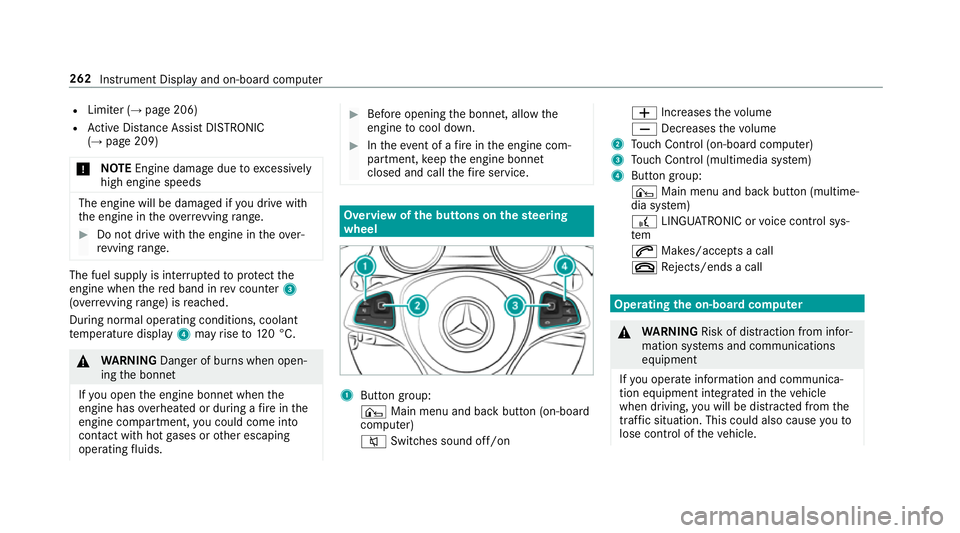
wheel 1
Buttong roup:
¤ Main menu and ba ckbutton (on-board
computer)
8 Switches sound off/on W
Increases thev olume
X Decreases thev olume
2 Touc hC ontrol (on-boar dcompu ter)
3 Touc hC ontrol (multimedia sy stem)
4 Button group:
¤ Main menu and bac kbutton (multime‐
dia sy stem)
£ LINGU ATRO NIC or voice control sys‐
tem
6 Makes/accepts acall
~ Rejects/end sacall Ope
ratin gthe on-boar dcom puter &
WARNING Risk of di stra ction from infor‐
mation sy stems and communications
equipment
If yo uo perat einformation and communica‐
tio ne quipment integ ratedint hevehicle
when driving, youw ill be distracted from the
traf fics ituation. Thi scould also cause youto
lose control of thev ehicle. 262
Instrument Displa yand on-boar dcomputer
Page 266 of 585
#
Onlyoperat ethis equipment when the
traf fics ituation permits. #
Ifyo uc anno tbes ureoft his,stop the
ve hicle whils tpaying attention toroad
and traf ficc onditions and ope rate the
equipment wit hthe vehicle stationar y. Yo
um usto bse rvet he legal requirements fort he
countr yinwhich youa recur rentl yd riving when
operating theo n-boar dcomputer.
% The on-boar dcomputer displa ysappear on
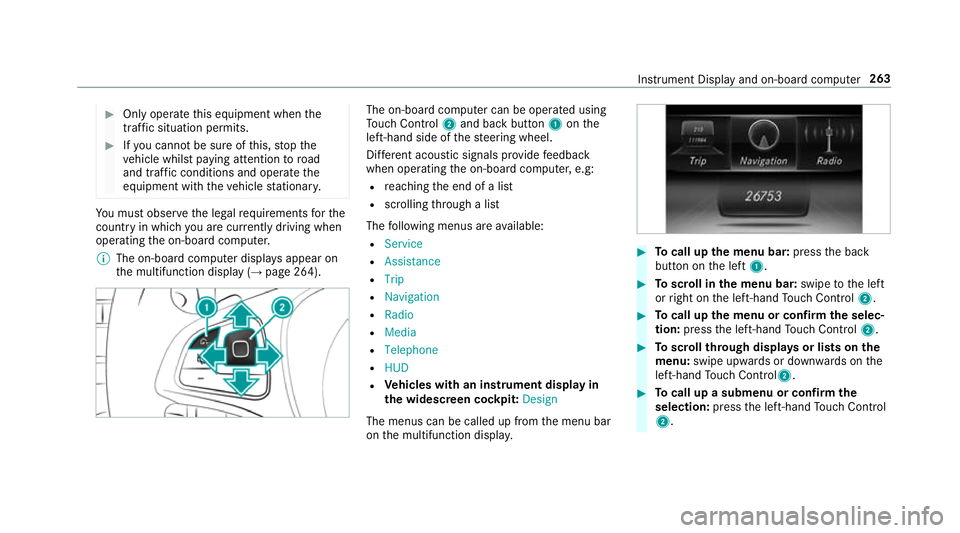
th em ultifunction displa y(→pag e264). The on-boar
dcomputer can be operated using
To uc hC ontrol 2and bac kbutton 1onthe
left-hand side of thes teering wheel.
Dif fere nt acoustic signals pr ovide feedback
when operating theo n-boar dcomputer ,e.g:
R reachin gthe end of alist
R scrolling thro ugh alist
The following menus ar eavailable:
R Service
R Assistance
R Trip
R Navigation
R Radio
R Media
R Telephone
R HUD
R Vehicles with an instrument displa yin
th ew idescreen cockpit: Design
The menus can be called up from them enu bar
on them ultifunction displa y. #
Tocall up them enu bar: presstheb ack
button on thel eft 1. #
Toscroll in them enu bar: swipetothel eft
or right on thel eft-hand Touc hC ontrol 2. #
Tocall up them enu or confir mthe selec‐
tion: press thel eft-hand Touc hC ontrol 2. #
Toscroll through displa ysor lists on the
menu: swipe upwards or down wardsont he
left-hand Touc hC ontrol2. #
Tocall up asubmen uorconfirmthe
selection: pressthel eft-hand Touc hC ontrol
2. In
stru ment Displa yand on-boar dcomputer 263
Page 268 of 585
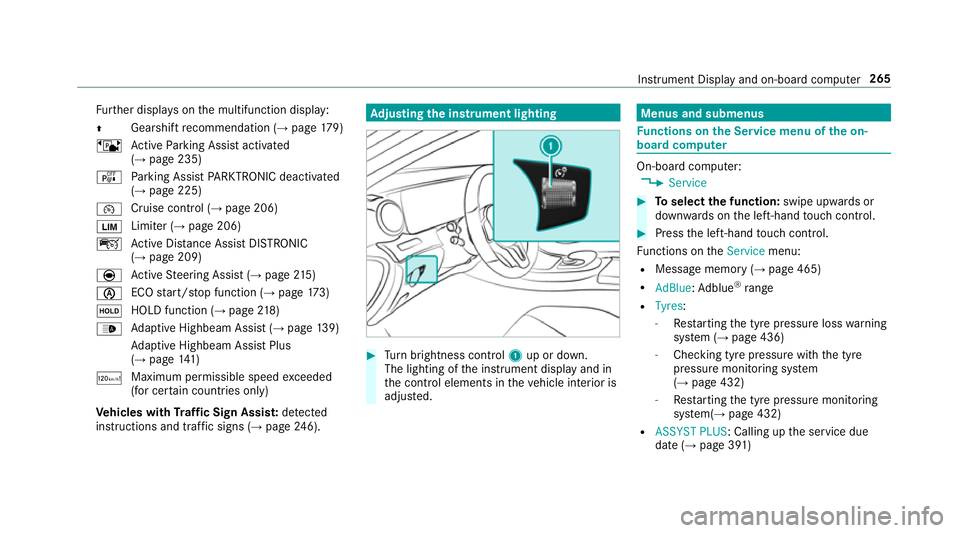
Fu
rther displa yson them ultifunction display:
Z Gearshif
trecommendatio n(→pa ge179)
ë ActiveP arking Assis tactivated
(→ pag e235)
é Parking Assis tPARKTRONIC deactivated
(→ page 225)
¯ Cruise control (→
page206)
È Limiter (→
page206)
ç ActiveD ista nce Assi stDISTRONIC
(→ page 209)
è ActiveS teering Assis t(→ pag e215 )
è EC
Os tart/s topf unction (→ page173)
ë HOLD function (→
page218)
_ Ad
aptiv eHighbeam Assis t(→pag e139)
Ad aptiv eHighbeam Assis tPlus
(→ pag e141 )
ð Maximum permissible spee
dexceeded
(for cer tain countries only)
Ve hicles with Traf ficS ign Assis t:de tected
instructions and traf fics igns (→ page 246). Ad
justin gthe in stru men tlighting #
Turn brightness control 1up or down.
The lightin gofthe instrument displa yand in
th ec ontrol element sinthevehicle interior is
adjus ted. Menus and submenus
Fu
nctions on theS ervice menu of theo n-
boar dcompu ter On-boar
dcomputer:
, Service #
Toselect thef unction: swipe upwards or
down wardsont he left-hand touc hc ontrol. #
Pres sthe left-hand touc hc ontrol.
Fu nctions on theService menu:
R Messag ememor y(→pag e465)
R AdBlue :Adblue ®
ra nge
R Tyres:
- Restartin gthe tyr epressur eloss warning
sy stem (→ page436)
- Checking tyr epressur ewitht he tyre
pressur emonitoring sy stem
(→ pag e432)
- Restartin gthe tyr epressur emonitoring
sy stem(→ page432)
R ASSYST PLUS:C alling upthes ervice due
dat e(→pag e391 ) Instrument Displa
yand on-boar dcomputer 265
Page 285 of 585
Vo
ice command Function
Show station list To
displa ythe names of all recei vable stations
Read out statio nlist To
listentot he names of all recei vable stations
Traffic informatio non
Traffic informatio noff To
switc hthe traf fici nformation service on/off
Radi oinfo on
Radi oinfo off To
switc hthe cur rent statio ninformation on/off Overvie
wofmedia pla yerv oice commands Media pla
yerv oice commands can also be used
when them edia pla yerruns in theb ackg round. 282
LINGU ATRO NIC
Page 306 of 585
Ac
tivatin gPINprotection ford atae xport #
Select Change settings .
Confir mwitht he PIN. #
Select Protect data export.
Ac tivate Oor deacti vate ª thef unction.
Ac tivatin gPINprotection foro ffline mode #
Select Changesettings .
Confir mwitht he PIN. #
Select Protect deactivation of offline mode.
Ac tivate Oor deacti vate ª thef unction.
Un blocking theP IN
Re quirements:
R Ther eisanI nternetconnection.
R AM ercedes me account exists at http://
www.me rcedes.me.
R The Personalisation (→pag e303)service is
activated.
If th eP IN has been entered incor rectly three
times ,the PIN will be bloc ked. Youc an ha ve a
single-use passwor dsent to yo uviathe Mercedes me connect online por
taltor esetthe
PIN pr otection. #
Select Unbloc kPIN. #
Ente rthe single-use password.
PIN pr otection is reset, and youc an se ta
ne wP IN.
% Alternativel y,yo uc an ha vePIN pr otection
re se tata Mercedes-Benz Service Centre. User profile
Setting
auser profile
Multimedia sy stem:
, System .
g Personalisation
Displaying auser profile when starting
If th is function is active, apromp tappear swhen
st artin gthe sy stem asking whic huser profile to
use. #
Select Display profile list after start . #
Activate Oor deacti vate ª thef unction.
Selecting auser profile #
Select Guestor individual profile #.%
Some settings from theu ser profile ar eonly
loaded when thev ehicle is stationar yor
when thei gnition is switched on.
Au tomatic syn chronisation
Eac htime thei gnition is switched of foron,the
individual user profiles ar esynchronised on the
multimedia sy stem and on thes erve r.This
ensures that thel ates tuser profiles ar ealways
av ailable. #
Select Automatic synchronisation. #
Activate Oor deacti vate ª thef unction.
% Form orei nformation about importing/
ex portin guser profiles (→ page304).
Creating auser profile
Multimedia sy stem:
, System .
g Personalisation .
Cre-
ate profile #
Ente ran ame. #
Select a.
Individuals ettings ar esave dint he user profile,
e.g.:
R System settings Multimedia sy
stem 303
Page 307 of 585
R
settings in theTVt uner's channel list
R Navigation and traf fici nformation
The settings di ffer depending on thev ehicle
equipment.
Importing/exporting user profiles
Requ irements:
R Ther eisanI nternetconnection .
R AM ercedes me account exists at http://
www.me rcedes.me.
R The Personalisation service is active.
Multimedia sy stem:
, System .
g Personalisation .
Man-
ual export/import
This function is no tavailable in all countries.
On lyindividual profiles can be impor tedor
ex por ted.
The individual profiles ar ealway sc ollectively
impor tedore xported. #
Impor t:select Import profiles from the
server.
The The profile import overwrites the exist-
ing profiles. Do you want to continue? mes‐
sag eappears. #
Select Yes.
Use rprofile sa reimpor ted. #
Expor t:select Export profiles to the server.
User profiles ar eexpo rted.
% Certain settings ,suc hasa ddress book
ent ries or pr evious destination sfromt he
navigation sy stem, ar enot ex ported.
Setting user profile options
Multimedia sy stem:
, System .
g Personalisation #
Highlight aprofile. #
Select ¥options.
The following option sareavailable:
R Rename
R Delete
R Reset %
The gues tprofile canno tbedeletedor
re named. So
ftwa reupdate Information on softwar
eupdates
The multimedi asystemp rovide sam essage
when an updat eisavailable.
Dependin gonthe source, youc an per form vari‐
ous updates:
Softwar eupdate Source of
the
update Up
dat etype
Interne tN avigation map, sys‐
te mu pdates, Digital
Owner's Manual
External storage
medium, e.g. USB
fl ash drive Na
vigation maps Softwar
eupdates ensur eyour vehicle's tech nol‐
ogy is al ways up-to-date. 304
Multimedia sy stem