2017 LEXUS RX200T battery
[x] Cancel search: batteryPage 171 of 776
1713-2. Opening, closing and locking the doors
3
Operation of each component
RX350/RX200t_EE_OM48F32E
■Note for the entry function
●Even when the electronic key is within the effective range (detection areas), the system may not operate properly in the following cases:
• The electronic key is too close to the window or outside door handle, near the ground, or in a high place when the doors are locked or unlocked.• The electronic key is near the ground or in a high place, or too close to the rear
bumper center when the back door is opened. • The electronic key is on the instrument panel, luggage compartment, floor, or in thedoor pockets or glove box when the engine is started or engine switch modes are
changed.
●Do not leave the electronic key on top of th e instrument panel or near the door pockets
when exiting the vehicle. Depending on the radio wave reception conditions, it may be detected by the antenna outside the cabin and the door will become lockable from theoutside, possibly trapping the electronic key inside the vehicle.
●As long as the electronic key is within the effective range, the doors may be locked orunlocked by anyone.
●Even if the electronic key is not inside the vehicle, it may be possible to start the engine
if the electronic key is near the window.
●The doors may unlock if a large amount of wa ter splashes on the door handle, such as in the rain or in a car wash when the electronic key is within the effective range. (The door
will automatically be locked after approx imately 30 seconds if the doors are not opened and closed.)
●If the wireless remote control is used to lock the doors when the electronic key is near
the vehicle, there is a possibility that the d oor may not be unlocked by the entry func- tion. (Use the wireless remote control to unlock the doors.)
●Touching the door lock sensor while wearin g gloves may delay or prevent lock opera-
tion. Remove the gloves and to uch the lock sensor again.
●If the door handle becomes wet while the electronic key is within the effective range,
the door may lock and unlock repeatedly. In that case, follow the following correction
procedures to wash the vehicle:
• Place the electronic key in a location 2 m (6 ft.) or more away from the vehicle. (Take
care to ensure that the key is not stolen.)
• Set the electronic key to battery-saving mode to disable the smart entry & start sys-
tem. ( P. 170)
●If the electronic key is inside the vehicle and a door handle becomes wet during a car wash, a message may be shown on the mult i-information display and a buzzer will
sound outside the vehicle. To turn off the alarm, lock all the doors.
●The lock sensor may not work properly if it comes into contact with ice, snow, mud, etc. Clean the lock sensor and attempt to operate it again.
●A sudden approach to the effective range or door handle may prevent the doors frombeing unlocked. In this case, return the door handle to the original position and check that the doors unlock before pulling the door handle again.
●If there is another electronic key in the de tection area, it may take slightly longer to unlock the doors after the door handle is gripped.
●Fingernails may scrape against the door duri ng operation of the door handle. Be care-
ful not to injure fingernails or damage the surface of the door.
Page 208 of 776

2083-4. Adjusting the steering wheel and mirrors
RX350/RX200t_EE_OM48F32E
When the mirror select switch is in the “L” or “R” position, the outside rear view
mirrors will automatically angle downwa rds when the vehicle is reversing in
order to give a better view of the ground.
To disable this function, select neither “L” nor “R” of the mirror select switch.
■Adjusting the mirror angle when the vehicle is reversing
With the shift lever in R, adjust the mirror angle at a desired position.
The adjusted angle will be memorized and the mirror will automatically tilt to
the memorized angle whenever the shift lever is shifted to R from next time.
The memorized downward tilt position of the mirror is linked to the normal position (angle adjusted with the shif t lever in other than R). Therefore, if the normal posi- tion is changed after adjustment, th e tilt position will also change.
When the normal position is changed, readjust the angle in reversing.
■Mirror angle can be adjusted when
The engine switch is in ACCESSORY or IGNITION ON mode.
■When disconnecting and reconnecting battery terminals
The automatic folding/extending mirror function will return to off as default. To turn the
function on, press the switch again to select on.
■When the mirrors are fogged up
The outside rear view mirrors can be clea red using the mirror defoggers. Turn on the
rear window defogger to turn on the outside rear view mirror defoggers. ( P. 542)
■Automatic adjustment of the mirror angle (if equipped)
A desired mirror face angle can be entered to memory and recalled automatically by the
driving position memory. ( P. 195)
■Auto anti-glare function (if equipped)
When the anti-glare inside rear view mirror is set to automatic mode, the outside rear
view mirrors will activate in co njunction with the anti-glare inside rear view mirror to reduce reflected light. ( P. 204)
■Using automatic mode in cold weather
When automatic mode is used in cold weat her, the door mirror could freeze up and automatic stowing and return may not be possible. In this case, remove any ice and snowfrom the door mirror, then either operate the mirror using manual mode or move the mir-
ror by hand.
■Customization
Some functions can be customized. ( P. 740)
Linked mirror function when reversing
Page 212 of 776
2123-5. Opening, closing the windows and moon roof
RX350/RX200t_EE_OM48F32E
■Door lock linked window operation
●The power windows can be opened and closed using the mechanical key.* (P. 711)
●The power windows can be opened and closed using the wireless remote control.*
(P. 140)
*: These settings must be customized at any authorized Lexus dealer or repairer, or
another duly qualified and equipped professional.
■Alarm (if equipped)
The alarm may be triggered if the alarm is set and a power window is closed using the
door lock linked power window operation function. ( P. 84)
■When the battery is disconnected
The window lock switch is disabled. If nece ssary, press the window lock switch after
reconnecting the battery.
■Power windows open warning buzzer
The buzzer sounds and a message is shown on the multi-information display in the instru-
ment cluster when the engine switch is turned off and the driver’s door is opened with the power windows open.
■Customization
Some functions can be customized. ( P. 740)
Page 248 of 776
2484-2. Driving procedures
RX350/RX200t_EE_OM48F32E
■Auto power off function
If the vehicle is left in ACCESSORY mode for more than 20 minutes or IGNITION ON mode (the engine is not running) for more than an hour with the shift lever in P, the engineswitch will automatically turn off. However, this function cannot entirely prevent battery
discharge. Do not leave the vehicle with the engine switch in ACCESSORY or IGNI- TION ON mode for long periods of time when the engine is not running.
■Electronic key battery depletion
P. 137
■Conditions affecting operation
P. 170
■Note for the entry function
P. 171
■If the engine does not start
●The engine immobilizer system may not have been deactivated. (P. 77) Contact any authorized Lexus dealer or repairer, or another duly qualified andequipped professional.
●Check that the shift lever is securely set in P. The engine may not start if the shift lever is displaced out of P. “To Start Vehicle, Put Shift Lever into P” will be displayed on themulti-information display.
■Steering lock
After turning the engine switch off and opening and closing the doors, the steering wheel will be locked due to the steering lock functi on. Operating the engine switch again auto-
matically cancels the steering lock.
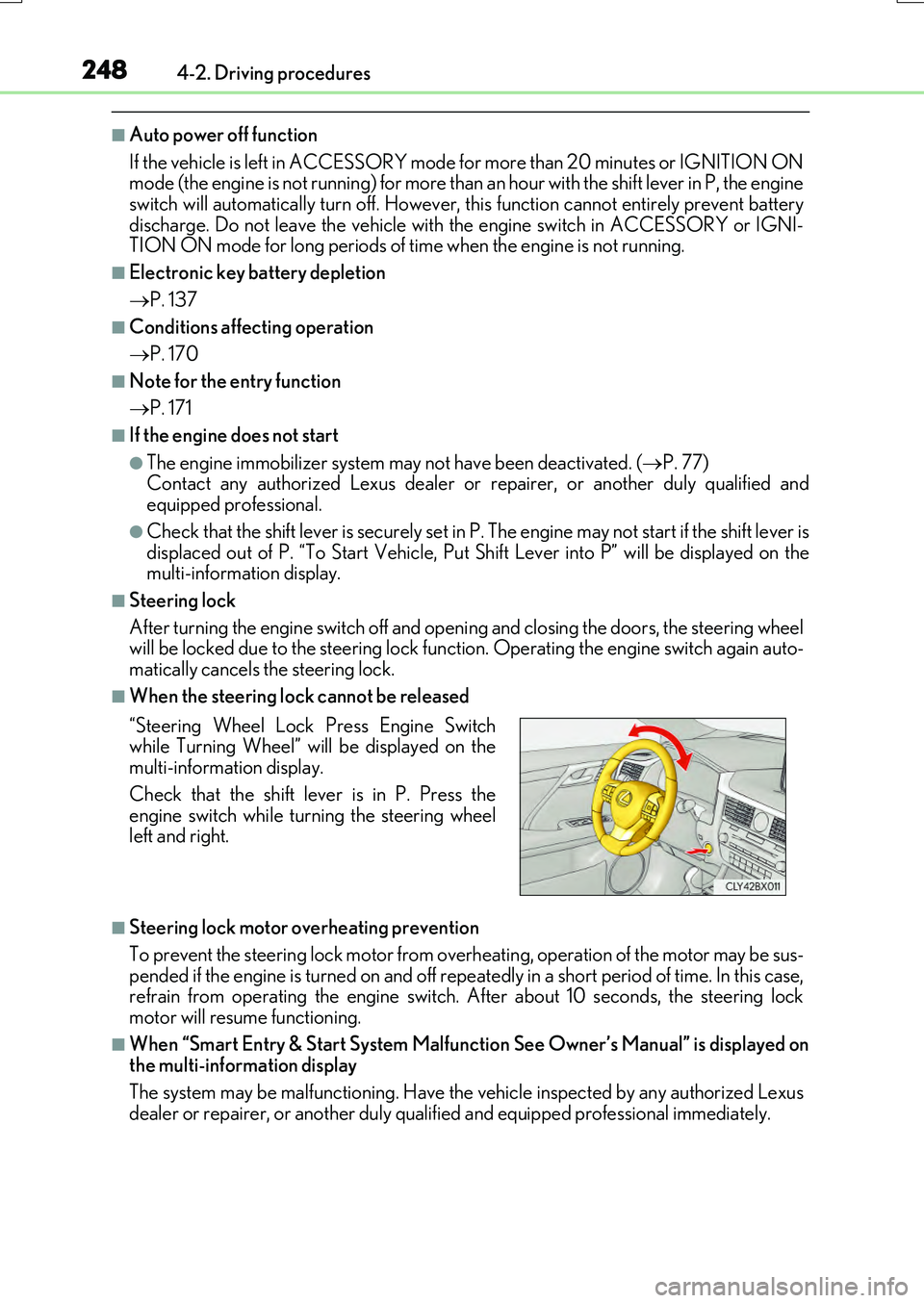
■When the steering lock cannot be released
■Steering lock motor overheating prevention
To prevent the steering lock motor from over heating, operation of the motor may be sus-
pended if the engine is turned on and off repeat edly in a short period of time. In this case, refrain from operating the engine switch. After about 10 seconds, the steering lockmotor will resume functioning.
■When “Smart Entry & Start System Malfunction See Owner’s Manual” is displayed onthe multi-information display
The system may be malfunctioning. Have the vehicle inspected by any authorized Lexus
dealer or repairer, or another duly qua lified and equipped professional immediately.
“Steering Wheel Lock Press Engine Switch while Turning Wheel” will be displayed on themulti-information display.
Check that the shift lever is in P. Press the engine switch while turning the steering wheelleft and right.
Page 249 of 776

2494-2. Driving procedures
4
Driving
RX350/RX200t_EE_OM48F32E
■If the electronic key battery is depleted
P. 638
■Operation of the engine switch
●If the switch is not pressed shortly and firmly, the engine switch mode may not change or the engine may not start.
●If attempting to restart the engine immediately after turning the engine switch off, the
engine may not start in some cases. After turning the engine switch off, please wait a few seconds before restarting the engine.
■If the smart entry & start system has been deactivated by a customized setting
P. 710
WARNING
■When starting the engine
Always start the engine while sitting in the driver’s seat. Do not depress the accelerator pedal while starting the engine under any circumstances.
Doing so may cause an accident resu lting in death or serious injury.
■Caution while driving
If engine failure occurs while the vehicle is moving, do not lock or open the doors until
the vehicle reaches a safe and complete stop. Activation of the steering lock in this cir- cumstance may lead to an accident, resulting in death or serious injury.
■Stopping the engine in an emergency
If you want to stop the engine in an emer gency while driving the vehicle, press and hold the engine switch for more than 2 seconds, or press it briefly 3 times or more in succes- sion. ( P. 657)
However, do not touch the engine switch while driving except in an emergency. Turning the engine off while driving will not cause loss of steering or braking control, but the power assist to these systems will be lost. Th is will make it more difficult to steer and
brake, so you should pull over and stop the vehicle as soon as it is safe to do so.
Page 250 of 776

2504-2. Driving procedures
RX350/RX200t_EE_OM48F32E
NOTICE
■To prevent battery discharge
●Do not leave the engine switch in ACCESSORY or IGNITION ON mode for long periods of time without the engine running on.
●If “ACCESSORY” or “IGNITION ON” is displayed on the meters while the engine isnot running, the engine switch is not off. Exit the vehicle after turning the engineswitch off.
●Do not stop the engine when the shift lever is in a position other than P. If the engine isstopped in another shift lever position, the engine switch will not be turned off butinstead be turned to ACCESSORY mode. If the vehicle is left in ACCESSORY
mode, battery discharge may occur.
■When starting the engine
●Do not race a cold engine.
●If the engine becomes difficult to start or stalls frequently, have your vehicle checked by any authorized Lexus dealer or repair er, or another duly qualified and equipped professional immediately.
■Symptoms indicating a malfun ction with the engine switch
If the engine switch seems to be operating s omewhat differently than usual, such as the switch sticking slightly, th ere may be a malfunction. Contact any authorized Lexus
dealer or repairer, or another duly qualif ied and equipped professional immediately.
Page 268 of 776

2684-3. Operating the lights and wipers
RX350/RX200t_EE_OM48F32E
■Windshield wiper linked headlight illumination
When driving during daytime with the headlig ht switch turned to , if the windshield
wipers are used, the headlights will turn on automatically after several seconds to help
enhance the visibility of your vehicle.
■Battery-saving function
In order to prevent the battery of the vehicle fr om discharging, if the light switch is in the
or position when the engine switch is turned off the battery saving function
will operate and automatically turn off all the lights after approximately 20 minutes.
When the engine switch is turned to IGNITION ON mode, the battery-saving function
will be disabled.
When any of the following are performed, the battery-saving function is canceled once
and then reactivated. All the lights will turn off automatically 20 minutes after the bat-
tery-saving function has been reactivated:
●When the headlight switch is operated
●When a door is opened or closed
■Customization
Some functions can be customized. ( P. 740)
NOTICE
■To prevent battery discharge
Do not leave the lights on longer than necessary when the engine is off.
Page 305 of 776

3054-5. Using the driving support systems
4
Driving
RX350/RX200t_EE_OM48F32E
■Operational conditions
Availability of the pedestrian detection func tion and pre-crash braking function depend on the region in which the vehicle was sold.
Read the following for details:
Region A (The pedestrian detection function and pre-crash braking function are available)
The pre-crash safety system is enabled and th e system determines that the possibility of a
frontal collision with a vehicle or pedestrian is high.
Each function is operational at the following speeds:
●Pre-crash warning:
• Vehicle speed is between approximately 10 and 180 km/h (7 and 110 mph). (For detecting a pedestrian, vehicle speed is between approximately 10 and 80 km/h [7and 50 mph].)
• The relative speed between your vehicle and the vehicle or pedestrian ahead is approximately 10 km/h (7 mph) or more.
●Pre-crash brake assist:
• Vehicle speed is between approximately 30 and 180 km/h (19 and 110 mph). (For detecting a pedestrian, vehicle speed is between approximately 30 and 80 km/h
[19 and 50 mph].) • The relative speed between your vehicle and the vehicle or pedestrian ahead isapproximately 30 km/h (19 mph) or more.
●Pre-crash braking:
• Vehicle speed is between approximately 10 and 180 km/h (7 and 110 mph). (For
detecting a pedestrian, vehicle speed is between approximately 10 and 80 km/h [7 and 50 mph].)• The relative speed between your vehicle and the vehicle or pedestrian ahead is
approximately 10 km/h (7 mph) or more. The system may not operate in the following situations:
●If a battery terminal has been disconnected and reconnected and then the vehicle has
not been driven for a certain amount of time
●If the shift lever is in R
●If VSC is disabled (only the pre-cras h warning function will be operational)
●If the PCS warning light is flashing or illuminated
RegionsFunction availability
Region AThe pedestrian detection function and pre-crash braking func- tion are available
Region BThe pedestrian detection function is not available and the pre-crash braking function is available
Region CThe pedestrian detection function and pre-crash braking func-
tion are not available