Page 429 of 776

429
4
Driving
RX350/RX200t_EE_OM48F32E
4-6. Driving tips
●Use fluids that are appropriate to the prevailing outside temperatures.
•Engine oil
• Engine coolant
• Washer fluid
●Have a service technician inspect the condition of the battery.
●Have the vehicle fitted with four snow tires or purchase a set of tire chains for
the front tires.
Ensure that all tires are of the specified size and the same brand, and that chains match the size of the tires.
Perform the following according to the driving conditions:
●Do not try to forcibly open a window or move a wiper that is frozen. Pour
warm water over the frozen area to melt the ice. Wipe away the water imme-
diately to prevent it from freezing.
●To ensure proper operation of the climate control system fan, remove any
snow that has accumulated on the air inlet vents in front of the windshield.
●Check for and remove any excess ice or snow that may have accumulated on
the exterior lights, vehicle’s roof, chassi s, around the tires or on the brakes.
●Remove any snow or mud from the bottom of your shoes before getting in the
vehicle.
Winter driving tips
Carry out the necessary preparations and inspections before driving the vehi-
cle in winter. Always drive the vehicle in a manner appropriate to the prevail-
ing weather conditions.
Pre-winter preparations
Before driving the vehicle
Page 443 of 776

4435-1. Basic Operations
5
Lexus Display Audio system
RX350/RX200t_EE_OM48F32E
■When using the screen
●Under extremely cold conditions, the Lexus Display Audio controller may react slowly.
●If the screen is cold, the display may be dark, or the system may seem to be operating slightly slower than normal.
●The screen may seem dark and hard to se e when viewed through sunglasses. Change your angle of viewing, adjust the display on the “Display” screen (P. 453) or remove your sunglasses.
■Using cellular phones
Interference may be heard through the audio system’s speakers if a cellular phone is being used inside or close to the vehicle while the audio system is operating.
WARNING
■Using the Lexus Display Audio controller
Be careful when touching the Lexus Display Audio controller in extreme temperatures as it may become very hot or cold due to the temperature inside the vehicle.
■Laser product
●CAUTIONEN/IEC 60825-1:2007Use of controls or adjustments or performa nce of procedures other than those spec-
ified herein may result in hazardous radiation exposure. A warning label is affixed on the back of this product.
NOTICE
■To prevent Lexus Display Audio controller malfunction
●Do not allow the Lexus Display Audio controller to come into contact with food, liq-
uid, stickers or lit cigarettes as doing so may cause it to change color, emit a strange odor or stop functioning.
●Do not subject the Lexus Display Audio controller to excessive pressure or strong
impact as the controller may bend or break off.
■To prevent battery discharge
Do not leave the audio system on longer than necessary when the engine is off.
■To avoid damaging the audio system
Take care not to spill drinks or other fluids on the audio system.
Page 473 of 776

4735-6. Using an external device
5
Lexus Display Audio system
RX350/RX200t_EE_OM48F32E
■About iPod
●“Made for iPod” and “Made for iPhone” mean that an electronic accessory has been designed to connect specifically to an iPod , or iPhone, respectively, and has been certi-
fied by the developer to meet Apple performance standards.
●Apple is not responsible for the operation of this device or its compliance with safety and regulatory standards. Please note that th e use of this accessory with iPod or iPhone
may affect wireless performance.
●iPhone, iPod, iPod classic, iPod nano and iPod touch are trademarks of Apple Inc., reg- istered in the U.S. and other countries.
■iPod cover art
●Depending on the iPod and songs in the iPod, iPod cover art may be displayed.
●This function can be changed to on/off. (P. 460)
●It may take time to display iPod cover art, and the iPod may not be operated while the cover art display is in process.
■iPod functions
●When an iPod is connected and the audio sour ce is changed to iPod mode, the iPod will resume play from the same poin t in which it was last used.
●Depending on the iPod that is connected to the system, certain functions may not be
available. If a function is unavailable due to a malfunction (as opposed to a system spec- ification), disconnecting the device and reconnecting it may resolve the problem.
●Depending on the iPod, while connected to the system, the iPod cannot be operated
with its own controls. It is necessary to use the controls of the vehicle’s audio system instead.
●When the battery level of an iPod is very low, the iPod may not operate. If so, charge the
iPod before use.
●Compatible models ( P. 475)
Page 490 of 776
490
RX350/RX200t_EE_OM48F32E
5-8. Bluetooth® Audio
When a Bluetooth® device cannot be connected, check the connection status
on the “Bluetooth* audio” screen. If the device is not connected, either register
or reconnect the device. ( P. 484, 486)
*: Bluetooth is a registered trademark of Bluetooth SIG, Inc.
You can check indicators, such as, signal strength and battery charge on the
screen.
Connection status
Battery charge
Depending on the type of portable
audio player used, some titles may not
be displayed.
Listening to Bluetooth® Audio
The Bluetooth® audio system enables the user to enjoy music played on a por-
table player from the vehicle speakers via wireless communication.
Status display
1
2
IndicatorsConditions
Connection statusGood Not connected
Battery chargeFull Empty
Page 492 of 776
492
RX350/RX200t_EE_OM48F32E
5-9. Bluetooth® Phone
Before making a phone call, check the connection status, battery charge, call
area and signal strength. (P. 493)
If a Bluetooth® device cannot be connected, check the connection status. If the
device is not connected, either register or reconnect it. (P. 484, 487)
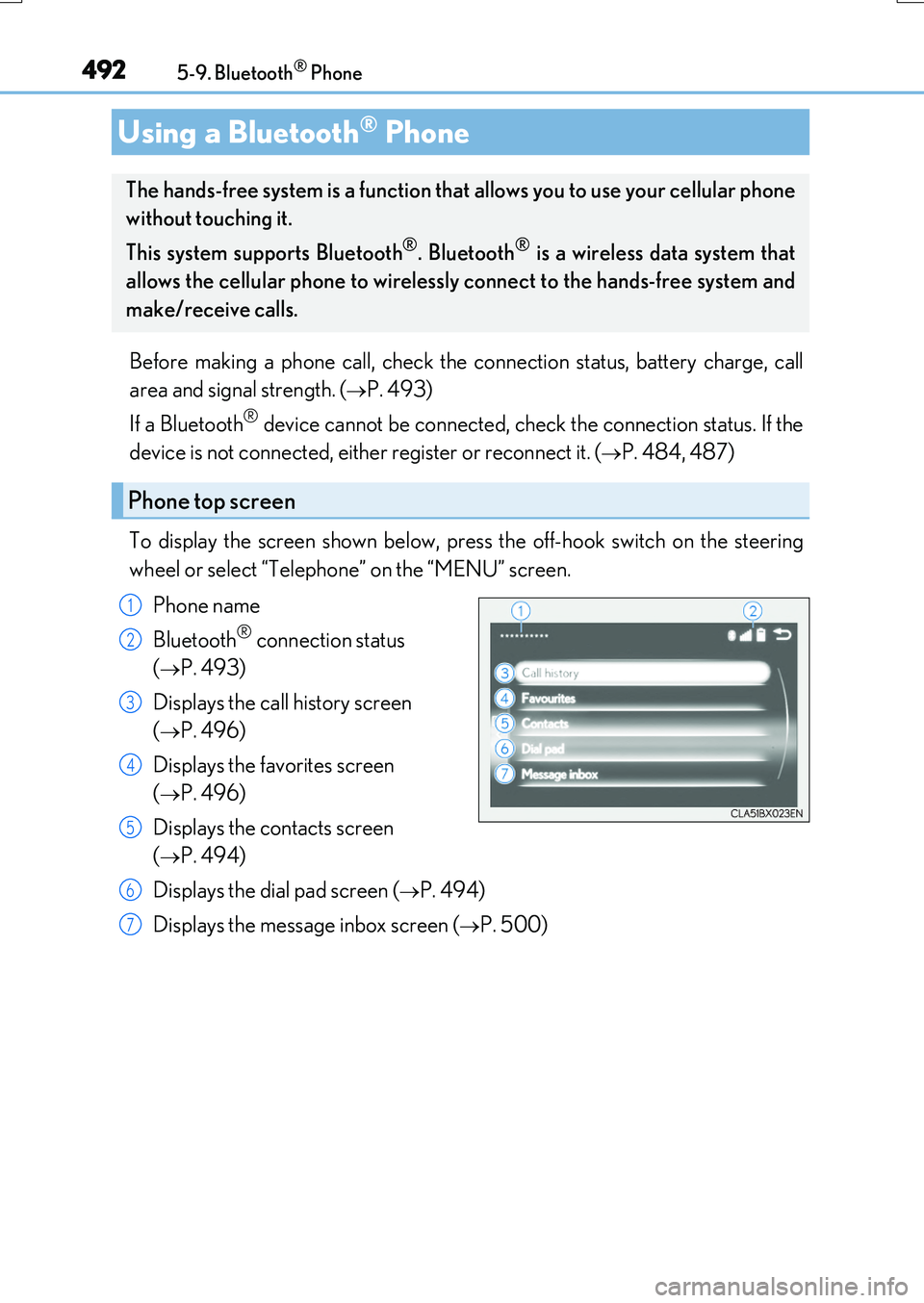
To display the screen shown below, press the off-hook switch on the steering
wheel or select “Telephone” on the “MENU” screen.
Phone name
Bluetooth® connection status
(P. 493)
Displays the call history screen
(P. 496)
Displays the favorites screen
(P. 496)
Displays the contacts screen
(P. 494)
Displays the dial pad screen (P. 494)
Displays the message inbox screen (P. 500)
Using a Bluetooth® Phone
The hands-free system is a function that allows you to use your cellular phone
without touching it.
This system supports Bluetooth®. Bluetooth® is a wireless data system that
allows the cellular phone to wirelessly connect to the hands-free system and
make/receive calls.
Phone top screen
1
2
3
4
5
6
7
Page 493 of 776
4935-9. Bluetooth® Phone
5
Lexus Display Audio system
RX350/RX200t_EE_OM48F32E
◆Phone switch (P. 503)
◆Microphone
The vehicle’s built-in microphone is
used when talking on the phone.
The person to whom you are speaking
to can be heard from the front speak-
ers.
To use the hands-free system, you must
register your Bluetooth® phone in the
system. ( P. 484)
You can check indicators such as signal strength and battery charge on any
screen.
Connection status
Signal strength
Battery charge
Status display
1
2
3
IndicatorsConditions
Connection status
GoodPoorNot connected
(Blue)(Gray)
Signal strength
ExcellentPoor
Battery charge
FullEmpty
Page 512 of 776
5125-11. Bluetooth®
RX350/RX200t_EE_OM48F32E
In other situations
Even though all conceivable measures have been taken, the symptom status does not change.
The cellular phone is not close enough to this system. Bring the cellular phone closer to this system.
The cellular phone is the most likely cause of the symptom.
Turn the cellular phone off, remove and reinstall the battery pack, and then restart the cellular phone. Enable the cellular phone’s Bluetooth® connection.
Stop the cellular phone’s security software and close all applications. Before using an application installed on the cellular phone, carefully check its source and how its operation might affect this system.
Page 513 of 776

5135-11. Bluetooth®
5
Lexus Display Audio system
RX350/RX200t_EE_OM48F32E
■When using the Bluetooth® audio system
●In the following situations, the system may not function.
• If the portable audio player is turned off • If the portable audio player is not connected
• If the portable audio player’s battery is low
●There may be a delay if a cellular phone connection is made during Bluetooth® audio
play.
●Depending on the type of portable audio player that is connected to the system, opera- tion may differ slightly and certain functions may not be available.
■When using the hands-free system
●The audio system is muted when making a call.
●If both parties speak at the same time, it may be difficult to hear.
●If the received call volume is over ly loud, an echo may be heard. If the Bluetooth® phone is too close to the system, quality of the sound may deteriorate and connection status may deteriorate.
●In the following situations, it may be difficult to hear the other party:
• When driving on unpaved roads • When driving at high speeds
•If a window is open • If the air conditioning is blowing directly on the microphone• If there is interference from the network of the cellular phone
●Depending on the type phone, cert ain functions may not be available.
■Conditions under which the system will not operate
●If using a cellular phone that does not support Bluetooth®
●If the cellular phone is turned off
●If you are outside of cellular phone service coverage
●If the cellular phone is not connected
●If the cellular phone’s battery is low
●When outgoing calls are controlled, due to heavy traffic on phone lines, etc.
●When the cellular phone itself cannot be used
●When transferring phonebook data from the cellular phone
Bluetooth®


