2017 FORD TAURUS ECO mode
[x] Cancel search: ECO modePage 414 of 504
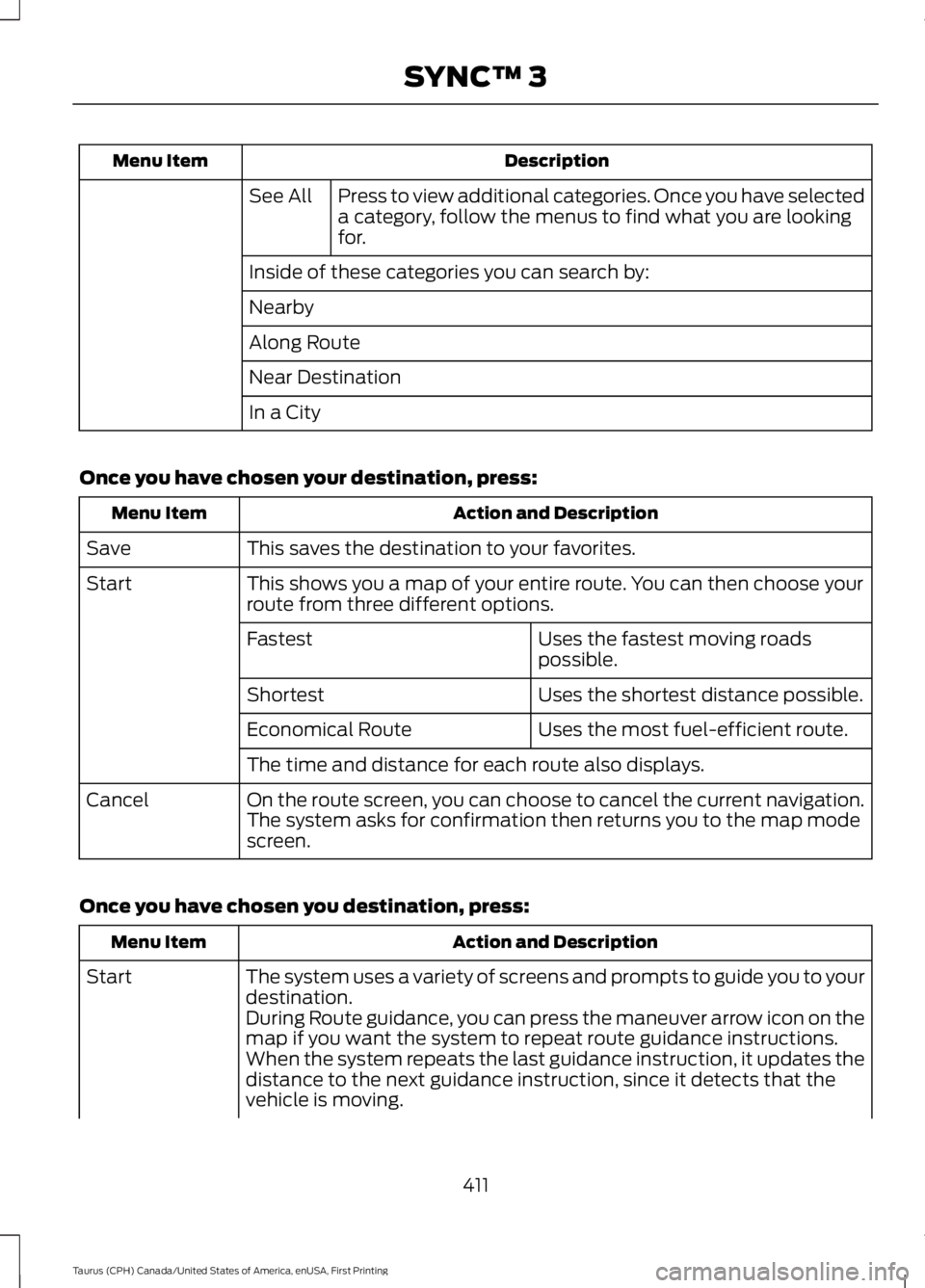
DescriptionMenu Item
Press to view additional categories. Once you have selecteda category, follow the menus to find what you are lookingfor.
See All
Inside of these categories you can search by:
Nearby
Along Route
Near Destination
In a City
Once you have chosen your destination, press:
Action and DescriptionMenu Item
This saves the destination to your favorites.Save
This shows you a map of your entire route. You can then choose yourroute from three different options.Start
Uses the fastest moving roadspossible.Fastest
Uses the shortest distance possible.Shortest
Uses the most fuel-efficient route.Economical Route
The time and distance for each route also displays.
On the route screen, you can choose to cancel the current navigation.The system asks for confirmation then returns you to the map modescreen.
Cancel
Once you have chosen you destination, press:
Action and DescriptionMenu Item
The system uses a variety of screens and prompts to guide you to yourdestination.Start
During Route guidance, you can press the maneuver arrow icon on themap if you want the system to repeat route guidance instructions.When the system repeats the last guidance instruction, it updates thedistance to the next guidance instruction, since it detects that thevehicle is moving.
411
Taurus (CPH) Canada/United States of America, enUSA, First Printing
SYNC™ 3
Page 418 of 504
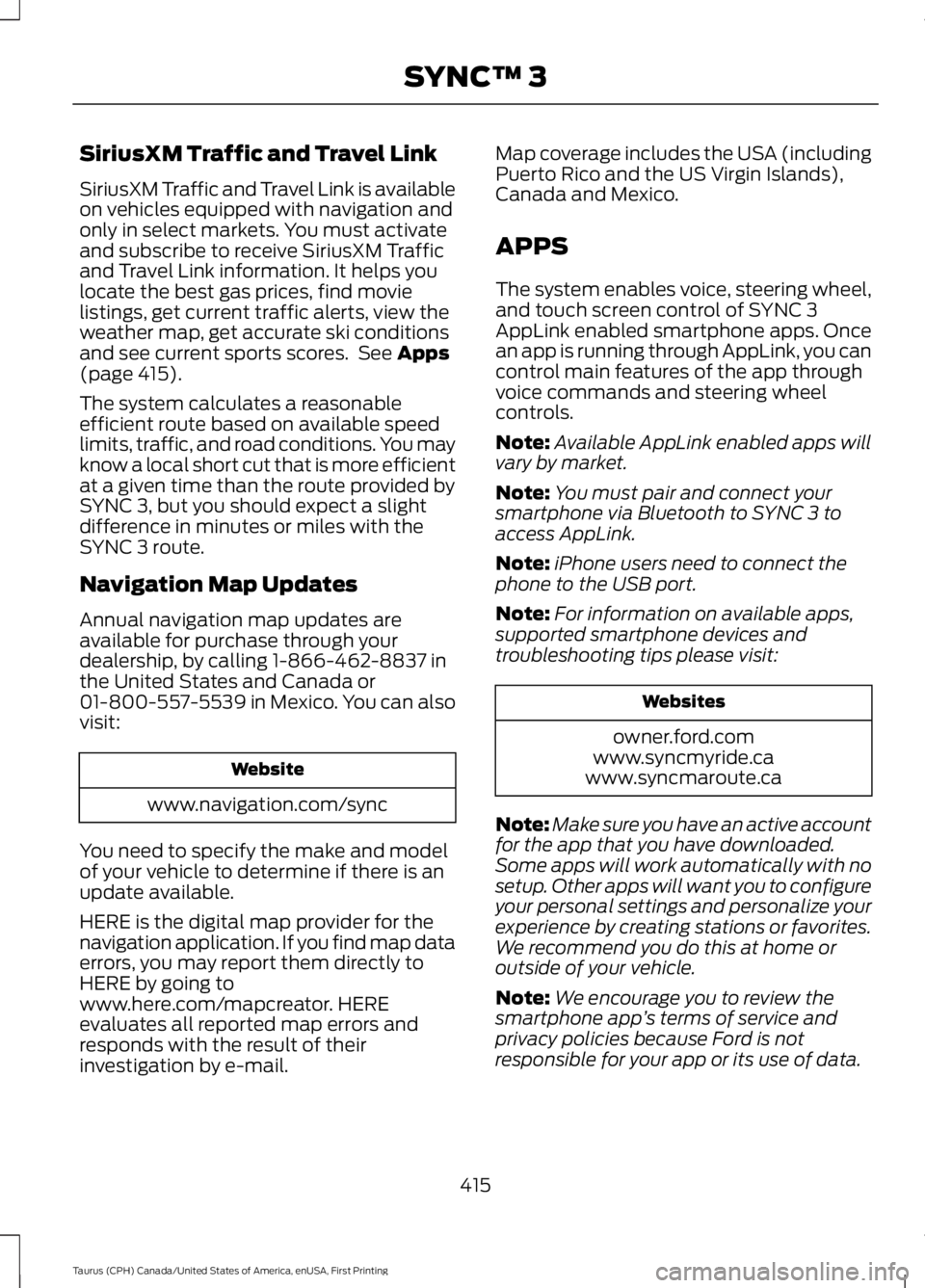
SiriusXM Traffic and Travel Link
SiriusXM Traffic and Travel Link is availableon vehicles equipped with navigation andonly in select markets. You must activateand subscribe to receive SiriusXM Trafficand Travel Link information. It helps youlocate the best gas prices, find movielistings, get current traffic alerts, view theweather map, get accurate ski conditionsand see current sports scores. See Apps(page 415).
The system calculates a reasonableefficient route based on available speedlimits, traffic, and road conditions. You mayknow a local short cut that is more efficientat a given time than the route provided bySYNC 3, but you should expect a slightdifference in minutes or miles with theSYNC 3 route.
Navigation Map Updates
Annual navigation map updates areavailable for purchase through yourdealership, by calling 1-866-462-8837 inthe United States and Canada or01-800-557-5539 in Mexico. You can alsovisit:
Website
www.navigation.com/sync
You need to specify the make and modelof your vehicle to determine if there is anupdate available.
HERE is the digital map provider for thenavigation application. If you find map dataerrors, you may report them directly toHERE by going towww.here.com/mapcreator. HEREevaluates all reported map errors andresponds with the result of theirinvestigation by e-mail.
Map coverage includes the USA (includingPuerto Rico and the US Virgin Islands),Canada and Mexico.
APPS
The system enables voice, steering wheel,and touch screen control of SYNC 3AppLink enabled smartphone apps. Oncean app is running through AppLink, you cancontrol main features of the app throughvoice commands and steering wheelcontrols.
Note:Available AppLink enabled apps willvary by market.
Note:You must pair and connect yoursmartphone via Bluetooth to SYNC 3 toaccess AppLink.
Note:iPhone users need to connect thephone to the USB port.
Note:For information on available apps,supported smartphone devices andtroubleshooting tips please visit:
Websites
owner.ford.comwww.syncmyride.cawww.syncmaroute.ca
Note:Make sure you have an active accountfor the app that you have downloaded.Some apps will work automatically with nosetup. Other apps will want you to configureyour personal settings and personalize yourexperience by creating stations or favorites.We recommend you do this at home oroutside of your vehicle.
Note:We encourage you to review thesmartphone app’s terms of service andprivacy policies because Ford is notresponsible for your app or its use of data.
415
Taurus (CPH) Canada/United States of America, enUSA, First Printing
SYNC™ 3
Page 433 of 504
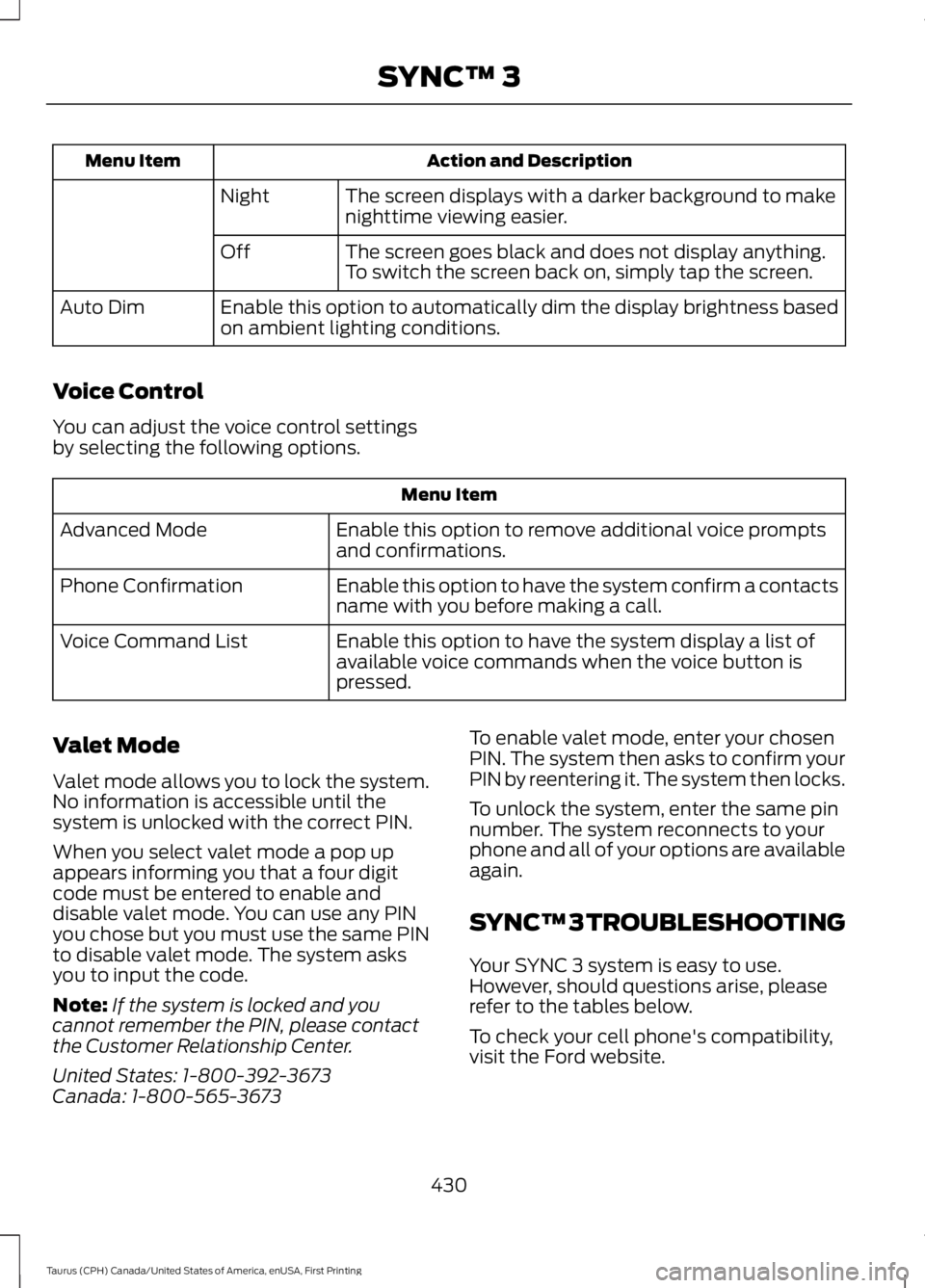
Action and DescriptionMenu Item
The screen displays with a darker background to makenighttime viewing easier.Night
The screen goes black and does not display anything.To switch the screen back on, simply tap the screen.Off
Enable this option to automatically dim the display brightness basedon ambient lighting conditions.Auto Dim
Voice Control
You can adjust the voice control settingsby selecting the following options.
Menu Item
Enable this option to remove additional voice promptsand confirmations.Advanced Mode
Enable this option to have the system confirm a contactsname with you before making a call.Phone Confirmation
Enable this option to have the system display a list ofavailable voice commands when the voice button ispressed.
Voice Command List
Valet Mode
Valet mode allows you to lock the system.No information is accessible until thesystem is unlocked with the correct PIN.
When you select valet mode a pop upappears informing you that a four digitcode must be entered to enable anddisable valet mode. You can use any PINyou chose but you must use the same PINto disable valet mode. The system asksyou to input the code.
Note:If the system is locked and youcannot remember the PIN, please contactthe Customer Relationship Center.
United States: 1-800-392-3673Canada: 1-800-565-3673
To enable valet mode, enter your chosenPIN. The system then asks to confirm yourPIN by reentering it. The system then locks.
To unlock the system, enter the same pinnumber. The system reconnects to yourphone and all of your options are availableagain.
SYNC™ 3 TROUBLESHOOTING
Your SYNC 3 system is easy to use.However, should questions arise, pleaserefer to the tables below.
To check your cell phone's compatibility,visit the Ford website.
430
Taurus (CPH) Canada/United States of America, enUSA, First Printing
SYNC™ 3
Page 435 of 504
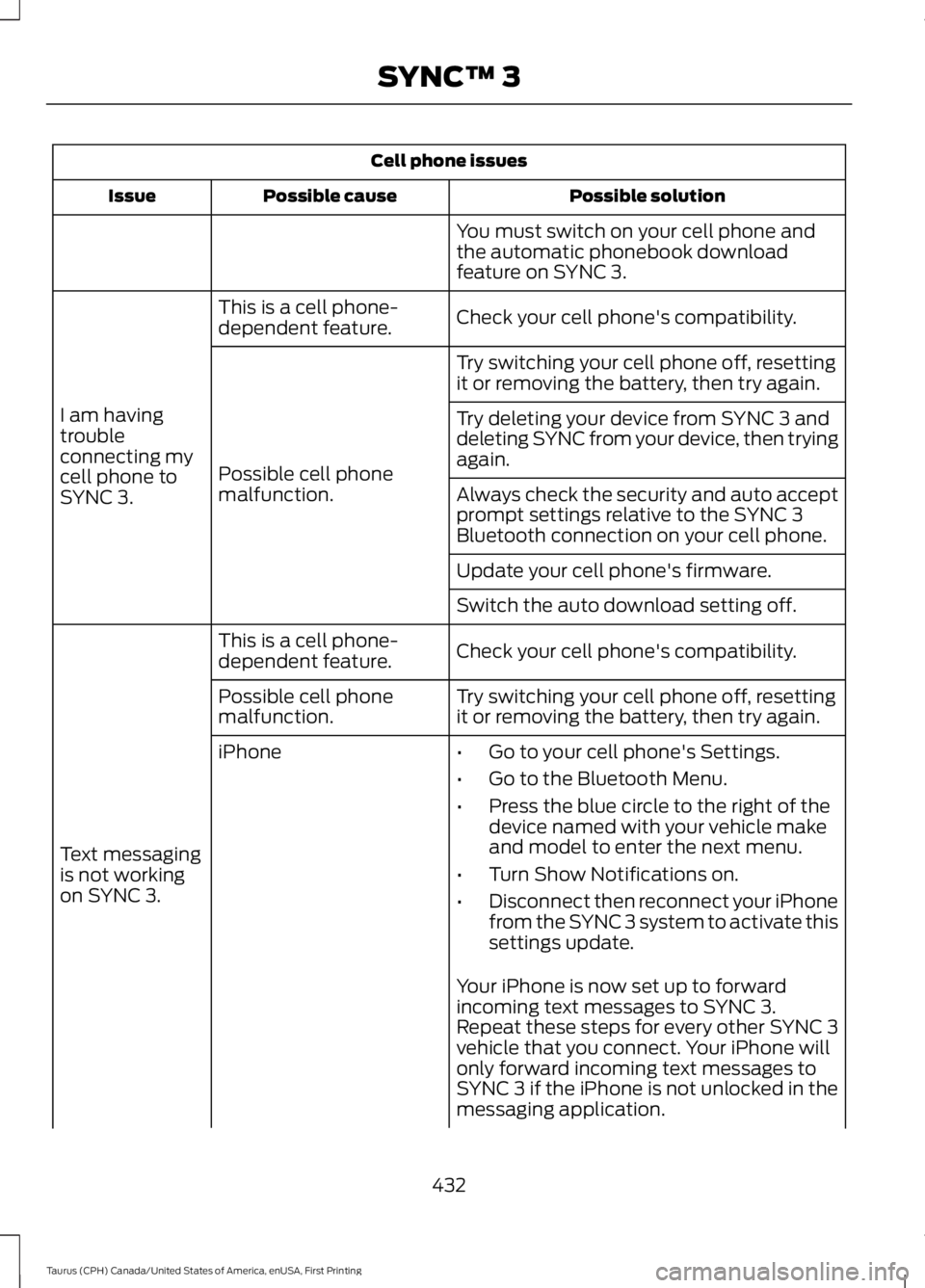
Cell phone issues
Possible solutionPossible causeIssue
You must switch on your cell phone andthe automatic phonebook downloadfeature on SYNC 3.
Check your cell phone's compatibility.This is a cell phone-dependent feature.
I am havingtroubleconnecting mycell phone toSYNC 3.
Try switching your cell phone off, resettingit or removing the battery, then try again.
Possible cell phonemalfunction.
Try deleting your device from SYNC 3 anddeleting SYNC from your device, then tryingagain.
Always check the security and auto acceptprompt settings relative to the SYNC 3Bluetooth connection on your cell phone.
Update your cell phone's firmware.
Switch the auto download setting off.
Check your cell phone's compatibility.This is a cell phone-dependent feature.
Text messagingis not workingon SYNC 3.
Try switching your cell phone off, resettingit or removing the battery, then try again.Possible cell phonemalfunction.
iPhone•Go to your cell phone's Settings.
•Go to the Bluetooth Menu.
•Press the blue circle to the right of thedevice named with your vehicle makeand model to enter the next menu.
•Turn Show Notifications on.
•Disconnect then reconnect your iPhonefrom the SYNC 3 system to activate thissettings update.
Your iPhone is now set up to forwardincoming text messages to SYNC 3.Repeat these steps for every other SYNC 3vehicle that you connect. Your iPhone willonly forward incoming text messages toSYNC 3 if the iPhone is not unlocked in themessaging application.
432
Taurus (CPH) Canada/United States of America, enUSA, First Printing
SYNC™ 3
Page 436 of 504
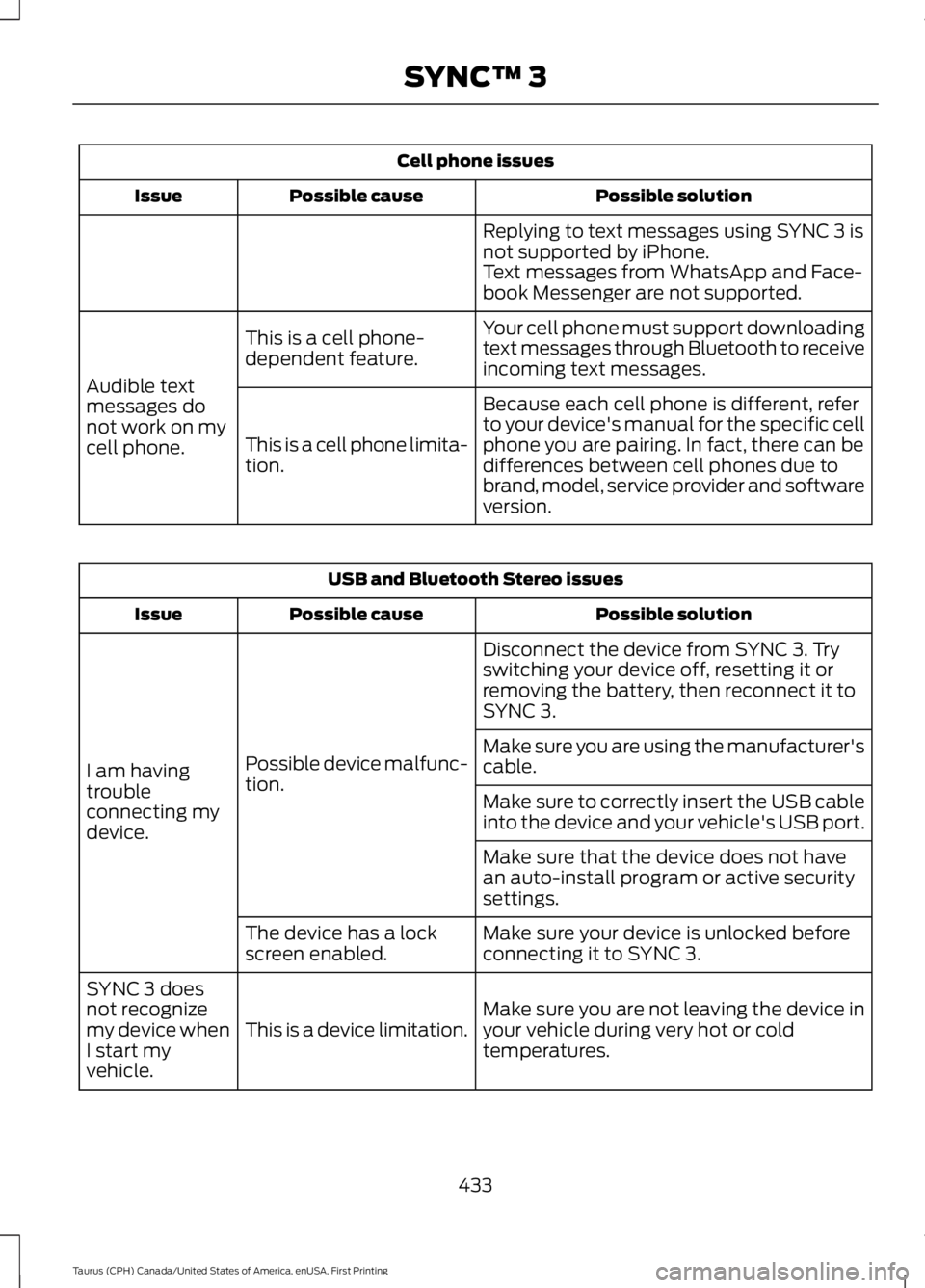
Cell phone issues
Possible solutionPossible causeIssue
Replying to text messages using SYNC 3 isnot supported by iPhone.Text messages from WhatsApp and Face-book Messenger are not supported.
Your cell phone must support downloadingtext messages through Bluetooth to receiveincoming text messages.
This is a cell phone-dependent feature.
Audible textmessages donot work on mycell phone.
Because each cell phone is different, referto your device's manual for the specific cellphone you are pairing. In fact, there can bedifferences between cell phones due tobrand, model, service provider and softwareversion.
This is a cell phone limita-tion.
USB and Bluetooth Stereo issues
Possible solutionPossible causeIssue
Disconnect the device from SYNC 3. Tryswitching your device off, resetting it orremoving the battery, then reconnect it toSYNC 3.
Possible device malfunc-tion.I am havingtroubleconnecting mydevice.
Make sure you are using the manufacturer'scable.
Make sure to correctly insert the USB cableinto the device and your vehicle's USB port.
Make sure that the device does not havean auto-install program or active securitysettings.
Make sure your device is unlocked beforeconnecting it to SYNC 3.The device has a lockscreen enabled.
Make sure you are not leaving the device inyour vehicle during very hot or coldtemperatures.This is a device limitation.
SYNC 3 doesnot recognizemy device whenI start myvehicle.
433
Taurus (CPH) Canada/United States of America, enUSA, First Printing
SYNC™ 3
Page 454 of 504
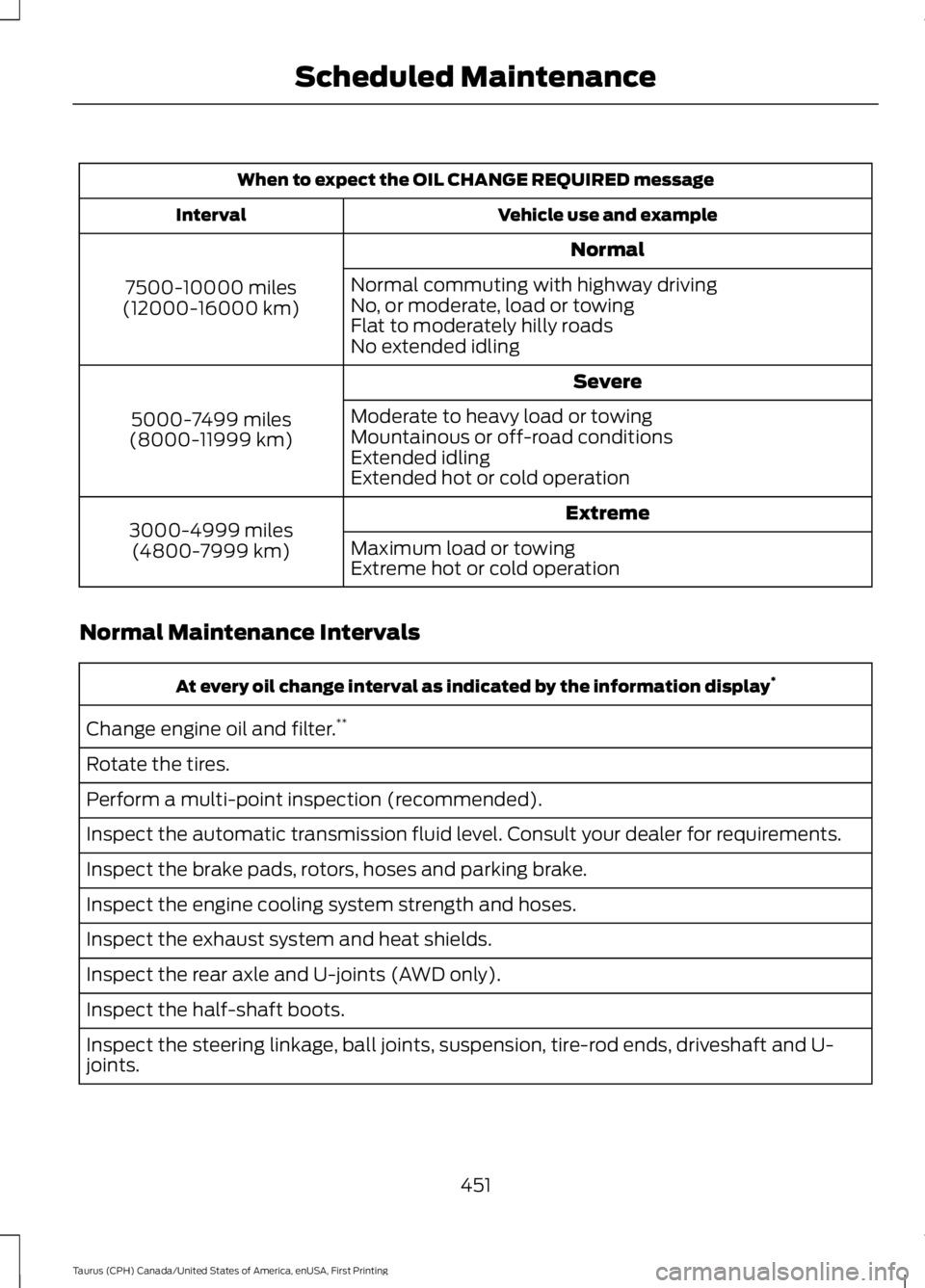
When to expect the OIL CHANGE REQUIRED message
Vehicle use and exampleInterval
Normal
7500-10000 miles(12000-16000 km)
Normal commuting with highway drivingNo, or moderate, load or towingFlat to moderately hilly roadsNo extended idling
Severe
5000-7499 miles(8000-11999 km)
Moderate to heavy load or towingMountainous or off-road conditionsExtended idlingExtended hot or cold operation
Extreme3000-4999 miles(4800-7999 km)Maximum load or towingExtreme hot or cold operation
Normal Maintenance Intervals
At every oil change interval as indicated by the information display*
Change engine oil and filter.**
Rotate the tires.
Perform a multi-point inspection (recommended).
Inspect the automatic transmission fluid level. Consult your dealer for requirements.
Inspect the brake pads, rotors, hoses and parking brake.
Inspect the engine cooling system strength and hoses.
Inspect the exhaust system and heat shields.
Inspect the rear axle and U-joints (AWD only).
Inspect the half-shaft boots.
Inspect the steering linkage, ball joints, suspension, tire-rod ends, driveshaft and U-joints.
451
Taurus (CPH) Canada/United States of America, enUSA, First Printing
Scheduled Maintenance
Page 497 of 504
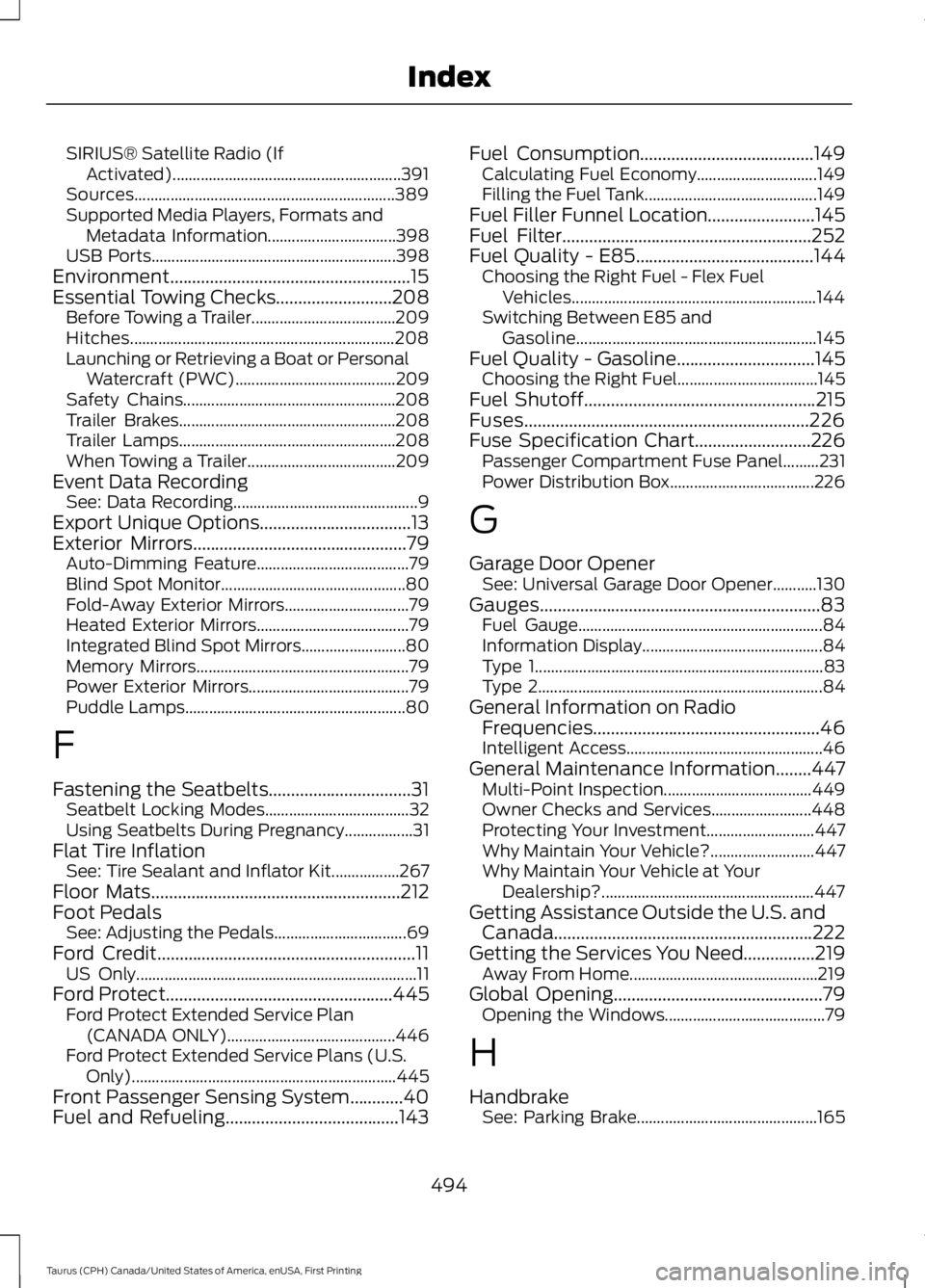
SIRIUS® Satellite Radio (IfActivated).........................................................391Sources.................................................................389Supported Media Players, Formats andMetadata Information................................398USB Ports.............................................................398Environment......................................................15Essential Towing Checks..........................208Before Towing a Trailer....................................209Hitches..................................................................208Launching or Retrieving a Boat or PersonalWatercraft (PWC)........................................209Safety Chains.....................................................208Trailer Brakes......................................................208Trailer Lamps......................................................208When Towing a Trailer.....................................209Event Data RecordingSee: Data Recording..............................................9Export Unique Options..................................13Exterior Mirrors................................................79Auto-Dimming Feature......................................79Blind Spot Monitor..............................................80Fold-Away Exterior Mirrors...............................79Heated Exterior Mirrors......................................79Integrated Blind Spot Mirrors..........................80Memory Mirrors.....................................................79Power Exterior Mirrors........................................79Puddle Lamps.......................................................80
F
Fastening the Seatbelts................................31Seatbelt Locking Modes....................................32Using Seatbelts During Pregnancy.................31Flat Tire InflationSee: Tire Sealant and Inflator Kit.................267Floor Mats........................................................212Foot PedalsSee: Adjusting the Pedals.................................69Ford Credit..........................................................11US Only......................................................................11Ford Protect...................................................445Ford Protect Extended Service Plan(CANADA ONLY)..........................................446Ford Protect Extended Service Plans (U.S.Only)..................................................................445Front Passenger Sensing System............40Fuel and Refueling.......................................143
Fuel Consumption.......................................149Calculating Fuel Economy..............................149Filling the Fuel Tank...........................................149Fuel Filler Funnel Location........................145Fuel Filter........................................................252Fuel Quality - E85........................................144Choosing the Right Fuel - Flex FuelVehicles.............................................................144Switching Between E85 andGasoline............................................................145Fuel Quality - Gasoline...............................145Choosing the Right Fuel...................................145Fuel Shutoff....................................................215Fuses................................................................226Fuse Specification Chart..........................226Passenger Compartment Fuse Panel.........231Power Distribution Box....................................226
G
Garage Door OpenerSee: Universal Garage Door Opener...........130Gauges...............................................................83Fuel Gauge.............................................................84Information Display.............................................84Type 1........................................................................83Type 2.......................................................................84General Information on RadioFrequencies...................................................46Intelligent Access.................................................46General Maintenance Information........447Multi-Point Inspection.....................................449Owner Checks and Services.........................448Protecting Your Investment...........................447Why Maintain Your Vehicle?..........................447Why Maintain Your Vehicle at YourDealership?.....................................................447Getting Assistance Outside the U.S. andCanada..........................................................222Getting the Services You Need................219Away From Home...............................................219Global Opening...............................................79Opening the Windows........................................79
H
HandbrakeSee: Parking Brake.............................................165
494
Taurus (CPH) Canada/United States of America, enUSA, First Printing
Index
Page 499 of 504

K
Keyless Entry...................................................60SECURICODE™ Keyless EntryKeypad................................................................60Keyless Starting.............................................137Ignition Modes.....................................................138Keys and Remote Controls........................46
L
Lane Keeping System.................................187Switching the System On and Off...............188Lighting Control...............................................72Headlamp Flasher................................................73High Beams.............................................................72Lighting...............................................................72General Information............................................72Load Carrying...............................................200Load Limit......................................................200Special Loading Instructions for Owners ofPick-up Trucks and Utility-typeVehicles............................................................205Vehicle Loading - with and without aTrailer................................................................200Locking and Unlocking.................................57Activating Intelligent Access...........................58Autolock..................................................................59Autounlock.............................................................59Battery Saver.........................................................60Enabling or Disabling Autolock andAutounlock........................................................59Illuminated Entry.................................................60Illuminated Exit.....................................................60Locking and Unlocking the Doors with theKey Blade............................................................57Opening a Rear Door From the Inside...........57Opening the Luggage Compartment...........58Power Door Locks.................................................57Remote Control.....................................................57Smart Unlocks for Integrated KeyheadTransmitter........................................................58Smart Unlocks for Intelligent AccessKeys......................................................................59Lug NutsSee: Changing a Road Wheel........................291
M
Maintenance.................................................236General Information.........................................236Manual Climate Control............................109Manual Seats..................................................121Lumbar Adjustment...........................................122Moving the Seat Backward andForward...............................................................121Recline Adjustment............................................122Media Hub......................................................326Memory Function..........................................125Easy Entry and Exit Feature............................126Saving a Preset Position..................................125Message CenterSee: Information Displays.................................89MirrorsSee: Heated Windows and Mirrors................117See: Windows and Mirrors................................78Mobile Communications Equipment.......13Moonroof...........................................................82Bounce-Back.........................................................82Opening and Closing the Moonroof..............82Venting the Moonroof........................................82Motorcraft Parts - 2.0LEcoBoost™.................................................299Motorcraft Parts - 3.5L Duratec............300Motorcraft Parts - 3.5LEcoboost™..................................................301MyKey Troubleshooting...............................55MyKey™..............................................................51Principle of Operation..........................................51
N
Navigation......................................................407cityseeker...............................................................414Destination Mode.............................................409Map Mode............................................................407Navigation Map Updates.................................415Navigation Menu.................................................412SiriusXM Traffic and Travel Link....................415Waypoints.............................................................413Normal Scheduled Maintenance..........450Intelligent Oil-Life Monitor™........................450Normal Maintenance Intervals......................451
496
Taurus (CPH) Canada/United States of America, enUSA, First Printing
Index