2017 AUDI TT ROADSTER ABS
[x] Cancel search: ABSPage 256 of 314

Wheels
circumference as the regular
tires.
A_ WARNING -
-Only use tire/rim combina
tions and suitable wheel bolts
that have been approved by
Audi. Otherwise, damage to
the vehicle and an accident could result.
-For technical reasons, it is not
possible to use tires from oth
er vehicles -in some cases,
you cannot even use tires from
the same vehicle model.
-Make sure that the tires you
select have enough clearance
to the vehicle. Replacement
tires should not be chosen simply based on the nominal
size, because tires with a dif
ferent construction can differ greatly even if they are the
same size. If there is not
enough clearance, the tires or
the vehicle can be damaged and this can reduce driving
safety and increase the risk of
an accident.
- Only use tires that are more
than six years old when abso
lutely necessary and drive
carefully when doing so.
254
-Do not use run-flat tires on
your vehicle. Using them when not permitted can lead to ve
hicle damage or accidents .
-If you install wheel covers on the vehicle, make sure they al
low enough air circulation to
cool the brake system. If they
do not, this could increase the risk of an accident.
Tire wear/damage
Fig. 189 Tire profile : treadwear indica
tor
Tire wear
Check the tires regularly for wear.
-Inflation pressure that is too low
or high can increase tire wear
considerably.
-Driving quickly through curves, rapid acceleration and heavy
braking increase tire wear.
-Hav e an authorized Audi dealer
or authorized Audi Service Facili
ty check the wheel alignment if
there is unusual wear .
..
Page 266 of 314

Wheels
installation of replacement or alternate tires or
wheels on the vehicle that prevent the TPMS
from functioning properly. Always check the
TPMS malfunction telltale after replacing one or
more tires or wheels on your vehicle to ensure
that the replacement or alternate tires and
wheels allow the TPMS to continue to function
proper ly .
If the Tire Pressure Monitoring System
indicator appears
The tire pressure indicator in the instrument
cluster informs you if the tire pressure is too low
or if there is a system malfunction.
Using the ABS sensors, the tire pressure monitor
ing system compares the tire tread circumfer
ence and vibration characteristics of the individu
al tires. If the pressure changes in one or more
tires, this is indicated in the Infotainment system
disp lay with an indicator light
RR and a message.
If only one tire is affected , the location of that
tire will be indicated.
The tire pressures must be stored in the Infotain
ment system again each time the pressures
change (switching between partial and full load pressure) or after changing or replacing a tire on
your vehicle ¢
page 265 . The tire pressure moni
toring system only monitors the tire pressure you
have stored. Refer to the tire pressure label for
the recommended tire pressure for your vehicle
¢ page 256, fig.191.
Tire tread circumference and vibration character
istics can change and cause a tire pressure warn
ing if:
- the tire pressure in one or more tires is too low.
- the tire has structural damage .
- the tire was replaced or the tire pressure was
changed and it was not stored¢
page 265.
-the spare tire* is installed.
Indicator lights
RR -Loss of pressure in at least one tire ¢ ,& .
Check the tires and replace o r repair if necessary.
Check/correct the p ressures of a ll four tires and
store the pressure again in the Infotainment sys
tem ¢
page 265.
264
mm (T ire Pressure Monitoring System) Tire
pressure: malfunction! See owner's manual -
If
mm appears after switching on the ignit ion or
while driving and then the indicator light
RR in
the instrument cluster also starts to blink for
about one minute and then stays on permanent ly, there is a system malfunction. Try to store the
correct tire pressures¢
page 265. If the indica
tor light does turn off or turns on again after a
short period of time , drive to an authorized A udi
dealer or authorized Audi Service Facility immedi
ate ly to have the ma lfunction corrected.
_& WARNING
-If the tire pressure indicator appears in the
disp lay, reduce your speed immediately and
avoid any hard steering or brak ing maneu
vers. Stop as soon as poss ible and check the
tires and their pressure .
- The driver is responsible for maintain ing the
correct tire pressures . You must check the
tire pressures regularly .
- Under certain cond it ions (such as a sporty
driving style, w inter condit ions or unpaved
roads), the pressure monitor indicator may
be delayed.
- Do not use run-flat tires on your vehicle . Us
ing them when not perm itted can lead to
vehicle damage or accidents.
(D Tips
- The tire pressure monitoring system can al
so stop working when there is an ESC mal
function.
- Us ing snow chains may result in a system
ma lfunction.
- The tires w ith the identification "AO"
¢
page 253 have been matched w ith your
Audi t ire pressure monitoring system. We
recommend that you use these tires.
Page 271 of 314
co
co
.... N
" N .... 0
" "' c:o
Care and cleaning
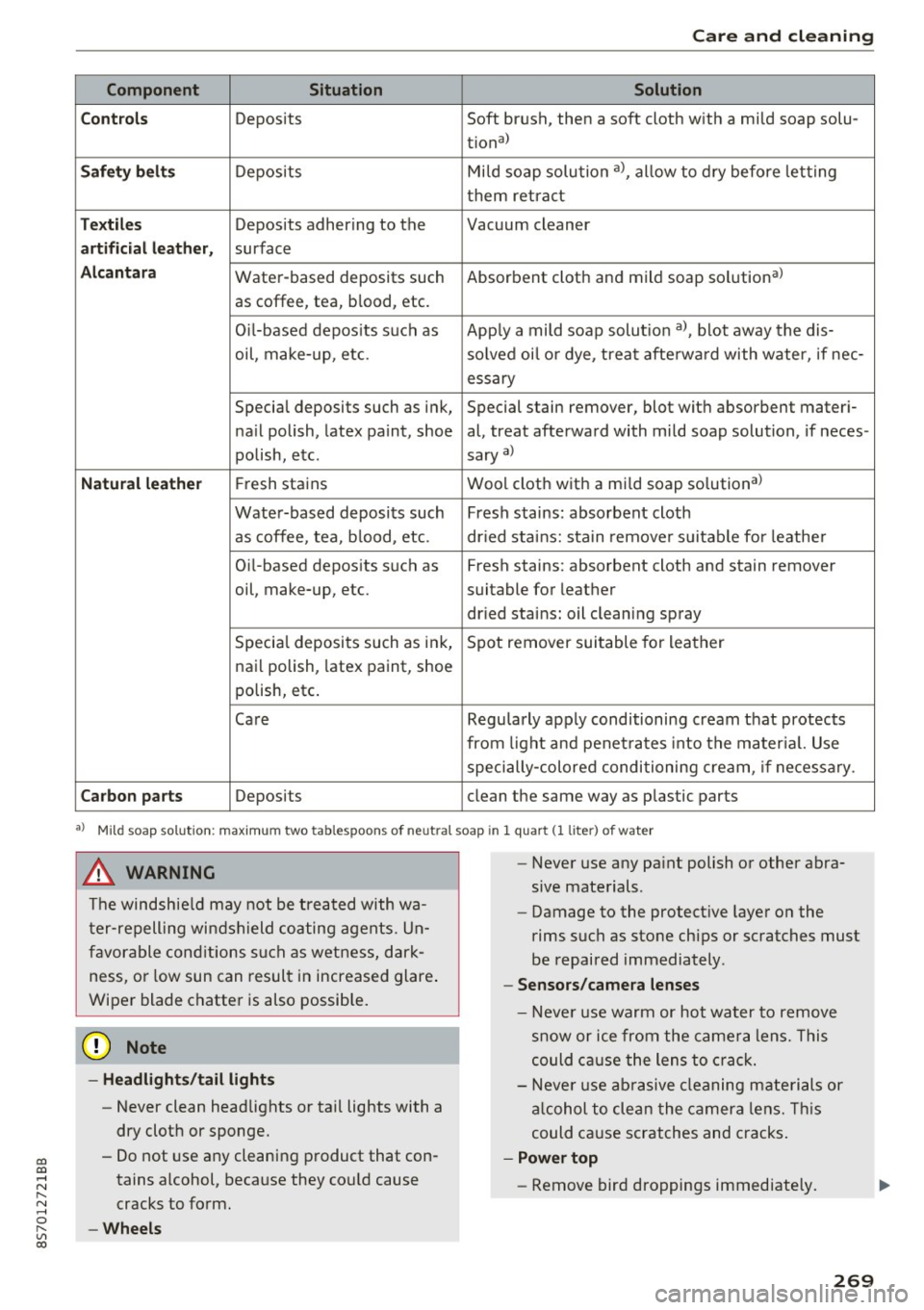
Component Situation Solution
C ont rols
Deposits Soft brush, then a soft cloth with a mild soap solu-
tiona)
Saf ety be lts Deposits Mi
ld soap solution a), allow to dry before letting
them retra ct
T ex til es Deposits adhering to the Vacuum cleaner
artificial l eather, surface
Alcantar a Water-based deposits such Absorbent cloth and mild soap solutiona)
as coffee, tea, blood, etc.
O il-based depos its s uch as App ly a mild soap solut ion a), blot away the dis-
oil, make-up, etc. solved oi l o r dye, treat afterwa rd with water, if nee-
essary
Special deposits such as ink, Special stain remover, blot with absorbent materi-
na il polish, latex paint, shoe al, treat afterward with mild soap solution, if neces-
polish, etc. sary
a)
Natu ral lea the r Fresh stains Wool cloth with a mi
ld soap solutiona >
Water-based deposits such Fresh stains: absorbent cloth
as coffee, tea, b lood, etc. dr ied stains: sta in remove r su itable for leathe r
Oi l-based deposits such as Fresh stains: absorbent cloth and stain remover
oil, make-up, etc. suitable for leather
dr ied stains: oil cleaning spray
Specia l deposits such as ink, Spot remover suitable for leather
nai l polish, latex paint, shoe
polish, etc.
Care Regularly apply conditioning cream that protects
from light and penet ra tes into the mater ial. Use
specially-colored conditioning cream, if necessa ry.
Carbon parts Deposits clean the same way as plastic parts
•> Mild soap solution: maximum two tablespoons of neutral soap in 1 quart (1 liter ) of water
A WARNING
The windshie ld may not be treated with wa
t er-repelling windshield coating agents. Un
favorable cond itions such as wetness, dark
ness, or low sun can result in increased glare .
Wiper blade chatter is also possib le.
{U) Note
- Headligh ts /t ail li ghts
- Never clean headlights or tai l lights with a
dry cloth or sponge.
- Do not use any cleaning product that con
tains alcohol, because they cou ld cause
cracks to form.
-Whe els
-
- Never use any pa int polish or other abra
sive materials.
- Damage to the protect ive layer on the
rims such as stone chips or scratches must
be repaired immediately.
- Sensors /cam era lenses
- Neve r use warm or hot water to remove
s n ow or ice from the came ra lens. This
could ca use the lens to crack.
- Neve r use ab rasive cleaning materials or
a lcohol to clean the camera lens. Th is
could cause scratches and cracks .
-Power top
- Remove bird droppings immediately.
269
Page 299 of 314
co
co
.... N
" N .... 0
" "' c:o
A
A/C (climate control system) . . . . . . . . . . . . . 53
Accessories . . . . . . . . . . . . . . . . . . . . . . . . . . 295
Active lane assist . . . . . . . . . . . . . . . . . . . . . . 7 4
Activating vibration warning . . . . . . . . . . . .
76
Adjusting steering time . . . . . . . . . . . . . . . . 76
Cleaning the camera area . . . . . . . . . . . . . 267
Indicator light . . . . . . . . . . . . . . . . . . . . . . . 75
Messages . . . . . . . . . . . . . . . . . . . . . . . . . . . 75
Switching on/off . . . . . . . . . . . . . . . . . . . . . 75
Adaptive dampers . . . . . . . . . . . . . . . . . . . . . . 80
Adaptive light . . . . . . . . . . . . . . . . . . . . . . . . . 80
Adapt ive light (indicator light) . . . . . . . . . . . 16
Additional phone ............ .. .. . 115, 176
Adjusting a ir distribution (Cl imate control sys-
tem) . . . . . . . . . . . . . . . . . . . . . . . . . . . . . . . .
53
Adjusting the air vents . . . . . . . . . . . . . . . . . . 54
Adjusting the center console lighting . . . . . . 42
Adjusting the sound . . . . . . . . . . . . . . . . . . . 179
Adjusting the temperature (climate control
system) . . . . . . . . . . . . . . . . . . . . . . . . . . . . . .
53
Advanced Airbag System
Children . . . . . . . . . . . . . . . . . . . . . . . . . . . 220
Componen ts . . . . . . . . . . . . . . . . . . . . . . . .
203
Front airbags . . . . . . . . . . . . . . . . . . . . . . . 201
How the components work together . . . . 204
Airbag . . . . . . . . . . . . . . . . . . . . . . . . . . . . . . 196
Indicator light . . . . . . . . . . . . . . . . . . . . . . . 14
Airbag system . . . . . . . . . . . . . . . . . . . . . . . . 215
Advanced Airbag-System . . . . . . . . . . . . . . 200
Care . . . . . . . . . . . . . . . . . . . . . . . . . . . . . . 210
Child restraints . . . . . . . . . . . . . . . . . . . . . 220
Components (front airbags) . . . . . . . . . . . 203
Danger of fitting a child safety seat on the
front passenger seat . . . . . . . . . . . . . . . . .
197
Disposal . . . . . . . . . . . . . . . . . . . . . . . . . . . 210
Front airbags . . . . . . . . . . . . . . . . . . . . . . . 200
H ow do the front airbags work? . . . . . . . . 205
H ow many airbags does my vehicle have? 203
Important information . . . . . . . . . . . . . . . 196
Important safety instructions on the knee
airbag system ................. ..... .
213
Knee airbags. ....................... 212
Monitoring . . . . . . . . . . . . . . . . . . . . . . . . . 207
PASSENGER AIR BAG light . . . . . . . . . . . . 208
Repairs ... . .. .. ............. .. .. .. . 210
Safety instructions . . . . . . . . . . . . . . . . . . . 209
Index
Side airbags . . . . . . . . . . . . . . . . . . . . . . . . 214
Warning/Indicator lights . . . . . . . . . . . . . 207
When must the system be inspected? . . . 207
Alarm system
refer to Anti-theft alarm system . . . . . . 24, 29
Alignment pin (changing the wheel) . . . . . . 272
All season tires . . . . . . . . . . . . . . . . . . . . . . . 260
All weather lights . . . . . . . . . . . . . . . . . . . . . . 39
All wheel drive . . . . . . . . . . . . . . . . . . . . . . . . 91
Alternative routes .. .. ................. 143
Ambient lighting . . . . . . . . . . . . . . . . . . . . . . 41
AMI
refer to Audi music interface . . . . . . . . . . . 162
Android Auto
refer to Audi smartphone interface
Announcements (settings)
refer to Voice guidance ........... .. . .
Anti-freeze
173
143
Windshield washer system . . . . . . . . . . . . 244
Anti-lock braking system (ABS) . . . . . . . . . . . 88
Anti-s lip regulat ion . . . . . . . . . . . . . . . . . . . . 88
Anti-theft alarm system . . . . . . . . . . . . . . . . . 29
Apple CarPlay
refer to Audi smartphone interface . . . . . 173
Armrest .......... .. .................. 48
Ashtray . . . . . . . . . . . . . . . . . . . . . . . . . . . . . . 48
Aspect rat io (video) . . . . . . . . . . . . . . . . . . .
167
Audi connect . . . . . . . . . . . . . . . . . . . . . . . . . 127
Data connection . . . . . . . . . . . . . . . . . . . . . 132
Data protection . . . . . . . . . . . . . . . . . . . . . 134
Services (overview) . . . . . . . . . . . . . . . . . . 129
Setup . . . . . . . . . . . . . . . . . . . . . . . . . . . . . 127
Audi magnetic ride
refer to Adaptive dampers . . . . . . . . . . . . . 80
Audi music interface . . . . . . . . . . . . . . . . . . . 162
Audi music stream
refer to W i- Fi . . . . . . . . . . . . . . . . . . . . . . . 160
Audio files . . . . . . . . . . . . . . . . . . . . . . . . . . . 164
Audio player
Bluetooth audio player . . . . . . . . . . . . . . .
159
Wi-Fi aud io player . . . . . . . . . . . . . . . . . . . 160
Audio track . . . . . . . . . . . . . . . . . . . . . . . . . . 167
Audi Service Repair Manuals and Literature 293
Audi smartphone interface ......... 173, 177
Audi virtual cockpit (instrument cluster) . . . . 8
297
Page 309 of 314

co
co
.... N
" N .... 0
" "' c:o
Seating position Driver . . . . . . . . . . . . . . . . . . . . . . . . . . . . . 182
Front passenger . . . . . . . . . . . . . . . . . . . . . 183
How to adjust the front seats . . . . . . . . . . 183
Incorrect seat position . . . . . . . . . . . . . . . 184
Occupants . . . . . . . . . . . . . . . . . . . . . . . . . . 182
Seats adjusting . . . . . . . . . . . . . . . . . . . . . . . . . . . 47
Correct seating position . . . . . . . . . . . . . . 182
Number of seats . . . . . . . . . . . . . . . . . . . . 189
Selecting a source Multifunction steering wheel ......... 22, 0
Selecting a source (media) . . . . . . . . . . . . . . 164
Selection menu . . . . . . . . . . . . 20, 98, 101, 102
Multifunction steering wheel . . . . . . . . . . . 22
Selective wheel torque control . . . . . . . . . . . 88
Selector lever (automatic transmission)
E mergency operat ion . . . . . . . . . . . . . . . . . . 71
Position . . . . . . . . . . . . . . . . . . . . . . . . . . . . 64
Service and disposal Safety belt pretensioner . . . . . . . . . . . . . . 195
Service interval display . . . . . . . . . . . . . . . . . 245
Settings Directory. . . . . . . . . . . . . . . . . . . . . . . . . . . 124
Map. .. .. .. .. ................. .... . 146
Media . . . . . . . . . . . . . . . . . . . . . . . . . . . . . 167
Navigation . . . . . . . . . . . . . . . . . . . . . . . . . 142
Radio . . . . . . . . . . . . . . . . . . . . . . . . . . . . . 154
System . . . . . . . . . . . . . . . . . . . . . . . . . . . . 175
Telephone . . . . . . . . . . . . . . . . . . . . . . . . . . 124
Setting the language ............ ..... . 175
Shift paddles (automatic transmission) . . . . 68
Shuffle . . . . . . . . . . . . . . . . . . . . . . . . . . . . . 167
Side airbags Description ... ................ ..... . 214
How they work ...................... 215
Side assist . . . . . . . . . . . . . . . . . . . . . . . . . . . . 76
Adjusting the brightness . . . . . . . . . . . . . . . 79
C leaning the sensors . . . . . . . . . . . . . . . . . 267
Sensor range . . . . . . . . . . . . . . . . . . . . . . . . 77
switching on and off . . . . . . . . . . . . . . . . . . 79
SIM card reader . . . . . . . . . . . . . . . . . . . . . . 127
Ski bag .... ................... .. ...... SO
Snowboard bag . . . . . . . . . . . . . . . . . . . . . . . . SO
Snow chains . . . . . . . . . . . . . . . . . . . . . . . . . 261
Socket . . . . . . . . . . . . . . . . . . . . . . . . . . . . . . . 48
Index
Software update
refer to System update (MMI) . . . . . . . . . . 178
Software (MMI) License . . . . . . . . . . . . . . . . . . . . . . . . . . . . 180
Update . . . . . . . . . . . . . . . . . . . . . . . . . . . . 178
Version . . . . . . . . . . . . . . . . . . . . . . . . . . . . 178
Sources of information about child restraints
and their use . . . . . . . . . . . . . . . . . . . . . . . . . 230
Spare tire . . . . . . . . . . . . . . . . . . . . . . . . . . . 279
Speed-dependent volume increase . . . . . . . 179
Speed limiter . . . . . . . . . . . . . . . . . . . . . . . . . 72
Speedometer . . . . . . . . . . . . . . . . . . . . . . . . . 19
Speed warning system . . . . . . . . . . . . . . . . . . 72
Speller . . . . . . . . . . . . . . . . . . . . . . . . . . . . . . 102
Sport mode . . . . . . . . . . . . . . . . . . . . . . . . . . . 89
START Engine STOP button . . . . . . . . . . . . . . 59
Starting (engine) . . . . . . . . . . . . . . . . . . . . . . 59
Stee ring
Electromechanical steering .......... . 91, 0
Indicator light . . . . . . . . . . . . . . . . . . . . . . . 13
also refer to Electromechanical steering 91
Steering wheel Adjusting . . . . . . . . . . . . . . . . . . . . . . . . . . . 59
Shift paddles (automatic transmission) . . . 68
also refer to Multifunction
steering wheel . . . . . . . . . . . . . . . . . 20, 21, 22
Steps for determin ing correct load limit . . . 259
Stopover (navigation) . . . . . . . . . . . . . . . . . . 141
Stopping (engine) . . . . . . . . . . . . . . . . . . . . . . 60
Storage compartments . . . . . . . . . . . . . . . . . 49
Stored stations
refer to Favorites . . . . . . . . . . . . . . . . . . . . 153
Streaming
refer to Online media . . . . . . . . . . . . . . . . . 161
Street View . . . . . . . . . . . . . . . . . . . . . . . . . . 147
S tronic (automatic transmission) . . . . . . . . . 63
Subtitles (DVD) . . . . . . . . . . . . . . . . . . . . . . . 167
Subwoofer (sound) . . . . . . . . . . . . . . . . . . . . 179
Sun visors . . . . . . . . . . . . . . . . . . . . . . . . . . . . 43
Swapping calls . . . . . . . . . . . . . . . . . . . . . . . 118
Switching daytime running lights on and off 40
Switching tabs
refer to Mult ifunction
steering wheel . . . . . . . . . . . . . . . . . 20, 21, 22
Switching the ignition on . . . . . . . . . . . . . . . . 59
307