2017 AUDI TT ROADSTER airbag off
[x] Cancel search: airbag offPage 30 of 314

Opening and clo sin g
Central locking switch
Fig. 19 D rive r's door : central lock ing switch
• To lock the vehicle, press the~ button c> .&,.
• Press t he !ill button to unlock the vehicle.
When locking the vehicle with the centra l locking
switch, the follow ing applies:
- Opening the door and the luggage compart
ment lid from the
outside is not possible (for
security such as when stopped at a light).
- The LED in the central locking switch turns on
when all doors are closed and locked.
- You can open the doors ind ividually from the
inside by pulling the door handle .
- In the event of a c rash with airbag deployment,
the doors unlock automat ically to a llow access
to the vehicle.
& WARNING
- The power locking sw itch works with the ig
nition off and automatically locks the entire
vehicle when the~ button is pressed.
- The centra l locking switch is inoperative
when the vehicle is locked from the outside.
- Locked doors make it more difficult for
emergency worke rs to get into t he vehicle,
wh ich puts lives at risk. Do not leave anyone
behind in the vehicle, especially children .
(D Tips
Your vehicle locks automatically when it
reaches a speed of 9 mph (15 km/h) (Auto Lock)
c> page 24 . You can unlock the vehicle
aga in using the
!ill b utton in the central lock
ing sw itch.
l) Th is fun ctio n is not a vailab le in a ll coun tries.
28
Setting the central locking system
In the Infotainment system, you can set which
doors the central locking system will unlock .
• Select in the Infotainment system: IMENU ! but
ton>
V eh icle > left control button >Vehicle set
t ings.
Door unloc king -
you can decide if All doors or
only the
Dr ive r door should unlock . The luggage
compartment lid also unlocks when
All i s select
ed . If you select
D riv er in a vehicle with a conven
i ence key*, on ly the door whose handle you pu ll
will unlock .
If you se lect
Dri ver , all the doors and luggage
compartment lid w ill unlock if you press the
I@
button on the remote control key tw ice .
Fold m irrors* -if you select On, the exterior rear
view m irrors fold in automatically when you press
the ~ button on the remote control master key
or touch the sensor* in the handle.
Lock whe n driving1l -if you select On , the veh icle
locks automatically when driving. All of the doors
and the luggage compartment lid lock .
Page 49 of 314

CD
CD
.... N
" N .... 0 r--. V, co
Seats and storage
General information
A WARNING
See¢ page 181 , Safe driving for important
information, tips, suggestions and warnings
that you sho uld read and follow for your own
safety and the safety of your passengers .
Front seats
Power seat adjustment
Applies to vehicles with power adjustable seats
Fig. 50 F ro nt seat: powe r seat ad jus tme nt
@ -lumbar support o r mult ifunct ion but
ton* ¢
page 47. To adjust the lumbar support,
press the button in the applicable location.
@ -Moving the seat up/down : p ress the button
upward/downwa rd . To adjust the front sea t cush
i on, press the front bu tton up/down . T o adjus t
the rear seat cushion, press the rear button up/
down.
@ -Mov ing the sea t fo rwa rd/back: press the but
ton forward/back.
@ -Adjusting the backrest angle : press the but
ton fo rward/back.
© -Lengthening/shorteni ng the upper th igh sup
port* : lift the grip ha ndle .
A WARNING
-Only adjust the fro nt sea t with whe n the ve
hicle is stat iona ry . O therwise, th is increases
t h e risk of an a cc ident
Seats and storag e
-The power front seats can a lso be adjusted
when the ignition is switched off. For this
reason, chi ldren should never be left unat
tended i n the vehicle -they could be injured!
- E xercise caution when adjust ing the seat
he ight. Unsupe rvised or careless seat ad
justment can pinch finge rs or hands caus ing
in ju ries .
- The front seat backrests must not be re
clined too far back when driv ing, because
this impa irs the effect iveness of the safety
be lts and airbag system, w hich inc rea ses
the risk of i nju ry.
- T o m inimize the r isk of injury during s udden
b raking or a collision, the dr iver and the
front passe nger m ust not drive o r ride w ith
the backrest in the re clin ed position. The
safety belts and airbag system can on ly pro
vide the greatest protection possib le w hen
the backrests are in the up right posit ion and
the safety belts are worn correctly. The
more a backrest is reclined , the greater the
risk of injury due to an i ncorrec t seating po
sition and safety belt posit ion .
Multifunction button
Applies to: vehicles with multifunction button
You can adjust the side bols ters using the mul ti
function button .
.. If you t urn the multifunction button(!)
¢
page 47 , fig. 50 to the left or right, the side
bolsters o n the seat backrests w ill increase/de
crease the lateral s upport .
(D Tips
The air in the s ide bo lsters* is released as
soon as the driver's door ope ns. This makes is
possib le to ente r and exit the veh icle more
comfo rtably . As soon as you start dr iving the
vehicle, the side bolsters fi ll.
47
Page 51 of 314
CD
CD
.... N
" N .... 0 r--. V, co
CD Note
-To reduce the risk of damage to the vehicle
electrical system, never attempt to charge
the veh icle battery by connect ing accesso
ries that prov ide power, such as solar panels
or battery chargers, to the 12 Volt sockets
or the cigarette lighter.
- To reduce the risk of damage to the sockets,
on ly use plugs that fit correctly .
Storage
Beverage holders
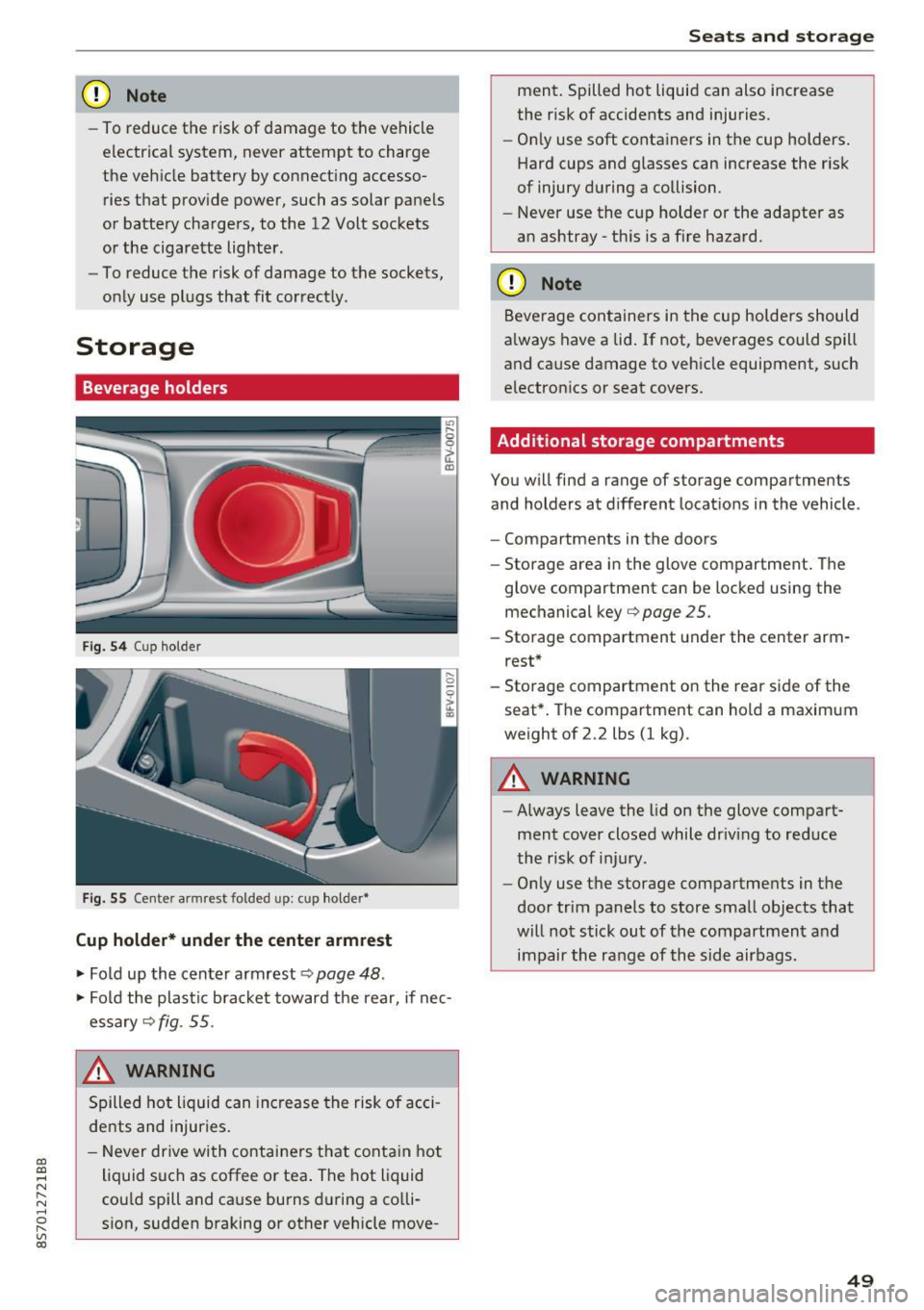
Fig. 5 4 Cup holder
Fig. 55 Cente r armrest folded up: cup holder•
Cup holder* under the center armrest
~ Fold up the center armrest q page 48 .
~ Fold the plas tic bracket toward the rear, if nec
essary
q fig . 55.
,&_ WARNING
Spilled hot liquid can increase the risk of acci
de nts and injuries .
- Never drive wi th containers that contain hot
liquid such as coffee or tea . The hot liquid
cou ld spill and cause burns during a colli·
sion, sudden braking or other vehicle move -
Seats and storage
ment. Spilled hot liquid can also increase
the risk of accidents and injuries.
- On ly use soft containers in the cup holders .
Hard cups and glasses can increase the risk
of injury during a collision.
- Never use the cup holder or the adapter as
an ashtray -th is is a f ire hazard.
CD Note
Beverage containers in the cup holders should
a lways have a lid. If not, beverages could spill
and cause damage to vehicle equipment, such
electronics or seat covers.
Additional storage compartments
You w ill find a range of storage compartments
and holders at different locat ions in the vehicle .
- Compartments in the doors
- Storage area in the glove compartment . The
glove compartment can be locked using the mechanical key
qpage 25 .
-Storage compartment under the center arm
rest*
- Storage compartment on the rea r side of the
seat*. The compartment can hold a maximum
weight of 2.2 lbs (1 kg) .
A WARNING
-
-Always leave the lid on the glove compart
ment cover closed while driv ing to reduce
the risk of injury.
- Only use the storage compartments in the
door trim panels to store small objects that
will not stick out of the compartment and
impair the range of the side airbags.
-
49
Page 61 of 314

CD
CD
.... N
" N ...... 0 r--. V, co
Steering
Adjusting the steering wheel position
The steering wheel position is fully adjustable up
and down and forward and back.
Fig . 6 6 Lever on th e steering column
... Tilt the lever c:::> fig . 66 downward c:::> A
... Bring the steering wheel into the desired posi
tion .
... Push the lever against the steering column un
t il it is secure.
A WARNING
Incorrect use of the steering wheel adj ust
ment and an incorrect seating posi tion can
cause se rious injuries.
- Only adjust the steering column when the vehicle is stat ionary so that you do not lose
cont ro l of the ve hicl e.
- Adjust the dr iver's seat or steering wheel so
that there is at least a 10 in (25 cm) d is
t an ce betwee n your chest a nd the s teering
w heel. If you d o not m aint ain this dis tance,
yo u will no t be proper ly protected by the a ir
bag system.
- If your phys ic al characteris tic s preven t you
from sit ting at least 10 in ( 25 cm) or mo re
away from the steering wheel, see if yo ur
authorized Audi dealer or autho rized Audi
Service Facility can prov ide adapters that
will help.
- If your face is level with the steering wheel,
the a irbag does not provide as much protec
t io n during a collision. A lways make s ure
that the steering wheel is level with you r
chest.
D rivi ng
-Always hold the steering wheel with your
hands in the 9 o'clock and 3 o'clock pos i
tions to reduce the risk of injury if the airbag
deploys.
- Never hold the steering wheel in the 12
o'clock position or with both hands on the
rim or the center of the stee ring wheel.
H old ing the steer ing whee l incorrect ly sig
n ificant ly increases the r isk of injury to the
hands, a rms and head if the airbag deploys.
Starting and stopping
the engine
Starting the engine
The ! S TART ENGINE STOPI button switches the
ignition on and starts the engine .
Fig . 67 Center console: START ENGINE STOP b utto n
Switching the ignition on /off
... To switch t he ignit io n on or off, press t he
!START ENGINE STOPI but ton. Do not press the
brake pedal while doing this.
Starting the engine
... Press the brake pedal a nd move the selector
lever into the P or N position
c:::> ,&. .
... Press the !START ENGINE STOP I butto n
<=:> fig. 67 . The eng ine will start.
If the engine does not start immediately, the
sta rt ing procedure stops automa tica lly after a
sho rt time. Repea t the s ta rt ing process .
A WARNING
-To redu ce the r is k of poiso ning, never allow
the eng ine to run in confined spaces.
59
Page 96 of 314

Intelligent Technology
greater than the amount being generated in or
der to maintain an optimal vehicle battery charge
level.
(D Tips
- Energy management cannot overcome the laws of physics. Note that the charge level
and length of the vehicle battery life are
limited.
- When the starting ability is jeopardized, the
(•j indicator light turns on¢ page 13.
What you should know
Maintaining the starting ability is the highest
priority.
A lot of stress is placed on the vehicle battery
when driving short distances, during city driving,
and at cold times of the year. A lot of energy is
used but little is generated. It is also critical
when the engine is not running but electrical
equipment is switched on. In this case, energy is used but none is generated .
In situations like this, energy management will
actively regulate the distribution of energy.
Long periods without use
If you do not drive your vehicle for several days or
weeks, electrical equipment is gradually scaled
back or switched off. This reduces energy use and
ensures the vehicle will be able to start after long
periods of time. Some convenience functions
such as opening with the remote control key may not be available . These convenience functions
will be available again once you switch the igni tion on and start the engine.
With the engine switched off
The vehicle battery will drain if you use Infotain ment functions such as listening to the radio
while the engine is switched off .
If the vehicle's ability to start may be impaired by
the energy use, a message will appear in the In
fotainment system display. The message indi cates that the system will switch off automatically soon .
If you would like to continue using the
functions, you must start the engine.
94
With the engine running
Although e lectrical energy is generated while
driving , the vehicle battery can drain . This can
happen if little energy is generated but much is
used, and the charge level of the vehicle battery
is not optimal.
To restore the balance of energy , components
that require large amounts of energy are tempo
rarily scaled back or switched off. Heating sys
tems in particular require a great deal of energy.
If you notice, for example, that the seat heating*
or rear window defroster is not working, then it has been temporarily reduced or switched off .
These systems are available again as soon as the energy supply has been restored.
In addition, you may notice that the idle speed
has slightly increased . That is normal and no
cause for concern . By increasing the idling speed ,
the additional required energy will be generated
and the vehicle battery will be charged.
Information about data
recorded by vehicle
control modules
Your vehicle is not equipped with a crash data re
corder . This device is installed by some vehicle
manufacturers to record data about crashes so
that it can be analyzed later. Crash data record
ers are also called "Event Data Recorders (EDR)".
In some legal jurisdictions, it is not permitted to
access or download data recorded by pre-instal
led crash data recorders in order to evaluate a
crash without clear consent of the vehicle owner.
Your vehicle is not equipped with a crash data re
corder. However it does contain a variety of elec
tronic control modules for various vehicle sys
tems such as engine function, exhaust treatment
or airbags and safety belts.
These electronic control modules record vehicle
data during normal driving for diagnosis and re
pair purposes. The recording capability of the
electronic control modules is limited to data only
- no sound is recorded. If the control module de
tects a system malfunction or other change in
status, a very limited amount of data is recorded .,,.
Page 162 of 314
Media
-Multiple Bluetooth audio players can be
connected to the MMI, but only one mobile
device can be active.
- Bluetooth protocols AVRCP ( 1.0/1.3/1.4)
and A2DP are supported.
- Note the volume se tting on your Bluetooth
device. A udi recommends setting your mo
bile device to the maxim um vo lume when
us ing it as a Bluetooth audio player.
- The supported media functions (such as
shuffle) depend on the Bluetooth device be
i ng used.
- For more information on the supported de
vices, visit
www.audi.com /bluetooth or
contact your author ized Audi dealer or au
thorized Audi Service Facility.
Wi-Fi audio player
A ppl ies to: ve hicles w ith Wi-F i
Using the Wi-Fi audio player media source on the
MMI, you can connect and operate your Wi-Fi-ca
pable media player (su ch as a smartphone) to
wirelessly play music from your media player
li
brary. The media player is connected through the
vehicle's Wi-Fi hotspot . A UPnP Server opp or an
integrated UPnPIDLNA server on your media
player is required to access your media player
li
brary.
Req uirement: the Wi-Fi function on your media
p layer must be switched on. The
Audi MMI con
nect
app or a UPnP server app must be installed
on your med ia player .
Or: you must be us ing a
media player wit h an integrated UPnP/DLNA
server .
-Connecting a media player : press the I MEDIA!
button. Press the left control button unti l the
sources overview
c::;,page 164 is d isp layed. Se
lect and co nfirm
W i-Fi audio player
(J) c::;, page 164, fig . 145.
- If necessary, select a nd confirm Wi -Fi off >
Turn on Wi-Fi
to activate Wi-Fi in the MMI. Se
lect
Wi-Fi settings , if necessary. Select the
same settings on the wire less media player
that are used for the Wi -Fi hotspot .
-Start ing the Wi -Fi audio pl ayer : start the Audi
MMI conne ct
app or a UPn P serve r app . Or: al
low medi a shar ing o n your medi a player.
160 Operating the medi
a playe r:
the med ia p layer is
operated through the MMI.
- Press the left control b utton repeatedly until
the
Folders menu item appears . Select and con
firm
Folders.
- Playing mu sic from the media player:
select
and confirm
Media cent er.
Web radio :
see c::;, page 161.
A WARNING
-As t he d river, do not allow usage of the Wi
Fi ho tspot to distract you from driv ing, as
this could increase the r isk of an accide nt.
- It is o nly safe to use tablets, laptops, mo
b ile devices and other s imilar devices when
t he vehicle is stat ionary because , like all
loose objec ts, they co uld be thrown a round
t he inside o f th e ve hicle in a crash and ca u se
serious inju ries. Store these types of devices
secure ly w hile d riving .
- Do no t use any W i-Fi devices wit hin range of
t he airbags while dr iv ing. A lso rea d the
warn ings in the chapter
¢page 196.
(D Note
You are re spon sib le fo r all pre ca utio ns taken
fo r d ata p rotection, an ti- v irus pro te cti on and
protection ag ain st loss o f data on mobi le de
v ices that a re used to access the Internet
thro ugh the W i-F i hotspot .
(D Tips
-The Wi-Fi connec tion is reconf igure d when
inserting or removin g the m ini SIM ca rd in
t h e SIM card reader*. There may be a tem
porary interr upt ion in aud io playback, de
pend ing o n the media player.
- Always read the chapter
c::;, page 133, About
Audi connect.
- Please note that a Wi-Fi connection does
not automatically make it possible to use
t h e Internet. For addit ional information,
see
c::;, page 127.
-To avoid interr upt ions during playback, de
act ivate the power sav ing funct io n on the
media player or co nnect it to a cha rger.
Page 163 of 314
co
co
.... N
" N .... 0
" "' c:o
-The loading times for the audio data depend
on the media player used and the number of
files that it contains.
- A maximum of 2,000 entries per directory
are displayed in the MMI.
- Songs downloaded for offline use using mu
sic streaming services are stored on your mobile device (such as a smartphone) and
may be DRM protected. The Wi-Fi audio
player will not play DRM protected files.
- Contact your authorized Audi dealer or au
thorized Audi Service Facility for additional
information on the Wi-Fi audio player.
Online media and
Internet radio
Applies to: vehicles with Audi connect
You can playback and operate various online me
dia services and Internet radio using the MMI.
• Press the I MEDIAi button. Press the left control
button until the sources overview<>
page 164,
fig. 145
is displayed .
Applies to: using online media and Internet radio
Requirement:
- The
Audi MMI connect app must be installed
and open on your mobile device.
- You must be logged into your my Audi account
in the
Audi MMI connect app and you must
have selected your vehicle.
- The Wi-Fi function on the mobile device and on
the MMI must be switched on.
- If necessary, check in the connection manager
<=> page 176 if the mobile device you connected
is selected under the
MMI connect app (~).
-The MMI must be connected to the network.
- The symbol for the
Online media* source @
<=> page 164, fig . 145 is shown in the MMI.
Applies to: using online media
Additional requirement:
- A supported online media service must be avail
able in your country.
- You must have an account with a supported on
line media service.
- Depending on the online media service, you
must install and open an app on your mobile
device .
Media
Starting Online media
- Press the I MEDIA i button. Press the left control
button until the sources overview
c:> page 164
is displayed.
- Select and confirm an online media service.
Starting Internet radio
- Press the I MEDIA ! button. Press the left control
button until the sources overview
c:> page 164
is displayed.
- Select and confirm
Internet radio . The Internet
radio browser or the last station that was play
ing is shown.
- Selecting the station : if necessary, select and
confirm a category in the Internet radio
Brows
er
> a station.
Online media and Internet radio: additional op
tions
- Press the right control button.
The following options may be available, depend
ing on the information shown (such as the sta
tion/track that is currently playing):
-Sound settings: see<> page 179.
-Wi-Fi settings: see <> page 131, Wi-Fi hotspot.
-Connection manager : see<> page 176.
-Additional options may be available, depending
on the active online media service or Internet
radio.
A WARNING
- It is only safe to use tablets, laptops, mo
bile devices and other similar devices when
the vehicle is stationary because, like all loose objects, they could be thrown around
the inside of the vehicle in a crash and cause
serious injuries . Store these types of devices
securely while driving.
- Do not use any Wi-Fi devices within range of
the airbags while driving . Also read the
warnings in the chapter <>
page 196.
Q) Note
Please note that there generally are addition
al costs when using an online media service
account, especially when it is used interna
tionally.
-
161
Page 193 of 314
CD
CD
.... N
" N ...... 0 r--. V, co
to offer protection in those accidents in which
airbags are not supposed to deploy or when they have a lready deployed. Unbelted occupants can
also be thrown out of the vehicle where even more severe or fatal injuries can occur.
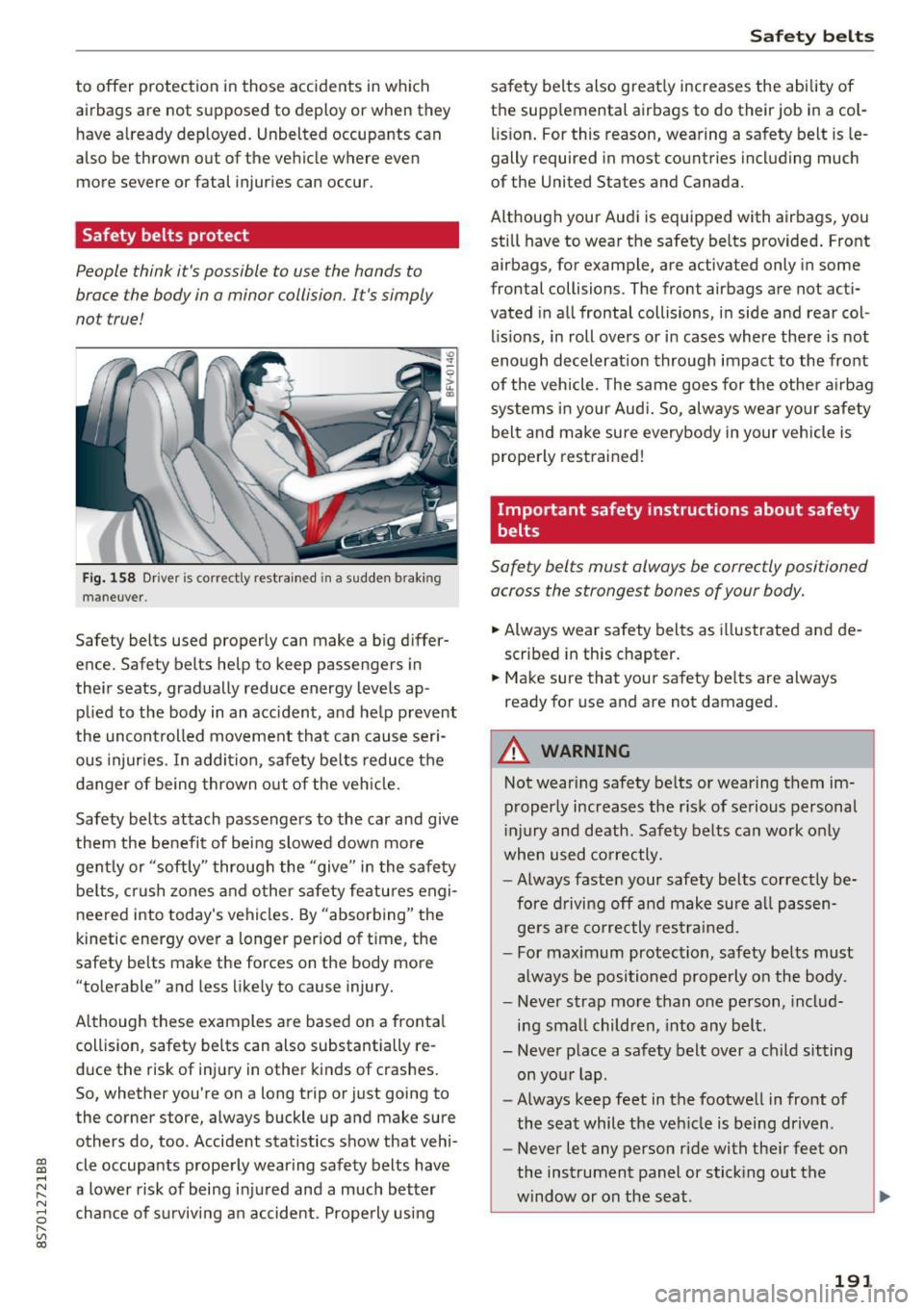
Safety belts protect
People think it's possible to use the hands to
brace the body in a minor collision. It's simply
not true!
Fi g. 158 Driver is correctly restra ined in a sudde n braking
maneuver .
Safety belts used properly can make a big differ
ence. Safety belts help to keep passengers in
their seats, gradually reduce energy levels ap plied to the body in an acc ident, and help prevent
the uncon trolled movement tha t can cause seri
ous injur ies. In addi tion, safety belts reduce the
danger of being thrown out of the veh icle.
Safety belts attach passengers to the car and give
them the be nefi t of bei ng slowed down more
gent ly or "softly" through the "give" in the safe ty
be lts, crush zones and other safety features engi
neered into today's vehicles . By "absorbing" the
kinetic energy over a longer period of time, the
safety belts make the forces on the body more
"to lerable" and less likely to cause injury.
Although these examples are based on a fronta l
coll is ion, safety belts can also substantially re
duce the risk of inj ury in other k inds of crashes.
So, whether you're on a long trip or just going to
the corner store, always buckle up and make sure
others do, too . Accident stat istics show that vehi
cle occupants prope rly wearing safety belts have
a lower risk of being in ju red and a much better
chance of s urviv ing a n accide nt. Prope rly using
Safet y bel ts
safety belts also great ly increases the ability of
the supp lemental airbags to do their job in a col
lis ion . For this reason, wearing a sa fety be lt is le
gally required in most countries including much
of the United States and Canada.
Although your Audi is equipped with airbags, you still have to wear the safety be lts p rovided . Front
airbags, for example, are activated only in some
frontal collisions. The front airbags are not acti
vated in a ll frontal collisions, i n side and rear col
lis ions, in roll overs or i n cases where there is not
enough decelerat ion through impact to the front
of the vehicle. The same goes for the othe r air bag
systems in your Aud i. So, always wear yo ur safe ty
belt and make sure everybody in your vehicle is
prope rly restrained!
Important safety instructions about safety
belts
Safety belts must always be correctly positioned
across the strongest bones of your body.
.. Always wear safety belts as i llustrated and de
scribed in this chapter .
.. Make sure that your safety be lts a re always
ready for use and are not damaged.
A WARNING
Not wear ing safety be lts o r wearing t hem im
p roperly increases the r is k of serious personal
i njury and death. Safety belts can work only
when used correctly.
- Always faste n your safety belts correctly be
fore d riving off and make sure a ll passen
ge rs a re co rrectly res trained.
- For maximum protection, safety belts must
a lways be positioned properly o n the body.
- Never strap more than one person, includ
i n g sma ll children, into any belt.
- Never p lace a safety belt over a child sitting
on yo ur lap.
- Always keep feet in the footwe ll in front of
the seat while the veh icle is being driven.
- Never let any person ride with the ir feet on
the instrument panel or stick ing o ut the
w indow or on the seat.
191