2017 AUDI TT ROADSTER CD player
[x] Cancel search: CD playerPage 5 of 314

co
co
.... N
" N .... 0
" "' c:o
Opening the selection/options menu with
the control knob . . . . . . . . . . . . . . . . . . . . 102
Letter/number speller . . . . . . . . . . . . . . . . 102
Free text search . . . . . . . . . . . . . . . . . . . . . 104
Menus and Symbols . . . . . . . . . . . . . . . . . . 105
Voice recognition system . . . . . . . . 108
Operating . . . . . . . . . . . . . . . . . . . . . . . . . . 107
Command overview information . . . . . . . . 108
Commands . . . . . . . . . . . . . . . . . . . . . . . . . 109
Telephone . . . . . . . . . . . . . . . . . . . . . . . . 114
Introduction . . . . . . . . . . . . . . . . . . . . . . . . 114
Setup . . . . . . . . . . . . . . . . . . . . . . . . . . . . . 114
Using the te lephone . . . . . . . . . . . . . . . . . 116
Favorites . . . . . . . . . . . . . . . . . . . . . . . . . . . 119
Messages . . . . . . . . . . . . . . . . . . . . . . . . . . 119
L istening to voicemail . . . . . . . . . . . . . . . . 121
Emergency call functions . . . . . . . . . . . . . 122
Directory . . . . . . . . . . . . . . . . . . . . . . . . . . . 122
Settings . . . . . . . . . . . . . . . . . . . . . . . . . . . 124
Safety belt microphone . . . . . . . . . . . . . . . 125
Troubleshooting . . . . . . . . . . . . . . . . . . . . . 126
Audi connect . . . . . . . . . . . . . . . . . . . . . 127
Introduction . . . . . . . . . . . . . . . . . . . . . . . . 127
Setup . . . . . . . . . . . . . . . . . . . . . . . . . . . . . 127
Configuration through myAudi . . . . . . . . . 128
Audi connect services. . . . . . . . . . . . . . . . . 129
W i-F i hotspot . . . . . . . . . . . . . . . . . . . . . . . 131
Configur ing the data connect ion . .. .. .. .
About Audi connect ............ ..... .
Troubleshooting .................... .
N .
. av1gat1on .. ................ ..... .
132
133
135
136
Opening navigation . . . . . . . . . . . . . . . . . . 136
Entering a destination . . . . . . . . . . . . . . . . 137
Cancel route guidance . . . . . . . . . . . . . . . . 141
Home address . . . . . . . . . . . . . . . . . . . . . . 142
Favorites . . . . . . . . . . . . . . . . . . . . . . . . . . . 142
Directory contacts . . . . . . . . . . . . . . . . . . . 142
Addit ional settings . . . . . . . . . . . . . . . . . . 142
Map ... .. ... ... .. .. .... ... .. .. .. .. . 144
Online map display . . . . . . . . . . . . . . . . . . 147
Accessing traffic information . . . . . . . . . . 148
Troubleshooting . . . . . . . . . . . . . . . . . . . . . 150
Table of contents
Radio ...... .. .. .................. .
151
Opening the radio . . . . . . . . . . . . . . . . . . . 151
Radio funct ions . . . . . . . . . . . . . . . . . . . . . 152
Radio menu . . . . . . . . . . . . . . . . . . . . . . . . 153
Favorites . . . . . . . . . . . . . . . . . . . . . . . . . . . 153
Additional settings . . . . . . . . . . . . . . . . . . 154
Troubleshooting . . . . . . . . . . . . . . . . . . . . . 155
Med ia .... .. .. .. .... .. .. .... ... .. .. 156
Introduction ... .. .. ...... ....... .. .. 156
Notes . . . . . . . . . . . . . . . . . . . . . . . . . . . . . 156
Media drives . . . . . . . . . . . . . . . . . . . . . . . . 157
Bluetooth audio player . . . . . . . . . . . . . . . 159
Wi-Fi audio player . . . . . . . . . . . . . . . . . . . 160
Online media and Internet radio . . . . . . . . 161
Multimedia connections . . . . . . . . . . . . . . 162
Playing media . . . . . . . . . . . . . . . . . . . . . . . 164
Additional settings . . . . . . . . . . . . . . . . . . 167
Supported media and file formats . . . . . . 169
Troubleshooting .. .. ................. 171
Audi smartphone interface . . . . . . 173
Setup . . . . . . . . . . . . . . . . . . . . . . . . . . . . . 173
Operating . . . . . . . . . . . . . . . . . . . . . . . . . . 173
Troubleshooting .. .. ................. 174
System settings .................. 175
Setting the date and time . . . . . . . . . . . . . 175
MM I settings . . . . . . . . . . . . . . . . . . . . . . . 175
Connection manager . . . . . . . . . . . . . . . . . 176
System update . . . . . . . . . . . . . . . . . . . . . . 178
Sound settings . . . . . . . . . . . . . . . . . . . . . . 179
Vo lume settings . . . . . . . . . . . . . . . . . . . . . 179
Restarting the MMI (Reset) . . . . . . . . . . . . 180
Software license information . . . . . . . . . . 180
Safety . . . . . . . . . . . . . . . . . . . . . . . . . . . . 181
Safe driving . . . . . . . . . . . . . . . . . . . . . . 181
Basics . . . . . . . . . . . . . . . . . . . . . . . . . . . . . 181
Correct passenger seating positions . . . . . 182
Driver and passenger side footwell . . . . . . 184
Pedal area . . . . . . . . . . . . . . . . . . . . . . . . . . 184
Stow ing luggage . . . . . . . . . . . . . . . . . . . . 185
Reporting Safety Defects . . . . . . . . . . . . . . 187
Safety belts . . . . . . . . . . . . . . . . . . . . . . 189
General notes . . . . . . . . . . . . . . . . . . . . . . . 189
Why safety belts? . . . . . . . . . . . . . . . . . . . 190
3
Page 115 of 314
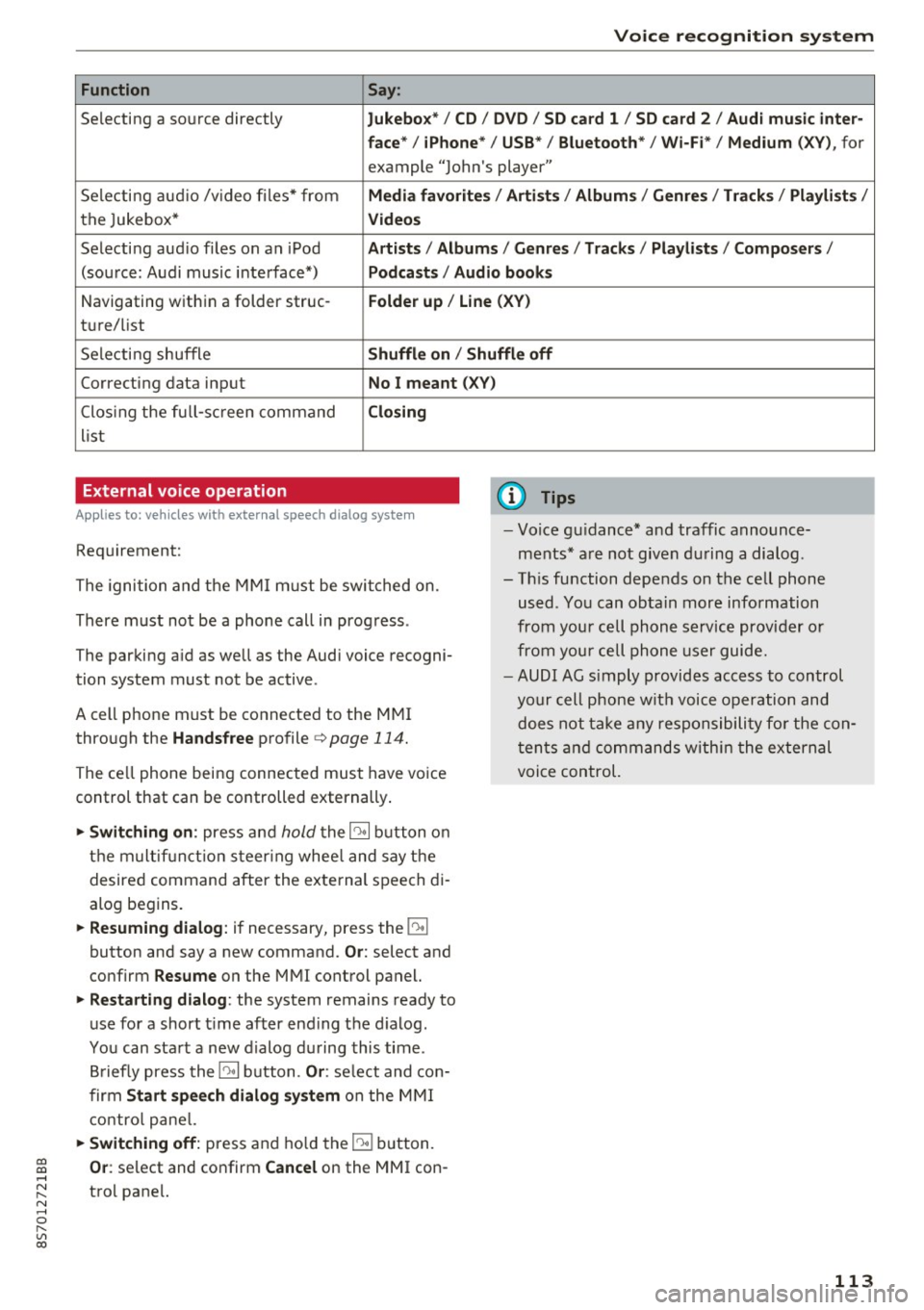
Voice recognition system
Function Say:
Selecting a so urce directly Jukebo x*/ CD/ DV D/ SD ca rd 1 / SD card 2 / Audi mu sic inter-
face * / iPhon e* / USB * / Bluetooth * / Wi -Fi * / Medium
(XV ), for
example "Jolhn's player"
Selecting aud io /v ideo files* from
Media favorite s/ Artists / Album s/ Genr es/ Track s/ Playli st s /
the Jukebox* Videos
Selecti ng aud io files on an iPod A rtists / Albums / Genre s/ Track s/ Playlists /Compos ers/
(sou rce: Audi music interface*) Podcast s / Audio books
Navigating w ith in a folder struc-Folder up / Line (XV )
tu re/list
Selecti ng shuffle
Shuffl e on / Shuffle off
Correcting data input No I meant (X V)
Clos ing the fu ll- sc reen command Closing
list
External voice operation
Applies to: veh icles with external speech dialog system
Requirement:
The ignition and the MMI m ust be swi tched on.
There must not be a phone call in progress .
The parki ng aid as well as the Audi voice recogni
tion system must not be active.
A cell phone must be connected to the MMI through the
Handsfree profile ¢page 114.
The ce ll phone being connected must have vo ice
control that can be controlled externally .
... Switching on : press and hold the 10• 1 button o n
the m ult if u nct ion s teer ing whee l and say the
desired command after the external speech di
alog begins .
... Resuming dialog : if necessary, press the 10•1
button and say a new command. Or: select and
confirm
R esume on the MMI control panel.
... Restarting dialog : the system remains ready to
use for a short t ime after end ing the d ialog.
You can sta rt a new dialog du ring this time .
B riefly press the
10• 1 button. Or : select and con
firm
Start sp eec h dialog sy stem on the M MI
contro l pane l.
... Switching off: press and ho ld the 51 b utton.
(D Tips
- Vo ice gu idance* and traffic announce
ments * are not given du ring a dialog .
- Th is function depends on the cell phone
used . You can obtain more information
from your cell phone service provider or
from your cell phone user guide.
- AUDI AG s imply provides access to control
your cell phone wit h voice opera tion and
does not take any responsibility fo r the con
t en ts and commands within the external
voice control.
~ Or : select and confirm Cancel on the MMI con-....
~ trol pane l. N ..... 0 r---
"' c:o
113
Page 133 of 314
co
co
.... N
" N .... 0
" "' c:o
-Set up destinations in your MMI using your
m yA udi acc ount or online map view
¢ page 147.
-Onli ne traffic i nfo rmat ion: receive up-to-the
minute traffic information about accidents,
road construction and other incidents
¢ page 148.
-Map updates *: import navigation map updates
in your MMI using an SD card .
@ Tips
-For the Map update Audi connect service us
ing an SD card, check the current software
version in your vehicle and compare it with
my.aud iu sa. com to see if a new version is
available . You can also have the new naviga
tion data installed by an Audi dealer, which
can be done for an add itiona l charge.
- More information on
map updat es can be
found in the
Audi c onnect Operating Man
ual under
m y.audiusa .com .
Audi connect services on the phone
Applies to: vehicles with Audi connect
The follow ing Audi connect serv ices are currently
ava ilable:
Storing contacts on your computer using your
m yAudi Ac count and loading the contacts into
the MMI directory ¢page 123.
Audi connect services in the Media menu
Applies to: vehicles with Wi- Fi audio player and Audi connect
-Wi-Fi audi o play er: you can access the media
center through Wi-Fi connected media players
(such as smartphones)
¢ page 160.
- Online m edia : offers access to different online
med ia services and operation through the MMI
using the
Audi MMI connect app .
(D Tips
For mo re information on the Wi-Fi a udio p lay
er and supported devices, contact an author
ized Audi dealer or authorized Audi Service Facility.
Audi c onn ect
Additional options
Applies to: vehicles with Audi connect
., Select: !M ENUI button> Audi conn ect> right
cont rol button .
The following options are available in the Aud i
connect serv ices overv iew :
-Lo g in: see ¢ page 128, Logging into myAudi in
the vehicle .
-Connect ion manage r: see¢ page 176.
Wi-Fi hotspot
Applies to: vehicles with Wi-Fi hotspot
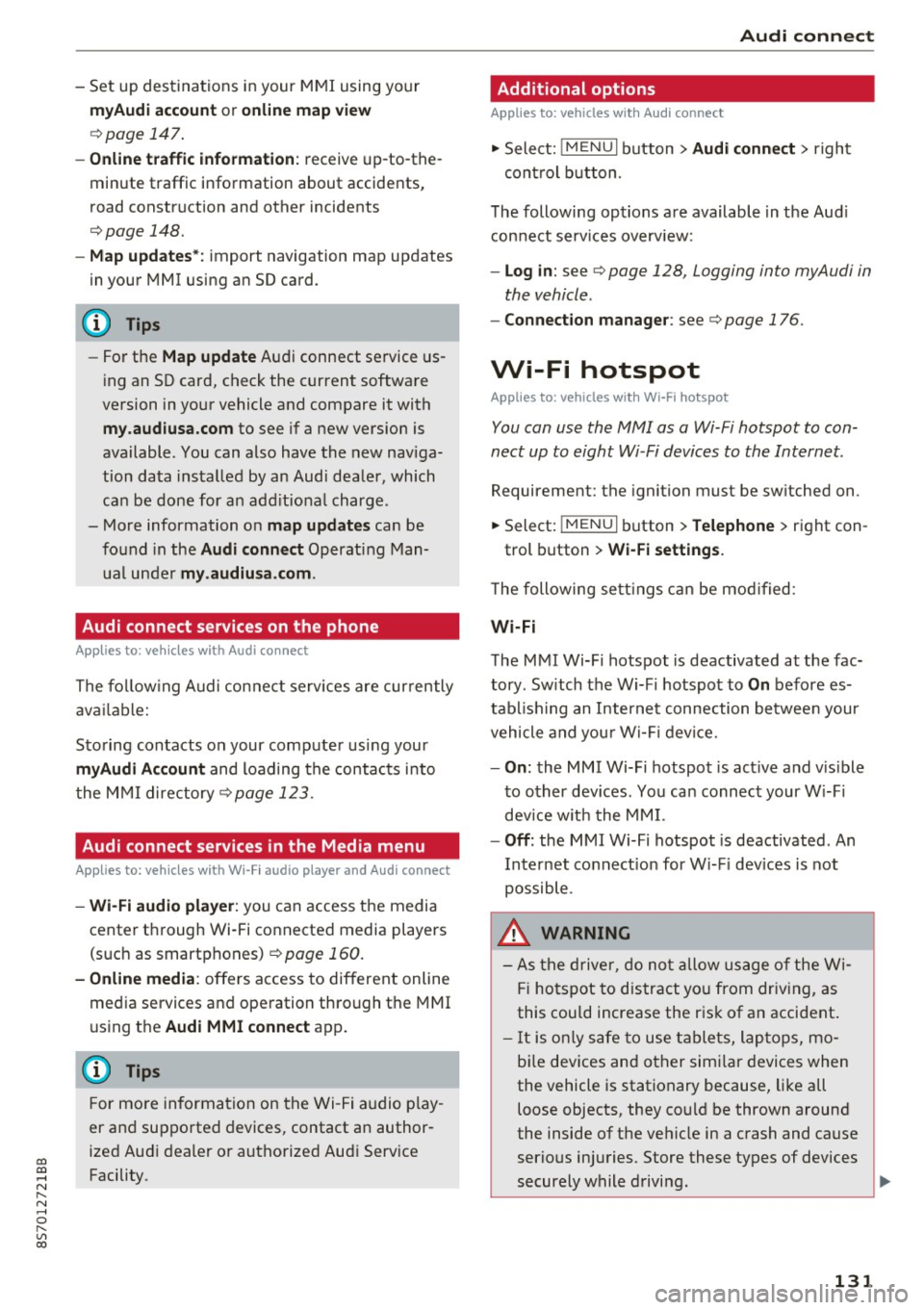
You can use the MMI as a Wi-Fi hotspot to con
nect up to eight Wi-Fi devices to the Internet.
Requirement: the ignition must be sw itched on .
.. Select:
!MENU I button> Telephone > right con-
trol button >
Wi-Fi setting s.
The following sett ings can be mod ified:
Wi -Fi
The MMI Wi-Fi hotspot is deactivated at the fac
tory . Sw itch the Wi-F i hotspot to
On before es
tab lishing an Internet connection between your
vehicle and you r Wi -Fi device.
- On : the MMI Wi-Fi hotspot is act ive and v is ible
to other dev ices. You can connect your W i-F i
dev ice w ith the MM I.
-Off : the MMI Wi-Fi hotspot is deactivated . An
Internet connect ion for W i- Fi dev ices is not
possible .
_&. WARNING
-As the driver, do not allow usage of the Wi
Fi hotspot to distract you from driving, as
this could increase the risk of an accident .
-It is only safe to use tablets, laptops, mo
bi le devices and other simi lar devices when
the vehicle is stationary because, like all loose objects, they could be thrown around
the inside of the vehicle in a crash and cause
serious injuries . Store these types of devices
securely while driving.
~
1 31
Page 161 of 314

co
co
.... N
" N .... 0
" "' c:o
When importing, the audio files a re automatical
l y sorted into the media center categor ies based
on the stored addit ional info rmation
c:> page 165. The copied video files are stored in
the media ce nter under the
Videos category.
Playing the Ju kebo x
Req uirement: the J ukebox must contain audio/
vi deo fi les
c:> page 158, Adding files to the Juke
box.
The Jukebox is a ccesse d and ope rated thr ou gh
the MMI
(D c:> page 164, fig . 144.
Displaying Jukebox memory capacity
Select: r igh t control button > Jukebox memory
capacity .
Inform ation abou t the J ukebox memory
c a pacity an d the numbe r of store d tra cks is dis
p layed .
Deleting tracks from the Jukebox1
)
Req uirement: the Ju kebox must contain audio/
video fi les.
- Deleting an entry : select an entry from the
Jukebox media center. Select: rig ht cont ro l but
ton
> Delete from Jukebox > This entry or En
tire list .
- The s tatus of the de leti ng p rocess is shown in
the MMI. Jukebox playback stops d uring the de
l eting process a nd starts again au tomatically
on ce the dele tio n i s comp lete.
(D Note
D o not import au dio/video files when the en
g in e is t urned off because this will d rain the
ve hicl e battery.
(D Tips
-Tracks fro m aud io C Ds cannot be impo rted
t o the Jukebox for leg al re as ons.
- Files that have al rea dy been import ed are
a utomat ica lly r ecogn ized and ca n not be
cop ied to the Juk eb ox again.
- It is no t possib le to play audio/v ideo* files
i n the C D/D V D* drive while import ing the m.
l) Not in th e Playba ck view .
Media
-The Jukebox does not provi de a n export
function d ue to legal reasons .
- F iles o r trac ks w ithout store d ad di tional in
formatio n are listed as
Unknown . Audi rec
ommends adding a dditio nal info rmation
(such as ID3 tags) to a udio f iles.
- Reset the J ukebox to t he factory default set
tings when selling your vehicle
c:> page 176 .
Bluetooth audio player
Applies to: vehicles with Bluetooth
With the Bluetooth audio player, you con ploy
music wirelessly from your Bluetooth-capable
device (such as a cell phone) through the MMI.
Requirement: the vehicle must be stationa ry and
the Bluetooth function on your Bl uetooth device
and the
Bluetooth audio player c:> page 177 in
t h e MMI m ust both be switched on .
-Connecting a Bluetooth de vice : press the
! MEDI Ai button. Press the left control button
until t he source overv iew is d isp layed. Select
and confirm
Bluetooth audio player @
Gpoge 164, fig. 145.
-If necessa ry, select and co nfirm, Not connected
> Connect Bluetooth audio player . The Blue
t ooth dev ice searc h starts . Fo llow the inst ruc
tions in the M MI.
- Select and confirm the des ired Bluetooth de
vice from the list. The M MI generates a PIN fo r
t he co nne ction.
- Select and confirm
Yes .
-Enter the PIN for connect ing on your Bl uetooth
dev ice.
Or : if the PIN is already displayed on
your Bl uetoo th device, confi rm it in the Blue
t ooth device and in the MMI. The t ime a llowed
for e ntering the P IN is lim ite d t o ap prox ima tely
3 0 seconds.
T he media is s tarted and operated thro ugh the
mobile device o r the MMI, de pending on t he de
vice be ing used.
@ Tips
- Check fo r any connection reques ts on you r
B lu etoo th devi ce .
159
Page 162 of 314
Media
-Multiple Bluetooth audio players can be
connected to the MMI, but only one mobile
device can be active.
- Bluetooth protocols AVRCP ( 1.0/1.3/1.4)
and A2DP are supported.
- Note the volume se tting on your Bluetooth
device. A udi recommends setting your mo
bile device to the maxim um vo lume when
us ing it as a Bluetooth audio player.
- The supported media functions (such as
shuffle) depend on the Bluetooth device be
i ng used.
- For more information on the supported de
vices, visit
www.audi.com /bluetooth or
contact your author ized Audi dealer or au
thorized Audi Service Facility.
Wi-Fi audio player
A ppl ies to: ve hicles w ith Wi-F i
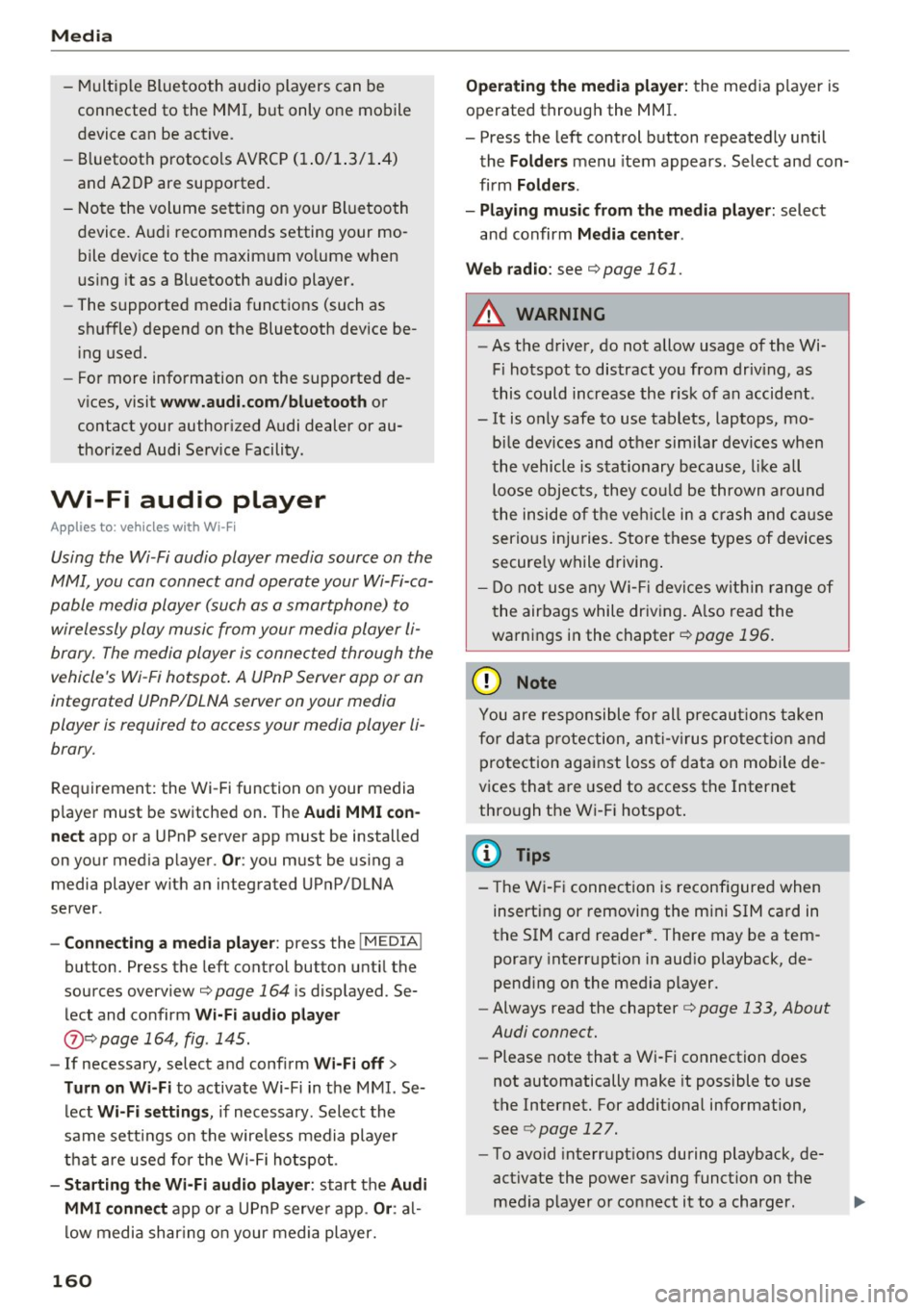
Using the Wi-Fi audio player media source on the
MMI, you can connect and operate your Wi-Fi-ca
pable media player (su ch as a smartphone) to
wirelessly play music from your media player
li
brary. The media player is connected through the
vehicle's Wi-Fi hotspot . A UPnP Server opp or an
integrated UPnPIDLNA server on your media
player is required to access your media player
li
brary.
Req uirement: the Wi-Fi function on your media
p layer must be switched on. The
Audi MMI con
nect
app or a UPnP server app must be installed
on your med ia player .
Or: you must be us ing a
media player wit h an integrated UPnP/DLNA
server .
-Connecting a media player : press the I MEDIA!
button. Press the left control button unti l the
sources overview
c::;,page 164 is d isp layed. Se
lect and co nfirm
W i-Fi audio player
(J) c::;, page 164, fig . 145.
- If necessary, select a nd confirm Wi -Fi off >
Turn on Wi-Fi
to activate Wi-Fi in the MMI. Se
lect
Wi-Fi settings , if necessary. Select the
same settings on the wire less media player
that are used for the Wi -Fi hotspot .
-Start ing the Wi -Fi audio pl ayer : start the Audi
MMI conne ct
app or a UPn P serve r app . Or: al
low medi a shar ing o n your medi a player.
160 Operating the medi
a playe r:
the med ia p layer is
operated through the MMI.
- Press the left control b utton repeatedly until
the
Folders menu item appears . Select and con
firm
Folders.
- Playing mu sic from the media player:
select
and confirm
Media cent er.
Web radio :
see c::;, page 161.
A WARNING
-As t he d river, do not allow usage of the Wi
Fi ho tspot to distract you from driv ing, as
this could increase the r isk of an accide nt.
- It is o nly safe to use tablets, laptops, mo
b ile devices and other s imilar devices when
t he vehicle is stat ionary because , like all
loose objec ts, they co uld be thrown a round
t he inside o f th e ve hicle in a crash and ca u se
serious inju ries. Store these types of devices
secure ly w hile d riving .
- Do no t use any W i-Fi devices wit hin range of
t he airbags while dr iv ing. A lso rea d the
warn ings in the chapter
¢page 196.
(D Note
You are re spon sib le fo r all pre ca utio ns taken
fo r d ata p rotection, an ti- v irus pro te cti on and
protection ag ain st loss o f data on mobi le de
v ices that a re used to access the Internet
thro ugh the W i-F i hotspot .
(D Tips
-The Wi-Fi connec tion is reconf igure d when
inserting or removin g the m ini SIM ca rd in
t h e SIM card reader*. There may be a tem
porary interr upt ion in aud io playback, de
pend ing o n the media player.
- Always read the chapter
c::;, page 133, About
Audi connect.
- Please note that a Wi-Fi connection does
not automatically make it possible to use
t h e Internet. For addit ional information,
see
c::;, page 127.
-To avoid interr upt ions during playback, de
act ivate the power sav ing funct io n on the
media player or co nnect it to a cha rger.
Page 163 of 314
co
co
.... N
" N .... 0
" "' c:o
-The loading times for the audio data depend
on the media player used and the number of
files that it contains.
- A maximum of 2,000 entries per directory
are displayed in the MMI.
- Songs downloaded for offline use using mu
sic streaming services are stored on your mobile device (such as a smartphone) and
may be DRM protected. The Wi-Fi audio
player will not play DRM protected files.
- Contact your authorized Audi dealer or au
thorized Audi Service Facility for additional
information on the Wi-Fi audio player.
Online media and
Internet radio
Applies to: vehicles with Audi connect
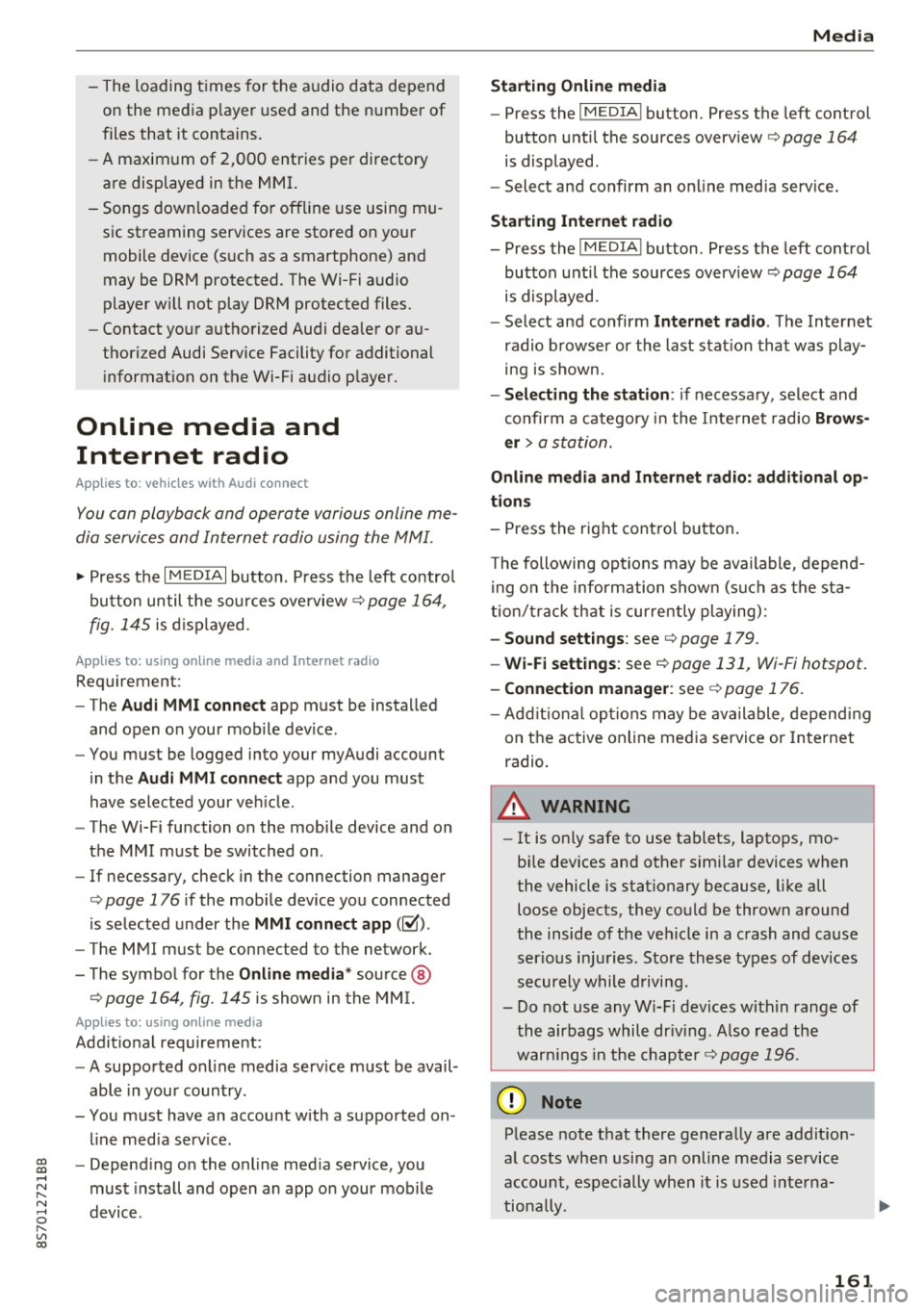
You can playback and operate various online me
dia services and Internet radio using the MMI.
• Press the I MEDIAi button. Press the left control
button until the sources overview<>
page 164,
fig. 145
is displayed .
Applies to: using online media and Internet radio
Requirement:
- The
Audi MMI connect app must be installed
and open on your mobile device.
- You must be logged into your my Audi account
in the
Audi MMI connect app and you must
have selected your vehicle.
- The Wi-Fi function on the mobile device and on
the MMI must be switched on.
- If necessary, check in the connection manager
<=> page 176 if the mobile device you connected
is selected under the
MMI connect app (~).
-The MMI must be connected to the network.
- The symbol for the
Online media* source @
<=> page 164, fig . 145 is shown in the MMI.
Applies to: using online media
Additional requirement:
- A supported online media service must be avail
able in your country.
- You must have an account with a supported on
line media service.
- Depending on the online media service, you
must install and open an app on your mobile
device .
Media
Starting Online media
- Press the I MEDIA i button. Press the left control
button until the sources overview
c:> page 164
is displayed.
- Select and confirm an online media service.
Starting Internet radio
- Press the I MEDIA ! button. Press the left control
button until the sources overview
c:> page 164
is displayed.
- Select and confirm
Internet radio . The Internet
radio browser or the last station that was play
ing is shown.
- Selecting the station : if necessary, select and
confirm a category in the Internet radio
Brows
er
> a station.
Online media and Internet radio: additional op
tions
- Press the right control button.
The following options may be available, depend
ing on the information shown (such as the sta
tion/track that is currently playing):
-Sound settings: see<> page 179.
-Wi-Fi settings: see <> page 131, Wi-Fi hotspot.
-Connection manager : see<> page 176.
-Additional options may be available, depending
on the active online media service or Internet
radio.
A WARNING
- It is only safe to use tablets, laptops, mo
bile devices and other similar devices when
the vehicle is stationary because, like all loose objects, they could be thrown around
the inside of the vehicle in a crash and cause
serious injuries . Store these types of devices
securely while driving.
- Do not use any Wi-Fi devices within range of
the airbags while driving . Also read the
warnings in the chapter <>
page 196.
Q) Note
Please note that there generally are addition
al costs when using an online media service
account, especially when it is used interna
tionally.
-
161
Page 164 of 314
Media
@ Tips
-Depending on the Internet connection and
network traffic, a connection loss can occur
during p layback of on line media serv ices.
- Online media and Internet radio usage de·
pends on the service avai lability of the third
party provider.
- Audi AG simply makes the access to online
media serv ices possible th rough the MMI
and does not take any respons ibility for the
contents of the online med ia services.
- Always read the chapter <=>page 133, About
Audi connect.
- Depending on the mobile device used, the re
may be interrupt ions during media playback
and when using the
Audi MMI connect app .
To avoid interruptions when usi ng a mob ile
d evice, do not loc k the sc reen on yo ur mo
bile devi ce and keep the
Audi MMI connect
a pp in the foreground.
- Contact you r authorized Audi dea ler or au
thorized Audi Se rvice F acili ty for a ddi tional
i n format io n a bout o n line medi a.
Multimedia connections
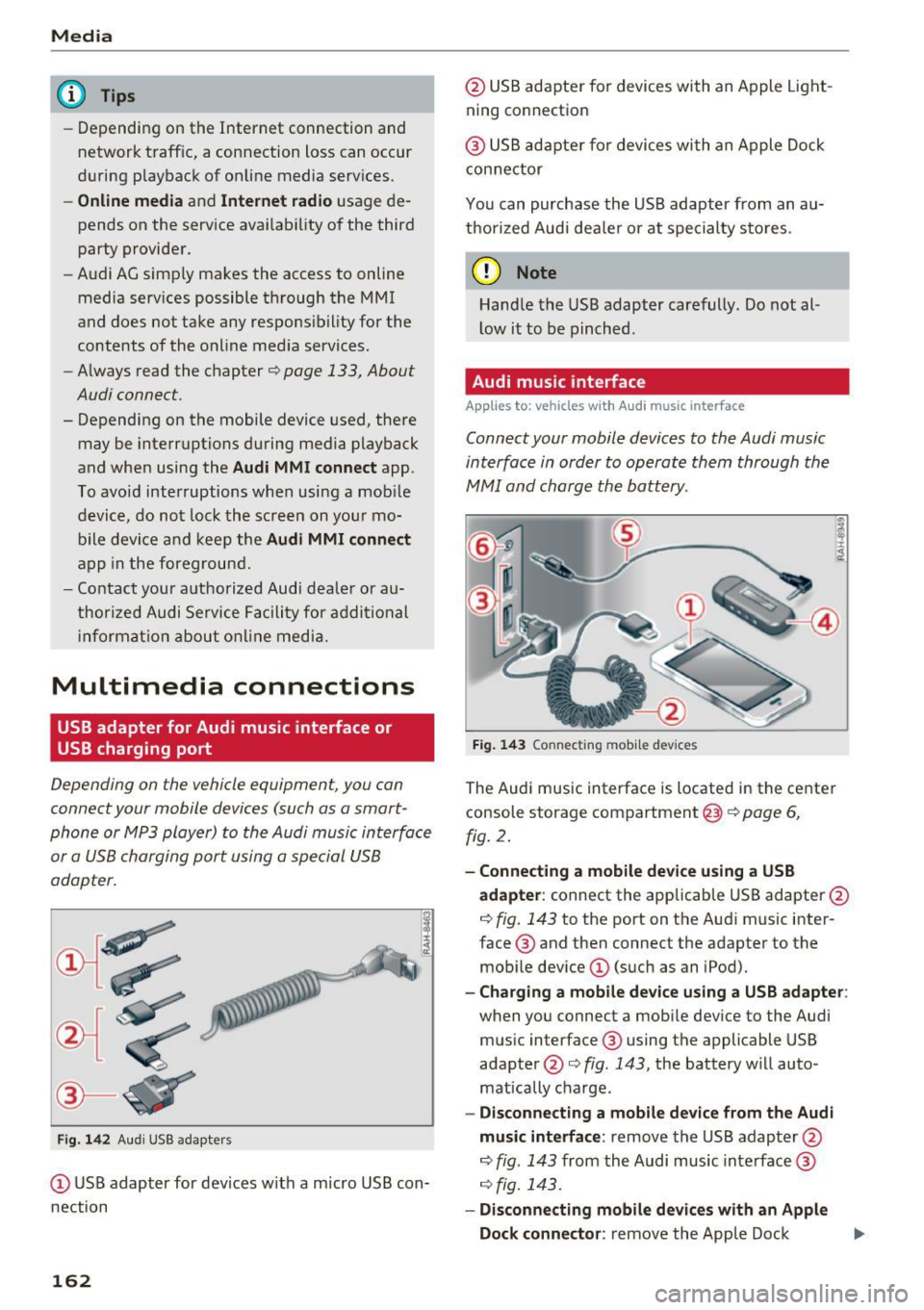
USB adapter for Audi music interface or
USB charging port
Depending on the vehicle equipment , you can
connect your mobile devices (such as a smart
phone or MP3 player) to the Audi music interface
or a USB charging port using a special USB
adapter.
Fig . 14 2 Aud i USS ada pte rs
CD US B adapter for dev ices w it h a m icro USB con
nection
162
@ USB adapte r fo r devi ces wi th an Apple Light
ning connection
@ USB ad ap ter fo r devices wi th an Apple Dock
con nector
You can purchase the USB adapter from an au
tho rized Audi dea ler or at specialty s to res.
(D Note
Hand le the USB adapter carefully. Do not al
l ow it to be pinched .
Audi music interface
Applies to: vehicles with Aud i music interface
Connect your mobile devices to the Audi music
interface in order to operate them through the
MMI and charge the battery.
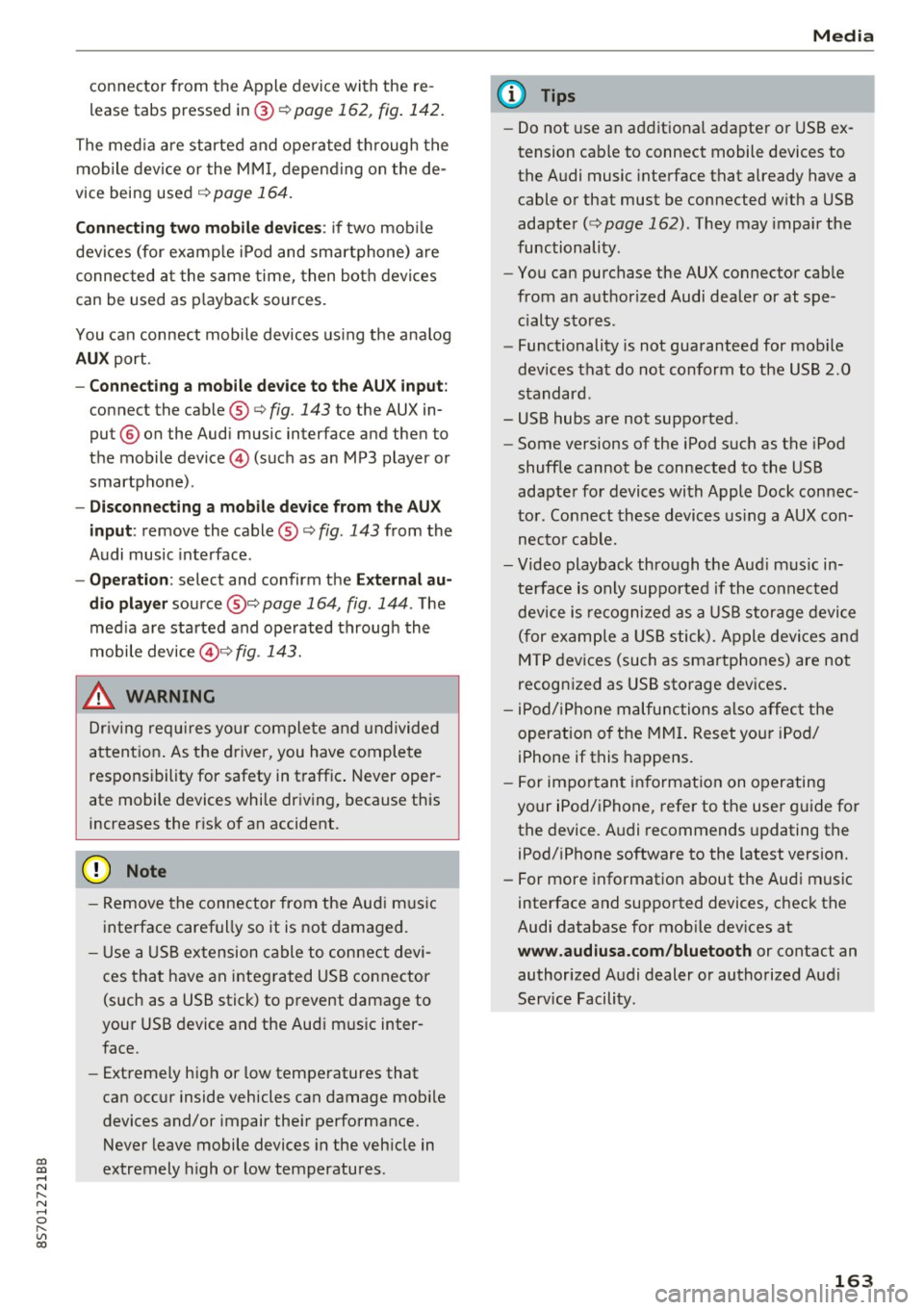
Fi g. 14 3 Connect ing mob ile devic es
The Audi music interface is located in the center
console storage compartment @
~ page 6,
fig. 2.
- Connecting a mobile device using a USB
adapter :
connect the applicab le USB adapter @
c:!) fig. 143 to the port on the Audi music inter
face ® and then connect the adapter to the
mob ile dev ice
CD (suc h as an iPod).
- Charging a mobile device using a USB adapter :
when you connect a mobile device to the Audi
mus ic interface ® using the applicable USB
adapter @<=> fig . 143 , the battery w ill auto
mat ically cha rge.
- Disconnecting a mobile d evice from the Audi
music interface :
remove the USB adapter @
<=> fig . 143 from the Audi music interface ®
r=;, fig. 143.
-Disconn ecting mobile devices with an Apple
Dock connecto r:
remove the Apple Dock .,..
Page 165 of 314
co
co
.... N
" N .... 0
" "' c:o
connector from the Apple device with the re
lease tabs pressed in@
¢page 162, fig. 142.
The media are started and operated through the
mobile device or the MMI, depending on the de
vice being used
q page 164.
Connecting two mobile devices: if two mobile
devices (for example iPod and smartphone) are
connected at the same time, then both devices
can be used as playback sources.
You can connect mobile devices using the analog
AUX port.
-Connecting a mobile device to the AUX input:
connect the cable®¢ fig. 143 to the AUX in
put @ on the Audi music interface and then to
the mobile device © (such as an MP3 player or
smartphone) .
-Disconnecting a mobile device from the AUX
input:
remove the cable®¢ fig. 143 from the
Audi music interface.
-Operation: select and confirm the External au
dio player
source @¢ page 164, fig. 144 . The
media are started and operated through the
mobile device@~
fig. 143.
.8, WARNING
Driving requires your complete and undivided
attention. As the driver, you have complete
responsibility for safety in traffic. Never oper
ate mobile devices while driving, because this
increases the risk of an accident.
@ Note
- Remove the connector from the Audi music
interface carefully so it is not damaged.
- Use a USB extension cable to connect devi
ces that have an integrated USB connector
(such as a USB stick) to prevent damage to
your USB device and the Audi music inter
face.
- Extremely high or low temperatures that
can occur inside vehicles can damage mobile
devices and/or impair their performance.
Never leave mobile devices in the vehicle in
extremely high or low temperatures .
Media
{!) Tips
-Do not use an additional adapter or USB ex
tension cable to connect mobile devices to
the Audi music interface that already have a
cable or that must be connected with a USB
adapter( ¢
page 162). They may impair the
functionality .
- You can purchase the AUX connector cable
from an authorized Audi dealer or at spe
cialty stores .
- Functionality is not guaranteed for mobile
devices that do not conform to the USB 2.0
standard.
- USB hubs are not supported .
- Some versions of the iPod such as the iPod
shuffle cannot be connected to the USB
adapter for devices with Apple Dock connec
tor . Connect these devices using a AUX con
nector cable.
- Video playback through the Audi music in
terface is only supported if the connected
device is recognized as a USB storage device
(for example a USB stick). Apple devices and
MTP devices (such as smartphones) are not
recognized as USB storage devices .
- iPod/iPhone malfunctions also affect the
operation of the MMI. Reset your iPod/
iPhone if this happens.
- For important information on operating
your iPod/iPhone, refer to the user guide for
the device. Audi recommends updating the
iPod/iPhone software to the latest version.
- For more information about the Audi music
interface and supported devices, check the
Audi database for mobile devices at
www.audiusa.com/bluetooth or contact an
authorized Audi dealer or authorized Audi
Service Facility.
163