2017 AUDI TT ROADSTER CD player
[x] Cancel search: CD playerPage 166 of 314
Media
Playing media
Accessing media
You can start and operate various media
through the MMI control panel.
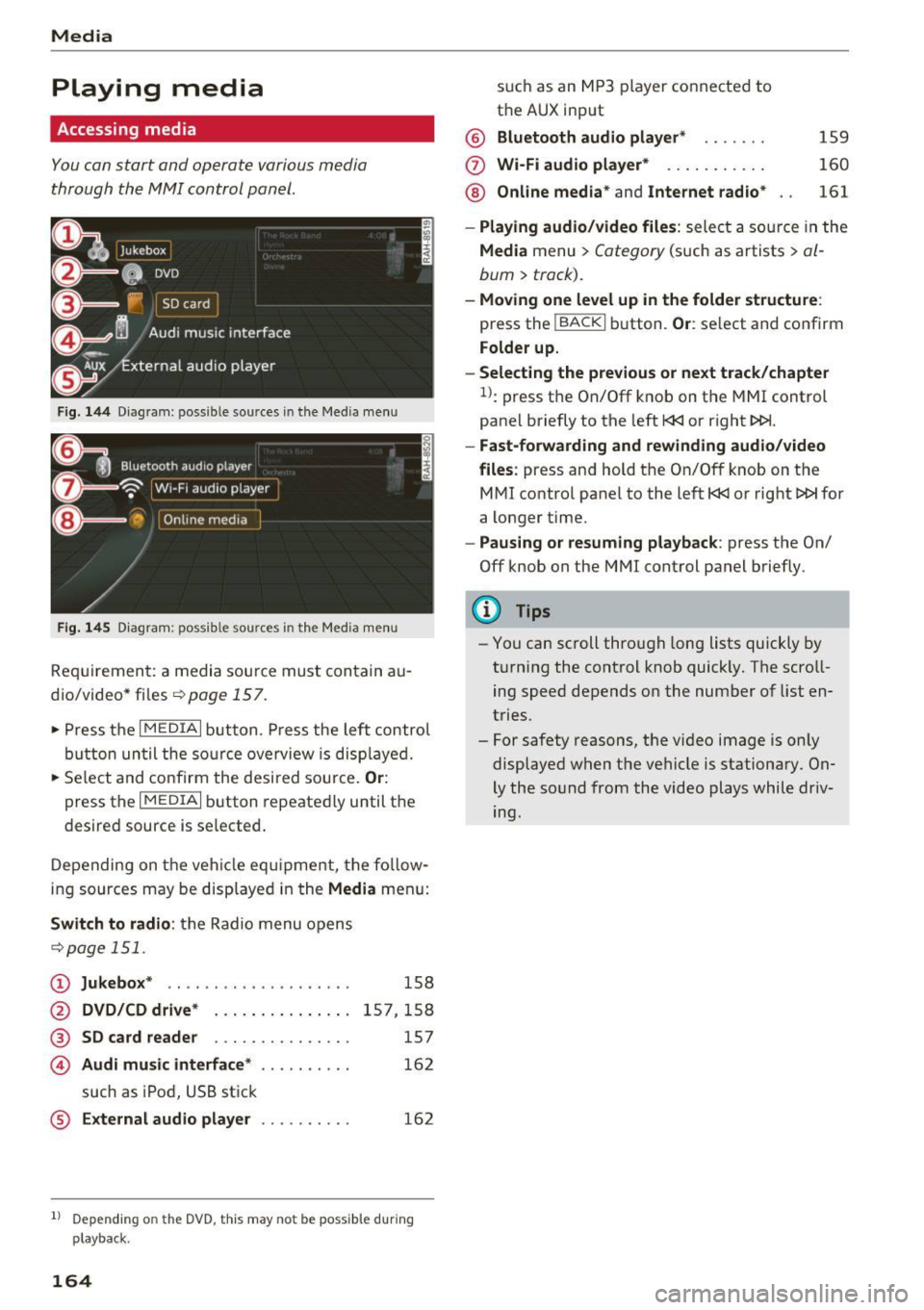
Fig . 14 4 Dia gr am : possible sources in the Media m enu
F ig. 145 D iag ra m : possible sources in t he Me dia me nu
Re qu ir emen t: a media sou rce must contain a u
dio/video* files-=>
page 157.
• Press t he I M EDIAi bu tton. Press the left co ntro l
button until the so urce ove rview is disp laye d.
• Se lect and confirm the desi red sou rce.
Or :
press the I MEDIAi button repeated ly until the
desired source is selected .
D epending on the ve hicle eq uipme nt, t he fo llow
i ng sources may be disp laye d in the
Media men u:
Switch to radio : the R adio menu o pens
-=> page 1 51.
CD Jukebox * .. ... ... ..... ..... ..
@ DVD/CD drive* ..... ....... .. .
® SD card reader . . . . . . . . . . . . . . .
© Audi music interface* ....... ...
such as iPod, U SB st ick
® External audio player . .. ...... .
158
15 7,1 58
157
16 2
162
1l Depend ing o n the DVD, this may not be possible du rin g
playback.
164
s u ch a s an MP3 player conne cte d to
t h e AUX input
@ Bluetooth audio player * .. .... .
(f) Wi -Fi audio player* .......... .
@ Online media* and Internet radio *
159
160
161
- Playing audio/video files : select a so urce in the
Media menu > Category (such as a rtists > al
bum> track).
-Moving one level up in the folder structu re :
press the IBACKI b utton. Or : select and confirm
Folder up.
- Selecting the previous or next track /chapter
1>: press t he On/Off k nob on the MMI control
panel briefly to the left
l
- Fast-forwarding and rew inding audio/video
files :
press and hold t he On/Off knob on the
M Ml control panel to the left
l
a longer time.
-Pausing or resuming playback : press the On/
Off knob on the MMI control panel b riefly.
(D Tips
- Yo u can scroll through long lists quickly by
t ur nin g the control knob quickly. The scroll
ing speed depends o n the number of list en
tries.
- For safety reasons, the vi deo image is on ly
displaye d when the vehicle is stationary. On
ly the so und from the video plays while driv
ing.
Page 171 of 314
co
co
.... N
" N .... 0
" "' c:o
Picture for-
mat
4:3
16: 9
(D Tips Information
The image is fixed in the 4:3 pie-
ture format.
Black bars are shown
on the s ides of the Infotainment
system display.
The image is fixed in the 16 :9 pie-
ture format . B lack bars are shown
in the upper and lower edges of the
Infotainment system display.
Media
- The security levels for the Parental cont rol
are based on the US standards from the Mo
tion P icture Associat ion of America (MPAA).
Note that the age levels for v ideo DVDs in
European countries may differ.
- Password entry for
P ar ental contro l will be
locked for approx imately one m inute if you
enter the incorrect password three t imes in
a row. The password can only be reset by an
authorized Audi dealer.
- Not a ll video DVDs have parental control.
Supported media and file formats
Overview
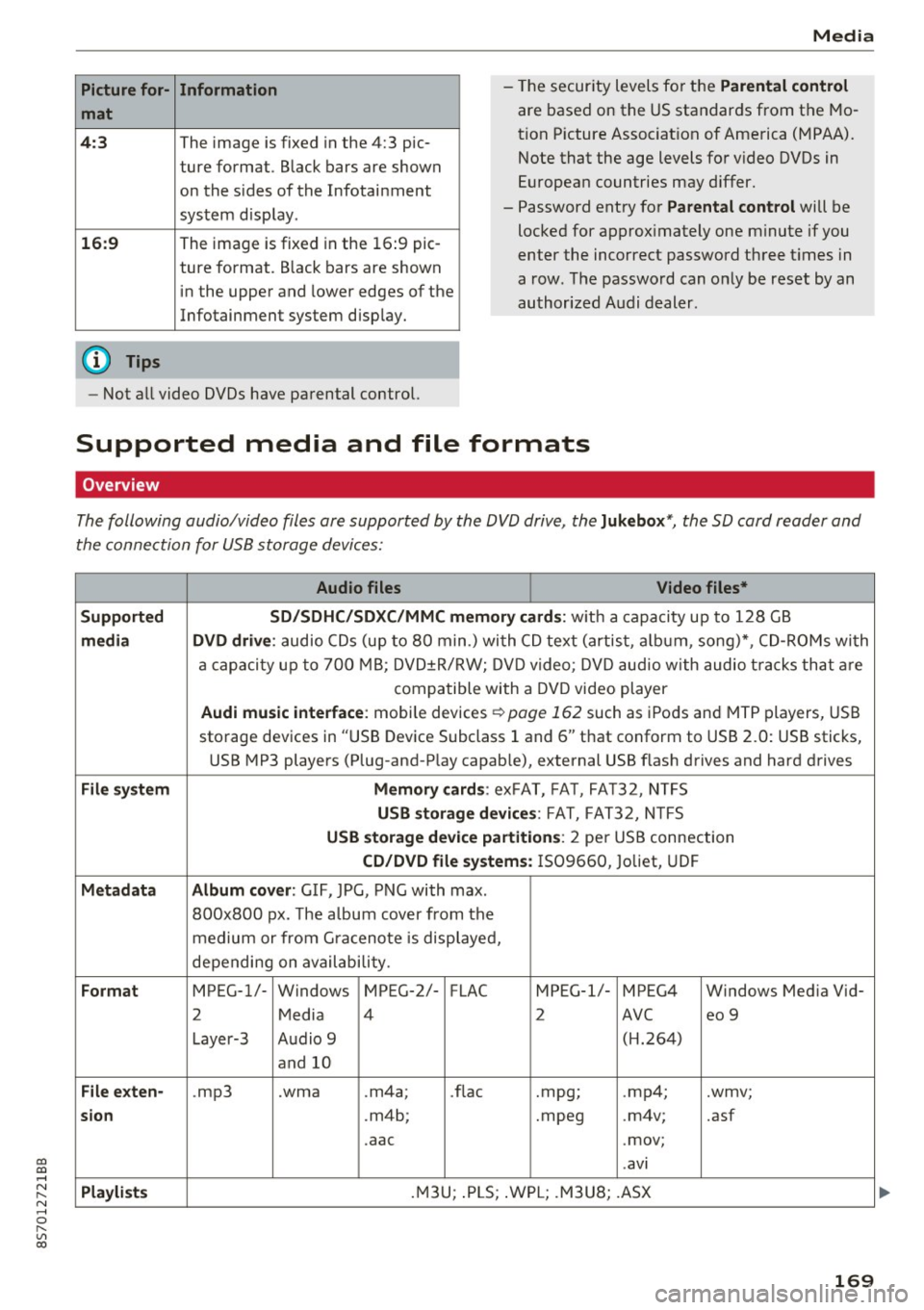
The following audio/video files are supported by the DVD drive, the Juk eb ox*, the SD card reader and
the connection for USB storage devices:
Audio fil es Vid eo fil es*
Support ed SD/SDH C/SDX C/MM C me mory ca rds:
w ith a capacity up to 128 GB
m edi a DV D driv e: audio CDs (up to 80 min .) with CD text (artist, a lbum, song)*, CD-ROMs with
a capacity up to 700 MB; DVD±R/RW; DVD video; DVD audio with audio t racks that are
compatible with a DVD video player
Aud i mu sic int erfac e: mobile devices r=>page 162 such as iPods and MTP players, USB
storage devices in "USB Device Subclass 1 and 6" that conform to USB 2.0: USB sticks,
USB MP3 players (Plug-and-Play capable), external USB flash drives and hard drives
File syste m Memory c ard s: exFAT, FA T, FA T32, NTFS
USB sto rag e devices: FAT, FAT32, N TFS
USB stora ge device pa rtition s: 2 per USB connection
CD/DV D file sy ste ms: IS09660, Joliet, UDF
Metadat a Album co ver: GIF, JPG, PNG with max.
800x800 px. The a lbum cover from the
medium or from Gra cenote is displayed,
depending on availability.
Form at MPEG-1/- Windows MPEG-2/- FLAC MPEG-1/- MPEG4 Windows Media Vid-
2 Media 4 2 AVC
eo 9
Layer-3 Audio 9 (H.264)
and 10
Fil e ex ten -.mp3 .wma .m4a;
.flac .mpg;
.mp4; .wmv;
si on .m4b; .mpeg .m4v; .asf
.aac .mov;
.avi
Playlist s .M3U; .PLS; .WPL; .M3U8; .ASX
169
Page 172 of 314
Media
Audio files Video files*
Characteris-
up to maximum 320 kbit/s and 48 kHz up to maximum 2,000 kbit/s and
tics
Number of
files
(D Tips
48 kHz sampling frequencies sampling 720x576 px. at maximum 2Sfps
frequen-
cy
DVD drive*: max. 1,000 files per medium
Jukebox* : approximate ly 10 GB memory capacity; max . 3,000 files can be imported
USB storage devices and memory cards: max. 10000 files per medium; max. 1000
fi les pe r playlist/directory
on the system language and cannot always
be guaranteed.
- The media drives do not support the Win
dows Media Audio 9 Voice format. -
Th e manufacturer of the storage device can
provide informat ion about its "USB Dev ice
Subclass".
-
To compress MP3 fil es, a bit rate of at least
160 kbit/s is recommended. The display
showing the remaining play time may differ
for MP3 f iles w ith variable bit rate.
- Specia l characters (such as those in 103 tag
in format ion) display different ly depending
CD drive
A ppl ies to: ve hicles w ith a CD drive
- Some MTP player functions are not support
ed, such as rating mus ic tracks and video
playback.
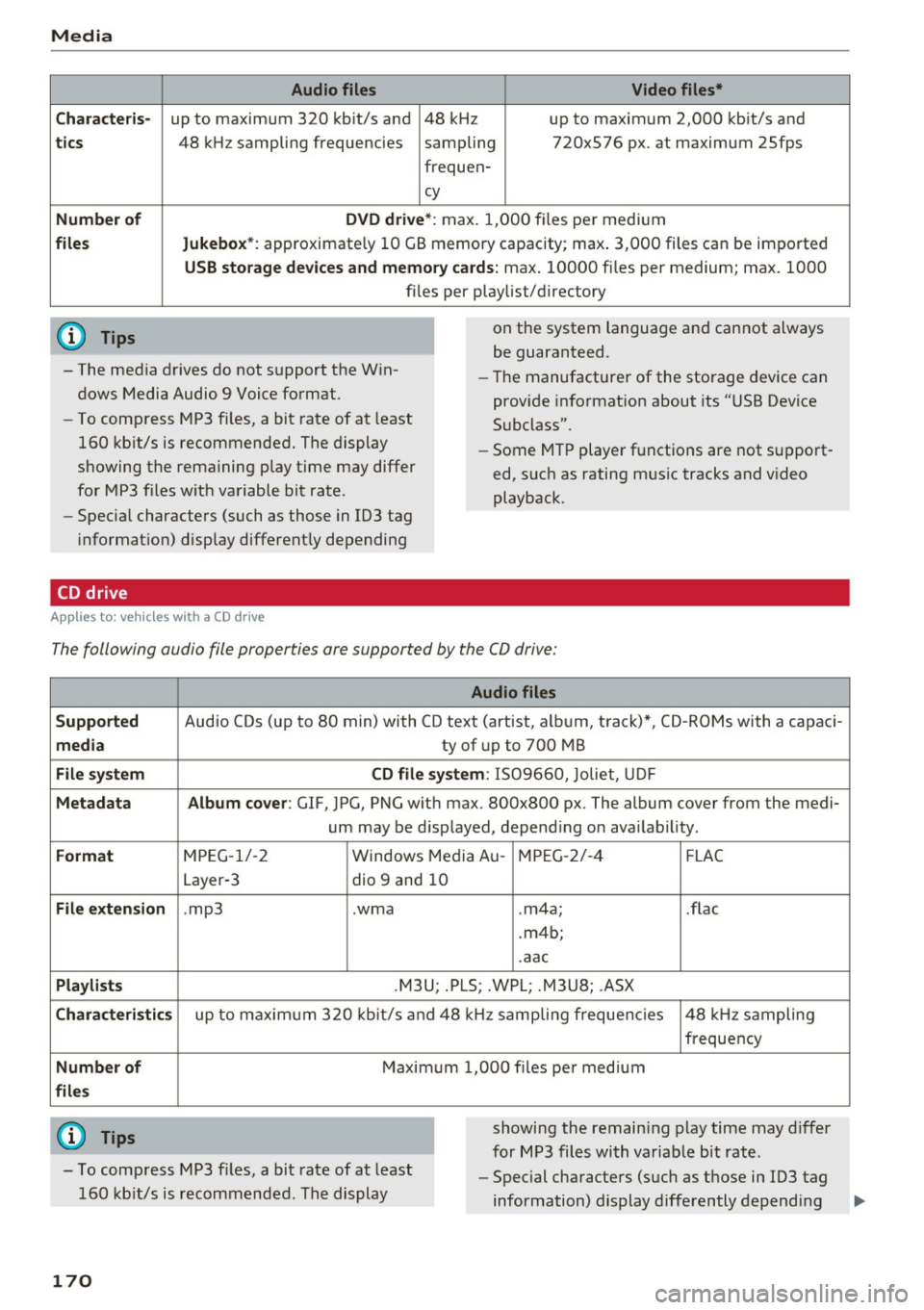
The following audio file properties are supported by the CO drive:
Supported
media
File system
Metadata
Format
File extension
Playlists
Characteristics
Number of
files
(0 Tips
Audio files
Audio CDs (up to 80 min) with CD text (artist, a lbum, track)*, CD-ROMs with a capaci-
ty of up to 700 MB
CD file system: 1509660, Jo liet, UDF
Album cover: GlF, JPG, PNG w ith max. 800x800 px. The album cover from the medi-
um may be d isplayed, depend ing on availab ility.
MPEG-1/-2 Windows Med ia Au -MPEG-2/-4 FLAC
Layer-3 dio 9 and 10
. mp3 .wma .m4a; .flac
. m4b;
.aac
.M3U; .PLS; .WPL; .M3U8; .ASX
up to maximum 320 kbit/s and 48 kHz sampling frequencies 48 kHz sampling
frequency
Maximum 1,000 files per medium
showing the remain ing play time may differ
for MP3 files with variable bit rate .
- To comp ress MP3 files, a bit rate of at least
160 kb it/s is recommended. The display -
Special characters (such as those in 103 tag
information) display differently depending
170
Page 173 of 314
co
co
.... N
" N .... 0
" "' c:o
Media
on the system language and cannot a lways
be g uaranteed .
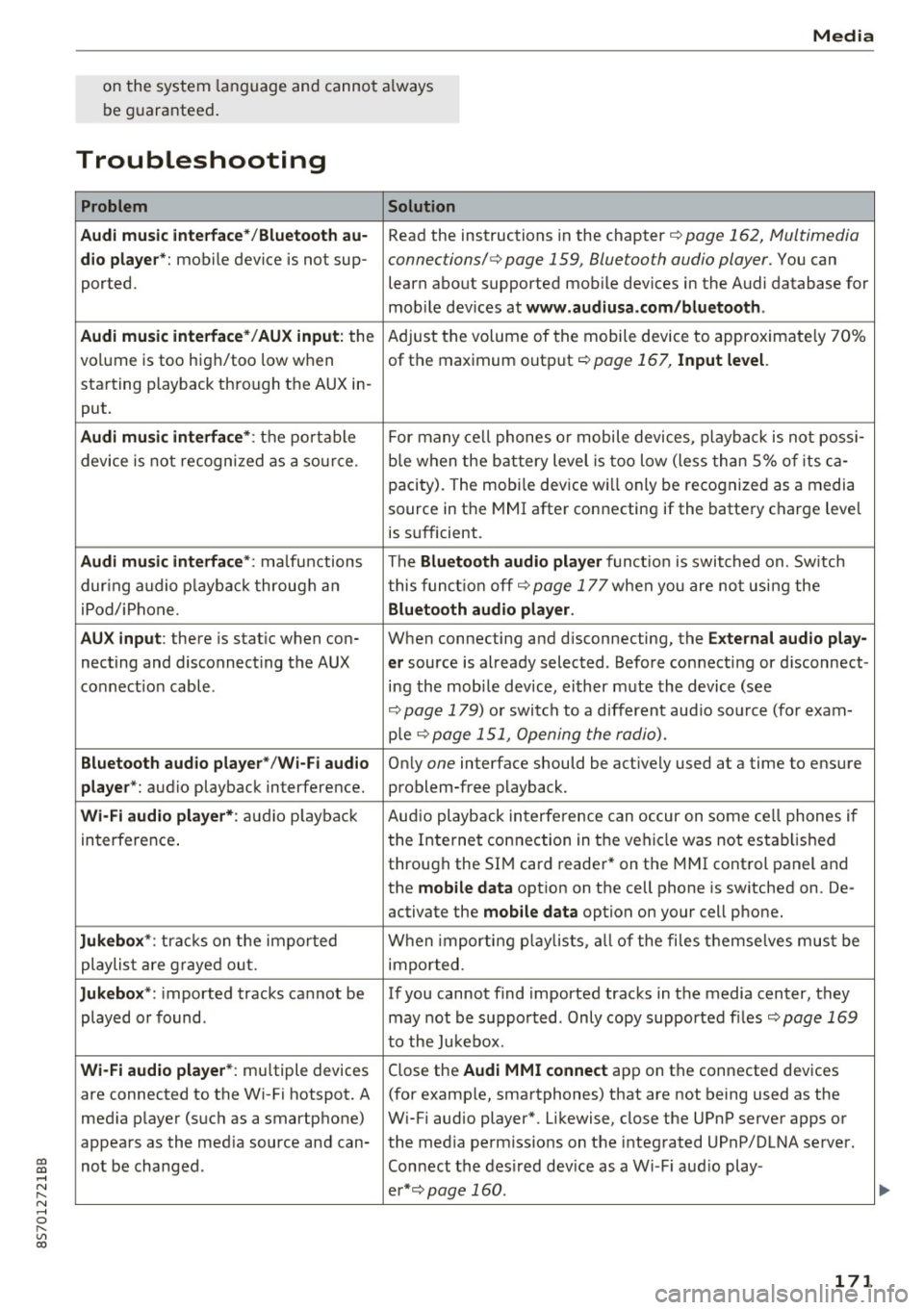
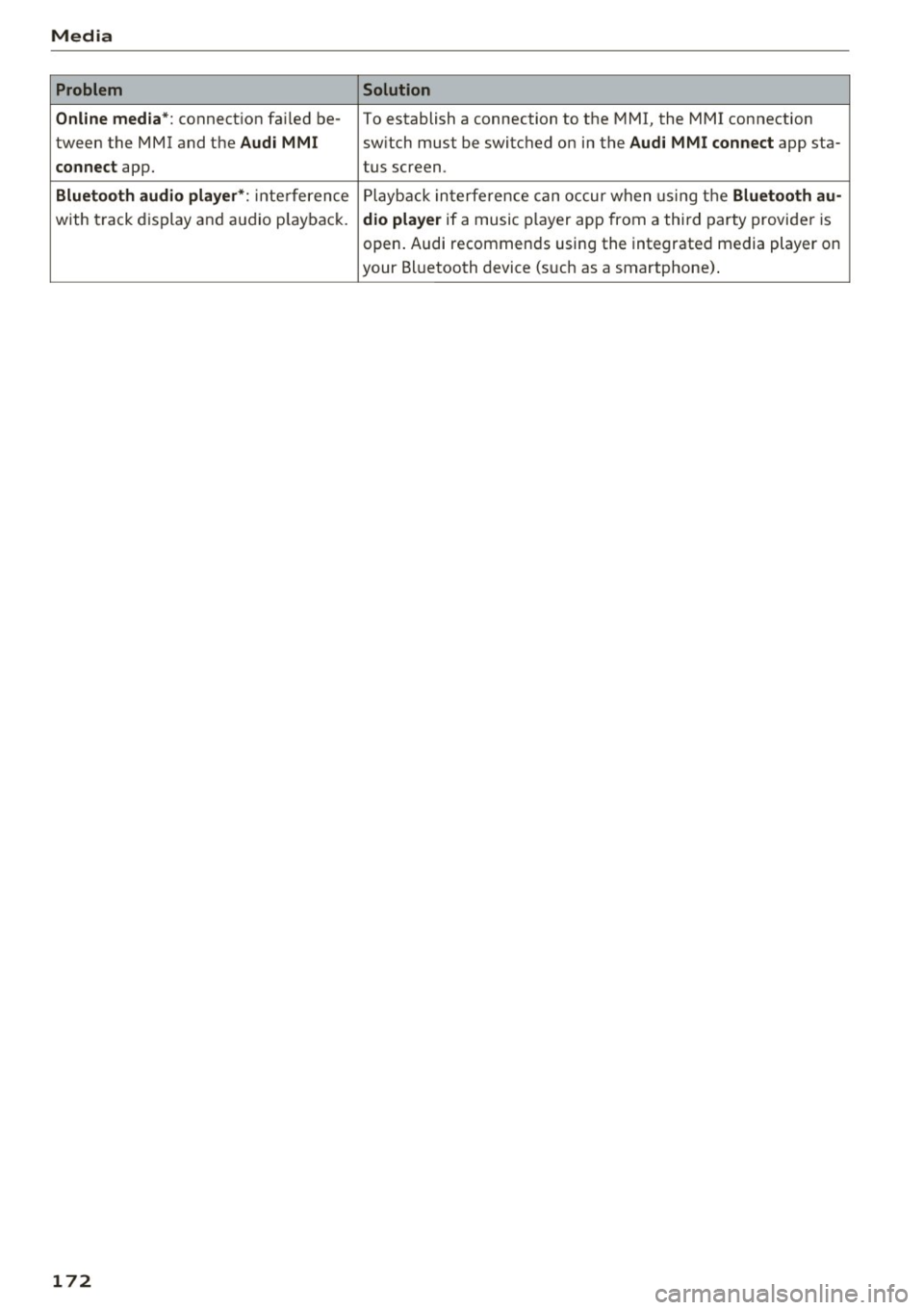
Troubleshooting
Problem Solution
Audi music interface* /Bluetooth au-
Read the instructions in the chapter ¢ page 162, Multimedia
dio player *: mobile device is not sup-connections/ ¢ page 159, Bluetooth audio player. You can
ported. learn about supported mobile devices in the Audi database for
mob ile dev ices at
www .audiusa.com /bluetooth .
Audi music interface* /AUX input:
the Adjust the volume of the mobile device to approximate ly 70%
volume is too high/too low when of the maximum output
¢ page 167, Input level.
starting playback through the AUX in-
put.
Audi music interface *: the portable For many cell phones or mobile devices, playback is not possi-
device is not recognized as a source. b
le when the battery level is too low (less than 5% of its ca-
pacity) . The mobi le device will only be recognized as a media
source in the MMI after connecting if the battery charge level
is sufficient.
Audi music interface *: malfunctions The Bluetooth audio player functio n is switched on. Switch
dur ing audio playback through an this funct io n off¢
page 177 when you are not using the
iPod/ iPhone .
Bluetooth audio player.
AUX input:
there is stat ic when con- When connecting and d isconnecting, the E xternal audio play-
necting and disconnect ing the AUX er source is already selected . Before connecting or d isconnect-
connection cable. ing the mobile dev ice, either m ute the device (see
¢ page 179) or switch to a different aud io so urce (fo r exam-
p ie
¢page 151, Opening the radio).
Bluetooth audio player * /Wi-Fi audio On ly one interface should be act ively used at a time to ensure
player* : audio playback interference. problem-free playback.
Wi-Fi audio player* : audio pla yback Aud io playback interference can occur on some ce ll phones if
in terference . the Internet connection in the vehicle was not estab lished
through the SIM card reader* on the MMI control panel and
the
mobile data option on the cell phone is switched on. De-
activate the
mobile data option on your cell phone.
Jukebox* : tracks on the imported When importing p laylists , all of the files themse lves must be
playlist are grayed out. imported.
Jukebox*: imported tracks cannot be If you cannot find imported tracks in the media center, they
played or found . may not be supported. Only copy supported f iles
¢ page 169
to the Jukebox .
Wi-Fi audio player* : multiple devices
Close the Audi MMI connect app on the connected devices
are connected to the Wi-Fi hotspot. A (for exam ple, smartphones) that are not being used as the
med ia p layer (such as a smartphone) Wi-Fi audio player*. Likewise, close the UPnP server apps or
appears as the med ia source and can- the med ia permiss ions on the integrated UPnP/DLNA server.
not be changed . Connect the desired dev ice as a W i- F i aud io play-
er* ¢page 160 .
171
...
Page 174 of 314
Media
Problem Solution
Online media*:
connection failed be-To establish a connection to the MMI, the MMI connection
tween the MMI and the
Audi MMI switch must lbe switched on in the Audi MMI connect app sta-
connect app. tus screen.
Bluetooth
audio player *: interference Playback interference can occur when using the Bluetooth au-
with track display and audio playback. dio player if a music player app from a third party provider is
open. Audi recommends using the integrated media player on
your Bluetooth device (such as a smartphone) .
172
Page 179 of 314
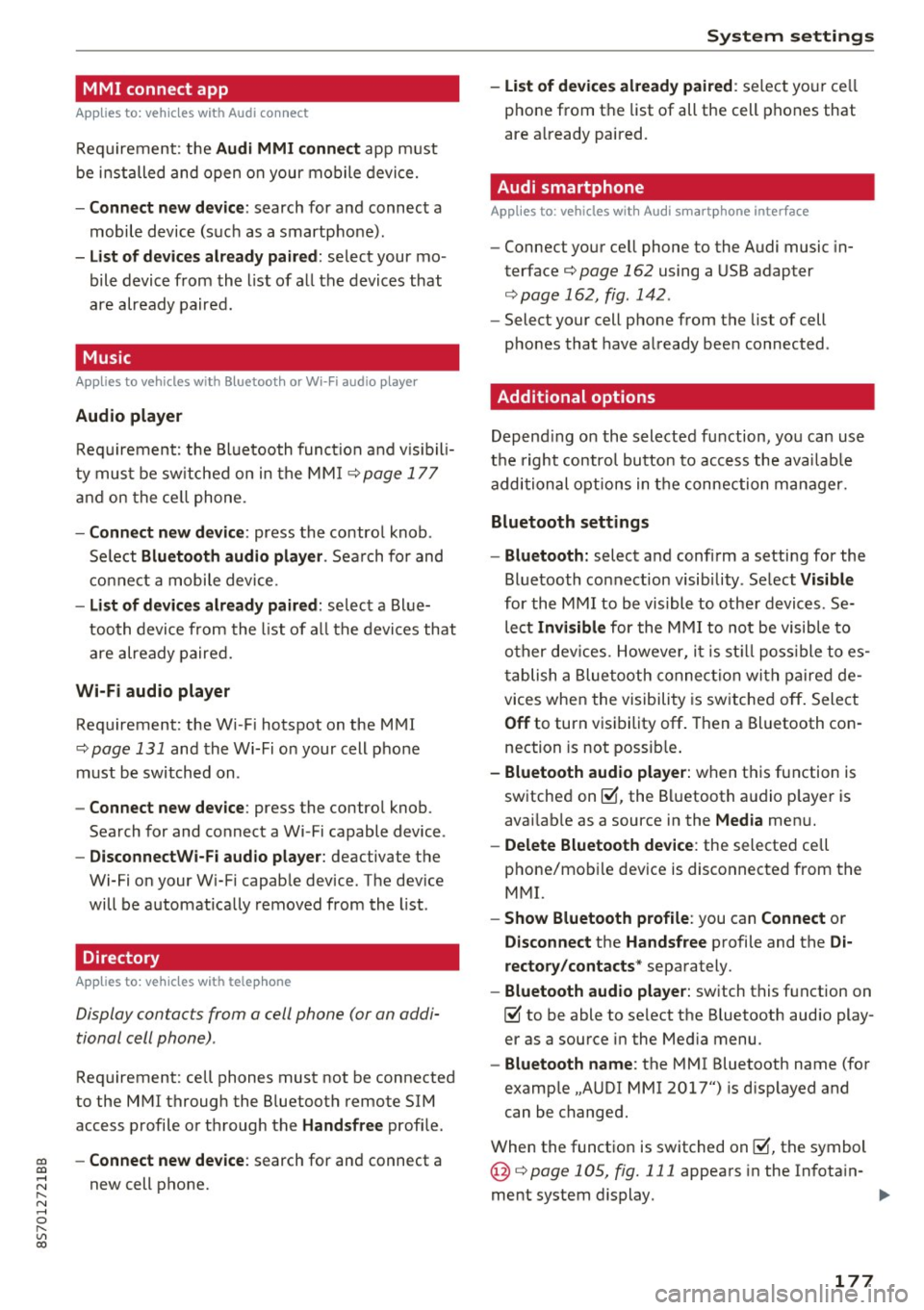
MMI connect app
Applies to: vehicles with Audi connect
Requ ireme nt: the Audi MMI connect app m ust
be i nst alled and open on your mobile devi ce.
- Connect new dev ice : search for and connect a
mobile device (s uch as a smartp hone).
- List of devices already paired : select your mo
bile device from th e list of a ll the devices that
are already paired.
Music
Applies to vehicles with Bluetooth or Wi -Fi audio player
Audio player
Req uirement: the Bl uetooth func tion a nd v is ib ili
ty mus t be sw itche d on in the MMI
¢page 177
and on the ce ll phone.
- Connect new device : press the contro l knob .
Se lect
Bluetooth audio player . Search fo r and
c o nne ct a mobile device.
- List of devices already paired : selec t a Bl ue
tooth device fro m the l ist of all the devi ces that
are already paire d.
Wi-Fi audio player
Req uirement: the Wi -Fi hotspot on the M MI
¢
page 131 and the Wi-Fi o n your cell p ho ne
must be switch ed on .
-Connect new device : press the control knob.
Sea rch for and connect a Wi-Fi capable device .
-DisconnectWi-Fi audio player : deactivate the
Wi-Fi on your Wi-Fi capab le device . The dev ice
will be automat ically removed from the list .
Directory
Applies to: vehicles with telephone
Display contacts from a cell phone (or an addi
tional cell phone) .
Requirement: cell phones must not be connected
to the MMI through the B luetooth remote SIM
access p rofile o r thr ough t he
Handsfree profi le.
co -Connect new device : search for and connect a co
;:::: new cell p hone.
" N ...... 0
" "' c:o
System settings
- List of devices already paired : select yo ur cell
phone from t he list of all the cell phones that
are a lready paired .
Audi smartphone
Applies to: vehicles with Aud i smartphone interface
- Connect yo ur ce ll phone to the Audi music in
terface¢
page 162 using a USB adapter
¢ page 162, fig . 142 .
-Select your cell pho ne from the list of cell
p hones that have a lready bee n connected .
Additional options
Depending on the selected f unction, yo u can use
t h e right contro l bu tto n to access the ava ilab le
additional options in t he connection manager.
Bluetooth settings
- Bluetooth:
select a nd confi rm a setti ng for the
Bluetooth co nnection visib ility . Se lect
Visible
for the MMI to be vis ible to othe r devic es. Se
lect
Invisible for the MMI to not be visib le to
o the r dev ices. However, i t is st ill poss ible t o es ·
t ablish a Blue tooth connec tion wit h pa ire d de
vices when the vi sibili ty is sw itched off . Select
Off to turn v is ib ility off . Then a Bl uetooth con
nection is not possib le .
- Bluetooth audio player: when t his function is
sw itched on~, the B luetooth a udio p laye r is
avai lab le as a source in the
Media men u.
- Delete Bluetooth device : the selected cell
phone/mob ile dev ice is disconnected from the
M MI.
- Show Bluetooth profile : you can Connect or
Disconnect the Handsfree profile and the Di
rectory/contacts *
separately.
- Bluetooth audio player : switch this f unction on
~ to be able to select the Bluetooth aud io play
er as a source i n the Med ia menu .
-Bluetooth name : the MMI Bluetooth name (fo r
examp le .,A UDI MMI 2017") is d isp layed and
can be changed.
When the funct io n is switched on~, the symbol
@ ¢
page 105 , fig. 111 appea rs in the In fotain-
ment system display.
1111-
177
Page 203 of 314
co
co
.... N
" N .... 0
" "' c:o
that are large, heavy, or bulky) on the doors;
never attach then to the doors or the wind
shield; never place them over or near or at
tach them to the area marked ,.AIRBAG" on
the steering wheel, instrument panel or the
seat backrests; never place them between
these areas and you or any other person in
the vehicle.
- Never attach objects to the windshield
above the passenger front airbag, such as
accessory GPS navigation units or music
players. Such objects could cause serious in
jury in a collision, especially when the air bags inflate.
&_ WARNING
A person on the front passenger seat, especially infants and small children, will receive
serious injuries and can even be killed by be
ing too close to the airbag when it inflates.
- Although the Advanced Airbag System in
your vehicle is designed to turn off the front
passenger airbag if an infant or a small child
is on the front passenger seat, nobody can
absolutely guarantee that deployment un
der these special conditions is impossible in
all conceivable situations that may happen
during the useful life of your vehicle.
- The Advanced Airbag System can deploy in
accordance with the "low risk" option under
the U.S. Federal Standard if a child that is
heavier than the typical one-year old child is
on the front passenger seat and the other
conditions for airbag deployment are met.
- For its own safety, a child should always ride
properly restrained for its age and si ze.
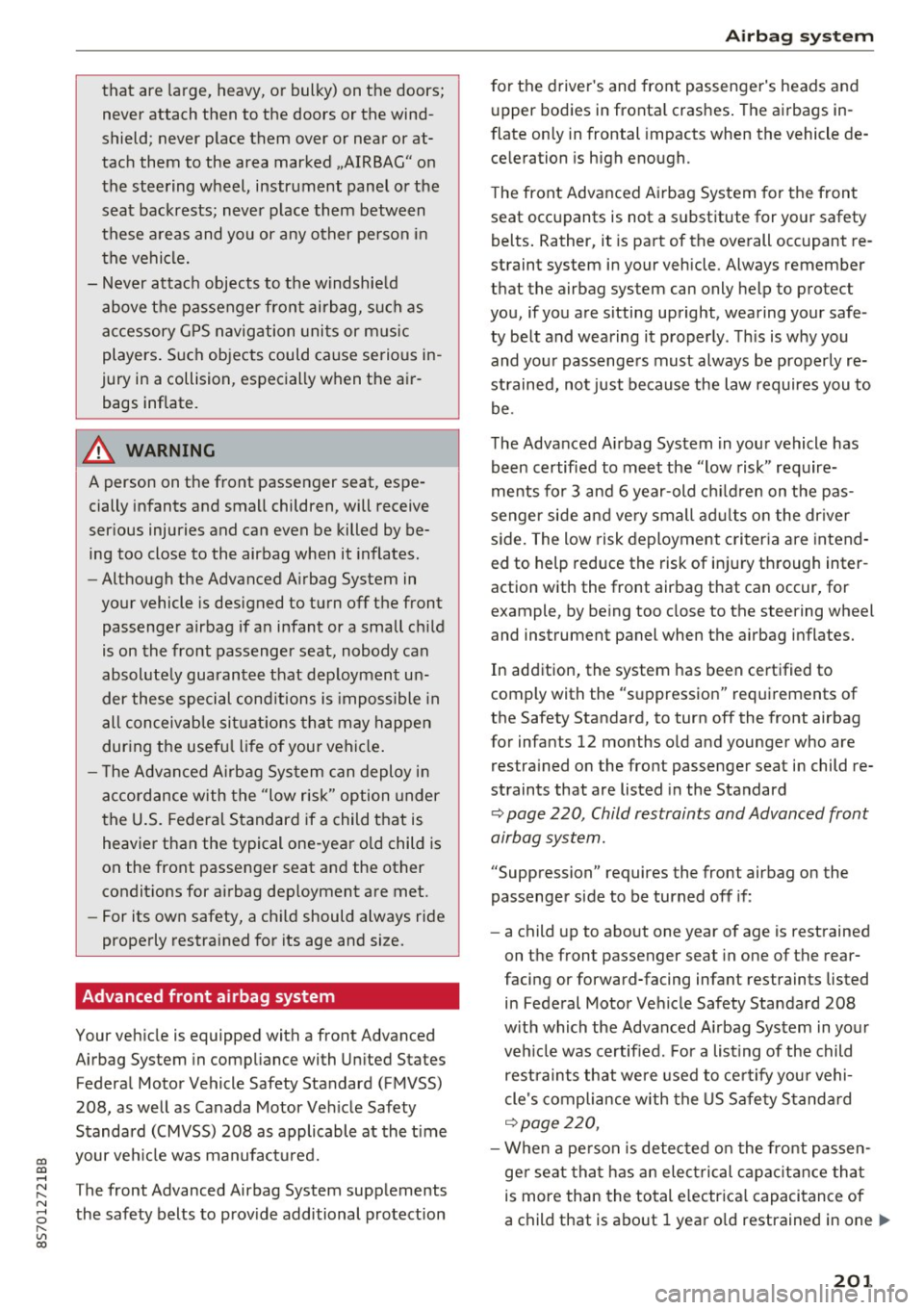
Advanced front airbag system
Your vehicle is equipped with a front Advanced
Airbag System in compliance with United States
Federal Motor Vehicle Safety Standard (FMVSS)
208, as well as Canada Motor Vehicle Safety
Standard (CMVSS) 208 as applicable at the time
your vehicle was manufactured.
T he front Advanced Airbag System supplements
the safety belts to provide additional protection
Airbag system
for the driver's and front passenger's heads and
upper bodies in frontal crashes. The airbags in
flate only in frontal impacts when the vehicle de
celeration is high enough.
The front Advanced Airbag System for the front
seat occupants is not a substitute for your safety
belts. Rather, it is part of the overall occupant re
straint system in your vehicle . Always remember
that the airbag system can only help to protect
you, if you are sitting upright, wearing your safe
ty belt and wearing it properly. This is why you
and your passengers must always be properly re
strained, not just because the law requires you to
be.
The Advanced Airbag System in your vehicle has
been certified to meet the "low risk" require
ments for 3 and 6 year-old children on the pas
senger side and very small adults on the driver
side. The low risk deployment criteria are intend
ed to help reduce the risk of injury through inter
action with the front airbag that can occur, for
example, by being too close to the steering wheel
and instrument panel when the airbag inflates.
In addition, the system has been certified to
comply with the "suppression" requirements of
the Safety Standard, to turn off the front airbag
for infants 12 months old and younger who are res trained on the front passenger seat in child re
straints that are listed in the Standard
¢ page 220, Child restraints and Advanced front
airbag system.
"Suppression" requires the front airbag on the
passenger side to be turned off if:
- a child up to about one year of age is restrained
on the front passenger seat in one of the rear
facing or forward-facing infant restraints listed in Federal Motor Vehicle Safety Standard 208
with which the Advanced Airbag System in your
vehicle was certified . For a listing of the child
restraints that were used to certify your vehi
cle's compliance with the US Safety Standard
¢page 220,
-When a person is detected on the front passen
ger seat that has an electrical capacitance that
is more than the total electrical capacitance of
a child that is about 1 year old restrained in one .,.
201
Page 206 of 314

Airbag syste m
-Repairs to the front passenger seat must be
performed by qua lified and properly trained
workshop personnel.
- Never remove the front passenger or driver
seat from the vehicle.
- Never remove the upholstery from the front
passenger seat.
- Never disassemble or remove parts from the
seat or disconnect wires from it.
- Never carry sharp objects in your pockets or
put them on the seat . The capacitive pas
senger detection mat in the front passenger
seat will not function properly if it is punc
tured.
- Never carry things on your lap or carry ob
jects on the front passenger seat. Such ob
jects can influence the capac itance regis
tered by the capac itive passenger detection
system, so that incorrect information is pro
vided to the airbag control unit.
- Never store items under the front passenger
seat. Parts of the Advanced Airbag System
under the passenger sea t could be dam
aged, preven ting them and the airbag sys
tem from working properly.
- Never place seat covers o r rep lacemen t up
holstery that have not been spec ifically ap
proved by Audi on the front seats.
- Seat covers can prevent the Advanced Air
bag System from recogn izing child re
straints or occupants on the front passenge r
seat and prevent the side airbag in the seat
backrest from dep loying proper ly.
- If a seat heater has been retrofitted or oth
erwise added to the front passenger seat,
never install any ch ild restraint system on
this seat.
- Never use cush ions, pillows, blankets, or
similar items on the front passenger seat.
The add itiona l layers prevent the capacitive
passenge r detection system from accurate ly
measuring the capac itance of the ch ild safe
ty seat and/or the pe rson on the seat and
t hu s keep the Advanced Airbag System from
wor king p roperly.
- Never place o r use any electrical device
(s uch as a laptop, CD player, elec tronic
games dev ice, power inverte r or seat he ater
204
for child seats) on the front passenger seat
if the device is connected to the 12-volt
socket or the cigarette lighter socket. Such
dev ices can influence the capac itance regis
tered by the capacitive passenger detection
system, so that incorrect informat ion is pro
vided to the airbag cont ro l unit.
- If you must use a child restra int on the front
passenger seat and the child restra int man
ufacturer's instructions requ ire t he use of a
towel, foam c ushion or someth ing else to
proper ly posit ion the child restra int, make
certa in that the
PASSENGER AIR BAG OFF
,; ; light comes on and stays on whenever
the child restraint is insta lled on the front
passenger seat.
- If the
PASSENGER AIR BAG OFF,;, light
does not come on and stay on, have the air bag system inspected by your Audi dealer.
A WARNING
If the front passenger seat gets wet, dry it immediately .
- If liq uid soaks into the front passenger seat,
this can keep the airbag system from work
ing proper ly and may, for instance, deacti
vate the passenger frontal airbag. If this
happens, the
PASSENGER AIR BAG OFF,;,
light will come on and stay on together w ith
t he airbag indica to r li gh t
min the instru
ment cluster.
'
- I f liq uid is pooled on the seat, but has not
soaked in, th is may also keep the airbag sys
tem from working p roperly and cause the
passenger fronta l airbag to be enabled
(turned on), even though there is a properly
installed child restraint system on the seat.
Wet towels or other wet things on the seat
cushion can have the same effect. If the
front passenger frontal airbag is turned o n,
the
PASSENGER AIR B AG OFF ,;, light light
w ill go out.
How the Advanced Airbag System
components work together
The front Advanced Airbag System and the side
airbags supp lement the protection offered by the .,,.