2017 AUDI TT ROADSTER infotainment
[x] Cancel search: infotainmentPage 4 of 314

Table of content s
About this Owne r's Manual . .. .. .
5
Cockpi t . . . . . . . . . . . . . . . . . . . . . . . . . . . 6
Cockpit overview . . . . . . . . . . . . . . . . . 6
Controls at a glance . . . . . . . . . . . . . . . . . . 6
Instruments and indicator lights 8
Instruments . . . . . . . . . . . . . . . . . . . . . . . . 8
Indicator lights . . . . . . . . . . . . . . . . . . . . . 9
On-Board Diagnostic system (OBD) . . . . .
17
Drive r information system . . . . . . 19
Overview . . . . . . . . . . . . . . . . . . . . . . . . . . . 19
M ultifunction steering wheel plus . . . . . . 20
Mu ltifunction steering wheel . . . . . . . . . . 22
Tachometer . . . . . . . . . . . . . . . . . . . . . . . . 23
Odometer . . . . . . . . . . . . . . . . . . . . . . . . . . 23
On-board computer . . . . . . . . . . . . . . . . . . 23
Start ing and driving . . . . . . . . . . . . . 24
Opening and clo sing ........... . .
Cent ral lock ing .... ........... .... .. . 24
24
L uggage compa rtment lid . . . . . . . . . . . . . 29
P ower w indow . . . . . . . . . . . . . . . . . . . . . . 30
Garage doo r opener (Home link) . . . . . . . .
3 1
Power top . . . . . . . . . . . . . . . . . . . . . . . . 34
P ower top . . . . . . . . . . . . . . . . . . . . . . . . . . 34
Wind deflector . . . . . . . . . . . . . . . . . . . . . . 36
Power top emergency operation . . . . . . . . 37
Ligh ts and Vi sion . . . . . . . . . . . . . . . . . 39
Exterior lighting . . . . . . . . . . . . . . . . . . . . . 39
Interior lighting . . . . . . . . . . . . . . . . . . . . .
41
V1s1on . . . . . . . . . . . . . . . . . . . . . . . . . . . . . 42
W indshield wipers . . . . . . . . . . . . . . . . . . . 43
Dig ital compass . . . . . . . . . . . . . . . . . . . . . 45
Seats and storage ................ 47
General information . . . . . . . . . . . . . . . . . 47
Front seats . . . . . . . . . . . . . . . . . . . . . . . . . 47
Ashtray . . . . . . . . . . . . . . . . . . . . . . . . . . . . 48
Cigarette lighter and socket . . . . . . . . . . . 48
S to rage . . . . . . . . . . . . . . . . . . . . . . . . . . . . 49
L uggage compartment . . . . . . . . . . . . . . . 5 0
2
Warm and cold . . . . . . . . . . . . . . . . . . . 52
Climate contro l system . . . . . . . . . . . . . . . 52
Dr1v1ng ... .. .. .. .. .. .. .. .. .... ... . .
Genera l information .. ... . .. .... ... . .
Steering . ... .. .. .. .. ... .. ..... ... . .
Start ing and stopping the engine
Electromechanical parking brake ...... .
Start ing from a stop .. ... ....... ... . .
Automat ic transmission ....... ..... . .
Tra ile r towing ...................... .
Driver assistance .............. .. .
Assist ............................ .
Electronic speed lim iter ..... ....... .. .
Speed warning sy stem . .. ........... . .
Cruise cont rol sys tem
Audi active lane assist ... . ... .... ... . .
Audi side assist . ... ... .. .. ..... ... . .
Audi drive select (drive settings) ... ... . .
Park ing sy stem s
Genera l information
Rear parking system
Parking system plus . .. .. ........... . .
Rearv iew camera . .. .. .............. .
Adjusting the d isplay and the warning
tones ........ ... ................ .. .
Er ror messages .. .. .. ... ....... ... . .
Intelligent Technology ......... .
Electron ic stabilization control (ESC) .. . .
B rakes ............................ .
El ectrome chanical steering .......... .
A ll wheel drive (quattro) .. .. ..... ... . .
Rear spoiler ... .. .. .. ... .. ..... ... . .
Energy management .. .. . ... .... ... . .
Information about data recorded by
57
57
59
59
62
63
63
71
72
72
72
72
72
74
76
79
82
82
83
83
84
86
86
88
88 89
91
91
92
93
vehicle control modules . . . . . . . . . . . . . . 94
Infotainment system . . . . . . . . . . . . 96
Multi Media Inte rface . . . . . . . . . . . . 96
Traffic safety information . . . . . . . . . . . . . 96
Introduction . . . . . . . . . . . . . . . . . . . . . . . . 96
MMI On/Off knob with joystick function . . 96
MM I ope ration . . . . . . . . . . . . . . . . . . . . . . 97
MM I touch . . . . . . . . . . . . . . . . . . . . . . . . . 98
Operat ing . . . . . . . . . . . . . . . . . . . . . . . . . .
101
Page 9 of 314
co
co
.... N
" N .... 0
" "' c:o
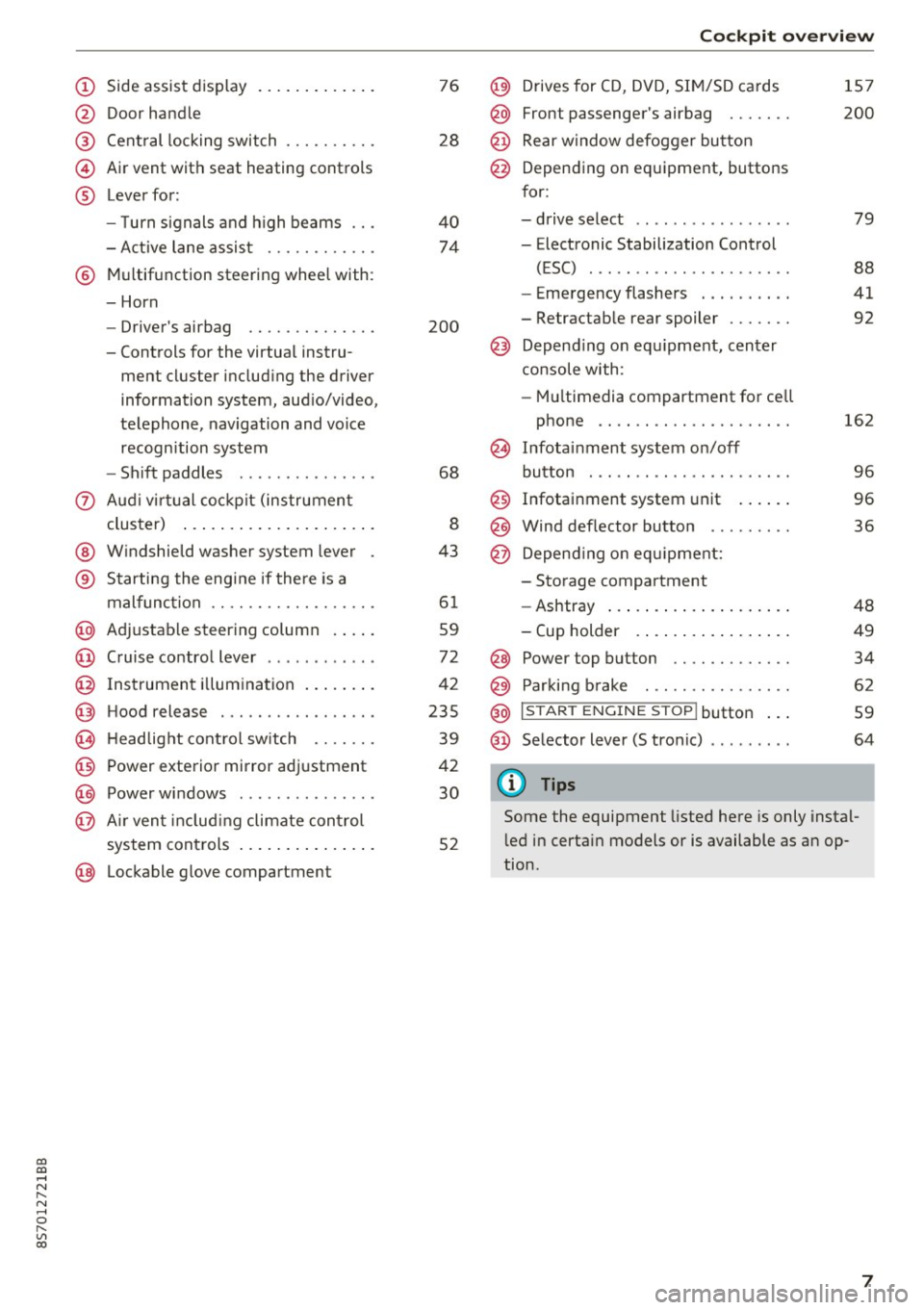
(!) Side assist display ..... ... .. .. .
@ Door handle
®
©
®
Cent ral locking switch
Air vent with seat heating controls
Lever for:
- T urn s ignals and h igh beams .. .
- Active lane assis t ......... .. .
® Multifunction steering wheel with :
- Horn
- Driver's ai rbag .. ......... .. .
- Controls for the virtual instru-
ment cluster includ ing the driver
information system, aud io/video,
telephone, navigation and voice
recogn ition system
- Shift paddles . .... ..... ... . .
0 Aud i v ir tu al co ckpit (instrument
cluster) ... .... .. .... ... .. .. .
@ W indshield washer system lever
® S tarting the engi ne if the re is a
mal func tion .. ........... .. .. .
@ Adjustab le st eering column . ... .
@ Cruise co ntrol lever .. ..... ... . .
@ Ins trument i llum ination ... .. .. .
@ Hood release . .... ......... .. .
0 H eadlight cont rol sw itch .... .. .
@ Power exterior mirror adjustment
@ Power windows . .... ..... ... . .
@ A ir ven t incl uding climate con trol
system controls ... .... ... .. .. .
@ Lockable g love compartment
76
28
40
74
200
68
8
43
6 1
59
72
42
235
39
42
30
52
Coc kpit o ve rv iew
@) Drives for CD, DVD, SI M/SD cards
@ Front passenger's ai rbag ...... .
@ Rear window defogger bu tton
@ Depending on equipment, buttons
for:
- drive select .. .. ............ .
- Electronic Stabilization Control
(ESC) ..... .. .. ............ .
- Emergency flashers . ...... .. .
- Retractab le rear spoiler ...... .
@ Depend ing on equ ipment , center
co nsole with:
- Mu ltimedia compartment for cell
phone .... .. .............. .
~ Infotai nment system on/off
button . .. .. .. .. ............ .
@ Infotainment system unit ... .. .
@ Wind deflector button ........ .
@ Depending o n eq uipment:
- Storage compartment
- Ashtray ... .. ... .. .. ..... .. .
- Cup holder .. ... .. .. ..... .. .
@ Power top button ............ .
@ Parking b rake . .. ............ .
@ I S TAR T ENGINE ST OP I butto n ...
@ Selector lever (S tronic)
@ Tips
1S7
200
79
88
41
92
162
9 6
96
36
48
49
34
62
59
64
Some the equipment listed here is only instal
l ed in certa in models or is available as an op
tion.
7
Page 21 of 314
CD
CD
.... N
" N .... 0 r--. V, co
Driver information system
Overview
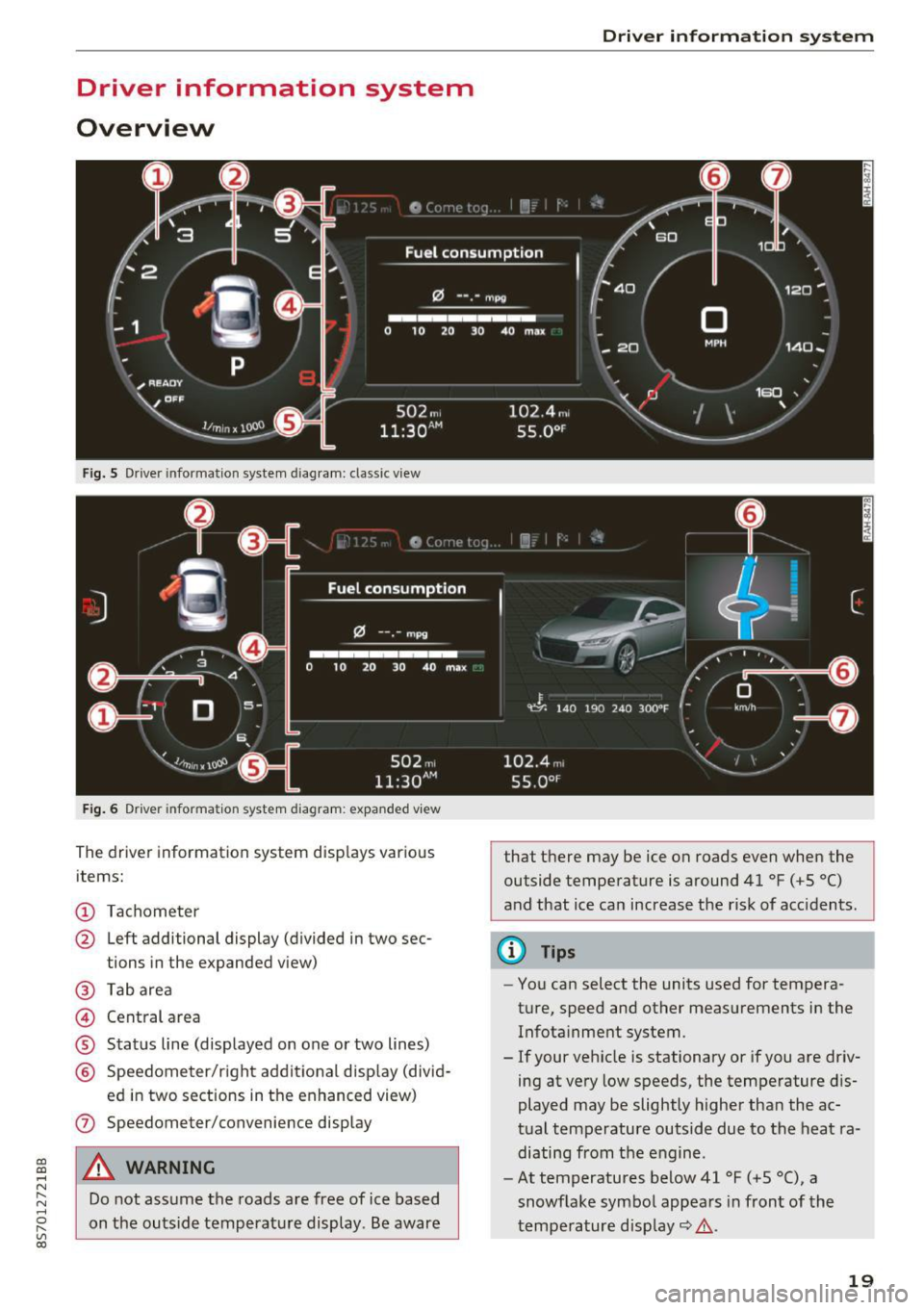
Fig. S Dr iver information system diagram: classic v iew
Fig. 6 D river information system diagram : expanded view
The driver information system displays various
items:
@ Tachometer
@ Left additional display (divided in two sec-
tions in the expanded view)
@ Tab area
@ Central area
® Status line (displayed on one or two lines)
@ Speedometer/right additional display (divid-
ed in two sections in the enhanced view)
(J) Speedometer/convenience display
A WARNING
Do not assume the roads are free of ice based
on the outside temperature display . Be aware
Driver in forma tion system
that there may be ice on roads even when the
outside temperature is around 41 °F ( +S °C)
and that ice can increase the risk of acc idents.
(D Tips
- You can select the units used for tempera
ture, speed and other measurements in the
Infotainment system.
- If your vehicle is stationary or if you are driv
ing at
very low speeds, the temperature dis
played may be slightly higher than the ac
tual temperature outside due to the heat ra
diating from the engine.
- At temperatures below 41 °F (+S °C), a
snowflake symbol appears in front of the
temperature display~ ,&.
19
Page 22 of 314
Driver information system
Multifunction steering
wheel plus
Operating
Apples to: vehicles with multifunctio n steering wheel plus
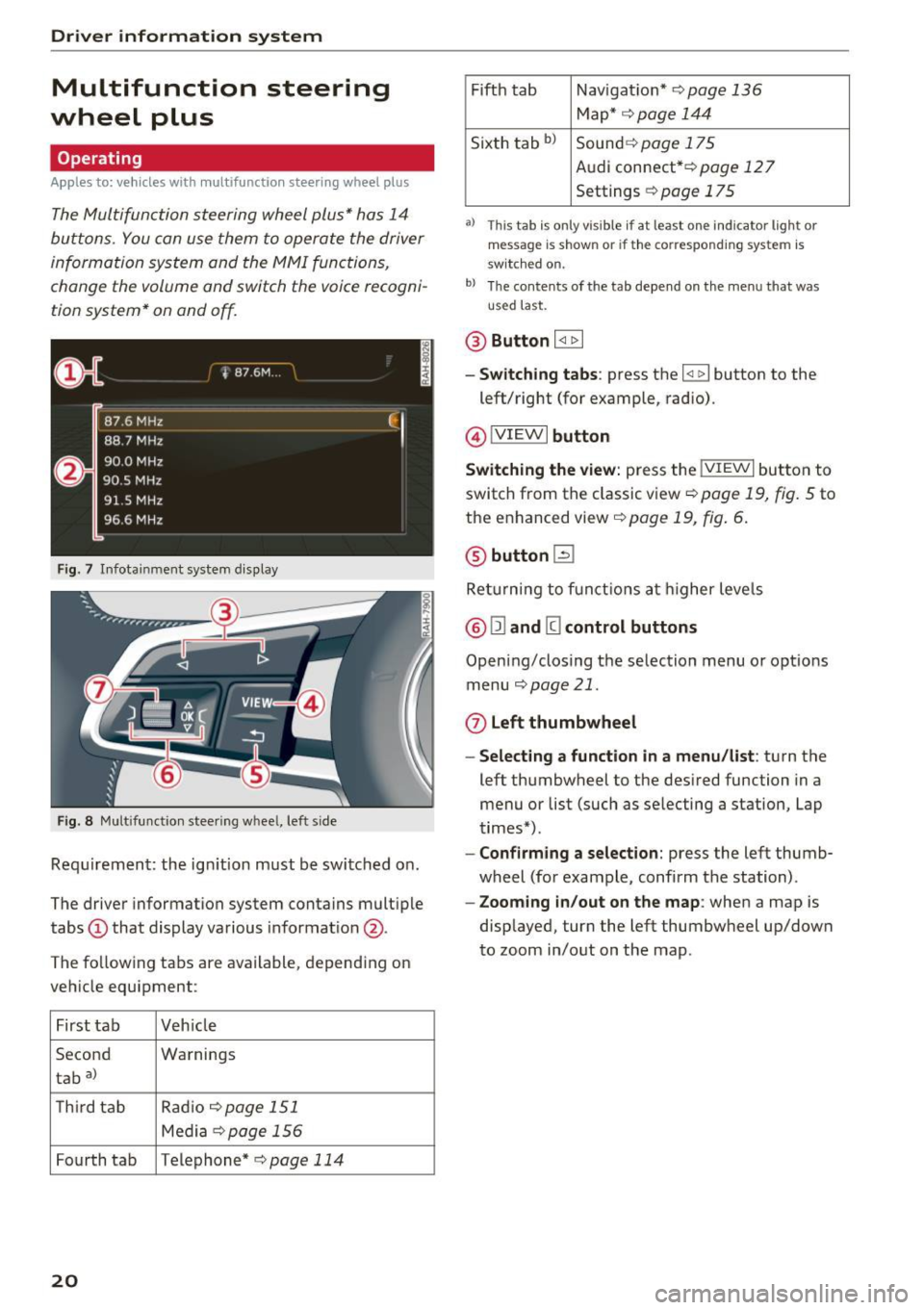
The Multifunction steering wheel plus* hos 14
buttons. You con use them to operate the driver
information system and the MMI functions,
change the volume and switch the voice recogni
tion system* on and off.
F ig. 7 Infotainment system display
Fig. 8 Mult ifunction steering wheel, left side
Requirement: the ign ition must be switched on .
The driver information system contains multiple
tabs
(D that display various informat ion @.
The fo llowing tabs are available, depending on
vehicle equipment :
First tab Veh icle
Second Warnings
tab
a)
T h ird tab Rad
io c:>page 151
Media c:> page 156
Fourth tab Telephone* c:> page 114
20
Fifth tab Navigat ion* c:> page 136
Map * c:> page 144
Sixth tab bl Sound c:> page 175
Audi connect* c:>page 127
Settings c:> page 175
a) This tab is only visible if at least o ne indicator lig ht or
message is shown or if the correspond ing system is
sw itc hed on.
bl Th e contents of the tab depend on the menu that was
u se d last.
® Button I <1 1> I
- Switching tabs: press the I
left/right (for example, radio).
@!VIEWI button
Switching the view: press the !VIEWI button to
switch from the classic view
c:> page 19, fig. 5 to
the enhanced view c:>
page 19, fig. 6.
@ button l2J
Returning to f unctions at higher levels
® l1l and III control buttons
Opening/closing the selection menu o r options
menu
c:>poge 21.
0 Left thumbwheel
-Selecting a function in a menu/list: turn the
left thumbwheel to the desired function in a
menu or list (such as selecting a station, Lap
times*) .
-Confirming a selection: press the left thumb
wheel (for example, confirm the station) .
-Zooming in/out on the map : when a map is
displayed, turn the left thumbwheel up/down
to zoom in/out on the map.
Page 25 of 314
CD
CD
.... N
" N .... 0
" V, co
Tachometer
The tachometer displays the engine speed in rev
olutions per minute (RPM) .
The beginning of the red zone in the tachometer
indicates the maximum permissible engine speed
for all gears once the engine has been broken in
and when it is warm. Before reaching the red
zone, you should shift into the next higher gear,
choose the Dor S selector lever position, or re
move your foot from the accelerator pedal.
@ Note
The needle in the tachometer may only be in
the red area of the gauge for a short per iod of
time or there is a risk of damaging the engine .
The location where the red zone begins varies
depending on the engine.
@) For the sake of the environment
Upshifting early helps you to save fuel and re
duce operating noise.
Odometer
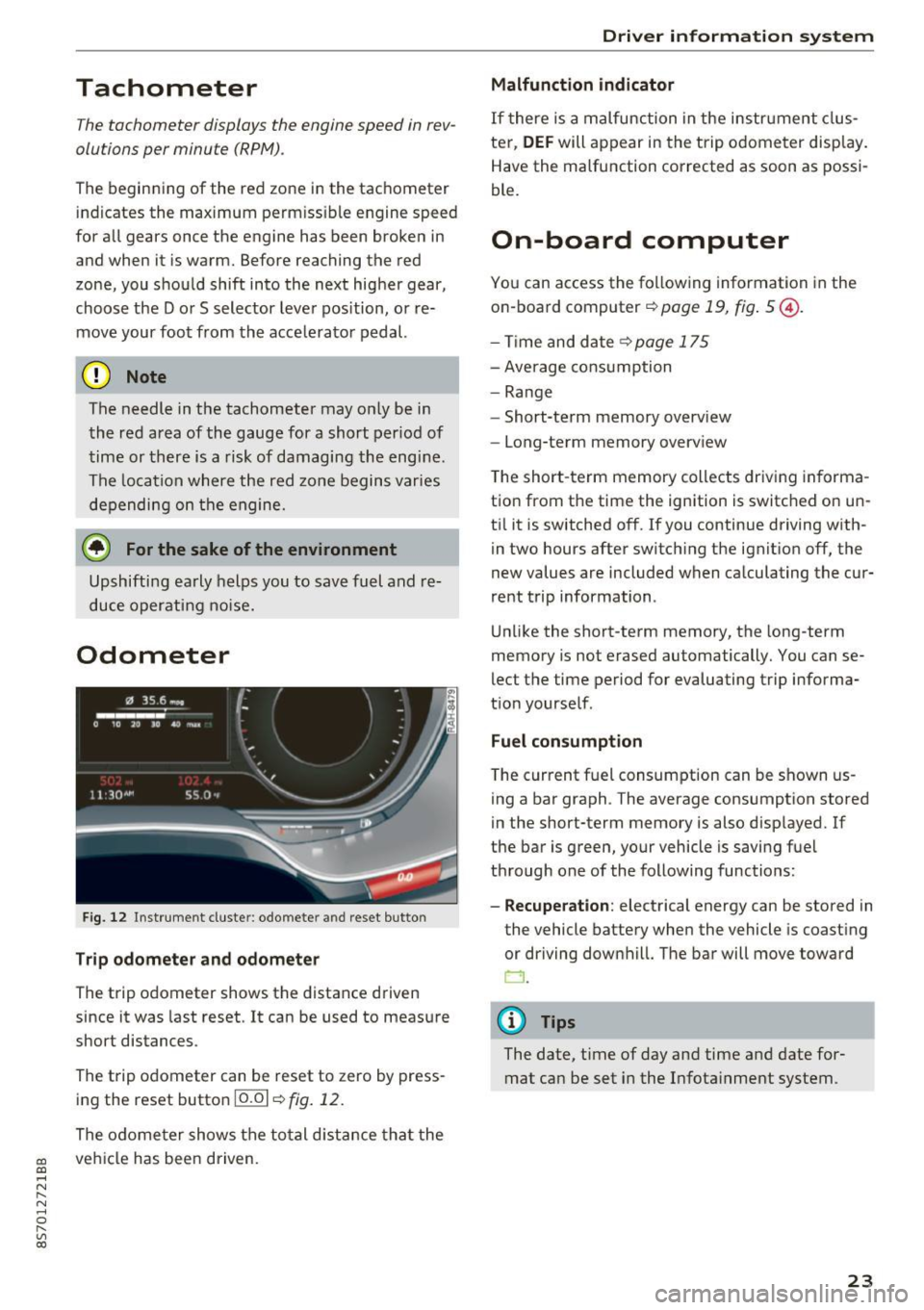
Fig. 12 Instrument cluste r: odomete r and reset button
Trip odometer and odometer
The trip odometer shows the distance driven
since it was last reset . It can be used to measure
short distances .
The trip odometer can be reset to zero by press ing the reset button 10.01
r=> fig. 12.
The odometer shows the total d istance that the
veh icle has been driven.
Driver in forma tion system
Malfunction indicator
If there is a malfunction in the instrument clus
ter,
DEF will appear in the trip odometer disp lay.
Have the malfunction corrected as soon as possi
ble.
On-board computer
You can access the following information in the
on-board computer
r=> page 19, fig . 5 @ .
-Time and date ~page 175
-Average consumption
-Range
- Short-term memory overv iew
- Long-term memory overview
The short -term memory collects driving informa
tion from the time the ignition is switched on un
til it is switched off. If you continue driving with·
in two hours after switching the ignition off, the
new values are included when calculating the cur
rent trip information .
Unlike the short-term memory, the long-term
memory is not erased automatically. You can se
lect the time period for evaluating trip informa
tion yourself .
Fuel consumption
The current fuel consumption can be shown us
ing a bar graph . The average consumption stored
in the short-term memory is also displayed. If
the bar is green, your vehicle is saving fuel
through one of the following functions:
- Recuperation : electrical energy can be stored in
the vehicle battery when the vehicle is coasting or driving downhill. The bar will move toward
CJ .
(D Tips
The date, time of day and time and date for
mat can be set in the Infotainment system.
23
Page 26 of 314
Opening and clo sin g
Opening and closing
Central locking
Description
You can lock and u nlock the veh icle centrally. You
have the following options:
- Remote control key
c::> page 26,
-Sensors in the door handles* c::> page 27,
- Lock cylinder on the driver 's door c::> page 29,
o r
- Central locking switch inside
c::> page 28.
Auto Lo ck
The A uto Lock f unct ion locks all doors and the
luggage compartment lid once the speed has ex
ceeded approx imately 9 mph (1S km/h) .
The vehicle can be unlocked if the openi ng func
tion in the centra l locking system sw itch is used
or one of the door handles is pulled. The A uto
L ock function can be switched on and off in the
Infotainment system
c::> page 28.
I n t he event of a crash with a irbag deployment ,
t he doors will a lso automat ically unlock to allow
access to the veh icle .
Selective unlocking
The doors and luggage compartment lid w ill lock
when they close. You can set in the Infotainment
system whether
only the driver's door or the en
tire veh icle should be unlocked when unlocking
c::> page 28 .
Turn signals
The turn s ignals flash tw ice when you unlock the
veh icle and flash once when you lock the vehicle .
I f the bli nking continues, one of the doo rs or the
luggage compartment lid is not closed or the ig
nition is still switched on .
Unintentionally locking yourself out
The follow ing cond itions prevent you from lock
ing your remo te contro l key in the vehicle :
- If the driver's door is open, the vehicle cannot
be locked by pressing the
I@ button on the re-
24
mote contro l key or touching the locking sen
sor* on a door.
- When lock ing using the
Im button in the central
locking switch, the vehicle will not lock if a door
is open
c::> page 28 .
-On veh icles with a convenience key *, the lug
gage compartment lid unlocks again after clos
ing if the most recent ly used key is in the lug
gage compartment. The emergency f lashers
blink four times.
Do not lock your vehicle with the remote cont rol
key or convenience key* until all doors and the
l uggage compartment lid are closed. This helps
to prevent you from locking yourself out acciden
tally .
¢j) Tips
- Do not leave va luables unattended in the ve
hicle. A locked veh icle is not a safe!
- The LED in the driver's door rail blinks when
you lock the vehicle. If the LED lights up for
approximate ly 30 seconds after locking,
there is a malfunction in the centra l locking
system . Have the problem corrected by an
authorized Audi dealer or au tho rized Aud i
Service Facili ty.
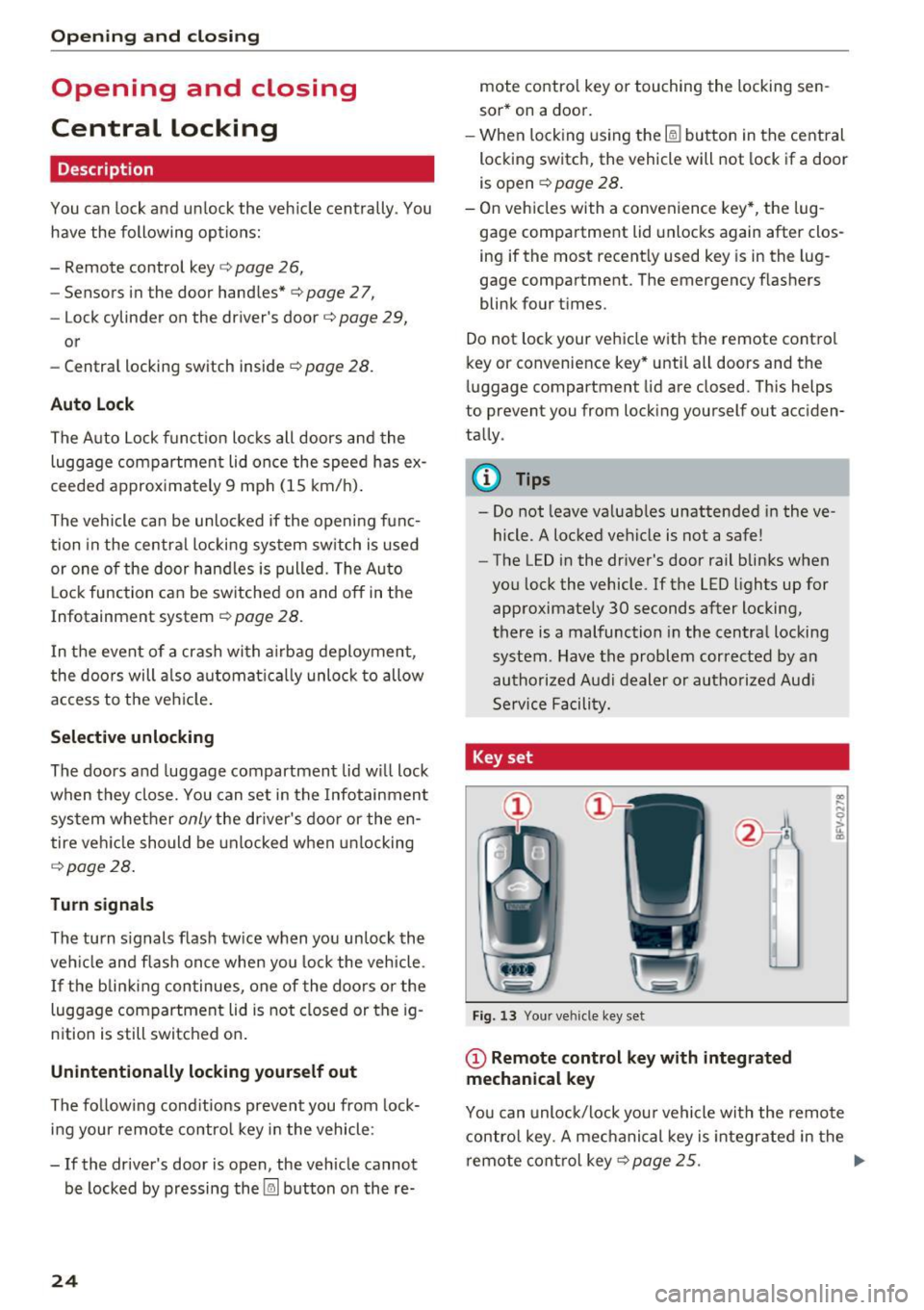
Key set
• J
-- --
Fig. 13 Your ve hicle key set
(D Remote control key with integrated
mechanical key
.. .... N 0 :l, u. CD
You can unloc k/lock you r vehicle with the remo te
contro l key. A mechanical key is integr ated in the
remote cont rol key
c::>page 25 . ..,.
Page 27 of 314
CD
CD
.... N
" N .... 0 r--. V, co
@ Key tag with PIN
Only applies to vehicles with Connectivity serv
ice*: open the key fob and rub the PIN until it is
v isib le . You can activate the Connectivity service*
on your vehicle using th is PIN code.
Replacing a key
If a key is lost, see an au thorized A udi dealer or
authorized Audi Service Facility. Have
this key de
activated.
It is important to bring all keys with
you. If a key is lost, you should report it to your
insurance company.
Number of keys
You can check the number of keys ass igned to
your veh icle in the Infotainment system . To do
this, select: the
I MENU ! button >Vehicle > left
control b utton
> Service & checks > Vehicle in
formation.
This way, you can make sure that you
have all the keys when purchasing a used vehicle .
Electronic immobilizer
The immobilizer prevents unauthorized use of
the vehicle.
Unde r certain circumstances, the vehicle may not
be ab le to start if there is a key from a different
vehicle manufacturer on the key chain .
Data in the master key
When driving, service and maintenance-relevant
data is continuously stored in your remote con
tro l key. Your Aud i service adviso r ca n read o ut
this da ta and tell you about the wo rk your veh icle
needs. This applies also to vehicles with a con
venience key*.
Personal convenience settings
I f two people use one vehicle, it is recommended
that each person always uses "t heir own" master
key. When the ignition is turned off or when the
vehicle is lock ed, persona l conven ience settings
for the following systems are stored and as
signed to the remote master key.
- Climate control system
- Parking aid*
- Active lane assist*
- Side assist*
Open ing and closing
-Drive se lect
T he sto red settings a re automa tica lly recalled
when you unlock the vehicle, open the doors or
turn on the ign ition.
& WARNING ~
A lways take the vehicle key with you when
l eav ing the vehicle, even for a short period of
time. This applies particularly when chi ldren
remain in the vehicle. Otherwise the children
could start the engine or operate e lectr ica l
equipment such as power windows.
@ Tips
-
The operation of the remote control key can
be temporarily disrupted by interference from
transmitters near the veh icle work ing in the
same frequency range (such as a cell phone or
radio equipment). A lways check if your vehicle
i s locked!
Removing the mechanical key
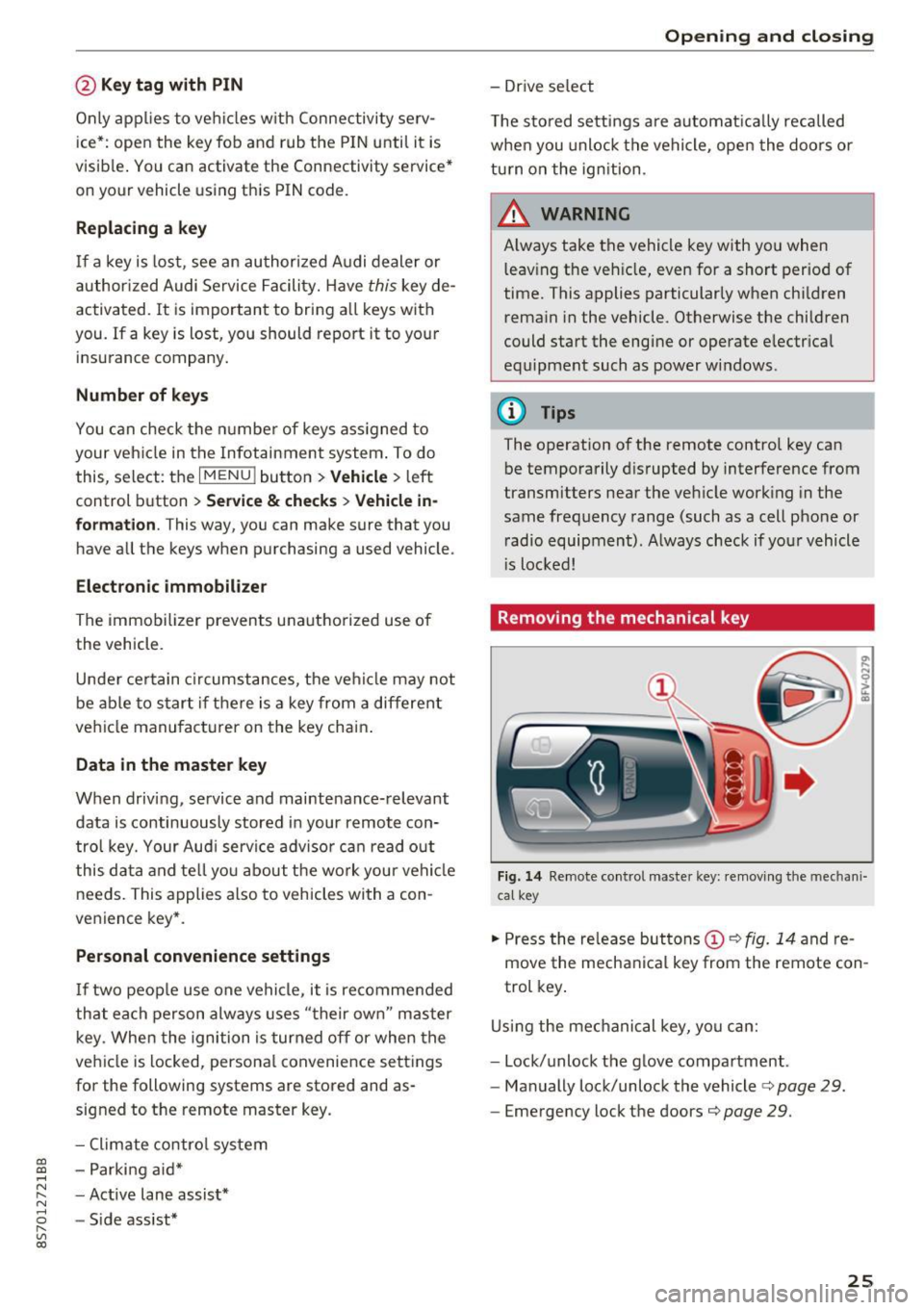
Fig . 14 Remote control mas ter key: remov ing the mechan i
ca l key
.,. Press the release but tons (D c::> fig. 14 and re
move the mechanical key from the remote con
trol key .
Using the mechanical key, you can:
- Lock/unlock the glove compartment.
- Manually lock/unlock the vehicle
c::> page 29.
-Eme rgency lock the doors c::> page 29.
25
Page 29 of 314
co
co
.... N
" N .... 0
" "' c:o
A WARNING ,~
No one, especially children, sho uld stay in the
veh icle w he n i t is locked from the outside, be
cause the w indows can no longer be opened
from th e inside
c::> page 29. Locked doors
ma ke it more difficult for eme rgency workers
t o get into the vehicle, which puts lives at
r isk.
@ Tips
- Only use the remote control key when you
are within view of the vehicle.
- Do not use the remote control when you are
inside the vehicle. Otherwise, yo u could un
i ntent io nally loc k the vehicle. If you then
tried to start the eng ine or open a door, the
alarm wou ld be triggered . If this happens,
press the un lock button@ .
- The selector leve r must be in the P position
on vehicles with a convenience key*. Other
wise the vehicle will not be ab le to lock .
- Only use the panic function in an emergen
cy .
Unlocking and locking with the
convenience key
Appl ies to: ve hicles with co nve nien ce key
The doors and luggage compartment lid can be
unlocked/locked without using the remote con
trol key.
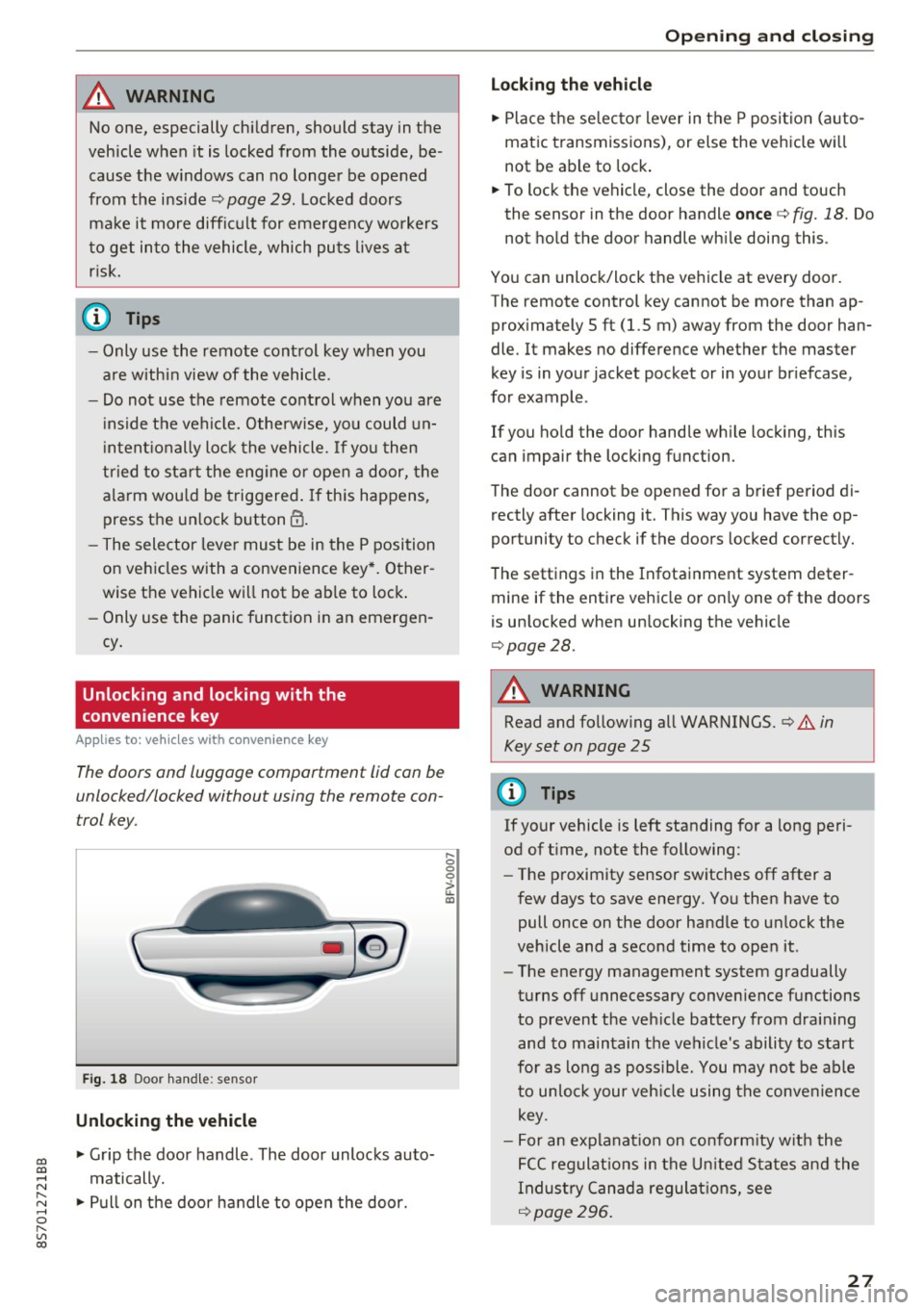
F ig . 18 Door han dle: senso r
Unlocking the vehicle
.,. Grip the door handle . The door unlocks auto
matically .
.,. Pull on the door handle to open the door.
.... 0 0 0
ii: IXl
Op ening and cl osing
Locking the v ehicle
.,. Place the se lecto r lever in t he P posi tion (a uto
matic transmiss ions), or else the vehicle wi ll
not be able to lock .
.,. To lock the vehicle, close the door and touch
the sensor in the door handle
once c::> fig. 18. Do
not hold the door handle wh ile doing this .
You can unlock/lock the ve hicle at every door.
The remote control key cannot be more than ap
prox imately 5 ft (1.5 m) away from the door han
dle. It makes no difference whether the master
key is in your jacket pocket or in your br iefcase,
for example .
If you ho ld the door handle wh ile lock ing, this
can impair the locking function.
The door cannot be opened for a brief period di rectly after locking it. This way you have the op
portunity to check if the doors locked correctly.
The settings in the Infotainment system deter mine if the entire vehicle or only one of the doors
is unlocked when un locking the vehicle
c::> page28.
A WARNING
-Read and follow ing all WARNINGS. c::> .&. in
Key set on page 25
0) Tips
If your vehicle is left standing for a long peri
od of t ime, note the follow ing:
- The proximity sensor sw itches off after a
few days to save energy. You then have to
pull once on the door handle to un lock the
vehicle and a second time to open it.
- The energy management system gradually
turns off unnecessary convenience functions
to prevent the veh icle battery from drain ing
and to ma intain the vehicle's ability to start
for as lo ng as poss ible. You may no t be ab le
to un lo ck your veh icle using the conve nience
key.
- For an explanat ion on co nfo rm ity w ith the
FCC regulat ions in the U nited S ta tes an d the
Indus try Canad a regulat ions, see
c::> page296 .
27