2017 AUDI TT ROADSTER infotainment
[x] Cancel search: infotainmentPage 120 of 314
Telephone
-Ending a phone call/cancel dialing: select and
confirm End call. Or : press the control knob.
A ccepting another call: see
q page 118, During
a phone call.
Caller information : the name, phone number or
Unknown appears in the Infotainment system
display depending on if the ca ller has bee n stored
in the directory and if the phone number has
been transmitted. A picture may also be dis
p layed, depending on whether you have assigned
a picture to a contact in your directory and if it
was transferred to your MMI. You can find out if
your cell phone supports this function from your cell phone network provider, your cell phone
owner's manual or at www.audiusa .com/blue
tooth .
{D) Tips
The radio or media playback is muted during a
phone call.
During a phone call
Applies to: vehicles with telephone
Requirement: there must be a call in progress.
"" Press the right control button.
The fo llowing options are possible during a call
depending on the ce ll phone being used and the
type of connection:
- Making an additional call: select: Find contact
> Recent calls /Directory /Favorites > an entry
from the list.
- Accepting an incoming call when there is an
active call and a call on hold : select Replace .
The active call is replaced with the incoming
call.
- Answering an additional call : if there is an in
coming call w hile another call is active, you can
select Accept call to put the exist ing call on
hold and answer the incomi ng call.
If you select
Decline , the incoming call w ill be declined.
Addit ional functions include:
Mute: if you se lect and confirm this function, the
other person on the phone cannot hear you . You
can hear the other person.
118
Hold call /Resume : you can place the existing call
on hold and resume it again . To res ume the call,
se lect and confirm the call you would like to re
sume .
Transfer call to mobile device* : select and con
firm Transfer call to mobile device to transfer
the exist ing ca ll from the MMI to your cell phone .
Switch to hands-free mode*: Requiremen t: you
must have a phone call in progress on your cell
phone. Select and confirm Switch to hands-free
mode to transfer the call from your cell phone to
the MMI.
Swap call: alternate between two phone calls
while one of the calls is on hold. Se lecting End
call will end the active phone call. A phone call on
hold can be resumed through the right control
button
> Resume .
Add to conference : a party on hold and up to five
active part ies (depending on the network) can be
added to a conference call. To make an addit ional
ca ll, put all participants in the current conference
call on hold using the right control button
> Hold
conference . Press the left control button . Se lect
and confirm Call list/Directory /Favorites
> an
entry from the list.
You can add called contacts
to the conference using the right control button
> Add to conference. Resume takes all part ies off
hold.
Multi-party calling: select the right con trol but
ton
> Telephone settings > Call options . When
the function is switched on~ you can accept an
additional ca ll using Accept call or decline a ca ll
using Decline. When the function is switched off,
you can Replace the call or Decline.
Connection manager: see
q page 176.
Telephone settings: see q page 124.
(D Tips
-To be notified of a n incom ing call dur ing a
phone call, the call wa iting function in your
cell phone must be switched on when using
the hands-free profile (Handsfree ).
- You can obtain more information from your
cell phone service provider or from your cell
phone user guide.
Ill>
Page 121 of 314
co
co
.... N
" N .... 0
" "' c:o
-W hen leaving the vehicle, the Bl uetoo th
co nnection to the ce ll phone wi ll automati
ca lly disconnect . Depending on your cell
phone, phone ca lls in progress may be a uto
matically redirected from the MMI to your
ce ll phon e and yo u can cont inue the call on
you r phone .
- The display of an i ncoming phone call in the
Infotainment system d is p lay may still be
v is ible fo r a f ew s eco nd s de pending on the
ce ll phone in use. Using th e
Replace or De·
dine
f unct ions m ay then end the a ctive
p ho ne call.
Favorites
Appl ies to: vehicles with telephone
Up to 50 contacts, in addition to the voicemail
number, can be stored in any order in the favor
ites list.
.. Se le ct: I M ENU I bu tton >Telephone > left con
t rol but ton .
-Storing an existing phone number as a favor ·
ite :
sele ct an d c onfirm Recent calls /Directory .
Select and co nf irm a conta ct or phone num ber
from the list . Select: right cont rol button >
Store as favorite. Enter a name for the favor ite
o r se lect a suggest ion. Select and confirm with
Store .
- Renaming a stored favorite :
select and confirm
Favorites > a favorite from the list. Select the
rig ht cont rol button>
Rename favorite .
- Moving a stored favorite :
select and confirm
Favorites > a favorite from the list. Select the
rig ht cont rol button>
Move favor ite . Se lect
and co nfirm the locat ion of t he se lected favor
it e.
- Deleting a stored favorite : select and confirm
Favorites > a favorit e from the list . Select the
r ig ht cont ro l but ton >
Delete favorite > Delete
this favorite or Delete all favorites .
Telephone
Messages
Text messages
Applies to: cell phones with Bluetooth Message Access Profile
(MAP)
Depending on the cell phone being used and the
cell phone network contract, you can receive and
send text messages using the MMI.
Requirement
A cell pho ne mus t be c onnec ted t o th e MMI via
Bl ue toot h M AP (M essage A ccess Pro fil e)
<=> page 11 4 .
.,. Sele ct: ! M EN UI button> Telephone > left con
t rol button
> Text message (MyPhone )/Text
message (additional phone)* .
lnbox
All received text messages are displayed .
Sent text messages
All sent text messages are displayed.
Outbox
All text messages to be sent a re displ aye d.
(D Tips
- Ple ase not e that you may hav e to activat e
t he receivi ng a nd se nding of te xt messages
in y our c ell pho ne dependin g on th e SI M
c ar d be ing use d (for ex am ple, when using a
M ulti -SIM) . Yo u ca n obtain more info rma
tion from yo ur ce ll phone service p rovider or
from your cell phone user guide.
- For more in format ion on t he suppo rted ce ll
p hones, visit
www.audiusa.com/bluetooth
or contact an a uthorized Audi dea ler or a u
thorized Audi Service Fac ility.
- You need a cell phon e with Message Access
Prof ile that a lso s upports the sen ding func
tion t o be able to se nd te xt messages
t hroug h the MMI.
119
Page 122 of 314
Telephone
Write text message
Applies to: cell phones with Bluetooth Message Access Profile
(MAP)
"' Select : I MENU I button >Telephone > left con
trol button
> Text message (MyPhone)/Text
message (additional phone)*> Inbox
> right
control button.
Write text message
Select and confirm the desired template from
the list . Enter a recipient . Select and confirm
Send .
Reply*
Select and confirm the desired template from
the list. Select and confirm
Send.
Message options
Applies to: cell phones with Bluetooth Message Access Profile
(MAP)
.. Se lect: I MENU I button >Telephone > left con
trol button >
Text message (MyPhone)/Text
message (additional phone)* > Inbox /Sent /
Outbox
> right control button.
The fo llowing options may be ava ilab le depend
ing on the se lected menu.
Reply*
A reply can be sent for the selected message in
the
Inbox.
Forward
The selected text message can be forwarded to a
different recipient.
Send again*
The se lected text message can be resent.
Delete this text message*
The selected text message can be deleted.
Read aloud1>
You can have the MMI read an open text mes
sage.
1> Not availa ble in all l ang uage s.
120
Text messaging settings*
To display when a new text message is received,
activate the
Text message notifications. New
text messages are indicated with an enve lope 121
in the Infotainment system display status line.
Connection manager
See¢ page 176.
Telephone settings
See¢ page 124 .
{!) Tips
Messages that are deleted in the MMI are also
deleted in the cell phone automatically.
' E -mail*
App lies to: ce ll ph ones with Bluetooth Message Access Profile
(MAP)
Depending on the type of cell phone used, you
con receive and send e-mails through the MMI.
Requirement: the Message Access Profile (MAP)
must be activated in the Bluetooth settings on
you r ce ll phone and your cell phone m ust be con
nected to the MMI
¢page 114. You can find out
in your cell phone owner's manual if your cell
phone supports this function .
.. Select:
!MENU I button> Telephone > left con
trol button >
E-mail (MyPhone)/E-mail (addi
tional phone)*.
Write new e-mail
- Using a template :
select and confirm the de-
sired template from the list .
- Enter one or more rec ipients.
- Select and confirm
Send .
Inbox
All received e-mails are displayed.
Sent
All sent e-mails are displayed.
Page 130 of 314
Audi connect
"'Enter the PIN for your SIM card .
"' Se lect and confirm
OK.
"'To connect to the Internet automatically in the
future, select and then confirm
Yes.
"' Confirm the system prompt asking to connect
to the Internet with either
Yes, connect once or
Yes, always if required.
After connecting successfully
After connecting successfully, the signal strength
and connection type are displayed in the Info
tainment system status line@/@ Qpage
105,
fig . 111.
You can now use Audi connect.
The list of available Audi connect services is dis
p la yed in the Infotainment system display.
Removing the Audi connect SIM card
"' Press on the Audi connect SIM card briefly. The
card is released from the slot. Remove the Audi
connect SIM card.
@ Note
-Audi connect is designed for use only with
the provided Audi connect SIM card. Audi
AG is not liable for the consequences of us
ing other SIM cards.
- If a SIM card of a different size is inserted in
the SIM card reader instead of an Audi con
nect mini SIM card, do not under any cir
cumstances remove this card yourself due
to the risk of damaging the SIM card reader.
Contact your authorized Audi dealer or au
thorized Audi Service Facility.
(D Tips
-You can connect a cell phone with Bluetooth
(handsfree) to make phone calls
Q page 114.
-Audi does not provide support for other SIM
cards. Audi recommends using only the pro
v ided SIM card .
- You can specify when the MMI connects to
the Internet Q
page 132. The Internet con
nection disconnects automatically once the
requested Audi connect service no longer re
quires any data packets.
128
Configuration through
myAudi
Activating/configuring specific Audi
connect services
Applies to: vehicles with Aud i connect
Some Audi connect services must be activated/
configured through your personal myAudi ac
count before using them for the first time .
- If you do not have a personal myAudi account
yet, you can register online at
my.audiusa.com .
-Add your vehicle to your myAudi account.
-Activate/configure the Audi connect services
you would like for your vehicle in your myAudi account.
- For some Audi connect services, you may also
have to enter your myAudi user data or your
myAudi PIN when accessing services in the MMI
to connect your vehicle to myAudi .
For detailed information on configuration, visit
my.audiusa .com.
Logging into myAudi in the vehicle
Applies to: vehicles with Audi connect
To use some Audi connect services (such as Twit
ter*), you must first connect your vehicle with
myAudi to transfer your personal settings from
your myAudi account.
"'S elect: !MENU I button> Audi connect > right
control button >
Log in.
"' Enter your myAudi user data. Or: enter your
eight-dig it myAudi PIN.
"' Confirm your entry w ith
OK .
Then you can open your personal settings from
your myAudi account in your vehicle .
(D Tips
You can receive your myA udi PIN if you have
set up a myAudi account. For additional infor
mation, see
my.audiusa.com .
Page 140 of 314

Navigation Entering an address
Applies to: vehicles with navigation system
"' Press the I NAV/MAPI button repeatedly until
the
Enter destination menu is displayed
<=:>page 136, fig. 123 .
.. Se lect: left control button > Enter address.
-Se lect and confirm a line (such as Street, House
number or Country/state)
and enter the de
sired information.
- Se lect and confirm
Start route guidance.
Setting a destination from the map
Applies to: vehicles with navigation system
A point on the map can be used as the destina
tion.
.. Press the I NAV/MAPI button repeatedly until
the map is disp layed .
-Adjusting the scale: turn the control knob to
the left/right to decrease the map scale.
-Activating crosshairs: press the control knob.
The crosshairs are shown on the map .
-Moving the crosshairs : move the crosshairs to
the destination using the MMI touch control pad .
-Setting as destination : press the control knob
whe n the crosshairs are shown . If necessary,
select and confirm
Add as stopover and then
Start route guidance .
- Hiding the crosshairs :
press the I BACKI button.
Additional information about the location of
the crosshairs :
if you select map content with
crosshairs, the available information is displayed
(such as the name of the c ity or points of inter
est) @
i::> page 144, fig . 129 .
138
Setting a home address/favorite as the
destination
Applies to: vehicles with navigation system
You can quickly and easily start route guidance
to your home address using the home address
function. Favorites allow easier access to fre
quently used destinations.
"' Press the I NAV /MAPI button repeatedly until
the
Enter destination menu is displayed
i=:> page 136, fig. 123.
Setting a home address as the destination
Requirement: a home address m ust be stored
<=:> page 142.
Your home address is directly shown in the Enter
destination
menu @<=:>page 136, fig. 123 .
-Select and confirm the home address.
- Select and confirm
Start route guidance.
Setting a favorite as the destination
Requirement: a destination must be stored as a
favorite
c:> page 142.
- Enter one or more letters into the free text
search input fie ld. The favorites that are found
are shown in the Infotainment system display
and marked with th e symbol @
i::> page 136,
fig. 123.
-Select and confirm the desired favorite.
- Select and confirm
Start route guidance .
(D Tips
-Additional settings for the home address
can be found under
i=:>page 142 .
-Additional settings for the favorites can be
found under<=:>
page 142.
Page 143 of 314
CD
CD
.... N
" N .... 0
Adding a stopover
Applies to: vehicles with navigation system
You con enter on additional destination when
route guidance is active.
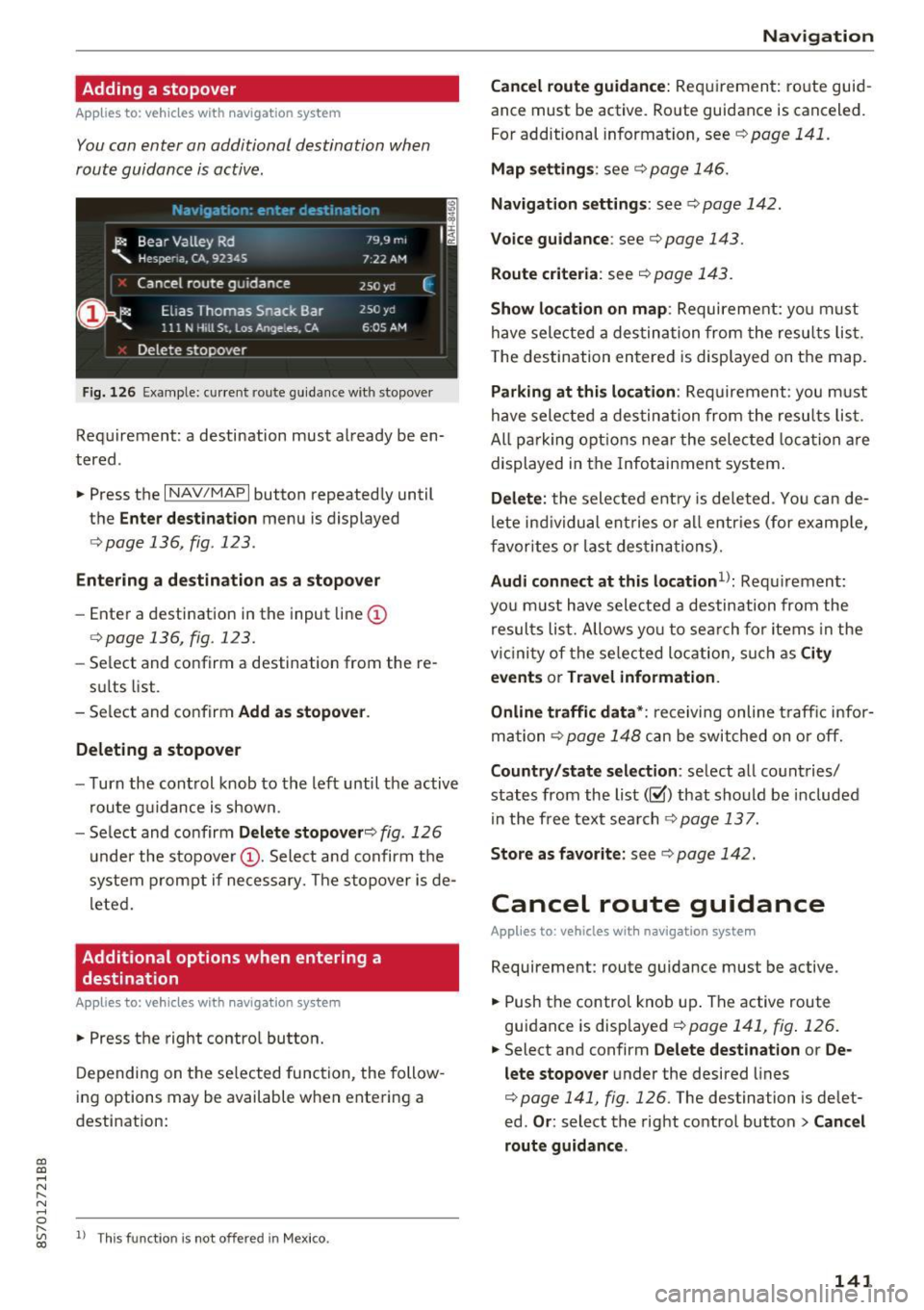
Fig. 126 Ex ample: current rou te guidance with stopover
Requirement: a destination must already be en
tered .
• Press the
I NAV/MAPI button repeatedly until
the
Enter destination menu is displayed
r=> poge 136 , fig . 123 .
Entering a de stination as a stopover
-Enter a destination in the input line (D
<=>page 136, fig . 123.
- Select and confirm a destination from the re-
sults list.
- Select and confirm
Add as stopover .
Deleting a stopover
- Turn the control knob to the left until the active
route guidance is shown.
- Select and confirm
Delete stopover ¢ fig. 126
under the stopover (D. Select and confirm the
system prompt if necessary. The stopover is de
l eted.
Additional options when entering a
destination
Applies to: veh icles with navigation system
• Press the right control button.
Depending on the selected function, the follow
ing options may be available when entering a
destination:
" "' 1> Th
is fun ctio n is not off ere d in Mexic o . co
Navigation
Cancel route guidance:
Requirement: route guid
ance must be active . Route guidance is canceled.
For additional information, see
c> pag e 141 .
Map settings : see c> page 146.
Navigation settings: see ¢ page 142.
Voice guidance : see c> page 143.
Route criteria : see c> page 143.
Show location on map : Requirement: yo u m ust
have selected a destination from the results list.
T he destination entered is displayed on the map.
Parking at this location : Requirement: you must
have selected a destination from the results list.
All pa rking options near the selec ted location are
displayed in the Infotainment system.
Delete: the selected entry is deleted . You can de
l ete ind ividual ent ries or all entr ies (for examp le,
favorites or last destina tions).
Audi connect at this location1>: Requ irement:
yo u must have sele cted a destination from the
results list. Allows yo u to search for items in the
vi cinity of the selected location, such as
City
events
or Travel information.
Online traffic data*:
receiving online traffic infor
mation
c> page 148 can be switched on or off.
Country/state selection: select all countries/
states from the list(~) that should be included
in the free text search
c> page 137.
Store as favorite: see c> page 142.
Cancel route guidance
Applies to : vehicles with navigat ion system
Requirement: route guidance must be active.
• Push the control knob up. The active route
guidance is displayed
c> page 141, fig . 126.
.. Select and confirm Delete destination or De
lete stopover
under the desired lines
c> page 141, fig. 126 . The destination is delet
ed.
Or : select the right control button > Cancel
route guidance .
141
Page 150 of 314
Nav igatio n
-The online map view is an Audi connect serv
ice and is regu larly updated when the func
tion is opened. The process may take several
seconds.
- When the on line map view is switched on
us ing the 30 map orientation, the MMI dis
play automatically switches to the 20 map
orientation when driving through tunnels.
- For safety reasons, the Street V iew func
tions can on ly be used when the vehicle is
stationary.
- Always read the chapter
¢page 133.
Online traffic information
Appl ies to: ve hicles w ith navigat ion system an d Aud i conn ect
- Additional information can be found under
www .audiu sa .c o m /audiconnect .
Accessing traffic
information
Auto rerouting (traffic)
Applies to: vehicles wi th naviga tion syste m
When receiving traffic information th rough TMC/
online -depending on availability -you can have
the MMI nav igate you around traffic incidents, if
possible.
Reception of traffic information is indicated by
the ITMC I or ION LINEI symbol on the map
¢ page 148, fig. 133.
The MMI can receive real-time traffic information about congestion accidents, road construction and
other incidents from the Internet.
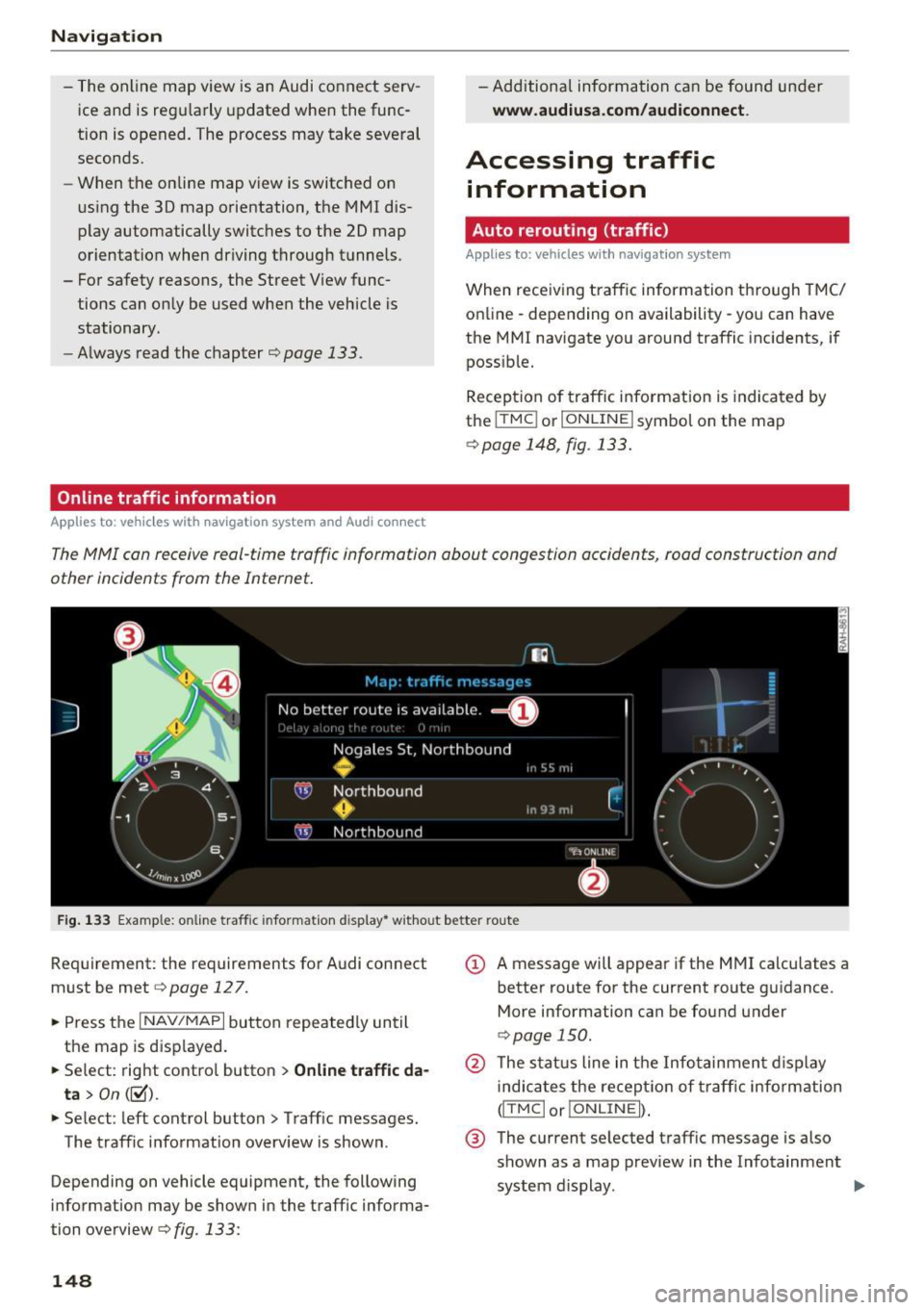
F ig . 1 33 Example: on line traffic information d isplay * w ithout better route
Requirement: the requirements for Audi connect
must be met
e> page 127.
• Press the I NAV/MAPI button repeated ly until
the map is disp layed.
• Se lect: right contro l button
> Online tr aff ic da·
ta >
On( ~).
• Se lect : left control button > Traff ic messages.
The traffic information overv iew is shown.
Depending on vehicle equipment, the following
information may be shown in the traff ic informa·
tion overview
e> fig. 133:
148
(D A message will appear if the MMI calculates a better route for the current route guidance.
More information can be found under
C> page 150.
@ The status line in the Infotainment d isplay
indicates the receptio n of traff ic info rmation
(ITMCI o r!ONLINEI) .
® The current selected traffic message is also
shown as a map preview in the Infotainment
system d isplay. .,..
Page 170 of 314
Media
Depending on availability, various information
will load about the track currently playing when
this function is switched on~-
Copy to jukebo x
See¢ page 158, Adding files to the Jukebox.
Favorite s
See ¢page 166.
Additional opt ions
Requirement: the vehicle must be stationary and
a video file* or a DVD * must be playing.
Parental control *
Playback of v ideo DVDs can be rest ricted using
parental control.
E nter the password fo r parenta l control. Pass
wo rd set at the factory:
12 34 . You have the fol
low ing options :
-Protection l evel: select and confi rm the protec
tion level (for example, Leve l 5). Eight diffe rent
protect ion leve ls can be set fo r parenta l con
trol.
If you set the parental control leve l at Lev
el 5, a ll DVDs from level 1 -5 can be played . Vid
eo DVDs with a higher leve l will not play. Se lect
No restriction to remove a ll of the restrictions .
-Change pa ssword : edit the current password .
Switch to full screen
The video image is displayed . T urn the control
knob to disp lay the playl ist.
Or : press the I BACKI
button.
Replay video
When this function is sw itched on~. the current
video will replay .
Show DVD menu
Select ing a menu item :
select and confirm a
menu item.
Or : move your finger on the MMI
touch control pad* and press the control knob.
l) Depe nding o n the DVD, thi s may not be possib le dur ing
p layback.
1 6 8
Audio trac k1
)
You can man ua lly se t the audio t rack (lang uage
and audio format). The language and audio fo r
mat options depend on the video DVD .
Subtitles1>
You can set subtitles for p laybac k manually. The
l anguages availab le depend on the DVD.
Picture fo rmat
Audi recommends the Automatic setting for the
picture format . You can set the picture format
depending on the act ive file or source (for exam
ple Video fi le* , DVD*).
Picture for-
Information
mat
Aut omati c
The M MI detects the picture for-
mat of the so urce and displays the
image in the opt imum ratio. Black
bars may appear on the sides of
the display, depending on the
source format and the Infotain-
ment system display that is instal-
led.
Zoom T he image is en la rged to f ill the
entire Infotainment system dis-
play. Switch the function off if the
image is distorted .
Cinema-Use this setting for fi lms in cinema
sco pe format 2 1:9. B lack bars w ill appea r
on the uppe r/ lower edge in the In-
fotainment system display.
Original The image is displayed in the ratio
of the source fo rmat. Select this
opt io n if the image is disto rted o r a
section of the image is cut off
when
Au to is selected.