2017 AUDI TT ROADSTER fuel
[x] Cancel search: fuelPage 60 of 314

Driving
Avoid full acc ele ra tion
You sho uld rare ly travel at the maximum vehicle
speed . High speeds cause a disp roportionately
high increase in fuel consumption, emissions and
traffic noise . Slower driving saves fuel.
Reduce idling time
It pays off to stop the engi ne, for examp le when
at rai lro ad crossings or tr affic lights with longer
red lights . Stopping the engine for 30 -40 sec
onds already saves more fuel than the amount of
extra fuel needed to resta rt the engine.
It t akes a very long time in idle to wa rm the en
g ine up to operating tempe ra ture . Wear and
emissions are especially high in the warm-up
p hase . Therefore, yo u should begin driving im
mediately after starting the engine. Avoid high
RPMs while do ing th is.
Have ma intenanc e performed r egularly
By having maintenance performed regular ly on
your vehicle, yo u can help to reduce f uel con
sumpt ion before you even start to dr ive. The
maintenance condition of your vehicle not only
affects traffic safety and long-term value but a l
so impacts
fuel consumpt ion .
A poorly maintained engine can lead to fuel con
sumpt ion that is 10% higher than normal.
A lso check the
oil le vel when refueling . The o il
consumption
depends large ly on the engine load
and speed. It is normal for the oil consumpt ion
of a new eng ine to reach its lowest point only af
ter a certain amount of use. Therefore, the oil
consumption can o nly be properly judged after
approx imately 3,000 m i (S,000 km) have been
d riven.
Avoid short trips
The engine and exhaust cleaning system must
reach the ir opt imal
operating temperature to ef
fectively red uce consumption and em iss ions.
A co ld engine uses a disproportionately h igh
amount of fuel. The engine reaches operating
temperature and consumpt io n normalizes only
afte r approximately
four kilometers.
58
(D Note
Do not leave engine idling unattended after
starting. If warning lights sho uld come on to
i ndicate imprope r operation, they would go
unheeded. Extended idling also produces
h eat, which could result in overheating or
other damage to the vehicle o r other proper
ty.
(D Note
- Have your ve hicle ma intained properly and
in accordance with the service recommenda
t ions i n your Warranty
& M aintenance book
let. La ck of prope r mai nte na nce as we ll as
imp roper use o f the ve hicle will impa ir the
func tion of the emission cont ro l sys tem and
cou ld lead to damage.
- Do not alte r or remove any compone nt of
the Emission Contro l System unless ap
proved by the man ufacturer.
- Do not alte r or remove any dev ice, such as
heat shields, switches, ig nition w ires,
valves, which are designed to protect your
vehicle's Emission Contro l System and other
important veh icle components.
(D Tips
The cons umption estimates as publishe d by
ENVIRONMENTAL PROTECTION AGENCY
(EPA) and Transport Canada may not corre
spond to your actual consumption on the r oad, which wi ll vary depending upon vehicle
l oad and speed, road a nd wea ther conditions,
tr ip length, etc.
Page 66 of 314
Driving
vehicle to accelerate without a noticeable
interruption in traction.
The transm ission upshifts o r downshifts auto
mat ica lly . T he driving sty le con tinuo usly influen
ces the selection of the driving program.
W hen a
moderate driving style is used , the
t ra nsmission se lects the most e conomical d riving
mode. The t ransm iss io n upshifts a t a lower RPM
and downshifts at a higher RPM to improve fuel
efficiency.
The transm ission switches to a spo rty mode after
a ki ck-down or when the drive r uses a
sp o rty
dri ving sty le
character ized by quick accelerator
pedal movements, heavy acce leration, frequent
changes in speed and traveling at the ma ximum
speed.
I f desired, the driver can a lso select the gears
manually ( tiptronic mode ).
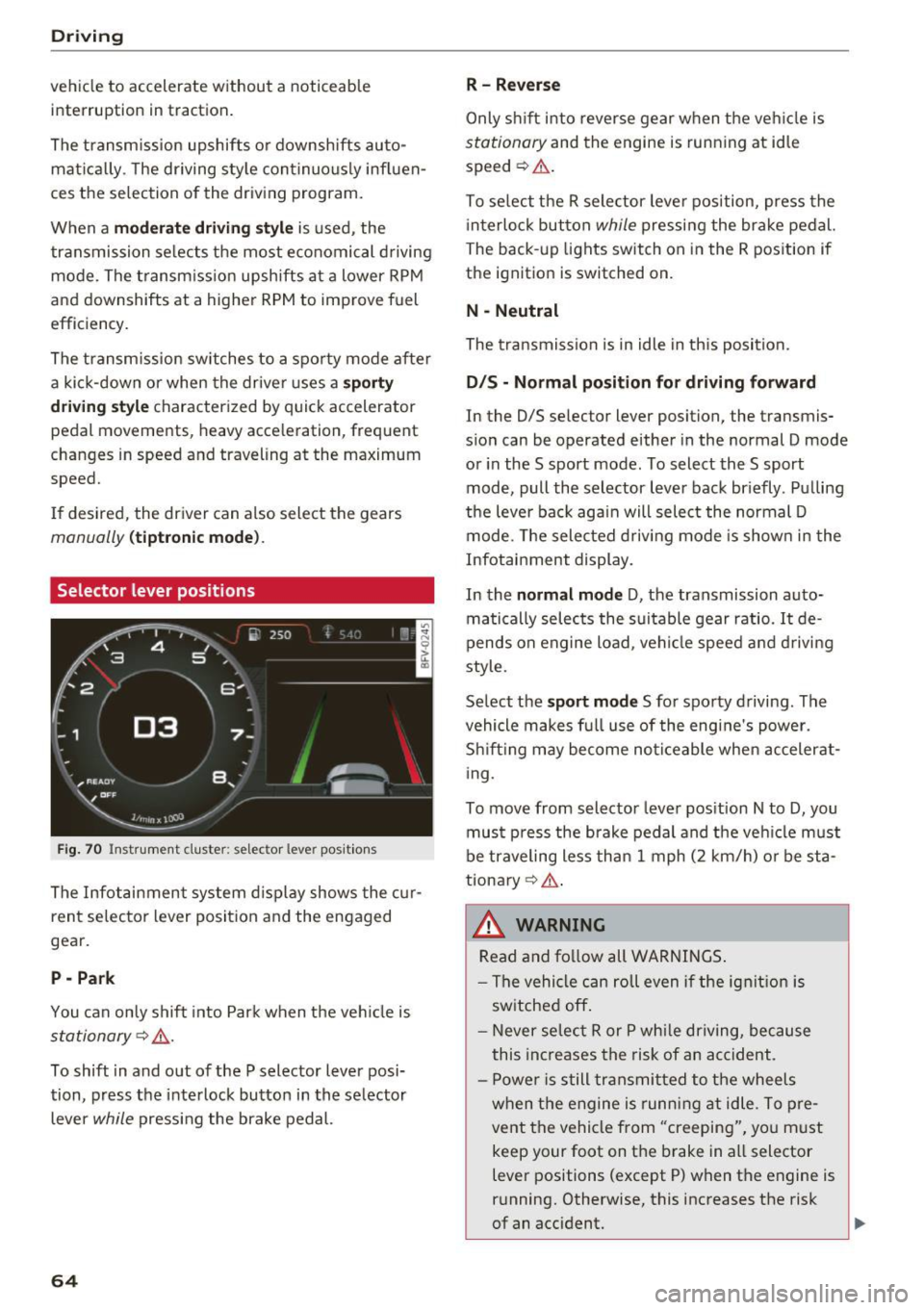
Selector lever positions
Fig. 70 Inst rument clus te r: s ele ctor leve r pos it io n s
The Infot ainment system d isplay shows the c ur
ren t selecto r lever position and the engaged
gear.
P -Park
You can only shift in to Par k when the ve hicle is
stationary ~,&. .
To shift in and out of the P selector lever posi
tion, press the inte rlock butto n in the se lector
lever
while pressi ng the brake pedal.
64
R- Reverse
Only s hift into reverse gear w hen the ve hicle is
stationary and the engine is runn ing at idle
speed ~&. .
To se lect t he R sele ctor leve r pos ition, press the
i nterlo ck button
while p ressi ng the bra ke pedal.
The back -up lights switch on in the R pos ition if
the ignit ion is switched on.
N -Neutral
The tra nsmission is in idle in th is position.
D IS -Normal position for driving forward
In the D/S se lector lever position, the transmis
s ion can be operated either in the normal D mode
or in the S sport mode. To select the S sport
mode, pull the selector lever bac k br iefly . Pu lling
the leve r bac k aga in will select the normal D
mode. The selec ted drivi ng mode is show n in t he
Infotai nment display.
In the
normal mode D , the transmission auto
matically sele cts the s uitable gear ratio.
It de
pends on engine load , vehi cle speed a nd driving
style.
Se lect the
sport mode S fo r spo rty d riving . The
vehicle makes f ull use of the engine's power.
Sh ift ing may become no ticeable whe n acceler at
i ng.
To move from selector leve r pos it ion N to D, you
mus t press the brake pedal and the veh icle m ust
be traveling less th an 1 mph (2 km/h) o r be sta
tiona ry ¢ ,&. .
&_ WARNING
Read and fo llow all WARNINGS .
- The vehi cle can roll even if the ig nitio n is
sw itched off .
- Never se lec t R or P whi le dr iving, because
this increases the risk of an ac cident .
- P owe r is still transmi tted to the wheels
w hen t he engine is runn ing at idle . To pre
vent the vehicle from "creeping", yo u m ust
keep your foot on the brake in a ll selector
lever positions (except P) when the engine is
r u nning. Otherwise, this increases the risk
of an accident.
Page 109 of 314
"'
"' ....
N
" N ....
R v> CX)
• Telephone
• Audi connect
• Navigation
• Directory
• Radio
• Med ia
• Sound
• Help
• Help Speech dia log system
• Help Telephone
• Help Audi connect
• Help Navigation
• Help Map
• Help Radio
• Help Media
TELEPHONE
· Enter number
• Delete number/ correc tion
• Directory
• Call (XY)
·business/ private/ land line/ mobile
NAVIG:ATI0N
• Navigate to (XV)
• Business address/ Private address
• Start/ cancel route guidance
· Directory
• Last destinations
• N avigation favorites
• Drive home
• Enter address
• Enter country/ town/ street/ state
• Exclude routt / Exclude route for (XY) km/ m
• M ap
• Day map / Night map
Voice recognition system
• Favor ites
• Call (XY)
• Enter number
• Redial
• Read new tex t message
• N avigate to
(XV)
• Enter address/destination
• Onhne destinations
• Cancel route guidance
• M ap
• Line (XY)
• Next page/ previous page
• Cancel
• N o, l meant
()(Y)
• Correction
• Call list
• Redial
• Call mailbox
• Enter PIN/ delete PI N
• Telephone favori tes
• Exclude ne xt route section / Exclude
nex t street
• Route list
• Calculate alternative routes
· Online destinations
• Special destination
• 20 driving position map/ 20 north position map/ 30 map/ Destination map/ Overview map
AllJC !H C0NNECf
• Audi connect
• Travel information/ Parking Information
• Fuel prices
• Weather
RADIO
• Radio presets
• Last stations
• FM
• FM / AM/ SIRIUS XM
• Station (XY) / Frequency (XY)
• T raffic announcement on/ off
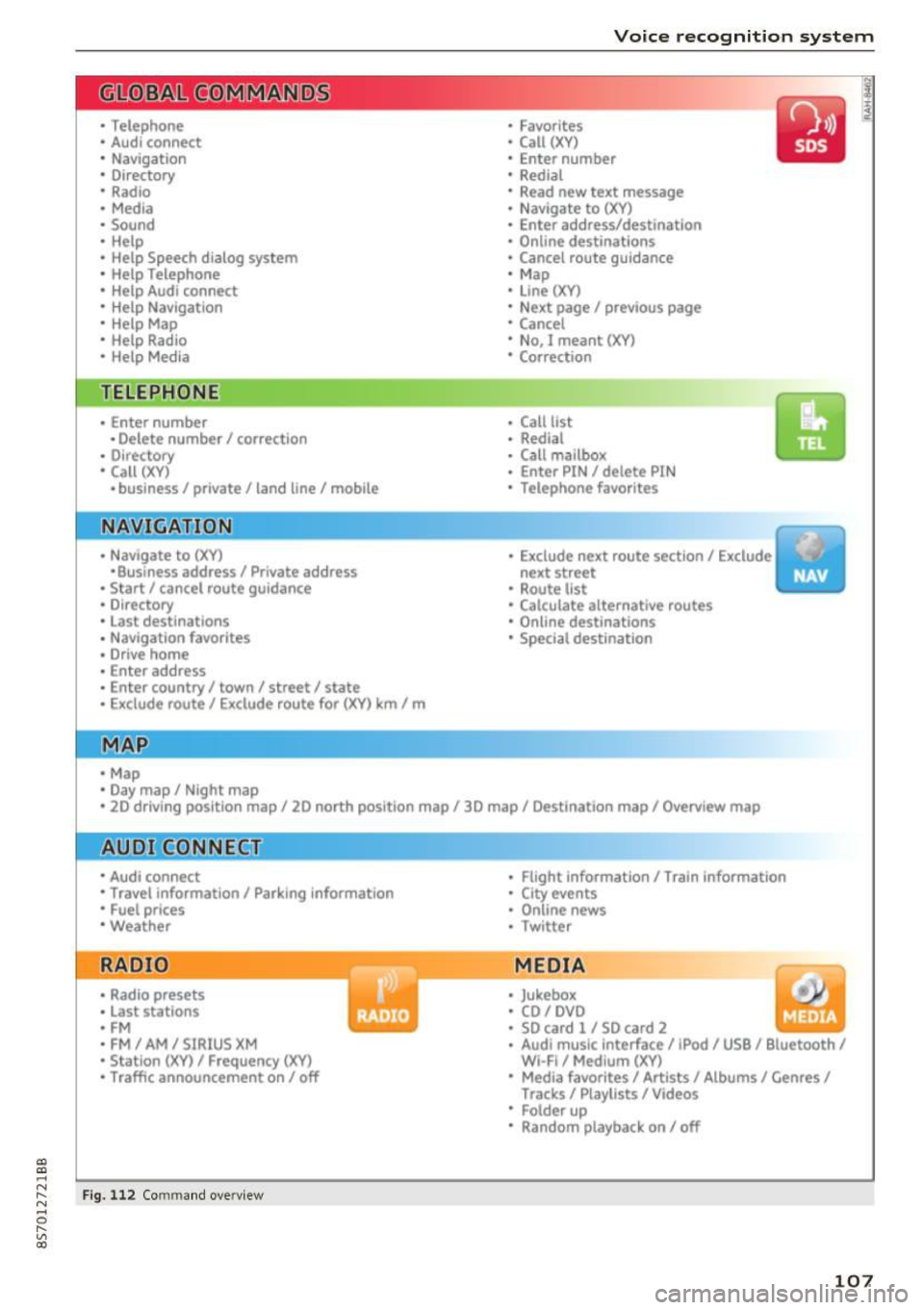
Fig . 112 Co mmand overv ie w
• Flight Information I Train Information
• City events
• Online news
• Twitter
MEDIA
• Jukebo x
• CO/ DVD y
• SO card l / SD card 2
· Audi music Interface/ !Pod/ USB / Bluetooth /
Wl ·Fi / Medium (XV)
• Media favorites/ Artists/ Albums/ Genres/
Tracks/ Playlists / Videos
• Folder up
· Random playback on / off
107
Page 116 of 314
Telephone
Telephone Introduction
Applies to: vehicles with telephone
To make phone coils in your vehicle using the
/11/111, connect your cell phone to the /11/111 via
Bluetooth.
Hand sfree
Afte r you have connected you r ce ll phone to the
MMI via Bluetooth , you can use the handsfree
system and operate telephone functions through
your MMI. You can make calls using the antenna
on your cell phone.
A WARNING
-Med ical experts warn that cell phones can
interfere w ith the funct ion of pacemakers .
Always mainta in a m inimum d istance of 20
c ent imeters between the cell phone anten
na and the pacemaker.
- Do not carry the cell phone in a pocket di
rectly over the pacemaker when the phone
is switched on.
- Sw itch the cell phone off immediately if
you suspect it may be interfering w ith the
pacemaker.
- Do not use the vo ice recognit ion sys-
tem* c>
page 108 in emergenc ies because
your vo ice may change in stressful situa
t ions. It may take longe r to dial the number
o r the system may not be able to dial it at
all. Dial the emergency n umbe r manually .
- Switch your cell phone off in areas where
there is a risk of an exp losion . These loca
tions are not always clea rly mar ked. This
may include gas stations, fuel and chemical
storage facilities or transport vehicles, or lo cations where fue l vapors (such as propane
or gaso line vapor in vehicles or bui ld ings),
chemicals or large quantities of dust parti
cles (such as flour, sawdust or metal) may
be present in the air. This also applies to all
other locations where you would normally
turn yo ur vehicle engine off .
- The demands of traffic requ ire yo ur full at
tent ion. Always read the chapter c>
page 96,
Traffic safety information.
114
-
(D Tips
- To learn which Bluetooth connections and
wh ich of the funct ions in your cell phone are
supported, check with your cell phone serv
ice provider or the database for mobile devi
ces at
www .audiu sa.com /bluetooth .
-The Bluetooth connection range is limited
to inside the vehicle . It can also be affected
by local condit ions and interference with
other devices .
Setup
Connecting a cell phone using Bluetooth
Applies to: vehicles with telephone
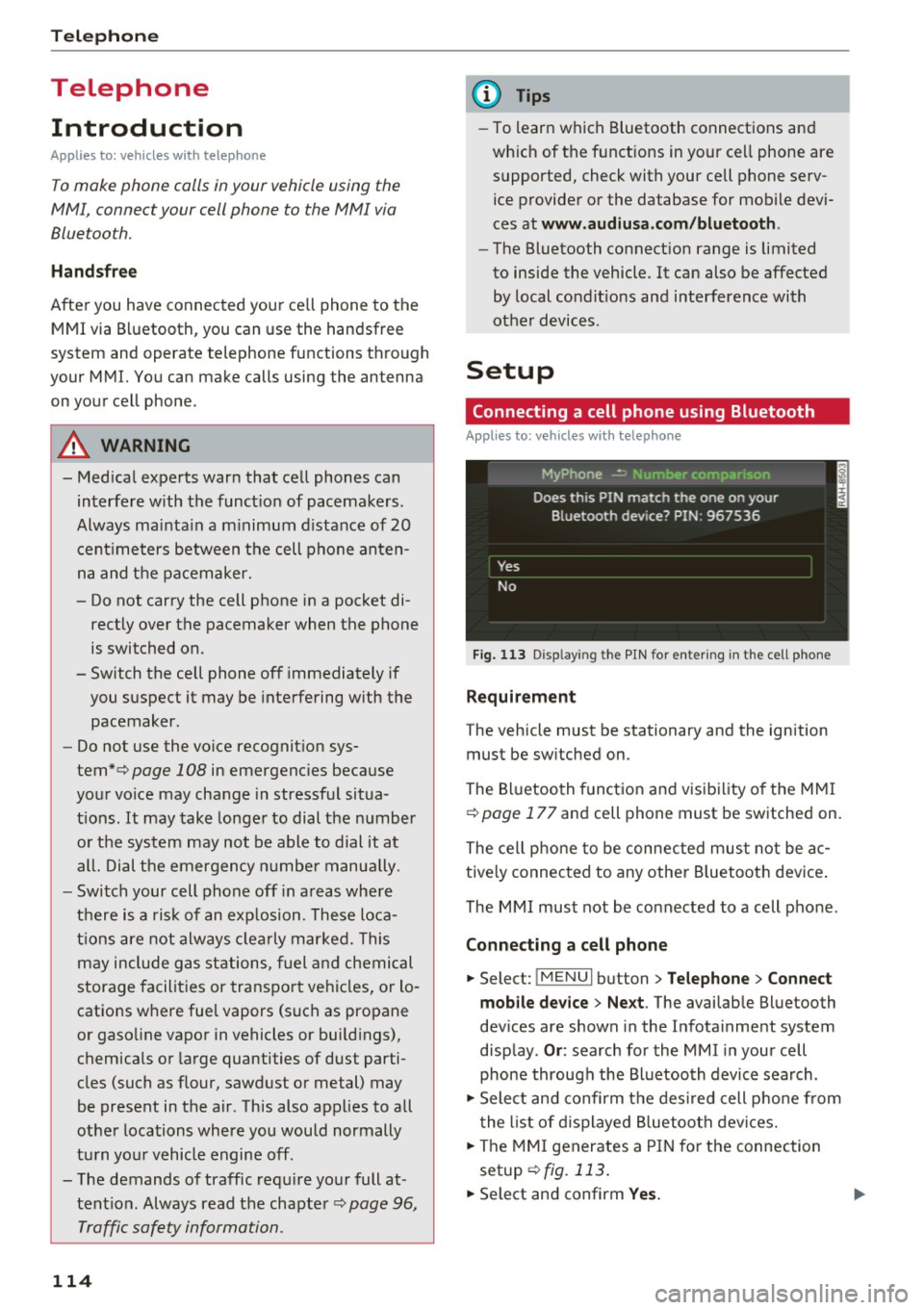
Fig. 11 3 Disp laying the PIN for entering in the cell phone
Requirement
The vehicle must be stationary and the ignition
must be sw itched on.
The Bluetooth funct ion and visibility of the MMI
c>
page 177 and cell phone must be switched on.
The cell phone to be connected must not be ac
tive ly connected to any othe r Bluetoot h dev ice .
The MMI must not be connected to a cell phone.
Connecting a cell phone
... Select: !MENUI button> Tel ephone > Connect
mob ile d ev ice > Ne xt .
The available Bluetooth
dev ices are shown in the Infotainment system
disp lay .
Or : search for the MMI in your cell
phone through the Bluetooth device search .
... Sele ct and confirm the des ired cell p hone from
the list of d isplayed B luetooth devices.
... The MMI generates a PIN for the connection
setup
c> fig. 113.
... Select and confirm Yes. .,..
Page 131 of 314
CD
CD
.... N
" N .... 0 r--. V, co
Audi connect services
Basic functions
Applies to: vehicles with Audi connect
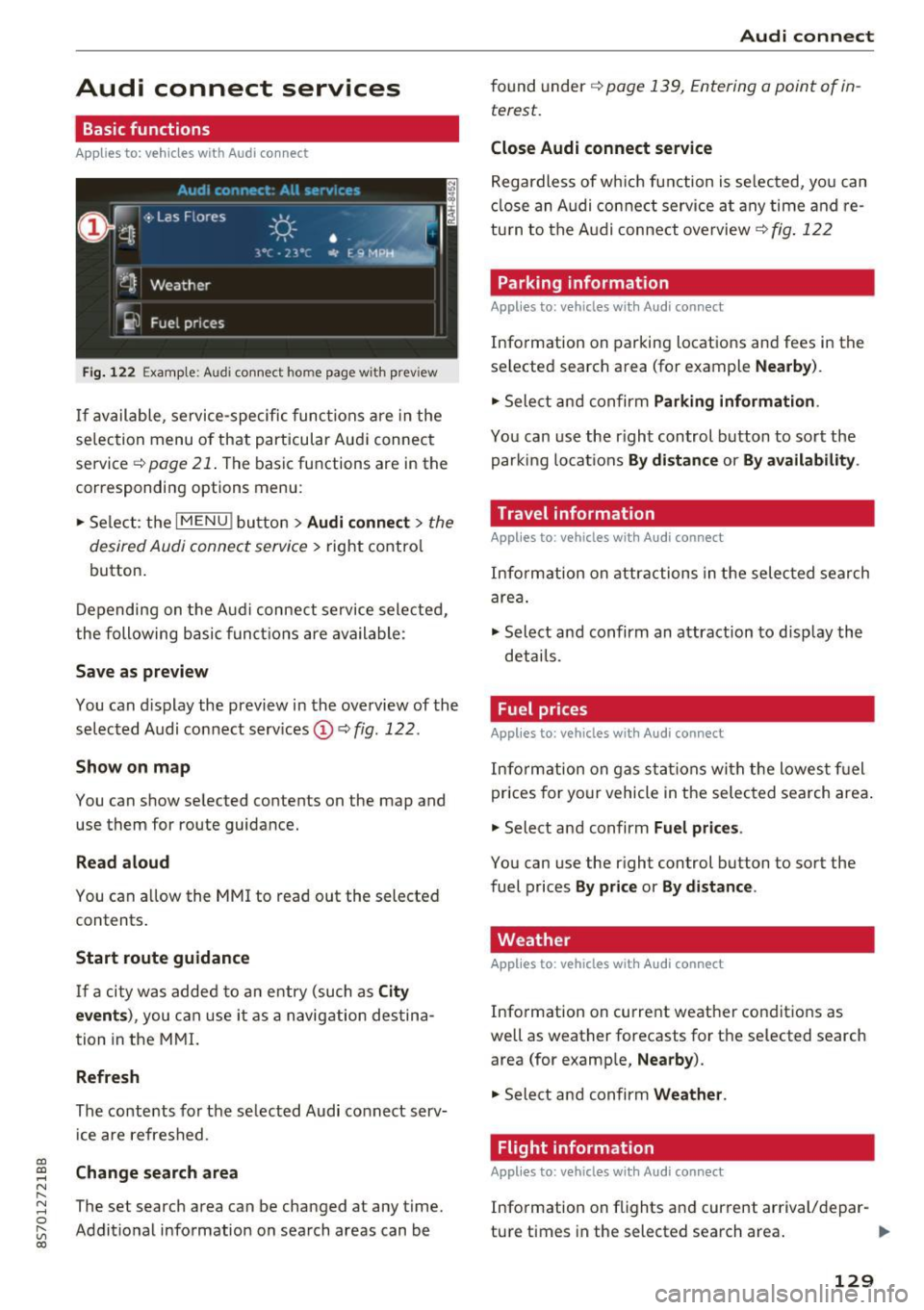
Fig. 12 2 Example: A udi co nn ect home page w ith prev iew
If available, service-specific func tions are in the
se lec tion menu o f th at particular Aud i connec t
service ~
page 21. The basic functions are in the
correspondi ng options menu:
.,. Se lect: the
I MENU ! button> Audi connect > the
desired Audi connec t service>
right contro l
button.
D epending on the A ud i connect se rvice sele cte d,
the following basic fun ctions are ava ilable:
Save as preview
You can d isplay the preview in the overview of the
se lected A udi connect services ©~
fig. 122 .
Show on map
You can show se lected contents on the map and
use them for route guidance.
Read aloud
You can a llow the MM I to read out the selected
contents .
Start route guidance
If a city was added to a n entry (such as City
event s),
you can use i t as a navig ation destina
tion in the M MI.
Refresh
The conte nts for the se lected Audi co nnect serv
i ce are refreshed .
Change search area
The set search area can be changed at any time.
Addit io nal information on search areas can be
Audi connect
found under ~ page 139, Entering a point of in
terest .
Close Audi connect service
Regardless of wh ich func tion is se lec ted, yo u can
cl ose an A udi con nect service a t any time and re
tu rn to the A udi conne ct overview
~ fig . 122
Parking information
Applies to: vehicles with Audi connect
Info rmation on parking locations and fees in the
se lected search area (for example
Nearby ).
.,. Sele ct and confirm Parking information .
You can use the right control button to sort the
parki ng locat ions
By distance or By availability .
Travel information
Applies to: vehicles with Audi connect
Info rm ation on attr actions in the selec ted search
are a.
.,. Select and confirm an attraction to disp lay the
details .
Fuel prices
Applies to: vehicles with Audi connect
Inform ation on gas s ta tions wi th the lowes t fu el
prices for yo ur vehicle in the selec ted sea rch area .
.,. Select and confirm
Fuel price s.
You can use the right control button to sort the
fuel prices
By pr ice or By d istance .
Weather
Applies to: vehicles with Audi connect
Info rmation on current weather conditions as
well as weather forecasts for the selected search area (for examp le,
Nearby ).
.,. Sele ct and confirm Weather .
Flight information
Applies to: vehicles with Audi connect
Info rmation on f lights and cur rent arrival/depar-
ture times in the selected search area . ..,.
129
Page 145 of 314
CD
CD
.... N
" N ...... 0 r--. V, co
Low fuel warning
A message is disp laye d if the fue l g auge goes be
l ow the reserve m arki ng when this fun ct ion is
switche d on ~-Co nfirming this message displays
a list of gas stations in the area. When a gas sta
tion is selected, route gu idance from the c urrent
ve hicle position is calcu lated.
Notification when nearby*
The notifi cation when near by is switche d off a t
the facto ry.
The M MI not ifi es you whe n you are appro ac hing
se lec te d p oin ts of in terest when this func tio n is
switche d on ~-You can a lso h ave a
Notification
tone .
Presentation mode
The pre se nt ation mode he lp s yo u to plan a nd fo l
l ow a ro ute wi tho ut mo ving the veh icle. Yo u ca n
Select starting point when yo u wo uld like to cal
cula te a ro ute star ting from a loca tion o ther than
the vehicle pos it io n. Sta rt p resentation mode to
sim ulate route guida nce .
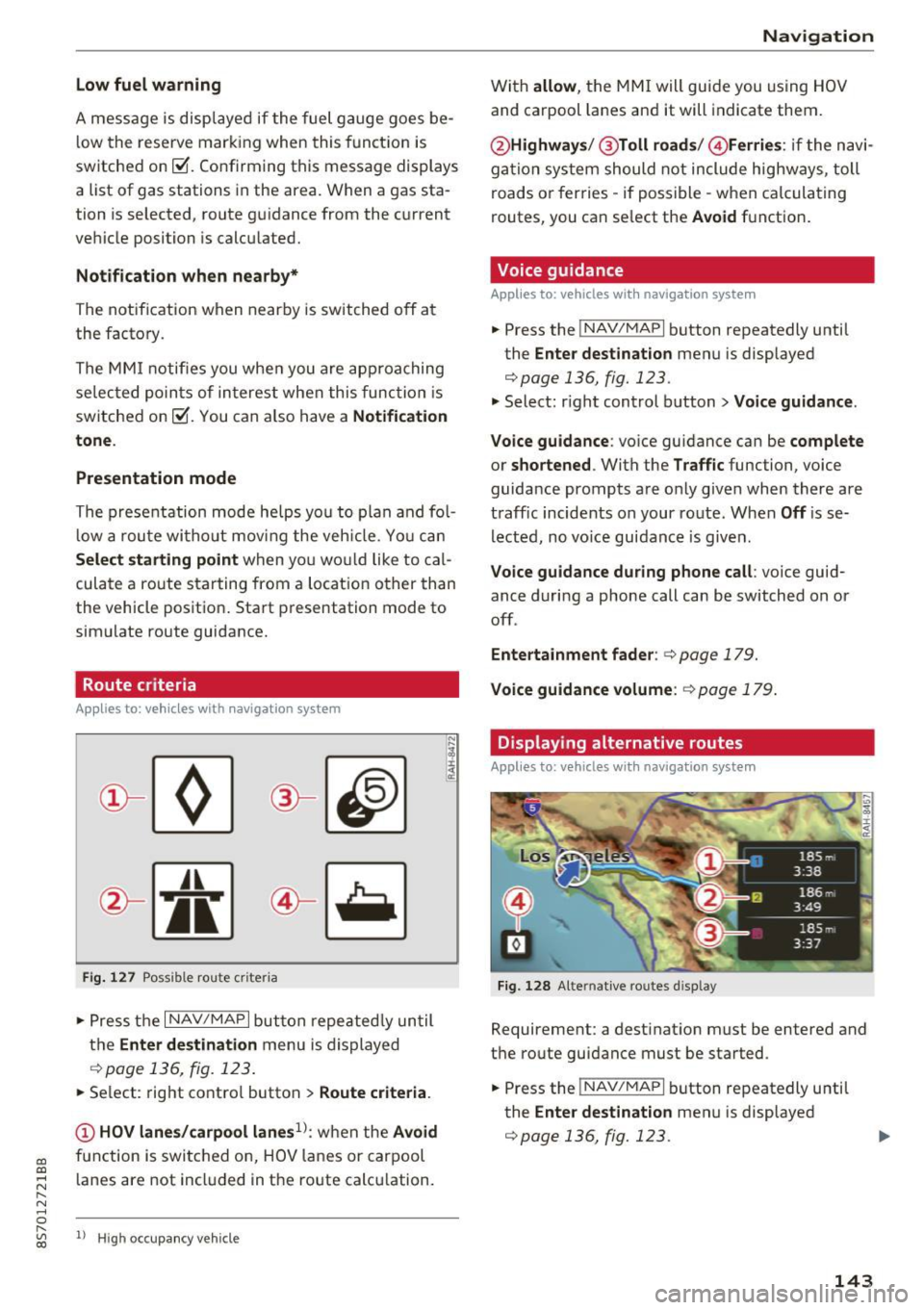
Route criteria
App lies to: veh icles with navigation system
J(
Fi g. 127 Possib le route criteria
• Pres s th e I NAV/ MAP I button r epeated ly un til
t h e
Enter destination menu is displayed
.::!) page 136, fig. 12 3.
• Se lect: rig ht contro l butto n > Route criteria .
(D HOV lanes/carpool lanes1
l: w hen t he Avoid
fu nction is swi tc h ed o n, HOV lanes or car pool
l anes are not incl uded in t he ro ute ca lcu lation .
1> Hig h oc cu pa ncy ve hicle
Navigation
W it h allow , the MMI will gui de you using HOV
and carpool la nes an d it will indicate them.
@ Highways /@ Toll roads /@ Ferries : if the n avi
ga tio n sy stem should not include highways, toll
roads or fer ries -if poss ible -w hen c alcula ting
routes, you can se lect the
Avoid f u nction .
Voice guidance
Applies to: vehicles with navigation system
• Press the !NAV/MAPI b utton repeatedly unti l
the
Enter destination men u is displayed
r::;,page 136, fig. 123.
• Select: r igh t cont rol button > Voice guidance .
Voice guidance :
voice gui dance ca n be complete
or shortened . With the Traffic function, voice
guida nce prompts a re o nly given when there ar e
t raff ic incidents on your ro ute. When
Off is se
l e cte d, no vo ic e gui dan ce is giv en.
Voice guidance during phone call : voice guid
ance d uri ng a phone call can be switched on or
off .
Entertainment fader : c:> page 179.
Voice guidance volume : r::!) page 179 .
Displaying alternative routes
Applies to: vehicles with navigation system
Fig. 128 Alte rnati ve routes d isp lay
Requireme nt: a dest inat ion m ust be entered and
t h e ro ute guidance must be started .
• Press the
!NAV/MAPI b utton repeatedly u nti l
the
Enter destination men u is displayed
r::;,page 136, fig. 123.
143
Page 177 of 314
"' "'
System settings
Setting the date and
time
You can set the clock time manually or using the
C PS .
.,. Se lect : I MENU I button> Settings > left co ntro l
button >
MMI settings > Date & time .
.,. Or :
select : IMENU I button> Vehicle > left con-
t ro l button >
Vehicle settings > Date & time .
Automatic setting
When th is function is sw itched on~. the time
a n d date are a utomat ically set.
Time
R equ irement: the Automatic setting must be
switched off .
Pr ess the cont ro l kn ob . You ca n se t the
Time
manu ally by turning and press ing the con trol
k nob.
Date
R equi remen t: the Automatic setting must be
s witche d off .
Pr ess the cont rol knob . You can set the
Date
manually by turn ing and press ing the con trol
knob.
Time zone
When se lecting the approp riate t ime zone, a
sampling of countr ies in this zone will be listed .
Automatic time zone*
When t his function is sw itched on~' the t ime
will automatically a djust to the correspon ding
time zone .
Time format
If yo u selec t 24h, the clock will disp lay, for ex
ample,
13:00. If yo u se lect AM/PM , the clock
wi ll disp lay, for e xamp le,
1:00 PM .
Date format
....
~ I f yo u sele ct DD.MM.YYYY , the da te di spl ay w ill
N 8 s how, for ex amp le, 31 .08 .2017 . If you se le ct
~ MM/DD/YYYY , the d ate disp lay wi ll s how, fo r ex -
System settings
amp le, 08/31/2017. If you select YYYY-MM
DD ,
the date display wi ll sh ow, fo r exam ple,
2017-08-31.
MMI settings
.,. Select: iME NUI button> Settings > left control
button >
MMI settings .
Language
Yo u ca n cha nge the displ ay la ngu age as well as
t h e la ngu age fo r th e v oic e gui dance* and voi ce
recognition system *.
T he number of language s avai lab le de pend s on
t h e m arket .
Measurement units
The following units ca n be selected:
- Speed (mph o r km/h)
- Distance (miles o r kilomete rs)
- Temperature (°For 0
( )
-Fuel consumption (l/ l0 0k m, mpg ( US), m pg
( UK ) or km/l )
-Volume (li te rs, ga llon s)
Tool tips
When this f unct ion is switched on~' your MMI
s h ows you t ips fo r input. The freq uency of how
often it display s dec reases w ith time . You can
swi tch off the operati ng tips a t any ti me.
Speech dialog system
Applies to : vehicles with voice recogn it ion system
Command display : when this function is sw itch
ed on~ , the MMI w ill show yo u the possible
commands for voice input in the res pect ive
me nu. You ca n sw itch the f unct io n off a t any
t im e.
Short dialog : when th is function is sw itched on
~ . a sho rter form of the prompts is used . You
can sw itch the func tion off at any t ime .
Speech dialog system volume : you can adjust
the volume of t he p rompts by turning the contro l
k nob. .,,.
175
Page 233 of 314
co
co
.... N
" N .... 0
" "' c:o
Checking and Filling Fuel
Gasoline grade
The correct gasoline grade is stated on the inside
of the fuel filler door .
The vehicle is equipped with a catalytic converte r
and must only be d riven w it h
unleaded gasoline .
Audi recommends using TOP TIER Detergent Gas
oline. Additiona l information on TOP TIER Deter
gent Gasoline can be found on the offic ial web
site (www .topt iergas.com).
The individ ua l gasoline grades a re differentiated
by
o ctane ratings . This value is given with (R +M)/
2 equating to AKI or in RON.
The fo llow ing headings ma tch the correspon ding
sticker in the fue l filler door .
UNLEADED FUEL ONLY MIN. (R+M)/2 87
Regula r/ MIN. RON
91 Regular
Use reg ular gaso line wi th minim um 87 AK I/
91 RON ~ 0 .
The m aximum engine power is only reache d if
p rem ium gaso line 91 AKI/ 95 R ON is use d .
UNLEADED FUEL ONLY PREMIUM MIN . (R
+M )/2
91 / SUPER MIN. RON 95
Using prem ium gaso line wit h minim um 91 AKI/
9 5 RON is recommende d.
If premium gasoline is not availab le, yo u can also
use reg ular gasoline 87 A KI/ 91 RO N. Howeve r
this does reduce t he engine powe r sli ght ly.
CD Note
- Fill ing the tank just one t ime with lead ed
fuel or o ther meta llic additives will cause
p erm anen t de ter io rat io n to the ca taly tic
c onve rter fu nctio n.
- W hen g asoline wi th an octane ratin g th at is
t oo low is used, high speed s or heavy eng ine
l o ad ca n lea d to eng ine damage.
Checking and Filling
{!) Tips
The vehicle may be filled with fuel t hat has a
higher octane rating than w hat is requ ired by
the eng ine .
Blended gasoline
Use of gasoline containing alcohol or MTBE (methyl tertiary butyl ether)
You may use unleaded gasoline b lended with al
cohol o r MTBE (commonly referre d to as oxygen
a tes) if the blende d m ixt ure meets the fo llow ing
cr it e ria :
Blend of gasoline methanol (wood alcohol or
methyl alcohol)
-Anti-knock index must be 87 AKI or higher.
- Blend must contain no more than
3% metha-
nol.
- Blend must contain more than
2% co-solvents.
Blend of gasoline and ethanol (grain alcohol or
ethyl alcohol )
-Ant i-kno ck ind ex mus t be 87 AKI or hig her.
- Blend must not co nta in mo re than
15% etha-
nol.
Blend of gasoline and MTBE
- Anti-knoc k index must be 87 AKI or h igher .
- Blend mus t contain no t mo re than
15% M TBE .
Seasonally adjusted gasoline
Many gasoline grades are blended to pe rform es
pecially well for w inter or s ummer dr iving . D ur
i ng seasonal cha nge-ove r, we sugges t that yo u
fill up a t busy gas stat ions where the seasonal
adjus tme nt is mo re li ke ly to be m ade in time .
CD Note
- Metha nol fuels which do not meet these re
quireme nts may cause cor rosion and dam
a ge to p last ic and r ubber co mpon ents i n t he
fue l sys te m .
- D o not use f ue ls tha t fa il to mee t the speci
fie d cr iteria in thi s ch ap te r.
231