2017 AUDI TT ROADSTER fuel
[x] Cancel search: fuelPage 6 of 314

Table of content s
Safety belts . . . . . . . . . . . . . . . . . . . . . . . . 192
Safety belt tensioner . . . . . . . . . . . . . . . . . 194
Airbag system ... . ...... ... .. .. ... 19 6
I mportant info rmation . . . . . . . . . . . . . . . 196
F ront airbags . . . . . . . . . . . . . . . . . . . . . . . 200
Mon itoring the Advanced Airbag System . 207
Knee airbags........................ 212
Side airbags . . . . . . . . . . . . . . . . . . . . . . . . 214
Ch ild safety . . . . . . . . . . . . . . . . . . . . . . 218
Important information . . . . . . . . . . . . . . . 218
Ch ild seats . . . . . . . . . . . . . . . . . . . . . . . . . 223
Secur ing ch ild seats . . . . . . . . . . . . . . . . . . 227
Add it io nal info rmation . . . . . . . . . . . . . . . 230
Maintenanc e and Care . . . . . . . . . . . 23 1
Checking and Filling . . . . . . . . . . . . . 23 1
F ue l... .. .. .. .. ... .......... .... .. . 23 1
Refueling . . . . . . . . . . . . . . . . . . . . . . . . . . 232
E ng ine compartment . . . . . . . . . . . . . . . . . 235
Eng ine oi l .... .. ... .. ..... ... .. .. ... 237
Cooling system . . . . . . . . . . . . . . . . . . . . . . 241
Brake fluid . . . . . . . . . . . . . . . . . . . . . . . . . 242
Battery . . . . . . . . . . . . . . . . . . . . . . . . . . . . 243
W indshield washer system . . . . . . . . . . . . 244
Service interval display . . . . . . . . . . . . . . . 245
Wheels ... .. ... ............ .... .. . 246
Wheels and Tires . . . . . . . . . . . . . . . . . . . . 246
Tire pressure monitoring system 263
Care and cleaning . . . . . . . . . . . . . . . . 266
General information . . . . . . . . . . . . . . . . . 266
Ca r washes . . . . . . . . . . . . . . . . . . . . . . . . . 266
C lea ning and care information . . . . . . . . . 267
P lacing your veh icle o ut of se rvice 27 1
Troubleshooting . . . . . . . . . . . . . . . . . 27 2
Emergency assistance . . . . . . . . . . . 272
T runk es cape l atch . . . . . . . . . . . . . . . . . . . 27 2
G eneral informa tion . . . . . . . . . . . . . . . . . 272
Equipment . . . . . . . . . . . . . . . . . . . . . . . . . 272
Tire mobility k it . . . . . . . . . . . . . . . . . . . . . 273
Replac ing whee ls . . . . . . . . . . . . . . . . . . . . 275
Spare tire . . . . . . . . . . . . . . . . . . . . . . . . . . 279
4
Fuses and bulbs . . . . . . . . . . . . . . . . . . 281
E lectrica l fuses . . . . . . . . . . . . . . . . . . . . . . 281
Bu lbs. . . . . . . . . . . . . . . . . . . . . . . . . . . . . . 283
Emergency situations . . . . . . . . . . . . 2 8 4
Genera l . . . . . . . . . . . . . . . . . . . . . . . . . . . . 284
Start ing by push ing or tow ing . . . . . . . . . . 284
Start ing with jumper cables . . . . . . . . . . . 284
Use o f jumper cables . . . . . . . . . . . . . . . . . 28S
T owing with a tow truck . . . . . . . . . . . . . . 286
Raising the vehicle . . . . . . . . . . . . . . . . . . . 288
Accessories and technical data . . 290
Technical data . . . . . . . . . . . . . . . . . . . . 290
Vehicle spec ificat ions . . . . . . . . . . . . . . . . 290
Weights . . . . . . . . . . . . . . . . . . . . . . . . . . . 290
D imens ions. . . . . . . . . . . . . . . . . . . . . . . . . 291
Capaci ties . . . . . . . . . . . . . . . . . . . . . . . . . . 291
Gasoline engines . . . . . . . . . . . . . . . . . . . . 292
Consumer information and
technical data . . . . . . . . . . . . . . . . . . . .
293
Consumer information . . . . . . . . . . 293
Warranty coverages . . . . . . . . . . . . . . . . . . 293
Operat ing your vehicle outside the U.S.A.
or Canada . . . . . . . . . . . . . . . . . . . . . . . . . . 293
Audi Service Repair Manuals and Lite rat ure . . . . . . . . . . . . . . . . . . . . . . . . . . 293
Maintenance. . . . . . . . . . . . . . . . . . . . . . . . 293
Accessor ies a nd techn ica l changes 295
Index .......... ... ............. ... 297
Page 10 of 314
Instrumen ts and ind icator ligh ts
Instruments and indicator Lights
Instruments
Audi virtual cockpit (instrument cluster)
The instrument cluster is the central information center for the driver.
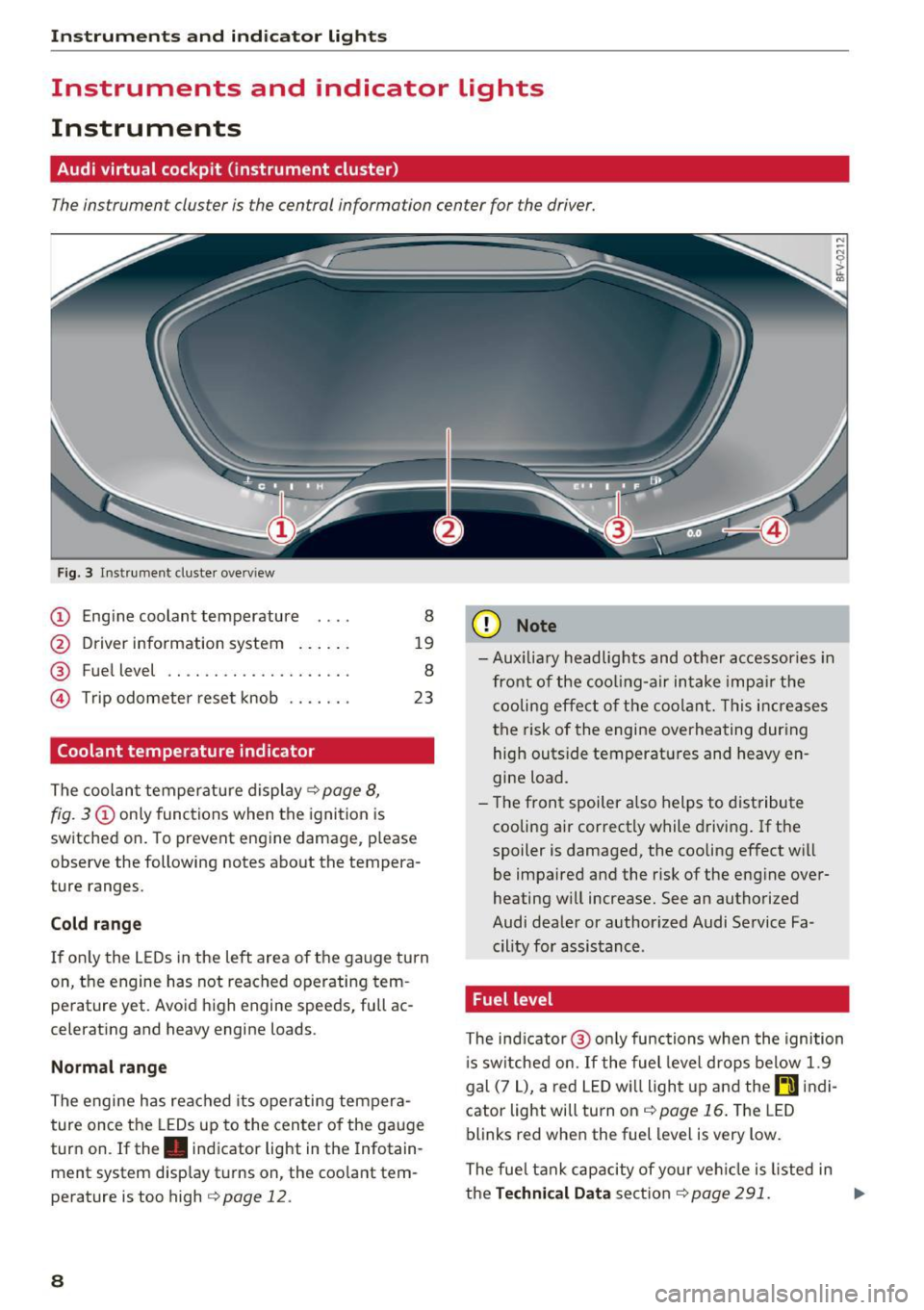
Fig. 3 Instrume nt cluster overv iew
(D Eng ine coolant temperature 8
@ Driver information system . . . . . . 19
® Fuel level . . . . . . . . . . . . . . . . . . . . 8
@ Trip odometer reset knob . . . . . . . 23
Coolant temperature indicator
The coolan t temperature display c:> page 8,
fig. 3
(D only functions when the ignition is
switched on. To prevent engine damage, p lease
observe the following notes about the tempera
ture ranges.
Cold rang e
If o nly the L EDs in the left area of the gauge turn
on, the engine has not reached operating tem
perature yet. Avoid high engine speeds, full ac
celerating and heavy engine loads .
Normal range
The engine has reached its operating tempera
ture once the LEDs up to the center of the gauge
turn on . If the . indicator light in the Infotain
ment system display turns on, the coolant tem
perature is too high
c:> page 12.
8
(D Note
-Aux iliary head lights and other accessories in
front of the coo ling-a ir intake impa ir the
cooling effect o f the coolant. This increases
the risk of the engine overheating during high outside temperatures and heavy en
gine load.
- T he front spoiler a lso helps to distribute
cooling air correctly while driving . If the
spoiler is damaged, the cooling effect will
be impaired and the risk of the eng ine over
heating w ill increase. See an authorized
Audi dealer or author ized Audi Service Fa
cility for assistance .
Fuel level
The indicator @ only func tions when the ignition
i s sw itched on. If the fuel level drops below 1.9
gal (7
L), a red LED wi ll light up and the rD indi
cator light will turn on
c:> page 16 . The LED
blinks red when the fuel level is very low.
The fuel tank capacity of your veh icle is listed in
the
Techni cal Dat a sectio n c:> page 291. ..,_
Page 11 of 314

co
co
.... N
" N .... 0
" "' c:o
(D Note
Never drive until the tank is completely emp
ty. The irregular supply of fuel that results
from that can cause engine misfires . Uncom
busted fuel will then enter the exhaust sys
tem. This can cause overheating and damage
to the catalytic converter .
Indicator lights
Description
The indicator lights in the instrument cluster
blink or turn on. They indicate functions or mal
functions.
With some indicator lights, messages may appear and warning signals may sound. The indica
tor lights and messages in the display can be cov
ered by other displays. To show them again, se lect the tab for the indicator lights and messages
using the multifunction steering wheel
c;, page 19. If there are several malfunct ions,
you can display them one at a time using the
thumbwheel.
Some ind icator lights in the display can display in
several colors .
Overview
Some indicator lights turn on briefly as a function
check whe n you switch the ign ition on . These sys
tems are marked with a
,I in the following tables.
If one of these indicator lights does not turn on,
there is a ma lfunction in that system.
Red indicator lights
---------------
US A models :
Brake system ./ c;, page 10
Canada models:
Brake system ./ c;, page 10
USA models : electromechanical
parking brake¢
page 11
Canada models: electromechanical
parking brake¢
page 11
Cooling system
<=>page 12
Instruments and indicator lights
Engine oil pressure
c;,page 12
Generator
¢page 13
Engine stop while driving
¢page 13
Safety be lt
c;, page 13
Electromechanical steering./
c;,page 91
Steering lock
¢page 13
Central indicator light
c;,page 13
Engine start system
c;,page 13
Transmission malfunction
c;, page 70
Rear spoiler
c;,page 92
Yellow indicator lights
Electronic Stabilization Contro l (ESC)
,I c;, page 14
Electronic Stabilization Control (ESC)
./ c;, page 14
USA models: anti-lock braking sys
tem (ABS)./
c;, page 14
Canada models: anti-lock braking
system (ABS) ./
c;, page 14
Safety systems ,I
c;,page 14
USA models:
Brake pads c;, page 14
Canada models:
Brake pads c;, page 14
Electromechanical parking brake
c;,page 11
Tire pressure monitoring system../
c>page264
Tire pressure monitoring system
<=>page 264
9
Page 18 of 314
Instruments and indicator lights
jj Tank system
D Please r efu el
If the indicator light turns on for the first time
a nd the message appears, there are about 1.9
ga l (7
L) of fue l left in the tank.
II] Plea se refuel immediately
If the indicator light turns on the message ap
pears , the fue l tank is almost empty . Refuel the
veh icle immediate ly.
D Tank s ystem: ma lfunction! Please contact
Service
If t h e ind icator lig ht tur ns on and th is mess age
appears, there is a mal func tion in the tank sys
tem .
D rive to an a uth o rized Aud i dea le r or authorized
Aud i Serv ice Facility immediately to have t he
malfunct ion cor re cted.
@ For the sake of the environment
Fue l sho uld never enter the sewe r system or
come into con ta ct w ith the gr ound.
(D Tips
More informat ion on refueling is ava ilable on
page
~ page 232.
~ Washer fluid level
(,-5 JJlea se add w asher fluid
F ill the washer fluid for the w indshield washer
system and the headlight washe r system* when
the ign ition is switc hed off ~
page 244.
"V! Windshield wipers
iii Windshield wipers : malfun ction ! Plea se
contact Service
There is a malfunction wi th the windshie ld w ip
e rs.
Dr ive to an autho rized Aud i dea ler or authorized
Aud i Serv ice Facility immediately to have the
malfunct io n corrected.
16
-:(f>:-Bulb failure indicator
If the II ind icator light tu rns on, a bulb has
failed . T he mess age indi cates the loc ation of the
bulb.
Replace the bu lb immediate ly .
Vehicle lights: malfunct ion! Please contact
S ervice
There is a ma lfunction in the headlights or the
li ght sw itch. Drive to an author iz ed Audi dealer or
authori zed Aud i Serv ice Facility immediately to
have the malfunction cor rected .
A WARNING
-Light bulbs a re under p ressure and can ex
plode when b ulbs are replaced, wh ich in
creases the risk of inju ry .
- With gas-discharge lamps* (xenon head
lights), the high-vo ltage component must
be handled appr opria tely. Ot he rw ise, there
is a risk of fatal injury.
~(D Headlight range control system
II Headlight range control : malfunction! See
owne r's manual
There is a ma lf u n ction in the headlight range
contro l system , which may cause gla re for o ther
drivers.
D rive to an author ized A udi dealer or autho rized
A udi Se rvice Fac il ity immed iate ly to have the
malfunction correc ted .
§0 Audi adaptive light
App lies to : vehicles wi th Audi ada ptive ligh t
II Audi adaptive light: malfunction! See own
er 's manual
-
The re is a ma lfunction in the adap tive lights. The
he adlig hts st ill func tion.
D rive to an au thorized A udi dealer or autho rized
A udi Se rvice Fac ility immediate ly to have the
malfunction cor rec ted .
Page 19 of 314
CD
CD
.... N
" N .... 0 r--. V, co
@:.D Light/rain sensor
l!I Automatic headlights: malfunction! See
owner' s manual
El Automatic wipers : malfun ction! See owner 's
manual
The light/ra in sensor is malf unct ion ing.
The low beams remain switched on at all times
for safety reasons when the light switch is in the
AUTO position. You can continue to turn the
lights on and off using the light switch . You can
still cont rol a ll wipe r functions that a re inde
pendent of the ra in se nsor.
Drive to an authorized Aud i dea ler or a ut horized
Audi Service Facility immediately to have t he
malfunction corrected .
; Adaptive dampers
Applies to: vehicles with Audi drive select
B Suspension : malfunction! You may continue
driving
There is an adaptive damper malf unct ion.
Drive to an aut horize d Aud i dea le r or a uthorized
Aud i Service Facility immediately to have t he
malfunct ion corrected.
¢i ¢ Turn signals
If t he B or Ill indicator light b links, a t urn sig
n a l is turned on. If both indicator lig hts are blink
i ng, the eme rgency flash ers a re on .
On-Board Diagnostic
system (OBD)
Malfunction indicator lamp (MIL)
The malfunction indica to r l amp (MIL) ¢.j in the
in str ument cluster is part of the O n Board Diag
n os tic Sys tem ( OBD II).
The warning/indicator light turns on w hen the ig
ni tion is switched o n and turns off once the e n
g ine is s tarted an d is runn ing in id le at a stab le
speed. This indica tes th at the MIL is functioning
cor re ct ly.
Instruments and indicator lights
If the light does not turn off after starting the
engine
or turns on while driving, this may in di
cate there is a malfunction in the engine.
If the
indicato r turns on, the cata lytic conve rter may be
damaged .
Drive
with reduced engine performan ce (avo id
high speeds for extended per io d s of t ime and/o r
fast acceleration) and have the ma lfunction cor
rected. See an author ized Audi dealer or author
ized Audi Service Facility.
The in dicator may turn on if the e lectron ic speed
li miter is faulty. For add it iona l information, see
¢ page 72, Electronic speed limiter.
On-Board Diagnostics
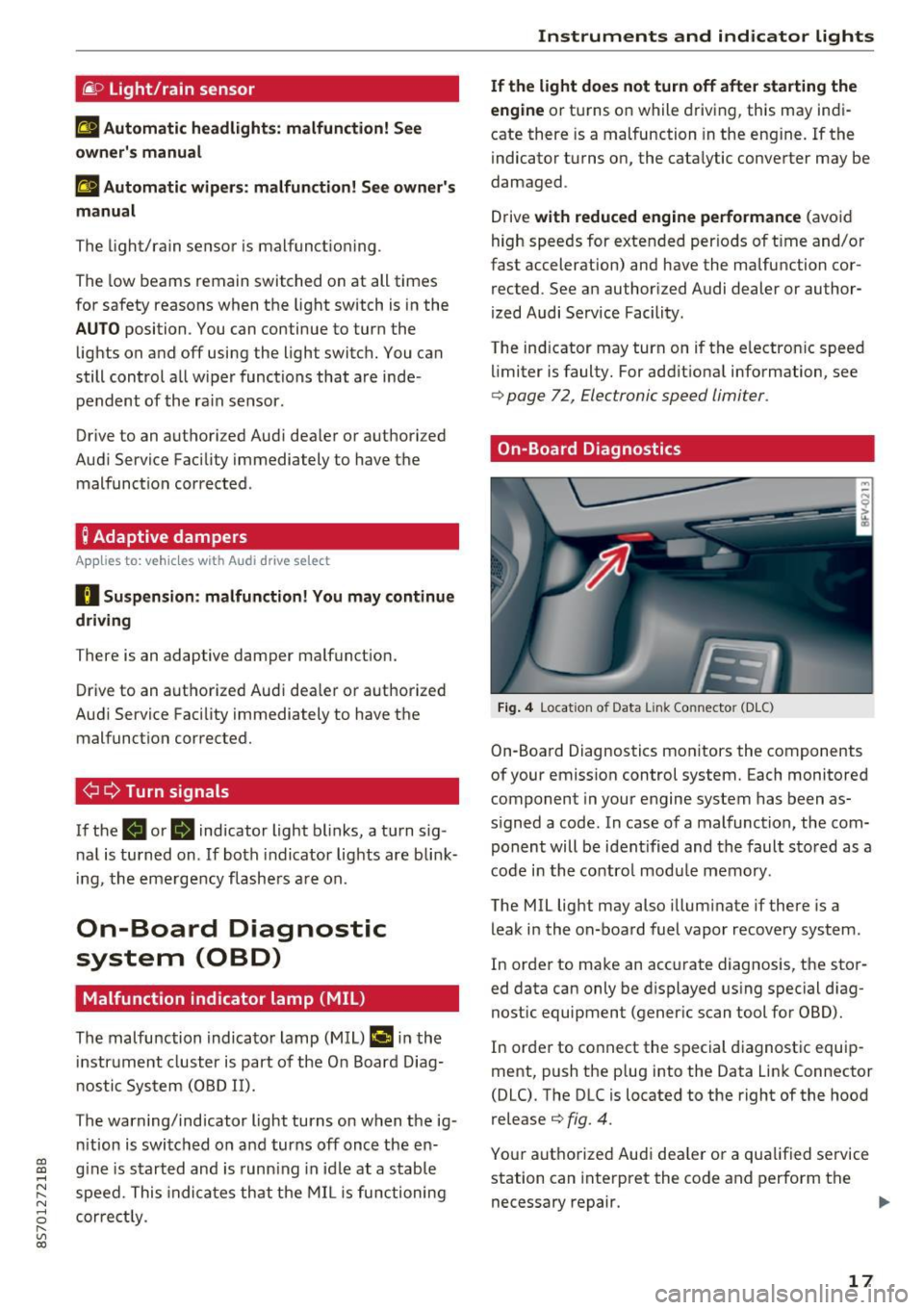
Fig. 4 Location of Data Link Connector (DLC)
On-Boa rd Diagnostics mo nitors the components
of your emission control system. Each monitored
component in your engine system has been as
s igned a code. In case o f a malfunction, the com
ponent will be i dent ified and the faul t st o red as a
co de i n t he co ntro l mo dule mem ory.
The MIL lig ht may also illum inate if there is a
leak in the on-boa rd fuel vapor recovery system .
In or de r to ma ke an acc urate diagnosis, the sto r
ed data can only be d isplayed using special d iag
nostic equipment (gener ic scan to ol for OBD).
In order to co nnect the s pecial diagnost ic equi p
ment, push the p lug into the Data Link Connector
(DLC). T he DLC is located to the right of the hood
re lease
¢ fig. 4.
You r aut horize d Aud i dea le r or a qua lified se rvice
station can inte rpret the code and perform the
necessary repair.
IJJI,
17
Page 25 of 314
CD
CD
.... N
" N .... 0
" V, co
Tachometer
The tachometer displays the engine speed in rev
olutions per minute (RPM) .
The beginning of the red zone in the tachometer
indicates the maximum permissible engine speed
for all gears once the engine has been broken in
and when it is warm. Before reaching the red
zone, you should shift into the next higher gear,
choose the Dor S selector lever position, or re
move your foot from the accelerator pedal.
@ Note
The needle in the tachometer may only be in
the red area of the gauge for a short per iod of
time or there is a risk of damaging the engine .
The location where the red zone begins varies
depending on the engine.
@) For the sake of the environment
Upshifting early helps you to save fuel and re
duce operating noise.
Odometer
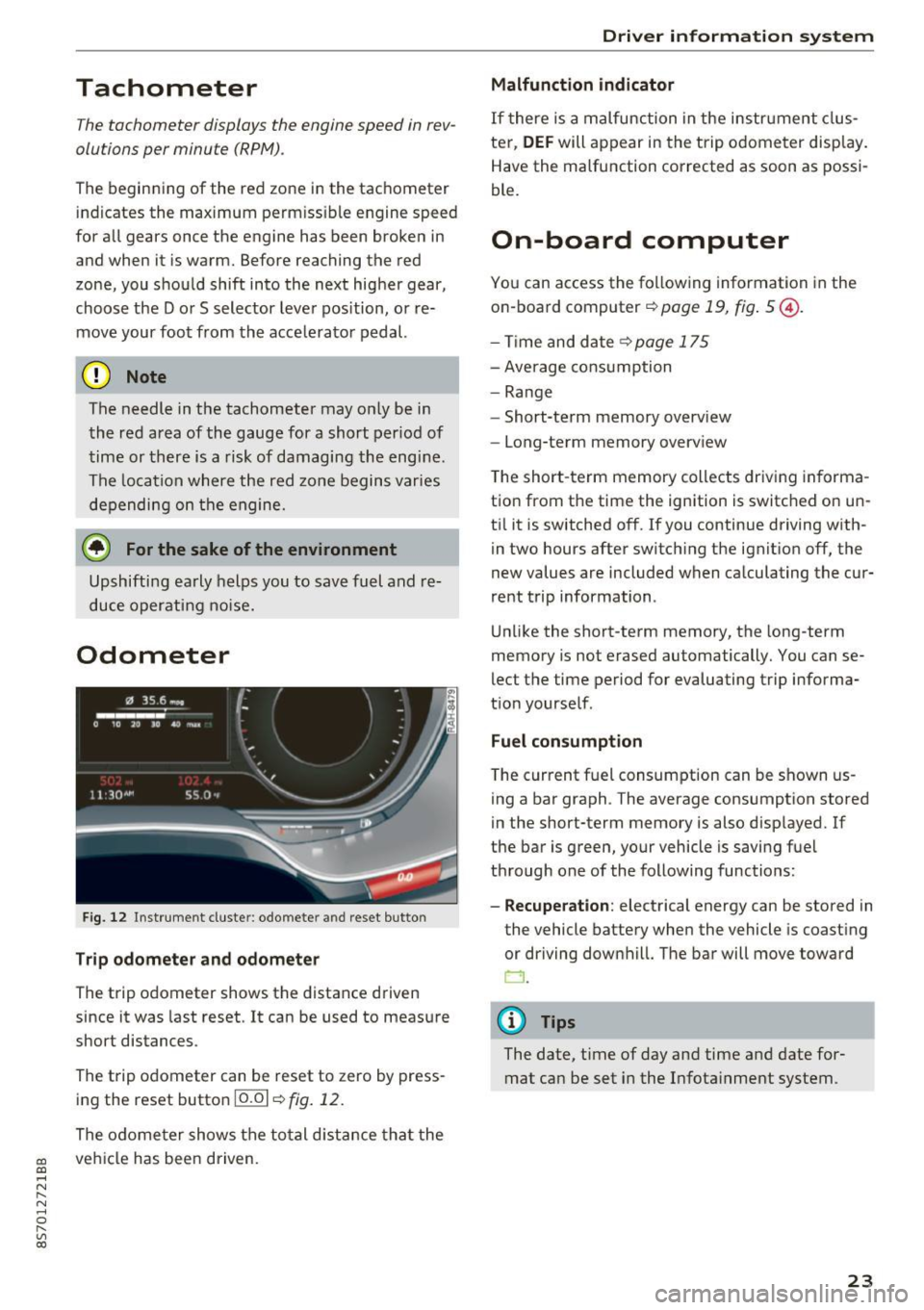
Fig. 12 Instrument cluste r: odomete r and reset button
Trip odometer and odometer
The trip odometer shows the distance driven
since it was last reset . It can be used to measure
short distances .
The trip odometer can be reset to zero by press ing the reset button 10.01
r=> fig. 12.
The odometer shows the total d istance that the
veh icle has been driven.
Driver in forma tion system
Malfunction indicator
If there is a malfunction in the instrument clus
ter,
DEF will appear in the trip odometer disp lay.
Have the malfunction corrected as soon as possi
ble.
On-board computer
You can access the following information in the
on-board computer
r=> page 19, fig . 5 @ .
-Time and date ~page 175
-Average consumption
-Range
- Short-term memory overv iew
- Long-term memory overview
The short -term memory collects driving informa
tion from the time the ignition is switched on un
til it is switched off. If you continue driving with·
in two hours after switching the ignition off, the
new values are included when calculating the cur
rent trip information .
Unlike the short-term memory, the long-term
memory is not erased automatically. You can se
lect the time period for evaluating trip informa
tion yourself .
Fuel consumption
The current fuel consumption can be shown us
ing a bar graph . The average consumption stored
in the short-term memory is also displayed. If
the bar is green, your vehicle is saving fuel
through one of the following functions:
- Recuperation : electrical energy can be stored in
the vehicle battery when the vehicle is coasting or driving downhill. The bar will move toward
CJ .
(D Tips
The date, time of day and time and date for
mat can be set in the Infotainment system.
23
Page 54 of 314
Warm and cold
Warm and cold
Climate control system
Description
The climate control system warms, cools and re moves humidity from the air in the vehicle interi
or. It functions most effectively when the w in
dows are closed .
If there is a build-up of heat in
side the vehicle , ventilation can help to speed up
the cooling process.
Pollutant filter
The po llutant filter removes pollutants such as
dust and pollen from the a ir.
Key recognit ion
Certain settings are automatically stored and as
signed to the remote control key be ing used .
.&_ WARNING
Poor visibility can lead to accidents.
- For safer driving, keep all windows free of
ice, snow and fog.
- Become familiar as quickly as possible with
the correct use and function of the cl imate
contro l system, especially w ith the defrost
ing and defogging function.
- Whe n the temperature is below freez ing,
on ly use the windsh ield washer system after
the windsh ie ld has been warmed by the cli
mate contro l system . T he washer fluid cou ld
freeze o n the windshield and impair visibili
ty .
(D Note
-If yo u suspect that the climate control sys
tem is damaged, switch the sys tem off to
52
prevent further damage and have it checked
by an authorized Audi dea ler or authorized
Audi Service Facility .
- Repairs to the Audi climate control system
require special technical knowledge and
special tools. See an authori zed Aud i dea ler
or authori zed Aud i Service Facility.
@) For the sa ke of the environment
Reducing the amo unt of fuel used also re
duces the amount of pollutants that enter the
a ir .
(D Tips
- To prevent interference with the heating
and cooling output and to prevent the win
dows from fogging over, the a ir intake in
front of the windshie ld m ust be free of ice ,
snow or leaves .
- Condensation from the cooling system can
dr ip and form a pudd le of water under t he
vehicle . This is norma l and does not mean
there is a lea k.
- The energy management system may sw itch
the seat heating* or rear window defroster
off tempora rily . These systems a re available
aga in as soo n as the energy supp ly has been
restore d.
- Th e flows throug h the vents under the rea r
window. Make su re t he openings are no t
c overed when plac ing clothing on the lug
gage compa rtment cove r.
Page 59 of 314

co
co
.... N
" N .... 0
" "' c:o
Driving
General information
Breaking in
A new vehicle must be broken in, and the break
in distance should be 1,000 mi les ( 1,500 km). Do
not drive at speeds that w ill exceed
2/3 of the
maximum permitted engine speed
(RPM) for the
first 600 miles (1,000 km) , and avoid full accel
eration during this period . You may gradually
start increasing the
RPM and the speed between
600 miles (1,000 km) and 1,000 miles (1,500
km).
During the first hours of use, the engine has a
higher internal friction than later on when all
moving parts have settled into place with each
other.
How the vehicle is driven during the first 1,000
miles (1,500 km) also affects the engine quality.
Drive at moderate engine speeds after the initial
break-in per iod, part icularly when running a cold
engine . This will reduce engine wear and improve
the mileage .
Do not drive at too low of an engine speed (rpm).
Shift down if the engine stops running "smooth
ly" . Extremely high eng ine speeds are automati
cally reduced .
Avoid damaging the vehicle
When you are driving on poor roads, or over
curbs, steep ramps, etc., make certain that low
lying parts such as spoilers and exhaust system
parts do not bottom out and get damaged.
This is especially true for vehicles with low-slung
chassis (sports chassis)* and fully loaded
vehicles.
Driving through water on roads
Note the following to reduce the risk of vehicle
damage when driving through water, for examp le
on flooded roads :
- The wate r must not be any higher than the bot
tom of the vehicle body .
Driving
- Do not drive faster than walking speed.
A WARNING
After driv ing through water or mud, the effec
tiveness of the brakes may be reduced due to moisture on the brake rotors and brake pads.
A few careful brake applications should dry
off the brakes .
(D Note
Vehicle components such as the engine,
transmission, suspension or electrical system
can be severely damaged by driving through
water.
(D Tips
- Determine the depth before driving through
water.
- Do not stop the vehicle, drive in reverse or
switch the engine off when driving through
water.
- Keep in mind that oncoming vehicles may create waves that raise the water level and
make it too deep for your vehicle to drive
through safely.
- Avoid dr iving through salt water, because
this can cause corrosion.
Economical and environmentally-friendly
driving
T he amount of fuel consumpt ion, the environ
menta l impact and the wear to the engine,
brakes and tires depends mostly on your driving
style. With an anticipatory and economic driving
style, fuel consumption can be reduced by ap
proximately 10-15%. The following tips will help
you conserve the environment and your money at
the same time .
Anticipatory driving
A vehicle uses the most fuel when accelerating.
When you drive with anticipation, you do not
need to brake as often and so you accelerate less.
When possible, let your vehicle coast with a
gear
engaged -
for example, when you notice that the
next traff ic light is red . .,,.
57