Page 323 of 688
3233-2. Using the audio system (Entune Audio)
VENZA_OM_OM73030U_(U) 3
Interior features
Steering wheel audio switches
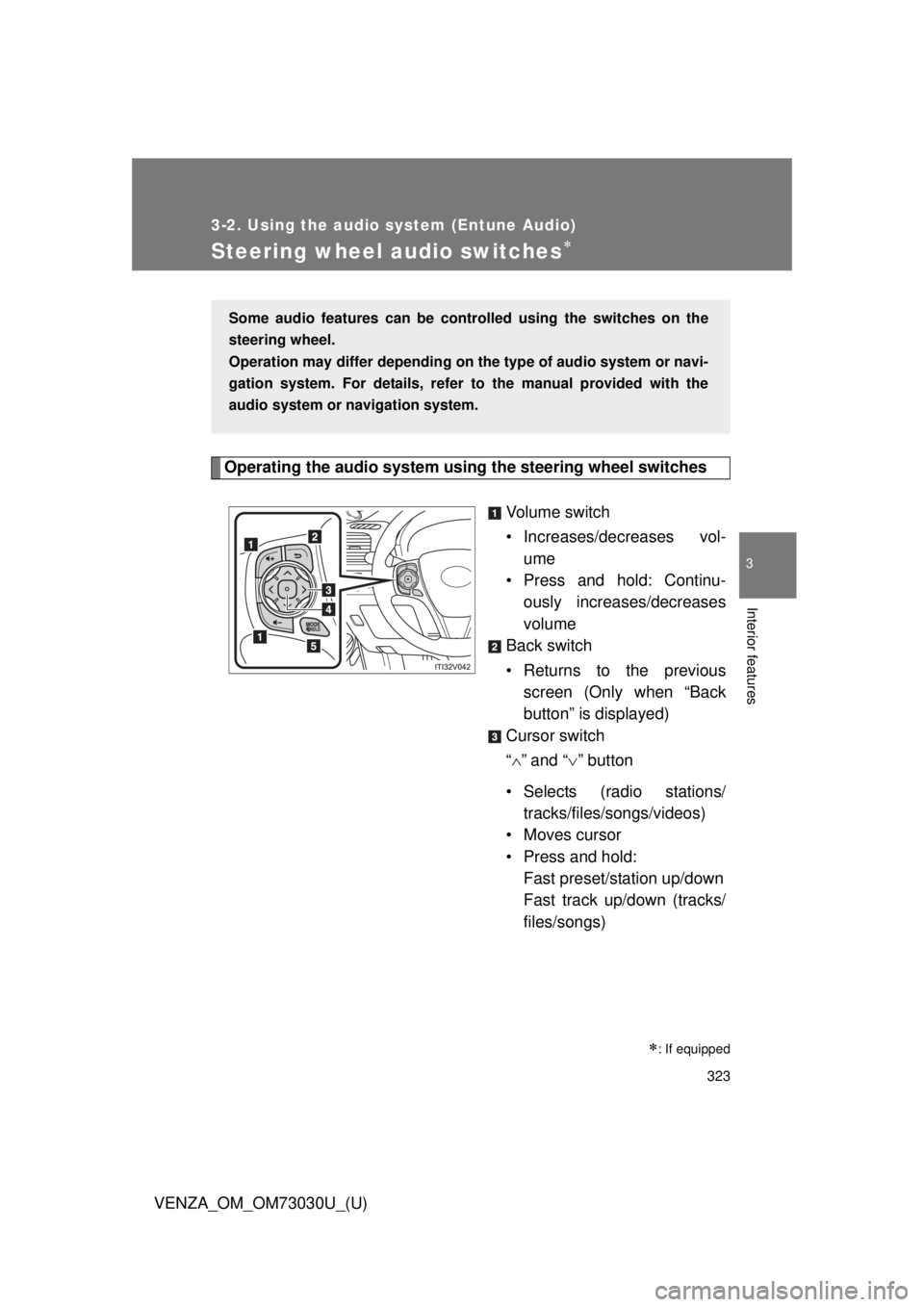
Operating the audio system using the steering wheel switches
Volume switch
• Increases/dec reases vol-
ume
• Press and hold: Continu-
ously increases/decreases
volume
Back switch
• Returns to the previous
screen (Only when “Back
button” is displayed)
Cursor switch
“ ” and “ ” button
• Selects (radio stations/
tracks/files/songs/videos)
• Moves cursor
• Press and hold:
Fast preset/station up/down
Fast track up/down (tracks/
files/songs)
: If equippedSome audio features can be contro lled using the switches on the
steering wheel.
Operation may differ depending on th e type of audio system or navi-
gation system. For details, refer to the manual provided with the
audio system or navigation system.
Page 324 of 688
3243-2. Using the audio system (Entune Audio)
VENZA_OM_OM73030U_(U) “ ” and “ ” button
• Tab change
• Press and hold:
Seek up/down (radio sta-
tions)
Fast up/down (tracks/files/
videos)
Enter switch
• Displays the audio screen
(Except when audio screen
is displayed)
• Displays the preset/list
screen (When audio screen
is displayed)
• Selects items (When audio
list screen is displayed)
“MODE/HOLD” switch
• Changes audio source
• Press and hold this switch
to mute or pause the current
operation
To cancel the mute or
pause, press and hold.
CAUTION■ To reduce the risk of an accident
Exercise care when operating the audio switches on the steering wheel.
Page 332 of 688
3323-2. Using the audio system (Entune Audio)
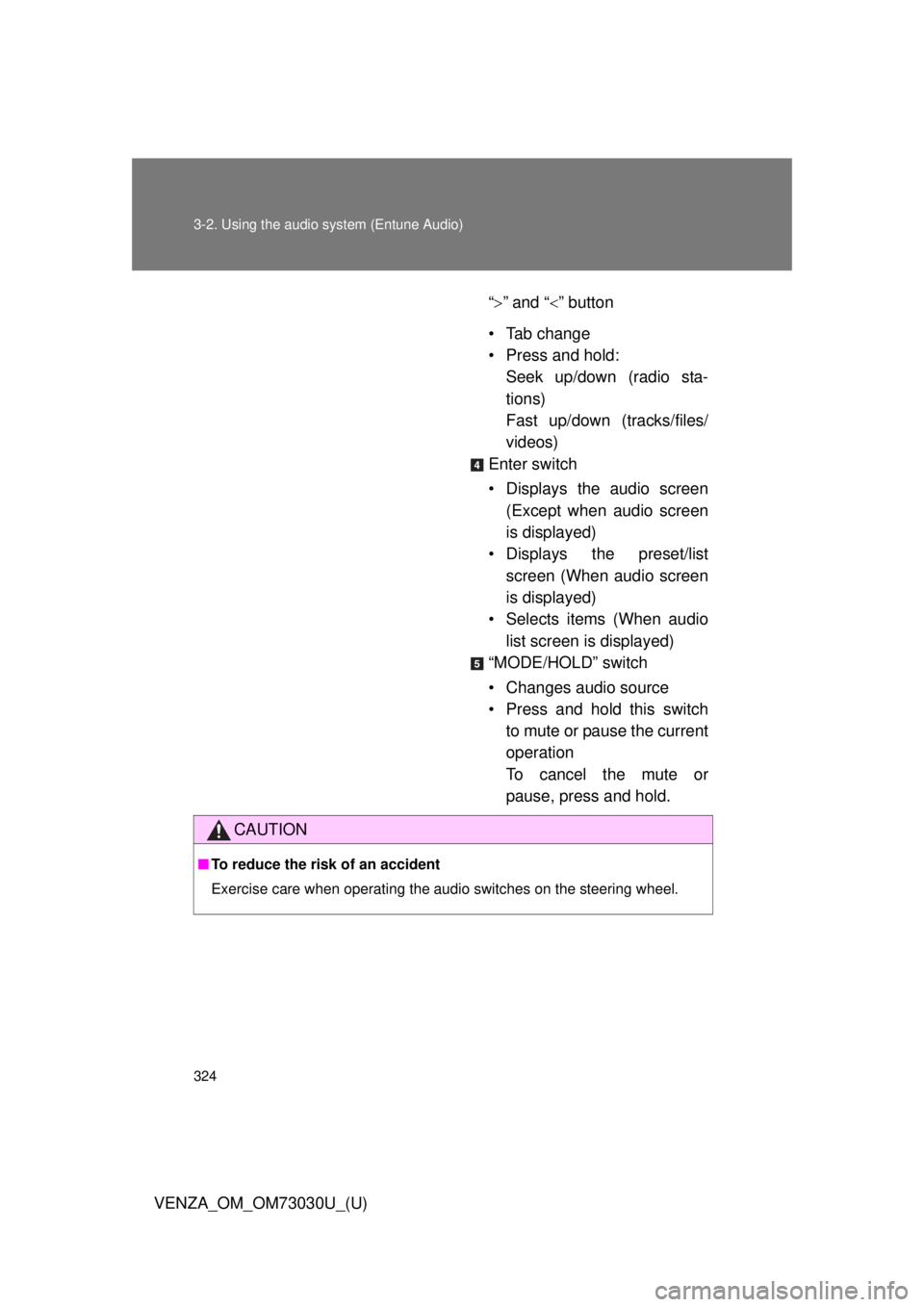
VENZA_OM_OM73030U_(U)Audio settings Screen for audio settings
Press the “SETUP” button.
Select “Audio” on the “Setup” screen.
Number of Radio Presets
Select the number of radio
preset stations.
Display Cover Art on/off
Automatic Sound Levelizer
Automatic sound leveliser (ASL)
Select “Automatic Sound Levelizer”.
Select “High”, “Mid”, “Low” or “Off”.Settings are available for adjusting the radio operation, cover art,
etc. STEP 1
STEP 2
■ The sound quality level is adjusted individually
The treble, mid and bass levels can be adjusted for each audio mode sepa-
rately.
■ About Automatic Sound Leveliser (ASL)
ASL automatically adjusts the volume and tone quality according to the vehi-
cle speed. STEP 1
STEP 2
Page 340 of 688
3403-2. Using the audio system (Entune Audio)
VENZA_OM_OM73030U_(U)Radio operation Audio control screen
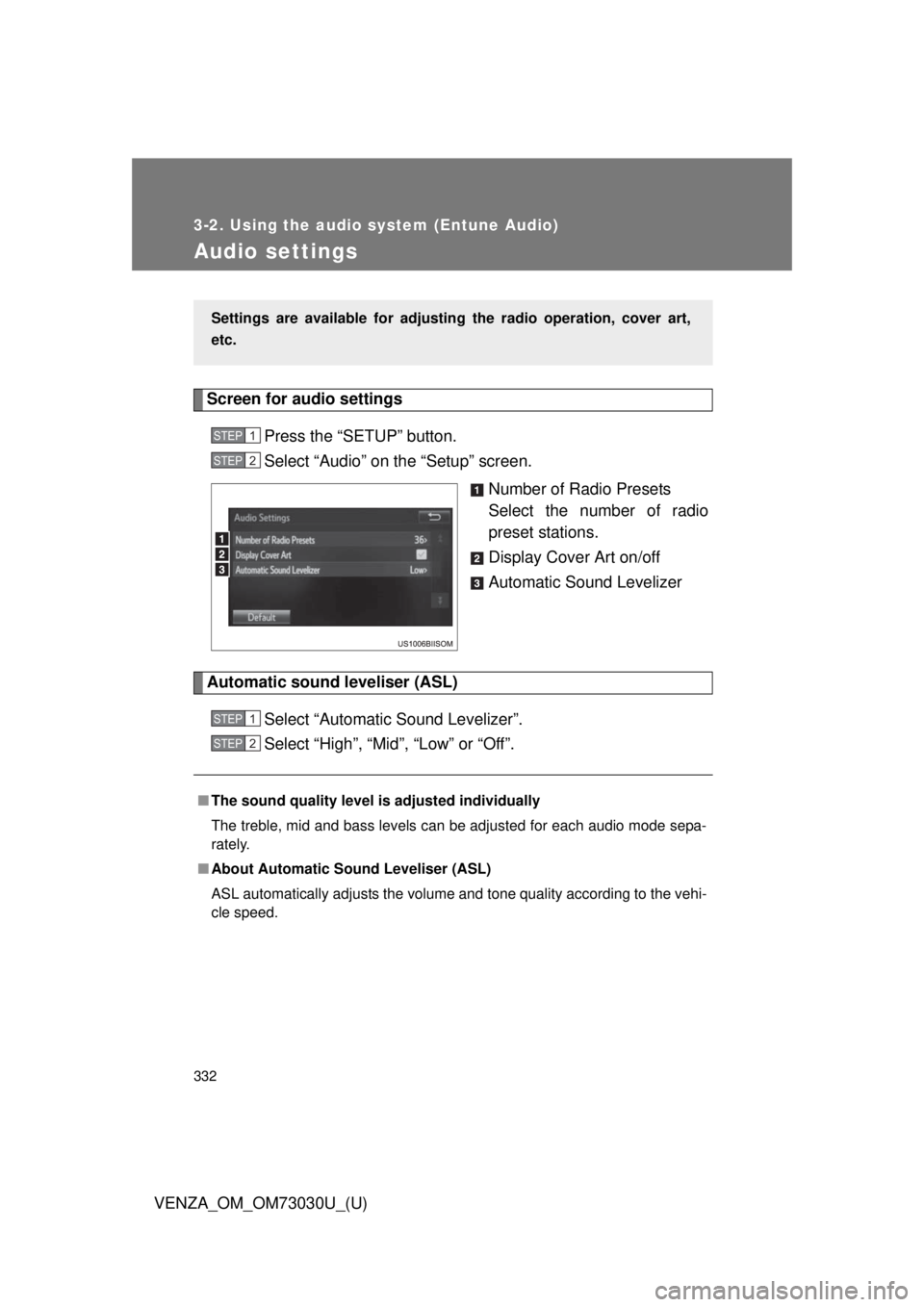
Pressing the “AUDIO” button disp lays the audio control screen from
any screens of the selected source.
Audio source selection screen
appears
Preset stations
FM only: Select to display
RBDS text messages.
Scanning for receivable sta-
tion
Select to display a list of
receivable stations
Setting the sound ( P. 339)
Selecting a station
Tune in to the desired station using one of the following methods.
■ Seek tuning
Press the “SEEK >” button or “< TRACK” button.
The radio will begin seeking up or down for a station of the nearest
frequency and will stop when a station is found.
■ Manual tuning
Turn the “TUNE•SCROLL” knob.
■ Preset stations
Select the desired preset station. Select “AM” or “FM” on the au dio source selection screen to begin
listening to the radio.
Page 341 of 688
3413-2. Using the audio system (Entune Audio)
VENZA_OM_OM73030U_(U) 3
Interior features Setting station presets
Search for desired stations by turning the “TUNE•SCROLL”
knob or pressing the “SEEK >” button or “< TRACK” button.
Select “(add new)”. To change the preset station to a different one, select and hold the
preset station.
Select “Yes”.
Select “OK” after setting the new preset station.
■ Refreshing the station list
Select “Refresh” on the “Station List” screen. To cancel the refresh, select “Cancel Refresh”.
Radio Broadcast Data System
This audio system is equipped with Radio Broadcast Data Systems
(RBDS). RBDS mode allows text me ssages to be received from radio
stations that utiliz e RBDS transmitters.
When RBDS is on, the radio can
only select stations of a particular program type,
display messages from radio stations.
RBDS features are available only wh en listening to an FM station that
broadcasts RBDS info rmation and the “FM Info” indicator is on.STEP 1
STEP 2
STEP 3
STEP 4
STEP 1
Page 352 of 688

3523-2. Using the audio system (Entune Audio)
VENZA_OM_OM73030U_(U) ■ iPod cover art
● Depending on the iPod and songs in the iPod, iPod cover art may be dis-
played.
● This function can be changed to on/off. ( P. 332)
● It may take time to display iPod cover art, and the iPod may not be oper-
ated while the cover art display is in process.
● Only iPod cover art that is saved in JPEG format can be displayed.
■ iPod functions
● When an iPod is connected and the audio source is changed to iPod
mode, the iPod will resume play from the same point in which it was last
used.
● Depending on the iPod that is connected to the system, certain functions
may not be available. If a function is unavailable due to a malfunction (as
opposed to a system specification), disconnecting the device and recon-
necting it may resolve the problem.
● While connected to the system, the iPod cannot be operated with its own
controls. It is necessary to use the controls of the vehicle’s audio system
instead.
● When the battery level of an iPod is very low, the iPod may not operate. If
so, charge the iPod before use.
● Compatible models ( P. 354)
■ iPod problems
To resolve most problems encountered when using your iPod, disconnect
your iPod from the vehicle iPod connection and reset it. For instructions on
how to reset your iPod, refer to your iPod Owner’s Manual.
Page 400 of 688
4003-2. Using the audio system (Entune Audio)
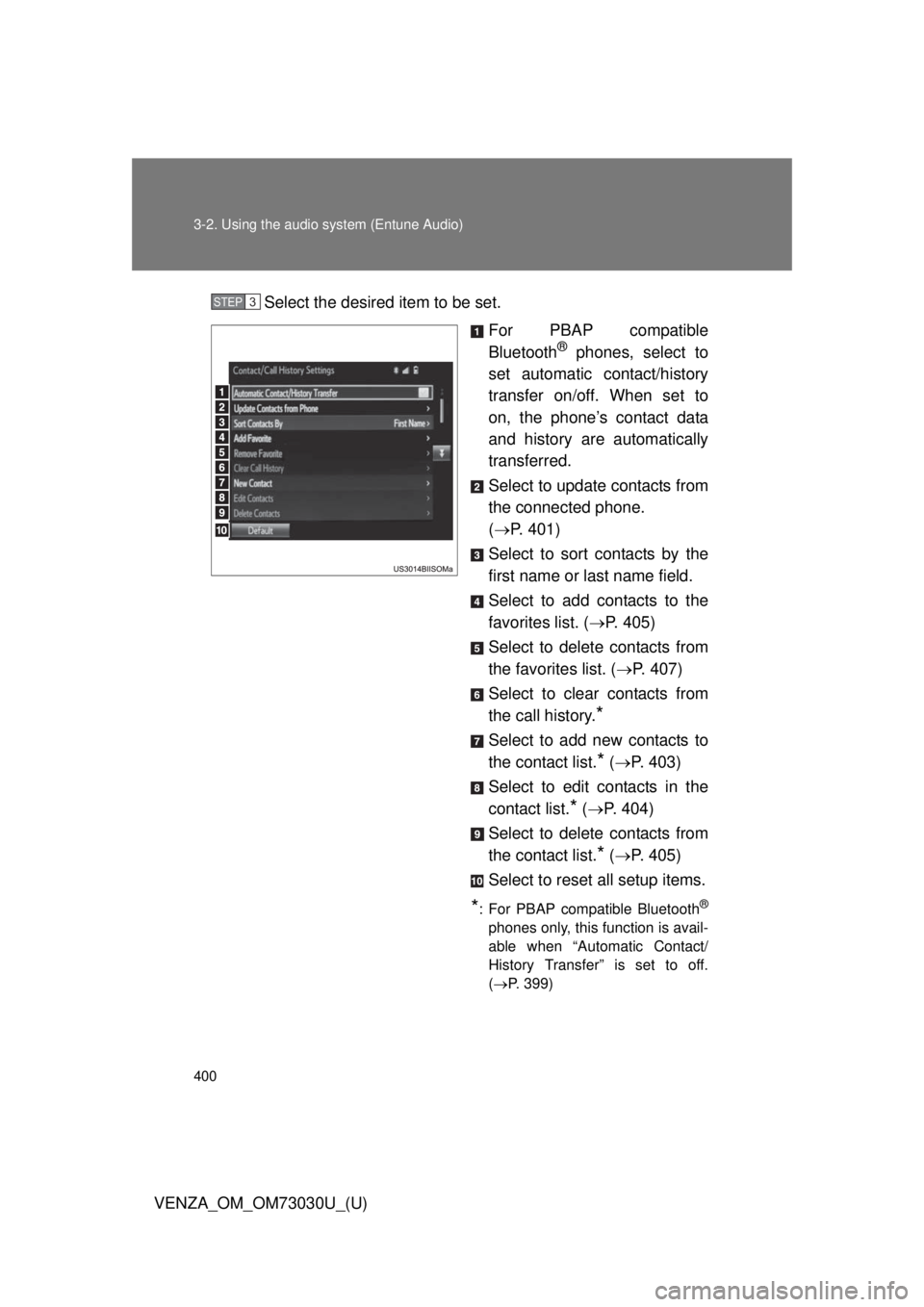
VENZA_OM_OM73030U_(U) Select the desired item to be set.
For PBAP compatible
Bluetooth ®
phones, select to
set automatic contact/history
transfer on/off. When set to
on, the phone’s contact data
and history are automatically
transferred.
Select to update contacts from
the connected phone.
( P. 401)
Select to sort contacts by the
first name or last name field.
Select to add contacts to the
favorites list. ( P. 405)
Select to delete contacts from
the favorites list. ( P. 407)
Select to clear contacts from
the call history.
* Select to add new contacts to
the contact list.
* ( P. 403)
Select to edit contacts in the
contact list.
* ( P. 404)
Select to delete contacts from
the contact list.
* ( P. 405)
Select to reset all setup items.
* : For PBAP compatible Bluetooth ®
phones only, this function is avail-
able when “Automatic Contact/
History Transfer” is set to off.
( P. 399)STEP 3
Page 477 of 688
4774-2. Maintenance
4
Maintenance and care
VENZA_OM_OM73030U_(U) ■ Resetting the maintenance required reminder light (U.S.A. only)
After the required maintenance is preformed according to the maintenance
schedule, please reset the reminder light.
To reset the reminder light, follow the procedures described below:
Switch the display to the trip meter A when the engine is running.
( P. 189)
Vehicles with smart key system:
Turn the “ENGINE START STOP” switch off.
Vehicles without smart key system:
Turn the engine switch to the “LOCK” position.
Vehicles with smart key system:
While pressing the trip meter reset button, set the “ENGINE START
STOP” switch to IGNITION ON mode (but do not start the engine
because otherwise the reset mode will be canceled). Continue to
press and hold the trip meter reset button until the trip meter dis-
plays “000000”.
Vehicles without smart key system:
While pressing the trip meter reset button, set the engine switch to
“ON” position (but do not start the engine because otherwise the
reset mode will be canceled). Continue to press and hold the trip
meter reset button until the trip meter displays “000000”.
■ Allow inspection and repairs to be performed by a Toyota dealer
● Toyota technicians are well-trained specialists and are kept up to date
with the latest service information. They are well informed about the
operations of all systems on your vehicle.
● Keep a copy of the repair order. It proves that the maintenance that has
been performed is under warranty coverage. If any problem should arise
while your vehicle is under warranty, your Toyota dealer will promptly
take care of it. STEP 1
STEP 2
STEP 3