Page 201 of 688
2012-2. Instrument cluster
2
When driving
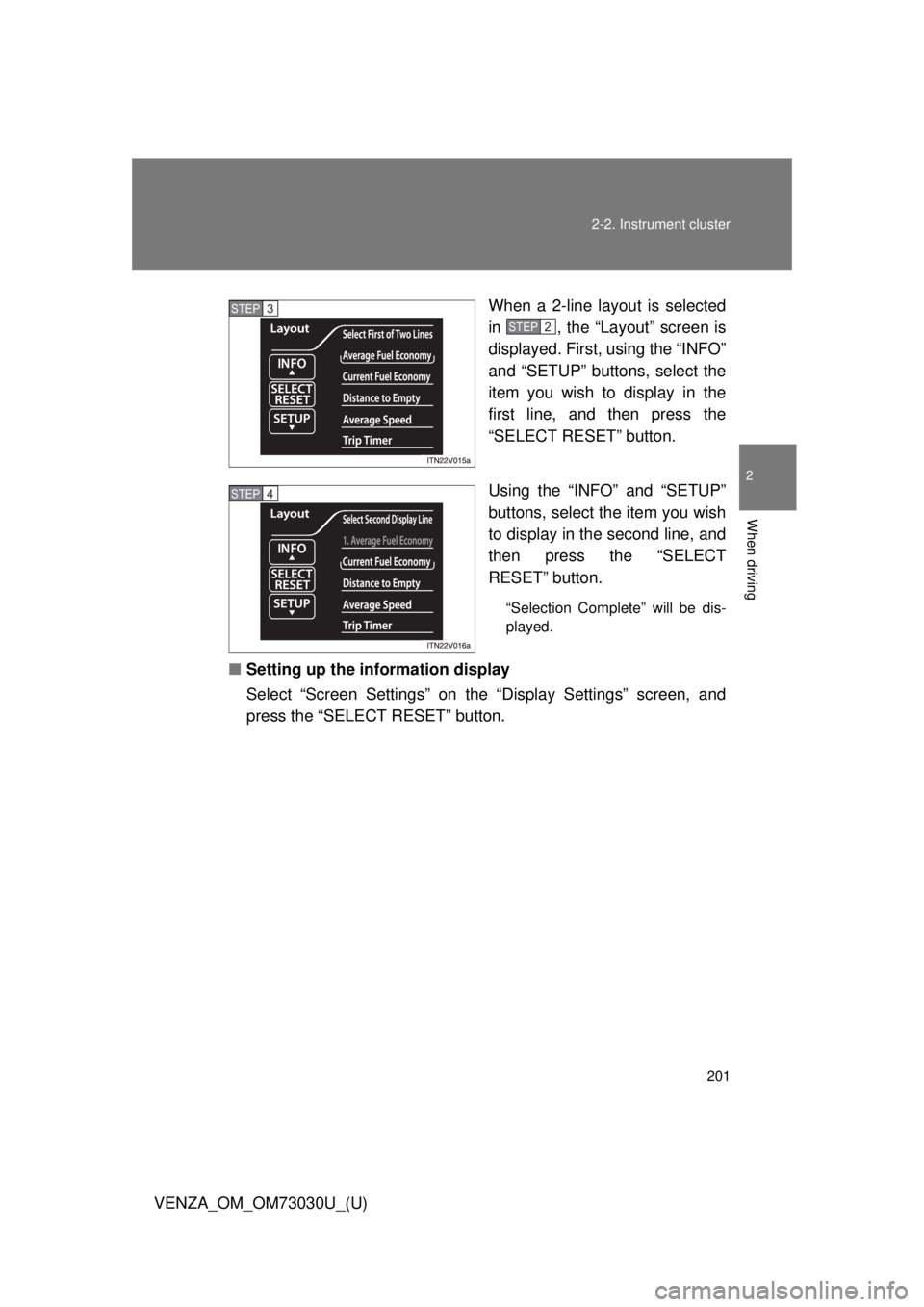
VENZA_OM_OM73030U_(U) When a 2-line layout is selected
in , the “Layout” screen is
displayed. First, using the “INFO”
and “SETUP” buttons, select the
item you wish to display in the
first line, and then press the
“SELECT RESET” button.
Using the “INFO” and “SETUP”
buttons, select the item you wish
to display in the second line, and
then press the “SELECT
RESET” button. “Selection Complete” will be dis-
played.
■ Setting up the information display
Select “Screen Settings” on the “Display Settings” screen, and
press the “SELECT RESET” button. STEP 3
STEP2
STEP 4
Page 202 of 688
2022-2. Instrument cluster
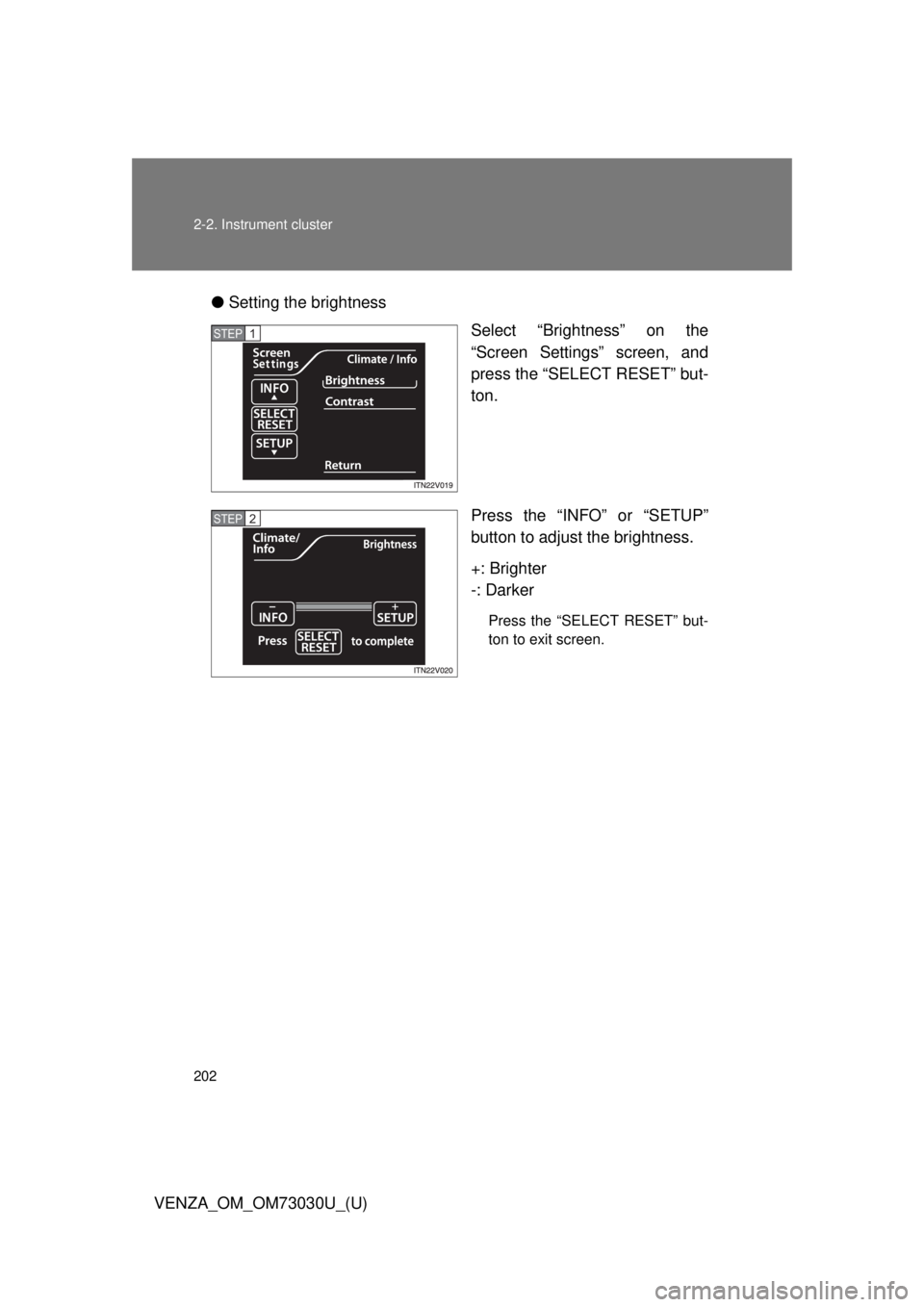
VENZA_OM_OM73030U_(U) ● Setting the brightness
Select “Brightness” on the
“Screen Settings” screen, and
press the “SELECT RESET” but-
ton.
Press the “INFO” or “SETUP”
button to adjust the brightness.
+: Brighter
-: Darker Press the “SELECT RESET” but-
ton to exit screen.STEP 1
STEP 2
Page 203 of 688
2032-2. Instrument cluster
2
When driving
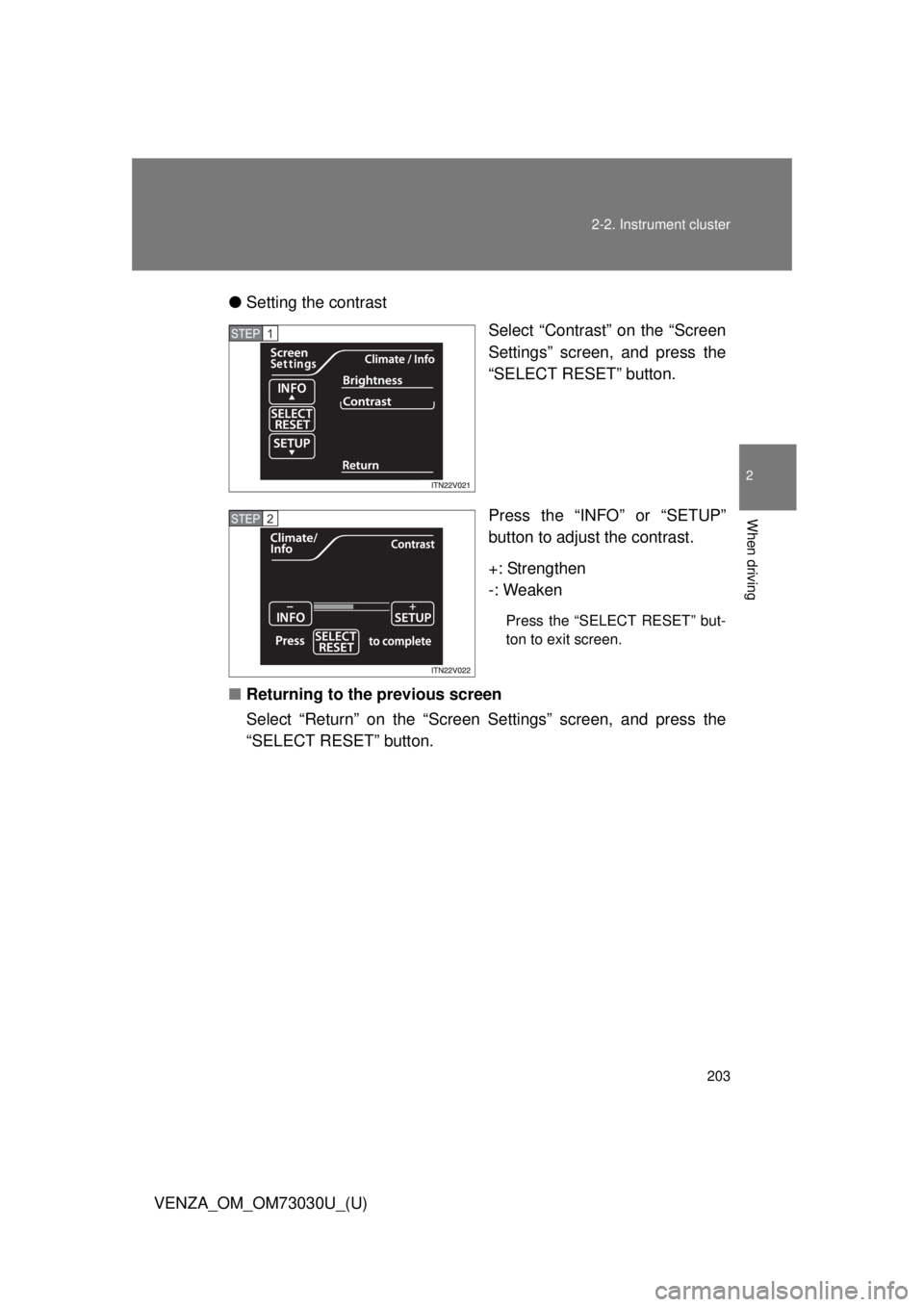
VENZA_OM_OM73030U_(U) ● Setting the contrast
Select “Contrast” on the “Screen
Settings” screen, and press the
“SELECT RESET” button.
Press the “INFO” or “SETUP”
button to adjust the contrast.
+: Strengthen
-: Weaken Press the “SELECT RESET” but-
ton to exit screen.
■ Returning to the previous screen
Select “Return” on the “Screen Settings” screen, and press the
“SELECT RESET” button. STEP 1
STEP 2
Page 207 of 688
2072-2. Instrument cluster
2
When driving
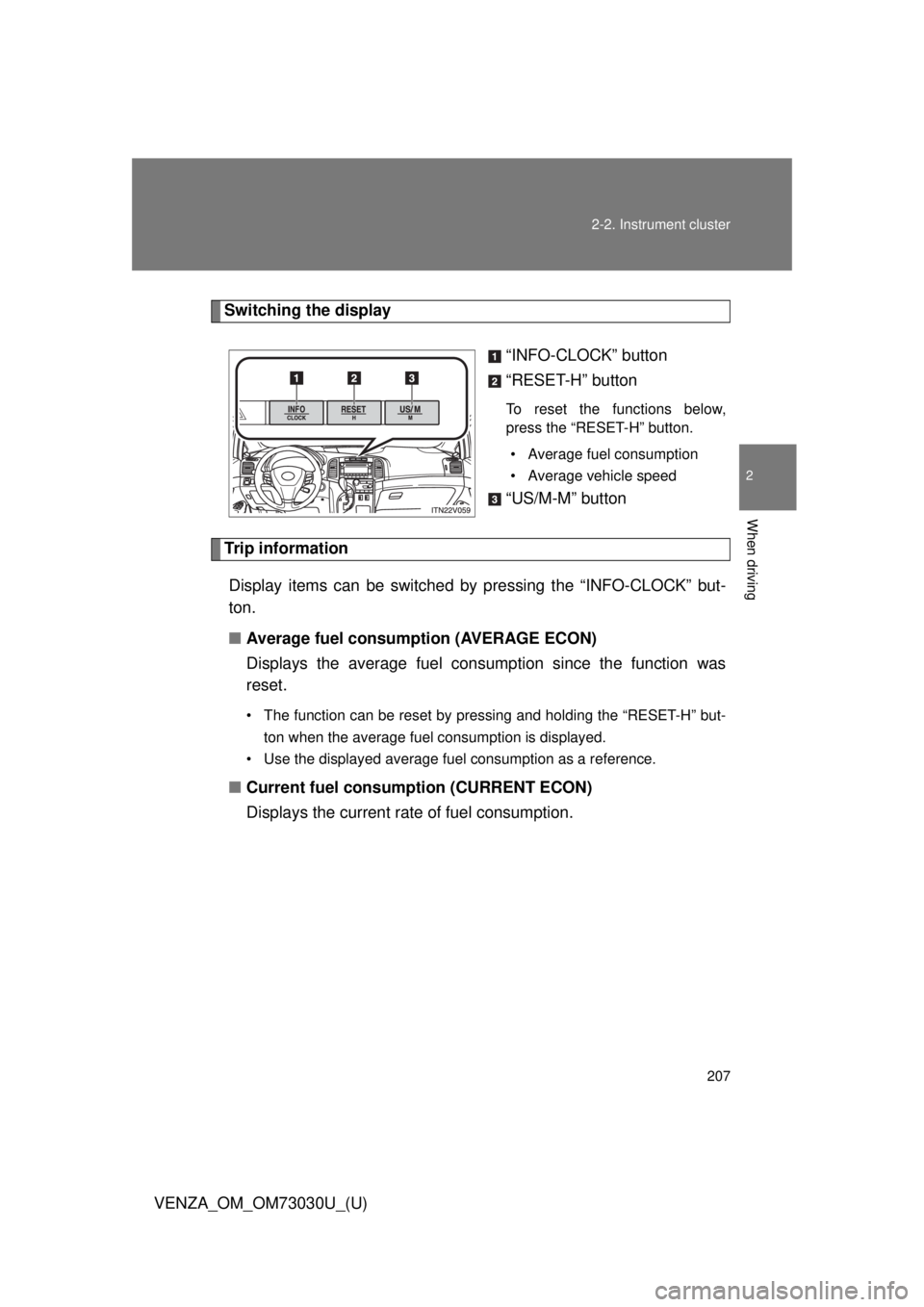
VENZA_OM_OM73030U_(U) Switching the display
“INFO-CLOCK” button
“RESET-H” button To reset the functions below,
press the “RESET-H” button.
• Average fuel consumption
• Average vehicle speed
“US/M-M” button
Trip information
Display items can be switched by pressing the “INFO-CLOCK” but-
ton.
■ Average fuel consumption (AVERAGE ECON)
Displays the average fuel cons umption since the function was
reset. • The function can be reset by pressing and holding the “RESET-H” but-
ton when the average fuel consumption is displayed.
• Use the displayed average fuel consumption as a reference.
■ Current fuel consumption (CURRENT ECON)
Displays the current rate of fuel consumption.
Page 208 of 688
2082-2. Instrument cluster
VENZA_OM_OM73030U_(U) ■ Driving range (RANGE)
Displays the estimated maximum di stance that can be driven with
the quantity of fuel remaining. ● This distance is computed based on your average fuel consumption. As
a result, the actual distance that can be driven may differ from that dis-
played.
● When only a small amount of fuel is added to the tank, the display may
not be updated.
When refueling, turn the “ENGINE START STOP” switch off. If the vehi-
cle is refueled without turning the “ENGINE START STOP” switch off,
the display may not be updated.
■ Average vehicle speed (AVERAGE SPEED)
Displays the average vehicle sp eed since the function was reset.The function can be reset by pressing and holding the “RESET-H” button
when the average vehicle speed is displayed.
Setting the clock
Press and hold the “INFO-CLOCK” button until part of the dis-
play begins to flash.
Press and hold the “RESET-H” button to adjust the hours and
the “US/M-M” button to adjust the minutes.
Press the “INFO-CLOCK” button to complete the setting.
Selecting the units
Press the “US/M-M” button. The unit changes each time the button is pressed. STEP 1
STEP 2
STEP 3
Page 210 of 688
2102-2. Instrument cluster
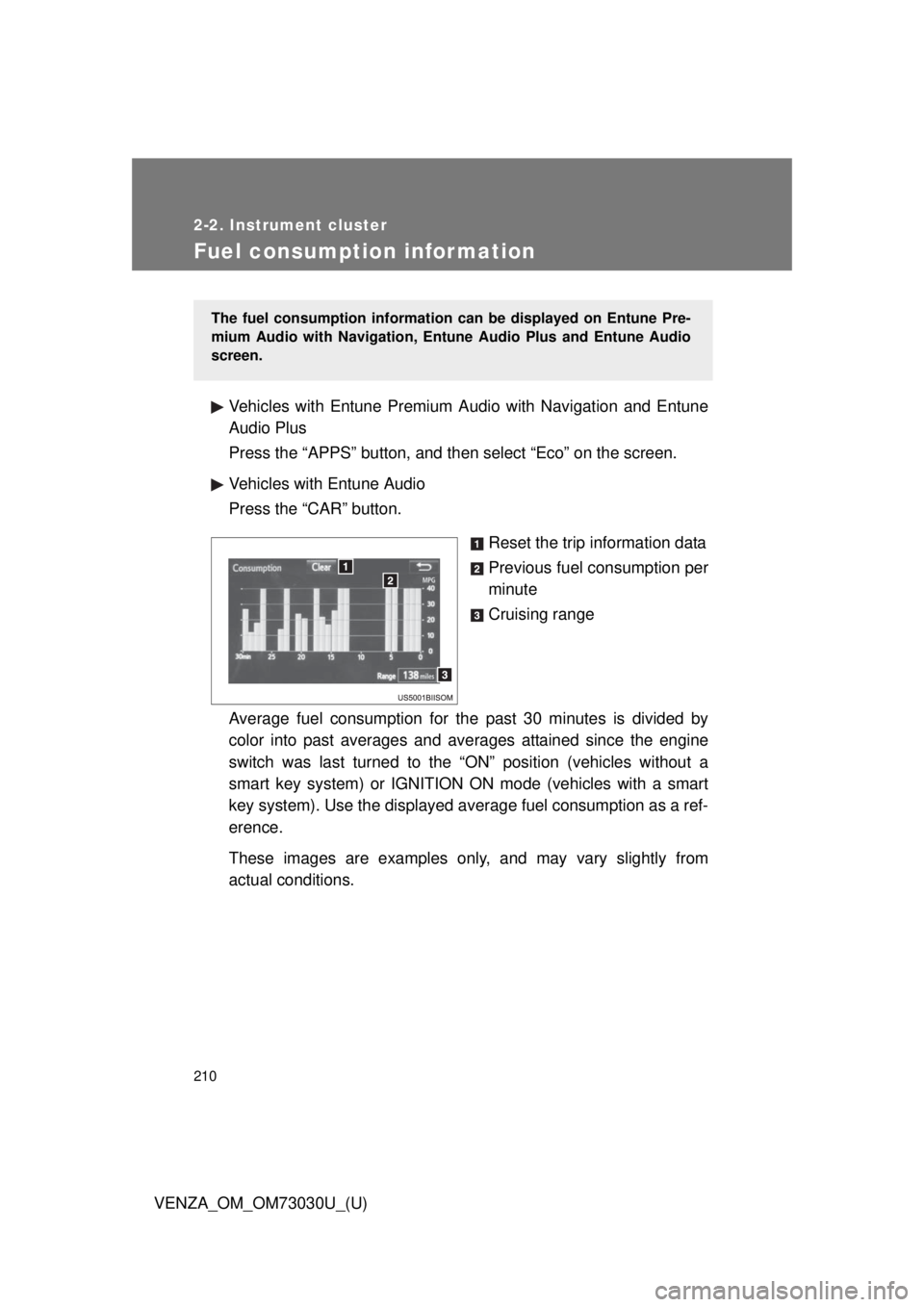
VENZA_OM_OM73030U_(U)Fuel consumption information Vehicles with Entune Premium Audio with Navigation and Entune
Audio Plus
Press the “APPS” button, and t hen select “Eco” on the screen.
Vehicles with Entune Audio
Press the “CAR” button.
Reset the trip information data
Previous fuel consumption per
minute
Cruising range
Average fuel consumption for the past 30 minutes is divided by
color into past averages and av erages attained since the engine
switch was last turned to the “ON” position (vehicles without a
smart key system) or IGNITION ON mode (vehicles with a smart
key system). Use the displayed av erage fuel consumption as a ref-
erence.
These images are examples only , and may vary slightly from
actual conditions. The fuel consumption information can be displayed on Entune Pre-
mium Audio with Navigation, Entune Audio Plus and Entune Audio
screen.
Page 211 of 688
2112-2. Instrument cluster
2
When driving
VENZA_OM_OM73030U_(U) ■ Resetting the data
Selecting “Clear” will reset the trip information data.
■ Cruising range
Displays the estimated maximum distance that can be driven with the quan-
tity of fuel remaining.
This distance is computed based on your average fuel consumption. As a
result, the actual distance that can be driven may differ from that displayed.
Page 234 of 688
2342-4. Using other driving systems
VENZA_OM_OM73030U_(U) ■ Automatic cruise control cancelation
Cruise control will stop maintaining the vehicle speed in any of the following
situations.
● Actual vehicle speed falls more than approximately 10 mph (16 km/h)
below the preset vehicle speed.
At this time, the memorized set speed is not retained.
● Actual vehicle speed is below approximately 25 mph (40 km/h).
● VSC is activated.
■ If the cruise control indicator light flashes
Press the “ON-OFF” button once to deactivate the system, and then press
the button again to reactivate the system.
If the cruise control speed cannot be set or if the cruise control cancels
immediately after being activated, there may be a malfunction in the cruise
control system. Have the vehicle inspected by your Toyota dealer.
CAUTION■ To avoid operating the cruise control by mistake
Switch the cruise control off using the “ON-OFF” button when not in use.
■ Situations unsuitable for cruise control
Do not use cruise control in any of the following situations.
Doing so may result in loss of control and could cause an accident resulting
in death or serious injury.
● In heavy traffic
● On roads with sharp bends
● On winding roads
● On slippery roads, such as those covered with rain, ice or snow
● On steep hills
Vehicle speed may exceed the set speed when driving down a steep hill.
● When your vehicle is towing a trailer or during emergency towing