Page 419 of 800
419
PRIUS_OM_OM47A29U_(U)
5Audio system
5-5. Playing an audio CD and MP3/WMA/AAC discs
CD player operation.......... 440
5-6. Using an external device iPod player operation........ 446
USB memory device player operation.............. 451
Using the AUX .................. 456
5-7. Connecting Bluetooth
®
Preparations to use wireless
communication ............... 457
Registering a Bluetooth
®
audio player for the
first time .......................... 460
Registering a Bluetooth
®
phone for the first time.... 461
Registering a Bluetooth
® device ........... 462
Connecting a Bluetooth
® device ........... 464
Displaying a Bluetooth®
device details.................. 466
Detailed Bluetooth
®
settings ........................... 467 5-8. Bluetooth
® Audio
Listening to Bluetooth®
Audio .............................. 468
5-9. Bluetooth
® phone
Using a Bluetooth®
Phone ............................. 470
Making a call .................... 473
Receiving a call ................ 476
Speaking on the phone .... 477
Bluetooth
® phone
message function ........... 480
Using the steering wheel switches.......................... 484
Bluetooth
® phone
settings ........................... 485
Contact/Call History Settings .......................... 486
What to do if... (Troubleshooting) ........... 495
5-10. Bluetooth
®
Bluetooth®........................ 499
5-11. Using the voice command system
Voice command system ... 505
Page 421 of 800
421
PRIUS_OM_OM47A29U_(U)
5-1. Basic Operations
5
Audio system
Audio system
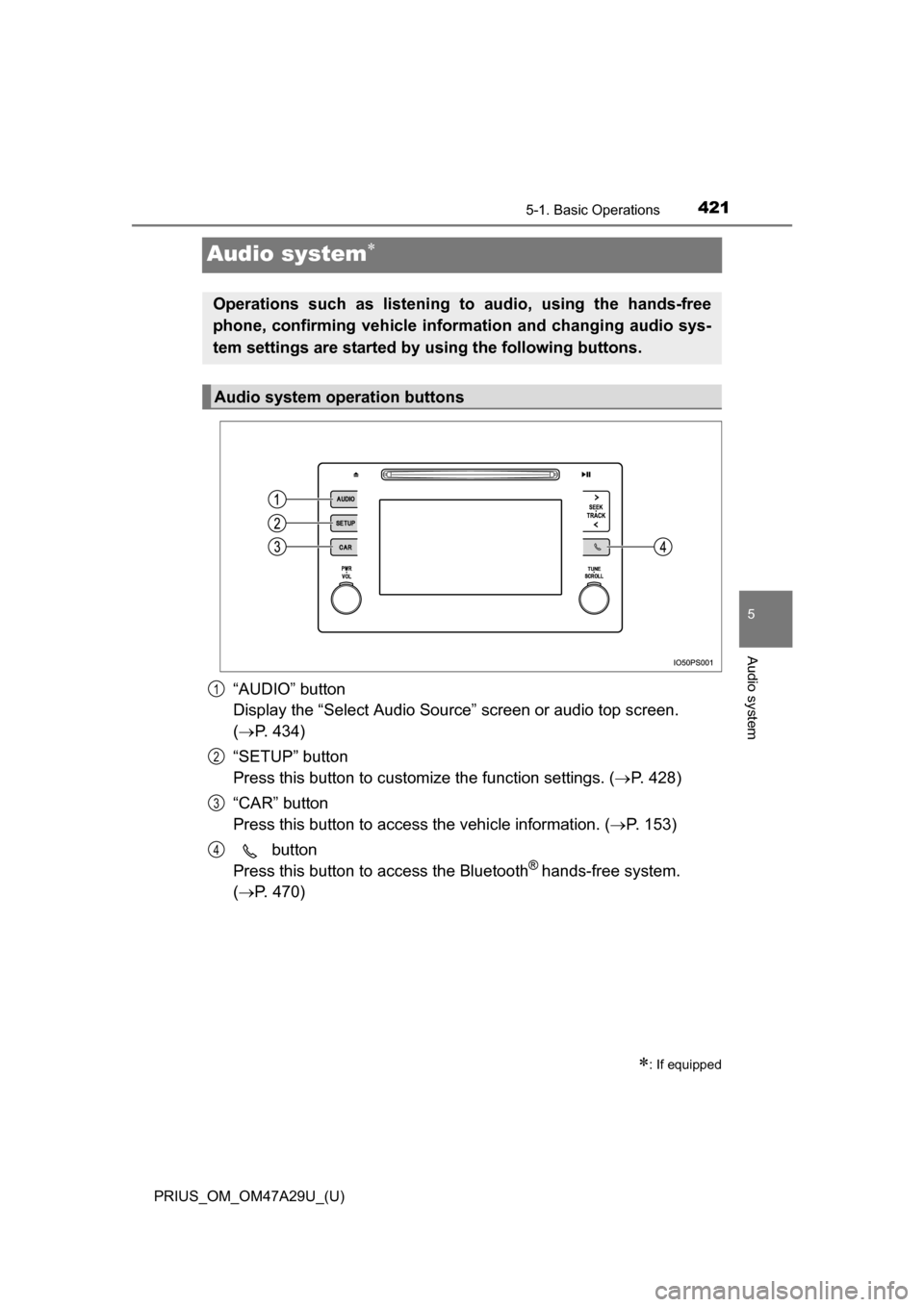
“AUDIO” button
Display the “Select Audio Source” screen or audio top screen.
( P. 434)
“SETUP” button
Press this button to customize the function settings. ( P. 428)
“CAR” button
Press this button to access the vehicle information. ( P. 153)
button
Press this button to access the Bluetooth
® hands-free system.
( P. 470)
: If equipped
Operations such as listening to audio, using the hands-free
phone, confirming vehicle inform ation and changing audio sys-
tem settings are started by using the following buttons.
Audio system operation buttons
1
2
3
4
Page 422 of 800
4225-1. Basic Operations
PRIUS_OM_OM47A29U_(U)
By touching the screen with your finger, you can control the audio sys-
tem, etc.
■Touch
Quickly touch and release once.
●Changing and selecting various settings
■Drag*
Touch the screen with your finger, and move the screen to the
desired position.
●Scrolling the lists
● Using scroll bar in lists
■Flick*
Touch the screen with your finger and quickly move the screen by
flicking your finger.
●Scrolling the main screen page
● Returning to the menu screen from the sub-menu screen (screen
one level below)
*: The above operations may not be performed on all screens.
■Capacitive touch switches
The control panel uses capacitive touch sensors.
In the following cases, incorrect operation or non-response may occur.
●If the operating section is dirty or has liquid attached to it, incorrect operation
or non-response may occur.
● If the operating section receives electromagnetic waves, incorrect operation
or non-response may occur.
● If wearing gloves during operation, non-response may occur.
● If fingernails are used to operate the system, non-response may occur.
● If a touch pen is used to operate the system, non-response may occur.
● If the palm of your hand touches the operating section during operation,
incorrect operation may occur.
● If the palm of your hand touches the operating section, incorrect operation
may occur.
● If operations are performed quickly, non-response may occur.
Operating the touch screen
Page 423 of 800
PRIUS_OM_OM47A29U_(U)
4235-1. Basic Operations
5
Audio system
■When using the touch screen
●If the screen is cold, the display may be dark, or the system may seem to be
operating slightly slower than normal.
● The screen may seem dark and hard to see when viewed through sun-
glasses. Change your angle of viewing, adjust the display on the “Display
Settings” screen ( P. 432) or remove your sunglasses.
● Flick operations may not be performed smoothly in high altitudes.
NOTICE
■ To avoid damaging the touch screen
●To prevent damaging the screen, lightly touch the screen buttons with your
finger.
● Do not use objects other than your finger to touch the screen.
● Wipe off fingerprints using a glass cleaning cloth. Do not use chemical
cleaners to clean the screen, as they may damage the touch screen.
Page 428 of 800
428
PRIUS_OM_OM47A29U_(U)
5-2. Setup
Setup menu
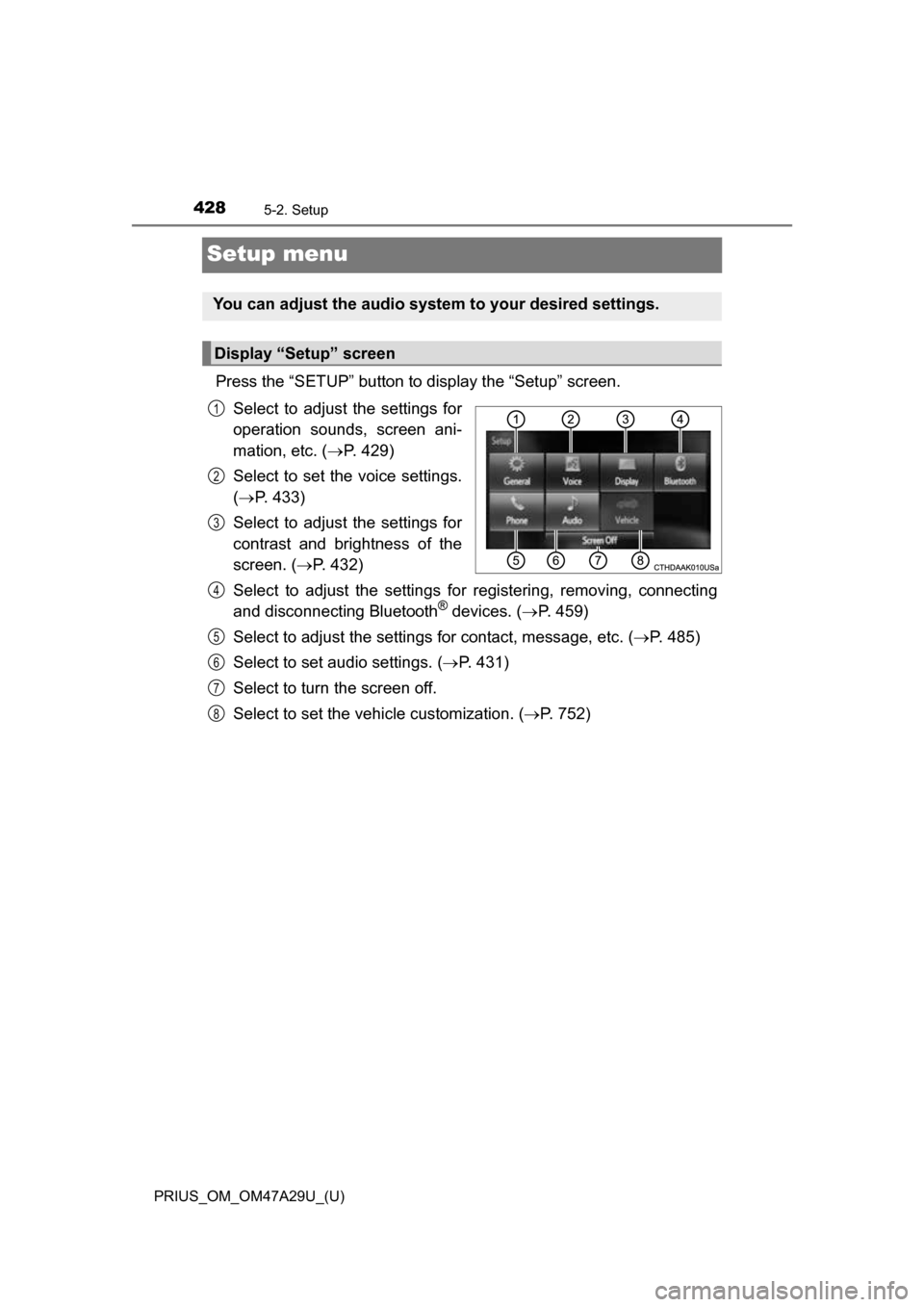
Press the “SETUP” button to display the “Setup” screen.Select to adjust the settings for
operation sounds, screen ani-
mation, etc. ( P. 429)
Select to set the voice settings.
( P. 433)
Select to adjust the settings for
contrast and brightness of the
screen. ( P. 432)
Select to adjust the settings for registering, removing, connecting
and disconnecting Bluetooth
® devices. ( P. 459)
Select to adjust the settings for contact, message, etc. (P. 485)
Select to set audio settings. ( P. 431)
Select to turn the screen off.
Select to set the vehicle customization. ( P. 752)
You can adjust the audio system to your desired settings.
Display “Setup” screen
1
2
3
4
5
6
7
8
Page 429 of 800
429
PRIUS_OM_OM47A29U_(U)
5-2. Setup
5
Audio system
General settings
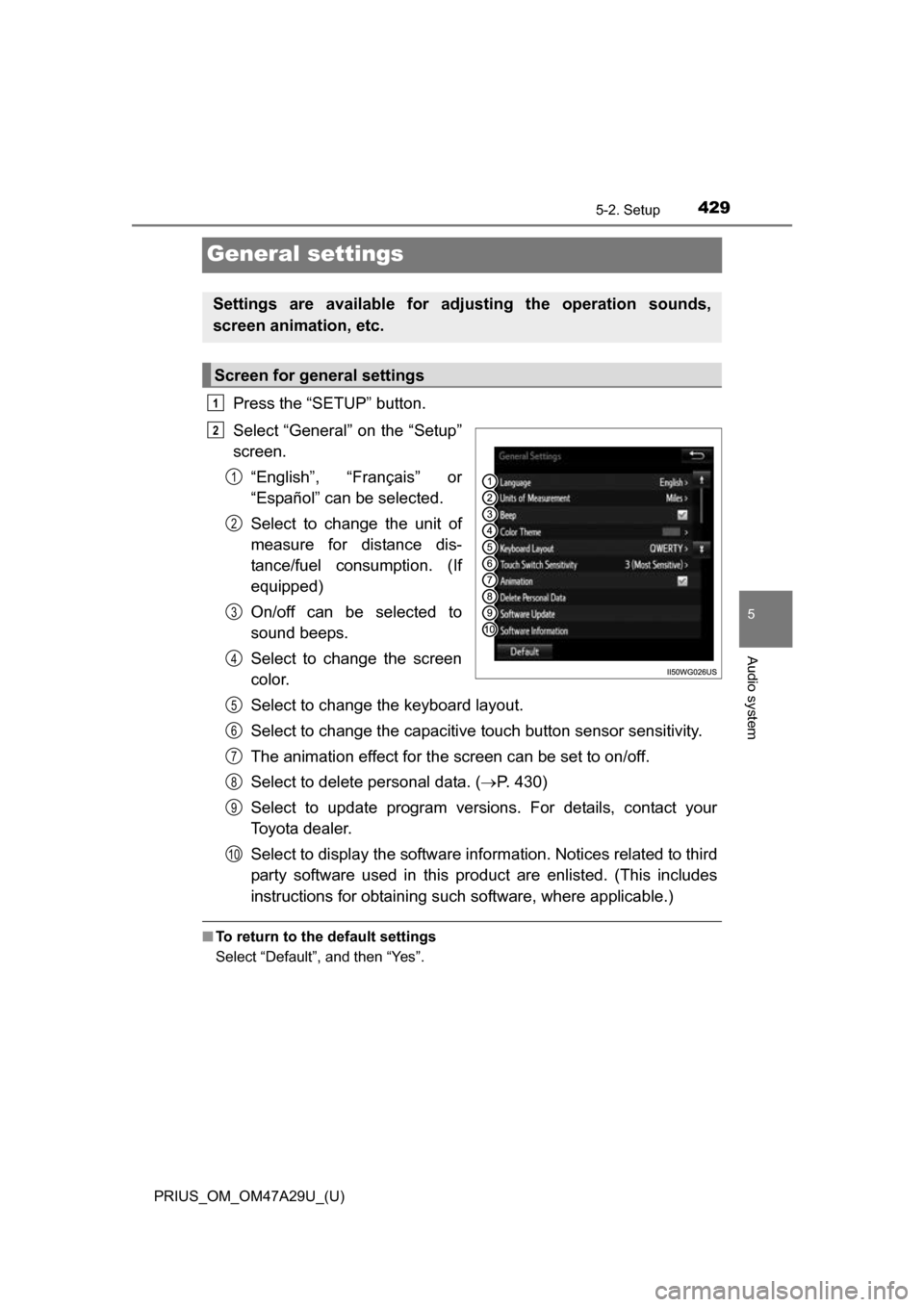
Press the “SETUP” button.
Select “General” on the “Setup”
screen.“English”, “Français” or
“Español” can be selected.
Select to change the unit of
measure for distance dis-
tance/fuel consumption. (If
equipped)
On/off can be selected to
sound beeps.
Select to change the screen
color.
Select to change the keyboard layout.
Select to change the capacitive touch button sensor sensitivity.
The animation effect for the screen can be set to on/off.
Select to delete personal data. ( P. 430)
Select to update program versions. For details, contact your
Toyota dealer.
Select to display the software info rmation. Notices related to third
party software used in this pr oduct are enlisted. (This includes
instructions for obtaining such software, where applicable.)
■ To return to the default settings
Select “Default”, and then “Yes”.
Settings are available for adjusting the operation sounds,
screen animation, etc.
Screen for general settings
1
2
1
2
3
4
5
6
7
8
9
10
Page 430 of 800
4305-2. Setup
PRIUS_OM_OM47A29U_(U)
Select “Delete Personal Data” on the “General Settings” screen.
Select “Delete”.
Check carefully beforehand, as data cannot be retrieved once deleted.
A confirmation screen will be displayed. Select “Yes”.
The following personal data will be deleted or changed to its default
settings.
• Audio settings
• Phone settings
Delete personal data
1
2
3
Page 431 of 800
431
PRIUS_OM_OM47A29U_(U)
5-2. Setup
5
Audio system
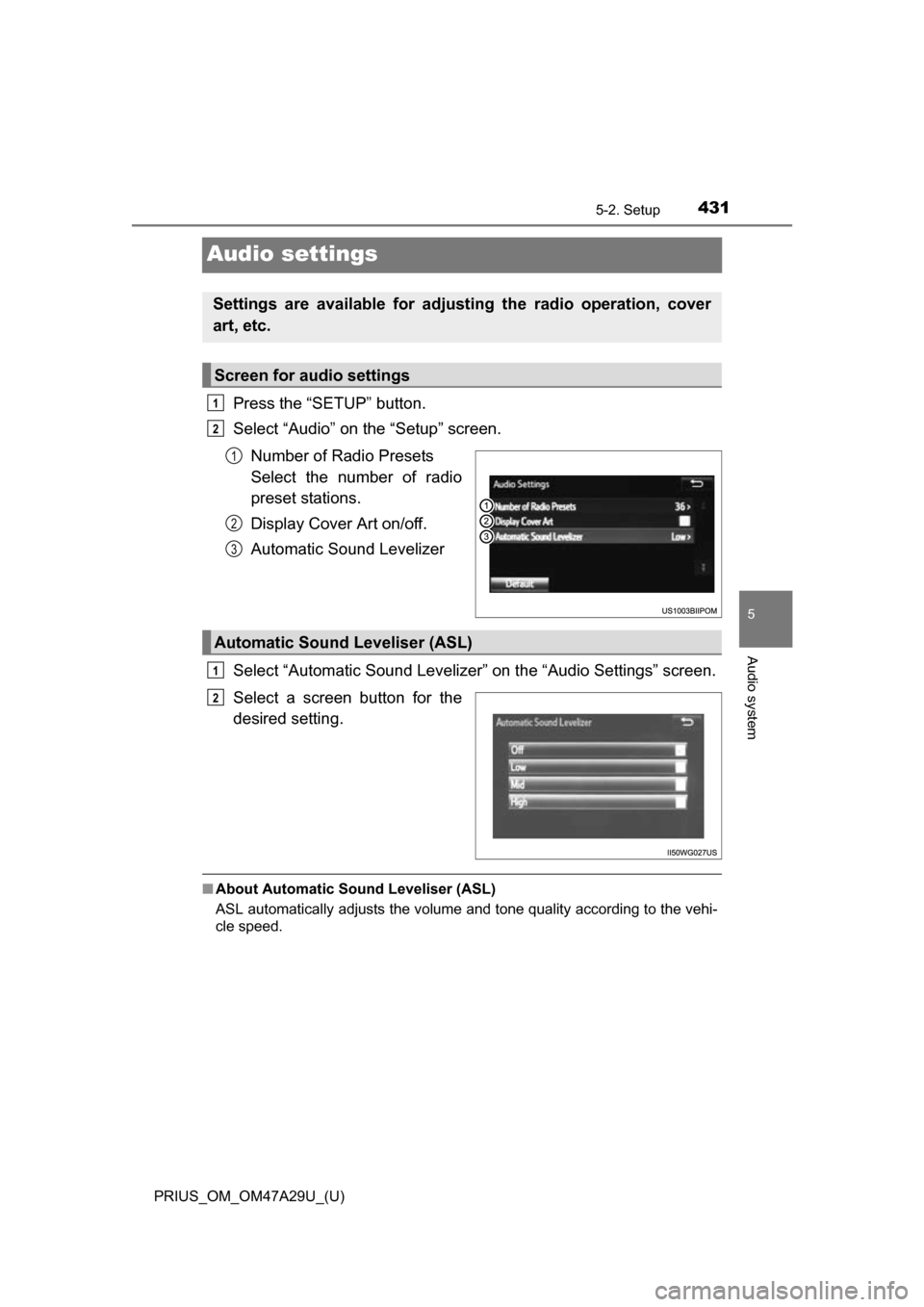
Audio settings
Press the “SETUP” button.
Select “Audio” on the “Setup” screen.Number of Radio Presets
Select the number of radio
preset stations.
Display Cover Art on/off.
Automatic Sound Levelizer
Select “Automatic Sound Levelizer” on the “Audio Settings” screen.
Select a screen button for the
desired setting.
■ About Automatic Sou nd Leveliser (ASL)
ASL automatically adjusts the volume and tone quality according to the vehi-
cle speed.
Settings are available for adjusting the radio operation, cover
art, etc.
Screen for audio settings
1
2
1
2
3
Automatic Sound Leveliser (ASL)
1
2