Page 295 of 800
PRIUS_OM_OM47A29U_(U)
2954-5. Using the driving support systems
4
Driving
■Operation conditions of each function
●Lane departure alert function
This function operates when all of the following conditions are met.
• LDA is turned on.
• Vehicle speed is approximately 32 mph (50 km/h) or more.
• System recognizes white (yellow) lines.
• Width of traffic lane is approximately 9.8 ft. (3 m) or more.
• Turn signal lever is not operated.
• Vehicle is driven on a straight road or around a gentle curve with a radius
of more than approximately 492 ft. (150 m).
• No system malfunctions are detected. ( P. 298)
● Steering control function
This function operates when all of the following conditions are met in addi-
tion to the operation conditions for the lane departure alert function.
• Setting for “LDA Steering Assist Mode” in screen of the multi-infor-
mation display is set to “On”. ( P. 139)
• Vehicle is not accelerated or decelerated by a fixed amount or more.
• Steering wheel is not operated with a steering force level suitable for
changing lanes.
• ABS, VSC, TRAC and PCS are not operating.
• TRAC or VSC is not turned off.
● Vehicle sway warning
This function operates when all of the following conditions are met.
• Setting for “Lane Sway Warning Status” in screen of the multi-infor-
mation display is set to “On”. ( P. 139)
• Vehicle speed is approximately 32 mph (50 km/h) or more.
• Width of traffic lane is approximately 9.8 ft. (3 m) or more.
• No system malfunctions are detected. ( P. 298)
Page 299 of 800
PRIUS_OM_OM47A29U_(U)
2994-5. Using the driving support systems
4
Driving
■Customization
The following settings can be changed.
For how to change settings, refer to P. 139.
FunctionSetting details
Lane departure alertAdjust alert sensitivity
Steering control functionTurn steering wheel assistance on and off
Vehicle sway warningTurn function on and off
Adjust alert sensitivity
Page 305 of 800
PRIUS_OM_OM47A29U_(U)
3054-5. Using the driving support systems
4
Driving
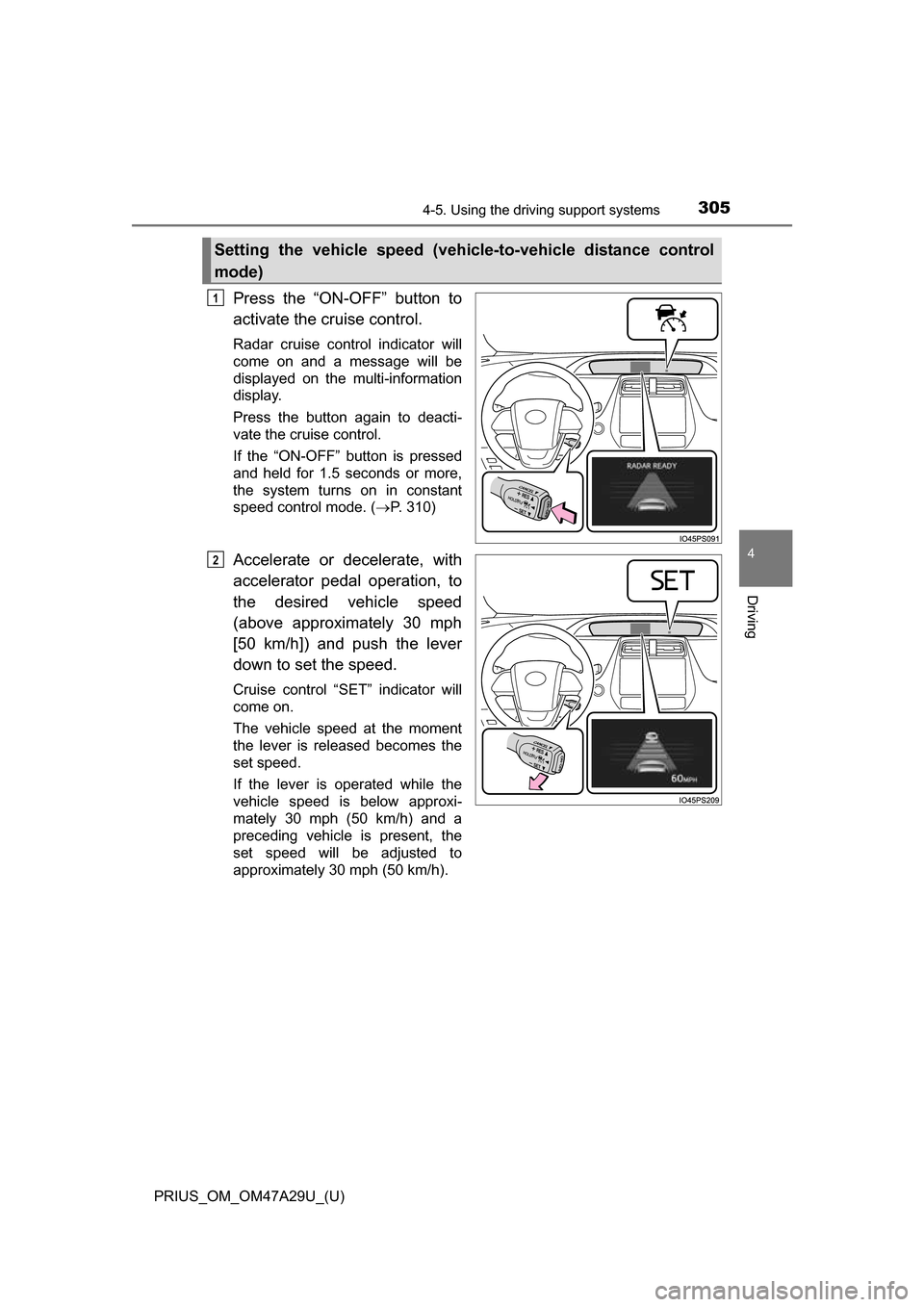
Press the “ON-OFF” button to
activate the cruise control.
Radar cruise control indicator will
come on and a message will be
displayed on the multi-information
display.
Press the button again to deacti-
vate the cruise control.
If the “ON-OFF” button is pressed
and held for 1.5 seconds or more,
the system turns on in constant
speed control mode. ( P. 310)
Accelerate or decelerate, with
accelerator pedal operation, to
the desired vehicle speed
(above approximately 30 mph
[50 km/h]) and push the lever
down to set the speed.
Cruise control “SET” indicator will
come on.
The vehicle speed at the moment
the lever is released becomes the
set speed.
If the lever is operated while the
vehicle speed is below approxi-
mately 30 mph (50 km/h) and a
preceding vehicle is present, the
set speed will be adjusted to
approximately 30 mph (50 km/h).
Setting the vehicle speed (vehicle-to-vehicle distance control
mode)
1
2
Page 307 of 800
PRIUS_OM_OM47A29U_(U)
3074-5. Using the driving support systems
4
Driving
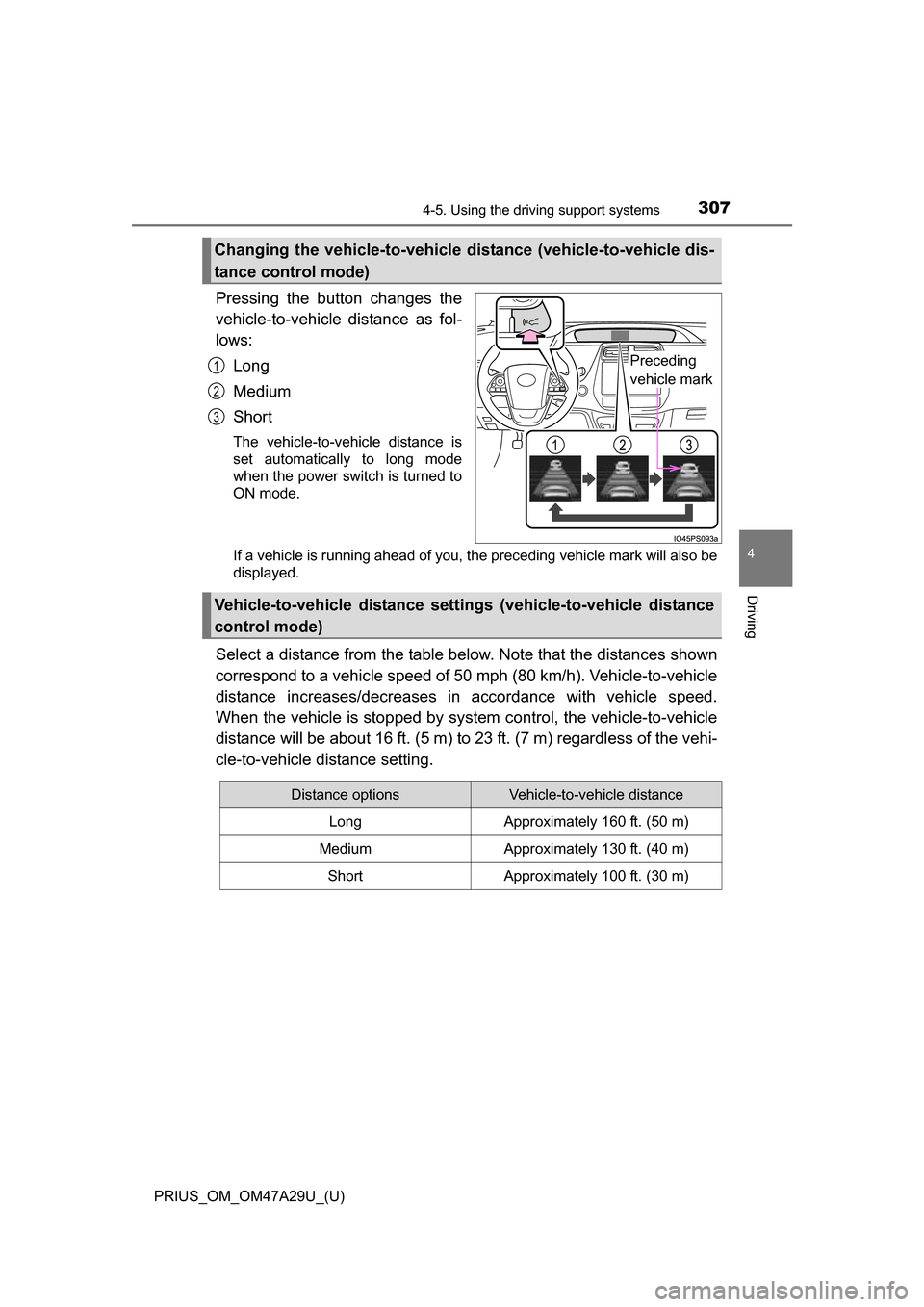
Pressing the button changes the
vehicle-to-vehicle distance as fol-
lows:
Long
Medium
Short
The vehicle-to-vehicle distance is
set automatically to long mode
when the power switch is turned to
ON mode.
If a vehicle is running ahead of you, the preceding vehicle mark will also be
displayed.
Select a distance from the table below. Note that the distances shown
correspond to a vehicle speed of 50 mph (80 km/h). Vehicle-to-vehicle
distance increases/decreases in accordance with vehicle speed.
When the vehicle is stop ped by system control, the vehicle-to-vehicle
distance will be about 16 ft. (5 m) to 23 ft. (7 m) regardless of the vehi-
cle-to-vehicle distance setting.
Changing the vehicle-to-vehicle di stance (vehicle-to-vehicle dis-
tance control mode)
Preceding
vehicle mark1
2
3
Vehicle-to-vehicle distance setti ngs (vehicle-to-vehicle distance
control mode)
Distance optionsVehicle-to-vehicle distance
LongApproximately 160 ft. (50 m)
MediumApproximately 130 ft. (40 m)
ShortApproximately 100 ft. (30 m)
Page 308 of 800
308
PRIUS_OM_OM47A29U_(U)
4-5. Using the driving support systems
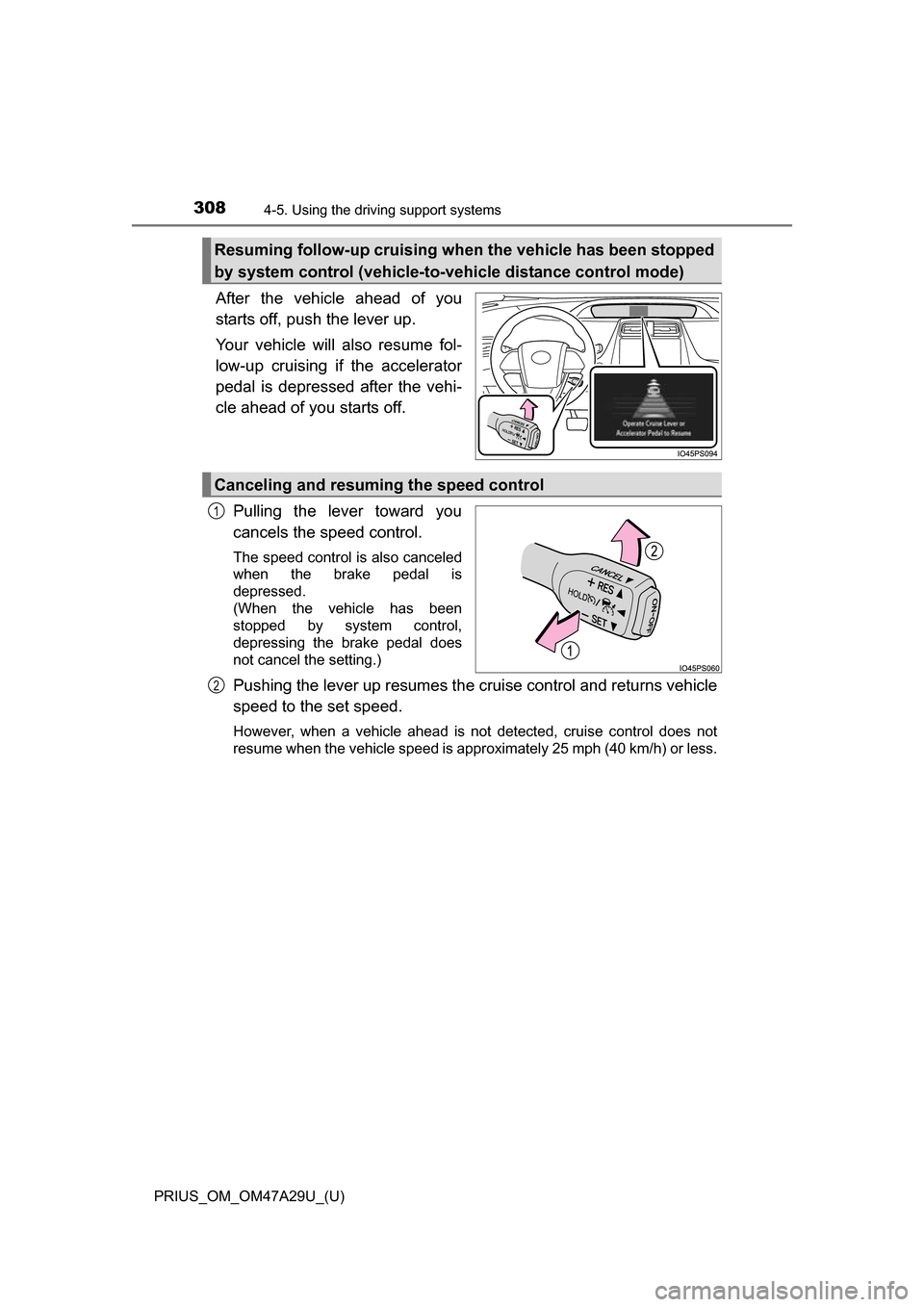
After the vehicle ahead of you
starts off, push the lever up.
Your vehicle will also resume fol-
low-up cruising if the accelerator
pedal is depressed after the vehi-
cle ahead of you starts off.
Pulling the lever toward you
cancels the speed control.
The speed control is also canceled
when the brake pedal is
depressed.
(When the vehicle has been
stopped by system control,
depressing the brake pedal does
not cancel the setting.)
Pushing the lever up resumes the cruise control and returns vehicle
speed to the set speed.
However, when a vehicle ahead is not detected, cruise control does not
resume when the vehicle speed is approximately 25 mph (40 km/h) or less.
Resuming follow-up cruising when the vehicle has been stopped
by system control (vehicle-to-vehicle distance control mode)
Canceling and resuming the speed control
1
2
Page 310 of 800
310
PRIUS_OM_OM47A29U_(U)
4-5. Using the driving support systems
When constant speed cont rol mode is selected, your vehicle will main-
tain a set speed without controlling the vehicle-to-vehicle distance.
Select this mode only when vehicl e-to-vehicle distance control mode
does not function correctly due to a dirty radar sensor.
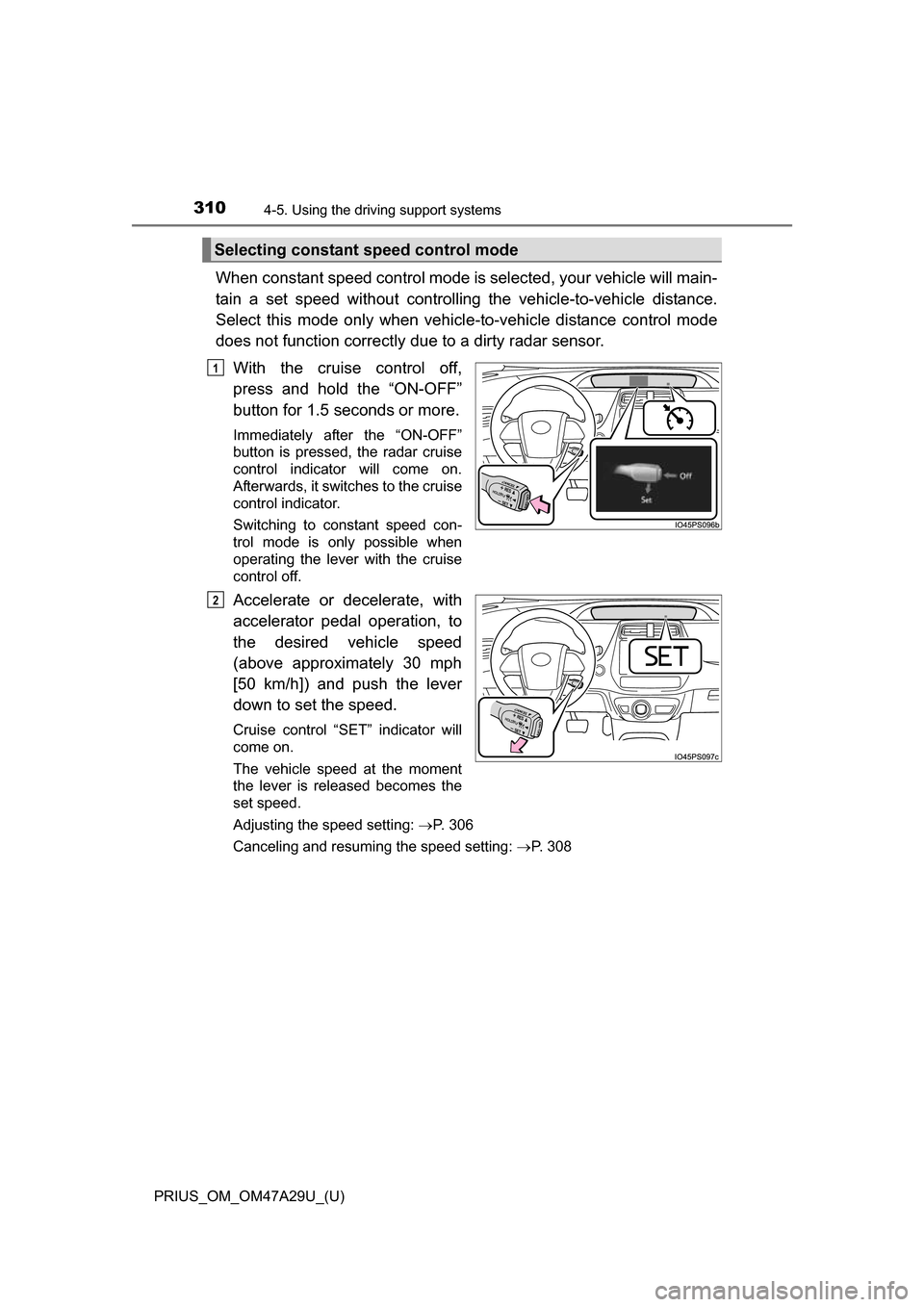
With the cruise control off,
press and hold the “ON-OFF”
button for 1.5 seconds or more.
Immediately after the “ON-OFF”
button is pressed, the radar cruise
control indicator will come on.
Afterwards, it switches to the cruise
control indicator.
Switching to constant speed con-
trol mode is only possible when
operating the lever with the cruise
control off.
Accelerate or decelerate, with
accelerator pedal operation, to
the desired vehicle speed
(above approximately 30 mph
[50 km/h]) and push the lever
down to set the speed.
Cruise control “SET” indicator will
come on.
The vehicle speed at the moment
the lever is released becomes the
set speed.
Adjusting the speed setting: P. 306
Canceling and resuming the speed setting: P. 308
Selecting constant speed control mode
1
2
Page 311 of 800
PRIUS_OM_OM47A29U_(U)
3114-5. Using the driving support systems
4
Driving
■Dynamic radar cruise control with full-speed range can be set when
● The shift position is in D.
● Vehicle speed is above approximately 30 mph (50 km/h).
However, when a preceding vehicle is detected, the dynamic radar cruise
control with full-speed range can be set even if the vehicle speed is at or
below approximately 30 mph (50 km/h).
■ Accelerating after setting the vehicle speed
The vehicle can accelerate by operating the accelerator pedal. After acceler-
ating, the set speed resumes. However, during vehicle-to-vehicle distance
control mode, the vehicle speed may decrease below the set speed in order
to maintain the distance to the preceding vehicle.
■ Automatic cancelation of vehicle -to-vehicle distance control mode
Vehicle-to-vehicle distance control mode is automatically canceled in the fol-
lowing situations.
● Actual vehicle speed falls below approximately 25 mph (40 km/h) when
there are no vehicles ahead.
● The preceding vehicle leaves the lane when your vehicle is following at a
vehicle speed below approximately 25 m ph (40 km/h). Otherwise, the sen-
sor can not properly detect the vehicle.
● VSC is activated.
● TRAC is activated for a period of time.
● When the VSC or TRAC system is turned off by pressing the VSC OFF
switch.
● The sensor cannot detect correctly because it is covered in some way.
● Pre-collision braking is activated.
● The parking brake is operated.
● Intelligent Clearance Sonar is operated. (if equipped)
● The vehicle is stopped by system control on a steep incline.
● The following are detected when the vehicle has been stopped by system
control:
• The driver is not wearing a seat belt.
• The driver’s door is opened.
• The vehicle has been stopped for about 3 minutes.
In this situation, the shift position may automatically switch to P. ( P. 237)
If vehicle-to-vehicle distance control mode is automatically canceled for any
other reason, there may be a malfunction in the system. Contact your Toyota
dealer.
Page 315 of 800
315
PRIUS_OM_OM47A29U_(U)
4-5. Using the driving support systems
4
Driving
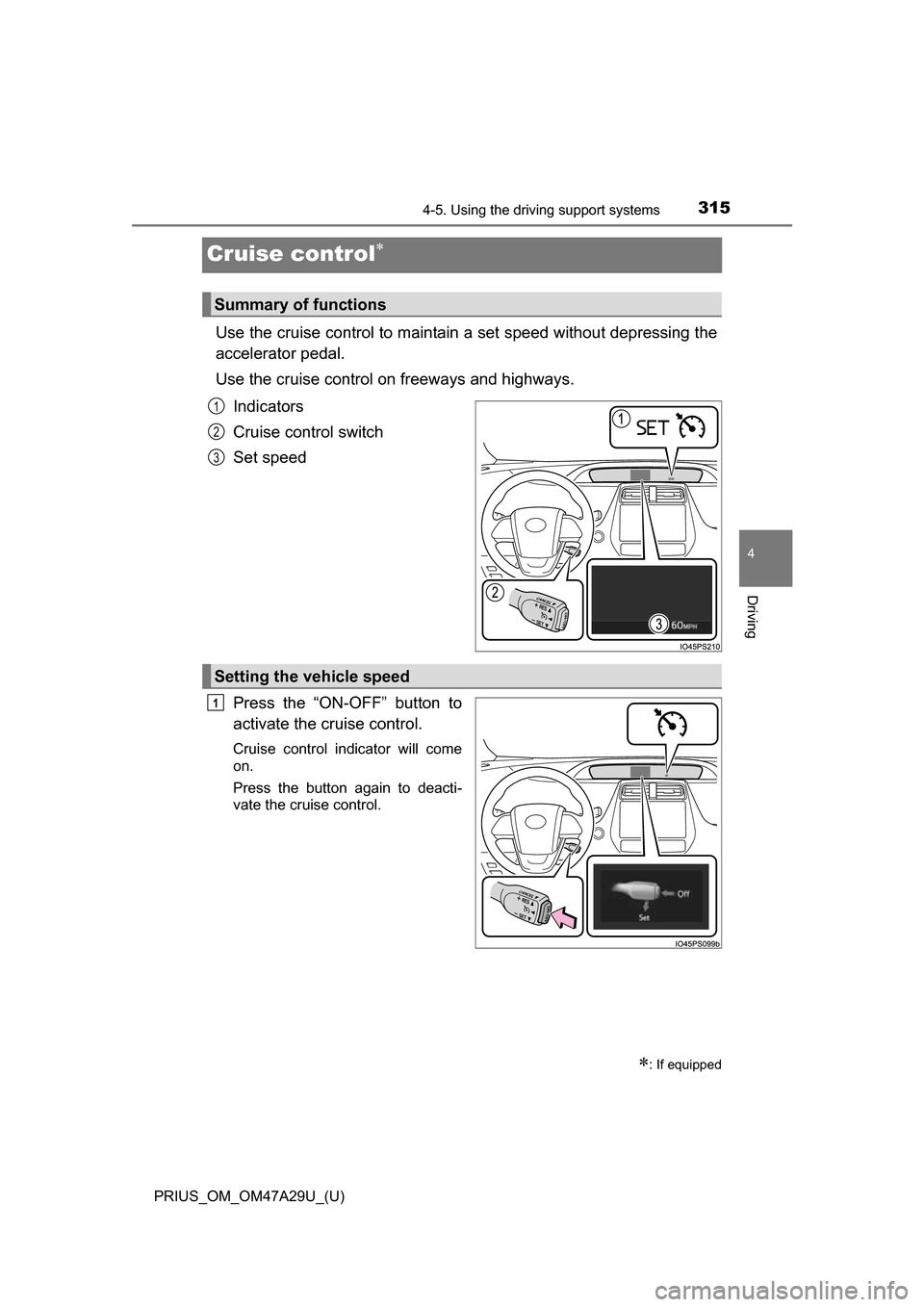
Cruise control
Use the cruise control to maintain a set speed without depressing the
accelerator pedal.
Use the cruise control on freeways and highways.
Indicators
Cruise control switch
Set speed
Press the “ON-OFF” button to
activate the cruise control.
Cruise control indicator will come
on.
Press the button again to deacti-
vate the cruise control.
: If equipped
Summary of functions
1
2
3
Setting the vehicle speed
1