Page 432 of 800
432
PRIUS_OM_OM47A29U_(U)
5-2. Setup
Display settings
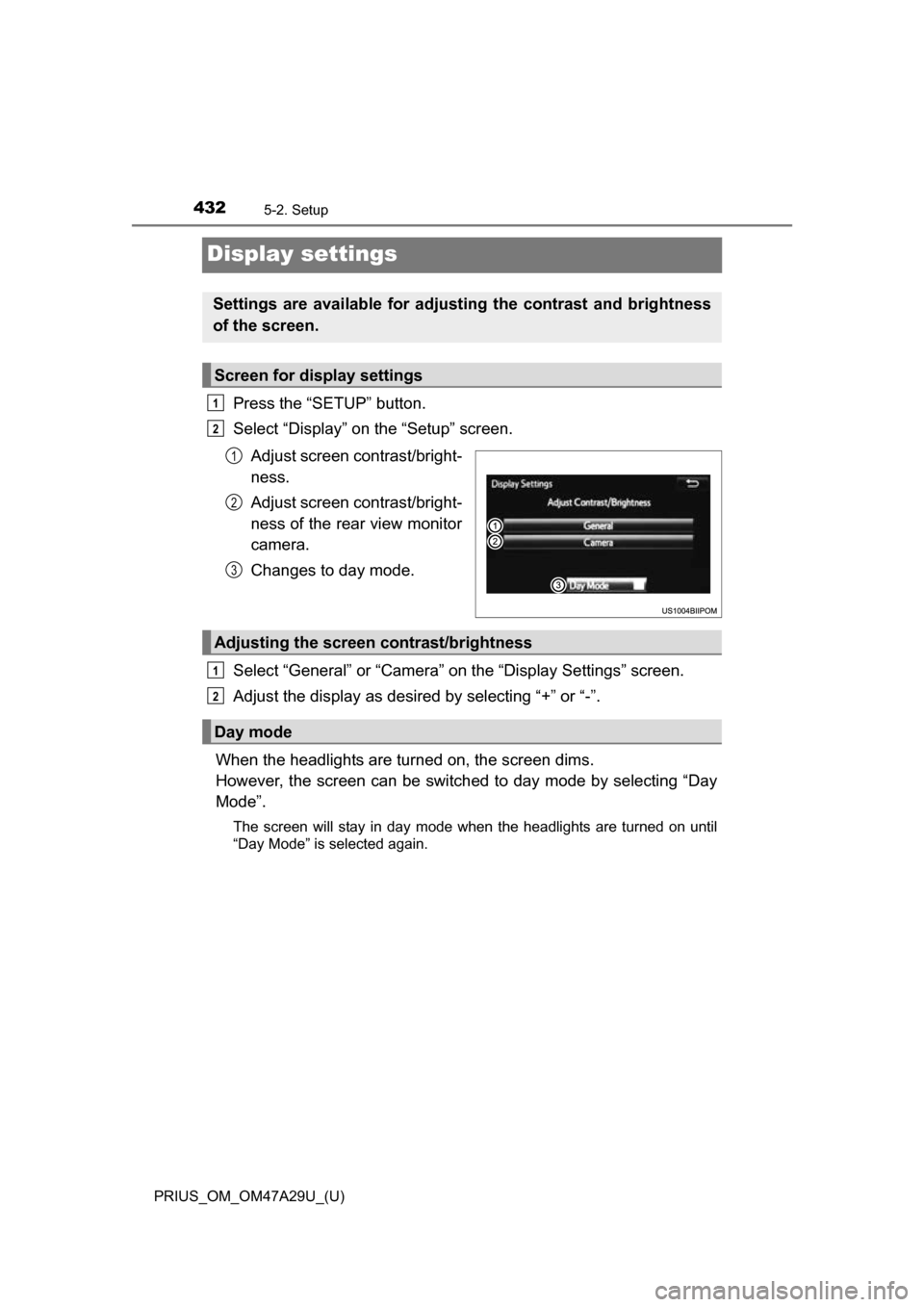
Press the “SETUP” button.
Select “Display” on the “Setup” screen.Adjust screen contrast/bright-
ness.
Adjust screen contrast/bright-
ness of the rear view monitor
camera.
Changes to day mode.
Select “General” or “Camera” on the “Display Settings” screen.
Adjust the display as desired by selecting “+” or “-”.
When the headlights are turned on, the screen dims.
However, the screen can be switch ed to day mode by selecting “Day
Mode”.
The screen will stay in day mode when the headlights are turned on until
“Day Mode” is selected again.
Settings are available for adjusting the contrast and brightness
of the screen.
Screen for display settings
1
2
1
2
3
Adjusting the screen contrast/brightness
Day mode
1
2
Page 433 of 800
433
PRIUS_OM_OM47A29U_(U)
5-2. Setup
5
Audio system
Voice settings
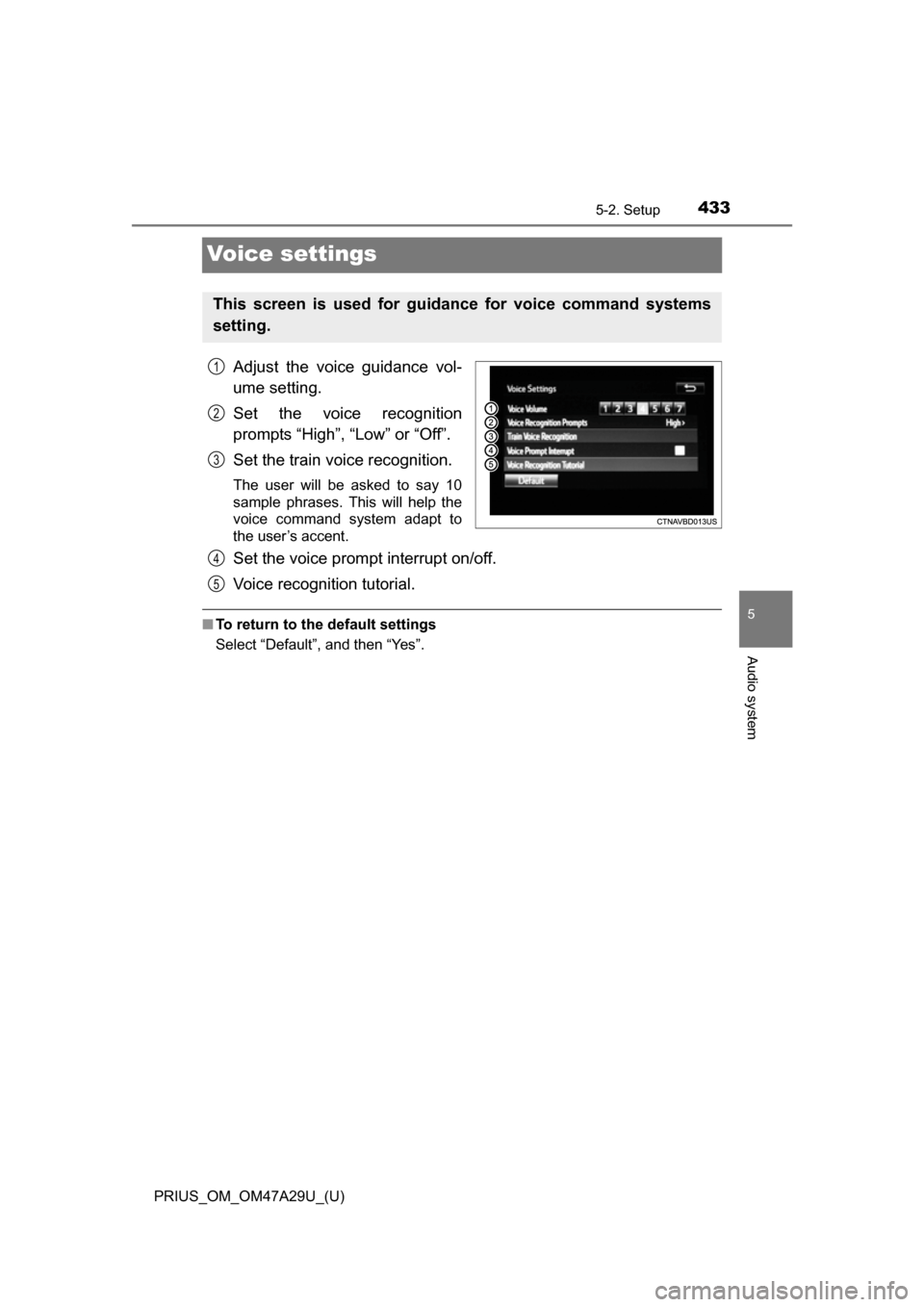
Adjust the voice guidance vol-
ume setting.
Set the voice recognition
prompts “High”, “Low” or “Off”.
Set the train voice recognition.
The user will be asked to say 10
sample phrases. This will help the
voice command system adapt to
the user’s accent.
Set the voice prompt interrupt on/off.
Voice recognition tutorial.
■To return to the default settings
Select “Default”, and then “Yes”.
This screen is used for guidance for voice command systems
setting.
1
2
3
4
5
Page 437 of 800
437
PRIUS_OM_OM47A29U_(U)
5-3. Using the Multimedia system
5
Audio system
Optimal use of the audio system
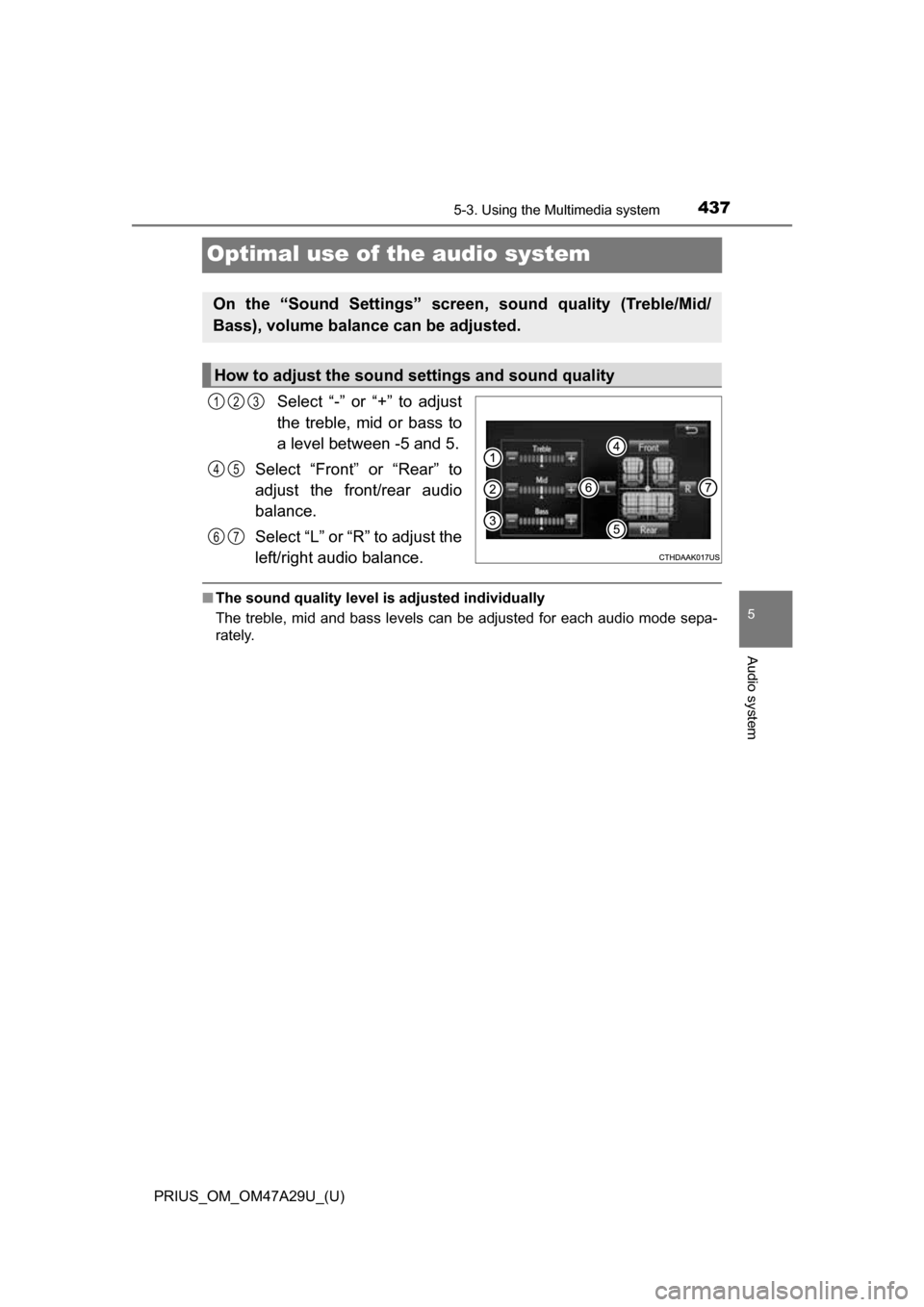
Select “-” or “+” to adjust
the treble, mid or bass to
a level between -5 and 5.
Select “Front” or “Rear” to
adjust the front/rear audio
balance.
Select “L” or “R” to adjust the
left/right audio balance.
■ The sound quality level is adjusted individually
The treble, mid and bass levels can be adjusted for each audio mode sepa-
rately.
On the “Sound Settings” screen, sound quality (Treble/Mid/
Bass), volume balance can be adjusted.
How to adjust the sound settings and sound quality
123
45
67
Page 438 of 800
438
PRIUS_OM_OM47A29U_(U)
5-4. Using the radio
Radio operation
Pressing the “AUDIO” button displays the audio control screen from
any screens of the selected source.
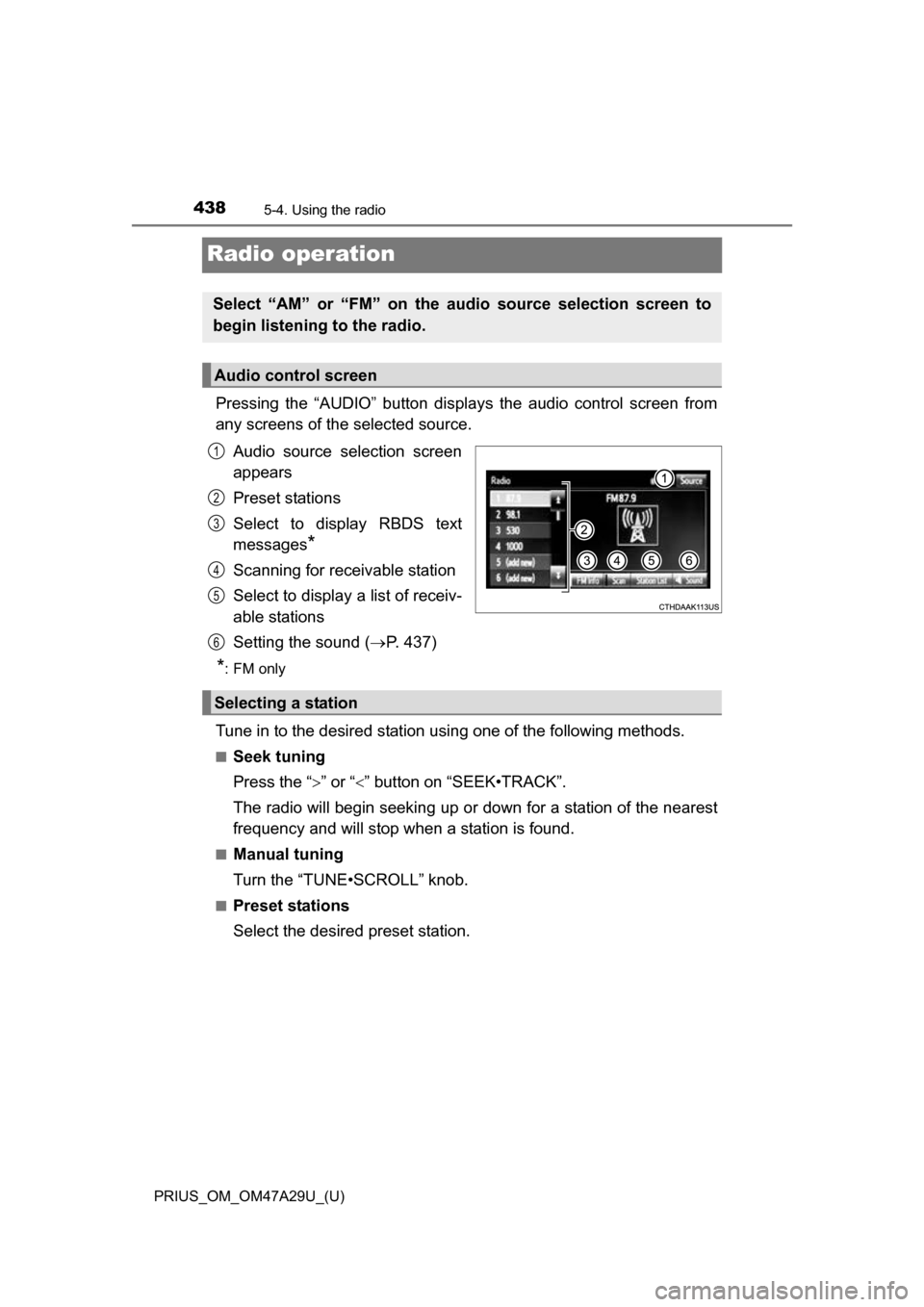
Audio source selection screen
appears
Preset stations
Select to display RBDS text
messages
*
Scanning for receivable station
Select to display a list of receiv-
able stations
Setting the sound ( P. 437)
*:FM only
Tune in to the desired station using one of the following methods.
■Seek tuning
Press the “ ” or “” button on “SEEK•TRACK”.
The radio will begin seeking up or down for a station of the nearest
frequency and will stop when a station is found.
■Manual tuning
Turn the “TUNE•SCROLL” knob.
■Preset stations
Select the desired preset station.
Select “AM” or “FM” on the audio source selection screen to
begin listening to the radio.
Audio control screen
1
2
3
4
5
6
Selecting a station
Page 439 of 800
PRIUS_OM_OM47A29U_(U)
4395-4. Using the radio
5
Audio system
Search for desired stations by turning the “TUNE•SCROLL” knob or
pressing the “” or “” button on “SEEK•TRACK”.
Select “(add new)”.
To change the preset station to a different one, select and hold the preset
station.
Select “Yes”.
Select “OK” after setting the new preset station.
■Refreshing the station list
Select “Refresh” on the “Station List” screen.
To cancel the refresh, select “Cancel Refresh”.
■ Reception sensitivity
●Maintaining perfect radio reception at all times is difficult due to the continu-
ally changing position of the antenna, differences in signal strength and sur-
rounding objects, such as trains, transmitters, etc.
● The radio antenna is mounted on the roof. The antenna can be removed
from the base by turning it.
Setting station presets
1
2
3
4
Page 440 of 800
440
PRIUS_OM_OM47A29U_(U)
5-5. Playing an audio CD and MP3/WMA/AAC discs
CD player operation
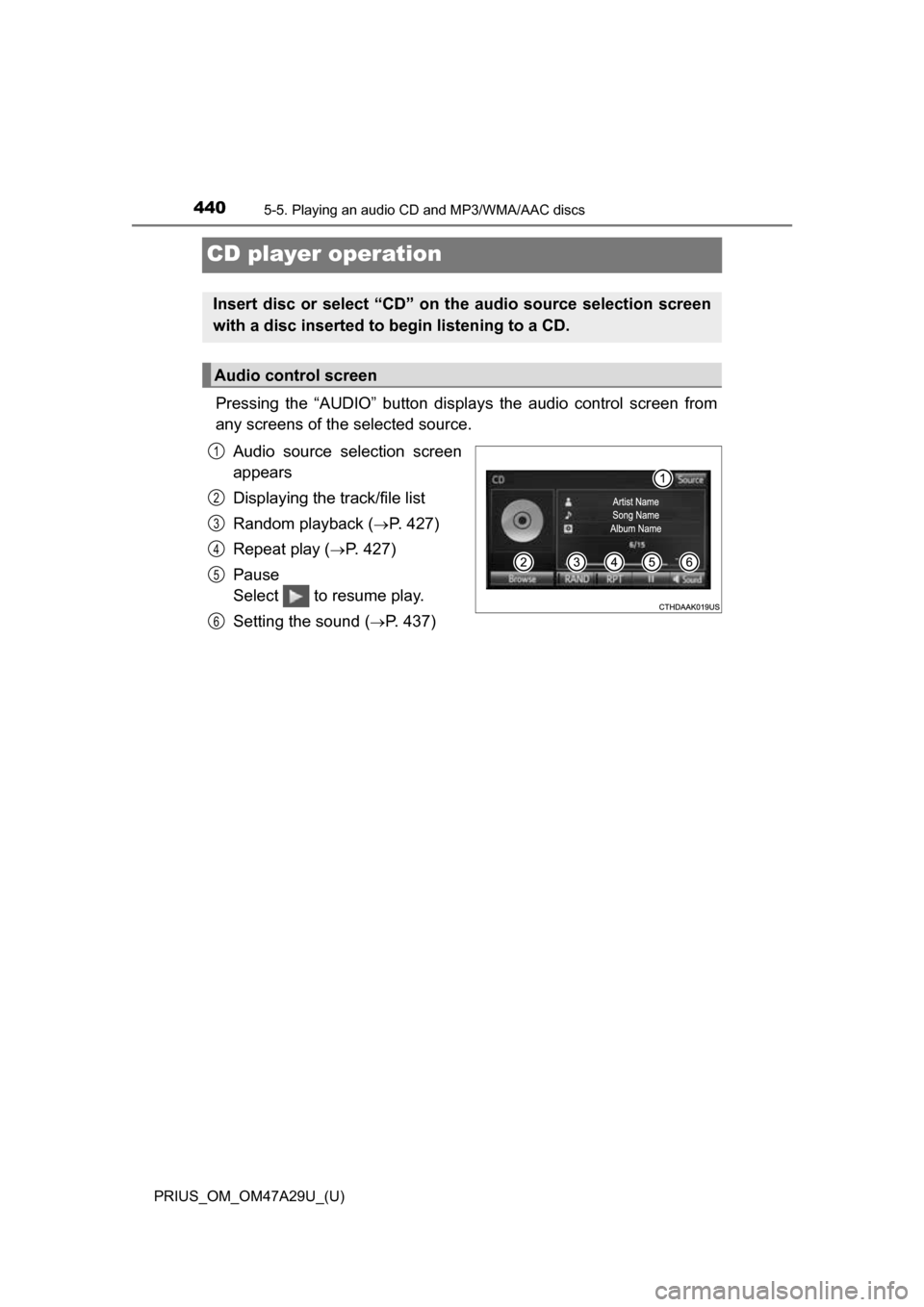
Pressing the “AUDIO” button displays the audio control screen from
any screens of the selected source.
Audio source selection screen
appears
Displaying the track/file list
Random playback (
P. 427)
Repeat play (
P. 427)
Pause
Select to resume play.
Setting the sound (
P. 437)
Insert disc or select “CD” on the audio source selection screen
with a disc inserted to begin listening to a CD.
Audio control screen
1
2
3
4
5
6
Page 446 of 800
446
PRIUS_OM_OM47A29U_(U)
5-6. Using an external device
iPod player operation
P. 4 2 5
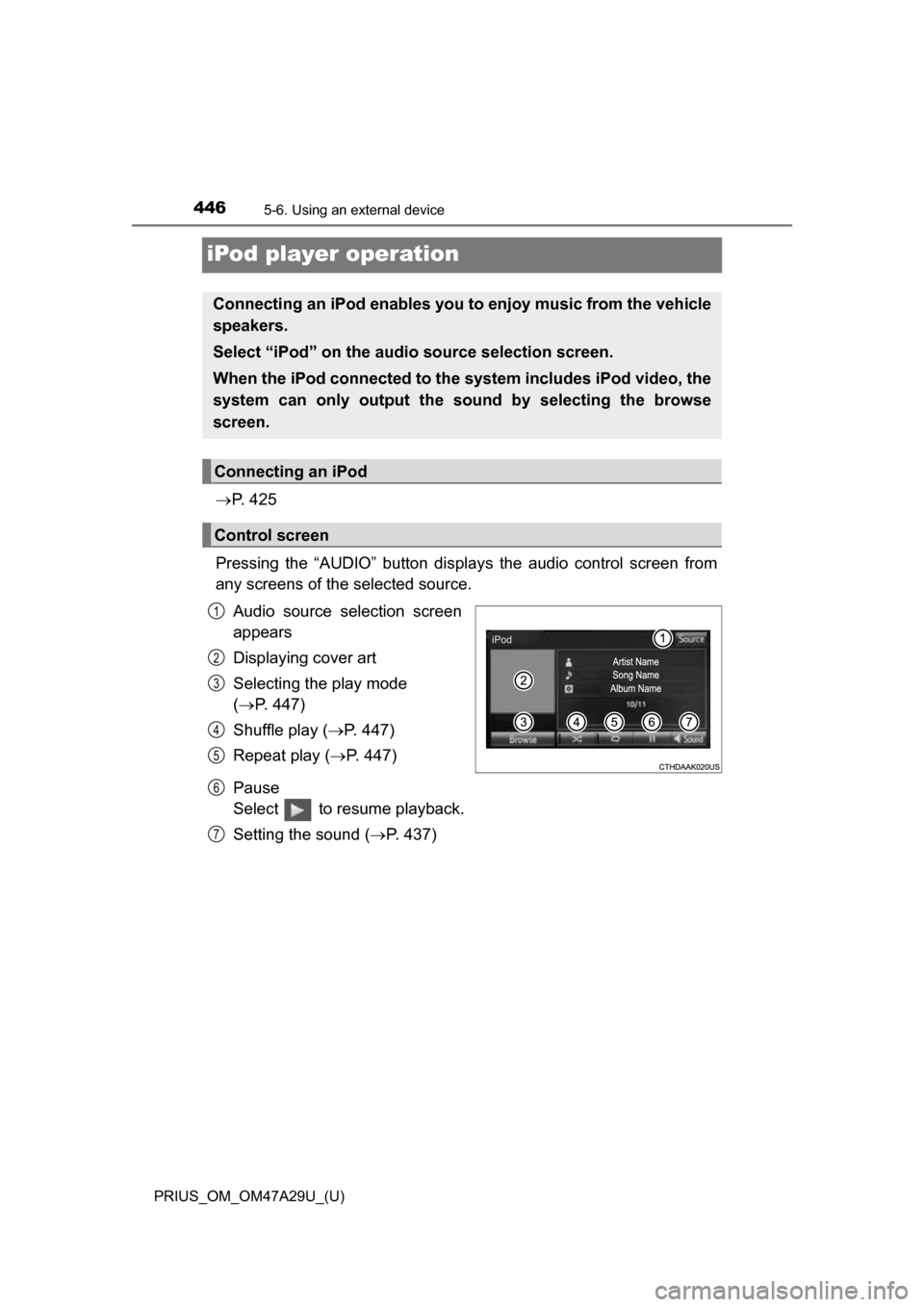
Pressing the “AUDIO” button disp lays the audio control screen from
any screens of the selected source.
Audio source selection screen
appears
Displaying cover art
Selecting the play mode
( P. 447)
Shuffle play ( P. 447)
Repeat play ( P. 447)
Pause
Select to resume playback.
Setting the sound ( P. 437)
Connecting an iPod enables you to enjoy music from the vehicle
speakers.
Select “iPod” on the audi o source selection screen.
When the iPod connected to the system includes iPod video, the
system can only output the sound by selecting the browse
screen.
Connecting an iPod
Control screen
1
2
3
4
5
6
7
Page 451 of 800
451
PRIUS_OM_OM47A29U_(U)
5-6. Using an external device
5
Audio system
USB memor y device player operation
P. 4 2 5
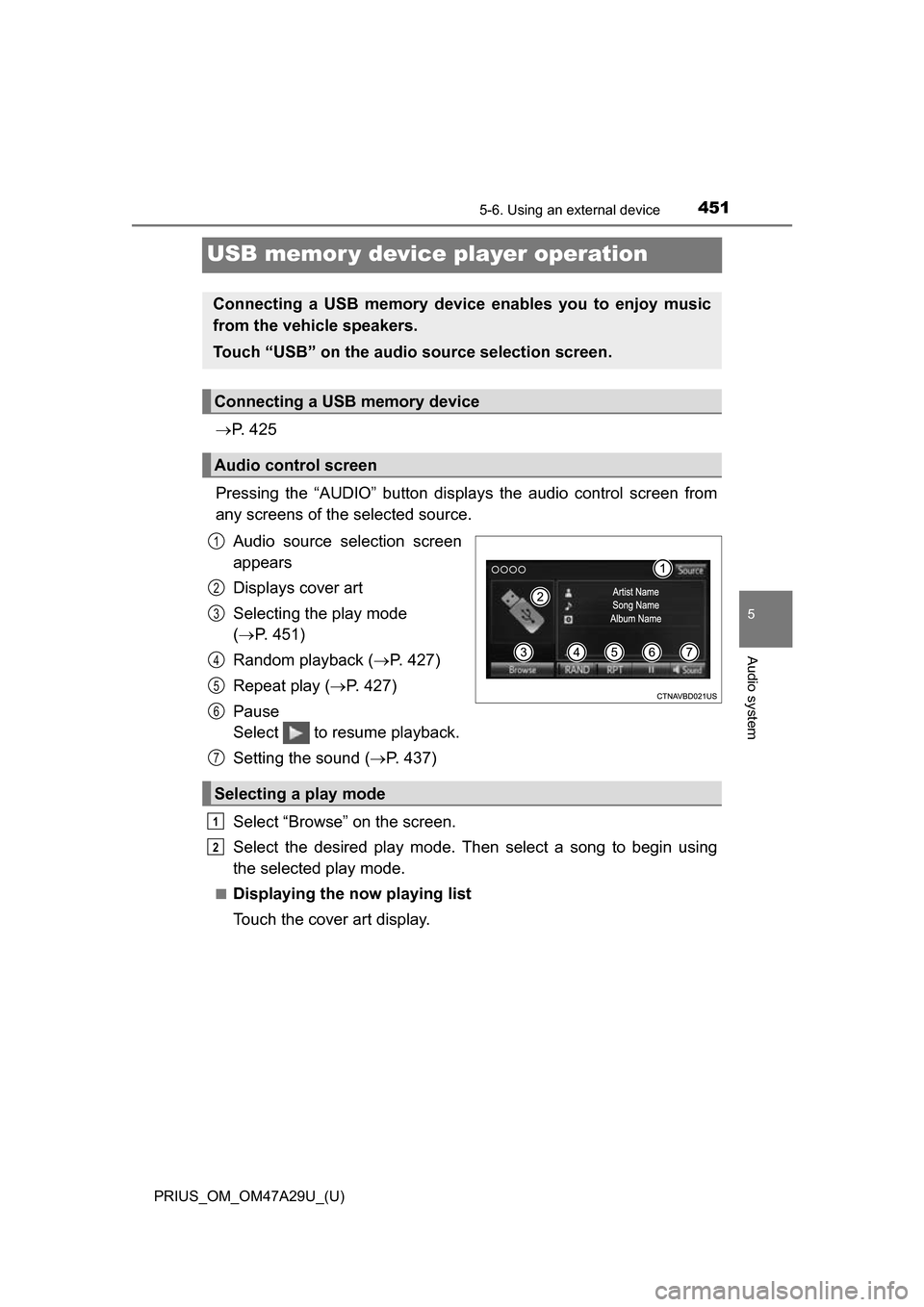
Pressing the “AUDIO” button disp lays the audio control screen from
any screens of the selected source.
Audio source selection screen
appears
Displays cover art
Selecting the play mode
( P. 451)
Random playback ( P. 427)
Repeat play ( P. 427)
Pause
Select to resume playback.
Setting the sound ( P. 437)
Select “Browse” on the screen.
Select the desired play mode. Then select a song to begin using
the selected play mode.
■Displaying the now playing list
Touch the cover art display.
Connecting a USB memory device enables you to enjoy music
from the vehicle speakers.
Touch “USB” on the audio source selection screen.
Connecting a USB memory device
Audio control screen
1
2
3
4
5
6
Selecting a play mode
7
1
2