Page 490 of 800
4905-9. Bluetooth® phone
PRIUS_OM_OM47A29U_(U)
For PBAP compatible Bluetooth® phones, this function is available
when “Automatic Transfer” is set to off. ( P. 486)
Select “Delete Contacts”.
Select the desired contact and select “Delete”.
Select “Yes” when the confirmation screen appears.
■Deleting the contact in a different way (From the “Contact
Details” screen) Display the phone screen. ( P. 470)
Select the “Contacts”, “Call History” tab or the “Favorites” tab and
select the desired contact.
Select “Delete Contacts”.
Select “Yes” when the confirmation screen appears.
Up to 15 contacts (maximum of 4 numbers per contact) can be regis-
tered in the favorites list.
■Registering the contacts in the favorites list
Select “Add Favorite”.
Select the desired contact to add to the favorites list.
Dimmed contacts are already stored as a favorite.
Check that a confirmation scr een is displayed when the opera-
tion is complete.
Deleting the contact data
Favorites list setting
1
2
3
1
2
3
4
1
2
3
Page 493 of 800
PRIUS_OM_OM47A29U_(U)
4935-9. Bluetooth® phone
5
Audio system
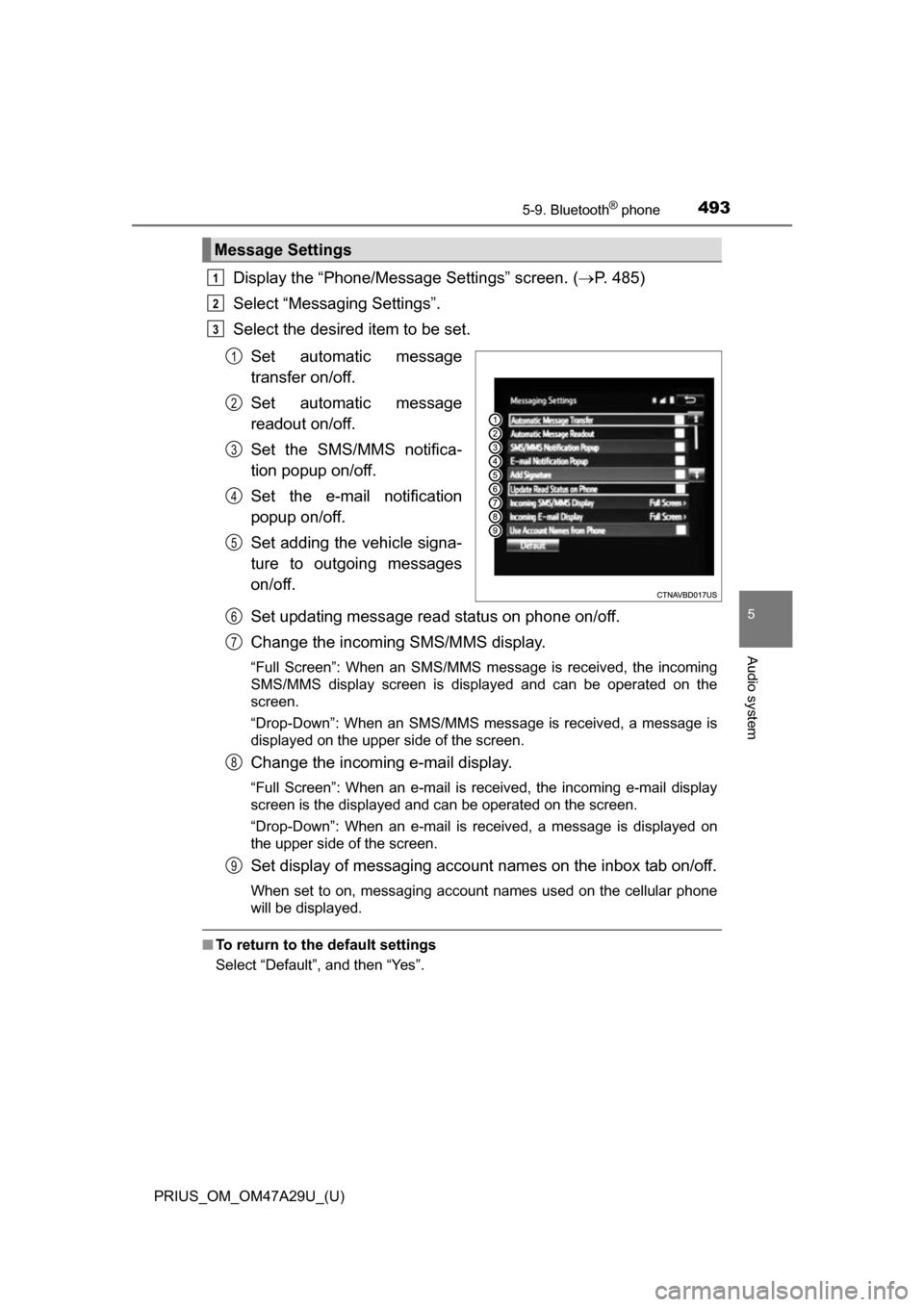
Display the “Phone/Message Settings” screen. (P. 485)
Select “Messaging Settings”.
Select the desired item to be set.
Set automatic message
transfer on/off.
Set automatic message
readout on/off.
Set the SMS/MMS notifica-
tion popup on/off.
Set the e-mail notification
popup on/off.
Set adding the vehicle signa-
ture to outgoing messages
on/off.
Set updating message read status on phone on/off.
Change the incoming SMS/MMS display.
“Full Screen”: When an SMS/MMS message is received, the incoming
SMS/MMS display screen is displayed and can be operated on the
screen.
“Drop-Down”: When an SMS/MMS message is received, a message is
displayed on the upper side of the screen.
Change the incoming e-mail display.
“Full Screen”: When an e-mail is received, the incoming e-mail display
screen is the displayed and can be operated on the screen.
“Drop-Down”: When an e-mail is received, a message is displayed on
the upper side of the screen.
Set display of messaging account names on the inbox tab on/off.
When set to on, messaging account names used on the cellular phone
will be displayed.
■To return to the default settings
Select “Default”, and then “Yes”.
Message Settings
1
2
3
1
2
3
4
5
6
7
8
9
Page 494 of 800
4945-9. Bluetooth® phone
PRIUS_OM_OM47A29U_(U)■
Displaying the “Messaging Settings” screen in a different way
Display the phone screen. ( P. 470)
Select .
Select “Settings”.
Select “Messaging Settings”.
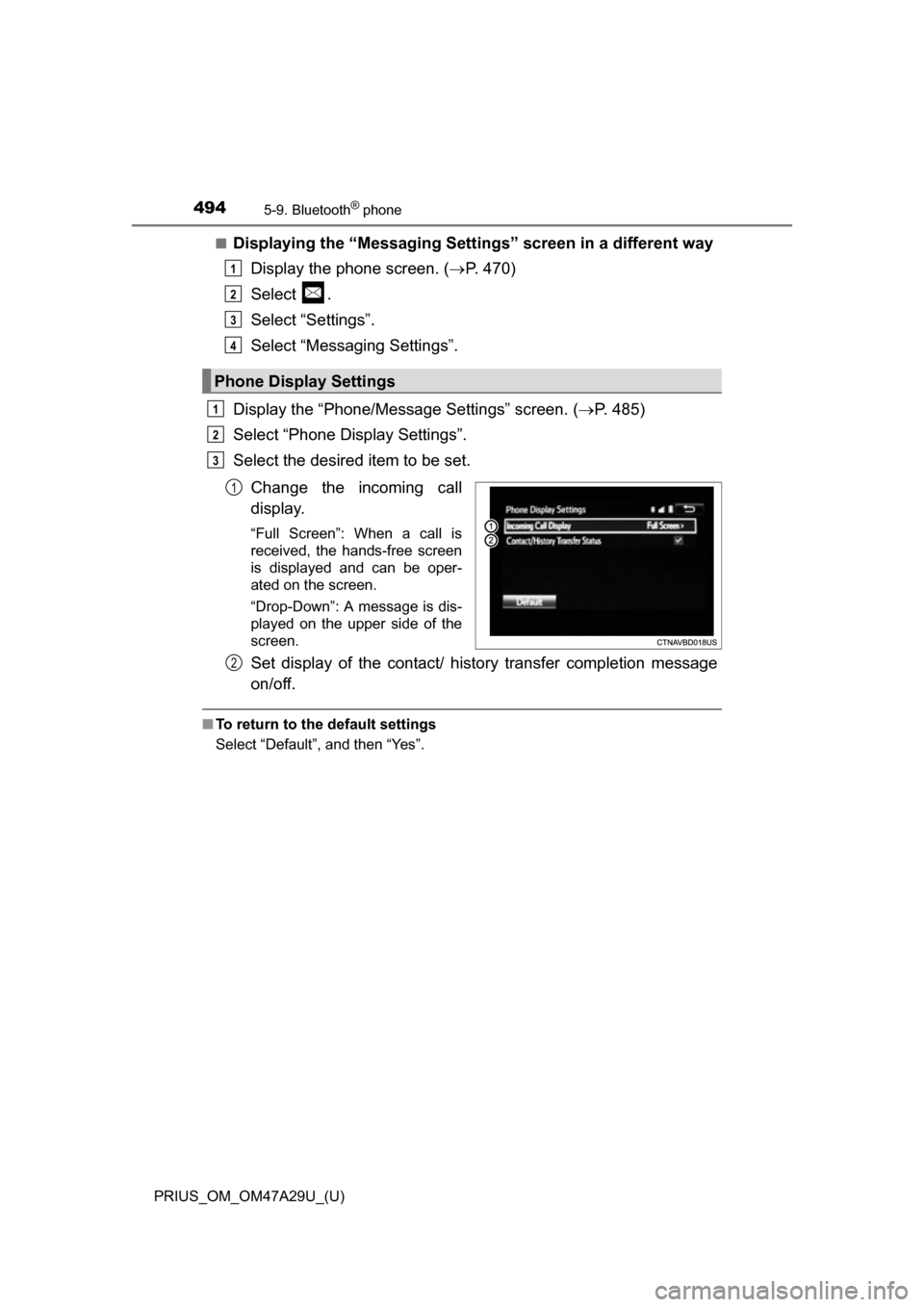
Display the “Phone/Message Settings” screen. ( P. 485)
Select “Phone Display Settings”.
Select the desired item to be set.
Change the incoming call
display.
“Full Screen”: When a call is
received, the hands-free screen
is displayed and can be oper-
ated on the screen.
“Drop-Down”: A message is dis-
played on the upper side of the
screen.
Set display of the contact/ history transfer completion message
on/off.
■To return to the default settings
Select “Default”, and then “Yes”.
Phone Display Settings
1
2
3
4
1
2
3
1
2
Page 496 of 800
4965-9. Bluetooth® phone
PRIUS_OM_OM47A29U_(U)
When registering/connecting a cellular phone
When making/receiving a call
A cellular phone cannot be registered.
An incorrect passcode was entered on the cellular phone.
Enter the correct passcode on the cellular phone.
The registration operation has not been completed on the cellular phone
side.
Complete the registration operation on the cellular phone (approve
registration on the phone).
Old registration information remains on either this system or the cellular
phone.
Delete the existing registration information from both this system
and the cellular phone, then regist er the cellular phone you wish to
connect to this system. ( P. 463)
A Bluetooth® connection cannot be made.
Another Bluetooth® device is already connected.
Manually connect the cellular phone you wish to use to this sys-
tem. ( P. 464)
Bluetooth® function is not enabled on the cellular phone.
Enable the Bluetooth® function on the cellular phone.
Automatic Bluetooth® connection on this system is set to off.
Set automatic Bluetooth® connection on this system to on when
the audio system is turned to on. ( P. 464)
“Please check your device settings.” message is displayed.
Bluetooth® function is not enabled on the cellular phone.
Enable the Bluetooth® function on the cellular phone.
Old registration information remains on either this system or the cellular
phone.
Delete the existing registration information from both this system
and the cellular phone, then regist er the cellular phone you wish to
connect to this system. ( P. 463)
A call cannot be made/received.
Your vehicle is in a “Out of cellular service area. Please try again later.”
area.
Move to where “Out of cellular ser vice area. Please try again later.”
no longer appears on the display.
Page 512 of 800
512
PRIUS_OM_OM47A29U_(U)
6-1. Using the air conditioning system and defogger
Automatic air conditioning system
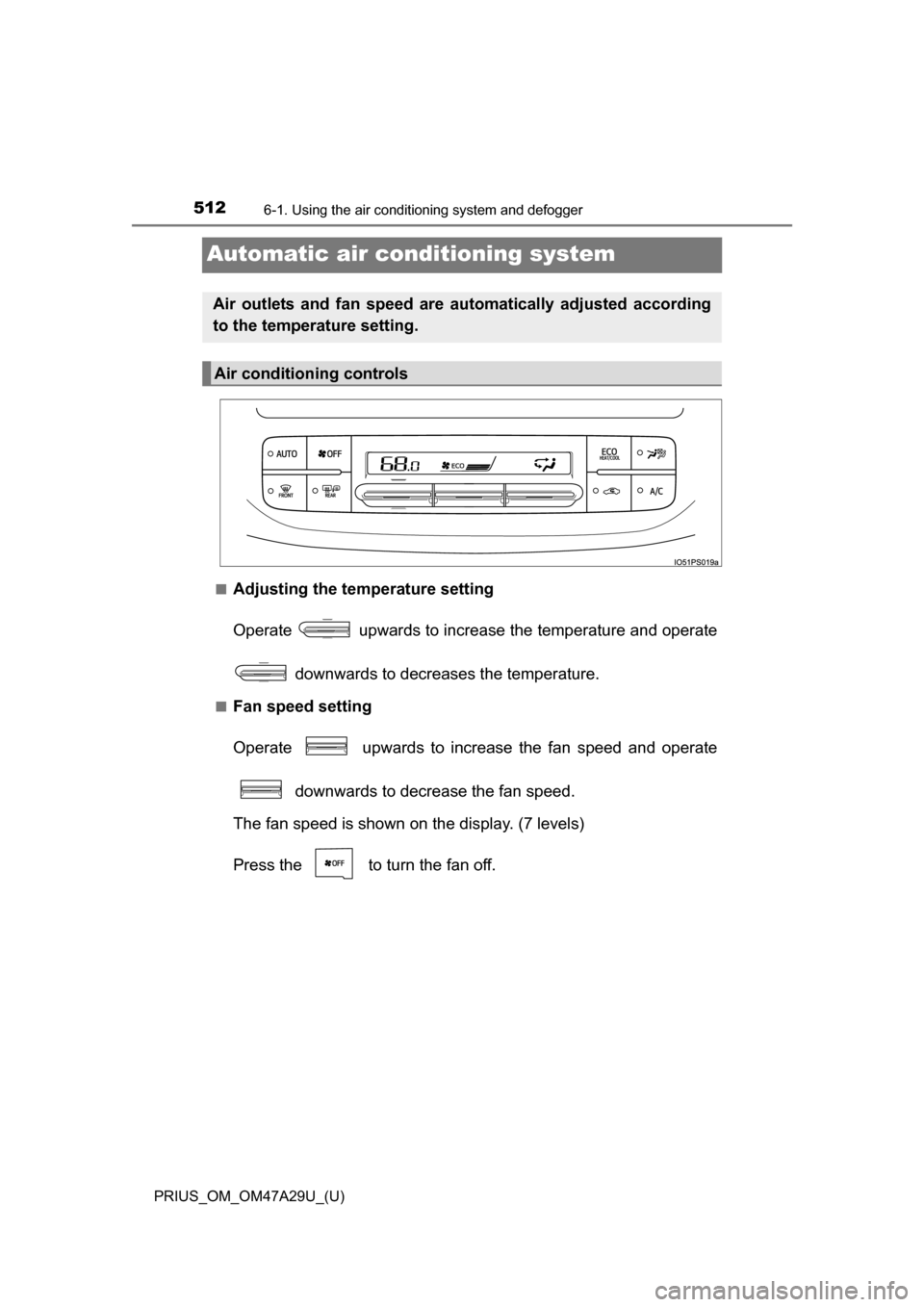
■Adjusting the temperature setting
Operate upwards to increase the temperature and operate
downwards to decreases the temperature.
■Fan speed setting
Operate upwards to increase the fan speed and operate downwards to decrease the fan speed.
The fan speed is shown on the display. (7 levels)
Press the to turn the fan off.
Air outlets and fan speed are automatically adjusted according
to the temperature setting.
Air conditioning controls
Page 515 of 800
PRIUS_OM_OM47A29U_(U)
5156-1. Using the air conditioning system and defogger
6
Interior features
Press the .
Adjust the temperature setting.
To stop the operation, press the .
■Automatic mode indicator
If the fan speed setting or air fl ow modes are operated, the auto-
matic mode indicator goes off. However, automatic mode for func-
tions other than that operated is maintained.
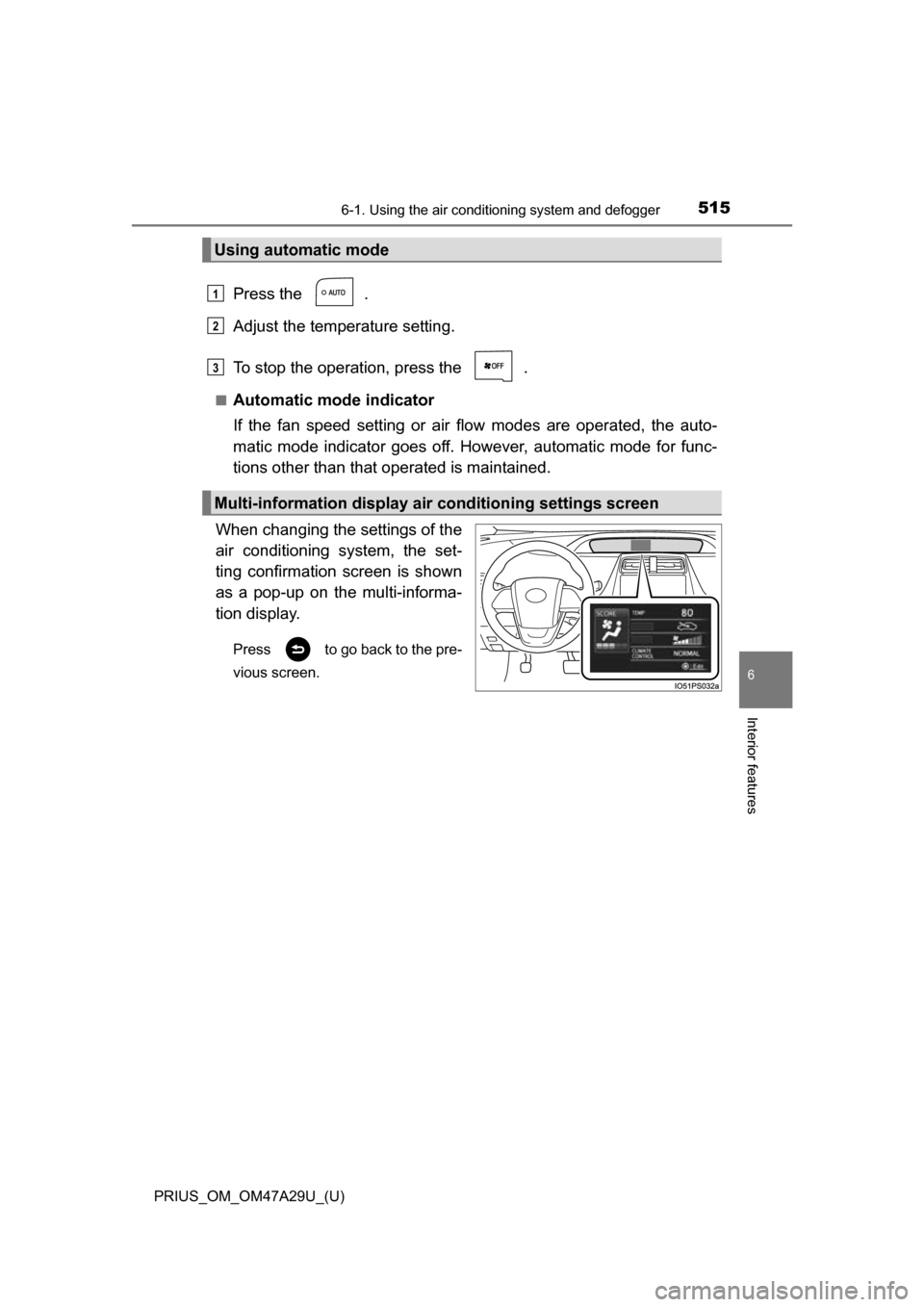
When changing the settings of the
air conditioning system, the set-
ting confirmation screen is shown
as a pop-up on the multi-informa-
tion display.
Press to go back to the pre-
vious screen.
Using automatic mode
Multi-information display air conditioning settings screen
1
2
3
Page 519 of 800
PRIUS_OM_OM47A29U_(U)
5196-1. Using the air conditioning system and defogger
6
Interior features
■Using automatic mode
Fan speed is adjusted automatically according to the temperature setting and
the ambient conditions.
Therefore, the fan may stop for a while until warm or cool air is ready to flow
immediately after the button is pressed.
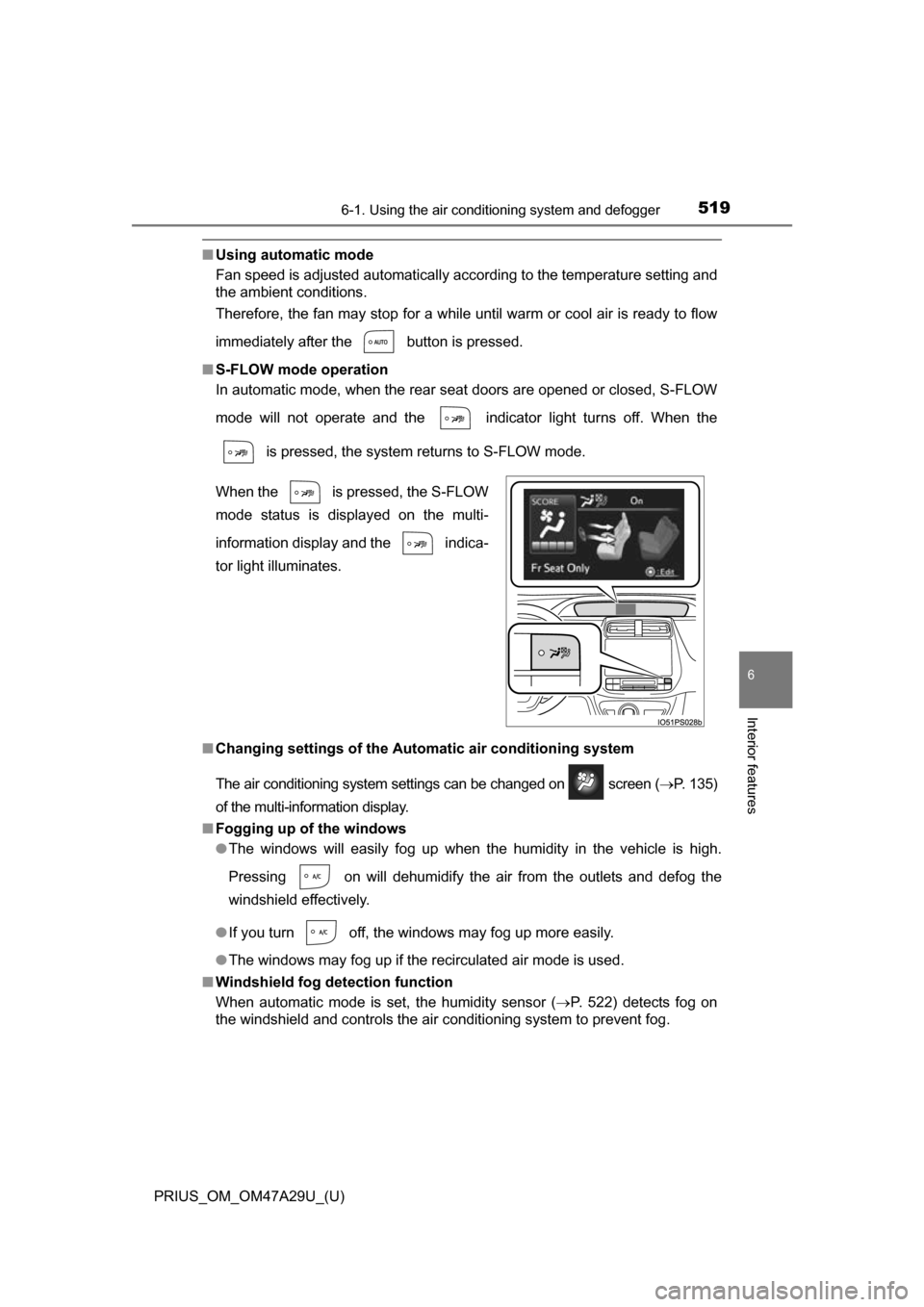
■ S-FLOW mode operation
In automatic mode, when the rear seat doors are opened or closed, S-FLOW
mode will not operate and the indicator light turns off. When the
is pressed, the system returns to S-FLOW mode.
■ Changing settings of the Automatic air conditioning system
The air conditioning system settings can be changed on screen ( P. 135)
of the multi-information display.
■ Fogging up of the windows
●The windows will easily fog up when the humidity in the vehicle is high.
Pressing on will dehumidify the air from the outlets and defog the
windshield effectively.
● If you turn off, the windows may fog up more easily.
● The windows may fog up if the recirculated air mode is used.
■ Windshield fog detection function
When automatic mode is set, the humidity sensor (P. 522) detects fog on
the windshield and controls the air conditioning system to prevent fog. When the is pressed, the S-FLOW
mode status is displayed on the multi-
information display and the indica-
tor light illuminates.
Page 520 of 800
5206-1. Using the air conditioning system and defogger
PRIUS_OM_OM47A29U_(U)■
Outside/recirculated air mode
●When driving on dusty roads such as tunnels or in heavy traffic, set
to the recirculated air mode. This is effective in preventing outside air from
entering the vehicle interior. During cooling operation, setting the recircu-
lated air mode will also cool the vehicle interior effectively.
● Outside/recirculated air mode may automatically switch depending on the
temperature setting or the inside temperature.
■ Operation of the air conditioning system in Eco drive mode
●In Eco drive mode, the air conditioning system is controlled as follows to pri-
oritize fuel efficiency:
• Engine speed and compressor operation controlled to restrict heating/
cooling capacity
• Fan speed restricted when automatic mode is selected
● To improve air conditioning performance, perform the following operations:
• Adjust the fan speed
• Adjust the temperature setting
• Turn off Eco drive mode
● Even when the drive mode is set to Eco drive mode, the air conditioning eco
mode can be turned off by pressing the .
■ When the outside temperature falls to nearly 32 F (0 C)
The dehumidification function may not operate even when button is
pressed.
■ Ventilation and air conditioning odors
●To let the flesh air in, set the air conditioning system to the outside air mode.
● During use, various odors from inside and outside the vehicle may enter into
and accumulate in the air conditioning system. This may then cause odor to
be emitted from the vents.
● In order to suppress odors that occur when the air conditioning system
starts, fresh air is automatically taken in when parked.
● To reduce potential odors from occurring:
The start timing of the blower may be delayed for a short period of time
immediately after the air conditioning system is started in automatic mode.
■ Air conditioning filter
P. 621
■ Customization
Settings (e.g. A/C Auto switch operation) can be changed.
(Customizable features: P. 752)