Page 527 of 800
PRIUS_OM_OM47A29U_(U)
5276-2. Using the interior lights
6
Interior features
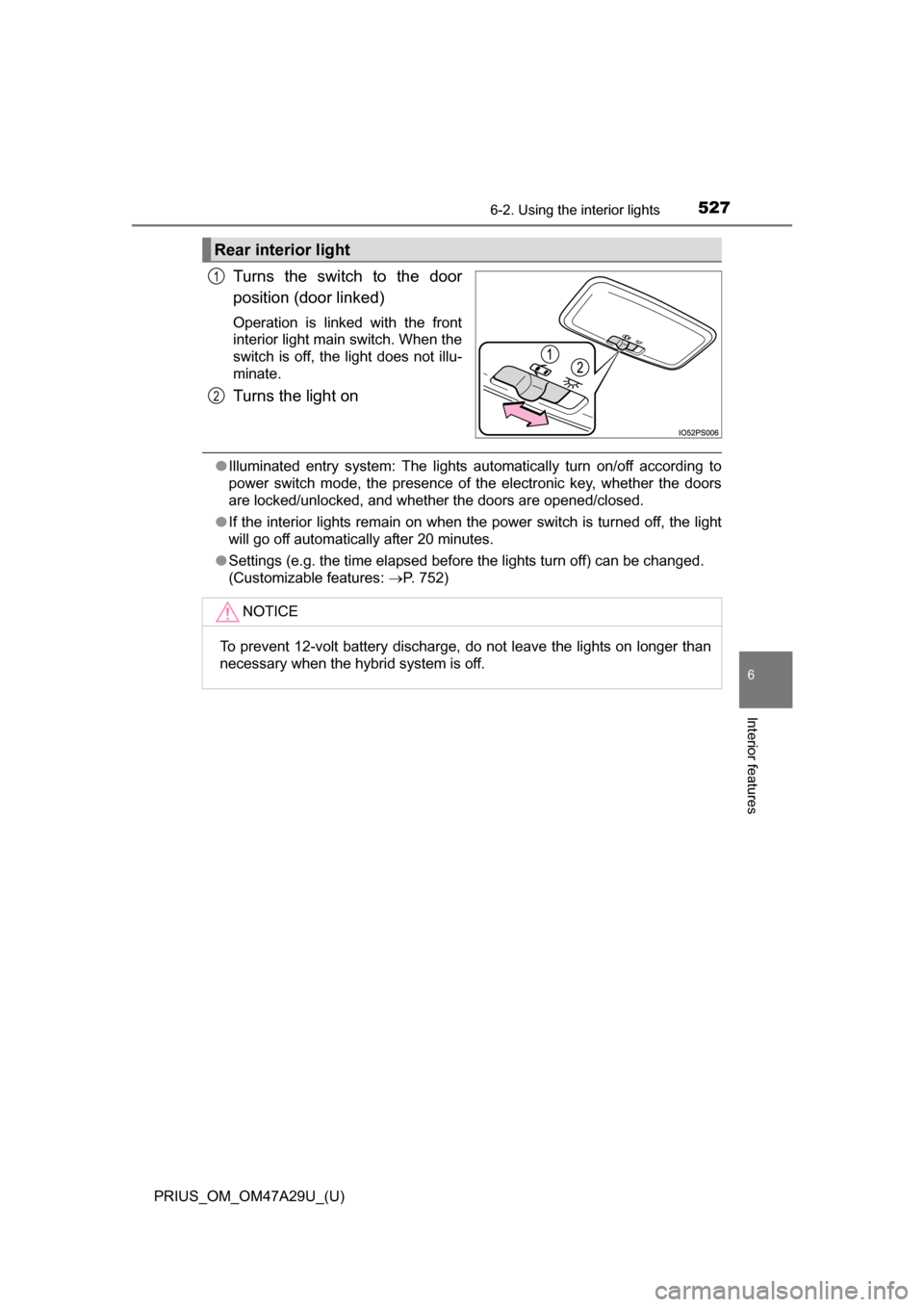
Turns the switch to the door
position (door linked)
Operation is linked with the front
interior light main switch. When the
switch is off, the light does not illu-
minate.
Turns the light on
●Illuminated entry system: The lights automatically turn on/off according to
power switch mode, the presence of the electronic key, whether the doors
are locked/unlocked, and whether the doors are opened/closed.
● If the interior lights remain on when the power switch is turned off, the light
will go off automatically after 20 minutes.
● Settings (e.g. the time elapsed before the lights turn off) can be changed.
(Customizable features: P. 752)
Rear interior light
1
2
NOTICE
To prevent 12-volt battery discharge, do not leave the lights on longer than
necessary when the hybrid system is off.
Page 579 of 800
PRIUS_OM_OM47A29U_(U)
5797-2. Maintenance
7
Maintenance and care
■Repair and replacement
It is recommended that genuine Toyota parts be used for repairs to ensure
performance of each system. If non-Toyota parts are used in replacement or if
a repair shop other than a Toyota dealer performs repairs, confirm the war-
ranty coverage.
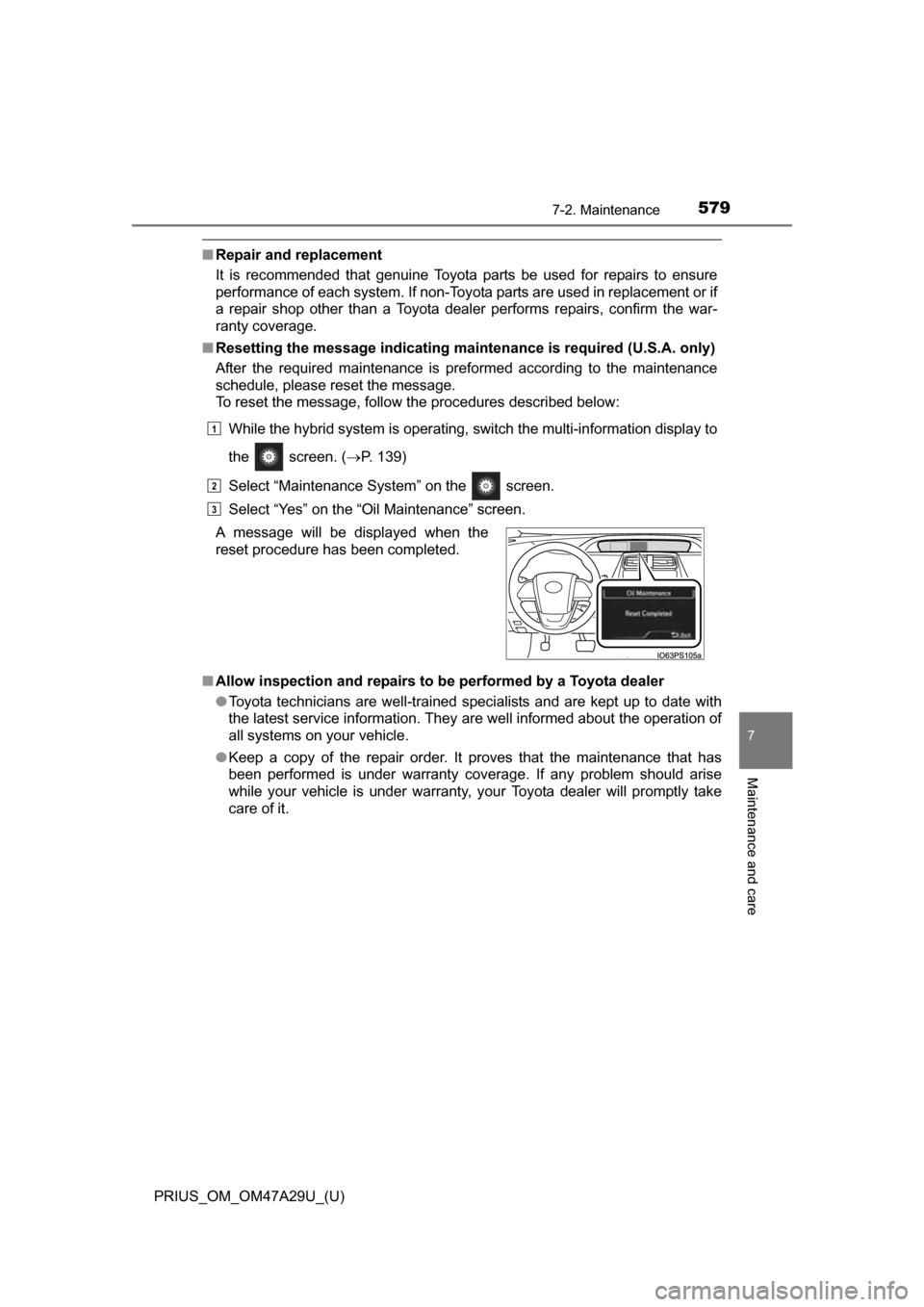
■ Resetting the message indicating maintenance is required (U.S.A. only)
After the required maintenance is preformed according to the maintenance
schedule, please reset the message.
To reset the message, follow the procedures described below:
While the hybrid system is operating, switch the multi-information display to
the screen. ( P. 139)
Select “Maintenance System” on the screen.
Select “Yes” on the “Oil Maintenance” screen.
■ Allow inspection and repairs to be performed by a Toyota dealer
●Toyota technicians are well-trained specialists and are kept up to date with
the latest service information. They are well informed about the operation of
all systems on your vehicle.
● Keep a copy of the repair order. It proves that the maintenance that has
been performed is under warranty cove rage. If any problem should arise
while your vehicle is under warranty, your Toyota dealer will promptly take
care of it.
A message will be displayed when the
reset procedure has been completed.
1
2
3
Page 612 of 800
612
PRIUS_OM_OM47A29U_(U)
7-3. Do-it-yourself maintenance
■When initialization of the tire pressure warning system has failed
Initialization can be completed in a few minutes. However, in the following
cases, the settings have not been recorded and the system will not oper-
ate properly. If repeated attempts to record tire inflation pressure settings
are unsuccessful, have the vehicle inspected by your Toyota dealer.
●When operating the tire pressure wa rning reset switch, the tire pressure
warning light does not flash 3 times and the setting message does not
appear on the multi-information display.
●After driving for a certain period of time since the initialization has been
completed, the warning light comes on after blinking for 1 minutes.
■Certification for the tire pressure warning system
For vehicles sold in the U.S.A.
FCC ID: PAXPMVC010
NOTE
This device complies with part 15 of the FCC Rules. Operation is subject
to the following two conditions: (1) This device may not cause harmful
interference, and (2) this device must accept any interference received,
including interference that may cause undesired operation.
FCC WARNING
Changes or modifications not expressly approved by the party responsi-
ble for compliance could void the user ’s authority to operate the equip-
ment.
For vehicles sold in Canada
NOTE
Operation is subject to the following two conditions: (1) this device may
not cause interference, and (2) this device must accept any interference,
including interference that may cause undesired operation of the device.
Page 708 of 800
708
PRIUS_OM_OM47A29U_(U)
8-2. Steps to take in an emergency
If the electronic key does not operate
properly
Use the mechanical key (P. 161) in order to perform the following
operations:
Locks all the doors
Closes the windows and moon
roof
*1 (turn and hold)*2
Unlocks the door
Opens the windows and moon
roof
*1 (turn and hold)*2
Turning the key rearward unlocks
the driver’s door. Turning the key
once again within 3 seconds
unlocks the other doors.
*1: If equipped
*2: These settings must be customized at your Toyota dealer. ( P. 752)
If communication between the electronic key and vehicle is
interrupted ( P. 178) or the electronic key cannot be used
because the battery is depleted, the smart key system and
wireless remote control cannot be used. In such cases, the
doors can be opened and the hybr id system can be started by
following the procedure below.
Locking and unlocking the doors
1
2
3
4
Page 710 of 800
7108-2. Steps to take in an emergency
PRIUS_OM_OM47A29U_(U)
■Stopping the hybrid system
Set the parking brake, shift the shift position to P and press the power switch
as you normally do when stopping the hybrid system.
■ Replacing the key battery
As the above procedure is a temporary measure, it is recommended that the
electronic key battery be replaced immediately when the battery is depleted.
( P. 628)
■ Changing power switch modes
Release the brake pedal and press the power switch in step above. The
hybrid system does not start and modes will be changed each time the switch
is pressed. ( P. 227)
■ When the electronic key does not work properly
●Make sure that the smart key system has not been deactivated in the cus-
tomization setting. If it is off, turn the function on.
(Customizable features: P. 752)
● Check if battery-saving mode is set. If it is set, cancel the function.
(P. 178)
WARNING
■ When using the mechanical key an d operating the power windows or
moon roof (if equipped)
Operate the power window or moon roof after checking to make sure that
there is no possibility of any passenger having any of their body parts
caught in the window or moon roof.
Also, do not allow children to operate the mechanical key. It is possible for
children and other passengers to get caught in the power window or moon
roof.
3
Page 752 of 800
752
PRIUS_OM_OM47A29U_(U)
9-2. Customization
Customizable features
When customizing vehicle features, ensure that the vehicle is parked
in a safe place with the parking brake set and the shift position in P.
■Changing using the multi-information display
Press or of the meter control switches, select .
Press or of the meter control switches, select “
(Vehicle Settings)”, and then press .
Press or of the meter control switches, select the item,
and then press .
Press or of the meter control switches, select the desired
setting, and then press .
To go back to the previous screen or exit the customize mode,
press .
■Changing using the Entune Audio (if equipped)
Press the “SETUP” button on the Entune Audio.
Select “Vehicle” on the “Setup” screen and select “Vehicle Cus-
tomization”.
Various settings can be changed. Refer to the list of settings that
can be changed for details.
Your vehicle includes a variety of electronic features that can be
personalized to suit your prefer ences. The settings of these fea-
tures can be changed using th e multi-information display,
Entune Audio or Entune Premiu m Audio with Navigation, or at
your Toyota dealer.
Some function settings are change d simultaneously with other func-
tions being customized. Contact your Toyota dealer for further
details.
Customizing vehicle features
1
2
3
4
1
2
Page 753 of 800

PRIUS_OM_OM47A29U_(U)
7539-2. Customization
9
Vehicle specifications
■Changing using the Entune Premium Audio with Navigation (if
equipped)
Press the “APPS” button on th e Entune Premium Audio with
Navigation.
Select “Setup” on the “Apps” screen.
Select “Vehicle” on the “Setup” screen and select “Vehicle Cus-
tomization”.
Various settings can be changed. Refer to the list of settings that
can be changed for details.
Settings that can be changed using the multi-information display
Settings that can be changed using the Entune Audio or Entune
Premium Audio with Navigation
Settings that can be changed by your Toyota dealer
Definition of symbols: O = Av ailable, – = Not available
■Hybrid system (P. 7 8 )
■Instrument cluster ( P. 92)
Customizable features
1
2
3
1
2
3
FunctionDefault
settingCustomized setting
Vehicle Proximity Notification
System (volume of sound)Level 1Level 2––OLevel 3
123
FunctionDefault settingCustomized setting
Sensor sensitivity for darken-
ing the brightness of the
instrument cluster depending
on the outside brightness
Standard-2 to 2––O
Sensor sensitivity for returning
the brightness of the instru-
ment cluster to the original
level depending on the outside
brightness
Standard-2 to 2––O
123
Page 754 of 800
754
PRIUS_OM_OM47A29U_(U)
9-2. Customization
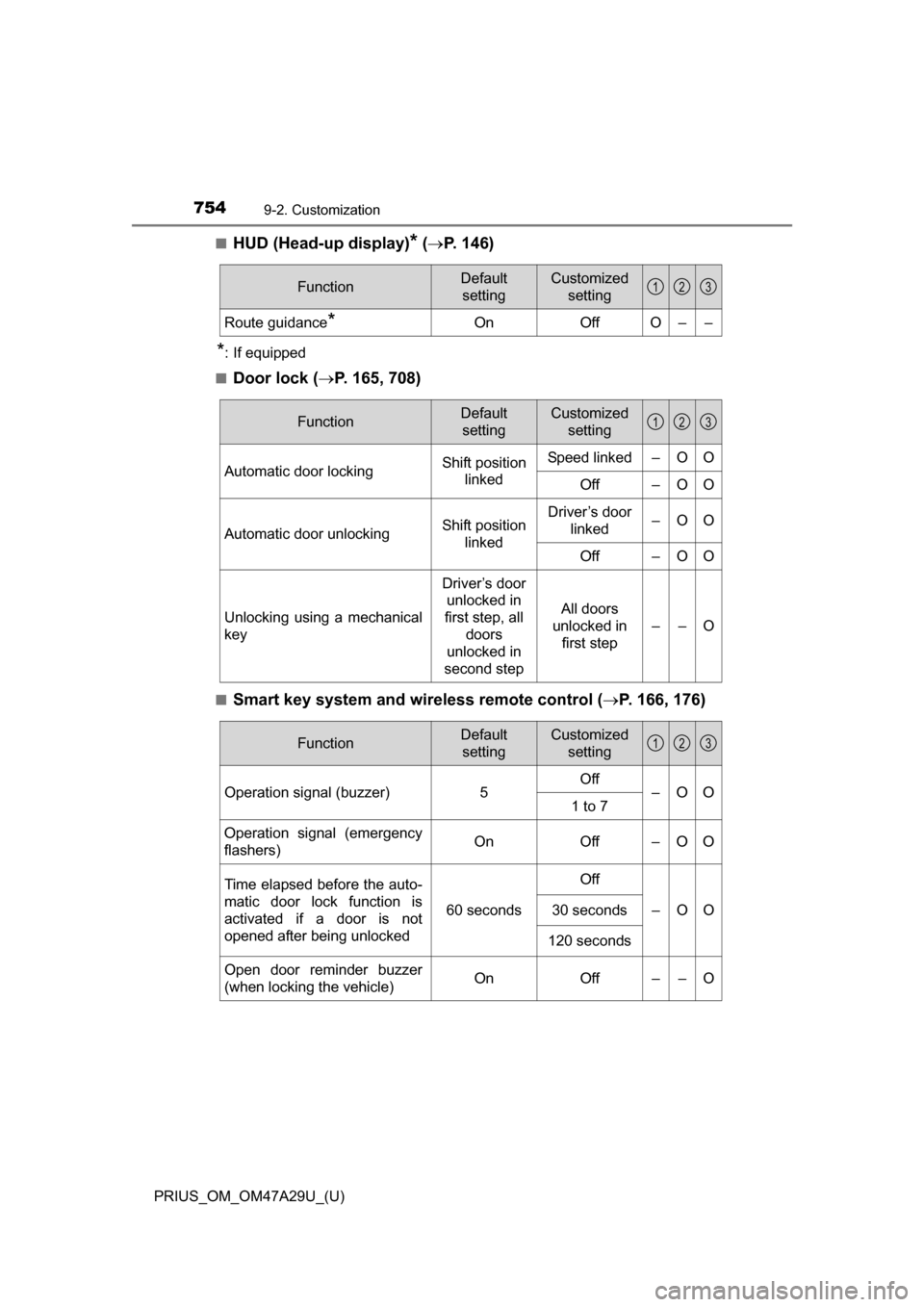
■HUD (Head-up display)* ( P. 146)
*: If equipped
■
Door lock ( P. 165, 708)
■Smart key system and wireless remote control ( P. 166, 176)
FunctionDefault
settingCustomized setting
Route guidance*OnOffO––
123
FunctionDefault settingCustomized setting
Automatic door lockingShift position linkedSpeed linked–OO
Off–OO
Automatic door unlockingShift position linkedDriver’s door linked–OO
Off–OO
Unlocking using a mechanical
key
Driver’s door unlocked in
first step, all
doors
unlocked in
second step
All doors
unlocked in first step
––O
123
FunctionDefault settingCustomized setting
Operation signal (buzzer) 5Off
–OO
1 to 7
Operation signal (emergency
flashers) On
Off – O O
Time elapsed before the auto-
matic door lock function is
activated if a door is not
opened after being unlocked
60 seconds
Off
–OO30 seconds
120 seconds
Open door reminder buzzer
(when locking the vehicle)OnOff––O
123