2016 SUBARU OUTBACK Acc switch
[x] Cancel search: Acc switchPage 317 of 572

When registering/connecting a cell phone
Symptom Likely cause SolutionPage
Cell
phoneThis
system
A cell phone cannot be registered.An incorrect passcode was entered
on the cell phone.Enter the correct passcode on the cell phone. *—
The registration operation has not
been completed on the cell phone
side.Complete the registration operation on the cell
phone (approve registration on the phone).*—
Old registration information remains
on either this system or the cell
phone.Delete the existing registration information from
both this system and the cell phone, then register
the cell phone you wish to connect to this system.*5-69
A Bluetooth connection cannot be
made.Another Bluetooth device is already
connected.Manually connect the cell phone you wish to use to
this system.—5-69
Bluetooth function is not enabled on
the cell phone.Enable the Bluetooth function on the cell phone. *—
Automatic Bluetooth connection on
this system is set to off.Set automatic Bluetooth connection on this system
to on when the ignition switch is turned to the“ACC”
or“ON”position.—5-69
*: For details, refer to the owner’s manual that came with the cell phone.Audio/What to do if...
–CONTINUED–
5-89
Page 326 of 572
Interior equipment/Sun visors
&OFF delay timer
The following lights have an automatic
illumination function.
.dome light
.map light
.cargo area light (Outback)
After being illuminated automatically,
these lights remain on for several seconds
and then gradually turn off under the
following conditions.
.after the ignition switch is turned to the
“LOCK”/“OFF”position
.after any doors or the rear gate
(Outback) is closed (dome light)
.after all doors are closed (map light)
.after the rear gate is closed (cargo area
light)
.after the doors are unlocked using the
keyless access function (if equipped)
(dome light and map light)
.after the doors are unlocked using the
remote keyless entry system (dome light
and map light)
.when approaching with the access key
(if equipped) (dome light and map light)
While the lights are illuminated, if any of
the following operations is performed, the
lights turn off immediately.
.The ignition switch is turned from the“LOCK”/“OFF”position to the“ACC”or
“ON”position.
.All doors and the rear gate (Outback)
are locked using the keyless access
function (if equipped).
.All doors and the rear gate (Outback)
are locked using the remote keyless entry
system.
The setting for the period of time in which
the lights remain on (OFF delay timer) can
be changed by a SUBARU dealer. Con-
tact your SUBARU dealer for details. Also,
the setting can be changed by operating
the multi information display. For details,
refer to“Interior Light”F3-42.
Sun visors
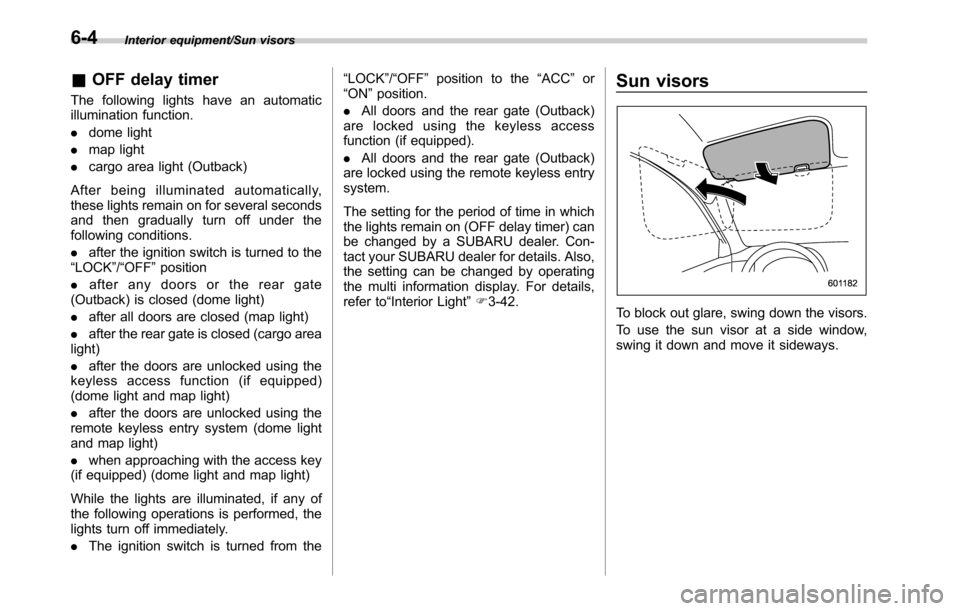
To block out glare, swing down the visors.
To use the sun visor at a side window,
swing it down and move it sideways.
6-4
Page 330 of 572
Interior equipment/Cup holder
Cup holder
CAUTION
Take care to avoid spills. Beverages,
if hot, might burn you and/or your
passengers. Spilled beverages may
also damage upholstery, carpets or
audio equipment.
&Front passenger’s cup holder
CAUTION
.Do not pick up a cup from the cup
holder or put a cup in the holder
while you are driving, as this may
distract you and lead to an
accident.
.Take care not to spill a beverage
on the shift lever/select lever or
any switch(es) in the adjacent
area. If the beverage is spilled, it
may cause a malfunction of the
shift lever/select lever and/or
switch(es).!CVT models
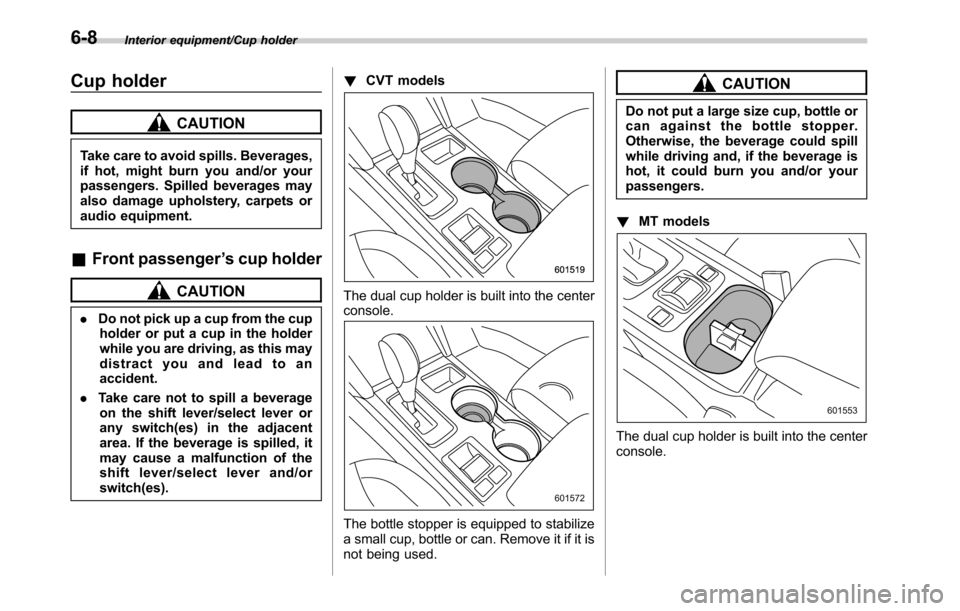
The dual cup holder is built into the center
console.
The bottle stopper is equipped to stabilize
a small cup, bottle or can. Remove it if it is
not being used.
CAUTION
Do not put a large size cup, bottle or
can against the bottle stopper.
Otherwise, the beverage could spill
while driving and, if the beverage is
hot, it could burn you and/or your
passengers.
!MT models
The dual cup holder is built into the center
console.
6-8
Page 332 of 572
Interior equipment/Accessory power outlets
trim can be used to hold beverage bottles
and other items.Accessory power outlets
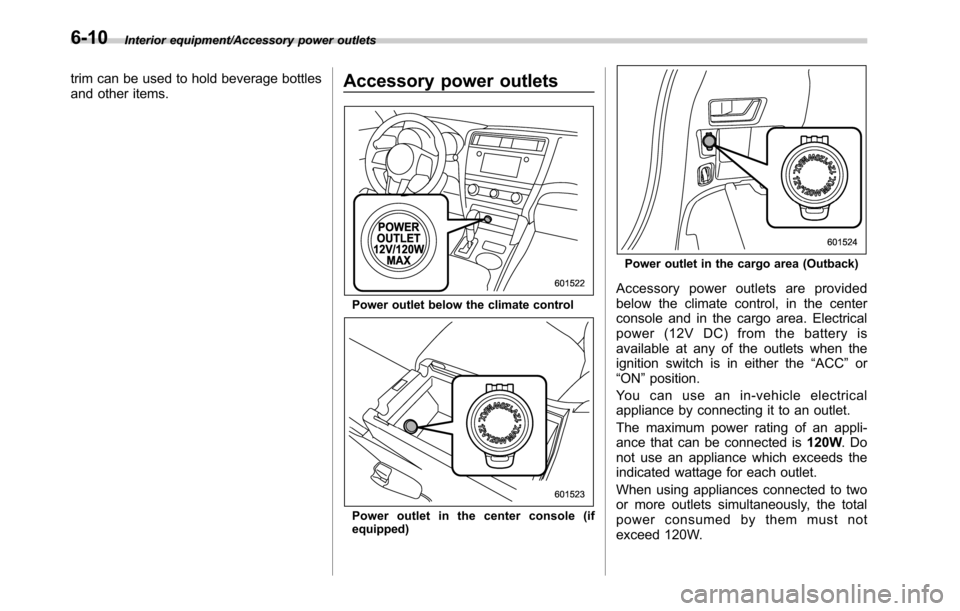
Power outlet below the climate control
Power outlet in the center console (if
equipped)
Power outlet in the cargo area (Outback)
Accessory power outlets are provided
below the climate control, in the center
console and in the cargo area. Electrical
power (12V DC) from the battery is
available at any of the outlets when the
ignition switch is in either the“ACC”or
“ON”position.
You can use an in-vehicle electrical
appliance by connecting it to an outlet.
The maximum power rating of an appli-
ance that can be connected is120W.Do
not use an appliance which exceeds the
indicated wattage for each outlet.
When using appliances connected to two
or more outlets simultaneously, the total
power consumed by them must not
exceed 120W.
6-10
Page 343 of 572
Rear view camera
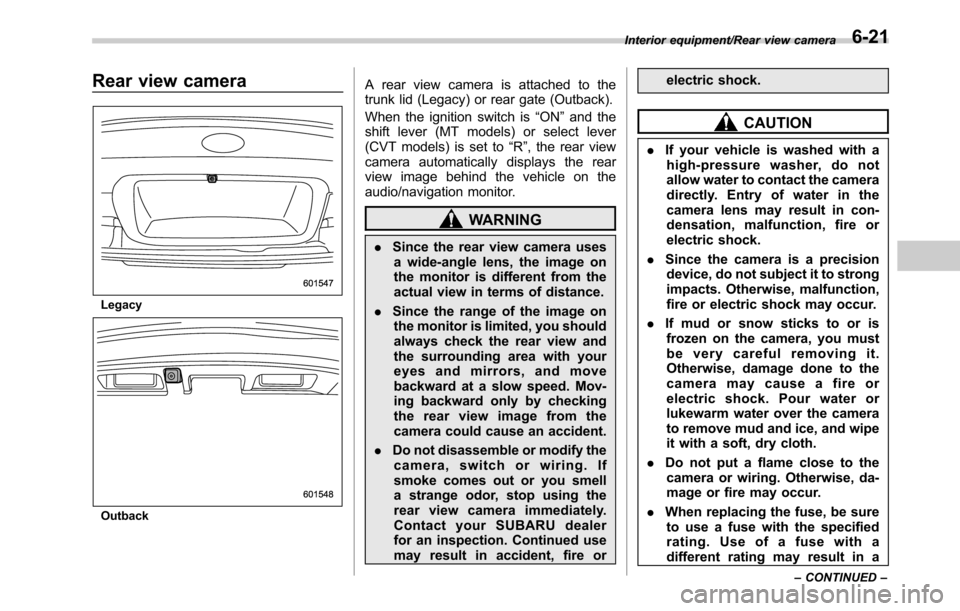
Legacy
Outback
A rear view camera is attached to the
trunk lid (Legacy) or rear gate (Outback).
When the ignition switch is“ON”and the
shift lever (MT models) or select lever
(CVT models) is set to“R”, the rear view
camera automatically displays the rear
view image behind the vehicle on the
audio/navigation monitor.
WARNING
.Since the rear view camera uses
a wide-angle lens, the image on
the monitor is different from the
actual view in terms of distance.
.Since the range of the image on
the monitor is limited, you should
always check the rear view and
the surrounding area with your
eyes and mirrors, and move
backward at a slow speed. Mov-
ing backward only by checking
the rear view image from the
camera could cause an accident.
.Do not disassemble or modify the
camera, switch or wiring. If
smoke comes out or you smell
a strange odor, stop using the
rear view camera immediately.
Contact your SUBARU dealer
for an inspection. Continued use
may result in accident, fire orelectric shock.
CAUTION
.If your vehicle is washed with a
high-pressure washer, do not
allow water to contact the camera
directly. Entry of water in the
camera lens may result in con-
densation, malfunction, fire or
electric shock.
.Since the camera is a precision
device, do not subject it to strong
impacts. Otherwise, malfunction,
fire or electric shock may occur.
.If mud or snow sticks to or is
frozen on the camera, you must
be very careful removing it.
Otherwise, damage done to the
camera may cause a fire or
electric shock. Pour water or
lukewarm water over the camera
to remove mud and ice, and wipe
it with a soft, dry cloth.
.Do not put a flame close to the
camera or wiring. Otherwise, da-
mage or fire may occur.
.When replacing the fuse, be sure
to use a fuse with the specified
rating. Use of a fuse with a
different rating may result in a
Interior equipment/Rear view camera
–CONTINUED–6-21
Page 349 of 572

Fuel...................................................................... 7-3
Fuel requirements............................................... 7-3
Fuel filler lid and cap........................................... 7-4
State emission testing (U.S. only)...................... 7-7
Preparing to drive............................................... 7-8
Starting and stopping the engine (models
without push-button ignition switch).............. 7-9
Starting engine.................................................... 7-9
Stopping the engine........................................... 7-11
Steering lock (models without“keyless access
with push-button start system”)........................ 7-11
Starting and stopping engine (models with
push-button start system).............................. 7-12
Safety precautions............................................. 7-12
Operating range for push-button start
system............................................................. 7-12
Starting engine................................................... 7-12
Stopping engine................................................. 7-14
When access key does not operate properly....... 7-14
Steering lock (models with“keyless access with
push-button start system”) ............................... 7-15
Remote engine start system (dealer
option).............................................................. 7-15
Models with“keyless access with push-button
start system”................................................... 7-16
Models without“keyless access with push-button
start system”................................................... 7-17
Entering the vehicle while it is running via remote
start................................................................. 7-20
Entering the vehicle following remote engine start
shutdown......................................................... 7-20Pre-heating or pre-cooling the interior of the
vehicle............................................................ 7-20
Service mode (models without“keyless access
with push-button start system”) ....................... 7-20
Remote transmitter program (models without
“keyless access with push-button start
system”).......................................................... 7-20
System maintenance.......................................... 7-21
Manual transmission......................................... 7-23Selecting reverse gear....................................... 7-23
Shifting speeds.................................................. 7-23
Driving tips........................................................ 7-24
Continuously variable transmission................. 7-25Select lever....................................................... 7-26
Shift lock function............................................. 7-27
Selection of manual mode.................................. 7-29
Driving tips........................................................ 7-30
Power steering................................................... 7-31
Braking............................................................... 7-32
Braking tips....................................................... 7-32
Brake system.................................................... 7-32
Disc brake pad wear warning indicators............. 7-33
ABS (Anti-lock Brake System).......................... 7-33
ABS self-check.................................................. 7-33
ABS warning light.............................................. 7-33
Electronic Brake Force Distribution (EBD)
system............................................................. 7-34
Steps to take if EBD system malfunctions.......... 7-34
Vehicle Dynamics Control system.................... 7-35Vehicle Dynamics Control system monitor.......... 7-36
Vehicle Dynamics Control OFF switch................ 7-37
Starting and operating
7
Page 357 of 572
CAUTION
Trapping small animals in the cool-
ing fan and belts of the engine may
result in a malfunction. Check that
no small animal enters the engine
compartment and under the vehicle
before starting the engine.
NOTE
Engine oil, engine coolant, brake fluid,
washer fluid and other fluid levels
should be checked daily, weekly or at
fuel stops.
Starting and stopping the
engine (models without
push-button ignition switch)
&Starting engine
CAUTION
Do not operate the starter motor
continuously for more than 10 sec-
onds. If the engine fails to start after
operating the starter for 5 to 10
seconds, wait for 10 seconds or
more before trying again.
NOTE
It may be difficult to start the engine
when the battery has been discon-
nected and reconnected (for mainte-
nance or other purposes). This diffi-
culty is caused by the electronically
controlled throttle’s self-diagnosis
function. To overcome it, keep the
ignition switch in the“ON”position
for approximately 10 seconds before
starting the engine.!General precautions when starting
engine
WARNING
.Never start the engine from out-
side the vehicle (except when
using the remote engine start
system). It may result in an
accident.
.Do not leave the engine running
in locations with poor ventilation,
such as a garage and indoors.
The exhaust gas may enter the
vehicle or indoors, and it may
result in carbon monoxide poi-
soning.
.Do not start the engine near dry
foliage, paper, or other flam-
mable substances. The exhaust
pipe and exhaust emissions can
create a fire hazard at high
temperatures.
CAUTION
.If the engine is stopped during
driving, the catalyst may over-
heat and burn.
.When starting the engine, be sure
to sit in the driver’s seat (except
Starting and operating/Starting and stopping the engine (models without push–button ignition switch)
–CONTINUED–7-9
Page 358 of 572

Starting and operating/Starting and stopping the engine (models without push–button ignition switch)
when using the remote engine
start system).
NOTE
.Avoid rapid racing and rapid accel-
eration immediately after the engine
has started.
.For a short time after the engine has
started, the engine speed is kept high.
When the warm-up is completed, the
engine speed lowers automatically.
.On rare occasions, it may be difficult
to start the engine depending on the
fuel and the usage condition (repeated
driving of a distance in which the
engine has not warmed up sufficiently).
In such a case, it is recommended that
you change to a different brand of fuel.
.On rare occasions, transient knock-
ing may be heard from the engine when
the accelerator is operated rapidly
such as a rapid start-up and a rapid
acceleration. This is not a malfunction.
.The engine starts more easily when
the headlights, air conditioner and rear
window defogger are turned off.
.After the engine starts, the engine
speed will be kept high until the engine
has warmed up sufficiently.!MT models
1. Apply the parking brake.
2. Turn off unnecessary lights and ac-
cessories.
3. Depress the clutch pedal to the floor
and shift the shift lever into neutral. Hold
the clutch pedal to the floor while starting
the engine. The starter motor will only
operate when the clutch pedal is de-
pressed fully to the floor.
4. Turn the ignition switch to the“ON”
position and check the operation of the
warning and indicator lights. Refer to
“Warning and indicator lights”F3-12.
5. Turn the ignition switch to the“START”
positionwithoutdepressing the accelera-
tor pedal. Release the key immediately
after the engine has started.
If the engine does not start, perform the
following procedure.
(1) Turn the ignition switch to the
“LOCK”position and wait for at least
10 seconds. After checking that the
parking brake is applied, turn the
ignition switch to the“START”position
while depressing the accelerator pedal
slightly (approximately a quarter of the
full stroke). Release the accelerator
pedal as soon as the engine starts.
(2) If this fails to start the engine, turn
the ignition switch back to the“LOCK”position and wait for at least 10
seconds. Then fully depress the accel-
erator pedal and turn the ignition
switch to the“START”position. If the
engine starts, quickly release the
accelerator pedal.
(3) If this does not start the engine,
turn the ignition switch again to the
“LOCK”position. After waiting for 10
seconds or longer, turn the ignition
switch to the“START”position without
depressing the accelerator pedal.
(4) If the engine still refuses to start,
contact your nearest SUBARU dealer
for assistance.
6. Confirm that all warning and indicator
lights have turned off after the engine has
started. The fuel injection system auto-
matically lowers the idle speed as the
engine warms up.
!CVT models
CAUTION
If you restart the engine while the
vehicle is moving, shift the select
lever into the“N”position. Do not
attempt to place the select lever of a
moving vehicle into the“P”posi-
tion.
7-10