2016 SUBARU OUTBACK Acc switch
[x] Cancel search: Acc switchPage 396 of 572
Starting and operating/Hill start assist system (MT models)
Hill start assist system (MT
models)
WARNING
.The Hill start assist system is a
device only for helping the driver
to START the vehicle on an uphill
grade. To prevent accidents
when the vehicle is parked on a
slope, be sure to firmly set the
parking brake. When setting the
parking brake, make sure that the
vehicle remains stationary when
the clutch pedal and brake pedal
are released.
.Do not turn the ignition switch to
the“LOCK”/“OFF”position while
the Hill start assist system is
operating. The Hill start assist
system will be deactivated, caus-
ing an accident.
The Hill start assist system is a device to
make the following vehicle operations
easier.
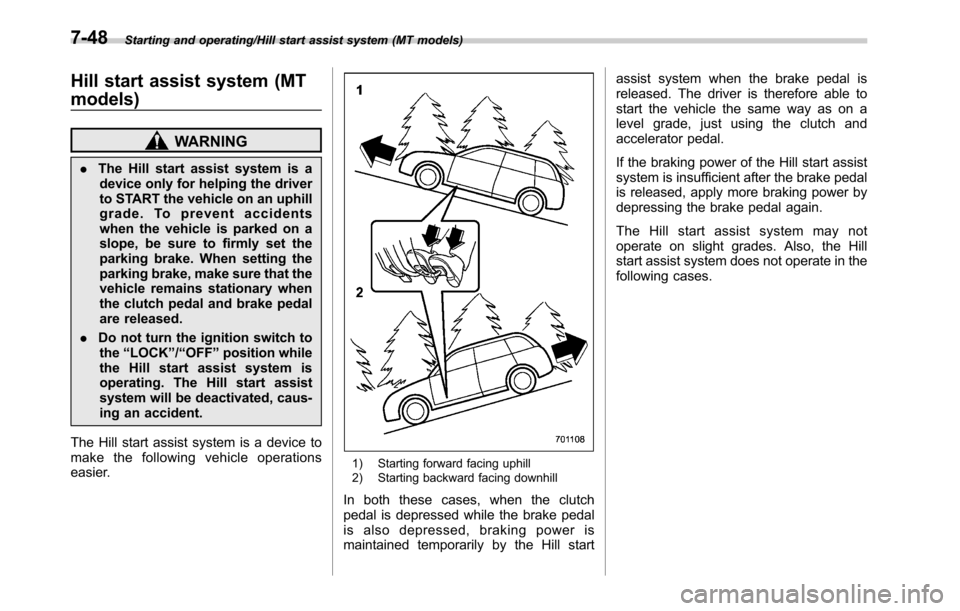
1) Starting forward facing uphill
2) Starting backward facing downhill
In both these cases, when the clutch
pedal is depressed while the brake pedal
is also depressed, braking power is
maintained temporarily by the Hill startassist system when the brake pedal is
released. The driver is therefore able to
start the vehicle the same way as on a
level grade, just using the clutch and
accelerator pedal.
If the braking power of the Hill start assist
system is insufficient after the brake pedal
is released, apply more braking power by
depressing the brake pedal again.
The Hill start assist system may not
operate on slight grades. Also, the Hill
start assist system does not operate in the
following cases.
7-48
Page 397 of 572
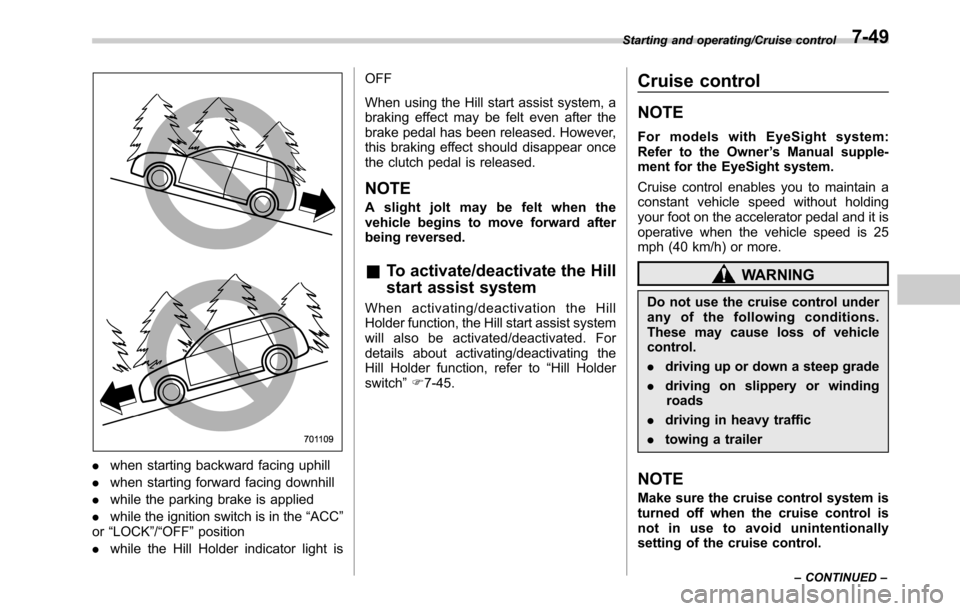
.when starting backward facing uphill
.when starting forward facing downhill
.while the parking brake is applied
.while the ignition switch is in the“ACC”
or“LOCK”/“OFF”position
.while the Hill Holder indicator light isOFF
When using the Hill start assist system, a
braking effect may be felt even after the
brake pedal has been released. However,
this braking effect should disappear once
the clutch pedal is released.
NOTE
A slight jolt may be felt when the
vehicle begins to move forward after
being reversed.
&To activate/deactivate the Hill
start assist system
When activating/deactivation the Hill
Holder function, the Hill start assist system
will also be activated/deactivated. For
details about activating/deactivating the
Hill Holder function, refer to“Hill Holder
switch”F7-45.
Cruise control
NOTE
For models with EyeSight system:
Refer to the Owner’s Manual supple-
ment for the EyeSight system.
Cruise control enables you to maintain a
constant vehicle speed without holding
your foot on the accelerator pedal and it is
operative when the vehicle speed is 25
mph (40 km/h) or more.
WARNING
Do not use the cruise control under
any of the following conditions.
These may cause loss of vehicle
control.
.driving up or down a steep grade
.driving on slippery or winding
roads
.driving in heavy traffic
.towing a trailer
NOTE
Make sure the cruise control system is
turned off when the cruise control is
not in use to avoid unintentionally
setting of the cruise control.
Starting and operating/Cruise control
–CONTINUED–7-49
Page 398 of 572
Starting and operating/Cruise control
&To set cruise control
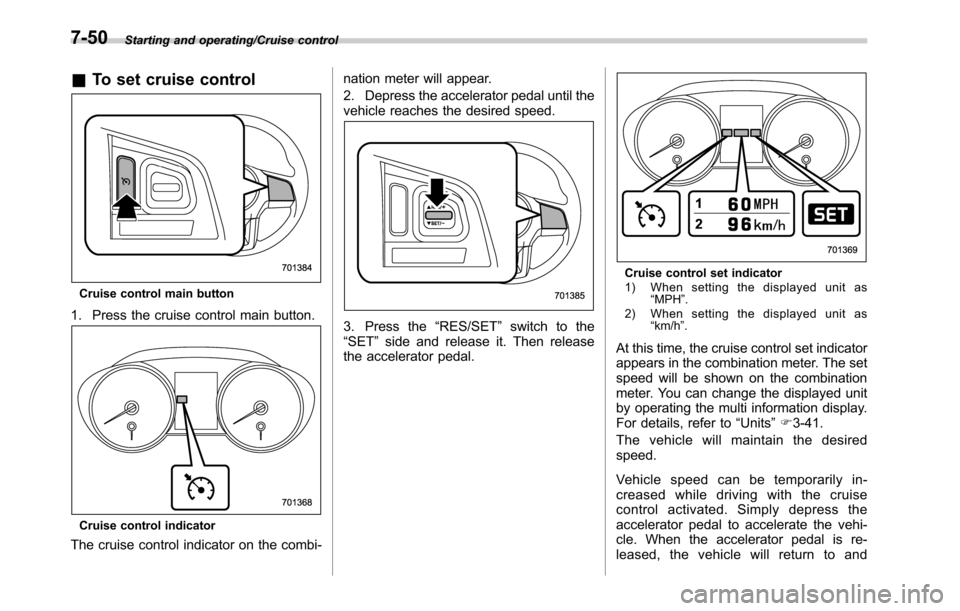
Cruise control main button
1. Press the cruise control main button.
Cruise control indicator
The cruise control indicator on the combi-nation meter will appear.
2. Depress the accelerator pedal until the
vehicle reaches the desired speed.
3. Press the“RES/SET”switch to the
“SET”side and release it. Then release
the accelerator pedal.
Cruise control set indicator
1) When setting the displayed unit as
“MPH”.
2) When setting the displayed unit as
“km/h”.
At this time, the cruise control set indicator
appears in the combination meter. The set
speed will be shown on the combination
meter. You can change the displayed unit
by operating the multi information display.
For details, refer to“Units”F3-41.
The vehicle will maintain the desired
speed.
Vehicle speed can be temporarily in-
creased while driving with the cruise
control activated. Simply depress the
accelerator pedal to accelerate the vehi-
cle. When the accelerator pedal is re-
leased, the vehicle will return to and
7-50
Page 399 of 572

maintain the previous cruising speed.
&To temporarily cancel the
cruise control
The cruise control can be temporarily
canceled in the following ways.
.Press the“CANCEL”button.
.Press the X-mode switch to activate
the X-mode (models with X-mode).
.Depress the brake pedal.
.Depress the clutch pedal (MT models).
WARNING
For CVT models, do not place the
select lever in the“N”position while
driving. If the select lever is shifted
into the“N”position, cruise control
can be canceled but the enginebrake will no longer work. This
could result in an accident.
The cruise control set indicator in the
combination meter disappears when the
cruise control is canceled.
To resume the cruise control after it has
been temporarily canceled and with vehi-
cle speed of approximately 20 mph (30
km/h) or more, press the“RES/SET”
switch to the“RES”side to return to the
original cruising speed automatically.
The cruise control set indicator in the
combination meter will automatically ap-
pear at this time.
&To turn off the cruise control
There are two ways to turn off the cruise
control:
.Press the cruise control main button
again.
.Turn the ignition switch to the“ACC”or
“LOCK”/“OFF”position (but only when the
vehicle is completely stopped).
&To change the cruising speed
!To increase the speed (by the“RES/
SET”switch)
Press the“RES/SET”switch to the“RES”
side and hold it until the vehicle reaches
the desired speed. Then, release the
switch. The vehicle speed at that moment
will be memorized and treated as the new
set speed.
Starting and operating/Cruise control
–CONTINUED–7-51
Page 400 of 572
Starting and operating/Cruise control
When setting the displayed unit as
“MPH”:
The set speed can be increased 1 mph
(1.6 km/h) each time by pressing the
“RES/SET”switch to the“RES”side.
When setting the displayed unit as
“km/h”:
The set speed can be increased 1 km/h
each time by pressing the“RES/SET”
switch to the“RES”side.
!To increase the speed (by accel-
erator pedal)
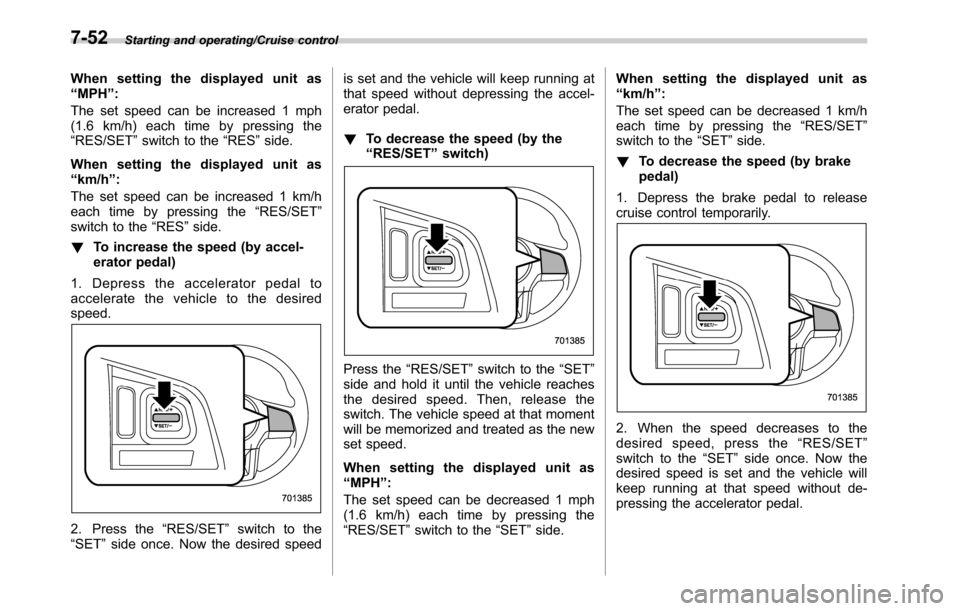
1. Depress the accelerator pedal to
accelerate the vehicle to the desired
speed.
2. Press the“RES/SET”switch to the
“SET”side once. Now the desired speedis set and the vehicle will keep running at
that speed without depressing the accel-
erator pedal.
!To decrease the speed (by the
“RES/SET”switch)
Press the“RES/SET”switch to the“SET”
side and hold it until the vehicle reaches
the desired speed. Then, release the
switch. The vehicle speed at that moment
will be memorized and treated as the new
set speed.
When setting the displayed unit as
“MPH”:
The set speed can be decreased 1 mph
(1.6 km/h) each time by pressing the
“RES/SET”switch to the“SET”side.When setting the displayed unit as
“km/h”:
The set speed can be decreased 1 km/h
each time by pressing the“RES/SET”
switch to the“SET”side.
!To decrease the speed (by brake
pedal)
1. Depress the brake pedal to release
cruise control temporarily.
2. When the speed decreases to the
desired speed, press the“RES/SET”
switch to the“SET”side once. Now the
desired speed is set and the vehicle will
keep running at that speed without de-
pressing the accelerator pedal.
7-52
Page 436 of 572
Driving tips/Trailer towing (Outback)
ground.
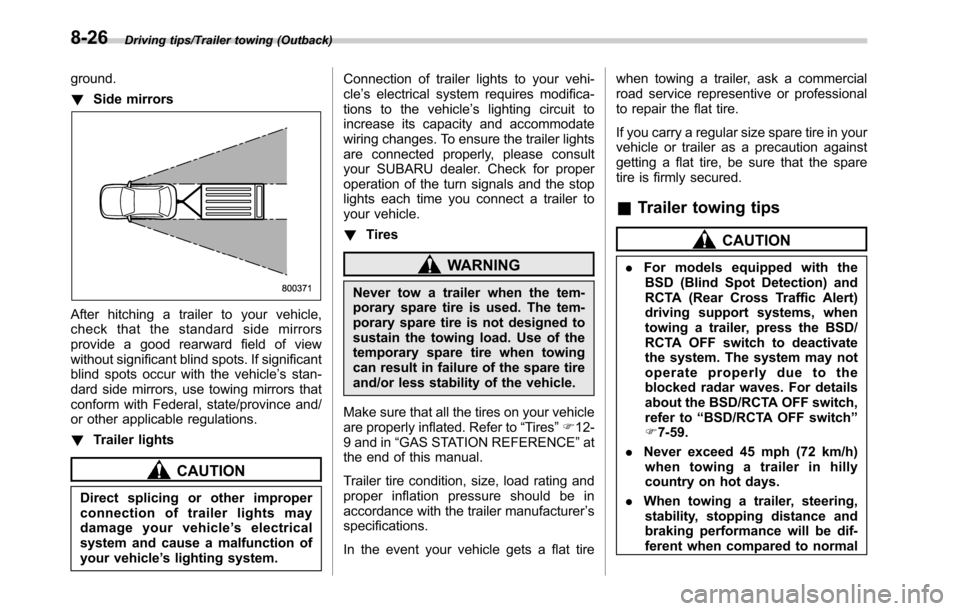
!Side mirrors
After hitching a trailer to your vehicle,
check that the standard side mirrors
provide a good rearward field of view
without significant blind spots. If significant
blind spots occur with the vehicle’s stan-
dard side mirrors, use towing mirrors that
conform with Federal, state/province and/
or other applicable regulations.
!Trailer lights
CAUTION
Direct splicing or other improper
connection of trailer lights may
damage your vehicle’s electrical
system and cause a malfunction of
your vehicle’s lighting system.Connection of trailer lights to your vehi-
cle’s electrical system requires modifica-
tions to the vehicle’s lighting circuit to
increase its capacity and accommodate
wiring changes. To ensure the trailer lights
are connected properly, please consult
your SUBARU dealer. Check for proper
operation of the turn signals and the stop
lights each time you connect a trailer to
your vehicle.
!Tires
WARNING
Never tow a trailer when the tem-
porary spare tire is used. The tem-
porary spare tire is not designed to
sustain the towing load. Use of the
temporary spare tire when towing
can result in failure of the spare tire
and/or less stability of the vehicle.
Make sure that all the tires on your vehicle
are properly inflated. Refer to“Tires”F12-
9 and in“GAS STATION REFERENCE”at
the end of this manual.
Trailer tire condition, size, load rating and
proper inflation pressure should be in
accordance with the trailer manufacturer’s
specifications.
In the event your vehicle gets a flat tirewhen towing a trailer, ask a commercial
road service representive or professional
to repair the flat tire.
If you carry a regular size spare tire in your
vehicle or trailer as a precaution against
getting a flat tire, be sure that the spare
tire is firmly secured.
&Trailer towing tips
CAUTION
.For models equipped with the
BSD (Blind Spot Detection) and
RCTA (Rear Cross Traffic Alert)
driving support systems, when
towing a trailer, press the BSD/
RCTA OFF switch to deactivate
the system. The system may not
operate properly due to the
blocked radar waves. For details
about the BSD/RCTA OFF switch,
refer to“BSD/RCTA OFF switch”
F7-59.
.Never exceed 45 mph (72 km/h)
when towing a trailer in hilly
country on hot days.
.When towing a trailer, steering,
stability, stopping distance and
braking performance will be dif-
ferent when compared to normal
8-26
Page 439 of 572

If you park your vehicle in an emergency......... 9-2
Temporary spare tire........................................... 9-2
Maintenance tools............................................... 9-3
Legacy................................................................ 9-4
Outback.............................................................. 9-5
Flat tires............................................................... 9-5Changing a flat tire.............................................. 9-5
Storing a flat tire................................................. 9-8
Tire pressure monitoring system (TPMS) (if
equipped)......................................................... 9-10
Jump starting..................................................... 9-11How to jump start............................................... 9-11
Engine overheating............................................ 9-13
If steam is coming from the engine
compartment.................................................... 9-13
If no steam is coming from the engine
compartment.................................................... 9-13
Towing................................................................. 9-13Towing hooks and tie-down hooks/holes ............. 9-14
Using a flat-bed truck......................................... 9-16Towing with all wheels on the ground................. 9-17
Electronic parking brake–if the electronic
parking brake cannot be released................. 9-17
Access key–if access key does not
operate properly............................................. 9-18
Locking and unlocking....................................... 9-18
Switching power................................................ 9-18
Starting engine.................................................. 9-19
Trunk lid (Legacy)–if the trunk lid cannot
be opened....................................................... 9-19
Rear gate (Outback)–if the rear gate
cannot be opened........................................... 9-20
Power rear gate - if power rear gate does
not operate properly....................................... 9-21
When the power rear gate is deactivated............ 9-21
When the rear gate cannot be opened................ 9-22
When the rear gate cannot be closed................. 9-22
If your vehicle is involved in an accident........ 9-22
In case of emergency
9
Page 440 of 572

In case of emergency/If you park your vehicle in an emergency
If you park your vehicle in an
emergency
The hazard warning flasher should be
used in day or night to warn other drivers
when you have to park your vehicle under
emergency conditions.
Avoid stopping on the road. It is best to
safely pull off the road if a problem occurs.
The hazard warning flasher can be acti-
vated regardless of the ignition switch
position.
Turn on the hazard warning by pressing
the hazard warning flasher switch. Turn it
off by pressing the switch again.
NOTE
When the hazard warning flasher is on,
the turn signals do not work.Temporary spare tire
WARNING
.Never tow a trailer when the
temporary spare tire is used.
The temporary spare tire is not
designed to sustain the towing
load. Use of the temporary spare
tire when towing can result in
failure of the spare tire and/or
less stability of the vehicle and
may lead to an accident.
.When a spare tire is mounted or a
wheel rim is replaced without the
original pressure sensor/trans-
mitter being transferred, the low
tire pressure warning light will
illuminate steadily after blinking
for approximately one minute.
This indicates the tire pressure
monitoring system (TPMS) is un-
able to monitor all four road
wheels. Contact your SUBARU
dealer as soon as possible for
tire and sensor replacement and/
or system resetting.
9-2