2016 NISSAN NOTE Display
[x] Cancel search: DisplayPage 2632 of 3641
PG
HARNESSPG-45
< WIRING DIAGRAM >
C
DE
F
G H
I
J
K L
B A
O P
N
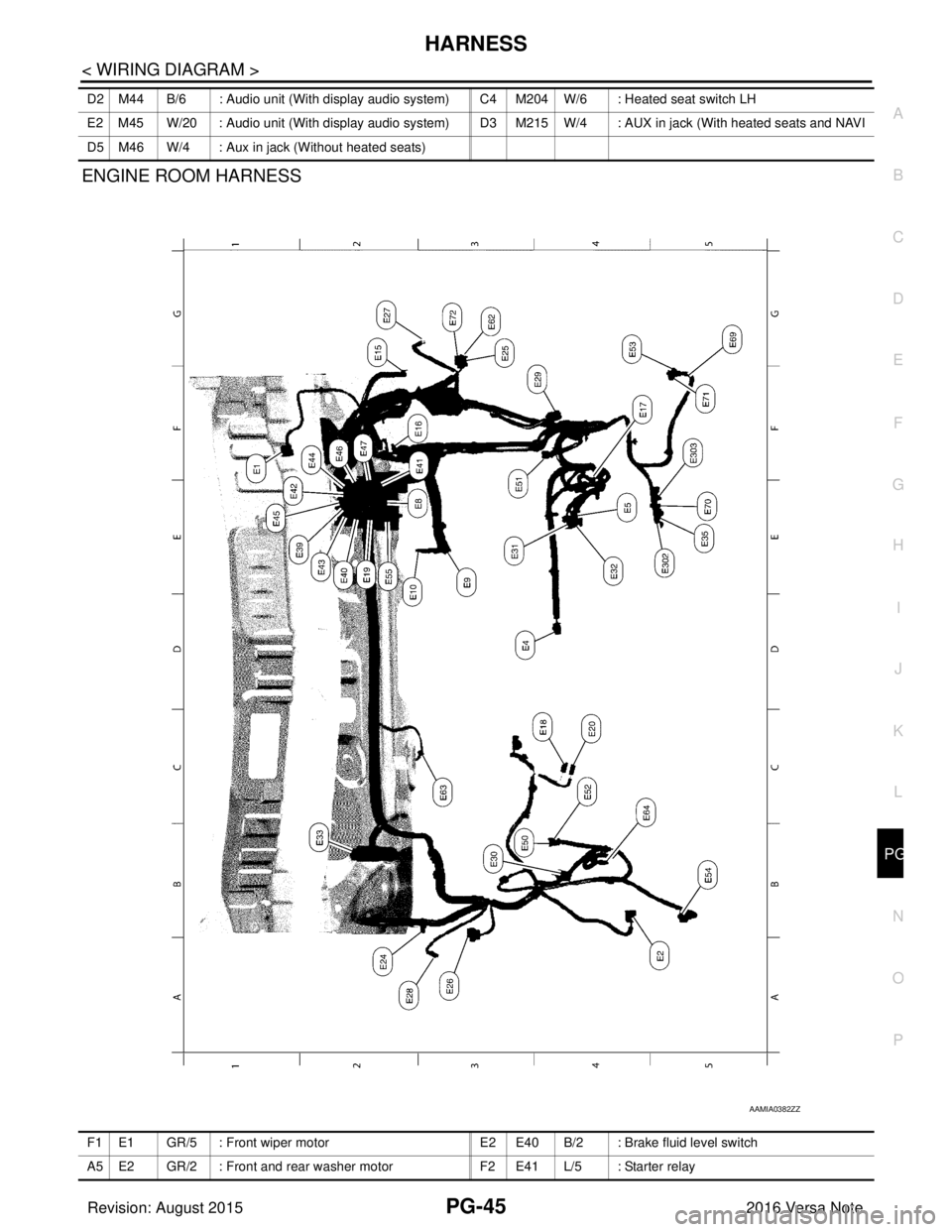
ENGINE ROOM HARNESS
D2 M44 B/6 : Audio unit (With display audio system) C4 M204
W/6 : Heated seat switch LH
E2 M45 W/20 : Audio unit (With display audio system) D3 M215 W/4 : AUX in jack (With heated seats and NAVI
D5 M46 W/4 : Aux in jack (Without heated seats)
AAMIA0382ZZ
F1 E1 GR/5 : Front wiper motor E2 E40 B/2 : Brake fluid level switch
A5 E2 GR/2 : Front and rear washer motor F2 E41 L/5 : Starter relay
Revision: August 2015 2016 Versa Note
cardiagn.com
Page 2652 of 3641
PG
FUSE INSPECTIONPG-65
< BASIC INSPECTION >
C
DE
F
G H
I
J
K L
B A
O P
N
FUSE INSPECTION
How To CheckINFOID:0000000012433130
• If fuse is blown, be sure to eliminate cause of malfunction before
installing new fuse.
• Use fuse of specified rating. Never use fuse of more than specified
rating.
• Do not partially install fuse; always insert it into fuse holder prop- erly.
• Remove fuse for “ELECTRICAL PARTS (BAT)” if vehicle is not used for a long period of time.
EXTENDED STORAGE SWITCH (IF EQUIPPED)
NOTE:
• When extended storage switch is pulled out, a message may be shown in the\
meter or display. To turn mes-sage/display off, push extended storage switch in.
• The following information is related to extended storage switch (shipping mode). For information related to BCM transit mode, refer to BCS-15, "
TRANSIT MODE CONTROL SYSTEM : System Description".
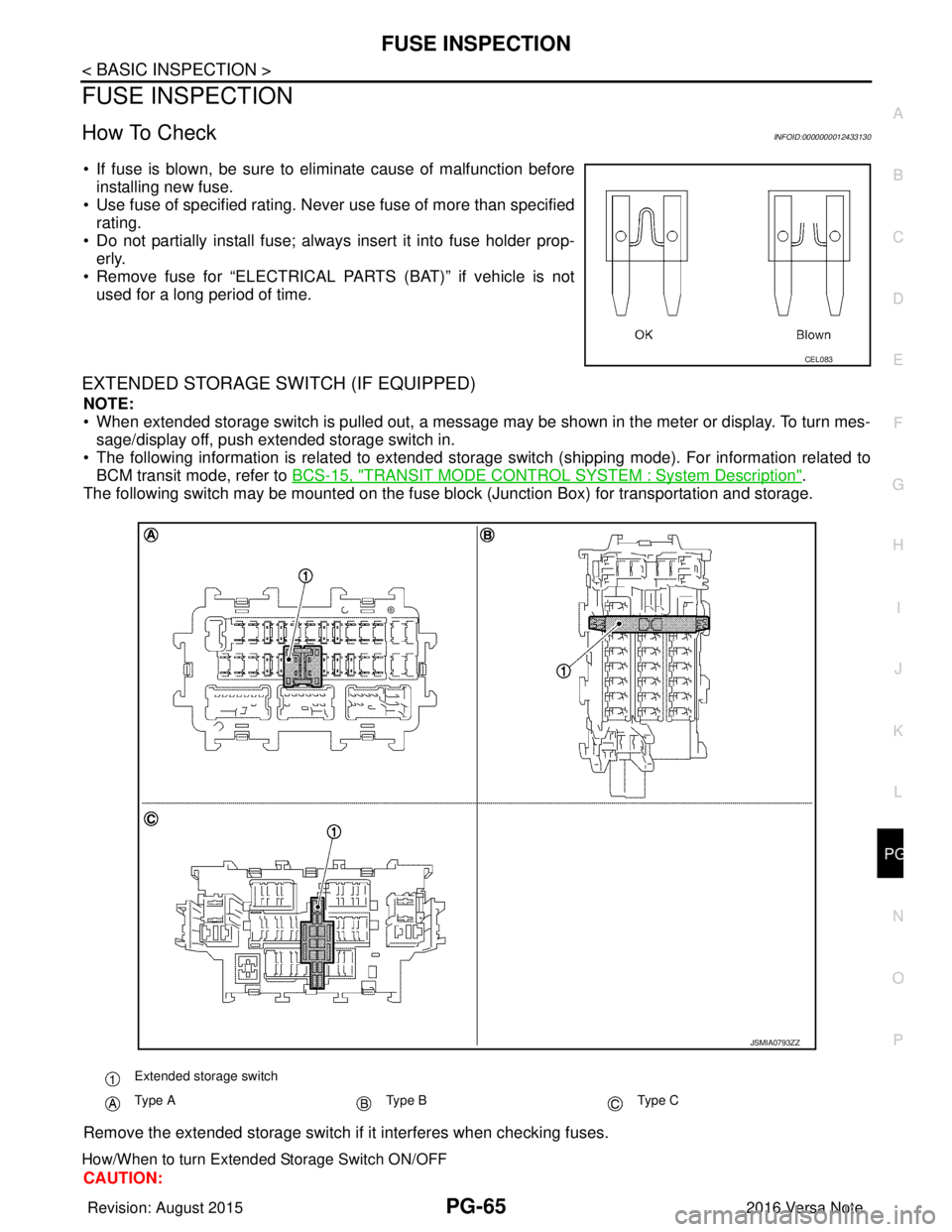
The following switch may be mounted on the fuse block (Junction Box) for transportation and storage.
Remove the extended storage switch if it interferes when checking fuses.
How/When to turn Extended Storage Switch ON/OFF
CAUTION:
CEL083
Extended storage switch
Type AType BType C
JSMIA0793ZZ
Revision: August 2015 2016 Versa Note
cardiagn.com
Page 2654 of 3641
PG
FUSE INSPECTIONPG-67
< BASIC INSPECTION >
C
DE
F
G H
I
J
K L
B A
O P
N
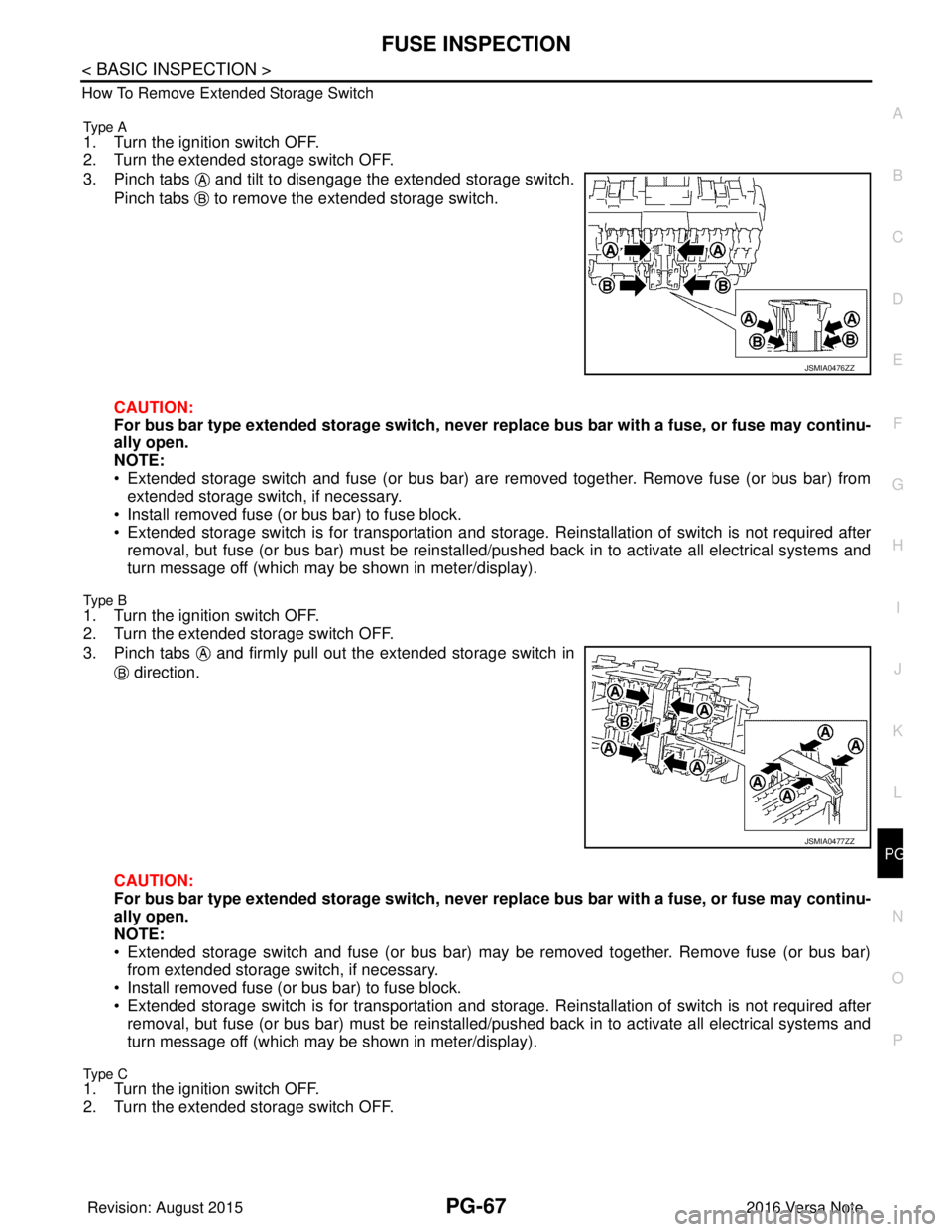
How To Remove Extended Storage Switch
Type A
1. Turn the ignition switch OFF.
2. Turn the extended storage switch OFF.
3. Pinch tabs and tilt to disengage the extended storage switch.
Pinch tabs to remove the extended storage switch.
CAUTION:
For bus bar type extended storage switch, never replace bus bar with a fuse, or fuse may continu-
ally open.
NOTE:
• Extended storage switch and fuse (or bus bar) are removed together. Remove fuse (or bus bar) from extended storage switch, if necessary.
• Install removed fuse (or bus bar) to fuse block.
• Extended storage switch is for transportation and storage. Reinstallation of switch is not required after
removal, but fuse (or bus bar) must be reinstalled/ pushed back in to activate all electrical systems and
turn message off (which may be shown in meter/display).
Type B
1. Turn the ignition switch OFF.
2. Turn the extended storage switch OFF.
3. Pinch tabs and firmly pull out the extended storage switch in
direction.
CAUTION:
For bus bar type extended storage switch, never replace bus bar with a fuse, or fuse may continu-
ally open.
NOTE:
• Extended storage switch and fuse (or bus bar) may be removed together. Remove fuse (or bus bar) from extended storage switch, if necessary.
• Install removed fuse (or bus bar) to fuse block.
• Extended storage switch is for transportation and storage. Reinstallation of switch is not required after
removal, but fuse (or bus bar) must be reinstalled/ pushed back in to activate all electrical systems and
turn message off (which may be shown in meter/display).
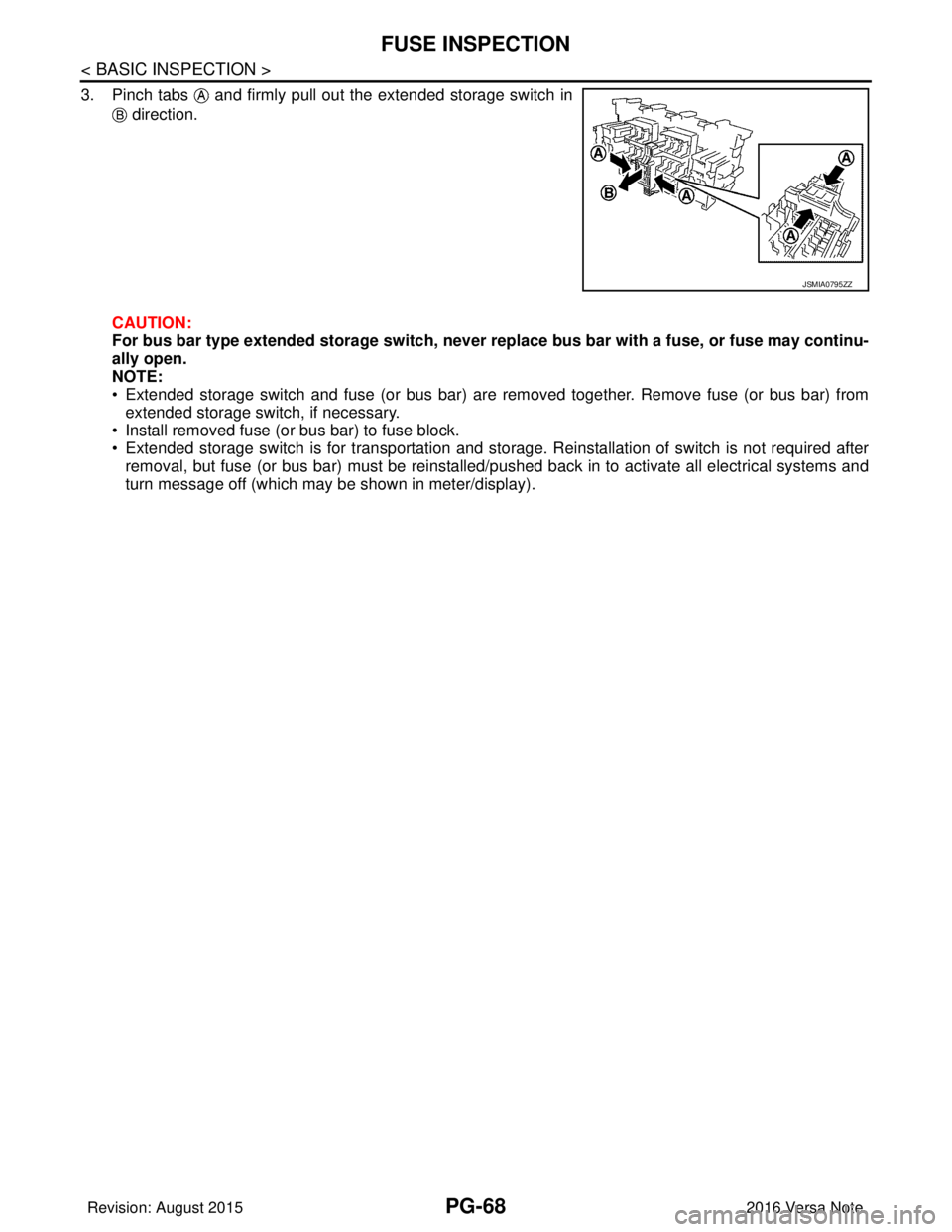
Type C1. Turn the ignition switch OFF.
2. Turn the extended storage switch OFF.
JSMIA0476ZZ
JSMIA0477ZZ
Revision: August 2015 2016 Versa Note
cardiagn.com
Page 2655 of 3641
PG-68
< BASIC INSPECTION >
FUSE INSPECTION
3. Pinch tabs and firmly pull out the extended storage switch in direction.
CAUTION:
For bus bar type extended storage switch, never replace bus bar with a fuse, or fuse may continu-
ally open.
NOTE:
• Extended storage switch and fuse (or bus bar) are removed together. Remove fuse (or bus bar) from extended storage switch, if necessary.
• Install removed fuse (or bus bar) to fuse block.
• Extended storage switch is for transportation and storage. Reinstallation of switch is not required after removal, but fuse (or bus bar) must be reinstalled/pushed back in to activate all electrical systems and
turn message off (which may be shown in meter/display).
JSMIA0795ZZ
Revision: August 2015 2016 Versa Note
cardiagn.com
Page 2670 of 3641

DIAGNOSIS SYSTEM (BCM) (WITH INTELLIGENT KEY SYSTEM)
PWC-9
< SYSTEM DESCRIPTION >
C
D E
F
G H
I
J
L
M A
B
PWC
N
O P
DIAGNOSIS SYSTEM (BCM) (WIT H INTELLIGENT KEY SYSTEM)
COMMON ITEM
COMMON ITEM : CONSULT Function (BCM - COMMON ITEM)INFOID:0000000012542484
APPLICATION ITEM
CONSULT performs the following functions via CAN communication with BCM.
SYSTEM APPLICATION
BCM can perform the following functions.
Direct Diagnostic Mode Description
ECU Identification The BCM part number is displayed.
Self Diagnostic Result The BCM self diagnostic results are displayed.
Data Monitor The BCM input/output data is displayed in real time.
Active Test The BCM activates outputs to test components.
Work support The settings for BCM functions can be changed.
Configuration • The vehicle specification can be read and saved.
• The vehicle specification can be written when replacing BCM.
CAN DIAG SUPPORT MNTR The result of transmit/receive diagnosis of CAN communication is displayed.
System Sub System Direct Diagnostic Mode
ECU Identification
Self Diagnostic Result
Data Monitor
Active Test
Work support
Configuration
CAN DIAG SUPPORT MNTR
Door lock
DOOR LOCK ×××
Rear window defogger REAR DEFOGGER ××
Warning chime BUZZER ××
Interior room lamp timer INT LAMP ×××
Exterior lamp HEAD LAMP ×××
Wiper and washer WIPER ×××
Turn signal and hazard warning lamps FLASHER ×××
Air conditioner AIR CONDITIONER ×
Intelligent Key system INTELLIGENT KEY ××××
Combination switch COMB SW ×
BCM BCM× × ×××
Immobilizer IMMU ××××
Interior room lamp battery saver BATTERY SAVER ×××
Vehicle security system THEFT ALM ××
RAP system RETAINED PWR ×
Signal buffer system SIGNAL BUFFER ×
TPMS AIR PRESSURE MONITOR ××××
Panic alarm system PANIC ALARM ×
Revision: August 2015 2016 Versa Note
cardiagn.com
Page 2672 of 3641

DIAGNOSIS SYSTEM (BCM) (WITHOUT INTELLIGENT KEY SYSTEM)PWC-11
< SYSTEM DESCRIPTION >
C
DE
F
G H
I
J
L
M A
B
PWC
N
O P
DIAGNOSIS SYSTEM (BCM) (WITHO UT INTELLIGENT KEY SYSTEM)
COMMON ITEM
COMMON ITEM : CONSULT Function (BCM - COMMON ITEM)INFOID:0000000012542486
APPLICATION ITEM
CONSULT performs the following functions via CAN communication with BCM.
SYSTEM APPLICATION
BCM can perform the following functions.
Direct Diagnostic Mode Description
ECU Identification The BCM part number is displayed.
Self Diagnostic Result The BCM self diagnostic results are displayed.
Data Monitor The BCM input/output data is displayed in real time.
Active Test The BCM activates outputs to test components.
Work support The settings for BCM functions can be changed.
Configuration • The vehicle specification can be read and saved.
• The vehicle specification can be written when replacing BCM.
CAN DIAG SUPPORT MNTR The result of transmit/receive diagnosis of CAN communication is displayed.
System Sub System Direct Diagnostic Mode
ECU Identification
Self Diagnostic Result
Data Monitor
Active Test
Work support
Configuration
CAN DIAG SUPPORT MNTR
Door lock
DOOR LOCK ×××
Rear window defogger REAR DEFOGGER ××
Warning chime BUZZER ××
Interior room lamp timer INT LAMP ×××
Remote keyless entry system MULTI REMOTE ENT ×××
Exterior lamp HEAD LAMP ×××
Wiper and washer WIPER ×××
Turn signal and hazard warning lamps FLASHER ××
Air conditioner AIR CONDITIONER ×
Combination switch COMB SW ×
BCM BCM× × ×××
Immobilizer IMMU ×××
Interior room lamp battery saver BATTERY SAVER ×××
Vehicle security system THEFT ALM ××
RAP system RETAINED PWR ××
Signal buffer system SIGNAL BUFFER ×
TPMS AIR PRESSURE MONITOR ××××
Panic alarm system PANIC ALARM ×
Revision: August 2015 2016 Versa Note
cardiagn.com
Page 2734 of 3641

RSU-6
< PERIODIC MAINTENANCE >
WHEEL ALIGNMENT
WHEEL ALIGNMENT
InspectionINFOID:0000000012431922
DESCRIPTION
Measure the wheel alignment under unladen conditions.
NOTE:
“Unladen conditions” means that fuel, engine coolant, and lubricants are full. Spare tire, jack, hand tools and
mats are in designated positions.
PRELIMINARY
Check the following:
1. Tires for improper air pressure and wear.
2. Road wheels for runout. Refer to WT-44, "
Inspection".
3. Wheel bearing axial end play. Refer to RAX-10, "
Wheel Bearing".
4. Shock absorber operation.
5. Each mounting part of suspension for looseness and deformation.
6. Rear suspension beam for cracks, deformation, and other damage.
7. Vehicle height (posture).
GENERAL INFORMATION AND RECOMMENDATIONS
1. A Four-Wheel Thrust Alignment should be performed. • This type of alignment is recommended for any NISSAN/INFINITI vehicle.
• The four-wheel “thrust” process helps ensure that the vehicle is properly aligned and the steering wheel
is centered.
• The alignment machine itself should be capabl e of accepting any NISSAN/INFINITI vehicle.
• The alignment machine should be checked to ensure that it is level.
2. Make sure the alignment machine is properly calibrated. • Your alignment machine should be regularly calibrated in order to give correct information.
• Check with the manufacturer of your specific al ignment machine for their recommended Service/Cali-
bration Schedule.
THE ALIGNMENT PROCESS
IMPORTANT: Use only the alignment specifications listed in this Service Manual. Refer to RSU-15, "Wheel
Alignment (Unladen*1)".
1. When displaying the alignment settings, many alignment machines use “indicators”: (Green/red, plus or minus, Go/No Go). Do NOT use these indicators.
• The alignment specifications programmed into your alignment machine that operate these indicators may not be correct.
• This may result in an ERROR.
2. Most camera-type alignment machines are equipped with both "Rolling Compensation" method and optional "Jacking Compensation" method to "com pensate" the alignment targets or head units.
"Rolling Compensation" is the preferred method.
• If using the "Rolling Compensation" method, after installing the alignment targets or head units, push or pull on the rear wheel to move the vehicle. Do not push or pull the vehicle body.
• If using the "Jacking Compensation" method, after in stalling the alignment targets or head units, raise
the vehicle and rotate the wheels 1/2 turn both ways.
NOTE:
Do not use the "rolling compensation" if you are using sensor-type alignment equipment.
• Follow all instructions for the alignment machine you're using for more information.
CAMBER INSPECTION
• Measure camber of both right and left wheels with a suitable alignment gauge.
• If it is out of the specificati on value, inspect and replace any damaged or worn rear suspension parts.
Camber : Refer to RSU-15, "
Wheel Alignment
(Unladen*1)".
Revision: August 2015
2016 Versa Note
cardiagn.com
Page 2748 of 3641
PREPARATIONWT-5
< PREPARATION >
C
DF
G H
I
J
K L
M A
B
WT
N
O P
PREPARATION
PREPARATION
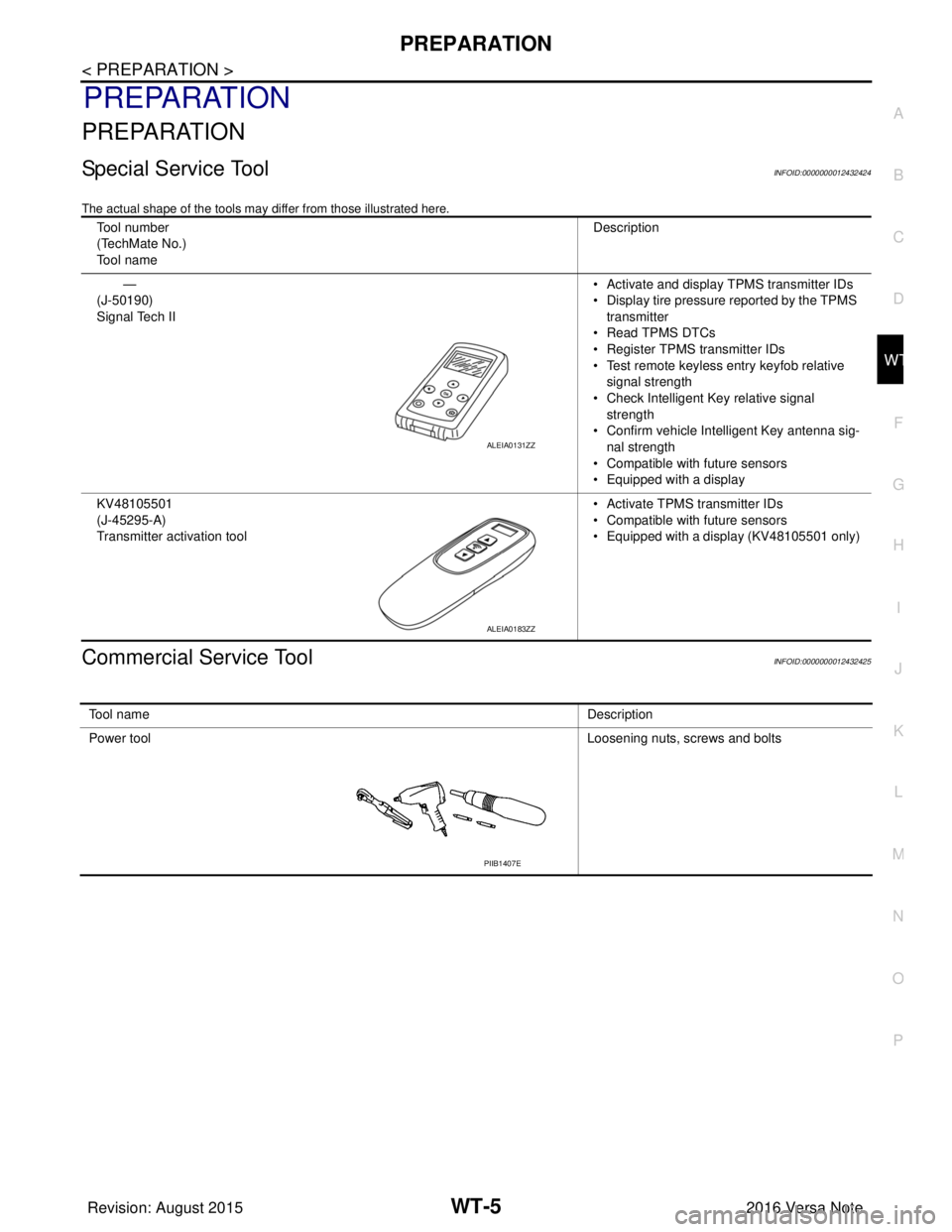
Special Service ToolINFOID:0000000012432424
The actual shape of the tools may di ffer from those illustrated here.
Commercial Service ToolINFOID:0000000012432425
Tool number
(TechMate No.)
Tool name Description
—
(J-50190)
Signal Tech II • Activate and display TPMS transmitter IDs
• Display tire pressure reported by the TPMS
transmitter
• Read TPMS DTCs
• Register TPMS transmitter IDs
• Test remote keyless entry keyfob relative signal strength
• Check Intelligent Key relative signal strength
• Confirm vehicle Intelligent Key antenna sig-
nal strength
• Compatible with future sensors
• Equipped with a display
KV48105501
(J-45295-A)
Transmitter activation tool • Activate TPMS transmitter IDs
• Compatible with future sensors
• Equipped with a display (KV48105501 only)
ALEIA0131ZZ
ALEIA0183ZZ
To o l n a m e
Description
Power tool Loosening nuts, screws and bolts
PIIB1407E
Revision: August 2015 2016 Versa Note
cardiagn.com