2016 NISSAN NOTE Display
[x] Cancel search: DisplayPage 2770 of 3641
C1708, C1709, C1710, C1711 TRANSMITTER (NO DATA)
WT-27
< DTC/CIRCUIT DIAGNOSIS >
C
DF
G H
I
J
K L
M A
B
WT
N
O P
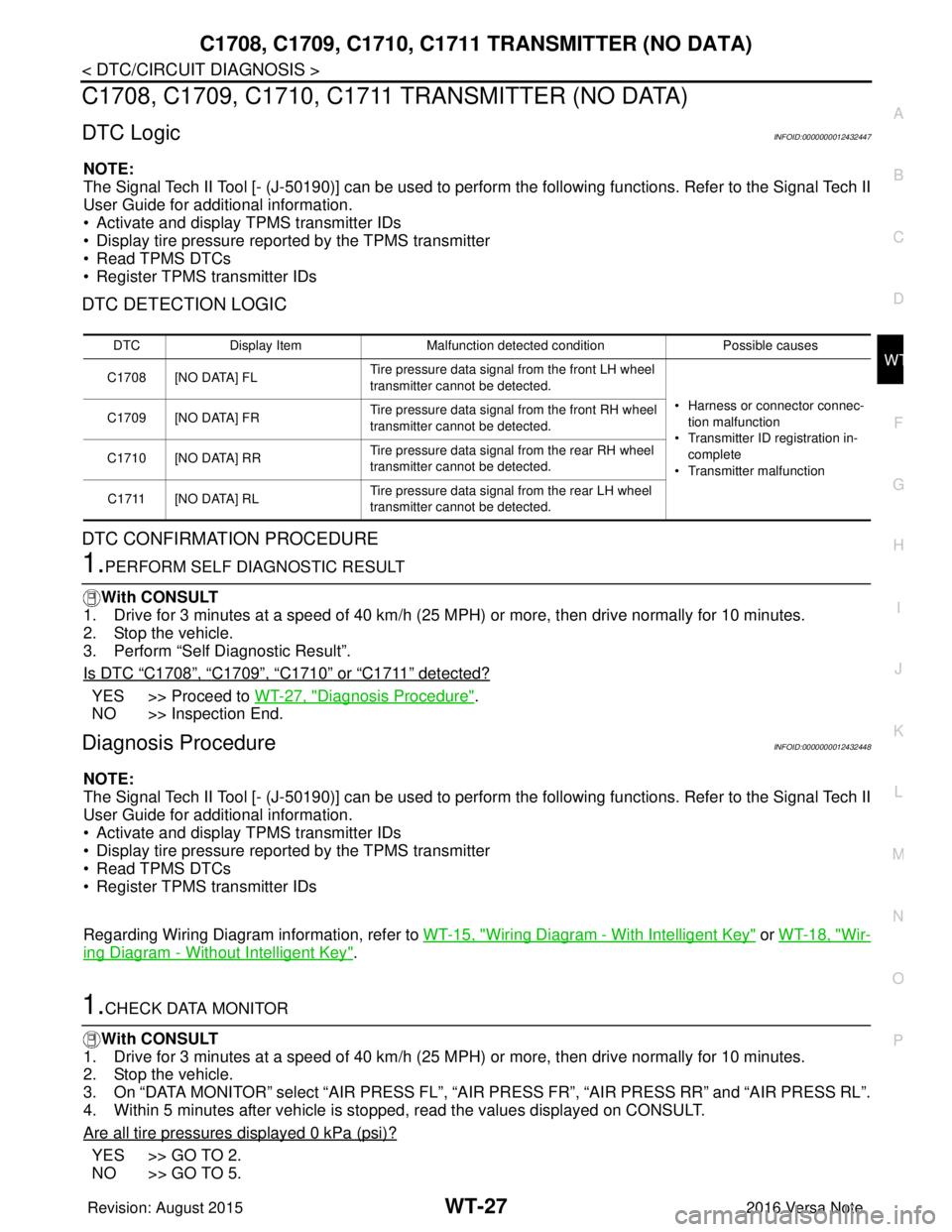
C1708, C1709, C1710, C1711 TRANSMITTER (NO DATA)
DTC LogicINFOID:0000000012432447
NOTE:
The Signal Tech II Tool [- (J-50190)] can be used to perform the following functions. Refer to the Signal Tech II
User Guide for additional information.
• Activate and display TPMS transmitter IDs
• Display tire pressure repor ted by the TPMS transmitter
• Read TPMS DTCs
• Register TPMS transmitter IDs
DTC DETECTION LOGIC
DTC CONFIRMATION PROCEDURE
1.PERFORM SELF DIAGNOSTIC RESULT
With CONSULT
1. Drive for 3 minutes at a speed of 40 km/h (25 MPH) or more, then drive normally for 10 minutes.
2. Stop the vehicle.
3. Perform “Self Diagnostic Result”.
Is DTC
“C1708”, “C1709”, “C1710” or “C1711” detected?
YES >> Proceed to WT-27, "Diagnosis Procedure".
NO >> Inspection End.
Diagnosis ProcedureINFOID:0000000012432448
NOTE:
The Signal Tech II Tool [- (J-50190)] can be used to perform the following functions. Refer to the Signal Tech II
User Guide for additional information.
• Activate and display TPMS transmitter IDs
• Display tire pressure repor ted by the TPMS transmitter
• Read TPMS DTCs
• Register TPMS transmitter IDs
Regarding Wiring Diagram information, refer to WT-15, "
Wiring Diagram - With Intelligent Key" or WT-18, "Wir-
ing Diagram - Without Intelligent Key".
1.CHECK DATA MONITOR
With CONSULT
1. Drive for 3 minutes at a speed of 40 km/h (25 MPH) or more, then drive normally for 10 minutes.
2. Stop the vehicle.
3. On “DATA MONITOR” select “AIR PRESS FL”, “AIR PRESS FR”, “AIR PRESS RR” and “AIR PRESS RL”.
4. Within 5 minutes after vehicle is stopped, read the values displayed on CONSULT.
Are all tire pressures displayed 0 kPa (psi)?
YES >> GO TO 2.
NO >> GO TO 5.
DTC Display Item Malfunction detected condition Possible causes
C1708 [NO DATA] FL Tire pressure data signal from the front LH wheel
transmitter cannot be detected.
• Harness or connector connec-tion malfunction
• Transmitter ID registration in- complete
• Transmitter malfunction
C1709 [NO DATA] FR
Tire pressure data signal from the front RH wheel
transmitter cannot be detected.
C1710 [NO DATA] RR Tire pressure data signal from the rear RH wheel
transmitter cannot be detected.
C1711 [NO DATA] RL Tire pressure data signal from the rear LH wheel
transmitter cannot be detected.
Revision: August 2015
2016 Versa Note
cardiagn.com
Page 2772 of 3641
C1708, C1709, C1710, C1711 TRANSMITTER (NO DATA)
WT-29
< DTC/CIRCUIT DIAGNOSIS >
C
DF
G H
I
J
K L
M A
B
WT
N
O P
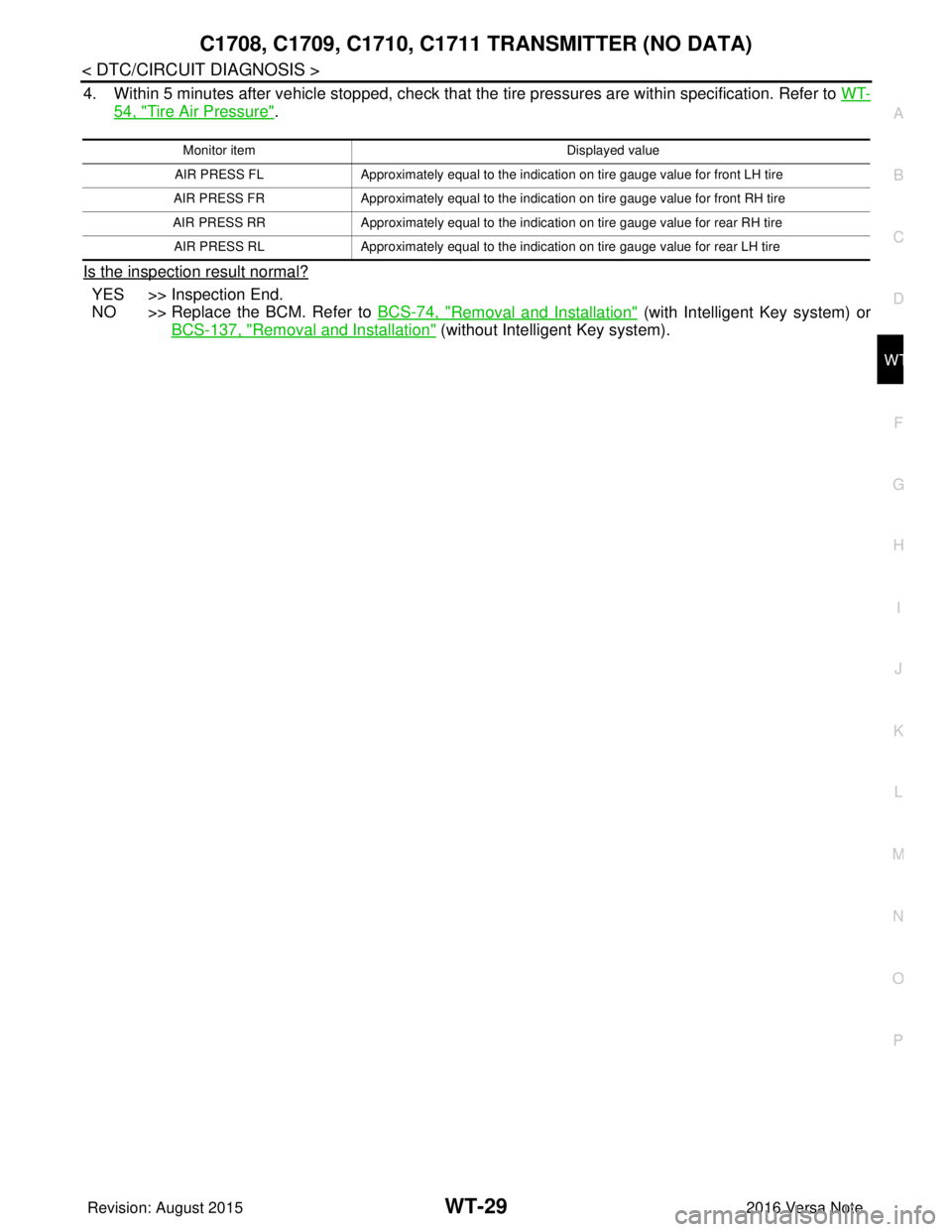
4. Within 5 minutes after vehicle stopped, check that t he tire pressures are within specification. Refer to WT-
54, "Tire Air Pressure".
Is the inspection result normal?
YES >> Inspection End.
NO >> Replace the BCM. Refer to BCS-74, "
Removal and Installation" (with Intelligent Key system) or
BCS-137, "
Removal and Installation" (without Intelligent Key system).
Monitor item Displayed value
AIR PRESS FL Approximately equal to the indication on tire gauge value for front LH tire
AIR PRESS FR Approximately equal to the indication on tire gauge value for front RH tire
AIR PRESS RR Approximately equal to the indication on tire gauge value for rear RH tire
AIR PRESS RL Approximately equal to the indication on tire gauge value for rear LH tire
Revision: August 2015 2016 Versa Note
cardiagn.com
Page 2773 of 3641
WT-30
< DTC/CIRCUIT DIAGNOSIS >
C1716, C1717, C1718, C1719 TRANSMITTER (PRESSURE DATA)
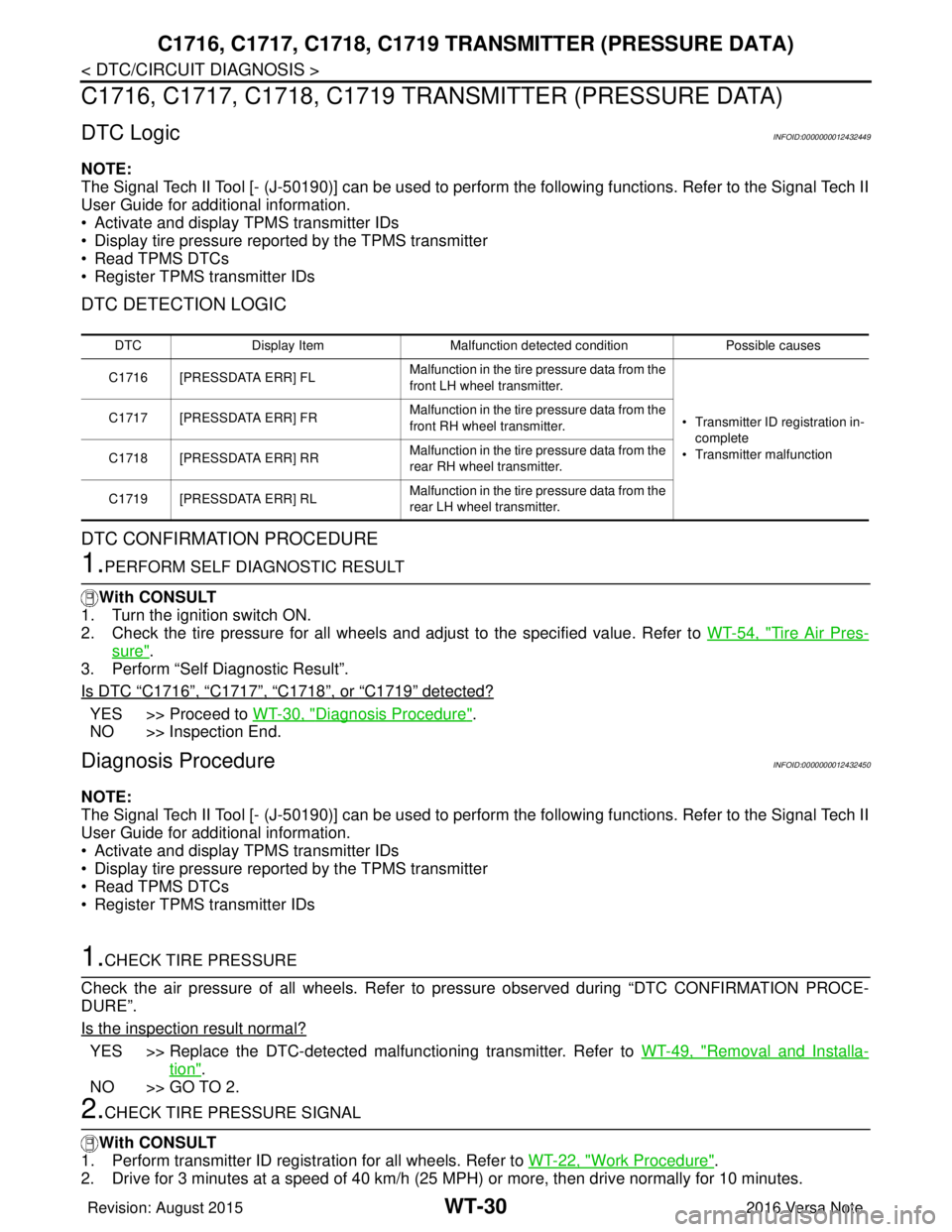
C1716, C1717, C1718, C1719 TRAN SMITTER (PRESSURE DATA)
DTC LogicINFOID:0000000012432449
NOTE:
The Signal Tech II Tool [- (J-50190)] can be used to perform the following functions. Refer to the Signal Tech II
User Guide for additional information.
• Activate and display TPMS transmitter IDs
• Display tire pressure reported by the TPMS transmitter
• Read TPMS DTCs
• Register TPMS transmitter IDs
DTC DETECTION LOGIC
DTC CONFIRMATION PROCEDURE
1.PERFORM SELF DIAGNOSTIC RESULT
With CONSULT
1. Turn the ignition switch ON.
2. Check the tire pressure for all wheels and adjust to the specified value. Refer to WT-54, "
Tire Air Pres-
sure".
3. Perform “Self Diagnostic Result”.
Is DTC
“C1716”, “C1717”, “C1718”, or “C1719” detected?
YES >> Proceed to WT-30, "Diagnosis Procedure".
NO >> Inspection End.
Diagnosis ProcedureINFOID:0000000012432450
NOTE:
The Signal Tech II Tool [- (J-50190)] can be used to perform the following functions. Refer to the Signal Tech II
User Guide for additional information.
• Activate and display TPMS transmitter IDs
• Display tire pressure reported by the TPMS transmitter
• Read TPMS DTCs
• Register TPMS transmitter IDs
1.CHECK TIRE PRESSURE
Check the air pressure of all wheels. Refer to pressure observed during “DTC CONFIRMATION PROCE-
DURE”.
Is the inspection result normal?
YES >> Replace the DTC-detected malfunctioning transmitter. Refer to WT-49, "Removal and Installa-
tion".
NO >> GO TO 2.
2.CHECK TIRE PRESSURE SIGNAL
With CONSULT
1. Perform transmitter ID regist ration for all wheels. Refer to WT-22, "
Work Procedure".
2. Drive for 3 minutes at a speed of 40 km/h (25 MPH) or more, then drive normally for 10 minutes.
DTC Display Item Malfunction detected condition Possible causes
C1716 [PRESSDATA ERR] FL Malfunction in the tire pressure data from the
front LH wheel transmitter.
• Transmitter ID registration in-
complete
• Transmitter malfunction
C1717 [PRESSDATA ERR] FR
Malfunction in the tire pressure data from the
front RH wheel transmitter.
C1718 [PRESSDATA ERR] RR Malfunction in the tire pressure data from the
rear RH wheel transmitter.
C1719 [PRESSDATA ERR] RL Malfunction in the tire pressure data from the
rear LH wheel transmitter.
Revision: August 2015
2016 Versa Note
cardiagn.com
Page 2774 of 3641

C1716, C1717, C1718, C1719 TRANSMITTER (PRESSURE DATA)
WT-31
< DTC/CIRCUIT DIAGNOSIS >
C
DF
G H
I
J
K L
M A
B
WT
N
O P
3. Stop the vehicle.
4. On “DATA MONITOR” select “AIR PRESS FL”, “AIR PRESS FR”, “AIR PRESS RR” and “AIR PRESS RL”.
5. Within 5 minutes after vehicle is stopped, read the values displayed on CONSULT.
Are tire pressures displayed as 438.6 kPa (4.47 kg/cm
2, 63.6 psi)?
YES >> Replace transmitter for the tire that displayed pressure as 438.6 kPa (4.47 kg/cm2, 63.6 psi).
Refer to WT-49, "
Removal and Installation".
NO >> Perform “DTC CONFIRMATION PROCEDURE” again. Refer to WT-30, "
DTC Logic".
Revision: August 2015 2016 Versa Note
cardiagn.com
Page 2775 of 3641
![NISSAN NOTE 2016 Service Repair Manual WT-32
< DTC/CIRCUIT DIAGNOSIS >
C1729 VEHICLE SPEED SIGNAL
C1729 VEHICLE SPEED SIGNAL
DTC LogicINFOID:0000000012432451
NOTE:
The Signal Tech II Tool [- (J-50190)] can be used to perform the following](/manual-img/5/57363/w960_57363-2774.png "NISSAN NOTE 2016 Service Repair Manual WT-32
< DTC/CIRCUIT DIAGNOSIS >
C1729 VEHICLE SPEED SIGNAL
C1729 VEHICLE SPEED SIGNAL
DTC LogicINFOID:0000000012432451
NOTE:
The Signal Tech II Tool [- (J-50190)] can be used to perform the following")
WT-32
< DTC/CIRCUIT DIAGNOSIS >
C1729 VEHICLE SPEED SIGNAL
C1729 VEHICLE SPEED SIGNAL
DTC LogicINFOID:0000000012432451
NOTE:
The Signal Tech II Tool [- (J-50190)] can be used to perform the following functions. Refer to the Signal Tech II
User Guide for additional information.
• Activate and display TPMS transmitter IDs
• Display tire pressure reported by the TPMS transmitter
• Read TPMS DTCs
• Register TPMS transmitter IDs
DTC DETECTION LOGIC
DTC CONFIRMATION PROCEDURE
1.PERFORM SELF DIAGNOSTIC RESULT
With CONSULT
1. Drive for 3 minutes at a speed of 40 km/h (25 MPH) or more without stopping.
2. Stop the vehicle.
3. Perform “Self Diagnostic Result”.
Is DTC
“C1729” detected?
YES >> Proceed to WT-32, "Diagnosis Procedure".
NO >> Inspection End.
Diagnosis ProcedureINFOID:0000000012432452
NOTE:
The Signal Tech II Tool [- (J-50190)] can be used to perform the following functions. Refer to the Signal Tech II
User Guide for additional information.
• Activate and display TPMS transmitter IDs
• Display tire pressure reported by the TPMS transmitter
• Read TPMS DTCs
• Register TPMS transmitter IDs
1.PERFORM COMBINATION METER SELF DIAGNOSTIC RESULT
With CONSULT
Perform “Self Diagnostic Result” for “METER/M&A”. Refer to MWI-18, "
CONSULT Function (METER/M&A)"
(type A) or MWI-71, "CONSULT Function (METER/M&A)" (type B).
Are any DTCs detected?
YES >> Refer to MWI-24, "DTC Index" (type A) or MWI-77, "DTC Index" (type B).
NO >> GO TO 2.
2.CHECK BCM INPUT/OUTPUT SIGNAL
Check the BCM input/output signal values. Refer to BCS-30, "
Reference Value" (with Intelligent Key system)
or BCS-101, "
Reference Value" (without Intelligent Key system).
Is the inspection result normal?
YES >> Check pin terminal and connection of each harness connector for malfunctioning conditions.
NO >> Replace the BCM. Refer to BCS-74, "
Removal and Installation" (with Intelligent Key system) or
BCS-137, "
Removal and Installation" (without Intelligent Key system).
DTC Display Item Malfunction detected condition Possible causes
C1729 VHCL SPEED SIG ERR Vehicle speed signal not detected. • CAN communication malfunction
• Combination meter malfunction
Revision: August 2015
2016 Versa Note
cardiagn.com
Page 2780 of 3641
LOW TIRE PRESSURE WARNING LAMP DOES NOT TURN ON
WT-37
< SYMPTOM DIAGNOSIS >
C
D F
G H
I
J
K L
M A
B
WT
N
O P
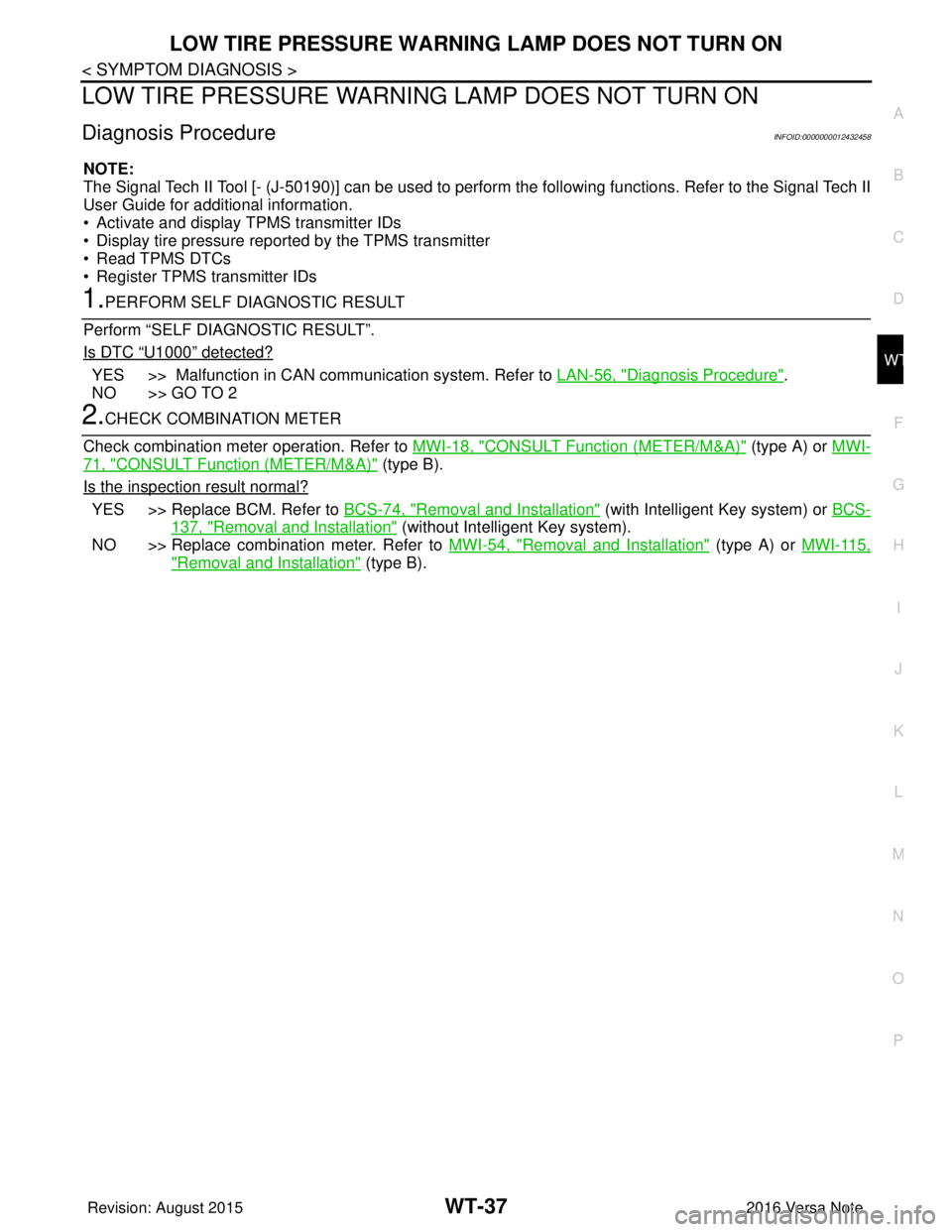
LOW TIRE PRESSURE WARNIN G LAMP DOES NOT TURN ON
Diagnosis ProcedureINFOID:0000000012432458
NOTE:
The Signal Tech II Tool [- (J-50190)] can be used to perform the following functions. Refer to the Signal Tech II
User Guide for additional information.
• Activate and display TPMS transmitter IDs
• Display tire pressure reported by the TPMS transmitter
• Read TPMS DTCs
• Register TPMS transmitter IDs
1.PERFORM SELF DIAGNOSTIC RESULT
Perform “SELF DIAGNOSTIC RESULT”.
Is DTC
“U1000” detected?
YES >> Malfunction in CAN communication system. Refer to LAN-56, "Diagnosis Procedure".
NO >> GO TO 2
2.CHECK COMBINATION METER
Check combination meter operation. Refer to MWI-18, "
CONSULT Function (METER/M&A)" (type A) or MWI-
71, "CONSULT Function (METER/M&A)" (type B).
Is the inspection result normal?
YES >> Replace BCM. Refer to BCS-74, "Removal and Installation" (with Intelligent Key system) or BCS-
137, "Removal and Installation" (without Intelligent Key system).
NO >> Replace combination meter. Refer to MWI-54, "
Removal and Installation" (type A) or MWI-115,
"Removal and Installation" (type B).
Revision: August 2015 2016 Versa Note
cardiagn.com
Page 2785 of 3641
![NISSAN NOTE 2016 Service Repair Manual WT-42
< SYMPTOM DIAGNOSIS >
ID REGISTRATION CANNOT BE COMPLETED
ID REGISTRATION CANNOT BE COMPLETED
Diagnosis ProcedureINFOID:0000000012432463
NOTE:
The Signal Tech II Tool [- (J-50190)] can be used t](/manual-img/5/57363/w960_57363-2784.png "NISSAN NOTE 2016 Service Repair Manual WT-42
< SYMPTOM DIAGNOSIS >
ID REGISTRATION CANNOT BE COMPLETED
ID REGISTRATION CANNOT BE COMPLETED
Diagnosis ProcedureINFOID:0000000012432463
NOTE:
The Signal Tech II Tool [- (J-50190)] can be used t")
WT-42
< SYMPTOM DIAGNOSIS >
ID REGISTRATION CANNOT BE COMPLETED
ID REGISTRATION CANNOT BE COMPLETED
Diagnosis ProcedureINFOID:0000000012432463
NOTE:
The Signal Tech II Tool [- (J-50190)] can be used to perform the following functions. Refer to the Signal Tech II
User Guide for additional information.
• Activate and display TPMS transmitter IDs
• Display tire pressure reported by the TPMS transmitter
• Read TPMS DTCs
• Register TPMS transmitter IDs
1.PERFORM ID REGISTRATION OF ALL TRANSMITTERS
Carry out ID registration of all transmitters. Refer to WT-22, "
Work Procedure".
Can ID registration of all transmitters be completed?
YES >> Inspection End.
NO >> Refer to WT-11, "
WITH INTELLIGENT KEY : CONSULT F unction (BCM - AIR PRESSURE MON-
ITOR)" (with Intelligent Key system) or WT-12, "WITHOUT INTELLIGENT KEY : CONSULT Func-
tion (BCM - AIR PRESSURE MONITOR)" (without Intelligent Key system).
Revision: August 2015 2016 Versa Note
cardiagn.com
Page 2875 of 3641
![NISSAN NOTE 2016 Service Repair Manual SEC-18
< SYSTEM DESCRIPTION >[WITH INTELLIGENT KEY SYSTEM]
DIAGNOSIS SYSTEM (BCM)
DIAGNOSIS SYSTEM (BCM)
COMMON ITEM
COMMON ITEM : CONSULT Fu
nction (BCM - COMMON ITEM)INFOID:0000000012542530
APPLICAT](/manual-img/5/57363/w960_57363-2874.png "NISSAN NOTE 2016 Service Repair Manual SEC-18
< SYSTEM DESCRIPTION >[WITH INTELLIGENT KEY SYSTEM]
DIAGNOSIS SYSTEM (BCM)
DIAGNOSIS SYSTEM (BCM)
COMMON ITEM
COMMON ITEM : CONSULT Fu
nction (BCM - COMMON ITEM)INFOID:0000000012542530
APPLICAT")
SEC-18
< SYSTEM DESCRIPTION >[WITH INTELLIGENT KEY SYSTEM]
DIAGNOSIS SYSTEM (BCM)
DIAGNOSIS SYSTEM (BCM)
COMMON ITEM
COMMON ITEM : CONSULT Fu
nction (BCM - COMMON ITEM)INFOID:0000000012542530
APPLICATION ITEM
CONSULT performs the following functions via CAN communication with BCM.
SYSTEM APPLICATION
BCM can perform the following functions.
Direct Diagnostic Mode Description
ECU Identification The BCM part number is displayed.
Self Diagnostic Result The BCM self diagnostic results are displayed.
Data Monitor The BCM input/output data is displayed in real time.
Active Test The BCM activates outputs to test components.
Work support The settings for BCM functions can be changed.
Configuration • The vehicle specification can be read and saved.
• The vehicle specification can be written when replacing BCM.
CAN DIAG SUPPORT MNTR The result of transmit/receive diagnosis of CAN communication is displayed.
System Sub System Direct Diagnostic Mode
ECU Identification
Self Diagnostic Result
Data Monitor
Active Test
Work support
Configuration
CAN DIAG SUPPORT MNTR
Door lock
DOOR LOCK ×××
Rear window defogger REAR DEFOGGER ××
Warning chime BUZZER ××
Interior room lamp timer INT LAMP ×××
Exterior lamp HEAD LAMP ×××
Wiper and washer WIPER ×××
Turn signal and hazard warning lamps FLASHER ×××
Air conditioner AIR CONDITIONER ×
Intelligent Key system INTELLIGENT KEY ××××
Combination switch COMB SW ×
BCM BCM× × ×××
Immobilizer IMMU ××××
Interior room lamp battery saver BATTERY SAVER ×××
Vehicle security system THEFT ALM ××
RAP system RETAINED PWR ×
Signal buffer system SIGNAL BUFFER ×
TPMS AIR PRESSURE MONITOR ××××
Panic alarm system PANIC ALARM ×
Revision: August 2015 2016 Versa Note
cardiagn.com