2016 NISSAN NOTE ABS
[x] Cancel search: ABSPage 2541 of 3641
![NISSAN NOTE 2016 Service Repair Manual PCS-38
< SYSTEM DESCRIPTION >[POWER DISTRIBUTION SYSTEM]
DIAGNOSIS SYSTEM (BCM)
INTELLIGENT KEY
INTELLIGENT KEY : CONSULT Function (BCM - INTELLIGENT KEY)INFOID:0000000012542492
SELF DIAGNOSTIC RESULT](/manual-img/5/57363/w960_57363-2540.png "NISSAN NOTE 2016 Service Repair Manual PCS-38
< SYSTEM DESCRIPTION >[POWER DISTRIBUTION SYSTEM]
DIAGNOSIS SYSTEM (BCM)
INTELLIGENT KEY
INTELLIGENT KEY : CONSULT Function (BCM - INTELLIGENT KEY)INFOID:0000000012542492
SELF DIAGNOSTIC RESULT")
PCS-38
< SYSTEM DESCRIPTION >[POWER DISTRIBUTION SYSTEM]
DIAGNOSIS SYSTEM (BCM)
INTELLIGENT KEY
INTELLIGENT KEY : CONSULT Function (BCM - INTELLIGENT KEY)INFOID:0000000012542492
SELF DIAGNOSTIC RESULT
Refer to
BCS-50, "DTCIndex".
DATA MONITOR
ACTIVE TEST
Monitor Item [Unit] Main Description
REQ SW -DR [On/Off] ×Indicates condition of door request switch LH.
REQ SW -AS [On/Off] ×Indicates condition of door request switch RH.
REQ SW -BD/TR [On/Off] ×Indicates condition of back door request switch.
PUSH SW [On/Off] Indicates condition of push-button ignition switch.
CLUCH SW [On/Off] ×Indicates condition of clutch interlock switch.
BRAKE SW 1 [On/Off] ×Indicates condition of brake switch.
BRAKE SW 2 [On/Off] Indicates condition of brake switch.
DETE/CANCL SW [On/Off] ×Indicates condition of P (park) position.
SFT PN/N SW [On/Off] ×Indicates condition of P (park) or N (neutral) position.
UNLK SEN -DR [On/Off] ×Indicates condition of door unlock sensor.
PUSH SW -IPDM [On/Off] Indicates condition of push-button ignition switch received from IPDM E/R on
CAN communication line.
IGN RLY1 -F/B [On/Off] Indicates condition of ignition relay 1 received from IPDM E/R on CAN commu-
nication line.
DETE SW -IPDM [On/Off] Indicates condition of detent switch received from TCM on CAN communication
line.
SFT PN -IPDM [On/Off] Indicates condition of P (park) or N (neutral) position from TCM on CAN com-
munication line.
SFT P -MET [On/Off] Indicates condition of P (park) position from TCM on CAN communication line.
SFT N -MET [On/Off] Indicates condition of N (neutral) position from IPDM E/R on CAN communica-
tion line.
ENGINE STATE [Stop/Start/Crank/Run] ×Indicates condition of engine state from ECM on CAN communication line.
VEH SPEED 1 [mph/km/h] ×Indicates condition of ve
hicle speed signal receiv ed from ABS on CAN commu-
nication line.
VEH SPEED 2 [mph/km/h] ×Indicates condition of vehicle speed signal received from combination meter on
CAN communication line.
DOOR STAT -DR [LOCK/READY/UNLK] ×Indicates condition of driver side door status.
DOOR STAT -AS [LOCK/READY/UNLK] ×Indicates condition of passenger side door status.
ID OK FLAG [Set/Reset] Indicates condition of Intelligent Key ID.
PRMT ENG STRT [Set/Reset] Indicates condition of engine start possibility.
RKE OPE COUN1 [0-19] ×When remote keyless entry receiver receives the signal transmitted while oper-
ating on Intelligent Key, the numerical value start changing.
RKE OPE COUN2 [0-19] ×When remote keyless entry receiver receives the signal transmitted while oper-
ating on Intelligent Key, the numerical value start changing.
RKE-LOCK [On/Off] Indicates condition of lock signal from Intelligent Key.
RKE-UNLOCK [On/Off] Indicates condition of unlock signal from Intelligent Key.
RKE-PANIC [On/Off] Indicates condition of panic signal from Intelligent Key.
RKE-MODE CHG [On/Off] Indicates condition of mode change signal from Intelligent Key.
Revision: August 2015 2016 Versa Note
cardiagn.com
Page 2557 of 3641
![NISSAN NOTE 2016 Service Repair Manual PCS-54
< DTC/CIRCUIT DIAGNOSIS >[POWER DISTRIBUTION SYSTEM]
U1000 CAN COMM CIRCUIT
DTC/CIRCUIT DIAGNOSIS
U1000 CAN COMM CIRCUIT
DescriptionINFOID:0000000012433296
Refer to
LAN-25, "CAN COMMUNICATION](/manual-img/5/57363/w960_57363-2556.png "NISSAN NOTE 2016 Service Repair Manual PCS-54
< DTC/CIRCUIT DIAGNOSIS >[POWER DISTRIBUTION SYSTEM]
U1000 CAN COMM CIRCUIT
DTC/CIRCUIT DIAGNOSIS
U1000 CAN COMM CIRCUIT
DescriptionINFOID:0000000012433296
Refer to
LAN-25, \"CAN COMMUNICATION")
PCS-54
< DTC/CIRCUIT DIAGNOSIS >[POWER DISTRIBUTION SYSTEM]
U1000 CAN COMM CIRCUIT
DTC/CIRCUIT DIAGNOSIS
U1000 CAN COMM CIRCUIT
DescriptionINFOID:0000000012433296
Refer to
LAN-25, "CAN COMMUNICATION SYSTEM : System Description".
DTC LogicINFOID:0000000012433297
DTC DETECTION LOGIC
NOTE:
U1000 can be set if a module harness was disconnected and reconnected, perhaps during a repair. Confirm
that there are actual CAN diagnostic symptoms and a pr esent DTC by performing the Self Diagnostic Result
procedure.
Diagnosis ProcedureINFOID:0000000012433298
1. PERFORM SELF DIAGNOSTIC RESULT
1. Turn ignition switch ON and wait for 2 second or more.
2. Perform “Self Diagnostic Result” of “BCM” using CONSULT.
Is
“CAN COMM CIRCUIT” displayed?
YES >> Perform CAN Diagnosis as described in DIAG NOSIS section of CONSULT Operation manual.
NO >> Refer to GI-42, "
Intermittent Incident".
CONSULT Display DTC Detection Condition Possible Cause
CAN COMM CIRCUIT
[U1000] When any listed module cannot communicate
with CAN communication signal continuously for
2 seconds or more with ignition switch ON In CAN communication system, any item (or
items) of the following listed below is malfunc-
tioning.
•Transmission
• Receiving (ECM)
• Receiving (VDC/TCS/ABS)
• Receiving (METER/M&A)
• Receiving (TCM)
• Receiving (IPDM E/R)
Revision: August 2015
2016 Versa Note
cardiagn.com
Page 2586 of 3641
PWO-6
< REMOVAL AND INSTALLATION >
CONSOLE POWER SOCKET
REMOVAL AND INSTALLATION
CONSOLE POWER SOCKET
Removal and InstallationINFOID:0000000012432101
CONSOLE POWER SOCKET or CIGARETTE LIGHTER (IF EQUIPPED)
REMOVAL
NOTE:
If unable to use the tool because of power socket location or access to the harness connector, then further
removal of interior components may be required. Refer to IP-18, "
Removal and Installation".
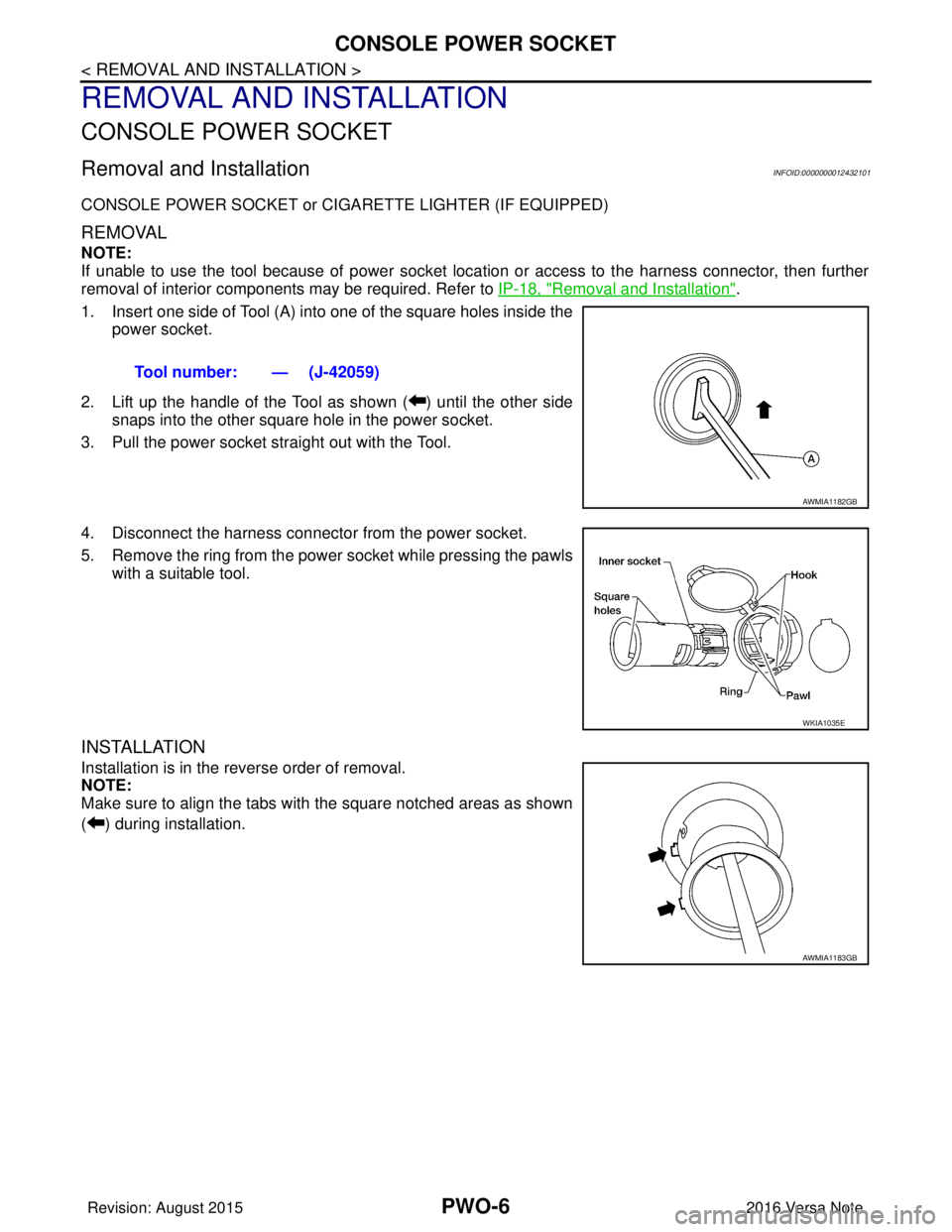
1. Insert one side of Tool (A) into one of the square holes inside the power socket.
2. Lift up the handle of the Tool as shown ( ) until the other side snaps into the other square hole in the power socket.
3. Pull the power socket straight out with the Tool.
4. Disconnect the harness connecto r from the power socket.
5. Remove the ring from the power socket while pressing the pawls with a suitable tool.
INSTALLATION
Installation is in the reverse order of removal.
NOTE:
Make sure to align the tabs with the square notched areas as shown
( ) during installation. Tool number: — (J-42059)
AWMIA1182GB
WKIA1035E
AWMIA1183GB
Revision: August 2015
2016 Versa Note
cardiagn.com
Page 2598 of 3641
![NISSAN NOTE 2016 Service Repair Manual PG
COMPONENT PARTSPG-11
< SYSTEM DESCRIPTION >
C
DE
F
G H
I
J
K L
B A
O P
N
[Example]
HARNESS CONNECTOR (LEVER LOCKING TYPE)
• Lever locking type harness connectors are used on certain control units](/manual-img/5/57363/w960_57363-2597.png "NISSAN NOTE 2016 Service Repair Manual PG
COMPONENT PARTSPG-11
< SYSTEM DESCRIPTION >
C
DE
F
G H
I
J
K L
B A
O P
N
[Example]
HARNESS CONNECTOR (LEVER LOCKING TYPE)
• Lever locking type harness connectors are used on certain control units")
PG
COMPONENT PARTSPG-11
< SYSTEM DESCRIPTION >
C
DE
F
G H
I
J
K L
B A
O P
N
[Example]
HARNESS CONNECTOR (LEVER LOCKING TYPE)
• Lever locking type harness connectors are used on certain control units and control modules such as ECM,
ABS actuator and electric unit (control unit), etc.
• Lever locking type harness connectors are also us ed on super multiple junction (SMJ) connectors.
• Always confirm the lever is fully locked in place by mo ving the lever as far as it will go to ensure full connec-
tion.
CAUTION:
SEL769V
Revision: August 2015 2016 Versa Note
cardiagn.com
Page 2633 of 3641

PG-46
< WIRING DIAGRAM >
HARNESS
D3 E4 Y/2 : Crash zone sensorE1 E42 B/2: IPDM E/R (Intelligent power distribution
module engine room)
E4 E5 B/2 : Cooling fan motor (With CVT)E2 E43 B/6: IPDM E/R (Intelligent power distribution
module engine room)
E2 E8 W/24 : To F8 F2 E44 BR/8: IPDM E/R (Intelligent power distribution
module engine room)
E3 E9 BR/2 : Fusible link b o x ( B a t t e r y )E 1 E 4 5 B R / 1 2: IPDM E/R (Intelligent power distribution
module engine room)
E2 E10 GR/2 : Fusible link box (Battery) F2 E46 W/24: IPDM E/R (Intelligent power distribution
module engine room)
G 2 E 1 5 — : B o d y g r o u n d F 2 E 4 7 W / 1 6: IPDM E/R (Intelligent power distribution
module engine room)
F 2 E 1 6 B / 3 2 : E C M B 3 E 5 0 B R / 2 : W a s h e r f l u i d l e v e l s w i t c h
F4 E17 B/3 : Refrigerant pressure sensor E3 E51 B/2 : Front wheel sensor LH
C4 E18 BR/1 : Horn C4 E52 B/2 : Front wheel sensor RH
E 2 E 1 9 W / 6 : To F 3 3 G 4 E 5 3 B / 2 : F r o n t f o g l a m p L H
C 4 E 2 0 B / 1 : H o r n B 5 E 5 4 B / 2 : F r o n t f o g l a m p R H
A2 E24 — : Body ground E2 E55 GR/12 : To F55
G3 E25 B/3 : Front combination lamp LH G3 E62 L/4 : Cooling fan relay
A3 E26 B/3 : Front combination lamp RH C3 E63 GR/4 : Heated oxygen sensor 2
G2 E27 B/2 : Front combination lamp LH C4 E64 L/4 : Heated seat relay
A2 E28 B/2 : Front combinati on lamp RHG5 E69 B/2 : Ambient sensor
F4 E29 GR/3 : Front combination lamp LH E5 E70 BR/3 : Intelligent Key warning buzzer
B3 E30 GR/3 : Front combination lamp RH F5 E71 B/4 : Front camera
E3 E31 GR/4 : Cooling fan motor (With CVT) G3 E72 L/4 : Active grille shutter relay
E4 E32 W/2 : Cooling fan motor (With CVT) Front fog lamp sub harness
B2 E33 B/38 : ABS actuator and electric unit (Control
unit) E5 E302 B/4 : To E35
E5 E35 B/4 : To E302 F5 E303 B/4 : Active grille shutter
E1 E39 W/3 : Horn relay F5 E303 B/4 : Active grille shutter
Revision: August 2015 2016 Versa Note
cardiagn.com
Page 2653 of 3641
PG-66
< BASIC INSPECTION >
FUSE INSPECTION
• Turn the ignition switch OFF when operating the extended storage switch.
• Under normal conditions, keep the extended storage switch in ON state. Never operate the extended
storage switch except when necessary.
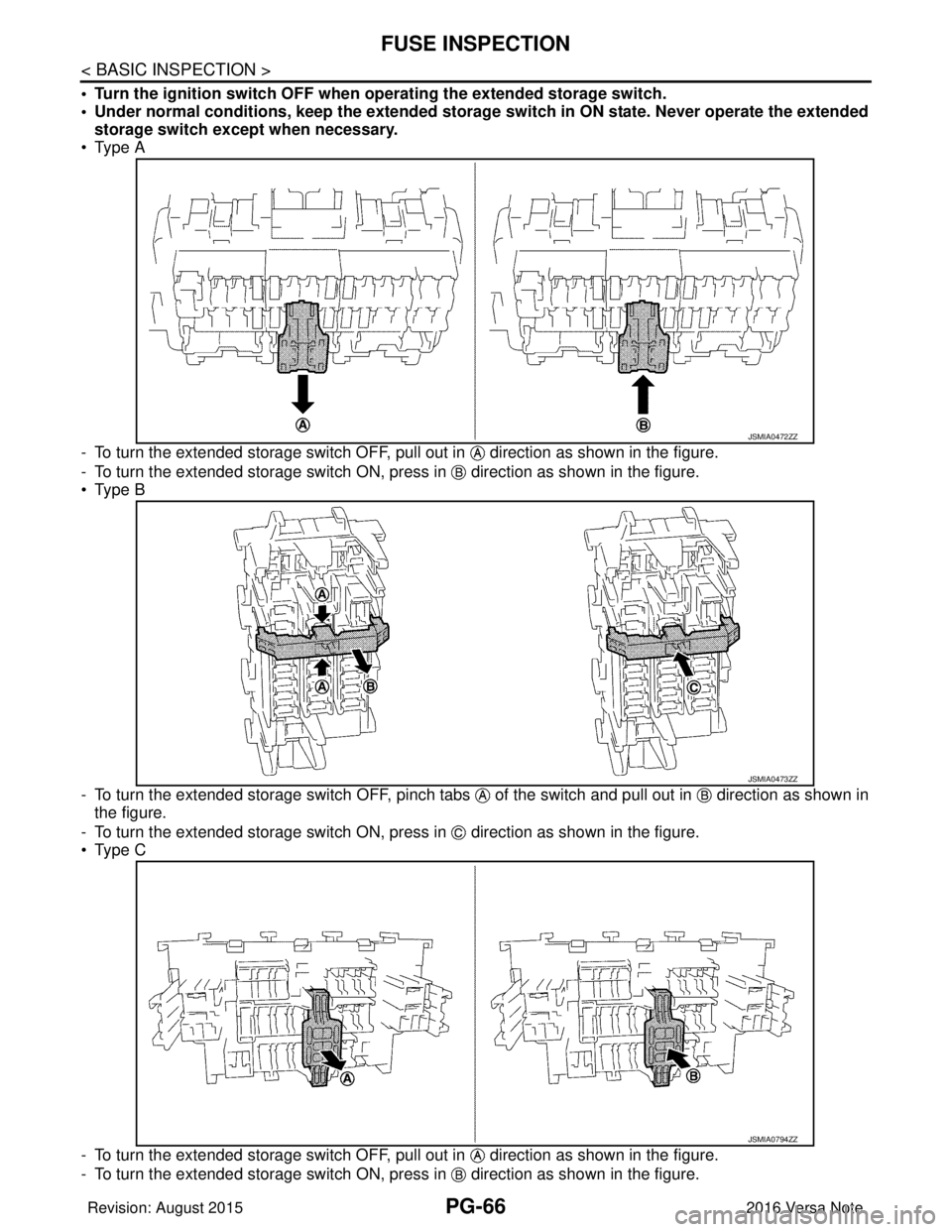
• Type A
- To turn the extended storage switch OFF, pull out in direction as shown in the figure.
- To turn the extended storage switch ON, press in direction as shown in the figure.
• Type B
- To turn the extended storage switch OFF, pinch tabs of the switch and pull out in direction as shown in
the figure.
- To turn the extended storage switch ON, press in direction as shown in the figure.
• Type C
- To turn the extended storage switch OFF, pull out in direction as shown in the figure.
- To turn the extended storage switch ON, press in direction as shown in the figure.
JSMIA0472ZZ
JSMIA0473ZZ
JSMIA0794ZZ
Revision: August 2015 2016 Versa Note
cardiagn.com
Page 2654 of 3641
PG
FUSE INSPECTIONPG-67
< BASIC INSPECTION >
C
DE
F
G H
I
J
K L
B A
O P
N
How To Remove Extended Storage Switch
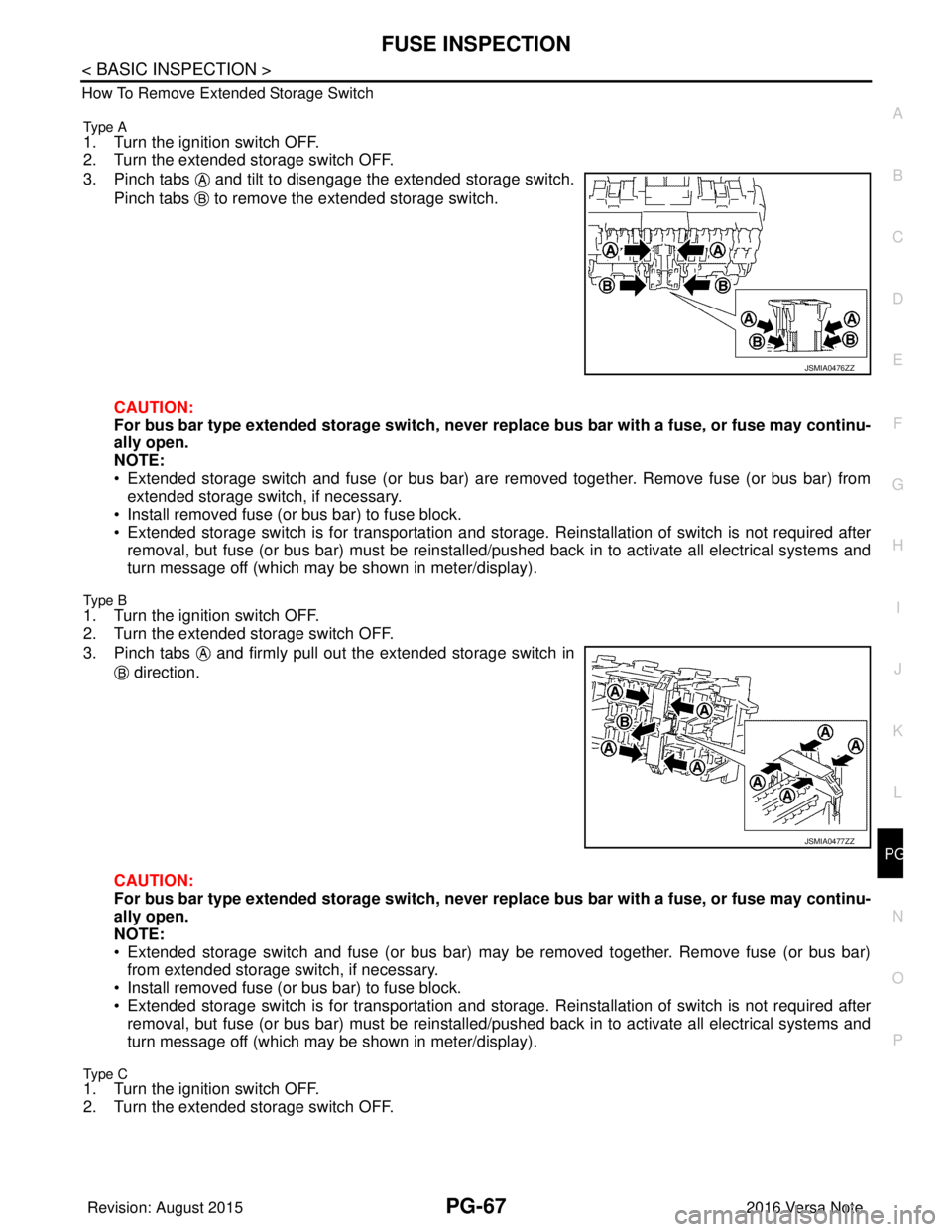
Type A
1. Turn the ignition switch OFF.
2. Turn the extended storage switch OFF.
3. Pinch tabs and tilt to disengage the extended storage switch.
Pinch tabs to remove the extended storage switch.
CAUTION:
For bus bar type extended storage switch, never replace bus bar with a fuse, or fuse may continu-
ally open.
NOTE:
• Extended storage switch and fuse (or bus bar) are removed together. Remove fuse (or bus bar) from extended storage switch, if necessary.
• Install removed fuse (or bus bar) to fuse block.
• Extended storage switch is for transportation and storage. Reinstallation of switch is not required after
removal, but fuse (or bus bar) must be reinstalled/ pushed back in to activate all electrical systems and
turn message off (which may be shown in meter/display).
Type B
1. Turn the ignition switch OFF.
2. Turn the extended storage switch OFF.
3. Pinch tabs and firmly pull out the extended storage switch in
direction.
CAUTION:
For bus bar type extended storage switch, never replace bus bar with a fuse, or fuse may continu-
ally open.
NOTE:
• Extended storage switch and fuse (or bus bar) may be removed together. Remove fuse (or bus bar) from extended storage switch, if necessary.
• Install removed fuse (or bus bar) to fuse block.
• Extended storage switch is for transportation and storage. Reinstallation of switch is not required after
removal, but fuse (or bus bar) must be reinstalled/ pushed back in to activate all electrical systems and
turn message off (which may be shown in meter/display).
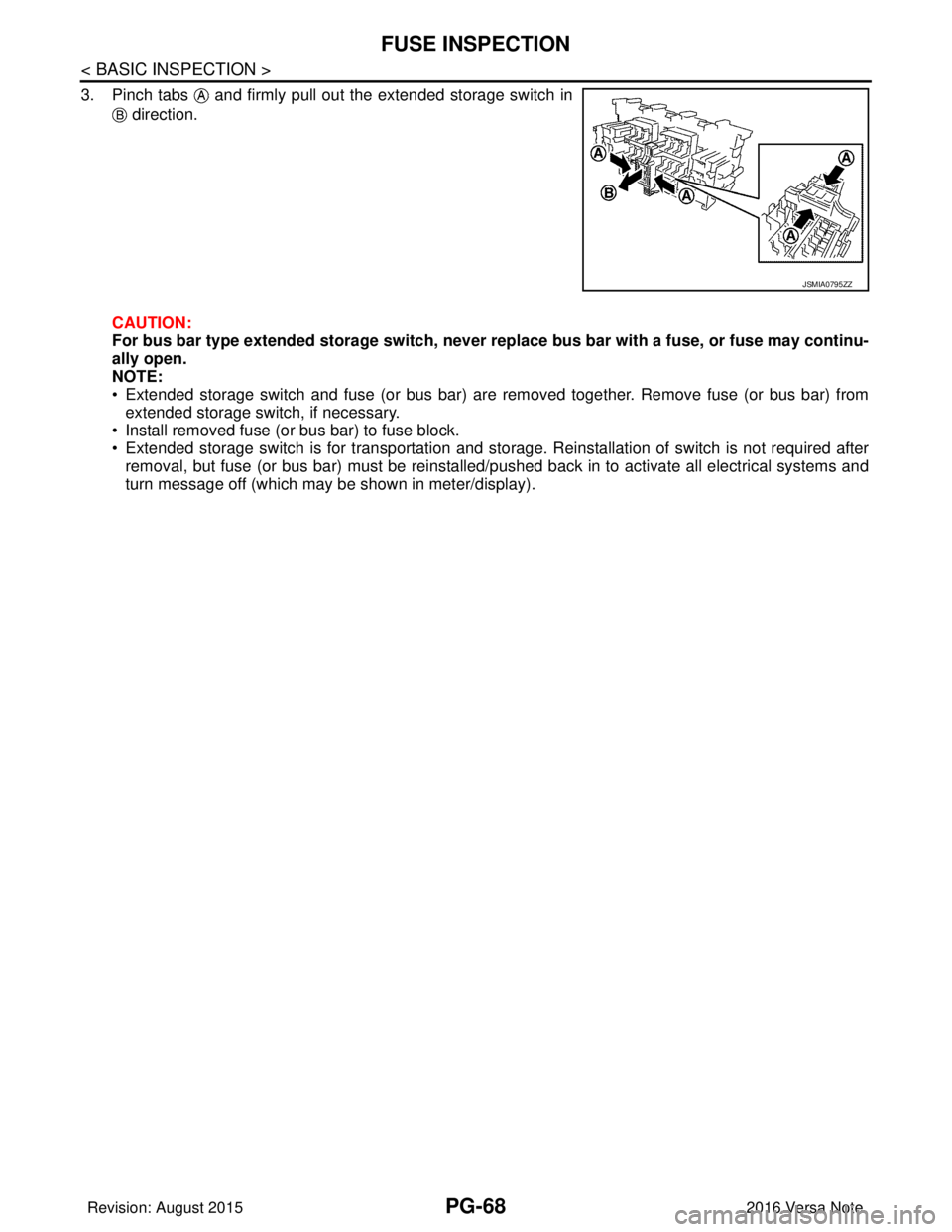
Type C1. Turn the ignition switch OFF.
2. Turn the extended storage switch OFF.
JSMIA0476ZZ
JSMIA0477ZZ
Revision: August 2015 2016 Versa Note
cardiagn.com
Page 2655 of 3641
PG-68
< BASIC INSPECTION >
FUSE INSPECTION
3. Pinch tabs and firmly pull out the extended storage switch in direction.
CAUTION:
For bus bar type extended storage switch, never replace bus bar with a fuse, or fuse may continu-
ally open.
NOTE:
• Extended storage switch and fuse (or bus bar) are removed together. Remove fuse (or bus bar) from extended storage switch, if necessary.
• Install removed fuse (or bus bar) to fuse block.
• Extended storage switch is for transportation and storage. Reinstallation of switch is not required after removal, but fuse (or bus bar) must be reinstalled/pushed back in to activate all electrical systems and
turn message off (which may be shown in meter/display).
JSMIA0795ZZ
Revision: August 2015 2016 Versa Note
cardiagn.com