Page 3218 of 3641
STC-34
< SYMPTOM DIAGNOSIS >
UNBALANCE STEERING WHEEL TURNING FORCE AND RETURN BETWEEN RIGHT AND LEFT
UNBALANCE STEERING WHEEL TU RNING FORCE AND RETURN BE-
TWEEN RIGHT AND LEFT
DescriptionINFOID:0000000012431979
Unbalance steering wheel turning force and return between right and left.
Diagnosis ProcedureINFOID:0000000012431980
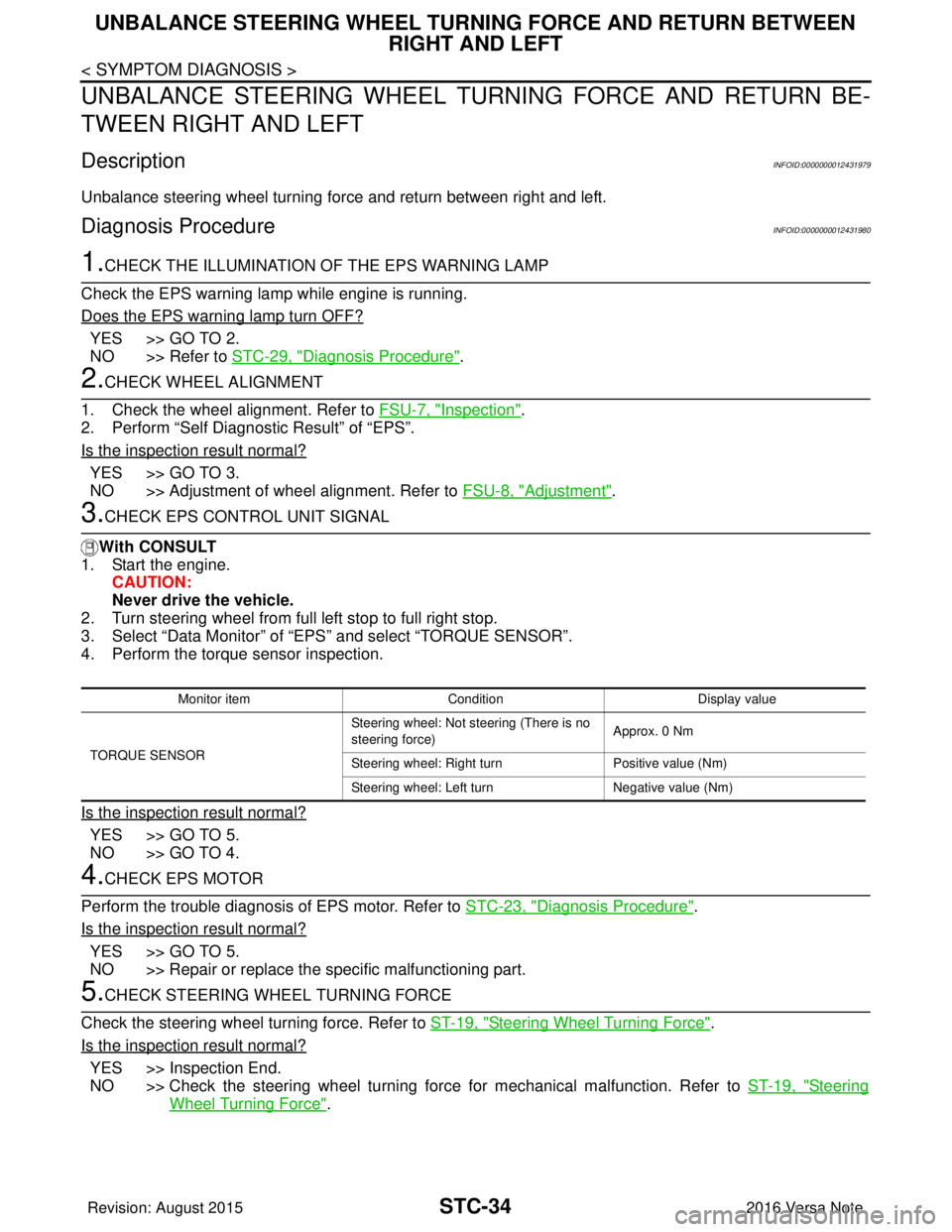
1.CHECK THE ILLUMINATION OF THE EPS WARNING LAMP
Check the EPS warning lamp while engine is running.
Does the EPS warning lamp turn OFF?
YES >> GO TO 2.
NO >> Refer to STC-29, "
Diagnosis Procedure".
2.CHECK WHEEL ALIGNMENT
1. Check the wheel alignment. Refer to FSU-7, "
Inspection".
2. Perform “Self Diagnostic Result” of “EPS”.
Is the inspection result normal?
YES >> GO TO 3.
NO >> Adjustment of wheel alignment. Refer to FSU-8, "
Adjustment".
3.CHECK EPS CONTROL UNIT SIGNAL
With CONSULT
1. Start the engine.
CAUTION:
Never drive the vehicle.
2. Turn steering wheel from full left stop to full right stop.
3. Select “Data Monitor” of “EPS” and select “TORQUE SENSOR”.
4. Perform the torque sensor inspection.
Is the inspection result normal?
YES >> GO TO 5.
NO >> GO TO 4.
4.CHECK EPS MOTOR
Perform the trouble diagnosis of EPS motor. Refer to STC-23, "
Diagnosis Procedure".
Is the inspection result normal?
YES >> GO TO 5.
NO >> Repair or replace the specific malfunctioning part.
5.CHECK STEERING WHEEL TURNING FORCE
Check the steering wheel turning force. Refer to ST-19, "
Steering Wheel Turning Force".
Is the inspection result normal?
YES >> Inspection End.
NO >> Check the steering wheel turning force for mechanical malfunction. Refer to ST-19, "
Steering
Wheel Turning Force".
Monitor item ConditionDisplay value
TORQUE SENSOR Steering wheel: Not st
eering (There is no
steering force) Approx. 0 Nm
Steering wheel: Right turn Positive value (Nm)
Steering wheel: Left turn Negative value (Nm)
Revision: August 2015 2016 Versa Note
cardiagn.com
Page 3219 of 3641
UNBALANCE STEERING WHEEL TURNING FORCE (TORQUE VARIATION)
STC-35
< SYMPTOM DIAGNOSIS >
C
D E
F
H I
J
K L
M A
B
STC
N
O P
UNBALANCE STEERING WHEEL TU RNING FORCE (TORQUE VARIA-
TION)
DescriptionINFOID:0000000012431981
Unbalance steering wheel turning force (torque variation).
Diagnosis ProcedureINFOID:0000000012431982
1.PERFORM SELF DIAGNOSTIC RESULT
With CONSULT
1. Turn the ignition switch OFF to ON.
2. Perform “Self Diagnostic Result” of “EPS”.
Is any DTC detected?
YES >> Check the DTC. Refer to STC-10, "DTC Index".
NO >> GO TO 2.
2.CHECK THE ILLUMINATION OF THE EPS WARNING LAMP
Check the EPS warning lamp while the engine is started.
Does the EPS warning lamp turn OFF?
YES >> GO TO 3.
NO >> Refer to STC-29, "
Diagnosis Procedure".
3.CHECK STEERING COLU MN AND STEERING GEAR
Check the steering column assembly and steering gear assembly.
• Steering column assembly. Refer to ST-9, "
Exploded View".
• Steering gear assembly. Refer to ST-14, "
Exploded View".
Is the inspection result normal?
YES >> GO TO 4.
NO >> Repair or replace the specific malfunctioning part.
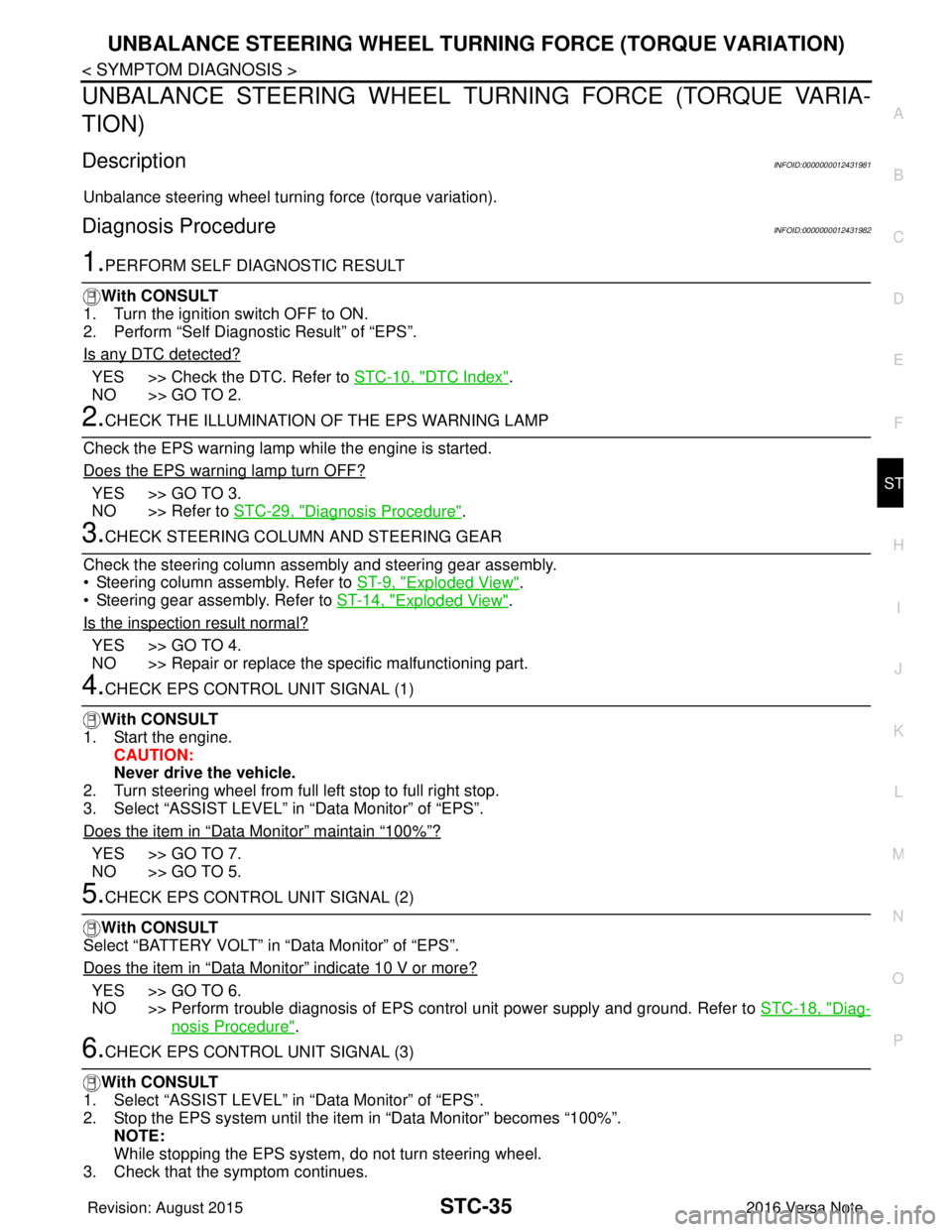
4.CHECK EPS CONTROL UNIT SIGNAL (1)
With CONSULT
1. Start the engine. CAUTION:
Never drive the vehicle.
2. Turn steering wheel from full left stop to full right stop.
3. Select “ASSIST LEVEL” in “Data Monitor” of “EPS”.
Does the item in
“Data Monitor” maintain “100%”?
YES >> GO TO 7.
NO >> GO TO 5.
5.CHECK EPS CONTROL UNIT SIGNAL (2)
With CONSULT
Select “BATTERY VOLT” in “Data Monitor” of “EPS”.
Does the item in
“Data Monitor” indicate 10 V or more?
YES >> GO TO 6.
NO >> Perform trouble diagnosis of EPS control unit power supply and ground. Refer to STC-18, "
Diag-
nosis Procedure".
6.CHECK EPS CONTROL UNIT SIGNAL (3)
With CONSULT
1. Select “ASSIST LEVEL” in “Data Monitor” of “EPS”.
2. Stop the EPS system until the item in “Data Monitor” becomes “100%”. NOTE:
While stopping the EPS system, do not turn steering wheel.
3. Check that the symptom continues.
Revision: August 2015 2016 Versa Note
cardiagn.com
Page 3220 of 3641
STC-36
< SYMPTOM DIAGNOSIS >
UNBALANCE STEERING WHEEL TURNING FORCE (TORQUE VARIATION)
Does the symptom continue?
YES >> GO TO 7.
NO >> The assist torque decreases because of protection function. This is not malfunction. Inspection
End.
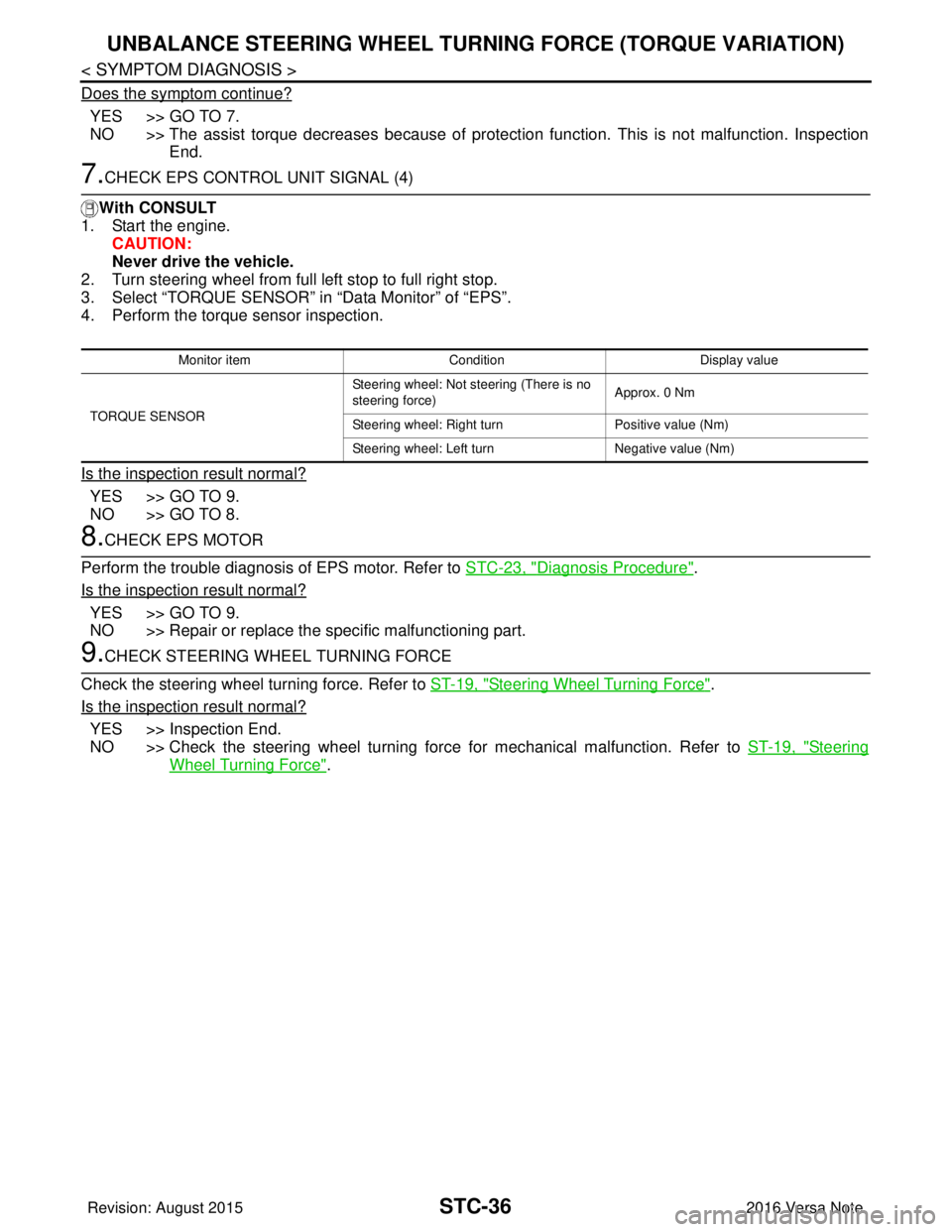
7.CHECK EPS CONTROL UNIT SIGNAL (4)
With CONSULT
1. Start the engine.
CAUTION:
Never drive the vehicle.
2. Turn steering wheel from full left stop to full right stop.
3. Select “TORQUE SENSOR” in “Data Monitor” of “EPS”.
4. Perform the torque sensor inspection.
Is the inspection result normal?
YES >> GO TO 9.
NO >> GO TO 8.
8.CHECK EPS MOTOR
Perform the trouble diagnosis of EPS motor. Refer to STC-23, "
Diagnosis Procedure".
Is the inspection result normal?
YES >> GO TO 9.
NO >> Repair or replace the specific malfunctioning part.
9.CHECK STEERING WHEEL TURNING FORCE
Check the steering wheel turning force. Refer to ST-19, "
Steering Wheel Turning Force".
Is the inspection result normal?
YES >> Inspection End.
NO >> Check the steering wheel turning force for mechanical malfunction. Refer to ST-19, "
Steering
Wheel Turning Force".
Monitor item ConditionDisplay value
TORQUE SENSOR Steering wheel: Not steering (There is no
steering force)
Approx. 0 Nm
Steering wheel: Right turn Positive value (Nm)
Steering wheel: Left turn Negative value (Nm)
Revision: August 2015 2016 Versa Note
cardiagn.com
Page 3221 of 3641
EPS CONTROL UNITSTC-37
< REMOVAL AND INSTALLATION >
C
DE
F
H I
J
K L
M A
B
STC
N
O P
REMOVAL AND INSTALLATION
EPS CONTROL UNIT
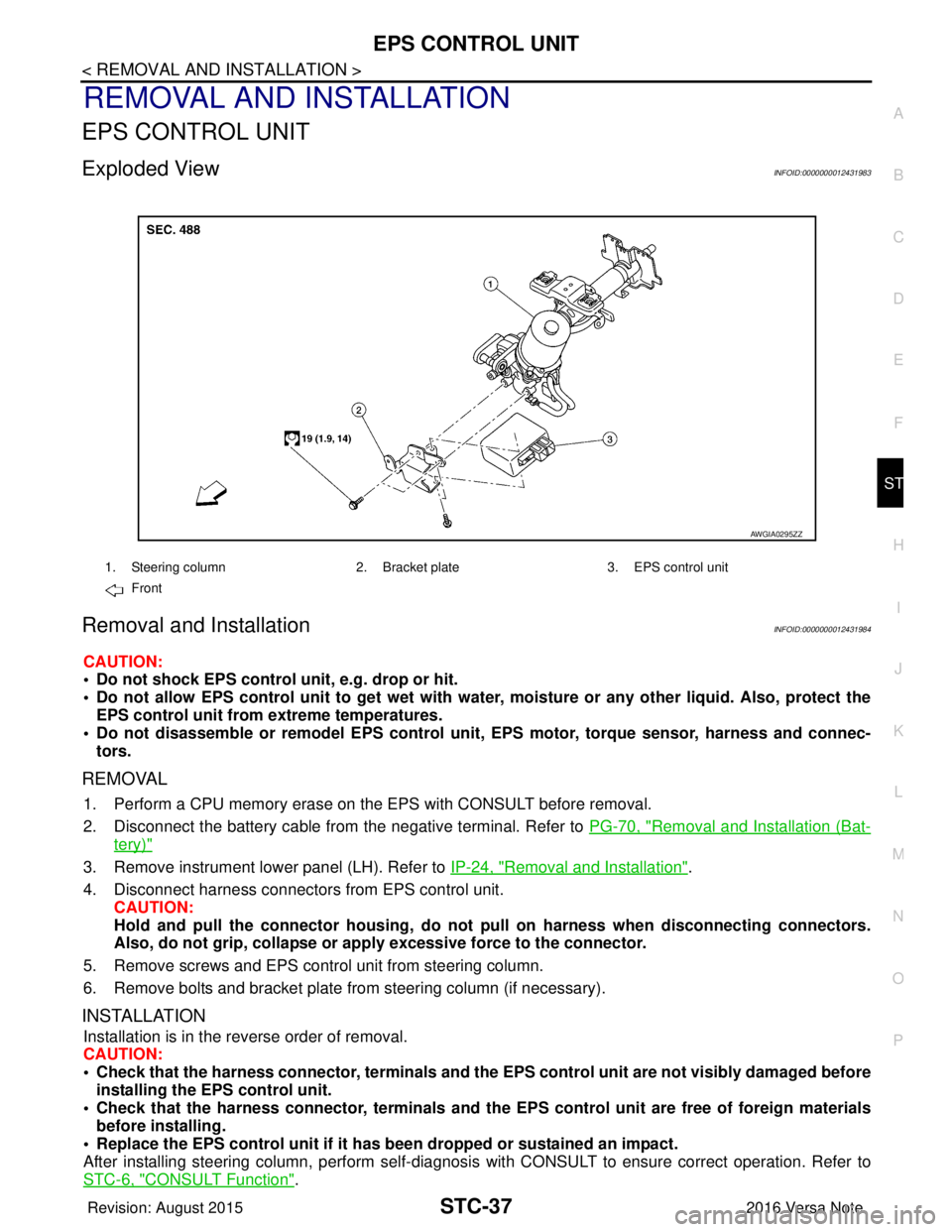
Exploded ViewINFOID:0000000012431983
Removal and InstallationINFOID:0000000012431984
CAUTION:
• Do not shock EPS control unit, e.g. drop or hit.
• Do not allow EPS control unit to get wet with wate r, moisture or any other liquid. Also, protect the
EPS control unit from extreme temperatures.
• Do not disassemble or remodel EPS control unit, EPS motor, torque sensor, harness and connec-
tors.
REMOVAL
1. Perform a CPU memory erase on t he EPS with CONSULT before removal.
2. Disconnect the battery cable from the negative terminal. Refer to PG-70, "
Removal and Installation (Bat-
tery)"
3. Remove instrument lower panel (LH). Refer to IP-24, "Removal and Installation".
4. Disconnect harness connectors from EPS control unit. CAUTION:
Hold and pull the connector housing, do not pull on harness when disconnecting connectors.
Also, do not grip, collapse or ap ply excessive force to the connector.
5. Remove screws and EPS control unit from steering column.
6. Remove bolts and bracket plate from steering column (if necessary).
INSTALLATION
Installation is in the reverse order of removal.
CAUTION:
• Check that the harness connector, terminals and the EPS control unit are not visibly damaged before
installing the EPS control unit.
• Check that the harness connector, te rminals and the EPS control unit are free of foreign materials
before installing.
• Replace the EPS control unit if it has been dropped or sustained an impact.
After installing steering column, perform self-diagnosis with CONSULT to ensure correct operation. Refer to
STC-6, "
CONSULT Function".
1. Steering column 2. Bracket plate3. EPS control unit
Front
AWGIA0295ZZ
Revision: August 2015 2016 Versa Note
cardiagn.com
Page 3224 of 3641
PREPARATIONST-3
< PREPARATION >
C
DE
F
H I
J
K L
M A
B
ST
N
O P
PREPARATION
PREPARATION
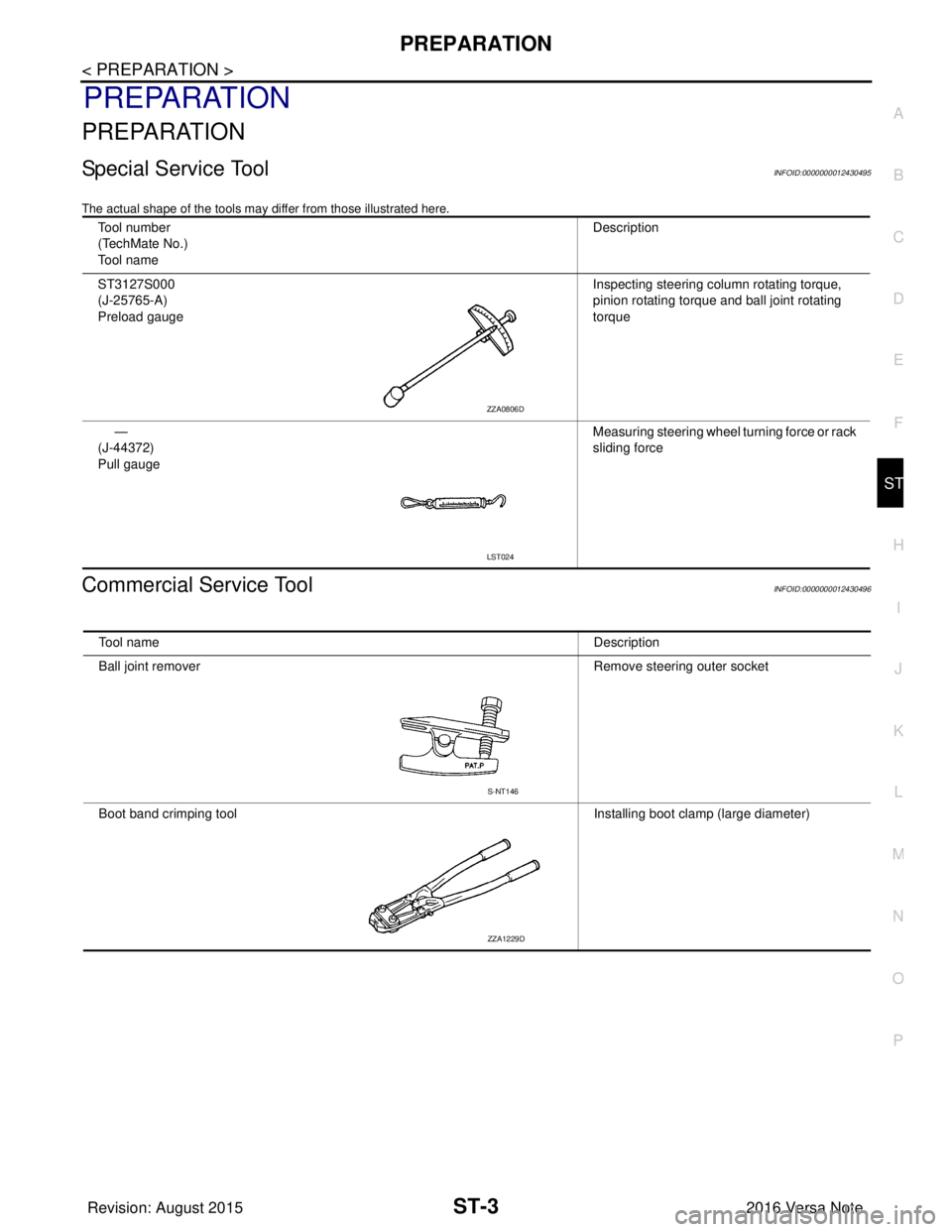
Special Service ToolINFOID:0000000012430495
The actual shape of the tools may di ffer from those illustrated here.
Commercial Service ToolINFOID:0000000012430496
Tool number
(TechMate No.)
Tool name Description
ST3127S000
(J-25765-A)
Preload gauge Inspecting steering column rotating torque,
pinion rotating torque and ball joint rotating
torque
—
(J-44372)
Pull gauge Measuring steering wheel turning force or rack
sliding force
ZZA0806D
LST024
Tool name
Description
Ball joint remover Remove steering outer socket
Boot band crimping tool Installing boot clamp (large diameter)
S-NT146
ZZA1229D
Revision: August 2015 2016 Versa Note
cardiagn.com
Page 3228 of 3641
NOISE, VIBRATION AND HARSHNESS (NVH) TROUBLESHOOTINGST-7
< SYMPTOM DIAGNOSIS >
C
DE
F
H I
J
K L
M A
B
ST
N
O P
SYMPTOM DIAGNOSIS
NOISE, VIBRATION AND HARSHN ESS (NVH) TROUBLESHOOTING
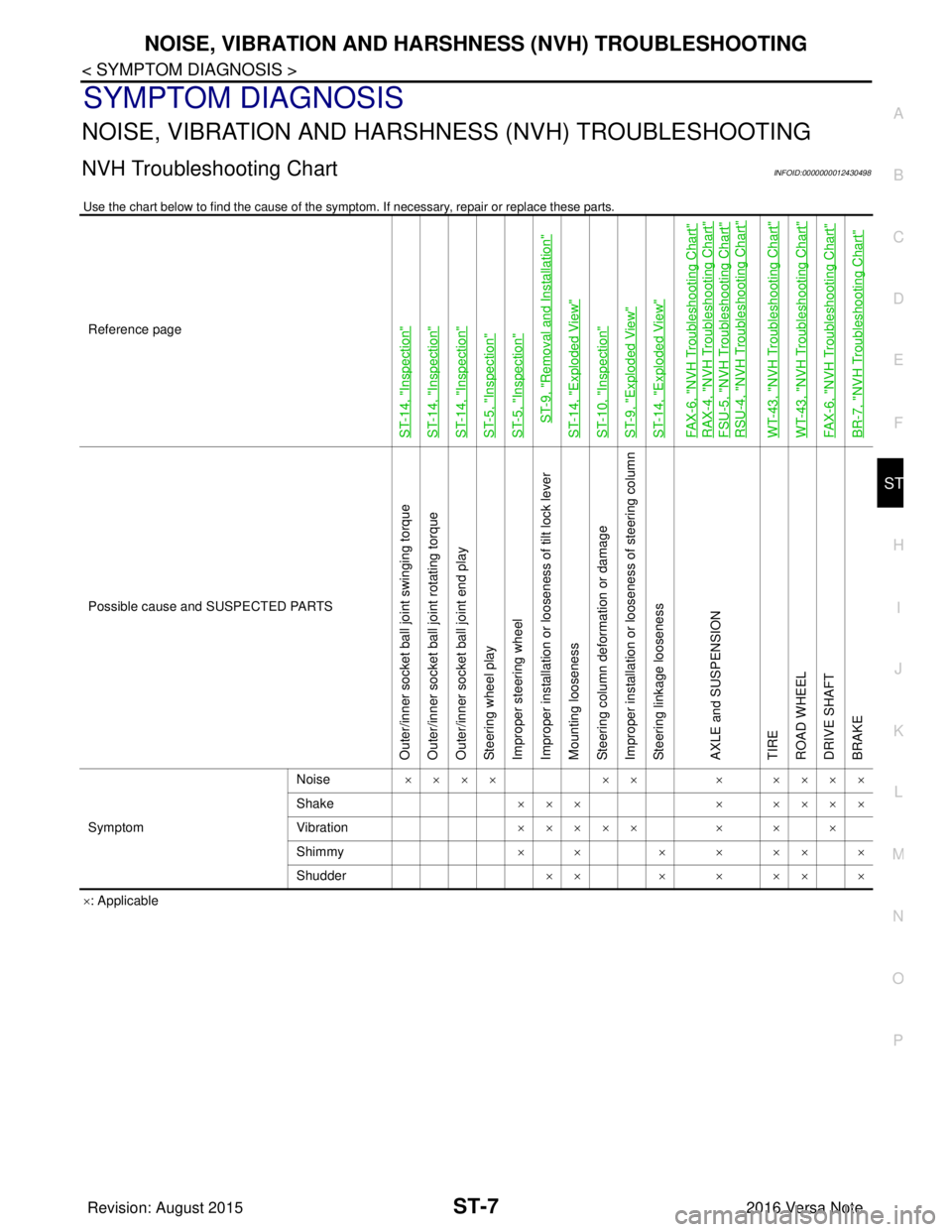
NVH Troubleshooting ChartINFOID:0000000012430498
Use the chart below to find the cause of the symp tom. If necessary, repair or replace these parts.
×: Applicable
Reference page
ST-14, "
Inspection
"
ST-14, "
Inspection
"
ST-14, "
Inspection
"
ST-5, "
Inspection
"
ST-5, "
Inspection
"
ST-9, "
Removal and Installation
"
ST-14, "
Exploded View
"
ST-10, "
Inspection
"
ST-9, "
Exploded View
"
ST-14, "
Exploded View
"
FAX-6, "
NVH Troubleshooting Chart
"
RAX-4, "
NVH Troubleshooting Chart
"
FSU-5, "
NVH Troubleshooting Chart
"
RSU-4, "
NVH Troubleshooting Chart
"
WT-43, "
NVH Troubleshooting Chart
"
WT-43, "
NVH Troubleshooting Chart
"
FAX-6, "
NVH Troubleshooting Chart
"
BR-7, "
NVH Troubleshooting Chart
"
Possible cause and
SUSPECTED PARTS
Outer/inner socket ball joint swinging torque
Outer/inner socket ball joint rotating torque
Outer/inner socket ball joint end play
Steering wheel play
Improper steering wheel
Improper installation or looseness of tilt lock lever
Mounting looseness
Steering column deformation or damage
Improper installation or looseness of steering column
Steering linkage looseness
AXLE and SUSPENSION
TIRE
ROAD WHEEL
DRIVE SHAFT
BRAKE
Symptom Noise
×××× ×× × ××××
Shake ×××× ××××
Vibration ××××× × × ×
Shimmy ×× × ××××
Shudder ×× × × ×× ×
Revision: August 2015 2016 Versa Note
cardiagn.com
Page 3232 of 3641
STEERING COLUMNST-11
< REMOVAL AND INSTALLATION >
C
DE
F
H I
J
K L
M A
B
ST
N
O P
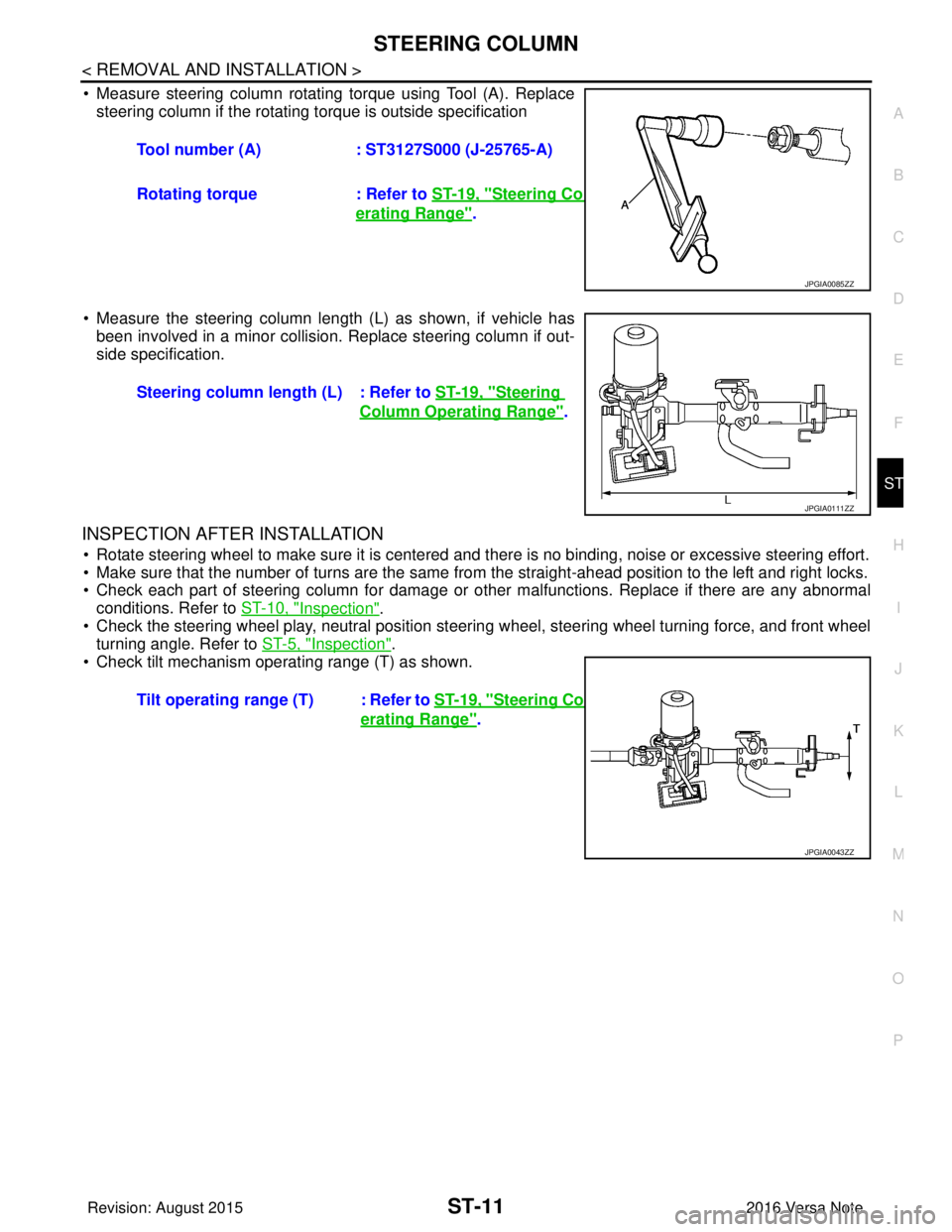
• Measure steering column rotating torque using Tool (A). Replace steering column if the rotating torque is outside specification
• Measure the steering column length (L) as shown, if vehicle has been involved in a minor collision. Replace steering column if out-
side specification.
INSPECTION AFTER INSTALLATION
• Rotate steering wheel to make sure it is centered and there is no binding, noise or excessive steering effort.
• Make sure that the number of turns are the same from the straight-ahead position to the left and right locks.
• Check each part of steering column for damage or other malfunctions. Replace if there are any abnormal
conditions. Refer to ST-10, "
Inspection".
• Check the steering wheel play, neutral position steering wheel, steering wheel turning force, and front wheel turning angle. Refer to ST-5, "
Inspection".
• Check tilt mechanism operating range (T) as shown. Tool number (A)
: ST3127S000 (J-25765-A)
Rotating torque : Refer to ST-19, "
Steering Column Op-
erating Range".
JPGIA0085ZZ
Steering column length (L) : Refer to ST-19, "Steering
Column Operating Range".
JPGIA0111ZZ
Tilt operating range (T) : Refer to ST-19, "Steering Column Op-
erating Range".
JPGIA0043ZZ
Revision: August 2015 2016 Versa Note
cardiagn.com
Page 3238 of 3641
STEERING GEAR AND LINKAGEST-17
< UNIT DISASSEMBLY AND ASSEMBLY >
C
DE
F
H I
J
K L
M A
B
ST
N
O P
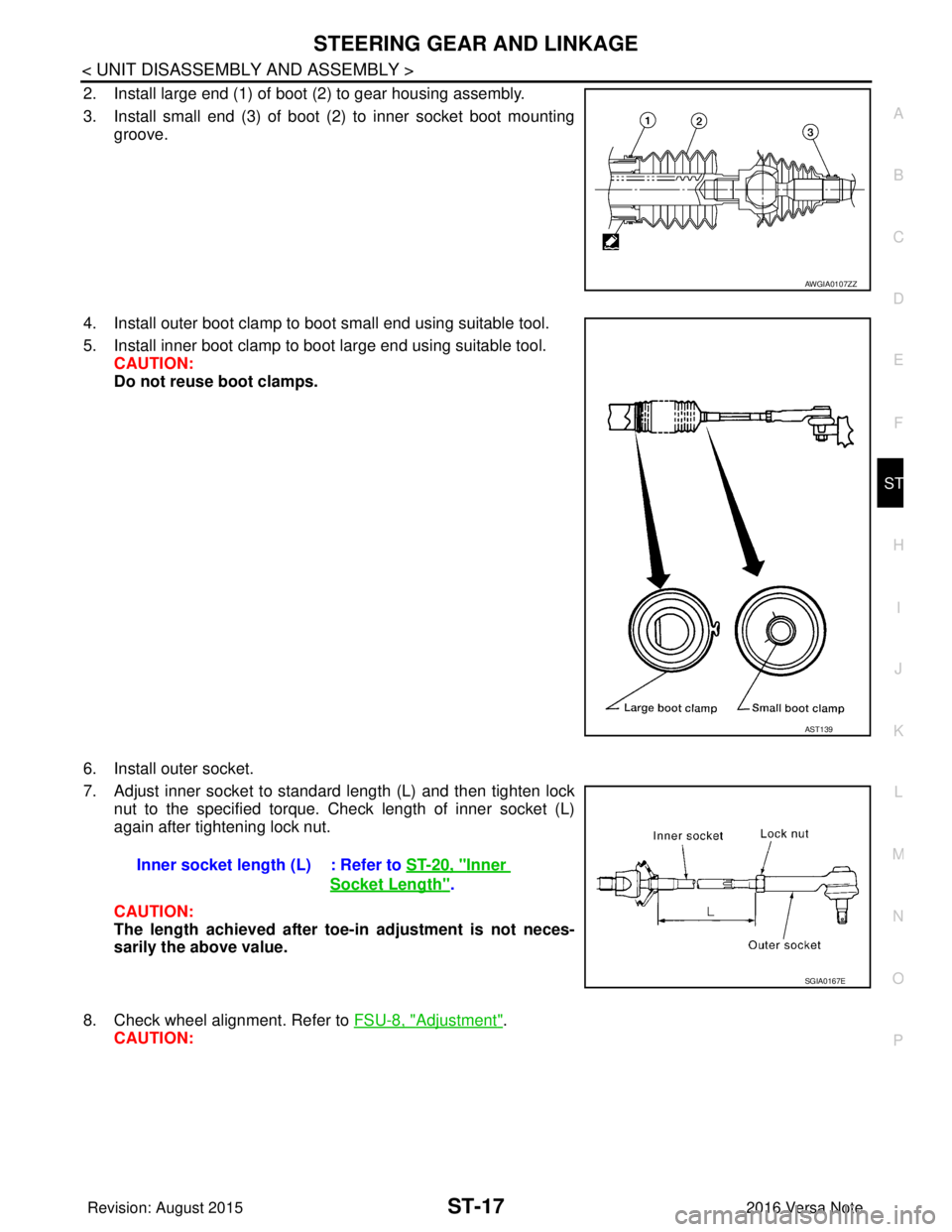
2. Install large end (1) of boot (2) to gear housing assembly.
3. Install small end (3) of boot (2) to inner socket boot mounting groove.
4. Install outer boot clamp to boot small end using suitable tool.
5. Install inner boot clamp to boot large end using suitable tool. CAUTION:
Do not reuse boot clamps.
6. Install outer socket.
7. Adjust inner socket to standard length (L) and then tighten lock nut to the specified torque. Check length of inner socket (L)
again after tightening lock nut.
CAUTION:
The length achieved after toe-in adjustment is not neces-
sarily the above value.
8. Check wheel alignment. Refer to FSU-8, "
Adjustment".
CAUTION:
AWGIA0107ZZ
AST139
Inner socket length (L) : Refer to ST-20, "Inner
Socket Length".
SGIA0167E
Revision: August 2015 2016 Versa Note
cardiagn.com