2016 NISSAN NOTE torque
[x] Cancel search: torquePage 3192 of 3641

STC-8
< ECU DIAGNOSIS INFORMATION >
EPS CONTROL UNIT
ECU DIAGNOSIS INFORMATION
EPS CONTROL UNIT
Reference ValueINFOID:0000000012431945
VALUES ON THE DIAGNOSIS TOOL
CAUTION:
The output signal indicates the EPS control unit calculation data. The normal values will be displayed
even in the event that the output circuit (harness) is open.
*1: Almost in accordance with the value of “MOTOR S IG”. It is not a malfunction though these values are not
accorded when steering quickly.
*2: A fixed value is indicated regardless of steering turning.
*3: Normally displays 100%. In case of an excessive stat ionary steering, the assist curvature gradually falls.
However, it returns to 100% when left standing.
*4: It is not a malfunction, though it might not be co rresponding just after ignition switch in turned ON.
Monitor item Data monitor
Condition Display value
BATTERY VOLT Ignition switch: ON Battery voltage
TORQUE SENSOR Engine running Steering wheel: Not
steering (There is
no steering force) Approx. 0 Nm
Steering wheel: Right turn Positive value (Nm)
Steering wheel: Left turn Negative value (Nm)
MOTOR CURRENT Engine running Steering wheel: Not
steering (There is
no steering force) Approx. 0 A
Steering wheel: Right or left turn Displays consumption current of
EPS motor (A)
*1
MOTOR SIG
Engine runningSteering wheel: Not
steering (There is
no steering force) Approx. 0 A
Steering wheel: Right turn Positive value (A)
Steering wheel: Left turn Negative value (A)
ASSIST TORQUE Engine running Approx. 0 Nm
*2
C/U TEMPIgnition switch ON or engine running Displays temperature of inside of
EPS control unit (
°C or °F)
ASSIST LEVEL Engine running
100 %
*3
VEHICLE SPEEDVehicle stopped
0 km/h or mph
While driving Approximately equal to the indication
on speedometer*4
(inside of ±
10%)
WARNING LAMP EPS warning lamp: ON
On
EPS warning lamp: OFF Off
ENGINE STATUS Engine not running
Stop
Engine running Run
Revision: August 2015 2016 Versa Note
cardiagn.com
Page 3193 of 3641
EPS CONTROL UNITSTC-9
< ECU DIAGNOSIS INFORMATION >
C
DE
F
H I
J
K L
M A
B
STC
N
O P
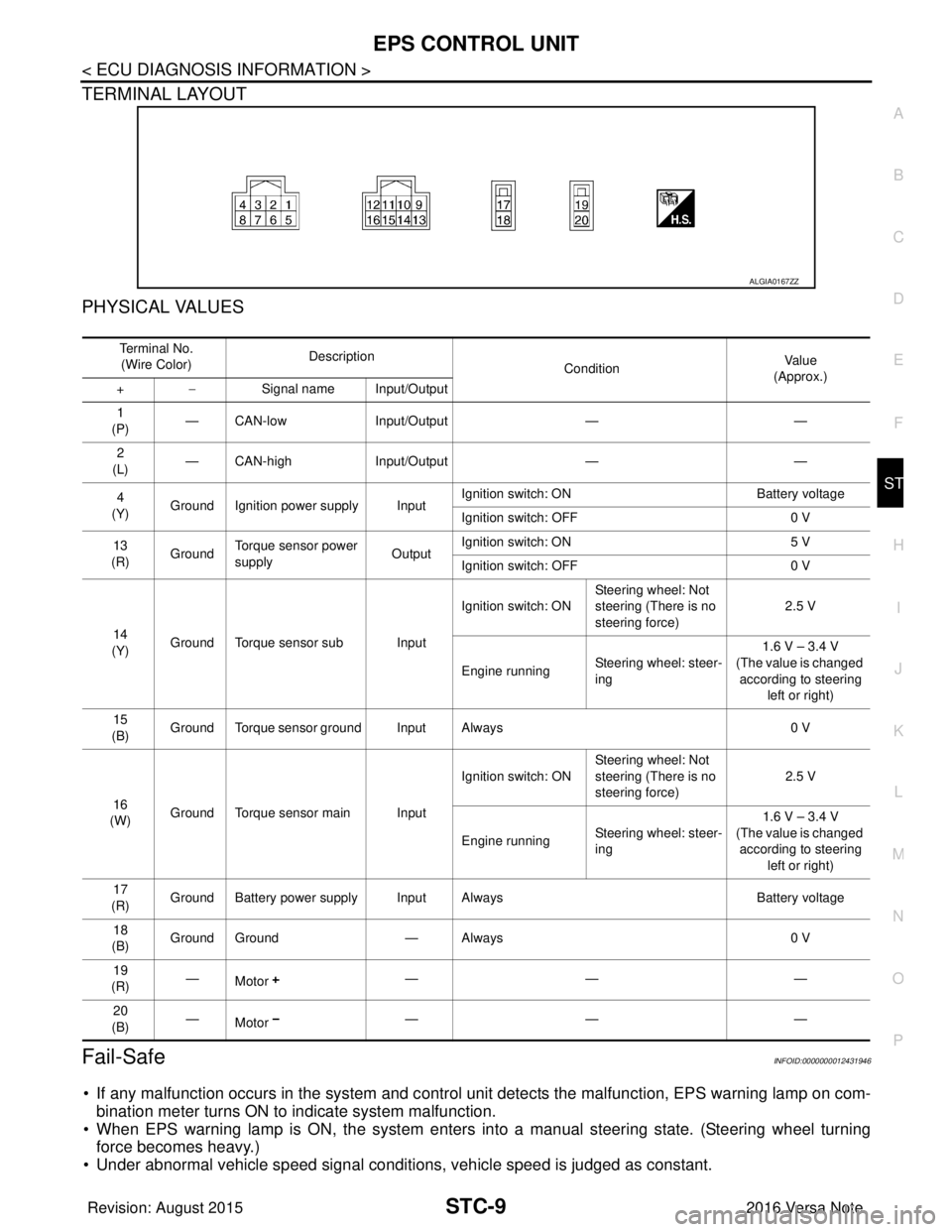
TERMINAL LAYOUT
PHYSICAL VALUES
Fail-SafeINFOID:0000000012431946
• If any malfunction occurs in the system and control uni t detects the malfunction, EPS warning lamp on com-
bination meter turns ON to indicate system malfunction.
• When EPS warning lamp is ON, the system enters into a manual steering state. (Steering wheel turning force becomes heavy.)
• Under abnormal vehicle speed signal conditions, vehicle speed is judged as constant.
ALGIA0167ZZ
Te r m i n a l N o .
(Wire Color) Description
ConditionVa l u e
(Approx.)
+ − Signal name Input/Output
1
(P) — CAN-low
Input/Output ——
2
(L) — CAN-high
Input/Output ——
4
(Y) Ground Ignition power supply Input Ignition switch: ON
Battery voltage
Ignition switch: OFF 0 V
13
(R) Ground Torque sensor power
supply
OutputIgnition switch: ON
5 V
Ignition switch: OFF 0 V
14
(Y) Ground Torque sensor sub Input Ignition switch: ON
Steering wheel: Not
steering (There is no
steering force) 2.5 V
Engine running Steering wheel: steer-
ing 1.6 V – 3.4 V
(The value is changed according to steering
left or right)
15
(B) Ground Torque sensor ground Input Always
0 V
16
(W) Ground Torque sensor main Input Ignition switch: ON
Steering wheel: Not
steering (There is no
steering force) 2.5 V
Engine running Steering wheel: steer-
ing 1.6 V – 3.4 V
(The value is changed according to steering left or right)
17
(R) Ground Battery power supply Input Always
Battery voltage
18
(B) Ground Ground
— Always 0 V
19
(R) —
Motor —— —
20
(B) —
Motor —— —
Revision: August 2015
2016 Versa Note
cardiagn.com
Page 3194 of 3641

STC-10
< ECU DIAGNOSIS INFORMATION >
EPS CONTROL UNIT
Protection Function
INFOID:0000000012431947
EPS control unit decreases the output signal to EPS mo tor while extremely using the power steering function
(e.g., full steering) consecutively for protecting EPS motor and EPS control unit (Overload protection control).
While activating overload protection control, the assist torque gradually decreases, and the steering wheel
turning force becomes heavy. The normal assist torque reactivates by no steering.
DTC Inspection Priority ChartINFOID:0000000012431948
When multiple DTCs are detected simultaneously, c heck one by one depending on the following priority list:
DTC IndexINFOID:0000000012431949
Priority Priority order item (DTC)
1 U1000 CAN COMM CIRCUIT
2 C1609 CAN VHCL SPEED, C1610 CAN ENG RPM
3 C1601 BATTERY VOLT
4 Other than the above
DTC Items (CONSULT screen terms) Reference
C1601 BATTERY VOLT STC-18, "
DTC Logic"
C1604TORQUE SENSOR STC-21, "DTC Logic"
C1606EPS MOTOR STC-23, "DTC Logic"
C1607EEPROM STC-25, "DTC Logic"
C1608CONTROL UNIT STC-25, "DTC Logic"
C1609CAN VHCL SPEED STC-26, "DTC Logic"
C1610CAN ENG RPM STC-27, "DTC Logic"
U1000CAN COMM CIRCUIT STC-28, "DTC Logic"
Revision: August 2015 2016 Versa Note
cardiagn.com
Page 3204 of 3641

STC-20
< DTC/CIRCUIT DIAGNOSIS >
C1601 BATTERY POWER SUPPLY
NO >> Repair or replace malfunctioning component.
6.CHECK CONNECTOR
1. Turn ignition switch OFF.
2. Disconnect torque sensor harness connector.
3. Check terminal for deformation, disconnection, looseness, and so on. If any malfunction is found, repair or replace terminal.
Is the inspection result normal?
YES >> Replace EPS control unit. Refer to STC-37, "Removal and Installation".
NO >> Repair or replace malfunctioning component.
Revision: August 2015 2016 Versa Note
cardiagn.com
Page 3205 of 3641
C1604 TORQUE SENSORSTC-21
< DTC/CIRCUIT DIAGNOSIS >
C
DE
F
H I
J
K L
M A
B
STC
N
O P
C1604 TORQUE SENSOR
DTC LogicINFOID:0000000012431955
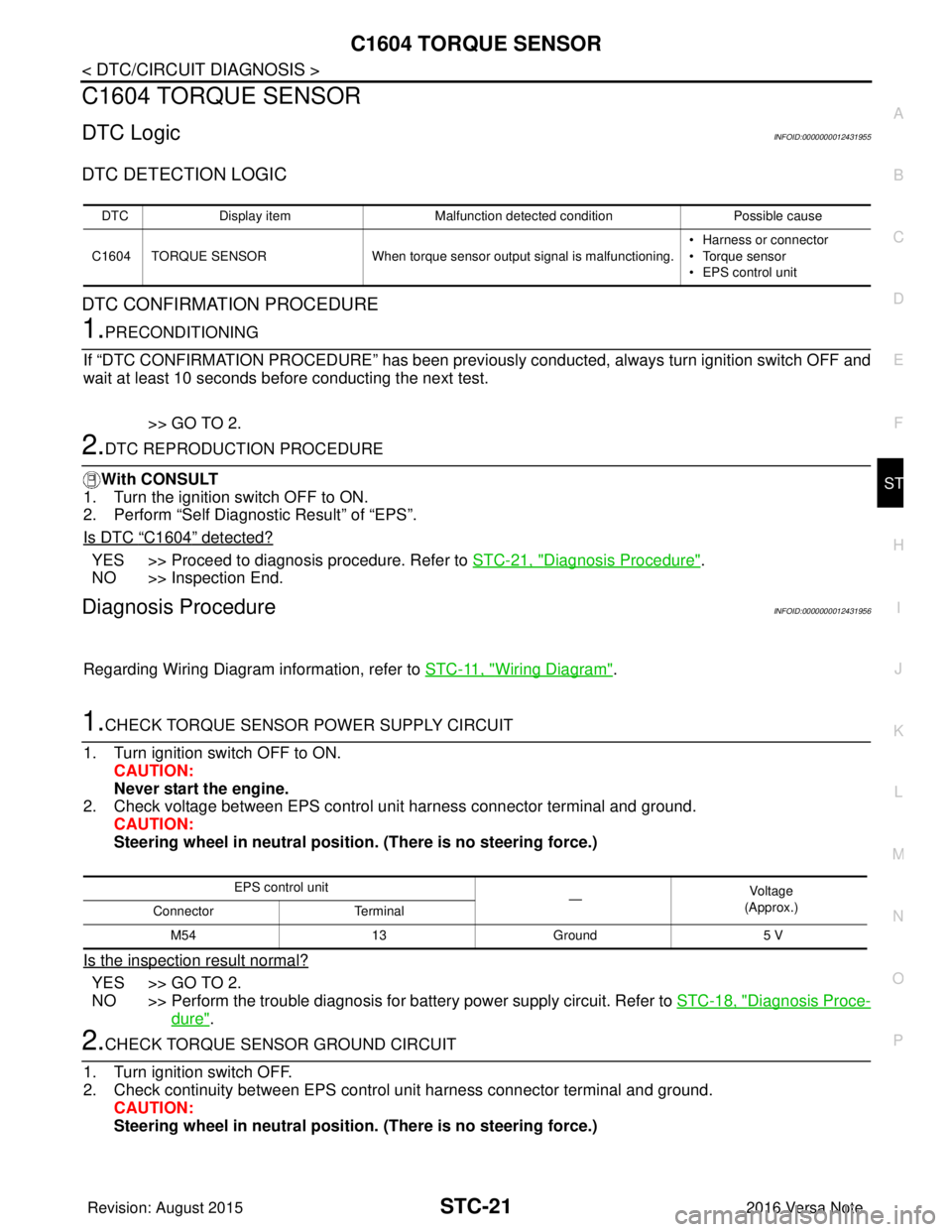
DTC DETECTION LOGIC
DTC CONFIRMATION PROCEDURE
1.PRECONDITIONING
If “DTC CONFIRMATION PROCEDURE” has been previously conducted, always turn ignition switch OFF and
wait at least 10 seconds before conducting the next test.
>> GO TO 2.
2.DTC REPRODUCTION PROCEDURE
With CONSULT
1. Turn the ignition switch OFF to ON.
2. Perform “Self Diagnostic Result” of “EPS”.
Is DTC
“C1604” detected?
YES >> Proceed to diagnosis procedure. Refer to STC-21, "Diagnosis Procedure".
NO >> Inspection End.
Diagnosis ProcedureINFOID:0000000012431956
Regarding Wiring Diagram information, refer to STC-11, "Wiring Diagram".
1.CHECK TORQUE SENSOR POWER SUPPLY CIRCUIT
1. Turn ignition switch OFF to ON. CAUTION:
Never start the engine.
2. Check voltage between EPS control unit harness connector terminal and ground.
CAUTION:
Steering wheel in neutral position . (There is no steering force.)
Is the inspection result normal?
YES >> GO TO 2.
NO >> Perform the trouble diagnosis for battery power supply circuit. Refer to STC-18, "
Diagnosis Proce-
dure".
2.CHECK TORQUE SENSOR GROUND CIRCUIT
1. Turn ignition switch OFF.
2. Check continuity between EPS control unit harness connector terminal and ground. CAUTION:
Steering wheel in neutral position . (There is no steering force.)
DTCDisplay item Malfunction detected condition Possible cause
C1604 TORQUE SENSOR When torque sensor output signal is malfunctioning. • Harness or connector
• Torque sensor
• EPS control unit
EPS control unit
—Vo l ta g e
(Approx.)
Connector Terminal
M54 13Ground 5 V
Revision: August 2015 2016 Versa Note
cardiagn.com
Page 3206 of 3641
STC-22
< DTC/CIRCUIT DIAGNOSIS >
C1604 TORQUE SENSOR
Is the inspection result normal?
YES >> GO TO 3.
NO >> Repair open circuit or short to ground or short to power in harness or connectors.
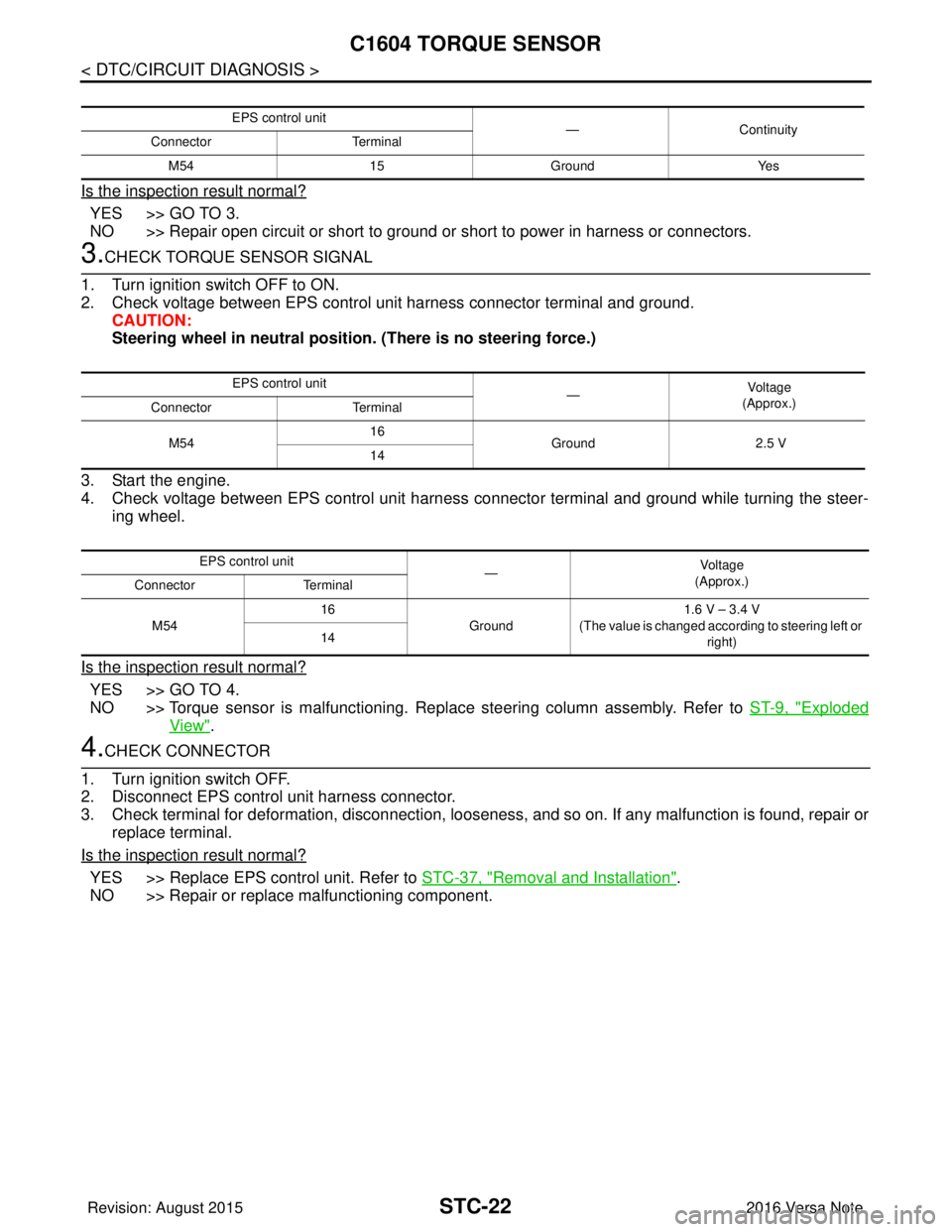
3.CHECK TORQUE SENSOR SIGNAL
1. Turn ignition switch OFF to ON.
2. Check voltage between EPS control unit harness connector terminal and ground. CAUTION:
Steering wheel in neutral position. (There is no steering force.)
3. Start the engine.
4. Check voltage between EPS control unit harness connector terminal and ground while turning the steer- ing wheel.
Is the inspection result normal?
YES >> GO TO 4.
NO >> Torque sensor is malfunctioning. Repl ace steering column assembly. Refer to ST-9, "
Exploded
View".
4.CHECK CONNECTOR
1. Turn ignition switch OFF.
2. Disconnect EPS control unit harness connector.
3. Check terminal for deformation, disconnection, looseness, and so on. If any malfunction is found, repair or replace terminal.
Is the inspection result normal?
YES >> Replace EPS control unit. Refer to STC-37, "Removal and Installation".
NO >> Repair or replace malfunctioning component.
EPS control unit —Continuity
Connector Terminal
M54 15Ground Yes
EPS control unit
—Vo l ta g e
(Approx.)
Connector Terminal
M54 16
Ground 2.5 V
14
EPS control unit —Voltag e
(Approx.)
Connector Terminal
M54 16
Ground 1.6 V – 3.4 V
(The value is changed according to steering left or right)
14
Revision: August 2015
2016 Versa Note
cardiagn.com
Page 3216 of 3641
STC-32
< SYMPTOM DIAGNOSIS >
STEERING WHEEL TURNING FORCE IS HEAVY OR LIGHT
STEERING WHEEL TURNING FORCE IS HEAVY OR LIGHT
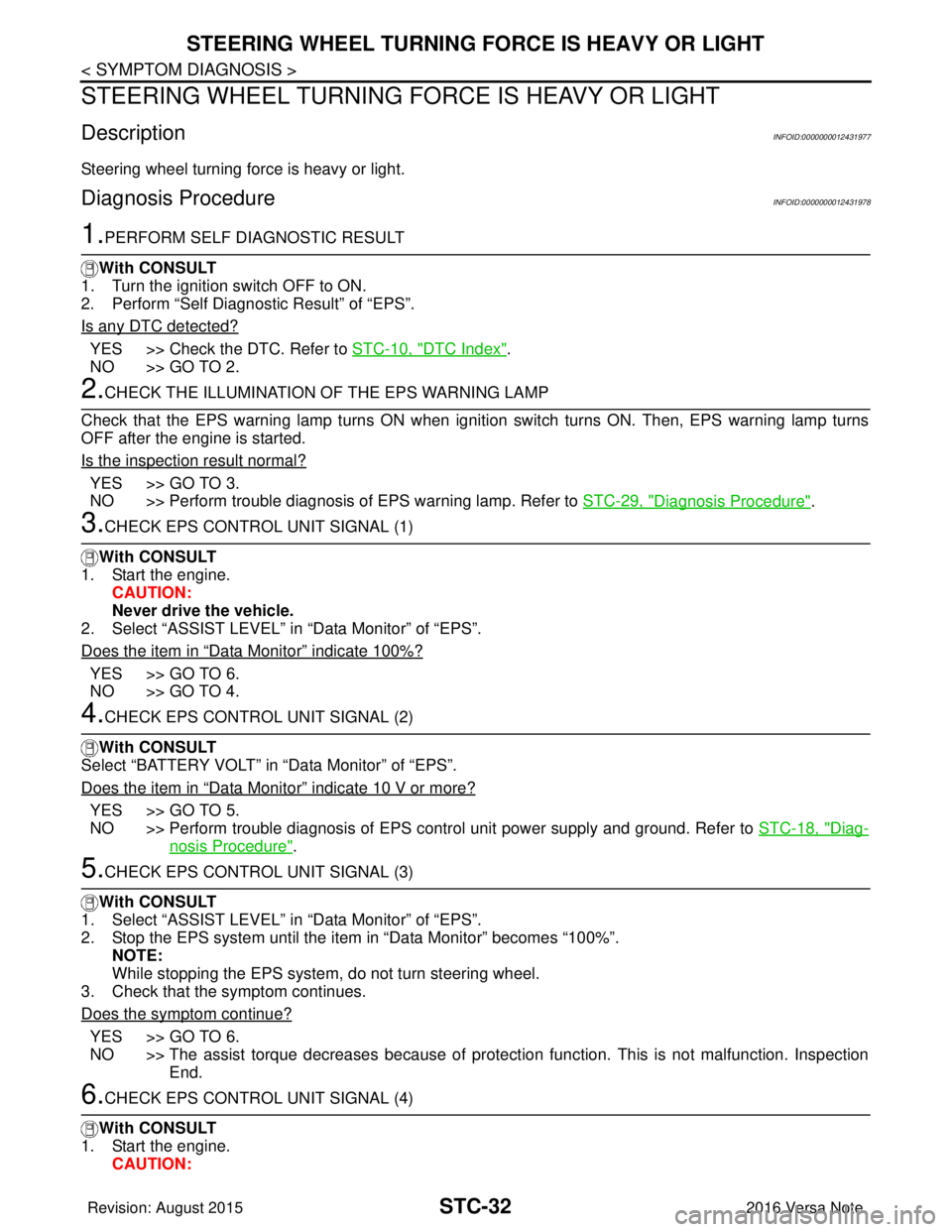
DescriptionINFOID:0000000012431977
Steering wheel turning force is heavy or light.
Diagnosis ProcedureINFOID:0000000012431978
1.PERFORM SELF DIAGNOSTIC RESULT
With CONSULT
1. Turn the ignition switch OFF to ON.
2. Perform “Self Diagnostic Result” of “EPS”.
Is any DTC detected?
YES >> Check the DTC. Refer to STC-10, "DTC Index".
NO >> GO TO 2.
2.CHECK THE ILLUMINATION OF THE EPS WARNING LAMP
Check that the EPS warning lamp turns ON when igni tion switch turns ON. Then, EPS warning lamp turns
OFF after the engine is started.
Is the inspection result normal?
YES >> GO TO 3.
NO >> Perform trouble diagnosis of EPS warning lamp. Refer to STC-29, "
Diagnosis Procedure".
3.CHECK EPS CONTROL UNIT SIGNAL (1)
With CONSULT
1. Start the engine. CAUTION:
Never drive the vehicle.
2. Select “ASSIST LEVEL” in “Data Monitor” of “EPS”.
Does the item in
“Data Monitor” indicate 100%?
YES >> GO TO 6.
NO >> GO TO 4.
4.CHECK EPS CONTROL UNIT SIGNAL (2)
With CONSULT
Select “BATTERY VOLT” in “Data Monitor” of “EPS”.
Does the item in
“Data Monitor” indicate 10 V or more?
YES >> GO TO 5.
NO >> Perform trouble diagnosis of EPS control unit power supply and ground. Refer to STC-18, "
Diag-
nosis Procedure".
5.CHECK EPS CONTROL UNIT SIGNAL (3)
With CONSULT
1. Select “ASSIST LEVEL” in “Data Monitor” of “EPS”.
2. Stop the EPS system until the item in “Data Monitor” becomes “100%”.
NOTE:
While stopping the EPS system, do not turn steering wheel.
3. Check that the symptom continues.
Does the symptom continue?
YES >> GO TO 6.
NO >> The assist torque decreases because of protection function. This is not malfunction. Inspection End.
6.CHECK EPS CONTROL UNIT SIGNAL (4)
With CONSULT
1. Start the engine. CAUTION:
Revision: August 2015 2016 Versa Note
cardiagn.com
Page 3217 of 3641
STEERING WHEEL TURNING FORCE IS HEAVY OR LIGHTSTC-33
< SYMPTOM DIAGNOSIS >
C
DE
F
H I
J
K L
M A
B
STC
N
O P
Never drive the vehicle.
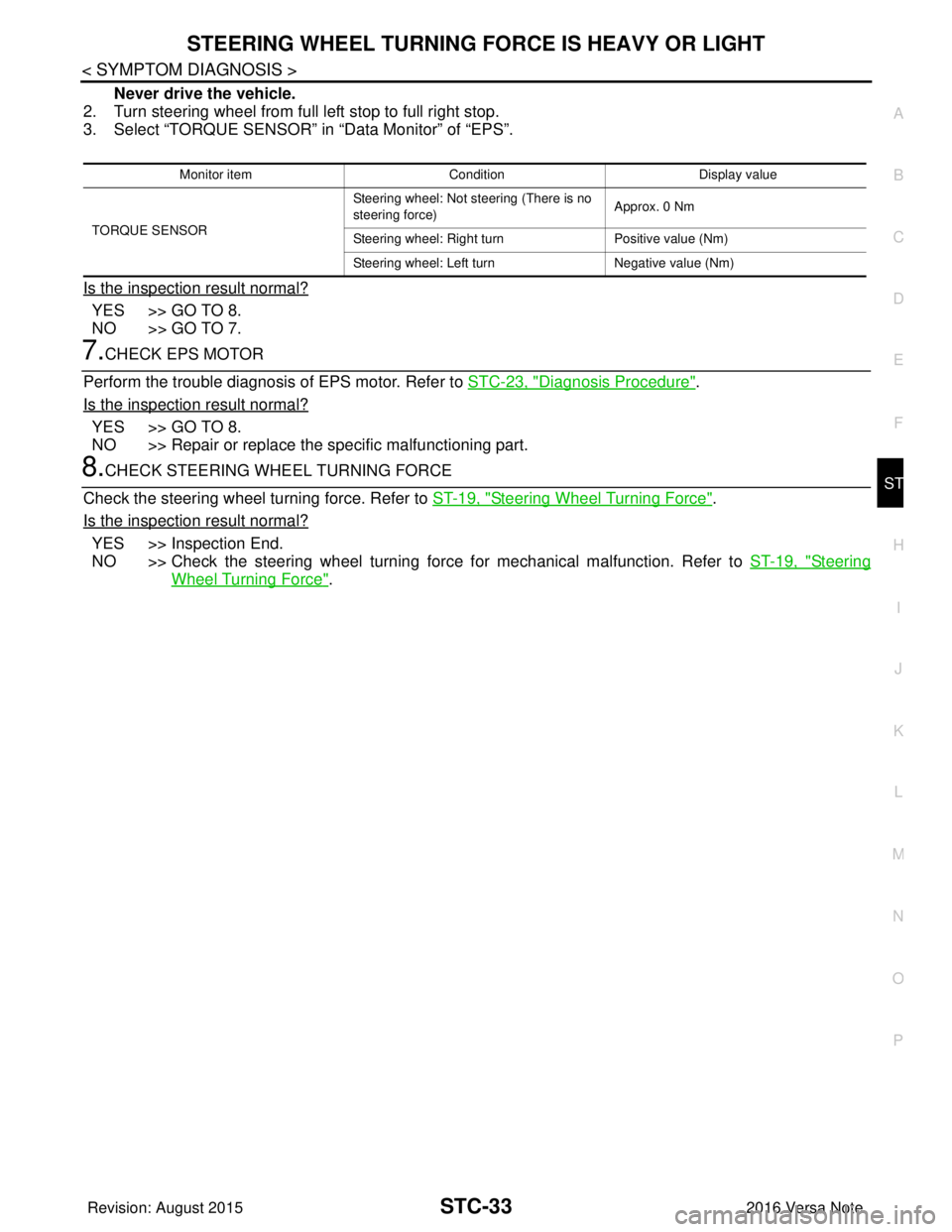
2. Turn steering wheel from full left stop to full right stop.
3. Select “TORQUE SENSOR” in “Data Monitor” of “EPS”.
Is the inspection result normal?
YES >> GO TO 8.
NO >> GO TO 7.
7.CHECK EPS MOTOR
Perform the trouble diagnosis of EPS motor. Refer to STC-23, "
Diagnosis Procedure".
Is the inspection result normal?
YES >> GO TO 8.
NO >> Repair or replace the specific malfunctioning part.
8.CHECK STEERING WH EEL TURNING FORCE
Check the steering wheel turning force. Refer to ST-19, "
Steering Wheel Turning Force".
Is the inspection result normal?
YES >> Inspection End.
NO >> Check the steering wheel turning forc e for mechanical malfunction. Refer to ST-19, "
Steering
Wheel Turning Force".
Monitor item ConditionDisplay value
TORQUE SENSOR Steering wheel: Not steering (There is no
steering force)
Approx. 0 Nm
Steering wheel: Right turn Positive value (Nm)
Steering wheel: Left turn Negative value (Nm)
Revision: August 2015 2016 Versa Note
cardiagn.com