2016 MERCEDES-BENZ E-CLASS ESTATE warning light
[x] Cancel search: warning lightPage 505 of 565
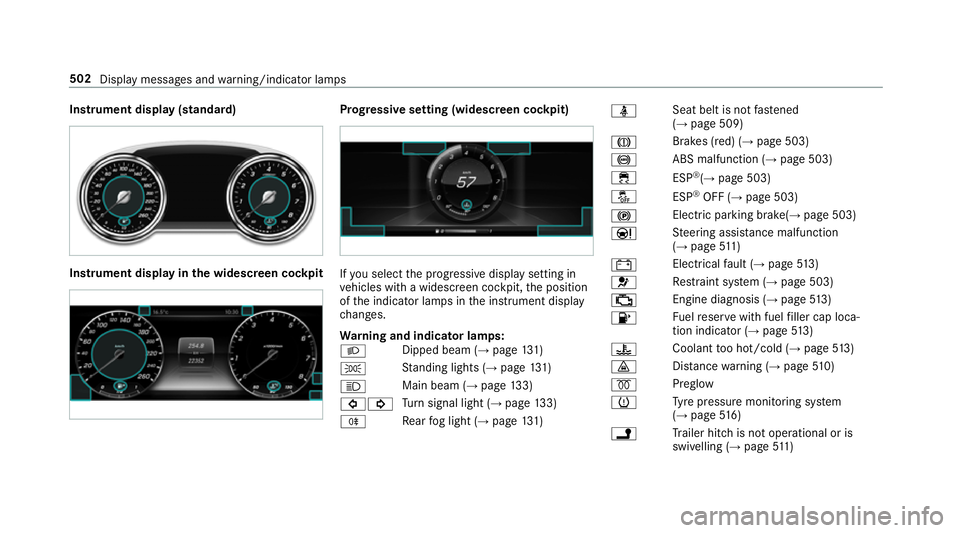
Instrument display (standard)
Instrument display in
the widescreen cockpit Prog
ressive setting (widescreen cockpit) If
yo u select the progressive display setting in
ve hicles with a widescreen cockpit, the position
of the indicator lamps in the instrument display
ch anges.
Wa rning and indicator lamps:
L Dipped beam (→
page131)
T St
anding lights (→ page131)
K Main beam (→
page133)
#! Tu
rn signal light (→ page133)
R Re
ar fog light (→ page131) ü
Seat belt is not
fastened
(→ page 509)
J Brakes (red) (→
page 503)
! ABS malfunction (→
page 503)
÷ ESP®
(→ page 503)
å ESP®
OFF (→ page 503)
! Elect
ric pa rking brake(→ page 503)
Ð St
eering assis tance malfunction
(→ page 511)
# Electrical
fault (→ page513)
6 Re
stra int sy stem (→ page 503)
; Engine diagnosis (→
page513)
8 Fu
elreser vewith fuel filler cap loca‐
tion indicator (→ page513)
? Coolan
tto o hot/cold (→ page513)
· Dis
tance warning (→ page510)
% Preglow
h Ty
re pressure monitoring sy stem
(→ page 516)
j Tr
ailer hit chis not operational or is
swivelling (→ page511) 502
Displaymessa ges and warning/indicator lamps
Page 509 of 565
Wa
rning/indicator lamp
Possible causes/consequences and M
MSolutions
÷ ESP ®
wa rning lamp flashes The
yellow ESP ®
wa rning lamp flashes while theve hicle is in motion.
ESP ®
is inter vening . #
Adapt your driving style to suit thero ad and weather conditions.
÷ ESP ®
wa rning lamp lights
up The
yellow ESP ®
wa rning lamp is lit while the engine is running.
ESP ®
is malfunctioning.
Other driving and driving sa fety sy stems may also be faulty. &
WARNING Risk of skidding if ESP ®
is malfunctioning
If ESP ®
is malfunctioning, ESP ®
cannot car ryout vehicle stabilisation. In addition, other driving saf ety sy stems are
switched off. #
Drive on carefull y. #
Have ESP ®
ch ecked at a qualified specialist workshop. #
Drive on carefully. #
Obser vethe messages in the multifunction displa y. #
Consult a qualified specialist workshop. 506
Display messages and warning/indicator lamps
Page 512 of 565
Wa
rning/indicator lamp
Possible causes/consequences and M
MSolutions
6 Re stra int sy stem warning
lamp The
redre stra int sy stem warning lamp is lit while the engine is running.
The restra int sy stem is malfunctioning. &
WARNING Risk of inju ryor fata l injury due toa malfunction in there stra int sy stem
If th ere stra int sy stem is malfunctioning, restra int sy stem components may be triggered unintentionally or might not
be triggered at all in theeve nt of an accident. This may af fect the seat belt tensioner or airbag, forex ample. #
Have there stra int sy stem checked and repaired immediately at a qualified specialist workshop. #
Drive on carefully. #
Obser vethe messages in the multifunction displa y. #
Consult a qualified specialist workshop immediatel y. Seat belt
Wa
rning/indicator lamp
Possible causes/consequences and M
MSolutions
7 Seat belt warning lamp
lights up The
red seat belt warning lamp lights up af terst arting the engine.
In addition, an acoustic warning tone may sound.
The seat belt warning lamp reminds the driver and front passenger tofast entheir seat belts. #
Fasten your seat belt .
If yo u ha veplaced objects on the front passenger seat, thewa rning lamp may remain lit. Display messa
ges and warning/indicator lamps 509
Page 513 of 565
Wa
rning/indicator lamp
Possible causes/consequences and M
MSolutions
7 Seat belt warning lamp
fl ashes The
red seat belt warning lamp flashes and an intermit tent wa rning tone sounds.
The driver or front passenger has not fastened their seat belt while theve hicle is in motion. #
Fasten your seat belt .
There are objects on the front passenger seat. #
Remo vethe objects from the front passenger seat. Driving sy
stems Wa
rning/indicator lamp
Possible causes/consequences and M
MSolutions
· Dis tance warning warning
lamp The
red dis tancewarning lamp lights up while theve hicle is in motion.
The dis tance totheve hicle in front is too small forth e speed selected.
If th ere is an additional warning tone, you are approaching an obs tacle at too high a speed. #
Be prepared tobrake immediatel y. #
Increase the dis tance.
Ac tive Brake Assi st .51 0
Displaymessa ges and warning/indicator lamps
Page 519 of 565
Ty
res Wa
rning/indicator lamp
Possible causes/consequences and M
MSolutions
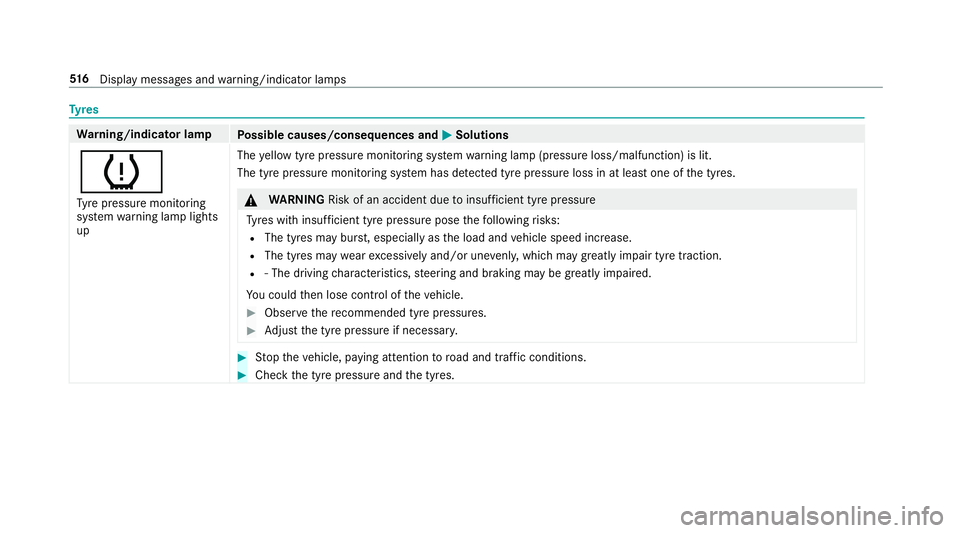
h Ty re pressure monitoring
sy stem warning lamp lights
up The
yellow tyre pressure monitoring sy stem warning lamp (pressure loss/malfunction) is lit.
The tyre pressure monitoring sy stem has de tected tyre pressure loss in at least one of the tyres. &
WARNING Risk of an accident due toinsuf ficient tyre pressure
Ty res with insuf ficient tyre pressure pose thefo llowing risks:
R The tyres may bur st, especially as the load and vehicle speed increase.
R The tyres may wearexc essively and/or une venly, which may greatly impair tyre traction.
R ‑ The driving characteristics, steering and braking may be greatly impaired.
Yo u could then lose control of theve hicle. #
Obser vethere commended tyre pressures. #
Adjust the tyre pressure if necessar y. #
Stop theve hicle, paying attention toroad and traf fic conditions. #
Check the tyre pressure and the tyres. 516
Displaymessa ges and warning/indicator lamps
Page 535 of 565
Emer
gency key element
Inserting/removing ............................... 66
Un locking theta ilgate ............................ 78
Emer gency operation mode
St arting vehicle ................................... 16 3
Emer gency spare wheel
No tes ................................................... 427
Re moving ............................................ 428
Emer gency spare wheel
see Spare wheel
see Wheel change
Energy consu mption
Ke y ........................................................ 65
Engine ECO start/ stop function ......................1 66
Engine number ................................... .431
St arting (eme rgency operation
mode) .................................................. 16 3
St arting (mobile phone) ...................... .162
St arting (s tart/s top button) .................1 62
St arting assis tance .............................. 398
Switching off (s tart/s top button) ........ 180
Engine bonnet Function (active bonnet) ...................... 373Opening/closing ..................................3
74
Re setting (active bonnet) ..................... 373
Engine data Displaying ............................................ 16 9
Engine electronics Notes .................................................. 429
Engine number ........................................4 31
Engine oil ................................................ .377
Ad ditives .............................................4 38
Che cking the oil le vel using the oil
dipstick ................................................ 376
Checking the oil le vel using the on-
board computer ................................... 376
Filling capacity .................................... 439
MB-F reigabe or MB-Appr oval .............. .439
To pping up ...........................................3 77
Entering characters
Fu nction/no tes ................................... 284
On theto uchpad ................................ .285
Using the controller ............................. 285
ERA-GLONASS test mode
St arting/ending .................................. 332 ESC (Elect
ronic Stability Control)
see ESP ®
(Electronic Stability Prog ram)
ESP ®
(Electronic Stability Prog ram) ...... 189
Crosswind Assist ................................ .193
Fu nction/no tes ................................... 189
Switching on/off ................................. 19 3
Tr ailer stabilisation .............................. 19 3
EU type appr oval number ....................... 431
Exterior lighting Care .................................................... 383
Ex terior lighting
see Lights F
Fa tigue warning
see ATTENTION ASSIST
Fa ult message
see Displ aymessa ge
Favo urites
Ad ding .................................................2 82
Calling up ............................................ 282
Deleting ............................................... 283
Moving ................................................ 283 532
Index
Page 537 of 565
Fu
ses ........................................................ 406
Assignment diagram ............................4 06
Before changing .................................. 406
Fu se box in the engine compartment .. 407
Fu se box in the front-passen gerfo ot‐
we ll ...................................................... 408
Fu se box in the load compartment ...... 408
Fu se box on the dashboard ................. 408
No tes .................................................. 406 G
Garage door opener Cleari ngthe memory ........................... 184
Opening or closing thega rage door .....1 83
Programming buttons .......................... 181
Ra dio equipment appr oval number ...... 184
Re solving problems ............................. 183
Synchronising thero lling code ............ 182
Gearshift paddles see Steering wheel gearshift paddles
Gea rshift recommendation .............170, 173
Genuine parts ............................................ 22
Genuine wood (Care) .............................. 385
Glide mode .............................................. .174 Glo
vebox
Air vent ................................................ 15 9
Locking/unlocking ...............................1 10
Gross mass ............................................. .431 H
Handbrake see Electric parking brake
Handling characteristics (unusual) ....... 409
HANDS-FREE ACCESS ................................ 76
HANDS-FREE ACCESS
see Opening theta ilgate using your foot
Hands-free sy stem .................................... 69
Hazard warning lights ............................ .134
HD prog rammes
see CAmodule (TV)
Head restra int .......................................... .95
Fr ont (adjusting manually) ..................... 95
Fr ont (luxury head restra int) .................. 96
Re ar (adjusting) .................................... .97
Re ar (lo wering from the front) ............... 97
Re ar (removing/fitting) .......................... 97Head-up display
Adjusting brightness (on-board com‐
pu ter) .................................................. 264
Ad justing display elements (on-board
compu ter) ............................................ 264
Fu nction .............................................. 265
Menu (on-board compu ter) .................. 264
Setting the position (on-board com‐
puter) .................................................. 264
Switching on/off ................................. 266
Using the memory function ................. 107
Head-up display see Menu (on-boa rdcompu ter)
Head-up display menu see On-board computer
Headlamp flashing .................................. 13 3
Heating see Climate control
High-pressure cleaner (care) ................. 380
Hill start assi st........................................ 212
HOLD function ......................................... 212
Ac tivating/deactivating ...................... .212
Fu nction/no tes .................................... 212534
Index
Page 538 of 565
I
i-Size child seat attachment
Seats suitable for attaching ................... 57
i-Size child seat securing sy stem
Fitting .................................................... 48
No tes ..................................................... 47
Identification pla te
Engine ................................................ .431
Ve hicle .................................................4 31
Ignition Swit ching on (s tart/s top button) .........1 61
Ignition key................................................ 64
Immobiliser ................................................ 88
Implied warranty
Ve hicle ................................................... 27
Inat tentiveness assistant
see ATTENTION ASSIST
Indicator lamp see Warning/indicator lamps
Individual drive prog ram
Con figuring .......................................... 16 9
Selecting ............................................. 16 9Instrument clus
ter .................................. 501
In stru ment clus ter
see Instrument display
Instrument display ..................................2 54
Ad justing the lighting .......................... 258
Fu nction/no tes ................................... 254
Overview (s tanda rd) .............................. 10
Overview (widescreen) .......................... 10
Wa rning/indicator lamps .................... .501
Instrument display see Display (on-board computer)
see In stru ment clus ter
Instrument lighting .................................258
Instrument lighting see Dashboard lighting
Intelligent Light Sy stem .......................... 13 4
Ad aptive Highbeam Assist Plus .......... .136
Ad versewe ather light .......................... 13 6
City lighting ........................................ .136
Cornering light ..................................... 13 5
Fo g light (extended range) ................... 13 5
Mo torw ay mode ................................... 13 5
Overview ............................................. 13 4
Switching on/off ................................. 13 6Interior lighting
........................................ 13 8
Ambient lighting .................................. 13 8
Setting ................................................. 13 8
Switch-off del aytime ........................... 13 9
Interior lighting see In terior lighting
see Lighting
see Lights
Interior pr otection
Fu nction ................................................ 89
Switching on/o ff................................... 89
In term ediatedestination ........................ 299
Calculating a route with intermediate
destinations ........................................ 299
Editing ................................................ .299
Entering ............................................... 299
St arting an automatic filling station
sear ch................................................. 300
In tern et
Del eting favo urites .............................. 345
Deleting his tory ................................... 345
Setting favo urites ................................ 345
Internet connection Cancelling permission ........................ .342 Index
535