Page 168 of 308
7-12 I Info
SiriusXM™ Fuel Price
Information
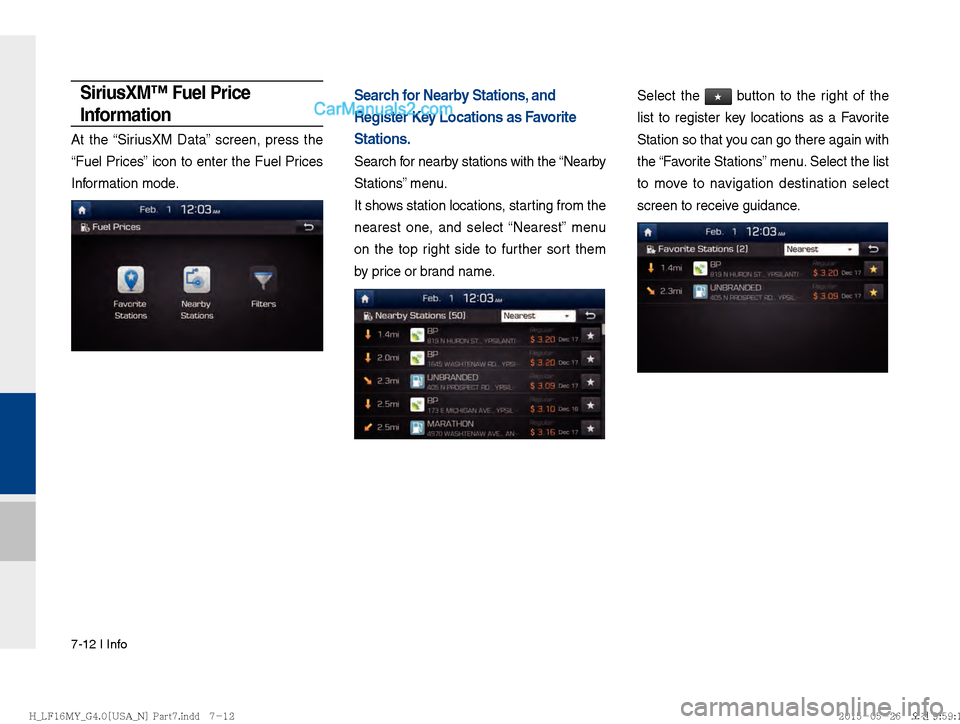
At the “SiriusXM Data” screen, press the
“Fuel Prices” icon to enter the Fuel Prices
Information mode.
Search for Nearby Stations, and
Register Key Locations as Favorite
Stations.
Search for nearby stations with the “Nearby
Stations” menu.
It shows station locations, starting from the
nearest one, and select “Nearest” menu
on the top right side to further sort them
by price or brand name.
Select the ★ button to the right of the
list to register key locations as a Favorite
Station so that you can go there again with
the
Page 172 of 308
7-16 I Info
SiriusXM™ Movie Information
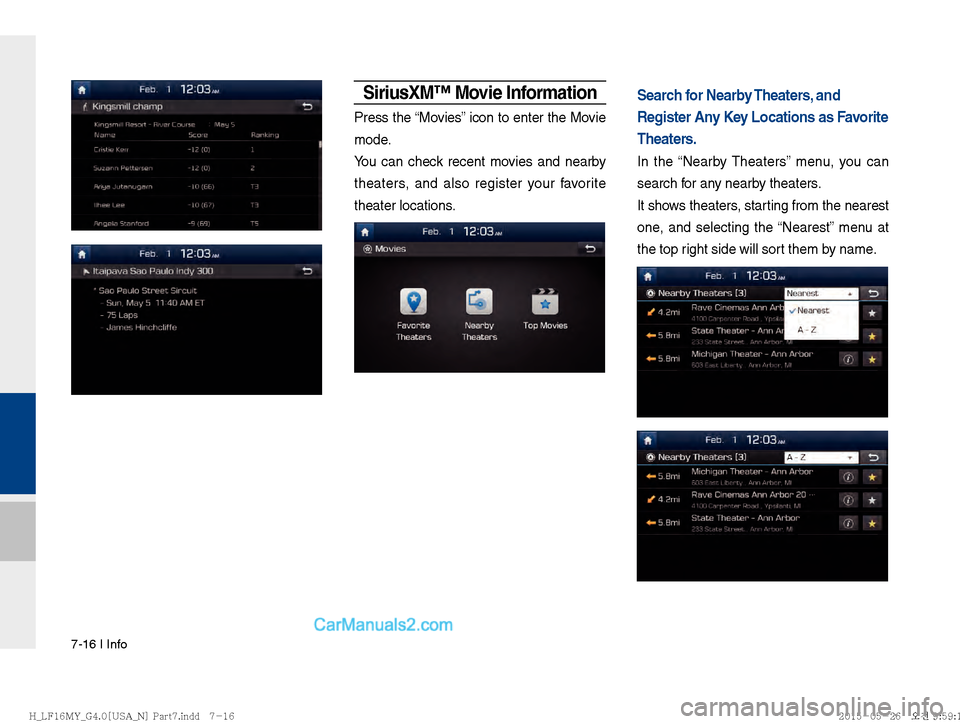
Press the “Movies” icon to enter the Movie
mode.
You can check recent movies and nearby
theaters, and also register your favorite
theater locations.
Search for Nearby Theaters, and
Register Any Key Locations as Favorite
Theaters.
In the “Nearby Theaters” menu, you can
search for any nearby theaters.
It shows theaters, starting from the nearest
one, and selecting the “Nearest” menu at
the top right side will sort them by name.
)@-'��.:@(���<64"@/>�1BSU��JOEE������� )@-'��.:@(���<64"@/>�1BSU��JOEE��������������������
Page 175 of 308

Pandora Radio I 7-19
07
!Ÿ
The following problems may occur due to issues with your
phone.
- Intermittent black screens appear when entering Android
Auto.
- Unable to differentiate between phones that support Android Auto and those that do not.
※ If services do not work properly due to problems similar to
the specified above, check your phone, and if necessary,
reconnect your phone after restarting
!Ÿ
It does not support Car Voice command when Android Auto
connected.
!Ÿ
Android auto might not function as same with Car multimedia
system.
!Ÿ
To function “Android voice command”, press and hold the key on
the Steering wheel (0.8 secs)
!Ÿ
It might function irrelevantly if controls mobile phone while
Android auto. Please do not use mobile phone while Android
auto.
!Ÿ
Android auto might go to Car Apps screen if disconnected
depending on connection status. You can re-use if the device
re-connected.
!Ÿ
Regarding mobile phone supporting Android auto and Q&A,
Please refer to google website.Using Android Auto Features
1. Call key in the steering wheel performs phone function while
Android Auto screen is displayed.
2. OS system of the phone should be 5.x or more and can be
used by installing through Google play.
3. On the Home or All Menus or Info screen, select the entry but-
ton.
4. You can use the functions for navigation, music, phone, and the
like of Android Auto.
)@-'��.:@(���<64"@/>�1BSU��JOEE������� )@-'��.:@(���<64"@/>�1BSU��JOEE������� �������������
Page 176 of 308

7-20 I Info
NOTICE
Before connecting your mobile phone, check whether Android Auto is set
to be used in Setup > Connectivity Settings.
After connecting the mobile phone, y
ou must release the lock or accept it
to connect Android Auto nor mally
.
With Android Auto connected, press the
key on the steering
wheel to run the phone function of Android Auto.
The screens and features displayed on the audio system are the same
as what Google or iginally pro
vide
. The screens and features are subject
to change according to the policy of each individual company.
CAUTIONS WHEN USING ANDROID AUTO
When Android Auto is activated, you can use only phone features among
all Bluetooth features.
You cannot use Bluetooth Media features such as
Bluetooth Audio and Pandora. If you want to use such features, remove
the USB cable before use.
Android Auto mode does not support the feature that enables you to
search f or music
les by controlling the
TUNE key.
In case Android Auto is not activated even after a connection has been
made successfully, chec k the f
ollowing:
– Check the status of Phone Application(Check if an error has occurred)
– Terminate the Android Auto process and attempt a reconnection
– Check whether Android Auto is set to be used in Setup > Connectivity Settings.
If Android Auto does not work normally even after a reconnection has
been made , see the man
ual pro
vided by Google or visit our website.
)@-'��.:@(���<64"@/>�1BSU��JOEE������� )@-'��.:@(���<64"@/>�1BSU��JOEE������� �������������
Page 179 of 308
Setup
Navigation Settings Sound Settings
Display Settings Phone Settings
Blue Link Settings
Voice Recognition Settings Clock Settings Wi-Fi Settings
Language Settings Keyboard Settings
Downloaded Apps Settings Screen Saver SettingsConnectivity Settings System Info
part.9 Setup
09
)@-'��.:@(���<64"@/>�1BSU��JOEE������
)@-'��.:@(���<64"@/>�1BSU��JOEE������ �������������
Page 180 of 308

9-2 I Setup
Setup
Setup
Setup is the screen to control system set-
tings of the AVN.
To enter the screen, select the
SETUP
key of the device or the
Setup button in
All Menus.
Features Description
NavigationProvides Normal/Screen/
Guidance/Route/Safety
Setting.
SoundProvides the sound control
options for Position, Bass,
Mid, Treble, Volume, Ratio
and Advanced settings.
Display
Provides the Mode/Brightness/
Adjust settings.
PhoneProvides the Bluetooth
Connection/Auto Connection
Priority/Ringtone/System
Bluetooth Information settings.
Blue Link
Provides the Activation/
Modem Information settings.
Voice RecognitionProvides the time and date
settings.
ClockProvides the time and date
settings.
Features
Description
Wi-FiProvides the Wi-Fi On and
Network Connection set-
tings.
Language
Provides the Change
Language settings.
Keyboard
Provides settings to switch
keyboard layouts.
Downloaded
Apps Provides the removal set-
tings for downloaded and
installed apps.
Screen
Saver Provides the Clock/None
settings.
Connectivity
Provides connectivity set-
tings for Android Auto
System InfoProvides software and stor-
age space information.
Display OffProvides the Display Off
(touch activation) function.
)@-'��.:@(���<64"@/>�1BSU��JOEE������ )@-'��.:@(���<64"@/>�1BSU��JOEE������
�������������
Page 182 of 308

9-4 I Setup
Display Settings
Controls the display brightness and image
rate for the whole system.
Phone Settings
Changes Bluetooth phone settings.
Phone Settings
!Ÿ
Select the SETUP key in the head unit
▶ Select
Phone.
!Ÿ
Home screen ▶
Select
All Menus ▶
Select
Setup ▶
Select Phone.
Features Description
BrightnessAdjusts the level of bright-
ness in Daylight or Night
mode. (If you use the
Automatic feature, you
can set the brightness for
both Daylight and Night
modes.)
Adjust
Adjust the hue, contrast,
and saturation of the
screen by dragging the
sliders.
Press the
Center button
to initialize the settings.
Display Off Provides the Display Off
(touch activation) function.
Features
Description
ModeProvides the Automatic
feature that automatically
adjusts the brightness of
the screen according to
the brightness levels of
the car’s surroundings.
If you do not use the
Automatic feature, you
can select either Daylight
or Night mode and
maintain the brightness
accordingly.
)@-'��.:@(���<64"@/>�1BSU��JOEE������ )@-'��.:@(���<64"@/>�1BSU��JOEE������
�������������
Page 183 of 308

Setup I 9-5
09
Bluetooth Connection Settings
Select the SETUP key in the head unit ▶
Select
Phone ▶
Select Bluetooth Connection
Features Description
Paired
Device List Displays the paired
Bluetooth device list.
When selecting from
the list, the device is
connected or discon-
nected.
Bluetooth
Audio
Connection
Status An icon appears when
you make a Bluetooth
Audio connection.
Bluetooth
Hands-Free
Connection
Status An icon appears when
you make a Bluetooth
Hands-free connec-
tion.
Add New
Register a new
Bluetooth device.
Delete
Devices Select and delete a
paired device.
Delete All
Delete all paired
devices.
HelpSwitches to the
Bluetooth Connection
Help screen.
i Information
Up to 5 Bluetooth devices can be paired.
Only one Bluetooth device can be connected
at a time.
Dur ing a Bluetooth de
vice connection, another
device cannot be paired.
When y ou delete a paired de
vice, the Call
History and Contacts stored in the head unit
are also completely deleted.
Bluetooth Hands-free and Bluetooth A udio
functions are suppor ted.
Hands-free and audio-suppor ted de
vices,
such as a Bluetooth smartphone or audio , will
function nor
mally.
When a Bluetooth device is connected, if
the Bluetooth connection is une xpectedly
disconnected, due to being out of
communication range, the device powering
off, or a Bluetooth communication error, the
Bluetooth device automatically searches for
and connects to nearby Bluetooth devices.
If the system is not stable, due to a vehicle-
Bluetooth de vice comm
unication error
, restore
the Default Factory Settings.
For Default Factory Settings, the bluetooth
settings are reset to f actor
y settings
Select the
SETUP key �
Select Phone
� Select
Bluetooth System Info Ü
Select
Default Factory Settings
)@-'��.:@(���<64"@/>�1BSU��JOEE������
)@-'��.:@(���<64"@/>�1BSU��JOEE������ �������������