Page 84 of 308
4-6 I Blue Link® Control
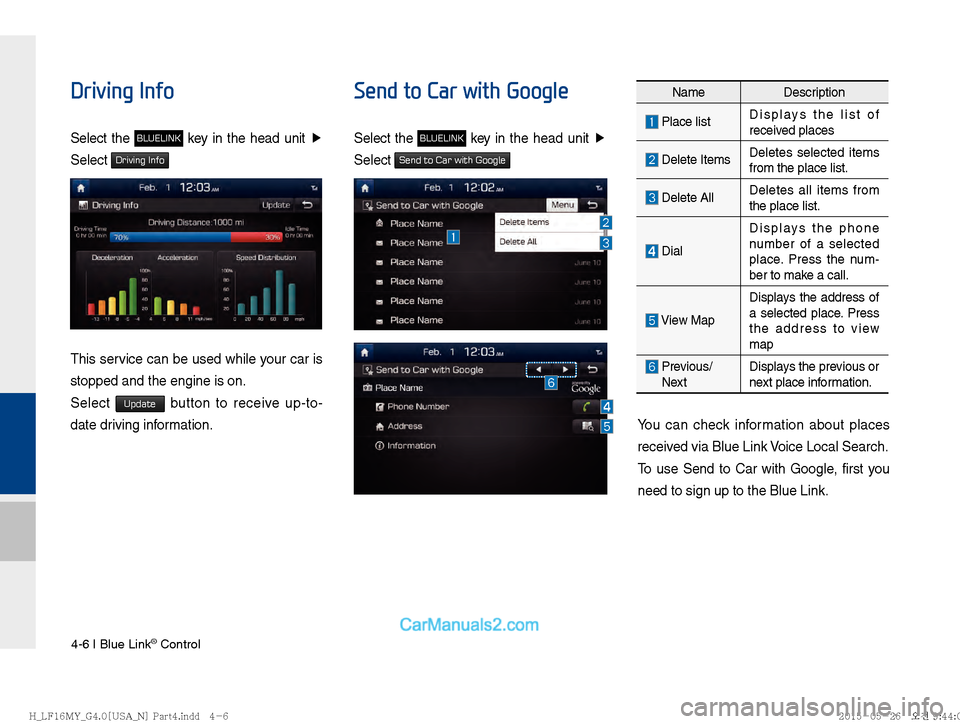
Driving Info
Select the BLUELINK key in the head unit Ü
Select
Driving Info
This service can be used while your car is
stopped and the engine is on.
Select
Update button to receive up-to-
date driving information.
Send to Car with Google
Select the BLUELINK key in the head unit Ü
Select
Send to Car with Google
You can check information about places
received via Blue Link Voice Local Search.
To use Send to Car with Google, first you
need to sign up to the Blue Link.
Name Description
Place listDisplays the list of
received places
Delete ItemsDeletes selected items
from the place list.
Delete AllDeletes all items from
the place list.
DialDisplays the phone
number of a selected
place. Press the num-
ber to make a call.
View MapDisplays the address of
a selected place. Press
the address to view
map
Previous/
Next Displays the previous or
next place information.
)@-'��.:@(���<64"@/>�1BSU��JOEE������ )@-'��.:@(���<64"@/>�1BSU��JOEE������
�������������
Page 85 of 308
Blue Link Settings I 4-7
04
Vehicle Diagnostics
Select the BLUELINK key in the head unit Ü
Select
Vehicle Diagnostics
Name Description
Blue Link
Center Calls the Blue Link
Center to check for
vehicle problems
You can have your vehicle inspected only
after stopping the vehicle because some
control units can't be diagnosed while driv-
ing.
Vehicle Diagnostics will be canceled if you
switch to another screen while diagnosis
is in progress.
To receive result details, you need to first
sign up to the Blue Link.
Blue Link Settings
For more details, refer to part 9. Setup >
Blue Link Settings.
)@-'��.:@(���<64"@/>�1BSU��JOEE������ )@-'��.:@(���<64"@/>�1BSU��JOEE������
�������������
Page 86 of 308
4-8 I Blue Link® Control
Blue Link Voice Local
Search
What is Blue Link Voice
Local Search?
With Blue Link network service, you can
search for Google-provided place names
with your voice.
Separated from Voice Recognition in the
steering wheel, it specializes in place
name searches and may be run with a
key in the rear-view mirror.
The search is done through network ser-
vices; it is only available when connected
to a communication network.
Starting Blue Link
Voice Local Search
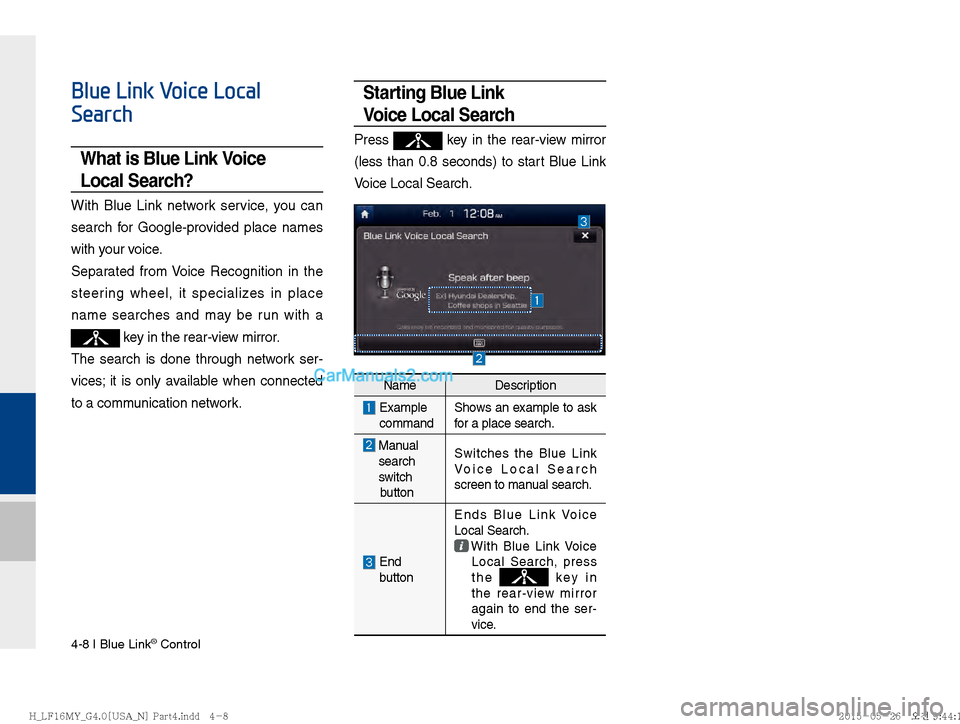
Press key in the rear-view mirror
(less than 0.8 seconds) to start Blue Link
Voice Local Search.
Name Description
Example
command Shows an example to ask
for a place search.
Manual
search
switch
button Switches the Blue Link
Voice Local Search
screen to manual search.
End
button Ends Blue Link Voice
Local Search.
With Blue Link Voice
Local Search, press
the
key in
the rear-view mirror
again to end the ser-
vice.
)@-'��.:@(���<64"@/>�1BSU��JOEE������ )@-'��.:@(���<64"@/>�1BSU��JOEE������ �������������
Page 100 of 308
5-14 I Navigation
Search
Places
You can enter POI Name, Address, or
Coordinates that you wish to search by.
Press the
NAVI head unit key. Ü
Select the
Destination tab. Ü
Select the
search bar.
Enter the POI Name, Address and
Coordinates of the location you want in
the input window above, and press the
Done button.
If you select a location from the search
result list, it will bring you to the point.
If you press the All Cities in MI button on the
search result screen, it will bring you to the
City search screen where you can filter the
search results by city names.
If you press the All Categories button from
the search result screen, it will bring you to
the POI Categories screen where you can
filter the search results by POI Categories.
)@-'��.:@(���<64"@/>�1BSU��JOEE������� )@-'��.:@(���<64"@/>�1BSU��JOEE������� �������������
Page 101 of 308
Search I 5-15
05
It will bring you from the search result
screen to the screen of the point where
you can set a destination or a waypoint, or
register the current position to the address
book.
Address
Set destination by address search.
Press the
NAVI head unit key. ▶
Select
the
Destination tab. ▶
Select the Address
icon.
How to Search Address
Name Description
Select state to search
Enter house number. If you don’t
know the house number, press Skip button.
Enter the street name. Entering
exact street name is required.
The letters on the keyboard
are automatically enabled and
disabled based on the search
result, and words are automati-
cally completed.
When same street names are
available in other cities, the lists
of city are displayed.
Select a city before entering
the street name. Addresses are
searched only from the selected
city.
)@-'��.:@(���<64"@/>�1BSU��JOEE������� )@-'��.:@(���<64"@/>�1BSU��JOEE�������
�������������
Page 102 of 308
5-16 I Navigation
Enter the address to check the location
information on the map.
Previous Destination
Select from previously inputted addresses
and POI’s.
Press the
NAVI head unit key.▶
Select the
Destination tab. ▶
Select the
Previous Destinations icon.
Arrange by all, latest destinations, latest
searched places and latest departing
places.
Arrange in order of date and name.
Name Description
Set asDestinationSet the location as a des-
tination.
AddWaypointSet the location as a way-
point.
Add to Address BookSave the location
POISearch nearby POIs.
NameDescription
Display all destinations, depart-
ing places, and searched places.
Display previous destination
places for route guidance
Display previous departing
places for route guidance
Display previously searched
places for route guidance.
But, not displayed when the
searched places are set as
destination.
)@-'��.:@(���<64"@/>�1BSU��JOEE������� )@-'��.:@(���<64"@/>�1BSU��JOEE������� �������������
Page 103 of 308
Search I 5-17
05
Press the Delete button to delete the
information.
Local Search
Press the NAVI head unit key. ▶
Select
the
Destination tab. ▶
Select the Local Search
icon.
Runs Google Local Search.
Enter the desired keywords and press the
Done button.
Searching is in progress.
If search successes, search results are
displayed. Select one of the search result.
Name Description
Mark AllSelect all.
Unmark AllDeselect all.
DeleteDelete the selected
item(s).
)@-'��.:@(���<64"@/>�1BSU��JOEE������� )@-'��.:@(���<64"@/>�1BSU��JOEE������� �������������
Page 104 of 308
5-18 I Navigation
Press the Change Destination button to start
guidance.
If failed, the connection error message is
displayed as above. Please try again.
POI Categories
Press the NAVI head unit key. ▶
Select
the
Destination tab. ▶
Select the POI Categories
icon.
Select the desired item.
Select the desired item in the sub-catego-
ries.
)@-'��.:@(���<64"@/>�1BSU��JOEE������� )@-'��.:@(���<64"@/>�1BSU��JOEE������� �������������