Page 26 of 308

2-2 I AV
FeaturesDescription
Mode Display
!Ÿ
Displays current operating mode
!Ÿ
If select wanted mode tap, it will change to
selected mode in Radio.
Preset
!Ÿ
Shows saved presets for user selection
!Ÿ
After selecting frequency →
press and hold
(over 0.8 seconds) the preset button. A 'beep'
will sound and the frequency is saved to the
selected preset button.
A total of 24 frequencies with 12 preset
frequencies each for FM/AM modes can be
saved.
Frequency Bar
!Ÿ
Flick the frequency bar left/right to search for
available radio channels to the left or right of
the current channel.
!Ÿ
Dragging: Drag the frequency bar to the left/
right to find the radio channel that you want.
Frequency Displays the current frequency
Broadcast
station Displays the current broadcast station name.
Scan
Plays frequencies with superior reception for
5 seconds each
HD RadioUsed to set whether to turn HD Radio™ recep-
tion On/Off.
AV
FM/AM
Accessing FM/AM Mode
You can access the radio player either by pressing the RADIO
hard key or by selecting the Radio menu option from All Menus on
the Home screen.
i Information
If you press the RADIO hard key when the power is off, then the power
will turn on and a radio broadcast will be tuned up.
If you are in the FM/AM mode, select the FM/AM radio widget from the
Home screen to access the radio pla y
er.
)@-'��.:@(���<64"@/>�1BSU��JOEE������ )@-'��.:@(���<64"@/>�1BSU��JOEE������ �������������
Page 29 of 308

SiriusXM™ I 2-5
02
Basic Mode Screen
(HD Radio™ reception ON)SiriusXM™
SiriusXM™ Mode
Hard Key Controls
You can access the radio player either by
pressing the
RADIO hard key or by
selecting the Radio menu option from All
Menus on the Home screen. Select the
SiriusXM™ tab from the radio player.
i Information
If you press the RADIO hard key when the
power is off, then the power will turn on and a
radio broadcast will be tuned up.
If you are in the SiriusXM™ mode, select
the SiriusXM™ r adio widget from the Home
screen to access the radio player.
When the power is off, pressing the
RADIO
key will turn the power on and play a
SiriusXM™ Radio broadcast.
Name Description
HD Radio™
Reception
&Channel
buttons Displays main HD Radio™
channels and used to directly
select the current available
channels
As HD Radio™ reception
is included within Radio
mode, the methods of
moving between chan-
nels, saving presets,
searching, or methods
of searching frequencies
are identical. However,
while the HD Radio™
related icon display will
become active when
within regions where an
HD Radio™ signal can
be received.
Name Description
HD
Channel
Number HD Channel number
saved in preset
Broadcast
Info Displays detailed infor-
mation about the current
broadcast
HD Radio
Used to set whether to
turn HD Radio™ recep-
tion On/Off.
)@-'��.:@(���<64"@/>�1BSU��JOEE������ )@-'��.:@(���<64"@/>�1BSU��JOEE������
�������������
Page 31 of 308

SiriusXM™ I 2-7
02
FeaturesDescription
Play Live
It will change to listening live broadcast mode.
Skip BackwardRepeats the previously broadcasted program.
!Ÿ
Holding for less than 0.8 seconds : Moves to
the previous segment
!Ÿ
Holding for longer than 0.8 seconds: Moves
to the previous 5 seconds
Play Pause Pauses/plays the current broadcasting program.
Skip ForwardMoves to the next segment.
ListDisplays SiriusXM™ Radio Categories/Channel
Lists
MenuWhat’s on My Preset?
The program schedule saved in my preset. (For
more details, see Section 2.5. Viewing Menu.)
!Ÿ
Featured Favorite
Theme channels recommended by SiriusXM™ .
(For more details, see Section 2.5. Viewing
Menu.)
!Ÿ
Preset Scan
Plays preset frequencies for 5 seconds each.
SoundHound Runs the SoundHound feature.
For more detailed feature, please refer to
SoundHound section in Info part.
SEEK/TRACKWhen key is pressed quickly.(under 0.8 seconds)
Plays the previous/next channel
When key is pressed and held.(over 0.8 seconds)
Continuously changes the channel until the key
is released and plays the current channel
TUNE
Changes the channel
)@-'��.:@(���<64"@/>�1BSU��JOEE������ )@-'��.:@(���<64"@/>�1BSU��JOEE������ �������������
Page 32 of 308
2-8 I AV
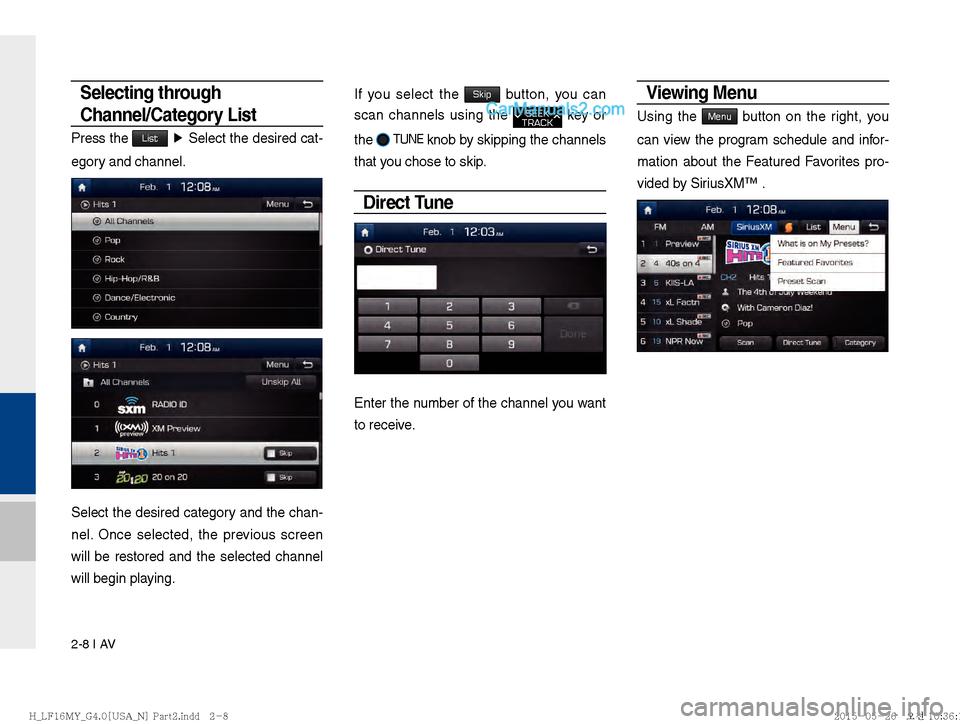
Selecting through
Channel/Category List
Press the List Ü
Select the desired cat-
egory and channel.
Select the desired category and the chan-
nel. Once selected, the previous screen
will be restored and the selected channel
will begin playing.
If you select the Skip button, you can
scan channels using the
SEEK
TRACK key or
the
� TUNE
knob by skipping the channels
that you chose to skip.
Direct Tune
Enter the number of the channel you want
to receive.
Viewing Menu
Using the Menu button on the right, you
can view the program schedule and infor-
mation about the Featured Favorites pro-
vided by SiriusXM™ .
)@-'��.:@(���<64"@/>�1BSU��JOEE������ )@-'��.:@(���<64"@/>�1BSU��JOEE������ �������������
Page 54 of 308

2-30 I AV
iPod
Using iPod Devices
!Ÿ
iPod is a registered trademark of Apple Inc.
!Ÿ
iPod mode will not operate if the con-
nected iPod cannot be recognized due
to operation of unsupported versions
that do not support related protocols,
iPod abnormalities, or iPod device
defects. Some iPods with unsupported
communication protocols may not prop-
erly operate with the Multimedia system.
!Ÿ
For fifth generation iPod Nano devices,
the iPod may not be recognized when
the battery level is low. Please charge
the iPod for use.
!Ÿ
Search/play orders shown within the
iPod device may differ with the orders
shown within the Multimedia system.
!Ÿ
If the iPod malfunctions due to an iPod
device defect, reset the iPod and try
again. (To learn more, refer to your iPod
manual)
!Ÿ
If repeatedly connect and disconnect
iPod/iPhone to the Multimedia system
with USB cable in short time, it may
cause abnormal operation.
!Ÿ
The time for recognition of iPod/iPhone
may vary depending on device type,
firmware version and iOS version.
!Ÿ
For some iPod Touch and iPhone
devices, connecting Bluetooth
® while the
iPod is operating may result in discon-
tinued iPod sound. When such devices
with Bluetooth
® support are connected,
this problem occurs as the sound source
is changed from the Dock Connector
(USB connector cable) to Bluetooth.
!Ÿ
To prevent this symptom, Bluetooth
Audio function in the Multimedia system
is limited if iPod/iPhone is connected
to the system through both cable and
Bluetooth. To listen to the iPod sound,
use either iPod menu with USB connec-
tion or Bluetooth Audio with Bluetooth
connection.
!Ÿ
To listen to the iPod sound, reconnect
the USB cable or change the audio out-
put settings in iPod/iPhone to Dock.
!Ÿ
In order to use the iPod while operating
the keys, you must use a dedicated iPod
cable. (the cable that is supplied when
purchasing iPod/ iPhone products)
œ During ACC ON state, connecting the
iPod through the iPod cable (The cable
that is supplied when purchasing iPod/
iPhone product.) will charge the iPod
through the head unit.
œ
The use of genuine iPod cables sup- The use of genuine iPod cables sup-
plied by Apple is recommended. (The plied by Apple is recommended. (The
use of other products may result in use of other products may result in
noise or abnormal operation.)noise or abnormal operation.)
)@-'��.:@(���<64"@/>�1BSU��JOEE������� )@-'��.:@(���<64"@/>�1BSU��JOEE������� �������������
Page 61 of 308

AUX I 2-37
02
AUX
Connecting an External Device
If an external device connector is connected with the AUX termi-
nal, then AUX mode will automatically operate. Once the connec-
tor is disconnected, the previous mode will be restored.
!Ÿ
AUX mode can be used only when an external audio player has
been connected.
!Ÿ
The AUX volume can also be controlled separately through the
connected device.
Features Description
SoundHoundRuns the SoundHound feature.
For more detailed feature, please refer to
SoundHound section in Info part.
Back Button
Move to home/previous mode screen
i Information
SEEK
TRACK key, TUNE
is not supported.
NOTICE
If only a cable is connected to the AUX without an external device, the
mode will be changed to AUX, but noise ma
y occur. When an external
device is not being used, remove the connector jack.
When the external device power is connected to the power jack, playing
the e xter
nal de
vice may output noise. In such cases, disconnect the
power connection before use.
)@-'��.:@(���<64"@/>�1BSU��JOEE������� )@-'��.:@(���<64"@/>�1BSU��JOEE������� �������������
Page 63 of 308
Bluetooth Õ Audio I 2-39
02
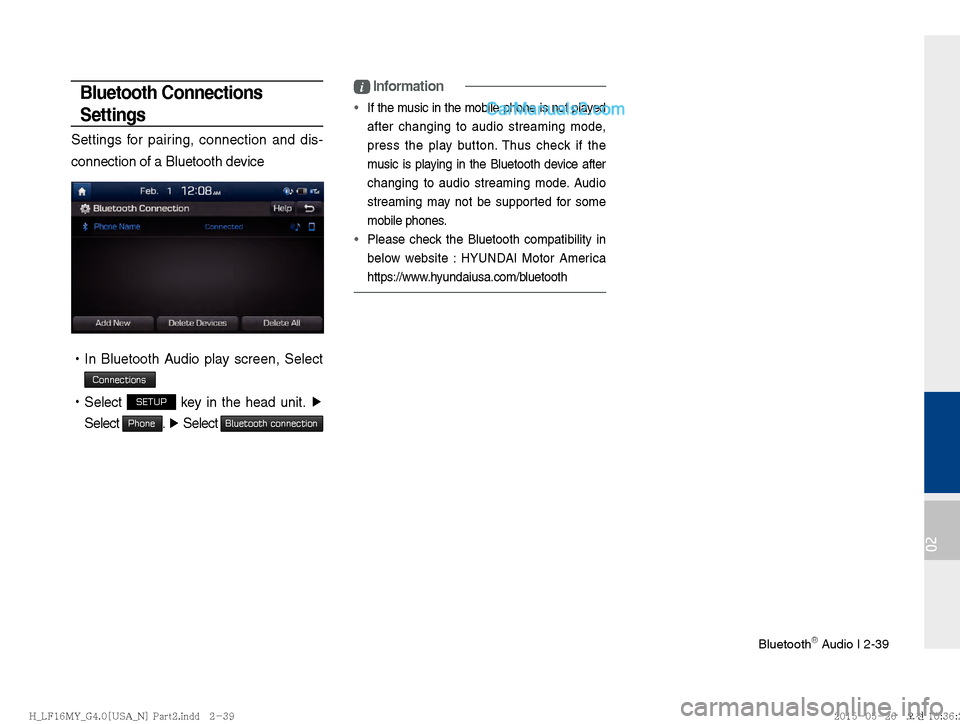
Bluetooth Connections
Settings
Settings for pairing, connection and dis-
connection of a Bluetooth device
!Ÿ
In Bluetooth Audio play screen, Select
Connections
!Ÿ
Select SETUP key in the head unit. ▶
Select
Phone. ▶
Select Bluetooth connection
i Information
If the music in the mobile phone is not played
after changing to audio streaming mode,
press the pla
y button. Thus check if the
music is playing in the Bluetooth device after
changing to audio streaming mode. Audio
streaming may not be supported for some
mobile phones.
Please check the Bluetooth compatibility in
belo w w
ebsite :
HYUNDAI Motor America
https://www.hyundaiusa.com/bluetooth
)@-'��.:@(���<64"@/>�1BSU��JOEE������� )@-'��.:@(���<64"@/>�1BSU��JOEE������� �������������
Page 70 of 308
3-4 I Bluetooth
Bluetooth Connection
Pairing a New Device
Before you can use the Bluetooth feature,
you must first pair/connect your mobile
phone to your car.
Up to 5 Bluetooth devices can be paired.
Only one Bluetooth device can be con-
nected at a time.
Pairing a New Device by Selecting
Phone/Call
Select PHONE key in the head unit or
key in the steering wheel remote
control. ▶
Select
Yes . ▶
Pair your car
after your mobile phone detects the
Bluetooth device. ▶
Enter the passkey or
accept the authorization popup. ▶
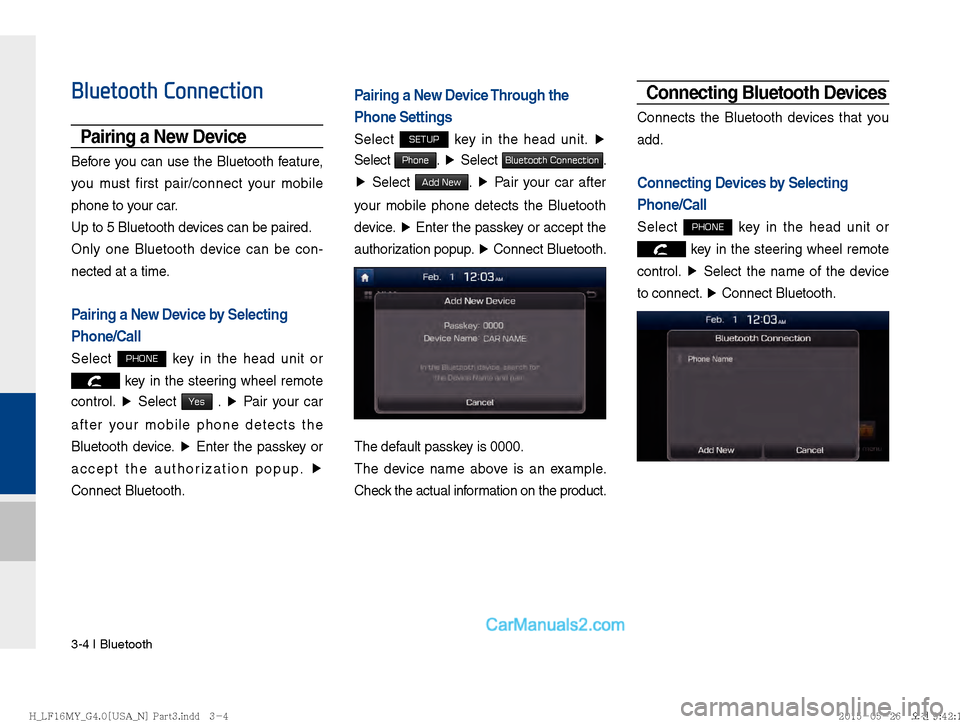
Connect Bluetooth.
Pairing a New Device Through the
Phone Settings
Select SETUP key in the head unit. ▶
Select
Phone. ▶
Select Bluetooth Connection.
▶ Select
Add New. ▶
Pair your car after
your mobile phone detects the Bluetooth
device. ▶
Enter the passkey or accept the
authorization popup. ▶
Connect Bluetooth.
The default passkey is 0000.
The device name above is an example.
Check the actual information on the product.
Connecting Bluetooth Devices
Connects the Bluetooth devices that you
add.
Connecting Devices by Selecting
Phone/Call
Select PHONE key in the head unit or
key in the steering wheel remote
control. ▶
Select the name of the device
to connect. ▶
Connect Bluetooth.
)@-'��.:@(���<64"@/>�1BSU��JOEE������ )@-'��.:@(���<64"@/>�1BSU��JOEE������ �������������