Page 289 of 308
77
Phone Number
Press the NAVI head unit key. ▶
Select the
Phone Number to search
POI by phone number.
Search destination by phone num-
ber.
Type phone number to search. To
search for a list of numbers, press
Done when results are narrowed
and the
Done button is activated.
Select the desired destination
among the searched items.
Press the Change Destination button to
start guidance.
Name Description
Select the desired desti-
nation from the searched
items.
Edit the item.
Register a new Address.
Delete the desired item.
)@-'��.:@(���<64"@/>�23(�JOEE����� .:@(���<64"@/>�23(�JOEE����� ������������� ß
y��������� ������������
Page 290 of 308
78
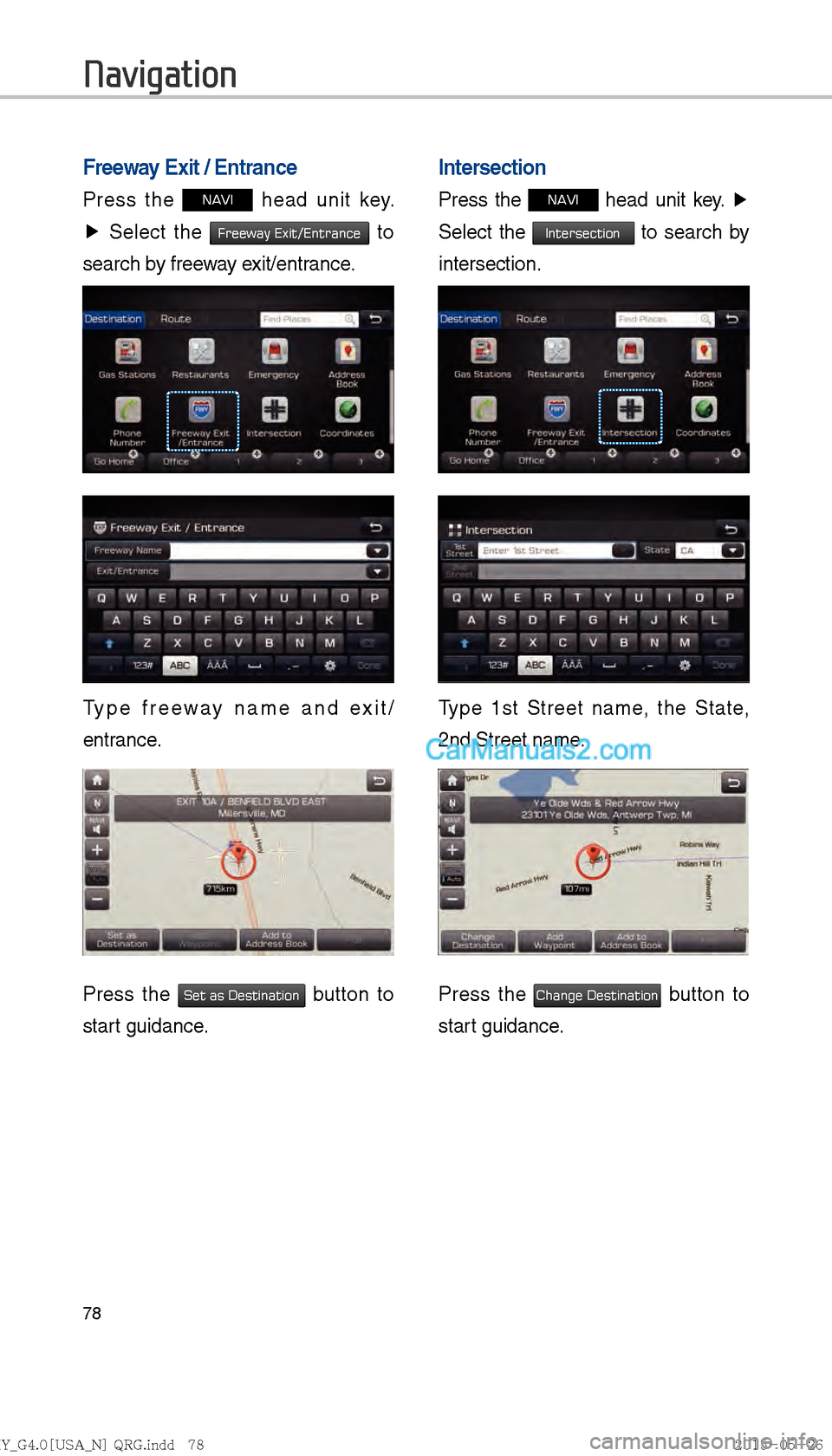
Freeway Exit / Entrance
Press the NAVI head unit key.
▶ Select the
Freeway Exit/Entrance to
search by freeway exit/entrance.
Type freeway name and exit/
entrance.
Press the Set as Destination button to
start guidance.
Intersection
Press the NAVI head unit key. ▶
Select the
Intersection to search by
intersection.
Type 1st Street name, the State,
2nd Street name.
Press the Change Destination button to
start guidance.
Navigation
)@-'��.:@(���<64"@/>�23(�JOEE����� .:@(���<64"@/>�23(�JOEE����� ������������� ß
y��������� ������������
Page 291 of 308
79
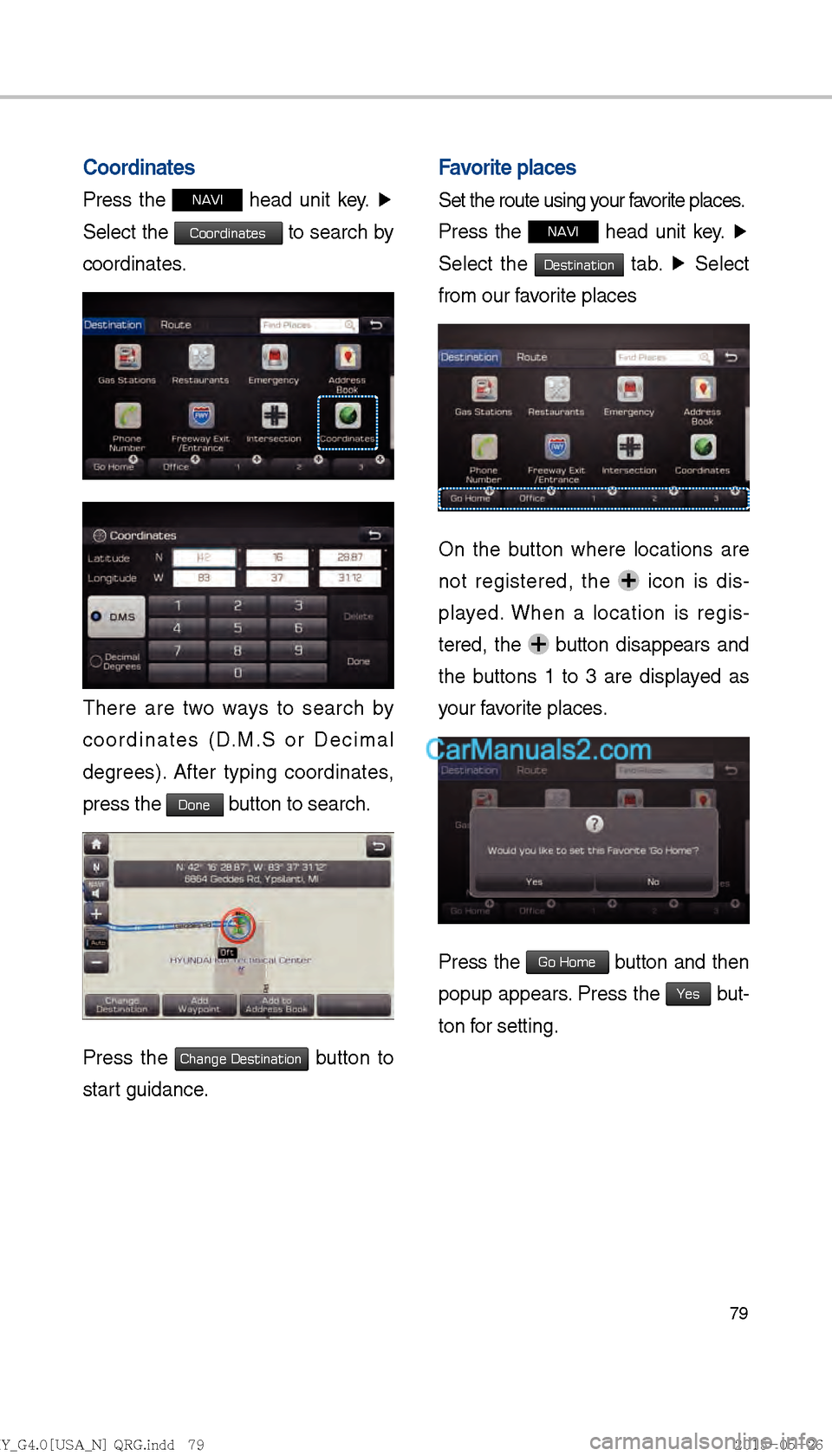
Coordinates
Press the NAVI head unit key. ▶
Select the
Coordinates to search by
coordinates.
There are two ways to search by
coordinates (D.M.S or Decimal
degrees). After typing coordinates,
press the
Done button to search.
Press the Change Destination button to
start guidance.
Favorite places
Set the route using your favorite places.
Press the
NAVI head unit key. ▶
Select the
Destination tab. ▶
Select
from our favorite places
On the button where locations are
not registered, the
icon is dis-
played. When a location is regis-
tered, the
button disappears and
the buttons 1 to 3 are displayed as
your favorite places.
Press the Go Home button and then
popup appears. Press the
Yes but-
ton for setting.
)@-'��.:@(���<64"@/>�23(�JOEE����� .:@(���<64"@/>�23(�JOEE����� ������������� ß
y��������� ������������
Page 294 of 308
82
The route will be calculated using
the option “Faster Time” by default.
Alternative routes can be suggested
if necessary,
SETUP head unit
key. ▶
Navigation
Icon ▶
Route ▶
Alternative : ON
Route Guidance
Get the detailed information on route
guidance.
Route Guidance Screen
Remaining time : Display the time
remaining by destination.
Arrival Time : Display the estimated
time of arrival.
Navigation
)@-'��.:@(���<64"@/>�23(�JOEE����� .:@(���<64"@/>�23(�JOEE����� ������������� ß
y��������� ������������
Page 295 of 308
83
Route
Canceling Route
Cancel the route.
Press the
NAVI head unit key. ▶
Press the
Route tab. ▶
Select
Cancel Route.
Click Cancel Route the icon.
Press the Yes button to cancel the
route.
Name Description
Displays the distance and
direction to the first turn
point.
Displays the distance and
direction to the second turn
point.
Displays the lane informa-
tion at the current location.
Display the recommended
direction in white, travelable
direction in white, and the
non-travelable direction in
greyM
Displays the distance to the
destination and the estiL
mated time of arrival. Press
the button to check the
detailed informationM
Cancel the routeM
Change to preliminary guidL
ance, TBT guidance, and
zoom-on guidance screensM
Displays the destination
information.
)@-'��.:@(���<64"@/>�23(�JOEE�����
.:@(���<64"@/>�23(�JOEE����� ������������� ß
y��������� ������������
Page 296 of 308
84
Display Route Information
Press the NAVI head unit key.
▶ Press the
Route tab. ▶
Select
Route Info .
Press the Route Info icon.
Check the information on the map.
Select the desired item to see the
map information.
Avoiding road
Click the Avoid Street button to avoid
the street or road.
Check the desired item and press
the
Done button to finish.
Route Overview
Check the information on route
including the distance, estimated
time, toll fees, etc.
Press the
NAVI head unit key. ▶
Press the
Route tab. ▶
Select
Route Overview .
Press the Route Overview icon.
Name Description
Change the search option.
Preview turn-by-turn list.
Provide information on sur-
rounding facilities.
Navigation
)@-'��.:@(���<64"@/>�23(�JOEE�����
.:@(���<64"@/>�23(�JOEE����� ������������� ß
y��������� ������������
Page 297 of 308
85
Editing Route
Edit the current route.
Press the
NAVI head unit key. ▶
Press the
Route tab. ▶
Select
Edit Route .
Press the Edit Route icon.
Route Preview
Check the detailed turn-by-turn list.
Press the
NAVI head unit key. ▶
Press the
Route tab. ▶
Select
Route Preview .
Press the Route Preview icon.
Name Description
Move to the departure
location.
Move to the previous
maneuver.
Move to the next maneuver.
Move to the destination loca-
tion.
Touch bar to move to the
specific position
Close the route preview.
Name Description
Display the selected point
on the map screen.
Move the selected item up.
Move the selected item
down.
Delete the selected item.
Press the button to finish
editing.
Press the button to add
an waypoint.
)@-'��.:@(���<64"@/>�23(�JOEE����� .:@(���<64"@/>�23(�JOEE����� ������������� ß
y��������� ������������
Page 298 of 308
86
Add a waypoint through various
searching methods.
Route Options
Press the NAVI head unit key. ▶
Press the
Route tab. ▶
Select
Route Options .
Press the Route Options icon.
Choose between faster time or
shorter distance.
Route options such as ferry route,
traffic information, HOV, and avoid-
ing highway can be set by pressing
Detailed Route Setting button.
Avoid Stre et
Search new route by avoiding the
selected street(s).
Press the
NAVI head unit key. ▶
Press the
Route tab. ▶
Select
Avoid Street .
Press the Avoid Street icon.
Press the Done button to plan new
route after selecting the street(s) that
you want to avoid.
Navigation
)@-'��.:@(���<64"@/>�23(�JOEE����� .:@(���<64"@/>�23(�JOEE����� ������������� ß
y��������� ������������