Page 260 of 308

48
Siri Eyes Free
How to start Siri
If you want to use Siri, you have
to connect your iOS device to
Multimedia system through
Bluetooth.
(Please check whether your iOS
device supports Siri and turning Siri
On)
Then you can use Siri while pressing
and holding
key on the
steering wheel.
How to use Siri
When you access the Siri screen
while pressing and holding
key on the steering wheel, you can
press
Speak button and then you
can speak what you want. Please
see the Multimedia system only sup-
ports “Phone” related functions.
Other functions will be performed in
your iOS device. If you press voice
key quickly, Siri would re-start. If you
hold down voice key, Siri would be
terminated and the screen would go
back to the previous screen. Eyes-
Free mode would be activated auto-
matically while you are driving. When
shifting gears into P or putting the
Parking break on, Eyes-Free mode
would be deactivated automatically.
i Information
Functions and feedbacks from voice
commands via Siri are ex
ecuted in
iOS device. If iOS version changed,
functions and feedbacks can be
changed according to iOS device.
Voice Recognition
)@-'��.:@(���<64"@/>�23(�JOEE����� .:@(���<64"@/>�23(�JOEE����� ������������� ß
y��������� ������������
Page 261 of 308

49
Accessing Pandora Radio Mode
Press the “Pandora” icon after selecting All Menus or the INFO hard-key to
enter Pandora Radio mode.
Pandora Radio Mode Screen Controls
Pandora Radio
Name Description
Mode Displays current operating mode.
Station Info Shows the station name current playing.
Track Info Shows the artist/title information current playing.
Play Time Displays the current play time.
Thumb
Down If you don’t like the music current
playing, press this button to move
to the ne xt m
usic and to minimiz
e the number of playbacks of simi-
lar genre music.
You can move to next song up to specific times which pandora allows
Thumb Up If you like the genre of the music current
playing, press this button to send
a “Thumb Up” signal to P
andora so that more similar music will play.
Play/Pause Plays/pauses the current song
SKIP Moves to the next track
You can move to next song up to specific times which pandora allows
Station List Moves to the station list screen.
Menu
!Ÿ
Bookmark Track
Adds the music current playing to the bookmarks list.
!Ÿ
Bookmark Artist
Adds the ar
tist of the music current playing to the bookmarks list.
You can view your bookmarked artists and songs from your
Pandora profile online. Go to pandora.com, then click on the “Your
Profile” button above the player. That will bring up a page with
your stations, bookmarked artists, and bookmarked songs.
)@-'��.:@(���<64"@/>�23(�JOEE����� .:@(���<64"@/>�23(�JOEE����� ������������� ß
y��������� ������������
Page 265 of 308
53
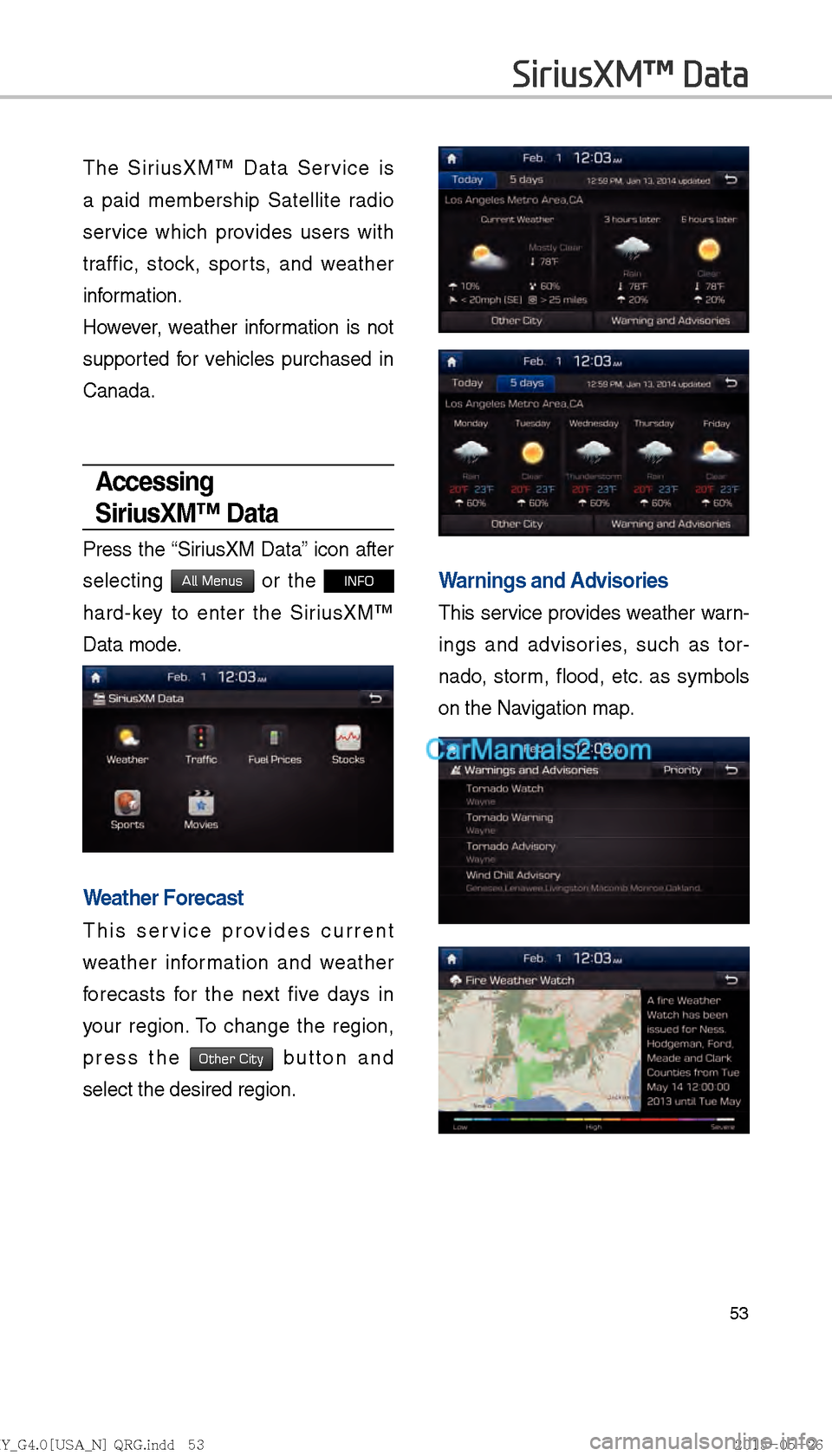
The SiriusXM™ Data Service is
a paid membership Satellite radio
service which provides users with
traffic, stock, sports, and weather
information.
However, weather information is not
supported for vehicles purchased in
Canada.
Accessing
SiriusXM™ Data
Press the “SiriusXM Data” icon after
selecting
All Menus or the INFO
hard-key to enter the SiriusXM™
Data mode.
Weather Forecast
This service provides current
weather information and weather
forecasts for the next five days in
your region. To change the region,
press the
Other City button and
select the desired region.
Warnings and Advisories
This service provides weather warn-
ings and advisories, such as tor-
nado, storm, flood, etc. as symbols
on the Navigation map.
SiriusXM™ Data
)@-'��.:@(���<64"@/>�23(�JOEE����� .:@(���<64"@/>�23(�JOEE����� ������������� ß
y��������� ������������
Page 266 of 308
54
SiriusXM™ Fuel
Price Information
At the “SiriusXM Data” screen, press
the “Fuel Prices” icon to enter the
Fuel Prices Information mode.
Search for Nearby Stations,
and Register Key Locations as
Favorite Stations.
Search for nearby stations with the
“Nearby Stations” menu.
It shows station locations, starting
from the nearest one, and select
“Nearest” menu on the top right side
to further sort them by price or brand
name.
Select the ★ button to the right of
the list to register key locations as
a Favorite Station so that you can
go there again with the
Page 269 of 308
57
SiriusXM™ Movie
Information
Press the “Movies” icon to enter the
Movie mode.
You can check recent movies and
nearby theaters, and also register
your favorite theater locations.
Search for Nearby Theaters, and
Register Any Key Locations as
Favorite Theaters.
In the “Nearby Theaters” menu, you
can search for any nearby theaters.
It shows theaters, starting from
the nearest one, and selecting the
“Nearest” menu at the top right side
will sort them by name.
Select the ★ button to the right of
the list to register your favorite theL
ater so that you can always check it
again using the
Page 272 of 308
60
!Ÿ
The following problems may occur
due to issues with your phone.
- Intermittent black screens
appear when entering Android
Auto.
- Unable to differentiate between phones that support Android
Auto and those that do not.
※ If services do not work properly
due to problems similar to the
specified above, check your
phone, and if necessary, recon-
nect your phone after restarting
!Ÿ
It does not support Car Voice
command when Android Auto
connected.
!Ÿ
Android auto might not function as
same with Car multimedia system.
!Ÿ
To function “Android voice com-
mand”, press and hold the key on
the Steering wheel (0.8secs)
!Ÿ
It might function irrelevantly if con-
trols mobile phone while Android
auto. Please do not use mobile
phone while Android auto.
!Ÿ
Android auto might go to Car Apps
screen if disconnected depending
on connection status. You can
re-use if the device re-connected.
!Ÿ
Regarding mobile phone support-
ing Android auto and Q&A, Please
refer to google website.Using Android Auto
Features
1. Call key in the steering wheel
performs phone function while
Android Auto screen is displayed.
2. OS system of the phone should
be 5.x or more and can be used
by installing through Google play.
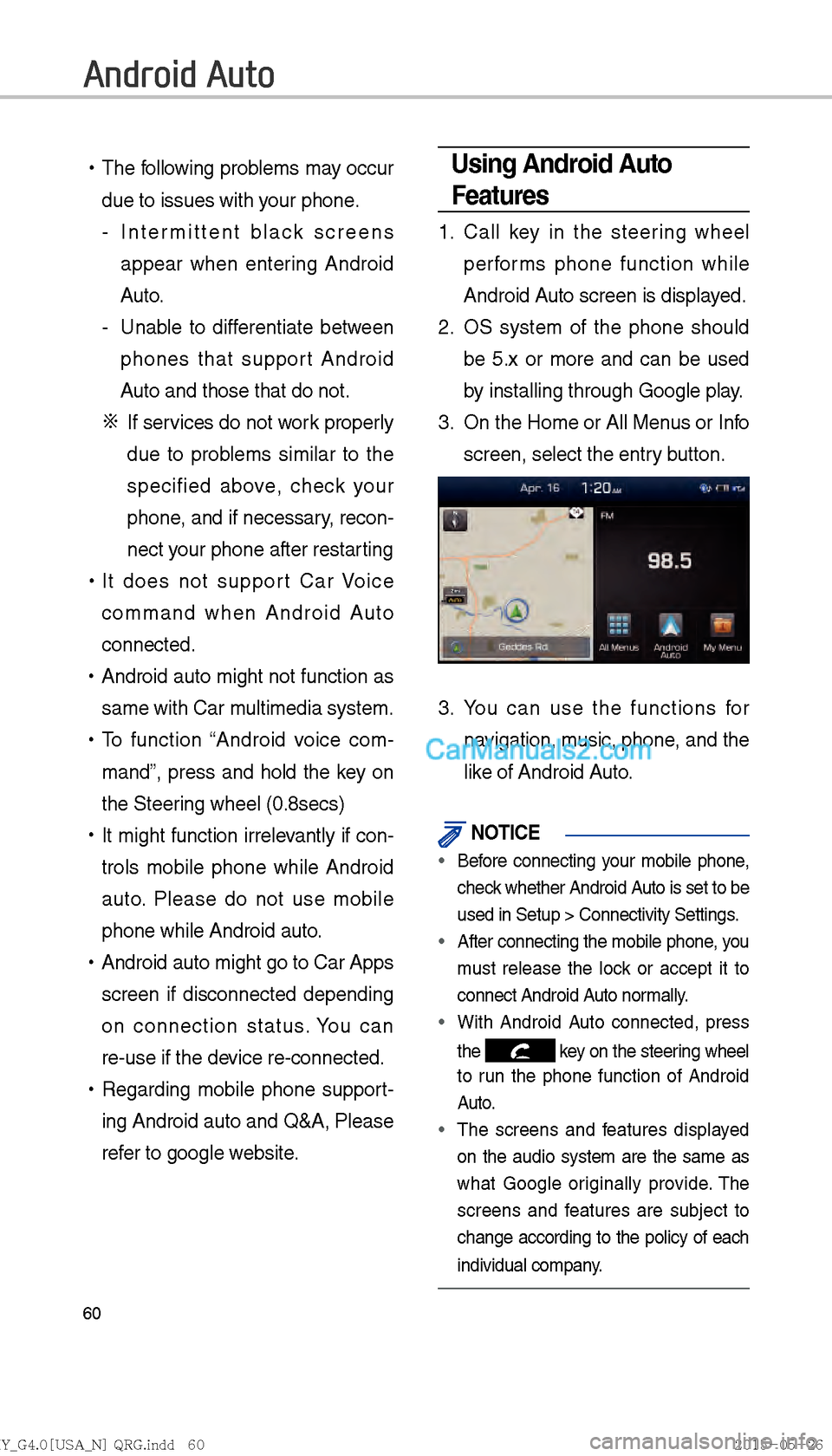
3. On the Home or All Menus or Info
screen, select the entry button.
3. You can use the functions for
navigation, music, phone, and the
like of Android Auto.
NOTICE
Before connecting your mobile phone,
check whether Android Auto is set to be
used in Setup > Connectivity Settings
.
After connecting the mobile phone, you
must release the loc
k or accept it to
connect Android Auto normally.
With Android Auto connected, press
the
key on the steering wheel
to run the phone function of Android
Auto.
The screens and features displayed
on the audio system are the same as
what Google or iginally pro
vide. The
screens and features are subject to
change according to the policy of each
individual company.
Android Auto
)@-'��.:@(���<64"@/>�23(�JOEE����� .:@(���<64"@/>�23(�JOEE����� ������������� ß
y��������� ������������
Page 273 of 308
61
CAUTIONS WHEN USINGANDROID AUTO
When Android Auto is activated, you
can use only phone features among
all Bluetooth f
eatures. You cannot use
Bluetooth Media features such as
Bluetooth Audio and Pandora. If you
want to use such features, remove the
USB cable before use.
Android Auto mode does not support
the f eature that enab
les y
ou to search
for music fi les by controlling the
TUNE key.
In case Android Auto is not activated
even after a connection has been made
successfully
, check the following:
– Check the status of Phone Application(Check if an error has
occurred)
– Terminate the Android Auto process and attempt a reconnection
– Check whether Android Auto is set to be used in Setup > Connectivity
Settings.
If Android Auto does not work normally
ev
en after a reconnection has been
made, see the manual provided by
Google or visit our website.
)@-'��.:@(���<64"@/>�23(�JOEE����� .:@(���<64"@/>�23(�JOEE����� ������������� ß
y��������� ������������
Page 274 of 308

62
About Pairing Mobile Phones
QI cannot pair my mobile phone, what is the cause?
A
Check to see that the mobile phone supports Bluetooth® function. Verify
if Bluetooth on the cell phone is set to OFF. If so, set it to ON. If the cell
phone still can’t be registered, try again after turning Bluetooth off and on,
or delete the device registration on the AVN and cell phone and then regis-
ter the cell phone again.
Q
What is the difference between pairing a mobile phone and connecting a mobile phone?
A
Pairing occurs through authenticating the head unit and mobile phone. Mobile phones paired to the head unit can be connected and disconnected \
until the paired mobile phone is deleted from the system. Bluetooth
®
Handsfree features, such as making/answering calls or managing
Contacts, are supported only in mobile phones connected with the head
unit.
Q
What is a Passkey?
A
A passkey is the password used to authenticate the connection between the head unit and mobile phone. The passkey only needs to be entered
once when pairing the mobile phone for the first time.
The initial passkey is 0000. You can change it with
SETUP Ü
Phone �Bluetooth System Info �Passkey�
menu options.
FAQ
)@-'��.:@(���<64"@/>�23(�JOEE����� .:@(���<64"@/>�23(�JOEE����� ������������� ß
y��������� ������������