Page 239 of 308
27
AUX
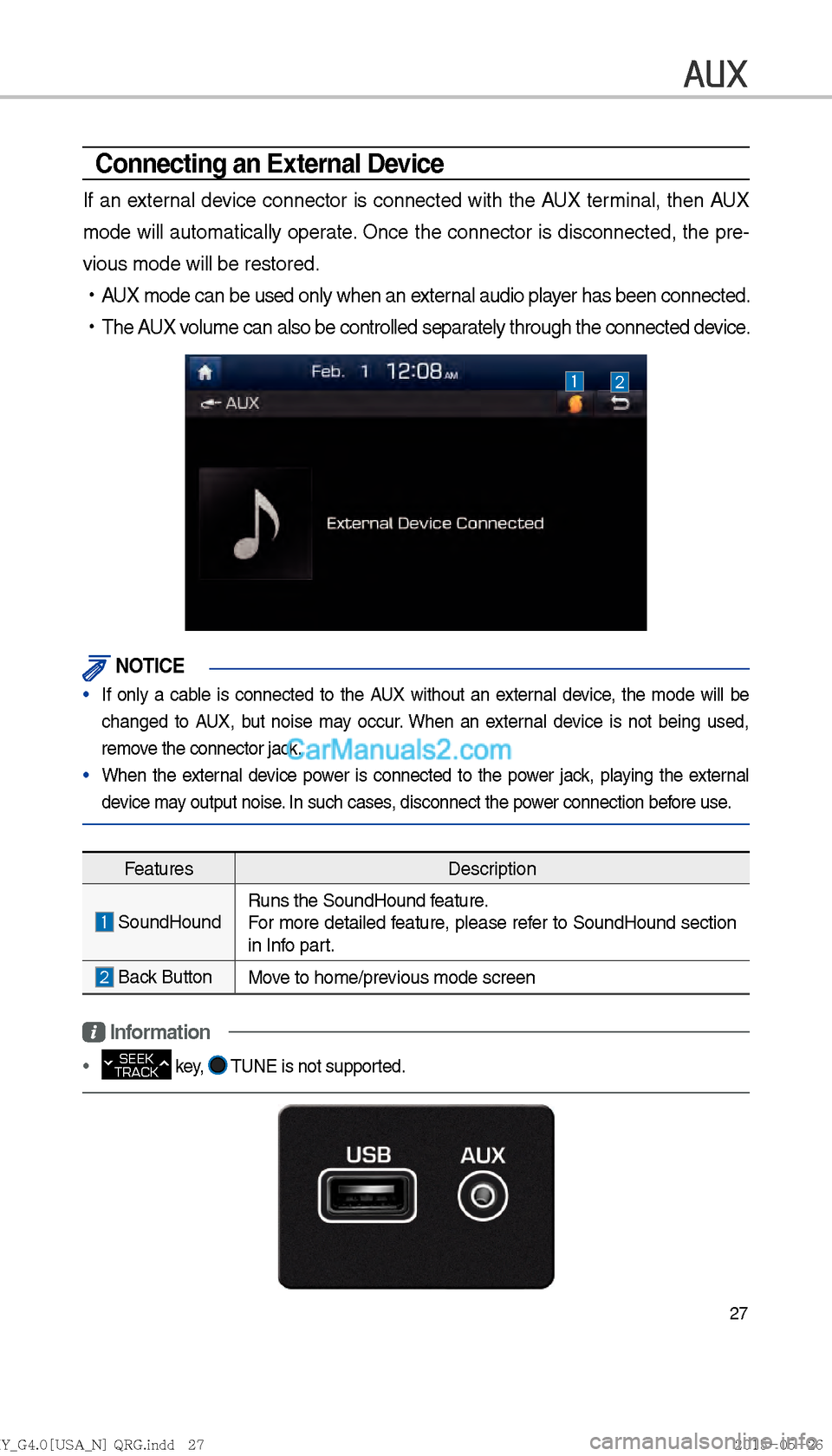
Connecting an External Device
If an external device connector is connected with the AUX terminal, then AUX
mode will automatically operate. Once the connector is disconnected, the pre-
vious mode will be restored.
!Ÿ
AUX mode can be used only when an external audio player has been connected.
!Ÿ
The AUX volume can also be controlled separately through the connected device.
NOTICE
If only a cable is connected to the AUX without an external device, the mode will be
changed to AUX, but noise ma
y occur. When an external device is not being used,
remove the connector jack.
When the external device power is connected to the power jack, playing the external
device ma
y output noise
. In such cases, disconnect the power connection before use.
Features Description
SoundHoundRuns the SoundHound feature.
For more detailed feature, please refer to SoundHound section
in Info part.
Back Button
Move to home/previous mode screen
Information
SEEK
TRACK key, TUNE is not supported.
)@-'��.:@(���<64"@/>�23(�JOEE����� .:@(���<64"@/>�23(�JOEE����� ������������� ß
y��������� ������������
Page 243 of 308

31
Bluetooth
Bluetooth Connection
Pairing a New Device
Before you can use the Bluetooth
feature, you must first pair/connect
your mobile phone to your car.
Up to 5 Bluetooth devices can be
paired.
Only one Bluetooth device can be
connected at a time.
Pairing a New Device by Selecting
Phone/Call
Select PHONE key in the head unit
or
key in the steering wheel
remote control. ▶
Select
Yes. ▶
Pair your car after your mobile phone
detects the Bluetooth device. ▶
Enter the passkey or accept the
authorization popup. ▶
Connect
Bluetooth.
Pairing a New Device Through the
Phone Settings
Select SETUP key in the head
unit. ▶
Select
Phone. ▶
Select
Bluetooth Connection. ▶
Select Add New.
▶ Pair your car after your mobile
phone detects the Bluetooth device.
▶ Enter the passkey or accept the
authorization popup. ▶
Connect
Bluetooth.
The default passkey is 0000.
The device name above is an exam-
ple. Check the actual information on
the product.
Connecting Bluetooth
Devices
Connects the Bluetooth devices that
you add.
Connecting Devices by Selecting
Phone/Call
Select PHONE key in the head unit
or
key in the steering wheel
remote control. ▶
Select the name
of the device to connect. ▶
Connect
Bluetooth.
)@-'��.:@(���<64"@/>�23(�JOEE����� .:@(���<64"@/>�23(�JOEE����� ������������� ß
y��������� ������������
Page 244 of 308

32
Connecting Devices Through the
Phone Settings
Select SETUP key in the head
unit. ▶
Select
Phone.▶
Select
Bluetooth Connection.▶
Select the
name of the device to connect. ▶
Connect Bluetooth.
Dial
Dials a call after the Bluetooth
devices are connected.
!Ÿ
Select
PHONE key in the head
unit or
key in the steering
wheel remote control. Select
All Menus from the full screen dis-
play ▶
Phone.
Information
Some types of mobile phones may not
support the Speed Dial function.
Bluetooth
Name Description
Keypad Use the keypad to
enter the phone num-
ber that you want to
call. Press and hold
the last number of
a speed dial to dial
a number that you
added to the Speed
Dial list in the phone
Delete
Delete the numbers
that you entered.
SettingsMoves to a screen of
Phone Settings.
CallMakes a call after
you dial a number
and select CALL. If
the number is listed
in Dialed Calls, you
can select the number
and press CALL to
automatically dial that
number again.
)@-'��.:@(���<64"@/>�23(�JOEE�����
.:@(���<64"@/>�23(�JOEE����� ������������� ß
y��������� ������������
Page 245 of 308
33
Using the Menu
During a Phone Call
When making a call, you can use
the following menu items.
Name Description
Use PrivateSwitches a voice
call from the car
Hands-free to the
mobile phone.
End
Ends a call.
Contacts Displays the
Contacts list.
Outgoing
Volume Displays the Mic
Volume settings.
You can adjust the
in-call volume that
the other party
hears (level 1 - 5).
Keypad
Moves to a screen
for entering ARS
numbers.
SwitchSwitches to a call
on hold, if any. You
can also switch
calls by selecting
the number in
the Information
Display. The Switch
function switches
the current call to
a waiting call in
order to answer a
new incoming call.
)@-'��.:@(���<64"@/>�23(�JOEE�����
.:@(���<64"@/>�23(�JOEE����� ������������� ß
y��������� ������������
Page 246 of 308
34
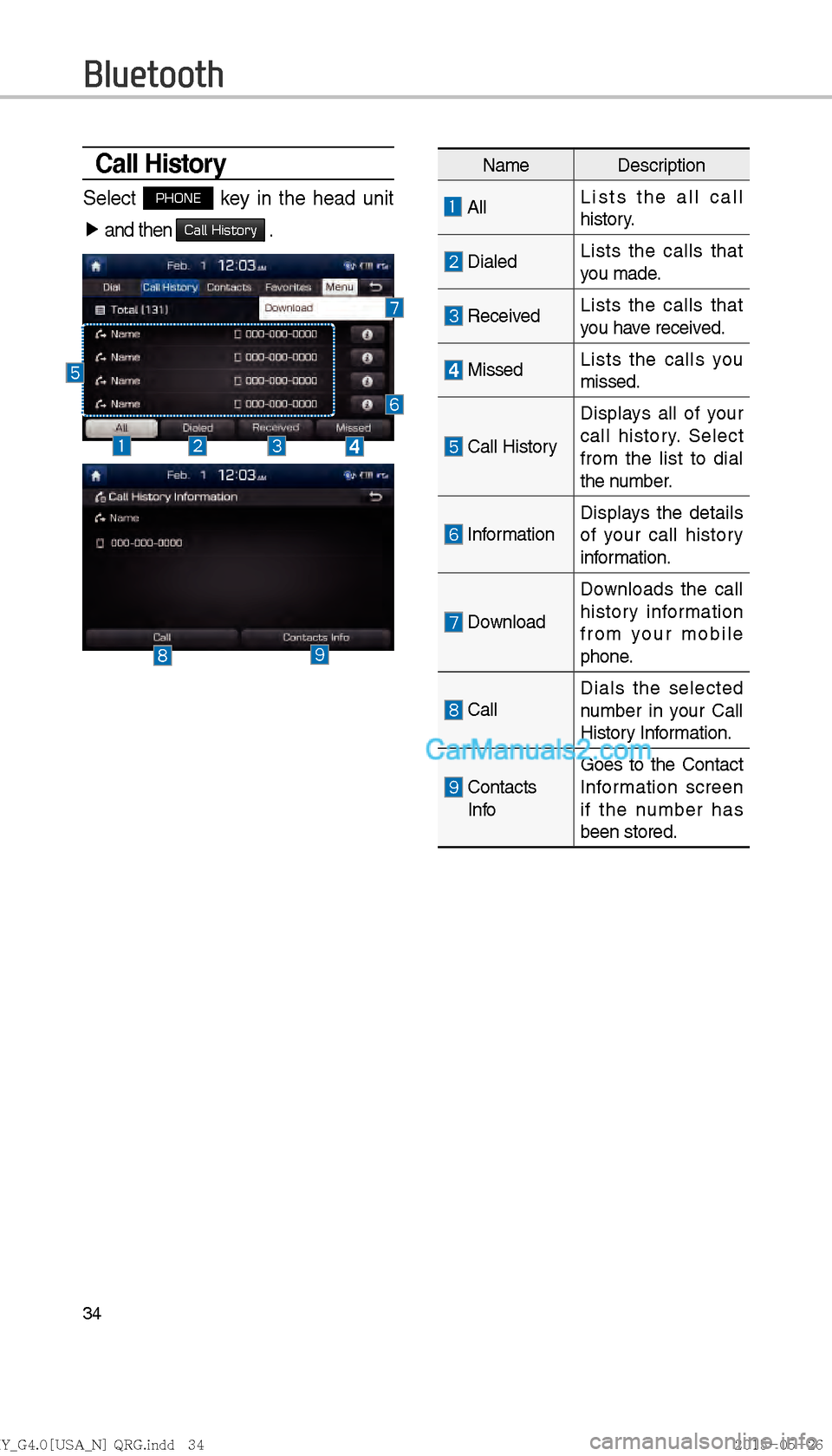
Call History
Select PHONE key in the head unit
▶ and then
Call History .
Bluetooth
Name Description
All Lists the all call
history.
DialedLists the calls that
you made.
Received Lists the calls that
you have received.
Missed
Lists the calls you
missed.
Call HistoryDisplays all of your
call history. Select
from the list to dial
the number.
Information
Displays the details
of your call history
information.
DownloadDownloads the call
history information
from your mobile
phone.
Call
Dials the selected
number in your Call
History Information.
Contacts
Info Goes to the Contact
Information screen
if the number has
been stored.
)@-'��.:@(���<64"@/>�23(�JOEE�����
.:@(���<64"@/>�23(�JOEE����� ������������� ß
y��������� ������������
Page 247 of 308
35
Favorites
Select PHONE key in the head unit
▶ and then
Favorites .
Contacts
Select PHONE key in the head unit
▶ and then
Contacts
Name Description
Contacts
List The list of Contacts.
Select from the list
to dial the number.
Information
Displays contact
information.
Download Downloads contacts
from your mobile
phone.
Search by
Name Searches Contacts
for the name that you
enter.
Search by
Number Searches Contacts
for the number that
you enter.
Add to
Favorites Adds a phone num-
ber to Favorites.
Name Description
FavoritesLists the phone
numbers saved as
Favorites. Select
from the list to dial
the number.
Add New
Adds a new number
to Favorites.
Delete
Items Deletes numbers
that you select from
Favorites.
Delete All
Deletes all of the
numbers from
Favorites.
)@-'��.:@(���<64"@/>�23(�JOEE�����
.:@(���<64"@/>�23(�JOEE����� ������������� ß
y��������� ������������
Page 248 of 308

36
Precautions Required
for Successful Voice
Recognition
1. Voice recognition supports only
the commands that are displayed
on the screen and written in the
User’s Guide.
2. To ensure the correct recognition
and execution of your command,
say your command when you hear
the beep after a voice prompt.
3. Voice recognition automatically
ends if:
1) A call is incoming or outgoing
2) A media (USB or iPod, etc.) is
connected or disconnected
3) The front or rear view camera
is operated (optional)
4) The car engine starts or stops
5) A system key, such as
RADIO key or MEDIA key is
selected
6) An emergency occurs, for
example re-searching for the
route after the navigation
route has been lost 4.
The microphone that recognizes
your voice is located over the
head part in the driver’s seat.
To make your commands bet-
ter understood, keep your body
straight in the driver’s seat when
speaking the command.
5. Speaking naturally and clearly will
ensure better recognition of your
voice commands.
6. In the following cases voice rec-
ognition will be affected by ambi-
ent noise.
1) The sound of the wind if any
window or the sun roof is
open.
2) High speed blower from the
air vents .
Set climate control
to blow lower than level 3.
3) Vibrations from passing
through a tunnel.
4) Vibrations from driving on an
uneven road.
5) Storms and heavy rain.
Voice Recognition
)@-'��.:@(���<64"@/>�23(�JOEE����� .:@(���<64"@/>�23(�JOEE����� ������������� ß
y��������� ������������
Page 249 of 308
37
Starting/Ending
and Setting Voice
Recognition
Starting Voice
Recognition
Press the key briefly (less
than 0.8 seconds) on the steering
wheel control to activate voice rec-
ognition.
Ending Voice Recognition
1. Select “Exit” to the left of the bot- tom to end voice recognition.
2. Press and hold (over 0.8 sec- onds) the
key on the
steering wheel control to end
voice recognition.
)@-'��.:@(���<64"@/>�23(�JOEE����� .:@(���<64"@/>�23(�JOEE����� ������������� ß
y��������� ������������