Page 201 of 308

Index I 10-11
10
N
Name and Function of Each Part …… 4-2
Navigation Commands ……………… 6-9
Navigation Settings ……………… 5-35, 9-3
Navigation Volume …………………… 5-5
Nearby POIs ………………………… 5-6
O
On-Screen Touch Controls ……………1-12
Operating Navigation Screen ………… 5-2
Other Commands List(Commands used
in List / Help) …………………………6-15
P
Pairing a New Device ………………… 3-4
Pandora Radio ……………………… 7-2
Pandora Radio Mode Screen Controls 7-2
Phone Ringtone ……………………… 9-5
Phone Settings ……………………… 9-4
Phone Status Icons ………………… 3-6
Places …………………………………5-14
Precautions for Safe Driving ………… 3-2
Precautions Required for Successful
Voice Recognition …………………… 6-2
Precautions upon Handling Discs ……2-11
Precautions ……………………………7-18
Product Specification …………………10-2
Q
Quick Run of Voice Recognition (Manual
Mode) ………………………………… 6-3
R
Radio Commands ……………………6-11
Rear View Mirror Switch ……………… 4-2
Recognizing Music …………………… 7-6
Restrictions on Features for Safety
Measures ………………………………1-10
Route Guidance ………………………5-29
Route Option …………………… 5-4, 5-34
Route Overview ………………………5-32
Route Preview …………………………5-32
Route Setting …………………………5-26
Route ………………………… 5-31, 5-36
S
Screen Saver Settings …………………9-11
Search …………………………………5-14
Searching Music ……………………… 7-6
Selecting through Channel/Category
List …………………………………… 2-8
Send to Car with Google ……………… 4-6
Service Activation …………………… 9-8
Setup ………………………………… 9-2
Siri Eyes Free …………………………6-21
SiriusXM™ …………………………… 2-5
SiriusXM™ Data ………………………7-10
SiriusXM™ Fuel Price Information ……7-12
SiriusXM™ Mode Display Controls … 2-6
SiriusXM™ Mode Hard Key Controls 2-5
SiriusXM™ Movie Information ………7-16
SiriusXM™ Sports Information ………7-14
SiriusXM™ Stock Information …………7-13
SiriusXM™ Traffic Information…………7-11
SiriusXM™ Weather Announcement …7-10
Skipping Prompt Messages ………… 6-5
Song Main Screen …………………… 7-7
Sound Settings ……………………… 9-3
)@-'��.:@(���<64"@/>�1BSU���JOEE�������� )@-'��.:@(���<64"@/>�1BSU���JOEE���������������������
Page 214 of 308

2
Controls and Functions
Head Unit
NameDescription
POWER/
VOL
!Ÿ
When power is off, press to turn power on
!Ÿ
When power is on, press and hold (over 0.8 seconds) to turn
power off
!Ÿ
When power is on, press quickly (under 0.8 seconds) to turn
Audio off
!Ÿ
Turn left/right to control volume
TUNE
!Ÿ
FM/AM mode : changes the frequency
!Ÿ
SiriusXM™ mode : changes the channel
!Ÿ
MEDIA (Disc/USB/iPod/My Music) mode : changes the
track, file or title changes the track, file or title (except USB
Image, Bluetooth Audio and AUX)
RADIOConverts to FM/AM/SiriusXM™ mode
!Ÿ
Each time the key is pressed, the mode is changed in order of
FM ª
AM ª
SiriusXM™ ª�
FM
MEDIA
Converts to MEDIA mode
!Ÿ
If the media is not connected or the CD player is not available
for this model, MEDIA mode will not be activated.
!Ÿ
Press this key to move to the last mode that you accessed
in MEDIA mode. Press it again to display the screen where
you can select a MEDIA mode.
PHONETakes user to phone screen
BLUELINKDisplays the Blue Link mode
MAPVOICEDisplays the map for the current position
NAVITakes you to the menu screen where you can find your desti-
nation and set the route.
)@-'��.:@(���<64"@/>�23(�JOEE���� .:@(���<64"@/>�23(�JOEE���� ������������� ß
y��������� ������������
Page 215 of 308
3
NameDescription
SD card insert slot
Press to insert or eject disc
DISPTurns the screen on/off.
INFODisplays the information mode
SETUPDisplays the Setup mode
RESETResets the system settings. (Preset radio channels and other data
will not be deleted)
SEEK
TRACK
When key is pressed shortly. (under 0.8 seconds)
!Ÿ
FM/AM mode : plays previous/next frequency
!Ÿ
SiriusXM™ mode : plays the previous/next channel
!Ÿ
MEDIA (Disc/USB/iPod/My Music) mode : changes the track, file
or title (except USB Image and AUX)
When key is pressed and held. (over 0.8 seconds)
!Ÿ
FM/AM mode : continuously changes the frequency until the key
is released
!Ÿ
SiriusXM™ mode : continuously changes the channel until the
key is released and plays the current channel
!Ÿ
MEDIA (Disc/USB/iPod/My Music) mode : rewinds or fastforwards
the track or file (except USB Image, Bluetooth Audio and AUX)
)@-'��.:@(���<64"@/>�23(�JOEE���� .:@(���<64"@/>�23(�JOEE���� ������������� ß
y��������� ������������
Page 216 of 308

4
Steering Wheel Control
Controls and Functions
NameDescription
VOL+
VOL-Controls the volume
MODE
!Ÿ
Each time this key is pressed, mode is changed in the order FM
ª AM ª
SiriusXM™ ª
Disc ª
USB Music or iPod ª
AUX ª
Bluetooth Audio ª
My Music ª
Android Auto ª
FM
!Ÿ
If the media is not connected, the corresponding modes will be
disabled
!Ÿ
Press and hold the key (more than 0.8 seconds) to turn the
Audio system on/off
!Ÿ
When power is off, press the key to turn power back on
When keys are pressed quickly. (less than 0.8 seconds)
!Ÿ
FM/AM mode : searches broadcast frequencies saved to
Presets
!Ÿ
SiriusXM™ mode : searches broadcast channels saved to
Presets
!Ÿ
MEDIA (Disc/USB/iPod/My Music) mode : changes the track,
file or title (except USB Image, AUX)
When keys are pressed and held. (more than 0.8 seconds)
!Ÿ
FM/AM mode : automatically searches broadcast frequencies
!Ÿ
SiriusXM™ mode : automatically searches broadcast channels
!Ÿ
MEDIA (Disc/USB/iPod/My Music) mode : quickly looks up
songs (excluding USB images, AUX and Bluetooth audio files)
)@-'��.:@(���<64"@/>�23(�JOEE���� .:@(���<64"@/>�23(�JOEE���� ������������� ß
y��������� ������������
Page 220 of 308

8
Setup
Setup is the screen to control sys-
tem settings of the AVN.
To enter the screen, select the
SETUP key of the device or the
Setup button in All Menus.
Features Description
NavigationProvides Normal/Screen/
Guidance/Route/Safety
Setting.
SoundProvides the sound
control options for
Position, Bass, Mid,
Treble, Volume, Ratio
and Advanced settings.
Display
Provides the Mode/
Brightness/Adjust set-
tings.
PhoneProvides the Bluetooth
Connection/Auto
Connection Priority/
Ringtone/System
Bluetooth Infor
mation
settings.
Blue Link Provides the Activation/
Modem Information
settings.
Voice
RecognitionProvides the Guidance
and Priority settings.
Clock Provides the time and
date settings.
Wi-FiProvides the Wi-Fi On
and Network Connection
settings.
Features Description
Language
Provides the Change
Language settings.
KeyboardProvides settings to
switch keyboard lay-
outs.
Downloaded
AppsProvides the removal
settings for down-
loaded and installed
apps.
Screen Saver Provides the Clock/
None settings.
ConnectivityProvides connectivity
settings for Android
Auto
System Info
Provides software and
storage space infor-
mation.
Display OffProvides the Display
Off (touch activation)
function.
)@-'��.:@(���<64"@/>�23(�JOEE����
.:@(���<64"@/>�23(�JOEE���� ������������� ß
y��������� ������������
Page 224 of 308
12
FM/AM
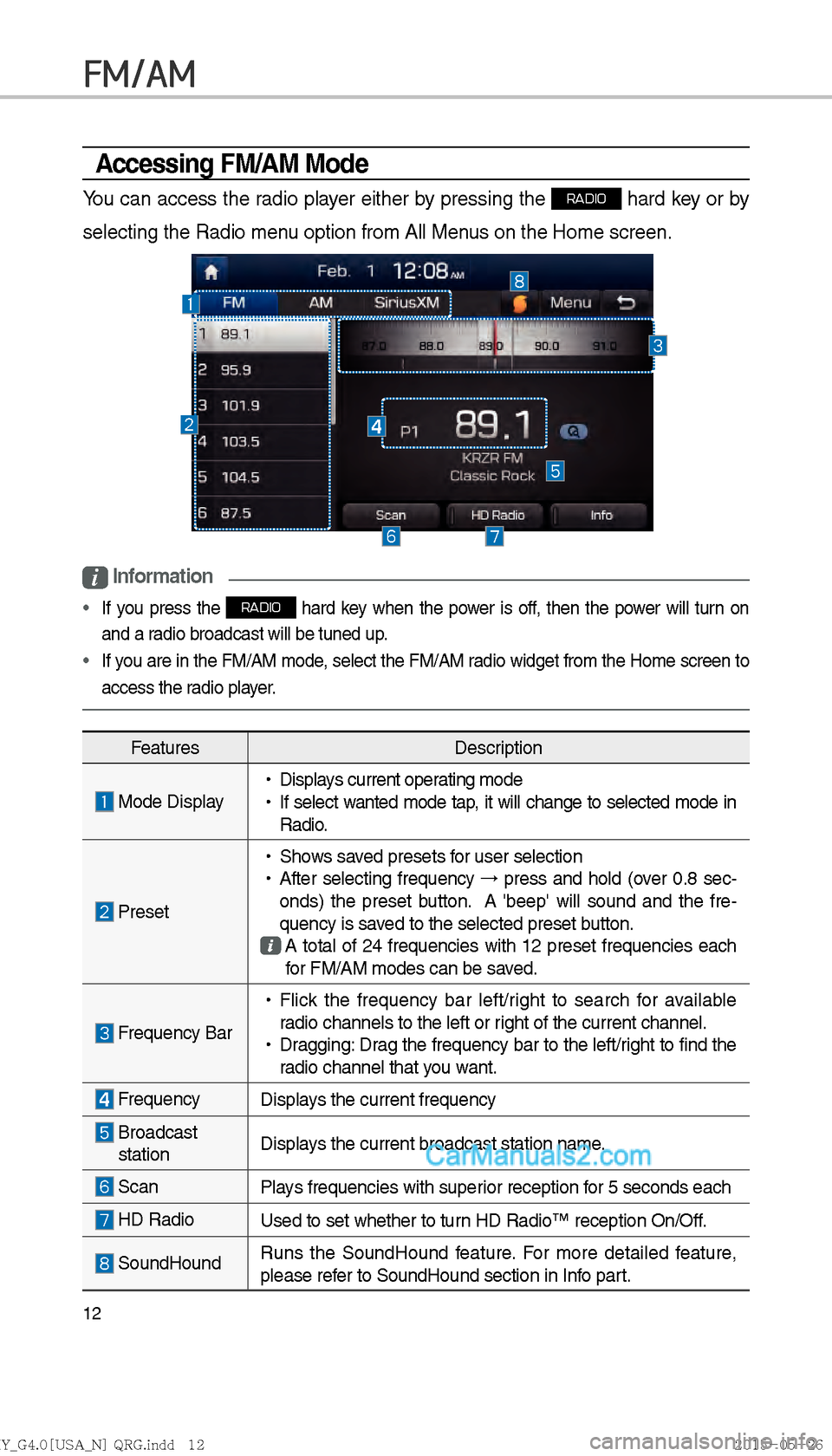
Accessing FM/AM Mode
You can access the radio player either by pressing the RADIO hard key or by
selecting the Radio menu option from All Menus on the Home screen.
i Information
If you press the RADIO hard key when the power is off, then the power will turn on
and a radio broadcast will be tuned up.
If you are in the FM/AM mode, select the FM/AM radio widget from the Home screen to
access the radio pla y
er.
Features Description
Mode Display
!Ÿ
Displays current operating mode
!Ÿ
If select w anted mode tap , it will change to selected mode in
Radio
.
Preset
!Ÿ
Shows saved presets for user selection
!Ÿ
After selecting frequency →
press and hold (over 0.8 sec-
onds) the preset button. A 'beep' will sound and the fre-
quency is saved to the selected preset button.
A total of 24 frequencies with 12 preset frequencies each
for FM/AM modes can be saved.
Frequency Bar
!Ÿ
Flick the frequency bar left/right to search for available
radio channels to the left or right of the current channel.
!Ÿ
Dragging: Drag the frequency bar to the left/right to find the
radio channel that you want.
Frequency Displays the current frequency
Broadcast
station Displays the current broadcast station name.
Scan
Plays frequencies with superior reception for 5 seconds each
HD RadioUsed to set whether to turn HD Radio™ reception On/Off.
SoundHoundRuns the SoundHound feature. For more detailed feature,
please refer to SoundHound section in Info part.
)@-'��.:@(���<64"@/>�23(�JOEE�����
.:@(���<64"@/>�23(�JOEE����� ������������� ß
y��������� ������������
Page 227 of 308
15
SiriusXM™ Mode Hard Key Controls
You can access the radio player either by pressing the RADIO hard key or by
selecting the Radio menu option from All Menus on the Home screen. Select
the SiriusXM™ tab from the radio player.
i Information
If you press the RADIO hard key when the power is off, then the power will turn on
and a radio broadcast will be tuned up.
If you are in the SiriusXM™ mode, select the SiriusXM™ radio widget from the Home
screen to access the radio pla y
er.
When the power is off, pressing the
RADIO key will turn the power on and play a
SiriusXM™ Radio broadcast.
SiriusXM™
)@-'��.:@(���<64"@/>�23(�JOEE����� .:@(���<64"@/>�23(�JOEE����� ������������� ß
y��������� ������������
Page 229 of 308

17
FeaturesDescription
Play Live
It will change to listening live broadcast mode.
Skip BackwardRepeats the previously broadcasted program.
!Ÿ
Holding for less than 0.8 seconds : Moves to the previous
segment
!Ÿ
Holding for longer than 0.8 seconds: Moves to the previous
5 seconds
Play Pause Pauses/plays the currently broadcasting program.
Skip ForwardMoves to the next segment.
List Displays SiriusXM™ Radio Categories/Channel Lists
MenuWhat’s on My Preset?
The program schedule saved in my preset. (For more details,
see Section 2.5. Viewing Menu.)
!Ÿ
Featured Favorite
Theme channels recommended by SiriusXM™. (For more
details, see Section 2.5. Viewing Menu.)
!Ÿ
Preset Scan
Plays preset frequencies for 5 seconds each.
SEEK/TRACK When key is pressed quickly
.(under 0.8 seconds)
Plays the pre vious/ne
xt channel
When key is pressed and held.(over 0.8 seconds)
Continuously changes the channel until the key is released
and plays the current channel
TUNE Changes the channel
)@-'��.:@(���<64"@/>�23(�JOEE�����.:@(���<64"@/>�23(�JOEE����� ������������� ß
y��������� ������������

