2015 Peugeot 208 stop start
[x] Cancel search: stop startPage 275 of 341
273
208_en_Chap9b_SMEGplus_ed01-2015
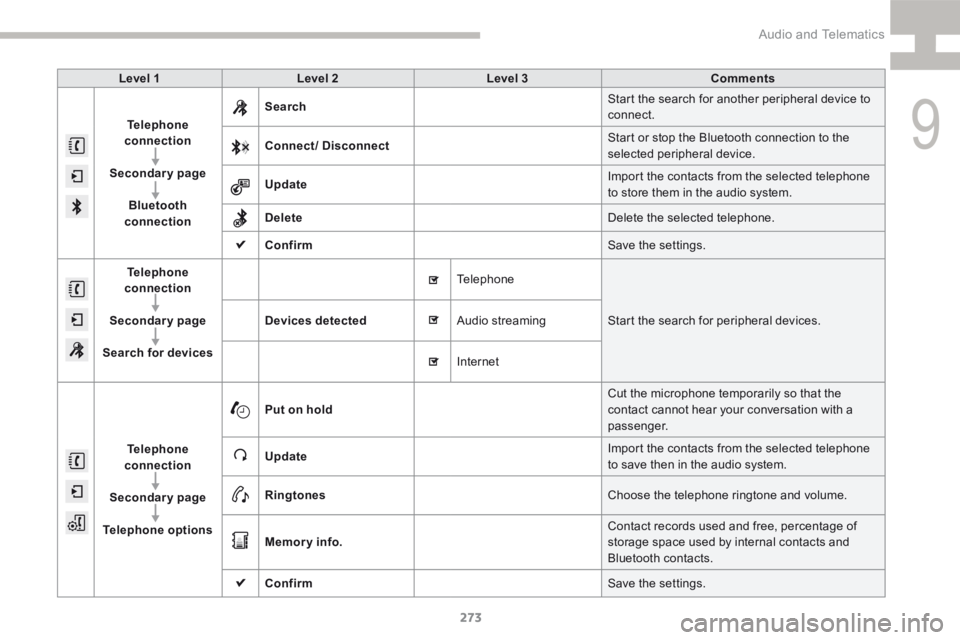
Level 1Level 2 Level 3 Comments
Telephone
connection
Secondary page Bluetooth
connection Search
Start the search for another peripheral device to
connect.
Connect/ Disconnect Start or stop the Bluetooth connection to the
selected peripheral device.
Update Import the contacts from the selected telephone
to store them in the audio system.
Delete Delete the selected telephone.
Confirm Save the settings.
Telephone
conn ection
Secondary page
Search for devices Devices detected Telephone
Start the search for peripheral devices.
Audio streaming
Internet
Telephone
connection
Secondary page
Telephone options Put on hold
Cut the microphone temporarily so that the
contact cannot hear your conversation with a
passenger.
Update Import the contacts from the selected telephone
to save then in the audio system.
Ringtones Choose the telephone ringtone and volume.
Memory info. Contact records used and free, percentage of
storage space used by internal contacts and
Bluetooth contacts.
Confirm Save the settings.
9
Audio and Telematics
Page 300 of 341
298
208_en_Chap9c_RDE2_ed01-2015
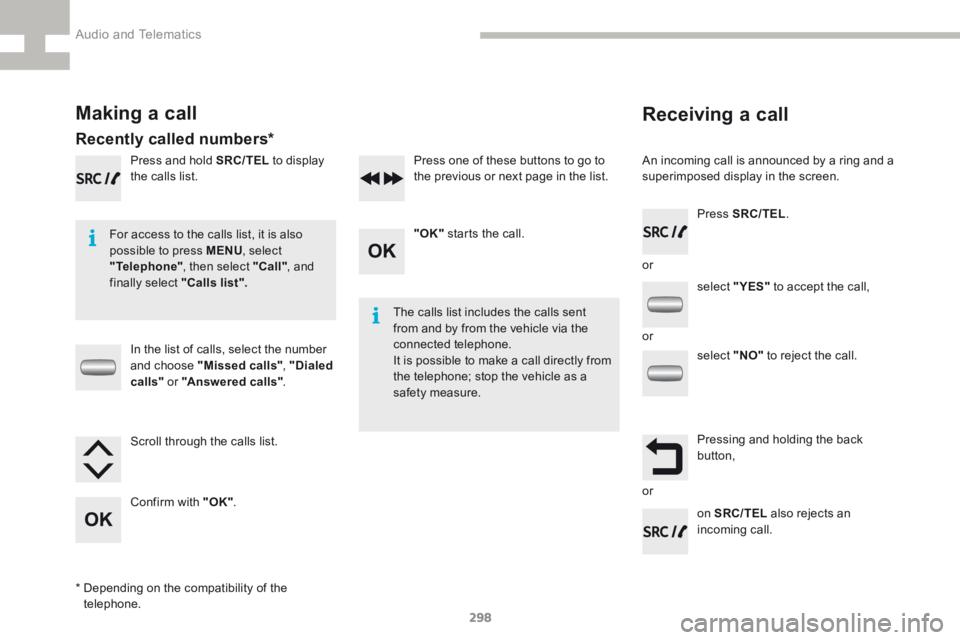
Receiving a call
An incoming call is announced by a ring and a
superimposed display in the screen.
For access to the calls list, it is also
possible to press MENU , select
"Telephone" , then select "Call" , and
finally select "Calls list".
The calls list includes the calls sent
from and by from the vehicle via the
connected telephone.
It is possible to make a call directly from
the telephone; stop the vehicle as a
safety measure.
Making a call
Recently called numbers*
In the list of calls, select the number
and choose "Missed calls" , "Dialed
calls " or "Answered calls" .
Press and hold SRC/TEL
to display
the calls list.
Press SRC/TEL.
on SRC/TEL also rejects an
incoming call.
or
or
or
Scroll through the calls list.
Confirm with "OK"
. "OK"
starts the call.
Press one of these buttons to go to
the previous or next page in the list.
* Depending on the compatibility of the
telephone. select "
YES" to accept the call,
select "NO" to reject the call.
Pressing and holding the back
button,
Audio and Telematics
Page 307 of 341
305
208_en_Chap9c_RDE2_ed01-2015
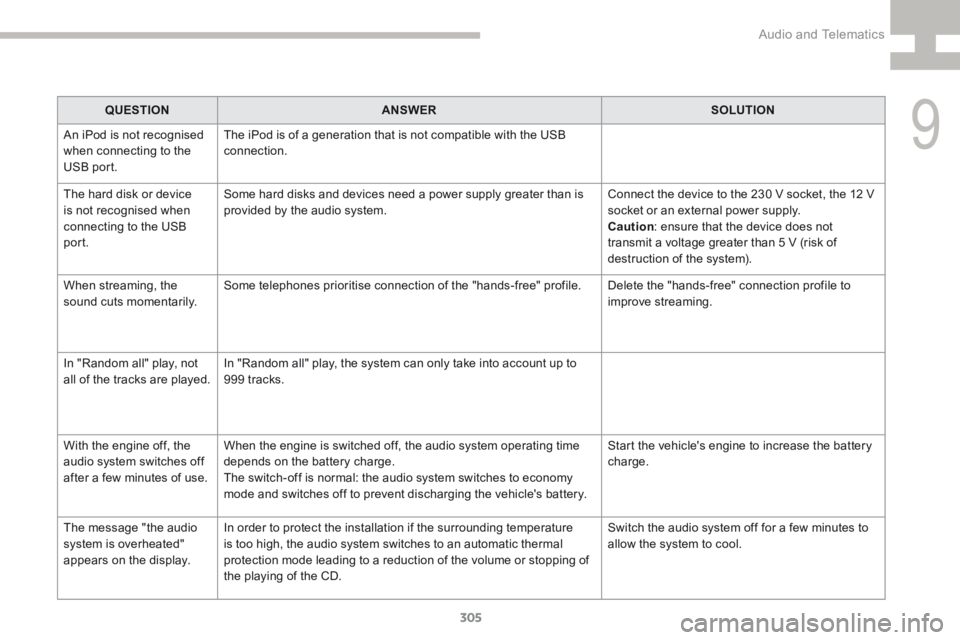
QUESTIONANSWER SOLUTION
An iPod is not recognised
when connecting to the
USB port. The iPod is of a generation that is not compatible with the USB
connection.
The hard disk or device
is not recognised when
connecting to the USB
port. Some hard disks and devices need a power supply greater than is
provided by the audio system.
Connect the device to the 230 V socket, the 12 V
socket or an external power supply.
Caution
: ensure that the device does not
transmit a voltage greater than 5 V (risk of
destruction of the system).
When streaming, the
sound cuts momentarily. Some telephones prioritise connection of the "hands-free" profile.
Delete the "hands-free" connection profile to
improve streaming.
In "Random all" play, not
all of the tracks are played. In "Random all" play, the system can only take into account up to
999
tracks.
With the engine off, the
audio system switches off
after a few minutes of use. When the engine is switched off, the audio system operating time
depends on the battery charge.
The switch-off is normal: the audio system switches to economy
mode and switches off to prevent discharging the vehicle's battery. Start the vehicle's engine to increase the battery
charge.
The message "the audio
system is overheated"
appears on the display. In order to protect the installation if the surrounding temperature
is too high, the audio system switches to an automatic thermal
protection mode leading to a reduction of the volume or stopping of
the playing of the CD. Switch the audio system off for a few minutes to
allow the system to cool.
9
Audio and Telematics
Page 320 of 341
318
208_en_Chap9d_RDE1_ed01-2015
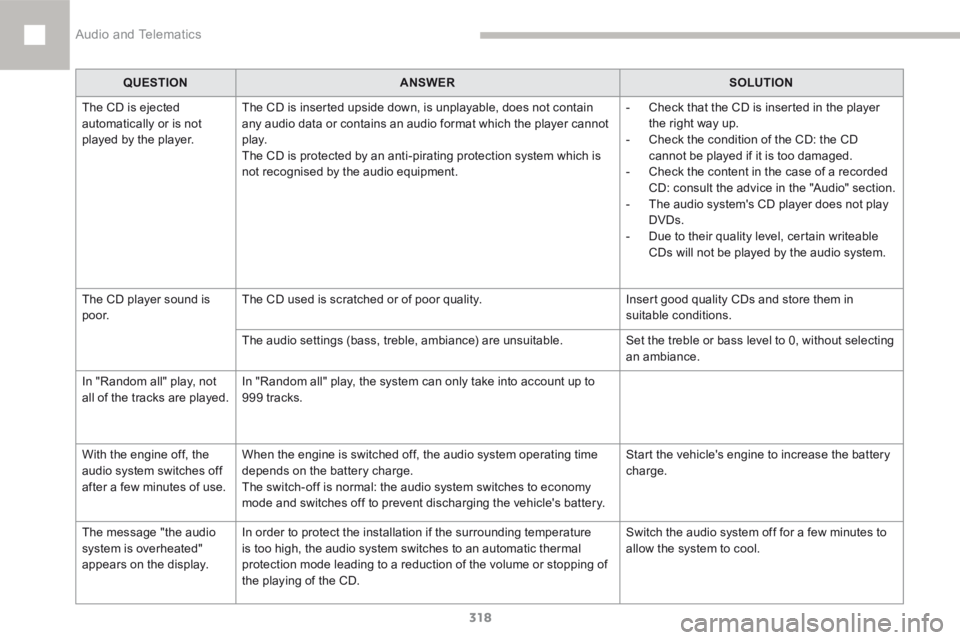
QUESTIONANSWER SOLUTION
The CD is ejected
automatically or is not
played by the player. The CD is inserted upside down, is unplayable, does not contain
any audio data or contains an audio format which the player cannot
p l ay.
The CD is protected by an anti-pirating protection system which is
not recognised by the audio equipment. -
Check that the CD is inserted in the player
the right way up.
- Check the condition of the CD: the CD
cannot be played if it is too damaged.
- Check the content in the case of a recorded
CD: consult the advice in the "Audio" section.
- The audio system's CD player does not play
DVDs.
- Due to their quality level, certain writeable
CDs will not be played by the audio system.
The CD player sound is
p o o r. The CD used is scratched or of poor quality.
Insert good quality CDs and store them in
suitable conditions.
The audio settings (bass, treble, ambiance) are unsuitable. Set the treble or bass level to 0, without selecting
an ambiance.
In "Random all" play, not
all of the tracks are played. In "Random all" play, the system can only take into account up to
999 tracks.
With the engine off, the
audio system switches off
after a few minutes of use. When the engine is switched off, the audio system operating time
depends on the battery charge.
The switch-off is normal: the audio system switches to economy
mode and switches off to prevent discharging the vehicle's battery. Start the vehicle's engine to increase the battery
charge.
The message "the audio
system is overheated"
appears on the display. In order to protect the installation if the surrounding temperature
is too high, the audio system switches to an automatic thermal
protection mode leading to a reduction of the volume or stopping of
the playing of the CD. Switch the audio system off for a few minutes to
allow the system to cool.
Audio and Telematics
Page 324 of 341
322
208_en_Chap10_index-alpha_ed01-2015
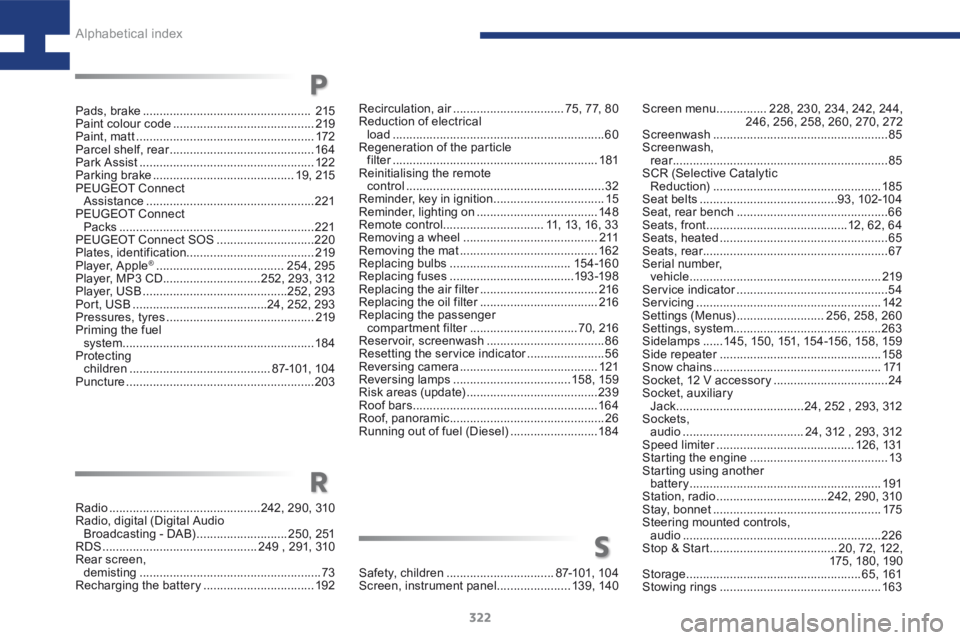
Screen menu ...............228, 230, 234, 242, 244,
246, 256, 258, 260, 270, 272
Screenwash .................................................... 85
Screenwash, rear ................................................................ 85
SCR (Selective Catalytic Reduction) .................................................. 185
Seat belts ......................................... 93, 102-104
Seat, rear bench ............................................. 66
Seats, front .......................................... 12, 62, 64
Seats, heated .................................................. 65
Seats, rear ....................................................... 67
Serial number, vehicle ......................................................... 219
Service indicator ............................................. 54
Servicing ....................................................... 142
Settings (Menus) ..........................256, 258, 260
Settings, system ............................................ 263
Sidelamps ......145, 150, 151, 15 4 -15 6, 15 8, 159
Side repeater ................................................ 15 8
Snow chains .................................................. 171
Socket, 12 V accessory ..................................24
Socket, auxiliary Jack ...................................... 24, 252 , 293, 312
Sockets, audio .................................... 24, 312 , 293, 312
Speed limiter ......................................... 126, 131
Starting the engine ......................................... 13
Starting using another battery ......................................................... 191
Station, radio ................................. 242, 290, 310
Stay, bonnet .................................................. 175
Steering mounted controls, audio ........................................................... 226
Stop & Start ...................................... 20, 72, 122,
175 , 180, 19 0
Storage .................................................... 65, 161
Stowing rings ................................................ 163
Recirculation, air
................................. 75, 77, 80
Reduction of electrical load ............................................................... 60
Regeneration of the particle filter ............................................................. 181
Reinitialising the remote control ........................................................... 32
Reminder, key in ignition ................................. 15
Reminder, lighting on .................................... 148
Remote control .............................. 11, 13, 16, 33
Removing a wheel ........................................ 2 11
Removing the mat ......................................... 162
Replacing bulbs .................................... 15 4 -16 0
Replacing fuses ..................................... 193 -198
Replacing the air filter ................................... 216
Replacing the oil filter ................................... 216
Replacing the passenger compartment filter ................................ 70, 216
Reservoir, screenwash ................................... 86
Resetting the service indicator .......................56
Reversing camera ......................................... 121
Reversing lamps ................................... 15 8, 159
Risk areas (update) ....................................... 239
Roof bars ....................................................... 16 4
Roof, panoramic .............................................. 26
Running out of fuel (Diesel) ..........................18 4
Pads, brake
.................................................. 215
Paint colour code .......................................... 219
Paint, matt ..................................................... 172
Parcel shelf, rear ........................................... 16 4
Park Assist .................................................... 12 2
Parking brake .......................................... 19, 215
P EUGEOT Connect
Assistance .................................................. 221
P EUGEOT Connect
Packs .......................................................... 221
P EUGEOT Connect SOS ............................. 220
Plates, identification ...................................... 219
Player, Apple
® ...................................... 254, 295
Player, MP3 CD ............................. 252, 293, 312
Player, USB ........................................... 252, 293
Port, USB ........................................ 24, 252, 293
Pressures, tyres ............................................ 219
Priming the fuel system ......................................................... 18 4
Protecting children .......................................... 87-101, 104
Puncture ........................................................ 203
P
Radio ............................................. 242, 290, 310
Radio, digital (Digital Audio Broadcasting - DAB) ...........................250, 251
RDS .............................................. 249 , 291, 310
Rear screen, demisting ...................................................... 73
Recharging the battery ................................. 192
R
Safety, children ................................ 87-101, 104
Screen, instrument panel ......................13 9, 14 0
S
Alphabetical index