2015 MERCEDES-BENZ S-Class shift
[x] Cancel search: shiftPage 256 of 502
X
To cancel the procedure: press the%
button on the multifunction steering wheel or pull away.
or
X To park using Active Parking Assist:
press the abutton on the multifunction
steering wheel.
The Park Assist Active Accelerate
Park Assist Active Accelerate
and and Brake
Brake Observe
Observe Surroundings
Surroundings mes-
sage appears in the multifunction display.
X Let go of the multifunction steering wheel.
X Back up the vehicle, being ready to brake at
all times. When backing up, drive at a speed below approximately 6 mph (10 km/h).
Otherwise Active Parking Assist will be can-
celed.
Active Parking Assist brakes the vehicle to a standstill when the vehicle approaches
the rear border of the parking space.
Maneuvering may be required in tight park- ing spaces.
The Park Assist Active Select D
Park Assist Active Select D
Observe
Observe Surroundings Surroundings message appears in
the multifunction display.
X Shift the transmission to position Dwhile
the vehicle is stationary.
Active Parking Assist immediately steers in
the other direction.
The Park Assist Active Accelerate Park Assist Active Accelerate
and
and Brake
Brake Observe
Observe Surroundings
Surroundings mes-
sage appears in the multifunction display.
i You will achieve the best results by wait-
ing for the steering procedure to complete before pulling away.
X Drive forwards and be ready to brake at all
times.
Active Parking Assist brakes the vehicle to a standstill.
The Park Assist Active Select R
Park Assist Active Select R
Observe
Observe Surroundings Surroundings message appears in
the multifunction display.
As soon as the parking procedure is com-
plete, the Park Assist Finished Park Assist Finished message
appears in the multifunction display and a warning tone sounds. The vehicle is now
parked. The vehicle is kept stationary without
the driver having to depress the brake pedal. The braking effect is canceled when you
depress the accelerator pedal.
Active Parking Assist no longer supports you
with steering interventions and brake appli-
cations. When Active Parking Assist is fin-
ished, you must steer and brake again your-
self. PARKTRONIC is still available.
Parking tips:
R The way your vehicle is positioned in the
parking space after parking is dependent
on various factors. These include the posi-
tion and shape of the vehicles parked in
front and behind it and the conditions of the
location. It may be the case that Active
Parking Assist guides you too far into a
parking space, or not far enough into it. In
some cases, it may also lead you across or
onto the curb. If necessary, you should can-
cel the parking procedure with Active Park- ing Assist.
R You can also select preselect transmission
position D. The vehicle redirects and does
not drive as far into the parking space.
Should the transmission change take place too early, the parking procedure will be
canceled. A sensible parking position can
no longer be achieved from this position.
Exiting a parking space In order that Active Parking Assist can sup-
port you when you exit the parking space:
R the border of the parking space must be
high enough at the front and the rear. A
curb is too small, for example.
R the border of the parking space must not be
too wide, as the position of the vehicle must
not exceed an angle of 45° to the starting
position as it is maneuvering into the park- ing space.
R a maneuvering distance of at least 3.3 ft
(1.0 m) must be available. 254
Driving systemsDriving
and parking
Page 257 of 502

Active Parking Assist can only assist you with
exiting a parking space if you have parked thevehicle parallel to the direction of travel using
Active Parking Assist.
i If PARKTRONIC detects obstacles, Active
Parking Assist brakes automatically whilst
the vehicle exits the parking space. You are
responsible for braking in good time.
X Start the engine.
X Release the electric parking brake.
X Switch on the turn signal in the direction
you are pulling away.
X Shift the transmission to position Dor R.
The Start Park Assist? Yes: OK No:
Start Park Assist? Yes: OK No:
message appears in the multifunction dis-
play %.
X To cancel the procedure: press the%
button on the multifunction steering wheel
or pull away.
or
X To exit a parking space using Active
Parking Assist: press theabutton on
the multifunction steering wheel.
The Park Assist Active Accelerate
Park Assist Active Accelerate
and and Brake
Brake Observe
Observe Surroundings
Surroundings mes-
sage appears in the multifunction display.
X Let go of the multifunction steering wheel.
X Pull away, being ready to brake at all times.
Do not exceed a maximum speed of
approximately 6 mph (10 km/h) when exit-
ing a parking space. Otherwise Active Park- ing Assist will be canceled.
X Shift the transmission to position Dor Ras
required or according to the message while
the vehicle is stationary.
Active Parking Assist immediately steers in
the other direction. The Park Assist
Park Assist
Active Accelerate and Brake
Active Accelerate and Brake
Observe Observe Surroundings
Surroundings message appears
in the multifunction display.
i You will achieve the best results by wait-
ing for the steering procedure to complete before pulling away. If you back up after activation, the steering
wheel is moved to the straight-ahead posi-
tion.
X Drive forwards and back up as prompted by
the PARKTRONIC warning displays, several
times if necessary.
Once you have exited the parking space com- pletely, the steering wheel is moved to the
straight-ahead position. You hear a tone and
the Park Assist Finished
Park Assist Finished message
appears in the multifunction display. You will
then have to steer and merge into traffic on
your own. PARKTRONIC is still available. You
can take over the steering, before the vehicle has exited the parking space completely. This
is useful, for example when you recognize
that it is already possible to pull out of the
parking space.
Canceling Active Parking Assist X
Stop the movement of the multifunction
steering wheel or steer yourself.
Active Parking Assist will be canceled at
once. The Park Assist Canceled Park Assist Canceled mes-
sage appears in the multifunction display.
or X Press the PARKTRONIC button
(Y page 250).
PARKTRONIC is switched off and Active
Parking Assist is immediately canceled.
The Park Assist Canceled Park Assist Canceled message
appears in the multifunction display.
Active Parking Assist is canceled automati-
cally if:
R the electric parking brake is engaged
R transmission position Pis selected
R parking using Active Parking Assist is no
longer possible
R you are driving faster than 6 mph (10 km/h)
R a wheel spins, ESP ®
intervenes or fails. The
÷ warning lamp lights up in the instru-
ment cluster.
A warning tone sounds. The parking symbol
disappears and the multifunction display Driving systems
255Driving and parking Z
Page 259 of 502

Activating/deactivating the rear view
camera X
To activate: make sure that the SmartKey
is in position 2in the ignition lock.
X Make sure that the Activation by R
Activation by R
gear
gear function is selected in COMAND (see
separate operating instructions).
X Engage reverse gear.
The rear view camera flap opens. The area
behind the vehicle is shown in the
COMAND display with guide lines.
The image from the rear view camera is
available throughout the maneuvering
process.
To deactivate: the rear view camera deacti-
vates if you shift the transmission to Por after
driving forwards a short distance.
Displays in the COMAND display The rear view camera may show a distorted
view of obstacles, show them incorrectly or
not at all. The rear view camera does not show
objects in the following positions:
R very close to the rear bumper
R under the rear bumper
R in the area immediately above the tailgate
handle
! Objects not at ground level may appear to
be further away than they actually are, e.g.:
R the bumper of a parked vehicle
R the drawbar of a trailer
R the ball coupling of a trailer tow hitch
R the rear section of an HGV
R a slanted post
Use the guidelines only for orientation.
Approach objects no further than the bot-
tom-most guideline. :
Yellow guide line at a distance of approx-
imately 13 ft (4.0 m) from the rear of the
vehicle
; White guide line without turning the steer-
ing wheel, vehicle width including the
exterior mirrors (static)
= Yellow guide line for the vehicle width
including the exterior mirrors, for current
steering wheel angle (dynamic)
? Yellow lane marking tires at current steer-
ing wheel angle (dynamic) A
Yellow guide line at a distance of approx-
imately 3 ft (1.0m) from the rear of the
vehicle
B Vehicle center axle (marker assistance)
C Bumper
D Red guide line at a distance of approx-
imately 12 in (0.30 m) fromthe rear of the
vehicle
The guide lines are shown when the trans-
mission is in position R.
The distance specifications only apply to
objects that are at ground level. Driving systems
257Driving and parking Z
Page 262 of 502
Object detection
The rear view camera can detect moving and
stationary objects. If, for example, a pedes-
trian or another vehicle is detected, these
objects are marked with bars. The system is
only able to detect and mark stationary
objects when your vehicle is moving. When
the vehicle is stationary, moving objects can
be detected and marked.
To ensure that you can use the function, it
must be switched on in COMAND (see the
separate operating instructions). 360° camera (surround view)
General notes The 360° camera is a system consisting of
four cameras.
The system analyzes images from the follow- ing cameras:
R Rear view camera
R Front camera
R Two side cameras in the exterior mirrors
The cameras capture the immediate sur-
roundings of the vehicle. The 360° camera
assists you, for instance when parking or at
exits with reduced visibility.
The 360° camera images can be shown in full screen mode or in seven different split-screenviews on the COMAND display. A split-screen
view also includes a top view of the vehicle.
This view is calculated from the data supplied by the installed cameras (virtual camera).
The seven split-screen views are: R top view and picture from the rear view
camera (130° viewing angle)
R top view and image from the front camera
(130° viewing angle without displaying the
maximum steering wheel angle)
R top view and enlarged rear view
R top view and enlarged front view
R top view and trailer view (vehicles with
trailer tow hitch) R
top view and images from the rear-facing
side cameras (rear wheel view)
R top view and images from the forward-
facing side cameras (front wheel view)
When the function is active and you shift the
transmission from Dor Rto N, the guide lines
in the COMAND display are hidden.
When you change between transmission
positions Dand R, you see the previously
selected front or rear view.
Important safety notes The 360°camera is only an aid and may show
a distorted view of obstacles, show them
incorrectly or not at all. The 360°camera is
not a substitute for attentive driving.
You are always responsible for safe maneu-
vering and parking. When maneuvering or
parking, make sure that there are no persons, animals or objects in the area in which you are
maneuvering.
You are always responsible for safety, and
must always pay attention to your surround-
ings when parking and maneuvering. This
applies to the areas behind, in front of and
beside the vehicle. You could otherwise
endanger yourself and others.
The 360° camera will not function or will
function in a limited manner:
R if the doors are open
R if the exterior mirrors are folded in
R if the trunk lid is open
R in heavy rain, snow or fog
R at night or in very dark places
R if the cameras are exposed to very bright
light
R if the area is lit by fluorescent bulbs or LED
lighting (the display may flicker)
R if the camera lenses fog up, e.g. when driv-
ing into a heated garage in winter, causing
a rapid change in temperature 260
Driving systemsDriving and parking
Page 283 of 502
E-SAVE R
Electric mode or driving
with the internal com-
bustion engine is possi-
ble
R Automatic selection of
drive mode with electric
mode as often as possi-
ble
R The current condition of
charge of the high-volt-
age battery is main-
tained so the electrical
energy can be used at a
later time. CHARGE R
Electric drive is not pos-
sible
R Charging the high-volt-
age battery while driv-
ing using the combus-
tion engine In automatic drive program
S(Y page 285)
and in manual drive program M(Y page 286),
only HYBRID operating mode is available.
If you switch from automatic drive program S
to automatic drive program Eor E+ ,HYBRID
operating mode continues to be selected.
If manual drive program Mis deactivated, the
automatic transmission shifts:
R into the automatic drive program that was
last selected
R into the driving mode that was last selected
Operating the on-board computer You can display the current operating condi-
tion of the hybrid system in the multifunction
display and the COMAND display
(Y page 281).
In the COMAND display, you can also call up a graphic display of the fuel consumption and
generated electricity (Y page 285). Menus and submenus
Selecting displays in the COMAND dis-
play X
Press button Øon the controller.
The vehicle menu is displayed.
X To select Energy EnergyFlow
Flow: turn and press the
controller.
The energy flow is displayed.
X To select Consumption Consumption: turn and press the
controller.
Fuel consumption and the generated elec-
tric energy are displayed.
X To exit the display: press the %button
on the controller.
Selecting the energy flow display in the
multifunction display X
Use Ñ on the steering wheel to call up
the list of menus.
X Press the :or9 button on the steer-
ing wheel to select the Trip Tripmenu.
X Confirm by pressing aon the steering
wheel.
X Use : or9 to select Energy Flow
Energy Flow .
The active hybrid components are highligh-
ted in the energy flow display.
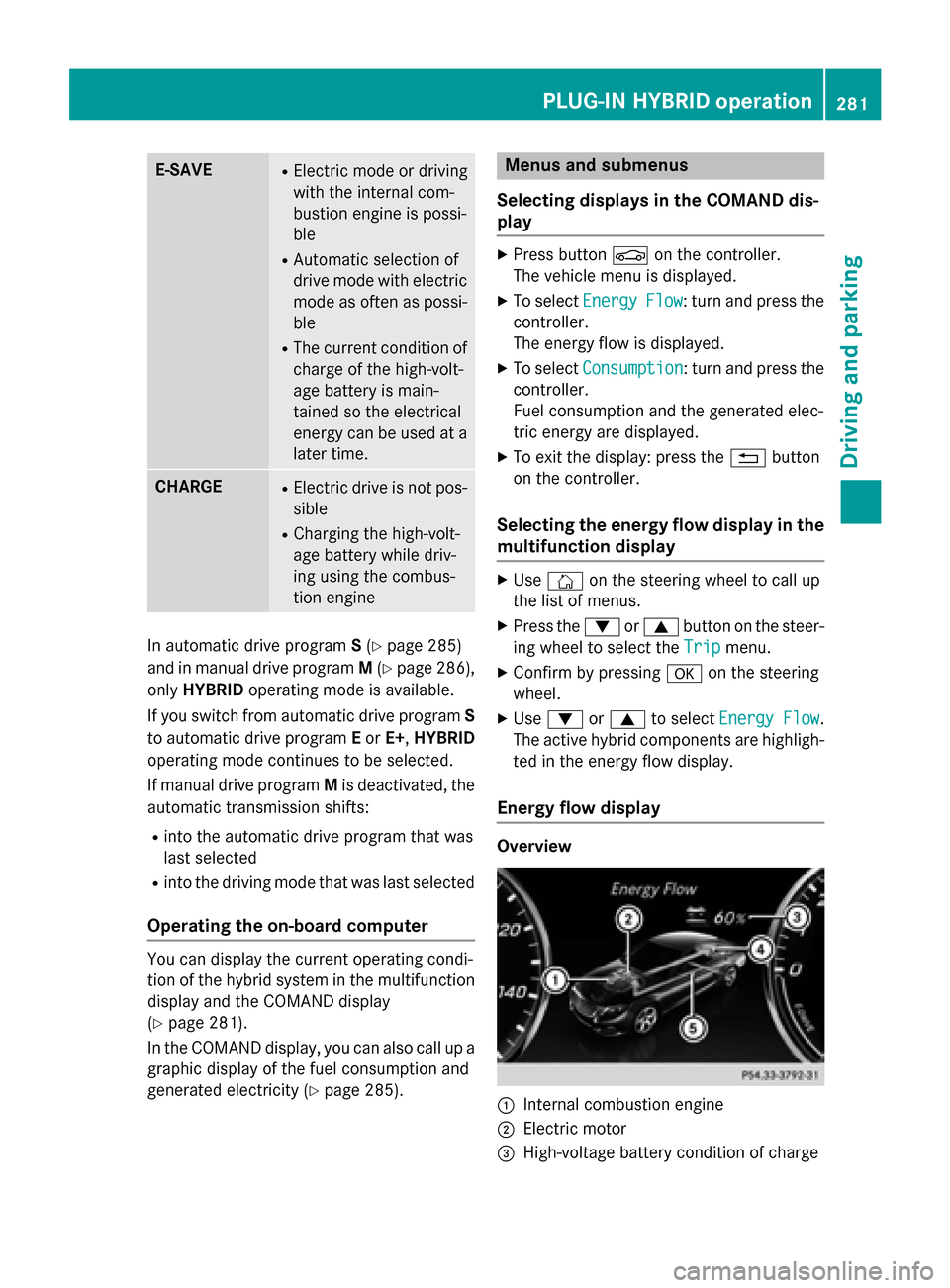
Energy flow display Overview
:
Internal combustion engine
; Electric motor
= High-voltage battery condition of charge PLUG-IN HYBRID operation
281Driving and parking Z
Page 287 of 502
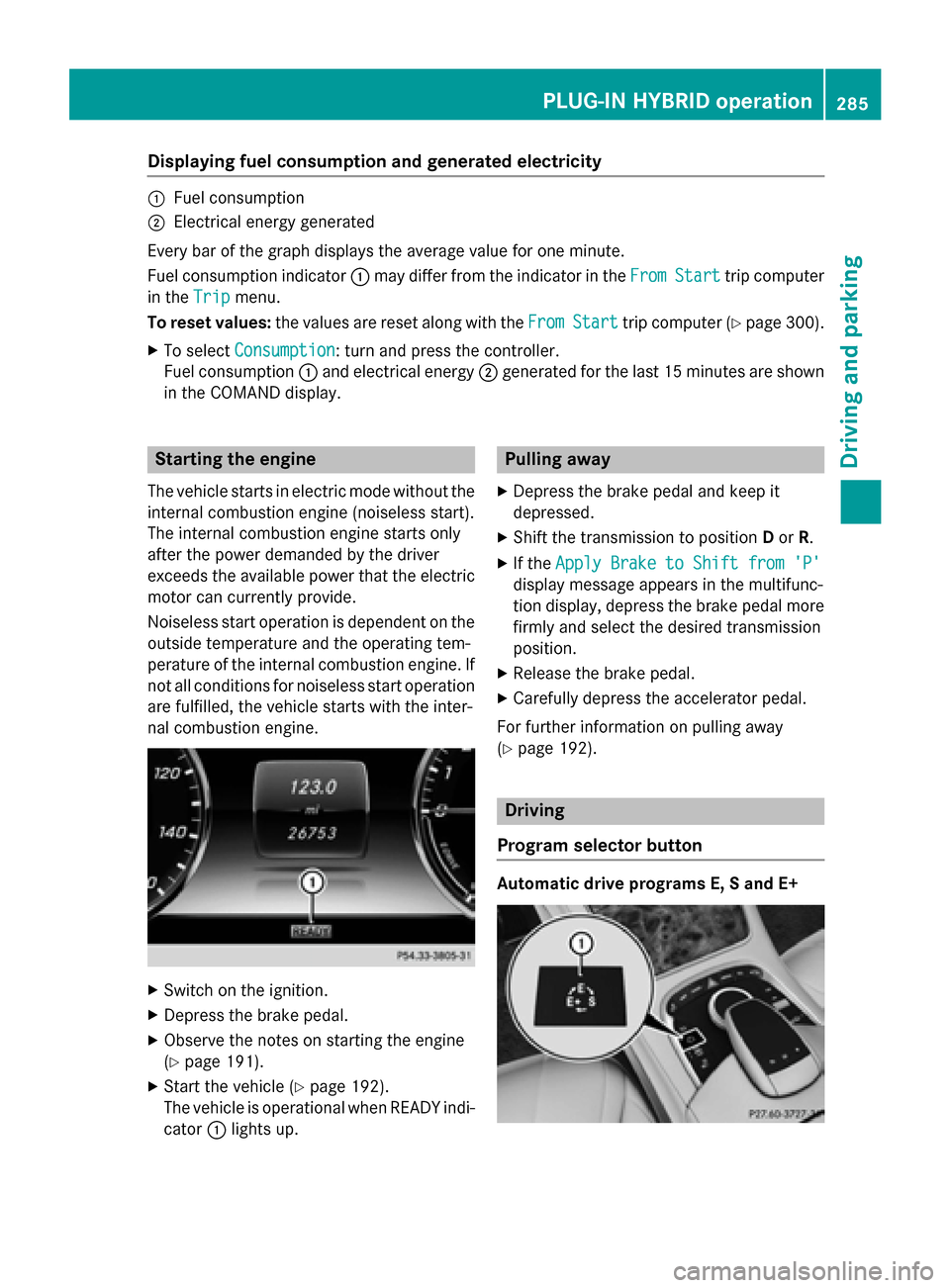
Displaying fuel consumption and generated electricity
:
Fuel consumption
; Electrical energy generated
Every bar of the graph displays the average value for one minute.
Fuel consumption indicator :may differ from the indicator in the From
FromStart
Start trip computer
in the Trip
Trip menu.
To reset values: the values are reset along with the From
FromStart
Start trip computer (Y page 300).
X To select Consumption
Consumption: turn and press the controller.
Fuel consumption :and electrical energy ;generated for the last 15 minutes are shown
in the COMAND display. Starting the engine
The vehicle starts in electric mode without the
internal combustion engine (noiseless start).
The internal combustion engine starts only
after the power demanded by the driver
exceeds the available power that the electric motor can currently provide.
Noiseless start operation is dependent on the
outside temperature and the operating tem-
perature of the internal combustion engine. If
not all conditions for noiseless start operation are fulfilled, the vehicle starts with the inter-
nal combustion engine. X
Switch on the ignition.
X Depress the brake pedal.
X Observe the notes on starting the engine
(Y page 191).
X Start the vehicle (Y page 192).
The vehicle is operational when READY indi-
cator :lights up. Pulling away
X Depress the brake pedal and keep it
depressed.
X Shift the transmission to position Dor R.
X If the Apply Brake to Shift from 'P' Apply Brake to Shift from 'P'
display message appears in the multifunc-
tion display, depress the brake pedal more firmly and select the desired transmission
position.
X Release the brake pedal.
X Carefully depress the accelerator pedal.
For further information on pulling away
(Y page 192). Driving
Program selector button Automatic drive programs E, S and E+ PLUG-IN HYBRID ope
ration
285Driving an d parking Z
Page 288 of 502

X
Press program selector button :to
change the drive program.
The selected drive program appears in the
multifunction display.
The program selector button allows you to
choose between different driving character-
istics. E
Economy R
Comfortable, economi-
cal driving
R Electric operation mode
is used as often as pos-
sible
R The ECO start/stop
function is available S
Sport R
Sporty driving style with
boost mode
R The internal combus-
tion engine is always
switched on E+
Economy
Plus R
Comfortable, economi-
cal driving
R Electric operation mode
is used as often as pos-
sible
R The ECO start/stop
function is available
R Double pulses in the
haptic accelerator
pedal, as an indication
to release the accelera-
tor pedal (Y page 286)
R After the accelerator
pedal has been
released, the coasting
characteristics of the
vehicle are adapted to
the traffic conditions. For further information on the automatic drive
program, see (Y page 202). Manual drive program M
In addition to automatic drive programs
Eand
S, you can switch to manual drive program M
using the steering wheel paddle shifters.
In manual drive program M, you can briefly
change gear yourself by using the steering
wheel paddle shifters. The transmission must be in position D. In manual drive program M
the internal combustion engine is always
switched on.
Activating when driving with the electric
motor:
X Pull the left or right steering wheel paddle
shifter (Y page 201).
The combustion engine is switched on.
Manual drive program Mis temporarily acti-
vated. The selected gear and Mappear in
the multifunction display.
Activating when driving with the combustion
engine:
X Pull the left or right steering wheel paddle
shifter (Y page 201).
Manual drive program Mis temporarily acti-
vated. The selected gear and Mappear in
the multifunction display.
The ECO start/stop function is not available
in manual drive program M.
Haptic accelerator pedal General notes
The haptic accelerator pedal helps you to
reduce the fuel consumption and emissions
of your vehicle.
There are two different functions available for this purpose:
R an additional point of resistance in E-MODE
operating mode (Y page 280)
R a double impulse in E+operating mode
(Y page 285) 286
PLUG-IN HYBRID operationDriving and parking
Page 291 of 502
Automatic engine start
The automatically switched-off internal com-
bustion engine starts automatically in certain situations, if:
R the power demand from the driver via the
accelerator pedal is greater than the elec-
tric motor alone can provide
R the driver switches to drive program Sor M
R the condition of charge of the high-voltage
battery has reached the lower limit
R the settings of the automatic climate con-
trol require it, e.g. at external temperatures
above 30 †
Overrun mode
In overrun mode, the combustion engine is
switched off and is disconnected from the
drive train. The electric motor:
R generates low thrust, which corresponds to
the overrun mode of an active combustion
engine
R functions as a generator and produces the
necessary energy for the auxiliary consum-
ers and charges the high-voltage battery
Overrun mode is possible in the following
speed range:
R in drive program Ebelow 130 km/h
R in drive program E+below 180 km/h
In drive program E+, after the accelerator
pedal has been released the coasting char-
acteristics of the vehicle are adapted to the
traffic conditions. Further information about
the haptic accelerator pedal (Y page 286).
Map-based energy management For map-based energy management, the sys-
tem factors in information about the expec-
ted route when route guidance is active.
The information on the route is provided by
COMAND and includes the following:
R road categories
R speed limitations
R data on downhill gradients The use of electric energy is automatically
optimally distributed from the beginning to
the end of the journey, using information
about the route. The distribution is pre-emp-
tive and takes into consideration:
R the sections of the journey ahead
R the energy consumption on the whole route
The condition of charge of the high-voltage
battery is thus systematically controlled. In
addition, the control function takes into
account that:
R the fuel saving through the use of electrical
energy can vary, dependent on the route
(e.g. urban, interurban or highway)
R the use of electrical energy is held available
for electric driving, particularly for urban
routes
The vehicle thus automatically selects the
optimum driving mode for the respective sec- tion of the route.
Map-based energy management is available
under the following conditions:
R drive program E+is selected
R HYBRID driving mode is selected
R active route guidance is activated
R suitable map data is available
When map-based energy management is
engaged, the area in front of the vehicle in the
multifunction display will be green. Parking
X Apply the electric parking brake.
The red !indicator lamp in the instru-
ment cluster lights up.
X Use the DIRECT SELECT lever to shift the
automatic transmission to P.
X Switch the ignition off.
The READY indicator in the instrument clus-
ter goes out.
Further information on parking and switching off the internal combustion engine
(Y page 221). PLUG-IN HYBRID operation
289Driving and parking Z