Page 316 of 620

3144-5. Using the driving support systems
LS600hL_U(OM50E41U)
■Conditions under which the Blind Spot Monitor function may not function cor-
rectly
●The Blind Spot Monitor function may not de tect vehicles correctly in the following
conditions:
• During bad weather such as heavy rain, fog, snow etc.
• When ice or mud etc. is attached to the rear bumper
• When driving on a road surface that is wet due to rain, standing water etc.
• When there is a significant difference in speed between your vehicle and the vehicle that enters the detection area
• When a vehicle is in the detection area from a stop and remains in the detection area as your vehicle accelerates
• When driving up or down consecutive steep inclines, such as hills, a dip in the road etc.
• When multiple vehicles approach with only a small gap between each vehicle
• When vehicle lanes are wide, and the vehicle in the next lane is too far away from your vehicle
• When the vehicle that enters the detect ion area is traveling at about the same
speed as your vehicle
• When there is a significant difference in height between your vehicle and the vehicle that enters the detection area
• Directly after the BSM main switch is set to on
●Instances of the Blind Spot Monitor functi on unnecessarily detecting a vehicle and/
or object may increase under the following conditions:
• When there is only a short distance between your vehicle and a guardrail, wall etc.
• When there is only a short distance between your vehicle and a following vehi- cle
• When vehicle lanes are narrow and a ve hicle driving 2 lanes across from your
vehicle enters the detection area
• When items such as a bicycle carrier are installed on the rear of the vehicle
Page 375 of 620
3735-5. Using the storage features
5
Interior features
LS600hL_U(OM50E41U)
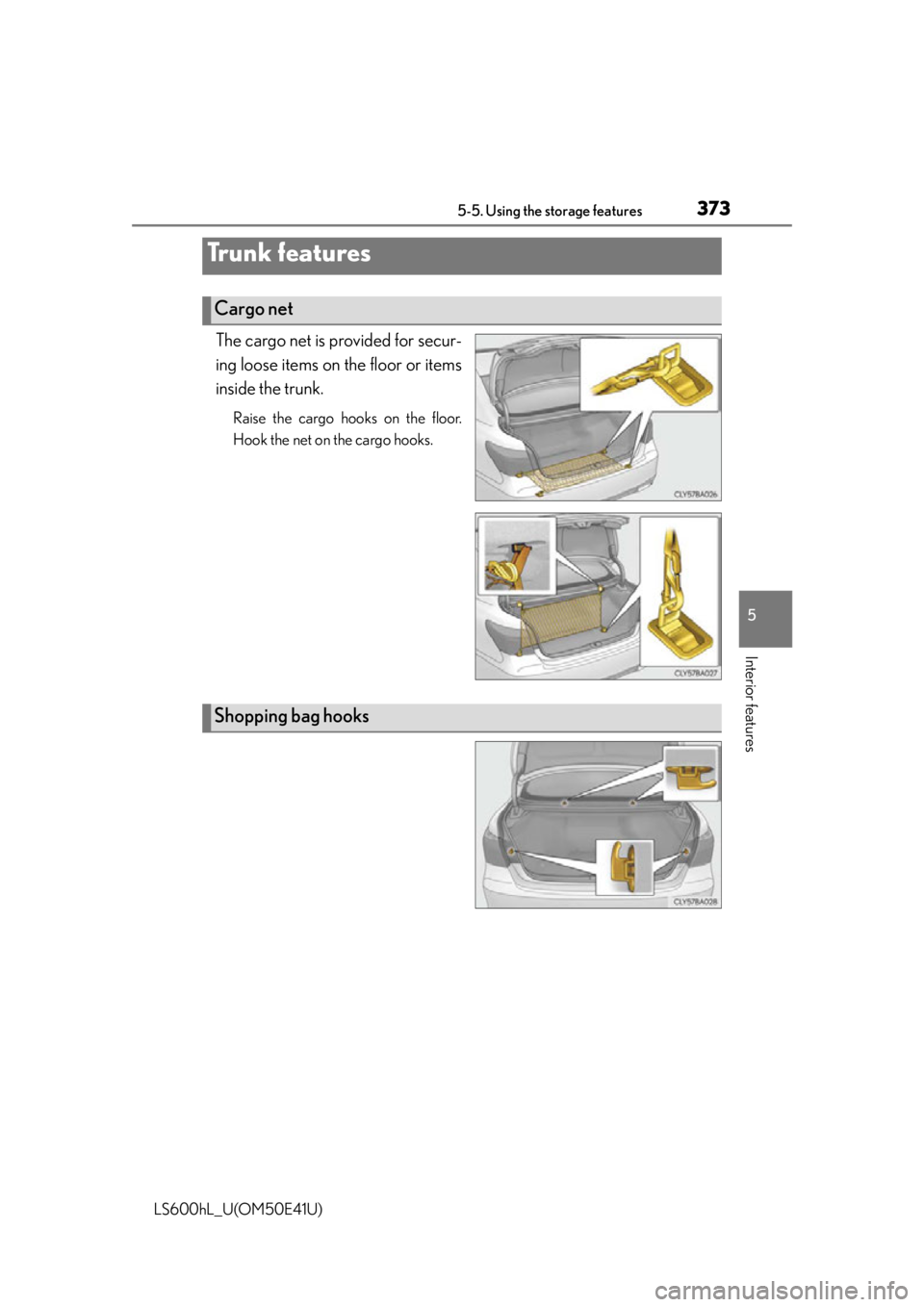
The cargo net is provided for secur-
ing loose items on the floor or items
inside the trunk.
Raise the cargo hooks on the floor.
Hook the net on the cargo hooks.
Tr u n k f e a t u r e s
Cargo net
Shopping bag hooks
Page 376 of 620
3745-5. Using the storage features
LS600hL_U(OM50E41U)
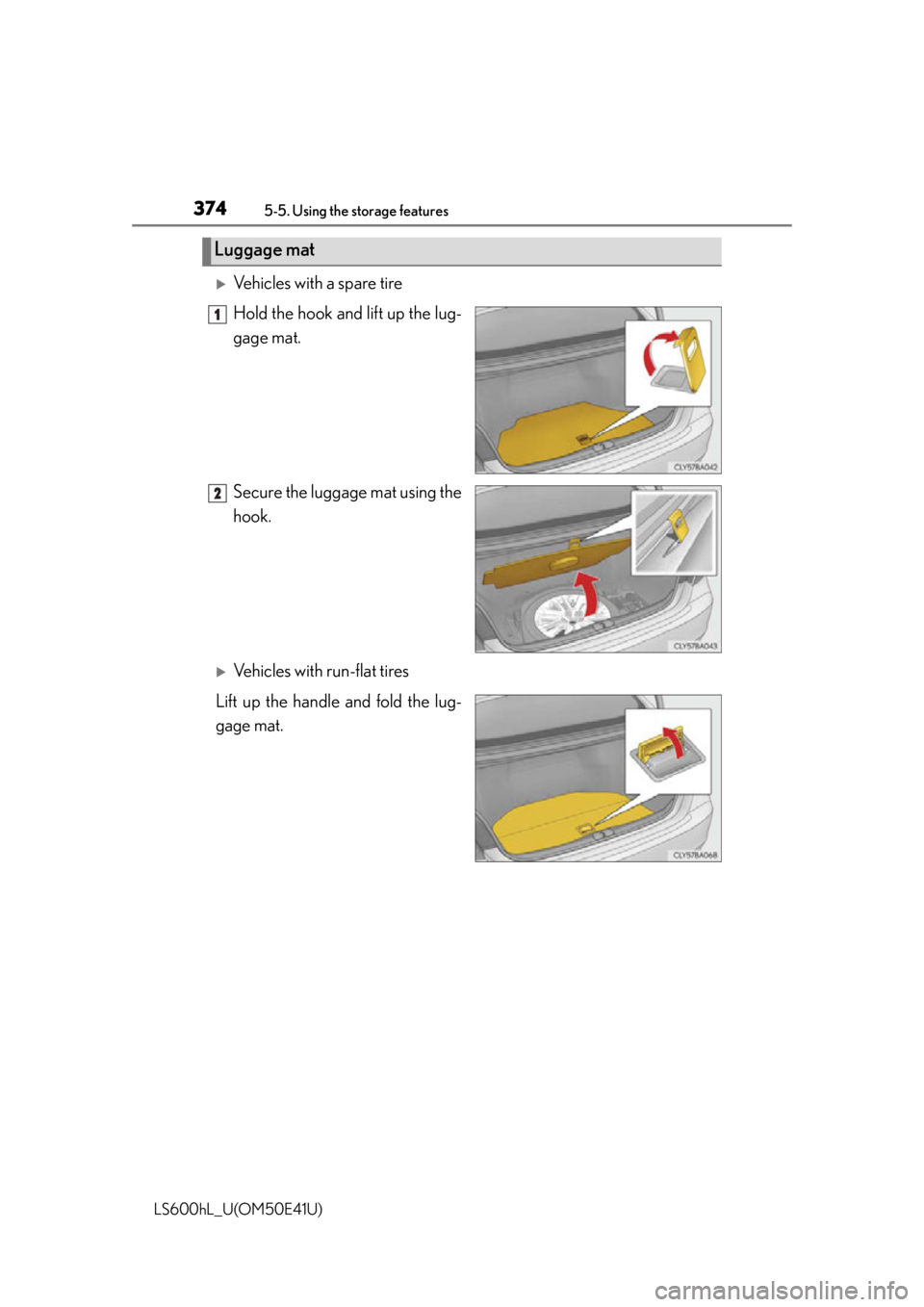
Vehicles with a spare tire
Hold the hook and lift up the lug-
gage mat.
Secure the luggage mat using the
hook.
Vehicles with run-flat tires
Lift up the handle and fold the lug-
gage mat.
Luggage mat
1
2
Page 395 of 620
3935-6. Other interior features
5
Interior features
LS600hL_U(OM50E41U)
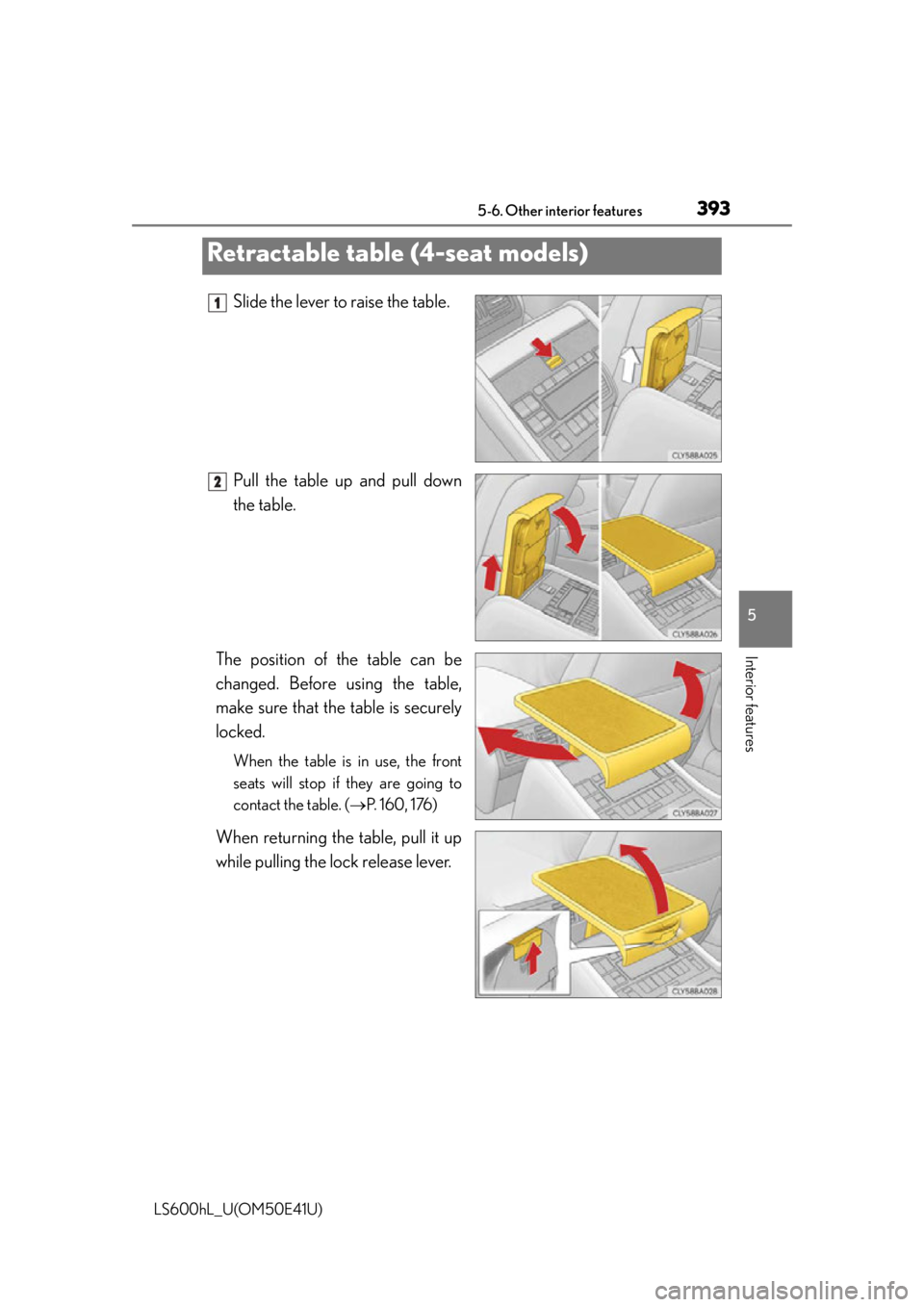
Slide the lever to raise the table.
Pull the table up and pull down
the table.
The position of the table can be
changed. Before using the table,
make sure that the table is securely
locked.
When the table is in use, the front
seats will stop if they are going to
contact the table. ( P. 160, 176)
When returning the table, pull it up
while pulling the lock release lever.
Retractable table (4-seat models)
1
2
Page 396 of 620
3945-6. Other interior features
LS600hL_U(OM50E41U)
CAUTION
■When not in use
To avoid injury, return the table.
■Caution while driving
Keep the table stowed properly in its place. In the event of an accident, contact
with the table may result in death or serious injury.
■When using the table
Observe the following precautions. Failure to do so may result in death or serious
injury.
●Make sure the table is securely locked.
●Do not lean on the table.
●Do not put anything heavier than 22 lb. (10 kg) on the table.
NOTICE
■To prevent damage to the table
Do not place too much strain on the table.
Page 405 of 620
4035-6. Other interior features
5
Interior features
LS600hL_U(OM50E41U)
The garage door opener (HomeLink Universal Transceiver) is manufac-
tured under license from HomeLink
.
The HomeLink
compatible transceiver in your vehicle has 3 buttons
which can be programmed to operate 3 different devices. Refer to the
programming method below appropriate for the device.
Indicator
Buttons
■Programming the HomeLink (for U.S.A. owners)
Point the remote control trans-
mitter for the device 1 to 3 in.
(25 to 75 mm) from the
HomeLink
control buttons.
Keep the HomeLink indicator
light in view while programming.
Garage door opener
The garage door opener can be programmed to operate garage doors,
gates, entry doors, door locks, home lighting systems, security systems,
and other devices.
Programming the HomeLink®
1
2
1
Page 408 of 620

4065-6. Other interior features
LS600hL_U(OM50E41U)
Press and hold the vehicle’s programmed HomeLink button for 2
seconds and release it. Repeat this step once again. The garage door
may open.
If the garage door opens, the programming process is complete. If the door
does not open, press and release the button a third time. This third press
and release will complete the programming process by opening the
garage door.
The ceiling mounted garage door open er motor should now recognize the
HomeLink
signal and operate the garage door.
Repeat the steps above to program another rolling code system for
any of the remaining HomeLink
buttons.
■Programming an entry gate (for U.S.A. owners)/Programming all
devices in the Canadian market
Place your transmitter 1 to 3 in. (2 5 to 75 mm) away from the surface
of the HomeLink
.
Keep the HomeLink indicator light in view while programming.
Press and hold the selected HomeLink button.
Repeatedly press and release (c ycle) the device’s remote control
button for two seconds each until step 4 is completed.
When the indicator light on the HomeLink
compatible transceiver
starts to flash rapidl y, release the buttons.
Test the operation of the HomeLink
by pressing the newly pro-
grammed button. Check to see if the gate/device operates correctly.
Repeat the steps above to progra m another device for each of the
remaining HomeLink
buttons.
■Programming other devices
To program other devices such as home security systems, home door
locks or lighting, contact your Lexus dealer for assistance.
■Reprogramming a button
The individual HomeLink
buttons cannot be erased but can be repro-
grammed. To reprogram a button, follow the “Reprogramming a
HomeLink
button” instructions.
3
4
1
2
3
4
5
6
Page 412 of 620
4105-6. Other interior features
LS600hL_U(OM50E41U)
■System componentsMicrophone
“SOS” button
LED light indicators
LEXUS Enform Safety Connect
: If equipped
Safety Connect is a subscripti on-based telematics service that uses
Global Positioning System (GPS ) data and embedded cellular technol-
ogy to provide safety and security fe atures to subscribers. Safety Con-
nect is supported by Lexus’ designated response center, which
operates 24 hours per day, 7 days per week.
Safety Connect service is available by subscription on select, telemat-
ics hardware-equipped vehicles.
By using the Safety Connect servic e, you are agreeing to be bound by
the Telematics Subscription Service Agreement and its Terms and
Conditions, as in effect and amen ded from time to time, a current copy
of which is available at Lexus.co m. All use of the Safety Connect ser-
vice is subject to such then-applicable Terms and Conditions.
1
2
3