2015 LEXUS LS600H low beam
[x] Cancel search: low beamPage 241 of 620
2394-3. Operating the lights and wipers
4
Driving
LS600hL_U(OM50E41U)
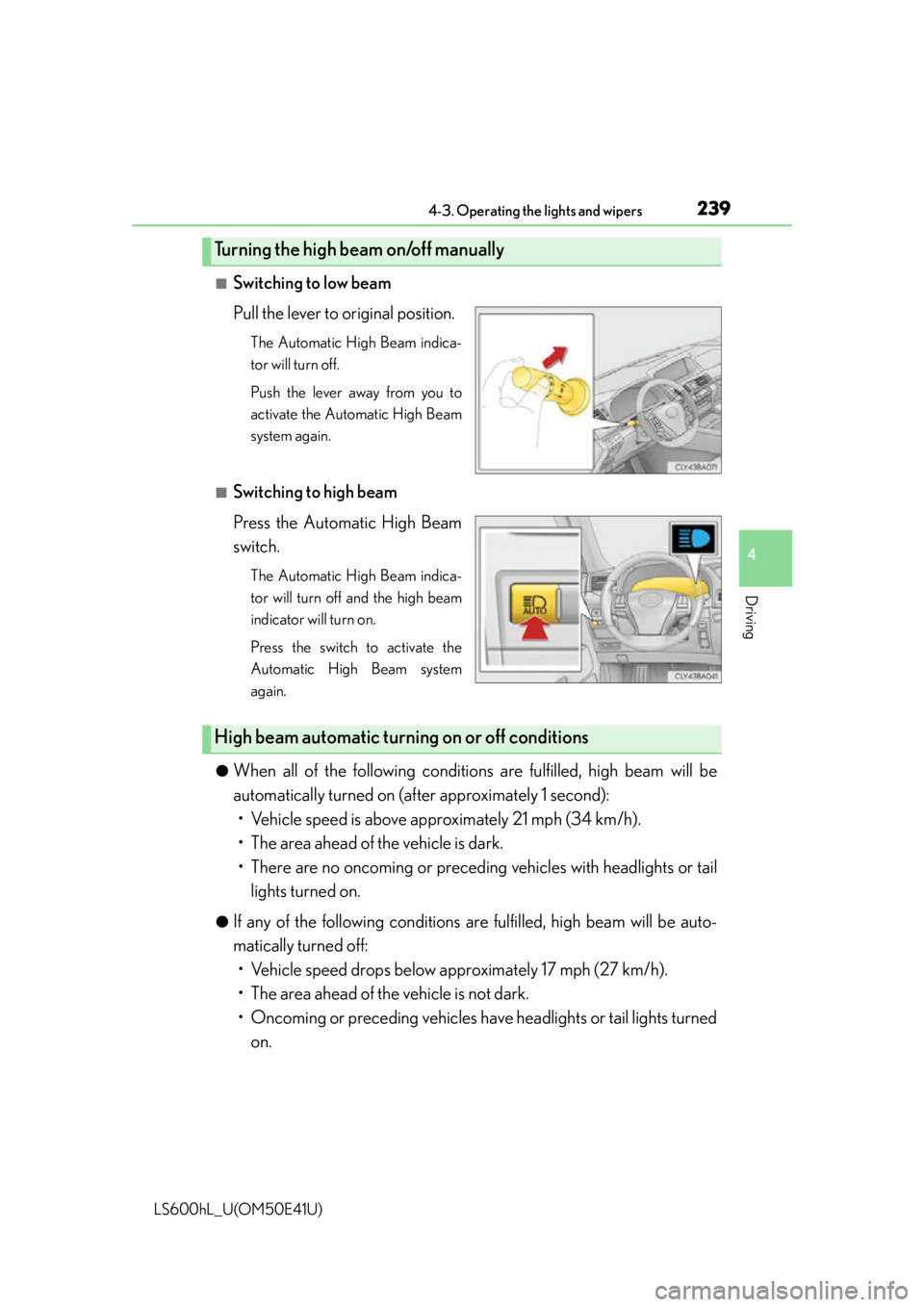
■Switching to low beam
Pull the lever to original position.
The Automatic High Beam indica-
tor will turn off.
Push the lever away from you to
activate the Automatic High Beam
system again.
■Switching to high beam
Press the Automatic High Beam
switch.
The Automatic High Beam indica-
tor will turn off and the high beam
indicator will turn on.
Press the switch to activate the
Automatic High Beam system
again.
●
When all of the following conditio ns are fulfilled, high beam will be
automatically turned on (a fter approximately 1 second):
• Vehicle speed is above approximately 21 mph (34 km/h).
• The area ahead of the vehicle is dark.
• There are no oncoming or preceding vehicles with headlights or tail
lights turned on.
●If any of the following conditions are fulfilled, high beam will be auto-
matically turned off: • Vehicle speed drops below a pproximately 17 mph (27 km/h).
• The area ahead of the vehicle is not dark.
• Oncoming or preceding vehicles have headlights or tail lights turned
on.
Turning the high beam on/off manually
High beam automatic turn ing on or off conditions
Page 242 of 620

2404-3. Operating the lights and wipers
LS600hL_U(OM50E41U)
■The Automatic High Beam can be operated when
The power switch is in ON mode.
■Camera sensor detection information
●High beam may not be automatically turned off in the following situations:
• When oncoming vehicles su ddenly appear from a curve
• When the vehicle is cut in front of by another
• When oncoming or preceding vehicles are hidden from sight due to repeated
curves, road dividers or roadside trees
●High beam may be turned off if an oncoming vehicle that is using fog lights without
using the headlights is detected.
●House lights, street lights, red traffic signals, and illuminated billboards or signs may
cause the high beam to turn off.
●The following factors may affect the amount of time taken to turn high beam on or
off:
• The brightness of headligh ts, fog lights, and tail lights of oncoming and preced-
ing vehicles
• The movement and direction of oncoming and preceding vehicles
• When a oncoming or preceding vehicle on ly has operational lights on one side
• When a oncoming or preceding vehicle is a two-wheeled vehicle
• The condition of the road (gradient, curve, condition of the road surface etc.)
• The number of passengers and amount of luggage
●High beam may be turned on or off when unexpected by the driver.
●Small vehicles, such as bicycles, may not be detected.
Page 243 of 620

2414-3. Operating the lights and wipers
4
Driving
LS600hL_U(OM50E41U)
●In the situations below, the system may not be able to correctly detect the sur-
rounding brightness levels, and may flash or expose oncoming or preceding vehi-
cles to the high beam or may continue using the low beam. Therefore, in these
situations you should consider turning th e high beams on or off manually rather
than relying on the Automatic High Beam system.
• In bad weather (rain, snow , fog, sandstorms etc.)
• The windshield is obscured by fog, mist, ice, dirt etc.
• The windshield is cracked or damaged.
• The inside rear view mirror or camera sensor is deformed or dirty.
• The camera sensor temperature is extremely high.
• Surrounding brightness levels are equal to those of headlights, tail lights or fog lights.
• Vehicles ahead have headlights that are either switched off, dirty, are changing color, or have are not aimed properly.
• When driving through an area of interm ittently changing brightness and dark-
ness.
• When frequently and repeatedly driving ascending/descending roads, or roads with rough, bumpy or uneven surfaces (such as stone-paved roads, gravel tracks
etc.).
• When frequently and repeatedly taking curves or driving on a winding road.
• There is a highly reflective object ahead of the vehicle, such as a sign or a mirror.
• The back of a vehicle ahead is highly reflective, such as a container on a truck.
• The vehicle’s headlights are damaged or dirty.
• The vehicle is listing or tilting, due to a flat tire, a trailer being towed etc.
■Temporary lowering sensor sensitivity
The sensitivity of the sensor can be temporarily lowered.
To lower the sensitivity, push and hold the “AUTO” button on the inside rear view mir-
ror for 15 to 20 seconds, and release. The indicator light on the inside rear view mir-
ror will flash to indicate that the sensitivity has been lowered.
When the power switch is turned off, the sensitivity will be returned to its normal
level.
CAUTION
■Limitations of the Automatic High Beam
Do not rely on the Automatic High Beam. Always drive safely, taking care to
observe your surroundings and turn the high beam on or off manually if necessary.
Page 244 of 620
2424-3. Operating the lights and wipers
LS600hL_U(OM50E41U)
NOTICE
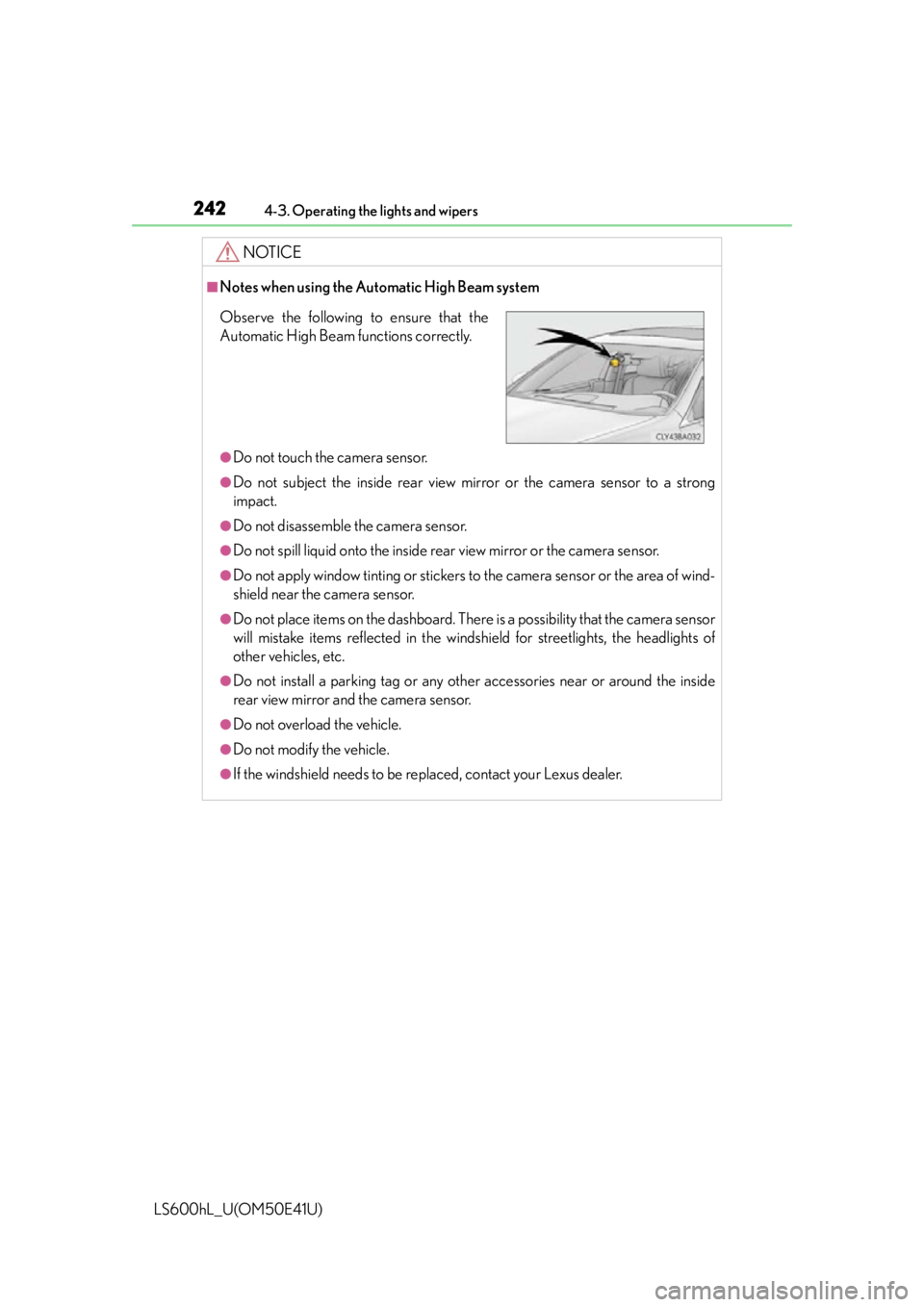
■Notes when using the Automatic High Beam system
●Do not touch the camera sensor.
●Do not subject the inside rear view mirror or the camera sensor to a strong
impact.
●Do not disassemble the camera sensor.
●Do not spill liquid onto the inside rear view mirror or the camera sensor.
●Do not apply window tinting or stickers to the camera sensor or the area of wind-
shield near the camera sensor.
●Do not place items on the dashboard. There is a possibility that the camera sensor
will mistake items reflected in the windsh ield for streetlights, the headlights of
other vehicles, etc.
●Do not install a parking tag or any other accessories near or around the inside
rear view mirror and the camera sensor.
●Do not overload the vehicle.
●Do not modify the vehicle.
●If the windshield needs to be replaced, contact your Lexus dealer.
Observe the following to ensure that the
Automatic High Beam functions correctly.
Page 245 of 620
2434-3. Operating the lights and wipers
4
Driving
LS600hL_U(OM50E41U)
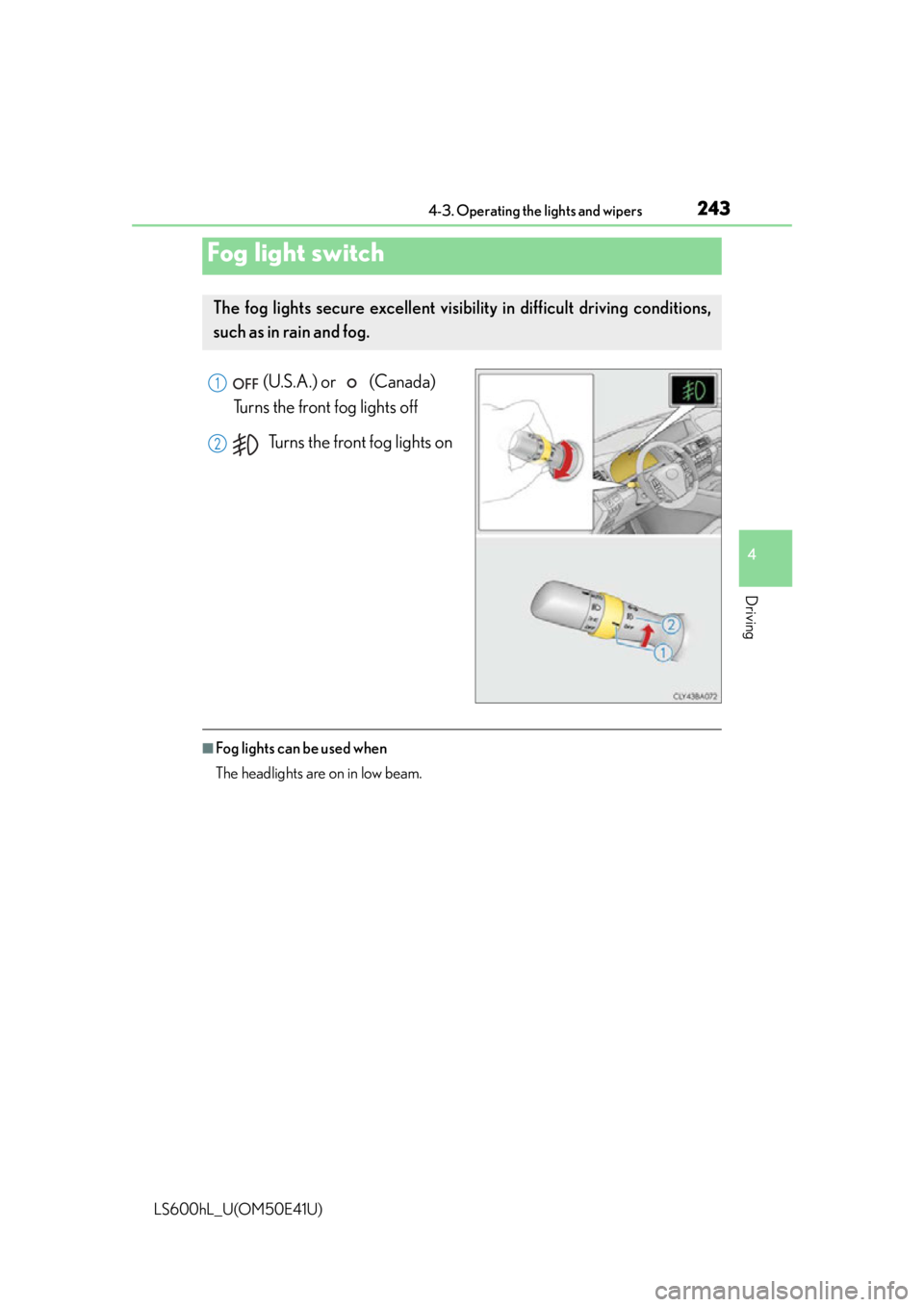
(U.S.A.) or (Canada)
Turns the front fog lights off
Turns the front fog lights on
■Fog lights can be used when
The headlights are on in low beam.
Fog light switch
The fog lights secure excellent visibility in difficult driving conditions,
such as in rain and fog.
1
2
Page 308 of 620
3064-5. Using the driving support systems
LS600hL_U(OM50E41U)
CAUTION
■Headlights (vehicles with camera sensors)
●Observe the following to ensure proper near-infrared ray projection:
• Keep the headlights clean at all times.
• The detection performance may deteriorate if the high beams are misaligned
or inoperative.
●The near-infrared ray transmitters projec t strong energy that is not visible.
Although the transmitters normally turn off when the vehicle is stopped, never
look into the headlights for your safety.
■Determining the direction the driver is facing and whether the driver’s eyes are
open or closed (vehicles with driver monitor system)
The direction the driver is facing and whether the driver’s eyes are open or closed
may not be determined correctly if the following conditions exist:
●There is an object between the driver monitor sensor and the driver’s face, such
as when the sensor is blocked.
●A part of the driver’s face is covered.
●The sensor or the driver’s face is exposed to intense light such as sunlight.
●The driving posture is improper.
●The vehicle is parked.
■Handling the driver monitor sensor (vehicles with driver monitor system)
Observe the following to ensure the driver monitor sensor can function effectively.
Failure to do so may result in a malfunction or may prevent the system from cor-
rectly determining the direction the driver is facing and whether the driver’s eyes
are open or closed, resulting in an unexpected accident.
●Do not disassemble, damage, lift or pull on the sensor.
●Do not select the sensor while driving.
●Do not wet or spill water on the sensor.
●Do not drop anything on or allow anythi ng to hit against the sensor. Do not sub-
ject the sensor to an impact.
●Make sure that there are no scratches, dirt or stickers on the side of the sensor
that faces the driver.
●Do not place any objects in front of the si de of the sensor that faces the driver or
cover the sensor.
Page 322 of 620

3204-5. Using the driving support systems
LS600hL_U(OM50E41U)
■When displaying on the “Side Display”
When another screen is displayed on
the “Main Display” while the Lexus
night view is being shown on the
“Main Display”, the Lexus night view
screen will be displayed on the “Side
Display”.
Lexus night view screen
“Main Display” switching but-
ton
Switches the Lexus night view from
the “Side Display” to the “Main Dis-
play”.
■Imaging range
The image is shown ranging from the ti p of the low beam to the high beam.
■If the vehicle speed is less than approximately 9 mph (15 km/h) when the Lexus
night view is operating
An image will be displayed on the Lexus night view screen, but both the range and
the distance of the projection will be limi ted as near-infrared rays are not being radi-
ated outward.
■When the Lexus night view switch is pressed while the Lexus night view cannot be
operated
Advice information will be displayed on the Lexus night view screen. Follow the dis-
played advice.
■If the Lexus night view switch is pressed at a time when the Lexus night view opera-
tion is not possible
Follow the advice displayed on the Remote Touch screen.
■When the shift lever is shifted to R wh ile the Lexus night view is operating
The Lexus night view screen switches as follows.
“Main Display”: Switches to the Le xus parking assist monitor screen.
“Side Display”: The display blacks out and no image is displayed.
1
2
Page 483 of 620

4816-3. Do-it-yourself maintenance
6
Maintenance and care
LS600hL_U(OM50E41U)
■LED Lights
The following lights consist of a number of LEDs. If any of the LEDs burn out, take
your vehicle to your Lexus dealer to have the light replaced.
●Headlight low beams
●Headlight low/high beams
●Headlight high beams (vehicles without LKA [Lane-Keeping Assist])
●Parking lights and daytime running lights
●Front side marker lights
●Front turn signal lights
●Front fog lights
●Side turn signal lights
●Outer foot lights
●Tail lights
●Stop lights
●Back-up lights
●Rear side marker lights
●Rear turn signal lights
●High mounted stoplight
●License plate lights
■Condensation build-up on the inside of the lens
Temporary condensation build-up on the insi de of the headlight lens does not indi-
cate a malfunction. Contact your Lexus dealer for more information in the following
situations:
●Large drops of water have built up on the inside of the lens.
●Water has built up inside the headlight.
Light bulbs
If any lights burn out, have it replaced by your Lexus dealer.