Page 149 of 429
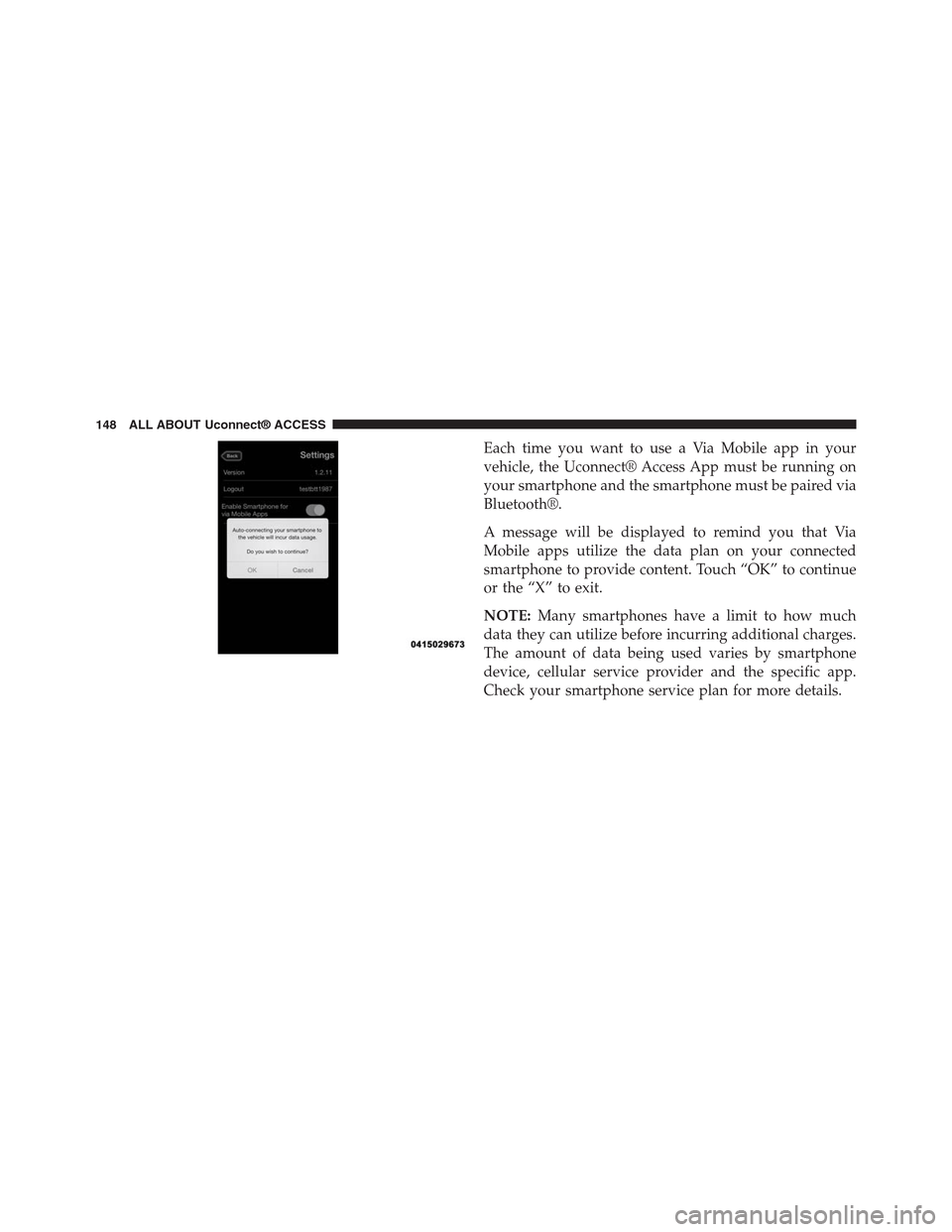
Each time you want to use a Via Mobile app in your
vehicle, the Uconnect® Access App must be running on
your smartphone and the smartphone must be paired via
Bluetooth®.
A message will be displayed to remind you that Via
Mobile apps utilize the data plan on your connected
smartphone to provide content. Touch “OK” to continue
or the “X” to exit.
NOTE:Many smartphones have a limit to how much
data they can utilize before incurring additional charges.
The amount of data being used varies by smartphone
device, cellular service provider and the specific app.
Check your smartphone service plan for more details.
148 ALL ABOUT Uconnect® ACCESS
Page 153 of 429
•If you recently changed your password for Aha™, it
may need to be updated on Mopar Owner Connect
under the “Via Mobile” section.
2.How does Aha™ help refine my music options?It
organizes your favorite content into personalized on-
demand radio stations. You can access podcasts, inter-
net radio, personalized traffic reports and even restau-
rant recommendations. It will assemble content for
you based on your use of the “like” and “dislike”
buttons on the touchscreen.
3.Where does the search function search from?The
search function will provide results based on the
location of your vehicle. As you drive, the search
results will change to reflect your vehicle’s current
location.
4.How do I sync my Aha™ account with Facebook®,
Twitter® and Slacker?Associate your Aha™ account
with Facebook®, Twitter® and Slacker services at
aharadio.com, or from the Aha™ smartphone app.
From the Aha™ smartphone app, visit the Aha™
settings screen and look for “Associate Accounts.”
5.If I enter personalized preferences on the web, will it
also save my setting when I am in the vehicle?Yes,
your personalized selections are saved to a common
area, so they will be reflected wherever you access
Aha™ in the vehicle on the vehicle touchscreen,
smartphone or the Aha™ websiteaharadio.com.
152 ALL ABOUT Uconnect® ACCESS
Page 162 of 429

1.How Do I Register For My Uconnect® Access Ac-
count?Press the “Apps” button on the in-vehicle
touchscreen, then select Uconnect® Registration.
2.Why Do I Need An Email Address?Without an email
address, customers cannot register for Uconnect®
Access. Customers need to register so they can sub-
scribe to receive additional services and create a
Uconnect® Security PIN for remote command re-
quests.
3.How Do I Create A Uconnect® Security PIN?Set up
your Uconnect® Security PIN during the registration
process. The Uconnect® Security PIN will be required
to authenticate you when accessing your account via
Uconnect® Care or performing any remote services
such as Remote Door Lock/Unlock, Remote Horn &
Lights, or Remote Vehicle Start.
4.What If I Forgot My Uconnect® Security PIN?If
you’ve already registered and forgot your Uconnect®
Security PIN, you can reset the pin by selecting Edit
Profile on the Mopar Owner Connect website
(moparownerconnect.com), or you can call
Uconnect® Care at 855-792-4241.
5.How Do I Create A Uconnect® Payment PIN?Log
into the Mopar Owner Connect website
(moparownerconnect.com) with your username and
password. Select Edit Profile > Uconnect® Payment
Account to create an account (and PIN) (if you have a
Uconnect® Access equipped vehicle).
6.What Is A Uconnect® Payment PIN?A Uconnect®
Payment PIN is a unique 4-digit code that you create
to gain access to your payment information – your
credit cards, billing address, payment history and
more. It is required in order to purchase Uconnect®
Access packages and Apps.
2
ALL ABOUT Uconnect® ACCESS 161
Page 163 of 429
7.What If I Forgot My Uconnect® Payment PIN?The
next time you are asked for your Uconnect® Payment
PIN, select “Forgot PIN?” and follow the steps to reset
it.
8.How Do I Update My Uconnect® Payment Account
Address?Your Uconnect® Payment Account address
must be updated online only: Login to the Mopar
Owner Connect website (moparownerconnect.com),
and select Edit Profile > Uconnect® Payment Account.
9.How Do I Update My Uconnect® Profile?Your
name, home address, phone number, email address
and Uconnect® Security PIN can be updated online on
the Mopar Owner Connect website
(moparownerconnect.com).
a. Log in to the Mopar Owner Connect website
(moparownerconnect.com) then select Edit Profile
to edit your personal information.
b. Make your edits and click “Save.”
10.Can I Try Apps, Features Or Packages Before I Buy
Them?Your new vehicle purchase may have come
with an included trial period for certain Apps and
services. For more information please contact
Uconnect® Care at 855-792-4241.
11.Can I Access Every App And Service While Driv-
ing?No, some applications and services are not
available while driving. For your own safety, it is not
possible to use some of the touchscreen features
while the vehicle is in motion (e.g. key pad).
12.Can I Access The Uconnect® Store While I Am
Driving?No, some applications and services are not
available while driving. Only use Uconnect® when it
is safe to do so.
162 ALL ABOUT Uconnect® ACCESS
Page 164 of 429
13.How Do I Know When A New App, Feature Or
Package Is Offered?Go to Uconnect® Store to check
for updated features, packages and Apps.
14.Will I Be Notified When My Subscription Is Ex-
pired Or Will It Automatically Renew?There is no
auto-renewal feature currently offered. You can find
the expiration dates for all of your App and package
subscriptions from your in-vehicle touchscreen, se-
lect Apps > All Apps > Uconnect® Store > My Apps.
15.How Do I Manage My Notification Preferences?Go
to Edit Profile > Uconnect® Notifications on the
Mopar Owner Connect website
(moparownerconnect.com).
16.Do I Receive A Purchase Confirmation?Yes. You
will receive a purchase confirmation email any time
you renew your Uconnect® Access subscription or
purchase WiFi Hotspot service.
17.How Do I Purchase A Subscription Or WiFi
Hotspot?From your in-vehicle touchscreen:
a. Select Apps > All Apps > Uconnect® Store.
b. Choose a package or service.
c. Follow the steps to enter your Uconnect® Payment
PIN and complete the process.
You can also go to the Uconnect® Store online at
Mopar Owner Connect
(moparownerconnect.com), select the Shop tab,
then Uconnect® Store. For additional support
please contact Uconnect® Care at 855-792-4241.
18.How Do I Update My Credit Card Information?
Login to the Mopar Owner Connect website
(moparownerconnect.com), and select Edit Profile,
then select Uconnect® Payment Account.
2
ALL ABOUT Uconnect® ACCESS 163
Page 173 of 429
!NAVIGATION.........................224
▫Navigation Registration (Uconnect® 8.4A
Only)..............................224
▫Getting Started.......................224
▫Main Menu..........................225
▫Where To?...........................226
▫View Map . . . . . . . . . . . . . . . . . . . . . . . . . ..262
▫View Map — Settings...................266
▫Information..........................272
▫Emergency..........................275
!SECURITY FEATURES...................281
▫Roadside Assistance — If Equipped.........281
▫9-1-1 Call — If Equipped................282
!REMOTE SERVICE FEATURES.............287
172 Uconnect® 8.4A — If Equipped
Page 179 of 429
Scrolling Preset List
Once in the Browse Presets screen, you can scroll the
preset list by rotation of the TUNE/SCROLL knob, or by
pressing the “Up and Down” arrow keys, located on the
right of the screen.
Preset Selection From List
A Preset can be selected by pressing any of the listed
Presets, or by pushing the ENTER/BROWSE button on
the TUNE/SCROLL knob to select the currently high-
lighted Preset.
When selected, the radio tunes to the station stored in the
Preset and returns to the main radio screen.
Deleting Presets
A Preset can be deleted in the Presets Browse screen by
pressing the “Trash Can” icon for the corresponding
Preset.
Return To Main Radio Screen
You can return to the Main Radio Screen, by pressing the
“X” button on the touchscreen when in the Browse
Presets screen.
SiriusXM Satellite Radio Mode — If Equipped
SiriusXM Satellite Radio uses direct satellite-to-receiver
broadcasting technology to provide clear, coast to coast
radio content. SiriusXM is a subscription based service.
SiriusXM Premier
Get over 160 channels on your satellite radio, and enjoy
all you want, all in one place. Hear commercial-free
music plus sports, news, talk and entertainment. Get all
the premium programming, including Howard Stern,
every NFL game, Oprah Radio®, every MLB® and
NHL® game, every NASCAR® race, Martha Stewart and
more. And get 20+ extra channels, including SiriusXM
178 Uconnect® 8.4A — If Equipped
Page 180 of 429

Latino, offering 20 channels of commercial free music,
news, talk, comedy, sports and more dedicated to Span-
ish language programming.
Go tosiriusxm.com/getallaccessfor more information.
SiriusXM services require subscriptions, sold separately
after the 12-month trial included with your new vehicle
purchase.If you decide to continue your service at the
end of your trial subscription, the plan you choose will
automatically renew and bill at then-current rates until
you call SiriusXM at 1-866-635-2349 to cancel.See Siri-
usXM Customer Agreement for complete terms at
www.siriusxm.com. All fees and programming subject
to change. Our satellite service is available only to those
at least 18 and older in the 48 contiguous USA and D.C.
Our SiriusXM satellite service is also available in PR
(with coverage limitations). Our Internet radio service is
available throughout our satellite service area and in AK
and HI. © 2014 SiriusXM Radio Inc. Sirius, XM and all
related marks and logos are trademarks of Sirius XM
Radio Inc. Service available in Canada; see
www.siriusxm.ca.
This functionality is only available for radios equipped
with a Satellite receiver. In order to receive satellite radio,
the vehicle needs to be outside with a clear view to the
sky.
If the screen shows Acquiring Signal, you might have to
change the vehicle’s position in order to receive a signal.
In most cases, the satellite radio does not receive a signal
in underground parking garages or tunnels.
No Subscription
Radios equipped with a Satellite receiver, require a
subscription to the SiriusXM Service. When the Radio
does not have the necessary subscription, the Radio is
able to receive the Traffic/Weather channel only.
3
Uconnect® 8.4A — If Equipped 179