Page 94 of 429

9.What are “Timer Constraints” or criteria that needs
to be met to show performance data?
•0-60 MPH or 0-100 kph ET reached within 10 seconds
•Distance of 1/4 mile and 1/8 mile
•Brake timer when traveling > 30 MPH
•A braking event goes beyond 30 seconds
10.How many Timers are stored on the radio and for
how long?Performance timers are maintained as
long as you drive the vehicle. You can save the
statistics at any time.
11.Do all Timer measurements give a “Best”, “Last”
and Current” value?They all do except for Braking
which will not provide a “Best” measurement.
Voice Texting
Add Free-Form Voice Texts To Your Voice Text Reply Feature
Description
This Voice Texting enhances the Voice Text Reply feature
built into your Uconnect® Access 8.4A and 8.4AN radio.
While Voice Text Reply provides 18 pre-defined messages
you can send, Voice Texting lets you create and send
nearly any message you want. Just speak your message
as if you were talking to the recipient, and the Uconnect®
Access voice-texting technology will convert your voice
into a text message.
Voice Texting and Voice Text Reply features are compatible
with many newer Android and Blackberry phones. Before
using, determine if your phone has been tested to support
Bluetooth® “Message Access Profile (MAP)” at
UconnectPhone.com. iPhone® and some other smart-
phones do not currently support Bluetooth® MAP. En-
sure MAP is ON and incoming message notification is
enabled.
2
ALL ABOUT Uconnect® ACCESS 93
Page 95 of 429

How It Works
Set Up Your Phone To Work With Voice Texting
After pairing your phone to the vehicle using Bluetooth®
(seeUconnectPhone.com), push the “phone” button on
the menu bar of the radio to see the main Phone screen.
A minute or so after a compatible MAP enabled phone
has been Bluetooth® connected to the vehicle; the “mes-
saging” button on the touchscreen will change from gray
to white. This is an indicator that Voice Texting will work
with your phone. Outgoing voice texts may not be
possible. The phone may allow incoming texts only.
Determine if your phone has been tested to support
Bluetooth® “Message Access Profile” (MAP) - at
UconnectPhone.com. (Your phone may support Voice
Texting even if not found on this website. Check with
your phone manufacturer to see if it supports MAP
protocol.)
NOTE:If phone supports MAP, then ensure MAP is on
and incoming message notification is enabled, (see
UconnectPhone.comfor phone specific instructions).
Follow the steps below to see if your phone can set up to
work with Voice Texting.
94 ALL ABOUT Uconnect® ACCESS
Page 96 of 429

Generic Phone Setup Instructions (your phone’s setup
process may be similar):
1. On phone select “Settings” (or the equivalent on your
phone)
2. Select Wireless/Bluetooth® settings
3. Ensure Bluetooth® is on (box checked)
4. Select Bluetooth® settings
5. Select Advanced setting
6. Ensure Message Access service is on (box checked)
7. Select Message Access settings
8. Check the box for SMS
9. Press the back button twice to return to the Bluetooth®
settings screen
10. Check the box for Discoverable
If a Bluetooth® authorization window appears showing
your phone requesting permissions, check the box for
Always and press Accept.
Sending A New Text Message From Radio
1. Pushon the steering wheel.
2. Say“Send text message.”
3. The system will respond “Say the phone number or
the full name and the phone type of the contact that
you want to send a message to.”
4. Dictate message (“I will be home at eight.”)
5. When finished dictating, wait for prompt and say
“Send.”
2
ALL ABOUT Uconnect® ACCESS 95
Page 97 of 429
Dictate A Free-Form Reply To A Message From Radio
(Voice Text Reply)
1. Say“Reply to message n”
n = the number of the message
OR
Press “Reply” after viewing message
OR
Push the phone button and say“Reply.”
2. The system will say “Please say the message you want
to send.” (“I will be home at eight.”)
3. Say the message you want to send up to 160 characters
of text.
4. The system will repeat the message you dictated and
state available commands. If your message was too
long, the system will respond with “Your message was
too long. Your message was truncated.” Say “Send,” or
“Start Over” or “Continue.”
5. Say“Continue”
OR
Say“Start over”
OR
Say“Repeat”
OR
Say“Send”
OR
Say“Cancel.”
96 ALL ABOUT Uconnect® ACCESS
Page 98 of 429
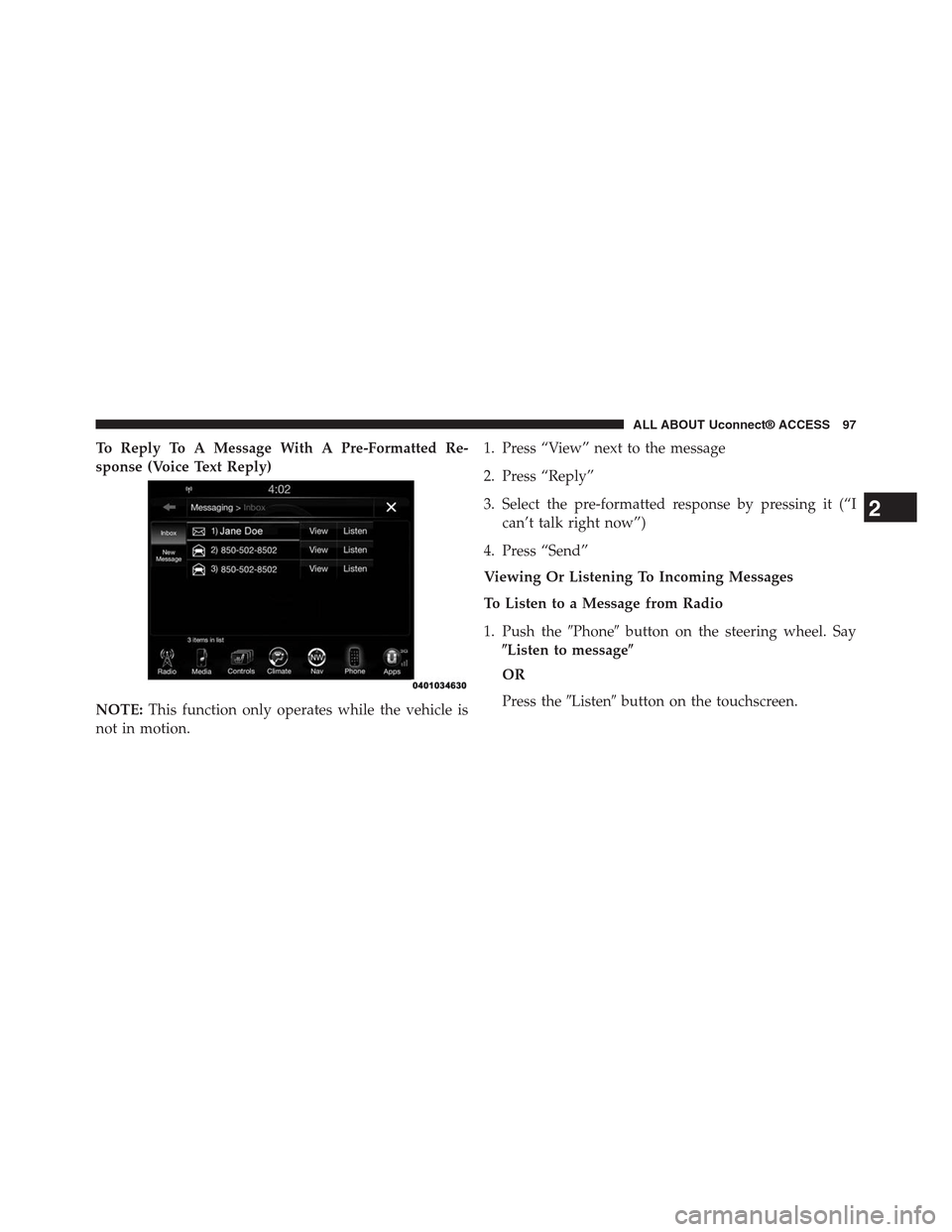
To Reply To A Message With A Pre-Formatted Re-
sponse (Voice Text Reply)
NOTE:This function only operates while the vehicle is
not in motion.
1. Press “View” next to the message
2. Press “Reply”
3. Select the pre-formatted response by pressing it (“I
can’t talk right now”)
4. Press “Send”
Viewing Or Listening To Incoming Messages
To Listen to a Message from Radio
1. Push the#Phone#button on the steering wheel. Say
$Listen to message$
OR
Press the#Listen#button on the touchscreen.
2
ALL ABOUT Uconnect® ACCESS 97
Page 101 of 429

user can press#Listen#on touchscreen or push the
#Phone#button on the steering wheel and say#Listen.#
Requirements
•(MAP may not be compatible with Apple iPhones®
(pre iOS 6). Apple iOS 6 supports receiving text
messages, but does not support sending text mes-
sages).
•Available on vehicles sold in the United States with a
Uconnect® 8.4A (sales code RA3) or Uconnect® 8.4AN
(sales code RA4) radio equipped with Uconnect®
Access.
•Vehicle must be registered with an active Uconnect®
Access Advantage trial or paid subscription for free
form text response to work.
•Vehicle and phone must be in range of the cellular
network.
•Customer must have a properly paired and connected
cellular device with Bluetooth® Message Access Pro-
file (MAP) enabled. Voice Texting is compatible with
many newer BlackBerry and Android mobile devices.
Apple iOS 5 and earlier does not support MAP so
iPhones will not send free form text messages. Apple
iOS 6 supports receiving, not sending text messages.
To check if your device has been tested to be compat-
ible please visitUconnectPhone.com.
Disclaimers
•Not all Voice Texting features may be available on your
phone.
•Your MAP supported phone must be paired and
connected to a compatible Uconnect® radio.
•You must have an active cellular connection and be
within cellular range to voice text.
100 ALL ABOUT Uconnect® ACCESS
Page 102 of 429
•Chrysler Uconnect® and its affiliates are not respon-
sible for errant text messages.
•Vehicle must be registered with an active Uconnect®
Access trial or paid subscription.
WARNING!
ALWAYS drive safely with your hands on the
steering wheel. You have full responsibility and
assume all risks related to the use of the
Uconnect® features and applications in this ve-
hicle. Only use Uconnect® when it is safe to do so.
Failure to do so may result in an accident involv-
ing serious injury or death.
FAQs
1.Can I still voice text if my phone is not listed?We are
constantly testing phones and updating our compat-
ibility database. If your phone is not listed, you may
still be able to pair and connect your MAP supported
phone to a compatible Uconnect® radio to see if all or
most voice texting functions work. Check your phone
manufacturer if MAP is supported on your phone.
2.Can I use voice texting while in my other Chrysler
vehicle?The Voice Texting free text response feature is
available only on Uconnect® 8.4A (sales code RA3) or
Uconnect® 8.4AN (sales code RA4) radios. Other
Chrysler vehicles do support hands free texting, but
only with fixed responses.
2
ALL ABOUT Uconnect® ACCESS 101
Page 103 of 429

3.My “Messaging” button on the touchscreen is White,
but I can only use pre-formatted responses.The Voice
Texting free-form voice response requires a subscrip-
tion to the Uconnect® Access Advantage package.
(Some phones will support pre-formatted responses,
but not free-form. Refer toUconnectPhone.comfor
further details.)
4.Do I have to “train” my Uconnect® radio to my
voice?Chrysler uses the latest voice recognition en-
gine that provides good recognition without required
training. This makes it easier for a passenger to also
use the system.
5.Can a passenger voice text?Yes, however, voice
recognition microphones are optimized for the driver,
so the system may have difficulty hearing the passen-
ger; also, the system will use the currently connected
phone, so be sure your passenger isn’t sending texts to
the wrong recipient.
6.Does Voice Texting work with accents?Speech isn’t
perfect. Technology isn’t perfect. While Chrysler
strives to use the latest voice recognition engine, the
technology may have difficulty with strong accents.
7.Can I voice text my car?The Voice Texting feature
allows you to listen to, and reply to text messages
(SMS) sent to your portable cellular mobile phone by
voice while in your vehicle.
8.How many pre-formatted replies are there?You can
respond with a set of up to 18 preset outgoing
messages such as#I’ll call you later.” Refer to “Voice
Texting” section of this supplement.
9.Can I use abbreviations and emoticons?Of course!
Just say the name of the most popular emoticon or
abbreviation, e.g. smiley, frown, wink, & LOL.
102 ALL ABOUT Uconnect® ACCESS