2015 AUDI TT ROADSTER wheel
[x] Cancel search: wheelPage 5 of 244

Knee airbags . . . . . . . . . . . . . . . . . . . . . 123
Side airbags . . . . . . . . . . . . . . . . . . . . . 125
Child Safety . . . . . . . . . . . . . . . . . . . 129
Important things to know ......... .
Child safety seats ................ .
Instal ling a chi ld safety seat .. .. .. . .
Additional Information ........... .
Vehicle operation ............ .
Intelligent technology .. .. .. . .
Notice about data recorded by vehicle
control modules .............. ... .
Electronic Stabilization Control (ESC) .
Rear spoiler ................ ... . .
Braking ........................ .
E lect ro-me chan ical power assis t ... . .
D riving w ith your quattro ......... .
Energy management ............. .
Driving and environment .....
The first 1,000 miles (1,500 km) and
afterwards .............. .. .. .. . .
Avoid damaging the vehicle ........ .
Driving through water on roads ... . .
Catalytic converter ............... .
Shutting down vehicle ............ .
Operate your vehicle economically and
minimize pollution ............... . 129
134
137
140
141
141
141
14 1
143
144
145
1 46
146
1 4 9
149
150
150 150
151
15 1
Tra iler towing . . . . . . . . . . . . . . . . . . . . 153
Vehicle care . . . . . . . . . . . . . . . . . . . 154
Vehicle care and cleaning . . . . . 154
General information . . . . . . . . . . . . . . 154
Car washes . . . . . . . . . . . . . . . . . . . . . . 154
Cleaning and care information . . . . . . 155
Fuel supply and filling your
fuel tank . . . . . . . . . . . . . . . . . . . . . . .
160
Gasoline . . . . . . . . . . . . . . . . . . . . . . . . 160
Fuel tank. . . . . . . . . . . . . . . . . . . . . . . . 161
Checking and filling . . . . . . . . . . . 164
Engine hood . . . . . . . . . . . . . . . . . . . . . 164
Eng ine oil . . . . . . . . . . . . . . . . . . . . . . . 166
Eng ine cooling system ............. 171
Brake fluid ...................... 174
Table of contents 3
Battery . . . . . . . . . . . . . . . . . . . . . . . . . 175
Windshield/headlight washer
container . . . . . . . . . . . . . . . . . . . . . . . 179
Tires and wheels ........... .. .
Tires ..... .. .... .. . .. .......... .
Tire pressure monitoring system ... .
Run-flat tire s .. .. ............... .
Do-it-yourself service ........ .
What do I do now? ........... .
Trunk escape handle ............. .
Vehicle tool kit .... .............. .
T ire repai r .... ... .. ............. .
What should I be aware of when
h . t
' 7 c angmg a ire .................. .
Fuses and bulbs .. .. .. ..... ... .
El ectr ical fuses . .. .. ............. .
Bulbs .......................... .
Emergency situations ........ .
General ........................ .
Starting by pushing or towing ...... .
Starting with jumper cables ....... .
U se of jump er cables ............. .
Emergency towing with commercia l
tow truck ...................... .
Lifting vehicle .. .. ............... . 180
180
198
201
204
204
204
204
205
208
212
212
215
2 16
216
216
216
217
218
221
Technical data . . . . . . . . . . . . . . . . . 222
Technical Data . . . . . . . . . . . . . . . . . 222
Vehicle identification . . . . . . . . . . . . . . 222
Weights . . . . . . . . . . . . . . . . . . . . . . . . 222
Dimensions . . . . . . . . . . . . . . . . . . . . . . 223
Capacities . . . . . . . . . . . . . . . . . . . . . . . 223
Gasoline engines . . . . . . . . . . . . . . . . . 224
Consumer Information . . . . . . . 225
Warranty coverages . . . . . . . . . . . . . . . 225
Operating your vehicle outside the
U.S. A. or Canada . . . . . . . . . . . . . . . . . 225
Audi Service Repair Manuals and
Literature . . . . . . . . . . . . . . . . . . . . . . . 225
Maintenance. . . . . . . . . . . . . . . . . . . . . 225
Additional accessories, modifications
and parts rep lacement . . . . . . . . . . . . 227
•
•
Page 11 of 244

(!) Power window switches
@
®
©
Door handle
Power locking sw itch
Adjuster control for outside mir- rors ... . ............. .... .
® Air outlets ............... . .
@ Light switch . ... .... ... .. .. .
(J) Turn signa l and high beam . .. .
@ Mu ltifunction stee ring wheel
with:
- Horn
- Drive r's ai rbag .... ... .. .. .
- Shift buttons ..... ... .. .. .
® Instrument cluster
@ Sw itches for
- Windshield wiper/washer
- Menu disp lay ..... ... .. .. .
39
36
S2
69
48
so
1 12
85
10
54
24
- T rip computer . . . . . . . . . . . . . 23
© Steering lock/ignition/starter
switch (in the steering wheel
column) . . . . . . . . . . . . . . . . . . . 72
@ Adjustab le s teer ing column . . . 72
@ Cruise control . . . . . . . . . . . . . . 77
€3J H ood re lease . . . . . . . . . . . . . . . 164
@ Data L ink Connector (DLC) for
On Board Diagnostics ( OBD II) 30
@ Instrument lighting . . . . . . . . . 52
@ Switches for
- Fuel filler flap release 162
- Rea r lid re lease . . . . . . . . . . . . 3 7
@ Depending on opt ions: Rad io or
nav igat ion system
@ Glove compar tment ( lockable) 65
@ Front passenger's a irbag . . . . . 112
@ Rear window defogger sw itch 70
@ C limate controls . . . . . . . . . . . . 6 7
@ Ashtray w ith cigarette lighter . . 63
@ Selecto r l ever (S troni c) . . . . . . . 81
@) Switches for
- Audi magnet ic r ide or Sport
mode . . . . . . . . . . . . . . . . . . . . 79, 79
- Electronic Stab ilizat ion Con-
tro l . . . . . . . . . . . . . . . . . . . . . 141
- Emergency flasher . . . . . . . . . 51
Cockpi t 9
- Retractable rear spo iler .. ...
@ Switch for automatic folding 143
top . ... .. .. .. .. . .. .... ... .
@ Swi tch for wind deflector .... .
@ C up ho lder .. .. .. .......... .
@ Pa rking brake lever
(D Tips
- Some of the equipment or features
show n in the genera l illustration may be
standard equ ipme nt on your vehicle or
may be opt ional equ ipment depending
on you r model. Always as k yo ur au tho r
ized Aud i de aler if you have a quest ion
abou t your vehi cle.
- A separate bro ch ure is p rov ided for yo ur
facto ry-installed audio system and/or
the A udi Navigation System. 43
4
4
63
74
Page 17 of 244

Instrument s and warnin g/indic ator ligh ts 15
flashes together with the brake system warn
ing/indicator light¢.&,. .
(USA models):
If the warning light . and the
warn ing light
riJ ill umina te together, imme
diate ly contact your authorized Audi dea ler o r
qualified workshop to have all brake pads in
spected
¢ page 19.
When the light comes on, an audib le warn ing
signal is also given .
Parking brak e set
The parking brake warning light./. (Cana
da models) illuminates whe n the park ing
b rake is set. In addit ion, a warning tone will
sound after you have driven for longer than 3
seconds and faster than 3 mph (5 km/h).
Pa rking brak e set
The . warning/ind icator light illuminates
when the parking brake is set¢.&, .
_& WARNING
-Always observe the wa rni ngs in
¢ page 164, Working in the engine
compartment,
before opening the en
gine hood and check ing the brake fluid.
- Driving with low brake fluid is a safety
hazard! Stop the car an d get professiona l
assistance.
- USA models: If both, the. warning
light and the
Ill warning light come on
at the same time, the rear wheels could
lock up first under hard brak ing . Lock-up
of the rear whee l brakes can cause loss of
vehicle control and an accident. Have
yo ur vehicle repaired immed iately by
you r autho rized Aud i dealer o r a quali
fied workshop . D rive slowly and avo id
s u dden, hard brake application .
-Canada models: If both, the brake warn
ing light . and the ABS warning light
[iJ come on at the same t ime, the rear
wheels co uld lock up first unde r hard
braking . Lock -up of the rear wheel brakes
can cause loss o f vehicle control and an
acc ident. Have your vehicle repaired im
med iate ly by your authorized Aud i dealer or a qualified workshop
. Drive slowly and
avoid sudden, hard brake application .
- If the brake warning/indicator light does
not go out after a few seconds and the
parking brake is released, or lights up
while you are dr iving, the f lu id leve l in
the brake flu id reservo ir is too low . If you
be lieve that it is safe to do so, proceed
immed iate ly at low speed to the nearest
author ized Audi dealer or qualified work
shop and have the brake sys tem inspect
ed .
- Always keep in mind that after severa l
brake applications, you will need greater
pressu re on the brake pedal to stop you r
vehicle . Do not rely on strained brakes to
respond with maximum stopping power
in critical s ituations. You must allow for
increased braking distances. The extra
distance used up by fading brakes could lead to an accident.
tli1 ! .'!r Safety systems
The . (USA models) /. (Canada models)
indicato r light monitors the safety systems
e.g. (a irbags, pre tensioners) and ill uminates
f or a few se conds eac h time you swi tch the ig
nition on.
If the . (USA models)/ . (Canada models)
i ndicato r ligh t does no t go o ut, o r if it illum i
na tes while yo u are driving, or if it starts to
blink, then there is a mal function somewhe re
in the system. If the light does not i lluminate
when you switch on the ignition , th is also
means there is a malfunct ion.
_& WARNING
If yo u have a ma lfunction in the safety sys
tems, co ntact your authorized Aud i dea ler
immediately. Otherwise the safety sys
tems may not work properly in an acc i
dent.
Page 20 of 244
18 Instruments and warning/indicator lights
If the J.J.) indicator lamp illuminates, the sys
tem has switched the ESC
off. In this case, you
can switch the ignition
off and then on to
switch the ESC on again. The system is func
tioning completely when the indicator lamp
switches
off .
If the II indicator lamp illuminates, the ESC
was switched
off with the [!I button.
Stabilization program and ABS fault! See
owner 's manual
If the DJ indicator lamp and the riJ ABS indi
cator lamp illuminate and the driver message
appears, the ABS or e lectronic differential lock
is ma lfunctioning. This also interrupts the
ESC. The brakes st ill function with their nor
mal power, but ABS is not active.
Drive to your authorized Audi dea ler immedi
ately to have the malfunction corrected .
For more informat ion about the ESC
<=>page 141.
ABS/ (8 ) Anti-lock brake system
This warning/indicator light monitors the ABS
and the electronic differential lock (EDL).
The warning/indicator light 1111 (USA mod-
e ls)
;riJ (Canada models) will come on for a
few seconds when the ignition is switched on .
The light will go o ut after an automatic check
sequence is completed.
There is a malfunction in the ABS when:
-The warning/indicator light does not illumi
nate when you switch the ign ition on.
- The warning/indicator light does not go out
after a few seconds .
- The warning/indicator light illuminates
wh ile driving .
The ESC indicator light also illuminates if
there is a malfunction in the ABS . The mes
sage
Stabilization program and ABS: fault!
See owner's manual
also appears in the in
strument cluster display and a warning tone
sounds .
The brake system will still respond even
without the assistance of the ABS system.
See your authorized Audi dealer as soon as
possible to restore full braking performance.
For more information regarding the ABS
<=>page 141.
Malfunction in the brake system
If the brake warning light r=> page 14 and the
ABS warning illuminate
together there may be
a malfunction in the ABS, and there may also
be a malfunction in the brake system itself
r=> &.. The ABS will not work and you will no
tice a change in braking response and per
formance.
In the event of a malfunction in the brake
system
the warning/ind icator light . (USA
models)/ . (Canada models) in the instru
ment cluster flashes
r=> page 14 .
Malfunction in the electronic differential
lock (EDL)
The EDL works together w ith the ABS . The
ABS warning light wi ll come on if there is a
malfunction in the EDL system
r=> page 141.
See your authorized Audi dealer as soon as
possible .
_& WARNING
-If the Ill (USA models)/11] (Canada
models) warning light does not go out,
or if it comes on whi le driving, the ABS
system is not work ing properly. The vehi
cle can then be stopped only wit h the
standard brakes (without ABS). You w ill
not have the protect ion ABS provides.
Contact your Audi dea le r as soon as pos
sible.
- USA models: If the . warning light, the
G1 warning light and the 1111 warning
light come on together, the rear wheels
could lock up fi rst under hard braking .
Rear wheel lock -up can cause loss o f ve
hicle control and an accident. Have your
vehicle repaired immediately by your au
thorized Audi dealer or a qualified work
shop. Drive s low ly and avoid sudden,
hard brake applications. ..,.
Page 21 of 244

Instrument s and warnin g/indic ator ligh ts 19
- Canada models:
If the brake warn ing
light ., the
J;.J warning light and the
ABS warning light
riJ come on together,
the rear wheels could lock up first under
hard braking. Rear wheel lock-up can
cause loss of vehicle control and an acci
dent. Have you r vehicle repaired immed i
a tely by your au thorized A udi dealer or a
qualified workshop . Dr ive slowly and
avoid sudden, hard brake applications.
( 0 ) Worn brake pads
llJ Check brake pad s!
If the war ning light illum inates, immediately
contact your au thori zed A udi dealer or quali
fied workshop to have all brake pads inspect
ed . On USA models the warning light
llJ
comes on together with the warning light •.
Both sets of brake pads on an axle must al
ways be rep laced at the same time.
A WARNING
Dr iv ing with bad brakes can cause a coll i
sion and serious personal injury .
-If the warning light llJ and the warning
light
. ll with the message Brake pads!
comes on in the inst rument cluste r dis
play, immediately contact your author
ized Audi dea le r or q ualified wor kshop to
have all br ake pads checked or rep laced if
necessary.
EPC Electronic power control
This warning/indicator light monitors the
electronic power control .
The [m warning/ind icator lig ht ( Electronic
P owe r Control) illuminates when you switch
on the igni tion as a fu nction check .
@ Tips
If this wa rning/i ndicator light ill uminates
while you are dr iving, then the re is a mal
fu nction in the engine elec tron ics. Have
1) .: USA mode ls onl y
the malfunct ion corrected as soon as pos
sible by your authorized A udi dealer or
q ualified works hop.
~ Malfunction Indicator Lamp (MIL)
The Ma lfunction Indicator Lamp (MIL) is part
of the On-Board Diagnostic (OBD II) system .
The symbol
II lights up when the ignition is
turned on and will turn off after the eng ine
has started and has settled at constant id le
speed . This indi cates that the M IL is work ing
properly.
The wa rning lig ht illuminates when the re is a
malfu nction in the eng ine electron ic system .
Contact your a uthorized Audi dea le r and have
t h e mal func tion cor rected.
An improperly closed fuel filler cap may also
cause the MIL light to illuminate
~ page 162.
For more information ~ page 30 .
!?') Engine speed limitation
App lies to veh icles : w it h eng ine speed limitatio n
(II Do not e xceed ma x. engine speed of
XXXX rpm
The (Pl symbol illuminates when there is an
engine con trol malfunct io n. The indicator
li ght
[mi n the instrum ent cluster also illum i
nates. The engi ne speed is limited to the
speed displayed in the d river i nformat ion sys
tem. Keep in mind that the engine speed w ill
not exceed the val ue d isplayed in the driver in
format ion system, for example when down
shifting.
Please go to an authorized A udi dealer or oth
er qualified wo rkshop to have the malfunct ion
repaired .
~ .. Checking the engine oil level
II Please add max . 1 qt of engine oil!
Page 51 of 244

light sensor checked as soon as possible at a
dealership.
Adaptive light *
The benefit of adaptive l ight is that the curve
and the edge of the road are better i llum inat
ed . The adaptive light is contro lled automati
cally, depending on vehicle speed and steering
wheel angle.
When driving a round bends, the head lights
are contro lled according to steering wheel an
g le . So that there is no black area ahead of the
ve hic le, the two main beams pivot at different
angles. The system works above a speed of
about 6 mph (10 km/h).
Com ing home /le avi ng home function *
The function is swit ched on when the switch is
in the AUTO* position and the function is
shown as active in the driver information sys
tem.
The
coming hom e function illuminates the
area around the vehicle when the ign ition is
switched off and the driver's door is ope ned.
The length of time the lights remain on can be
set in the menu display
( Illumination > Exte
rior lights > coming home ).
The leavi ng home function i lluminates the
area around the vehicle when unlocking it.
A WARNING
- Never use dayt ime running l ights to see
where you are going. They are not bright
enough and w ill not let you see far
enough ahead for safety, especially at
dusk or when it is dar k. Always switch on
the low beams at dusk or when i t is dar k.
- Automatic headlights a re only intended
to assist the dr iver. They do not re lieve
t he driver of his responsibi lity to check
t he headlights and to turn them on man
ually according to the current light and
visibility conditions. For example, fog
and rain cannot be detected by the light
sensors. So a lways switch on the head
lights under these weather cond itions
and when driving in the dark
jO .
Clear vis ion 49
- Crashes can happen when you cannot see
the road ahead and when you cannot be
seen by other motorists.
- Always turn on the headlights so that
youcanseeahe adandsothatothe ~
can see your car from the back .
- Please observe legal regulat ions w hen
using the ligh ting systems des cribed.
(D Tips
- T he light sensor for head light control is
located in the rear view mirror mount.
Do not apply any stickers to t he wind
shield in th is area to preven t malfunc
tions or fa ilures.
- Some exter io r l ighting funct ions can be
adjusted in t he driver i nformat ion sys
t em
~page 24.
- I f you remove the igni tion from t he igni
t ion lock while the headligh ts are s till
on, a buzzer wi ll sound as long as the
driver's door is o pen to remind yo u to
t u rn off the lights.
- Always observe the specific local regula
tions for your area as to when to use your
lights.
- With automatic headlights, the high
beam f unction is also available, but w ith
one restrict ion: If you have not sw itched
the high beams back to low beams dur
ing automatic headlight operation (for
example, after d riving throug h a tunnel),
only the low beams come on the next
t ime au tomati c headlights a re swi tched
on. To use the high beams , you firs t have
t o pull the hig h beam lever back and
then push the lever fo rward again .
- In coo l or damp weather, the inside of
the headlights, turn signals an d tail
lights can fog over due to the tempera
t u re difference between the inside and
outside. They w ill clear shortly after
switching them on. This does not affect
the se rv ice life of the lighting.
Page 54 of 244
52 Clear vis ion
Instrument panel illumination
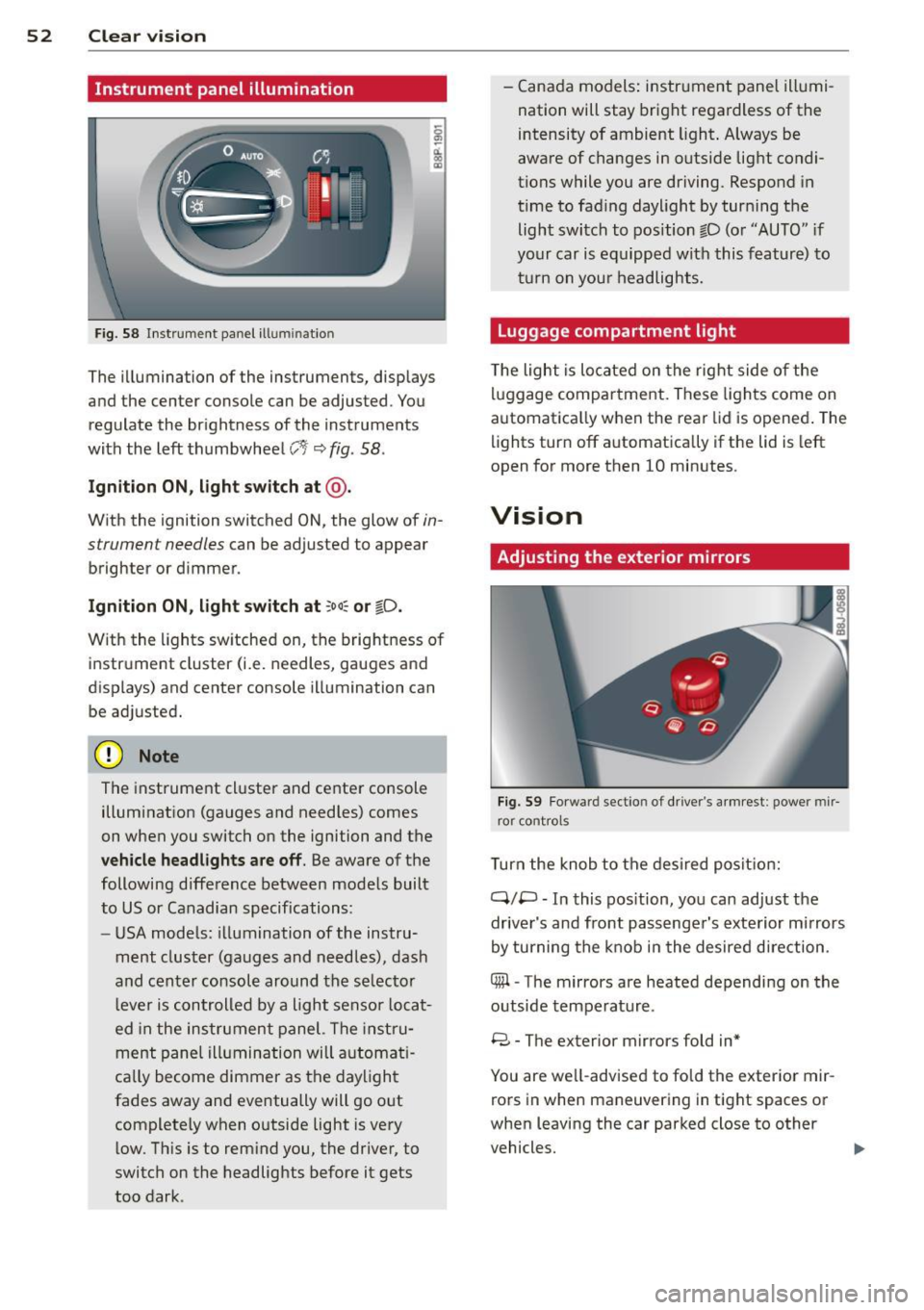
F ig. 58 Instrument panel ill umination
The illumination of the instruments, displays
and the center console can be adjusted. You
regulate the brightness of the instruments
with the left thumbwheel
CJ:J ~ fig. 58.
Ignition ON, light switch at @ .
With the ignition switched ON, the glow of in
strument needles can be adjusted to appear
brighter or dimmer.
Ignition ON , light switch at ;oo~ or io .
With the l ights sw itched on, the brightness of
instrument cluster (i.e. needles, gauges and
displays) and center console illumination can
be adjusted.
@ Note
The instrument cl uster and cente r console
illumination (gauges and needles) comes
on when you switch on the ignition and the
vehicle headligh ts ar e off . Be aware of the
following difference between mode ls built
to US or Canadian specifications:
- USA mode ls: illumination of the instru
ment cluster (gauges and needles), dash
and center consol e around the se lector
l ever is controlled by a light senso r locat
ed in the instrument panel. The instru
ment pane l illumination will a utomat i
cally become dimmer as the daylight
fades away and eventually will go out
complete ly when outside light is very
l ow . Th is is to rem ind you, the driver, to
switch on the headlights before it gets
too dark . -
Canada models: instrument panel illumi
nation will stay bright regardless of the
intensity of ambient light . Always be
aware of changes in outside light condi
tions while you are driving. Respond in
time to fading daylight by tur ning the
light switch to position fD (o r "AUTO" if
your car is equipped with this feature) to
t ur n on you r headlights.
Luggage compartment light
The light is located on the right side of the
lu ggage compartme nt. These lights come on
automat ica lly when the rear lid is opened . The
lights turn off automatica lly if the lid is left
open for more then 10 minutes.
Vision
Adjusting the exterior mirrors
Fig. 59 Fo rwa rd section of driver's a rmrest: power mir
ror controls
Turn the knob to the desired posit ion:
Q/ P -In this pos ition, you can adjust the
driver's and front passenger's exte rior m irrors
by turning the knob in the desired d irection.
4iil -The mirrors are heated depending on the
outside temperature .
8 -The exterior mirrors fold in*
You are we ll-advised to fold the exterior mir
rors in when maneuvering in tight spaces or
when leaving the car parked close to other
vehicles. ..,,.
Page 61 of 244
Seats and storage
General recommen
dations
Why is your seat adjustment so important?
The safety belts and the airbag system can
only provide maximum protection if the front
seats are correctly adjusted.
There are various ways of adjusting the front
seats to provide safe and comfortable support
for the driver and the front passenger. Adjust
your seat properly so that :
- you can easily and quick ly reach all the
switches and controls in the instrument
panel
- your body is properly supported thus reduc ing physical stress and fatigue
- the safety belts and airbag system can offe r
maximum protection
¢ page 108.
In the following sections, you will see exactly
how you can best adjust your seats .
There are special regulations and instructions
for installing a child safety seat on the front passenger's seat. Always heed the informa
tion regard ing child safety provided in
¢ page 129, Child Safety.
A WARNING
Incorrect seating position of the driver and
all other passengers can result in serious
personal injury.
- Always keep your feet on the f loor when
the vehicle is in motion -never p ut your
feet on top of the instrument panel, out
of the w indow or on top of the seat cush
ion! This applies espec ially to the passen
gers . If your seating position is incorrect
you increase the r isk of injury in the case
of sudden braking or an acc ident. If the
airbag inflates and the seating position
is incorrect this could result in personal
injury or even death.
- It is important for bo th the driver and
front passenger to keep a distance of a t
Seat s an d sto rage 59
least 10 inches (25 cm) between them
selves and the steering wheel and/or in
strument panel. If you're s itting any
closer than th is, the airbag system can
not protect you properly. In addition to
this, the front seats and head restra ints
must be adjusted to yo ur body height so
that they can give you max imum prote c
tion.
- Always try to keep as much distance as
possible be tween yourself and the s teer
ing wheel o r instrument pane l.
- Do not adjust the driver's or front pas
senger's seat whi le the vehicle is moving.
Your seat may move unexpected ly, caus
ing sudden loss of vehicle control and
personal injury . If you ad just yo ur seat
while the veh icle is moving, you are out
of posit ion.
Driver's seat
The correct seat position is important for safe
and relaxed driving.
We recommend that you adjust the driver's
seat in the fo llowing manner:
.,. Adj ust the seat in fore and aft direction so
t ha t you can easily push the peda ls to the
floor whi le keeping your knee sligh tly bent
c::> A in Why is your seat adjustment so im
portant? on page 59 .
.,. Adjust the seatback so that when you sit
w ith your back against the seatback, you can
still grasp the top of the steering wheel.
.,. Pos it ion the head restrai nt accord ing to the
occupant 's height
c::> page 62 . For maxi
mum protection, the top of the head re
straint shou ld be at least at eye level, pref
erably higher and idea lly level with the top
of the head
¢ page 94, fig. 100 .
A WARNING
Never place any objects in the dr iver's foot
well. An object could get into the pedal
area and interfere with pedal funct ion. In
case of sudden braking or an acc ident, you
would not be able to brake or accelerate!