2015 AUDI TT ROADSTER instrument cluster
[x] Cancel search: instrument clusterPage 11 of 244

(!) Power window switches
@
®
©
Door handle
Power locking sw itch
Adjuster control for outside mir- rors ... . ............. .... .
® Air outlets ............... . .
@ Light switch . ... .... ... .. .. .
(J) Turn signa l and high beam . .. .
@ Mu ltifunction stee ring wheel
with:
- Horn
- Drive r's ai rbag .... ... .. .. .
- Shift buttons ..... ... .. .. .
® Instrument cluster
@ Sw itches for
- Windshield wiper/washer
- Menu disp lay ..... ... .. .. .
39
36
S2
69
48
so
1 12
85
10
54
24
- T rip computer . . . . . . . . . . . . . 23
© Steering lock/ignition/starter
switch (in the steering wheel
column) . . . . . . . . . . . . . . . . . . . 72
@ Adjustab le s teer ing column . . . 72
@ Cruise control . . . . . . . . . . . . . . 77
€3J H ood re lease . . . . . . . . . . . . . . . 164
@ Data L ink Connector (DLC) for
On Board Diagnostics ( OBD II) 30
@ Instrument lighting . . . . . . . . . 52
@ Switches for
- Fuel filler flap release 162
- Rea r lid re lease . . . . . . . . . . . . 3 7
@ Depending on opt ions: Rad io or
nav igat ion system
@ Glove compar tment ( lockable) 65
@ Front passenger's a irbag . . . . . 112
@ Rear window defogger sw itch 70
@ C limate controls . . . . . . . . . . . . 6 7
@ Ashtray w ith cigarette lighter . . 63
@ Selecto r l ever (S troni c) . . . . . . . 81
@) Switches for
- Audi magnet ic r ide or Sport
mode . . . . . . . . . . . . . . . . . . . . 79, 79
- Electronic Stab ilizat ion Con-
tro l . . . . . . . . . . . . . . . . . . . . . 141
- Emergency flasher . . . . . . . . . 51
Cockpi t 9
- Retractable rear spo iler .. ...
@ Switch for automatic folding 143
top . ... .. .. .. .. . .. .... ... .
@ Swi tch for wind deflector .... .
@ C up ho lder .. .. .. .......... .
@ Pa rking brake lever
(D Tips
- Some of the equipment or features
show n in the genera l illustration may be
standard equ ipme nt on your vehicle or
may be opt ional equ ipment depending
on you r model. Always as k yo ur au tho r
ized Aud i de aler if you have a quest ion
abou t your vehi cle.
- A separate bro ch ure is p rov ided for yo ur
facto ry-installed audio system and/or
the A udi Navigation System. 43
4
4
63
74
Page 12 of 244

10 Instruments and warning/indicator lights
Instruments and warning/indicator Lights
Instruments
Instrument cluster and controls
The instrument cluster is your central source of information.
Fig. 3 Overv iew of the inst rument cluster
(D Tachometer with time and date
dis play .. .... ..... ........ .
@ Coolant temperature gauge .. .
® Fuel gauge ................ .
© Speedometer with odometer ..
® Set/Check button ..... ... .. .
@ Driver information display
(?) Reset button for
- Trip odometer .......... .. .
- Service indicator
@ Tips
10 ,11
11
12
12
11
22
12
28
- When switching the ignition on, the nee
dles in the instrument cluster move up
ward briefly.
- The illumination for the instrument clus
ter lights up whenever you switch on the
i gnition with the
vehicle headlights off .
As the daylight fades, the instrument
cluster illumination likewise dims auto
matically a nd will go out completely
when the outside light is very low. This
feature is meant to remind you to switch
on the head lights when outside light
conditions become poor .
Tachometer (engine rev counter)
The tachometer indicates the engine RPM
(revolutions per minutes) .
en 0
~
~
"'
If engine RPM drops below 1,500, you should
downshift to the next lower gear. The red area
at the end of the scale indicates maximum
permissible engine RPM after the br eak-in pe
riod. Before reaching this area, move these
lector lever to position "D (Drive)" or ease
your foot off the acce lerator pedal.
(D Note
The tachometer needle should only briefly
be in the red zone: you could damage your
engine! The beg inning of the red zone var
i es depending on the engine.
@ For the sake of the environment
Upshifting early saves fuel and reduces en
gine noise.
Page 13 of 244

Instrument s and warning /indicator lights 11
Digital clock with date display
Your vehicle is equipped with a quartz con
trolled digital clock .
Fig. 4 In str um en t cl uste r w it h t he dig ita l cloc k
To set the hour
.. Pull the knob (hou r d isp lay flashes) and turn
i t to the left o r right.
To set the minutes
.. Pull the knob as ma ny times as necessary
un til the mi nute display flash es.
.. Turn the knob to the left or right .
To set the date
.. Pull the knob as many times as necessary
unt il the day, month or year display flashes.
.. Turn the knob to the left or right .
To hide or d isplay the date
.. Pull the knob as many times as necessary
unti l the date display flashes.
.. Turn the knob to the left or right.
When the date disp lay stops blinking, this
means the time and date have been success
fu lly stored.
W ith the ignition off, pushing or pulling the
Set/Check button¢
page 10, fig . 3@ can
turn on the dis play f ie ld lighting for a few sec
onds .
Engine coolant temperature gauge
The engine coo la nt gauge ¢ page 10 , fig. 3@
only works when the ign ition is on. To prevent
damage to your e ngine, please note the fo l
l owing important points:
Engine cold
As long as the nee dle rem ains a t the left end
of the gauge, the engine s till h as not reac hed
its operating temperat ure. Avoid high engine
speeds, heavy engine loads and heavy throt
tle.
Normal temperature
W hen the engine has re ache d its ope rat ing
temperature, the need le w ill move into the
mid dle of t he gauge and rema in there .
If the
engine is working hard at high outside tem
peratures, the needle may turn fu rther to the
right. This is no cause for concern as long as
the . warning light in the instrument cluster
does not illuminate .
When the. warning light sta rts to flash,
th is can mean one of two things: either the
coolant
temperature is too high, o r the coo l
ant
level is too low ¢ page 17 .
A WARNING
--Always obs erv e th e war ning in
¢ page 164 before openi ng the eng ine
h o od and che ck ing t he e ngine coolant
leve l.
- N ever open t he eng ine hood if you see or
he ar steam, or if you see engi ne coo lant
drippin g from t he en gine compar tment .
You could burn yourse lf . Let the engi ne
coo l off fi rst until yo u can n o longe r see
or hea r steam or coolant escap ing.
(D Note
- M ounting ad ditiona l lights or accessories
i n fr ont of the air inlets reduces the coo l
ing effect of t he radiato r. At high o utsi de
tempe rat ures or h igh engine load, the
eng ine could overheat.
- The front spoiler has been designed to
properly d istribute the cooling a ir when
the vehicle is movi ng. If the spoiler is
damaged, this could reduce the coo ling
e ff ect a nd th e eng ine could then ove r
heat . As k yo ur au thori zed A udi deal er for
a ssis tan ce.
Page 14 of 244

12 Instruments and warning/indicator lights
Fuel gauge
The fuel gauge works only when the ignition is
on . When the needle reaches the red area, the
warning light in the instrument cluster will il
luminate ¢
page 20 Ill Time to refuel!
The total tank capacity of your veh icle is listed
in
¢ page 223
CD Note
Never run the tank completely dry! An ir
regula r supply of fue l can cause engine
m isfiri ng and fuel could enter into the ex
haust system. The catalyt ic converter
could then overheat and be damaged.
Speedometer with odometer
The speedometer shows you the vehicle
speed , and the odometer shows you how
many miles (kilometers) you have driven.
Fig . S Spee domete r close -up: odometer display
The dis tance driven is shown in miles (USA
models) or in kilometers (Canada models) .
Lower odometer
The lower odometer shows the total number
of miles (kilometers) driven.
Upper odometer (trip odometer)
The upper odometer shows the total number
of mi les (kilometers) driven since you last re
set the odometer back to zero. You can use
this odometer wh en you want to keep track of
how many miles (kilometers) you have driven
for a sing le trip or errand. The last digit indi
ca tes 1/10 of a mile (100 me ters). You can se t the trip odometer
back to zero by pressing the
reset button
¢ fig. 5.
With the ign ition off, pushing of the Set/
Check button ¢
page 10, fig . 3 ® can turn on
the display fie ld lighting for a few seconds.
Malfunction message
If there is a malfunct ion somewhere in the in
strument cluster,
dEF will appear in the trip
odometer and will stay on. Contact your au
thorized Audi dea ler to have the problem cor
rected.
Immobilizer
When the ignition is sw itched on, the data on
the ignition key are scanned automat ically .
If an unauthor ized key was used,
SAFE is dis
played continuously in the odometer display
field . The vehicle cannot be operated
¢ page 33.
Warning/indicator
Lights
Description
T he ind icator lights in the instrument cluster
blink or turn on . They indicate funct ions or
malfunctions ¢
,&.
Messages may appear with some indicator
lights . The messages turn
off after a short
time . To display a message again, press the
Set/Check button¢
page 10, fig . 3 ® · If
there is more than one ma lfunction, the indi
cator lights will turn on one after the other for
approximat ely two seconds each.
Some indicators lights in the display can turn
on in severa l colors.
A WARNING
=
- Failure to heed warning lights and other
important vehicle information may result
in ser ious personal in jury or vehicle dam
age.
- Whenever stalled or stopped for repair,
move the vehicle a safe distance
off the
Page 20 of 244
18 Instruments and warning/indicator lights
If the J.J.) indicator lamp illuminates, the sys
tem has switched the ESC
off. In this case, you
can switch the ignition
off and then on to
switch the ESC on again. The system is func
tioning completely when the indicator lamp
switches
off .
If the II indicator lamp illuminates, the ESC
was switched
off with the [!I button.
Stabilization program and ABS fault! See
owner 's manual
If the DJ indicator lamp and the riJ ABS indi
cator lamp illuminate and the driver message
appears, the ABS or e lectronic differential lock
is ma lfunctioning. This also interrupts the
ESC. The brakes st ill function with their nor
mal power, but ABS is not active.
Drive to your authorized Audi dea ler immedi
ately to have the malfunction corrected .
For more informat ion about the ESC
<=>page 141.
ABS/ (8 ) Anti-lock brake system
This warning/indicator light monitors the ABS
and the electronic differential lock (EDL).
The warning/indicator light 1111 (USA mod-
e ls)
;riJ (Canada models) will come on for a
few seconds when the ignition is switched on .
The light will go o ut after an automatic check
sequence is completed.
There is a malfunction in the ABS when:
-The warning/indicator light does not illumi
nate when you switch the ign ition on.
- The warning/indicator light does not go out
after a few seconds .
- The warning/indicator light illuminates
wh ile driving .
The ESC indicator light also illuminates if
there is a malfunction in the ABS . The mes
sage
Stabilization program and ABS: fault!
See owner's manual
also appears in the in
strument cluster display and a warning tone
sounds .
The brake system will still respond even
without the assistance of the ABS system.
See your authorized Audi dealer as soon as
possible to restore full braking performance.
For more information regarding the ABS
<=>page 141.
Malfunction in the brake system
If the brake warning light r=> page 14 and the
ABS warning illuminate
together there may be
a malfunction in the ABS, and there may also
be a malfunction in the brake system itself
r=> &.. The ABS will not work and you will no
tice a change in braking response and per
formance.
In the event of a malfunction in the brake
system
the warning/ind icator light . (USA
models)/ . (Canada models) in the instru
ment cluster flashes
r=> page 14 .
Malfunction in the electronic differential
lock (EDL)
The EDL works together w ith the ABS . The
ABS warning light wi ll come on if there is a
malfunction in the EDL system
r=> page 141.
See your authorized Audi dealer as soon as
possible .
_& WARNING
-If the Ill (USA models)/11] (Canada
models) warning light does not go out,
or if it comes on whi le driving, the ABS
system is not work ing properly. The vehi
cle can then be stopped only wit h the
standard brakes (without ABS). You w ill
not have the protect ion ABS provides.
Contact your Audi dea le r as soon as pos
sible.
- USA models: If the . warning light, the
G1 warning light and the 1111 warning
light come on together, the rear wheels
could lock up fi rst under hard braking .
Rear wheel lock -up can cause loss o f ve
hicle control and an accident. Have your
vehicle repaired immediately by your au
thorized Audi dealer or a qualified work
shop. Drive s low ly and avoid sudden,
hard brake applications. ..,.
Page 21 of 244

Instrument s and warnin g/indic ator ligh ts 19
- Canada models:
If the brake warn ing
light ., the
J;.J warning light and the
ABS warning light
riJ come on together,
the rear wheels could lock up first under
hard braking. Rear wheel lock-up can
cause loss of vehicle control and an acci
dent. Have you r vehicle repaired immed i
a tely by your au thorized A udi dealer or a
qualified workshop . Dr ive slowly and
avoid sudden, hard brake applications.
( 0 ) Worn brake pads
llJ Check brake pad s!
If the war ning light illum inates, immediately
contact your au thori zed A udi dealer or quali
fied workshop to have all brake pads inspect
ed . On USA models the warning light
llJ
comes on together with the warning light •.
Both sets of brake pads on an axle must al
ways be rep laced at the same time.
A WARNING
Dr iv ing with bad brakes can cause a coll i
sion and serious personal injury .
-If the warning light llJ and the warning
light
. ll with the message Brake pads!
comes on in the inst rument cluste r dis
play, immediately contact your author
ized Audi dea le r or q ualified wor kshop to
have all br ake pads checked or rep laced if
necessary.
EPC Electronic power control
This warning/indicator light monitors the
electronic power control .
The [m warning/ind icator lig ht ( Electronic
P owe r Control) illuminates when you switch
on the igni tion as a fu nction check .
@ Tips
If this wa rning/i ndicator light ill uminates
while you are dr iving, then the re is a mal
fu nction in the engine elec tron ics. Have
1) .: USA mode ls onl y
the malfunct ion corrected as soon as pos
sible by your authorized A udi dealer or
q ualified works hop.
~ Malfunction Indicator Lamp (MIL)
The Ma lfunction Indicator Lamp (MIL) is part
of the On-Board Diagnostic (OBD II) system .
The symbol
II lights up when the ignition is
turned on and will turn off after the eng ine
has started and has settled at constant id le
speed . This indi cates that the M IL is work ing
properly.
The wa rning lig ht illuminates when the re is a
malfu nction in the eng ine electron ic system .
Contact your a uthorized Audi dea le r and have
t h e mal func tion cor rected.
An improperly closed fuel filler cap may also
cause the MIL light to illuminate
~ page 162.
For more information ~ page 30 .
!?') Engine speed limitation
App lies to veh icles : w it h eng ine speed limitatio n
(II Do not e xceed ma x. engine speed of
XXXX rpm
The (Pl symbol illuminates when there is an
engine con trol malfunct io n. The indicator
li ght
[mi n the instrum ent cluster also illum i
nates. The engi ne speed is limited to the
speed displayed in the d river i nformat ion sys
tem. Keep in mind that the engine speed w ill
not exceed the val ue d isplayed in the driver in
format ion system, for example when down
shifting.
Please go to an authorized A udi dealer or oth
er qualified wo rkshop to have the malfunct ion
repaired .
~ .. Checking the engine oil level
II Please add max . 1 qt of engine oil!
Page 30 of 244

28 Driver information system
-The fuel economy messages are not dis
played in every instance, but rather in in
terva ls over a period of ti me.
Service interval display
The service interval display reminds you when
your nex t service is due.
Fig. 19 Sect ion of instrument cluster: Serv ice in terva l
d isp lay
The schedule for the next oil change or inspec
tion is calculated automatically and displayed
accordingly. The display works in two stages :
Service reminder
30 days before the next service is due, a serv
ice reminder appears in the display when you
turn on the ignition.
After about
5 seconds the display switches
back to normal. The distance and time re
maining are updated each time the ignition is
turned on until the date due for service is
reached.
Service due
When the due date for service is reached , the
message
Service due! appears in the instru
ment cluster immediately after you turn on
the ignition. Additionally, a warning tone
sounds . After about
5 seconds the display
switches back to normal.
Calling up the service schedules
If or when an oil change or inspection is due,
can be shown in the instrument cluster by se
lecting the serv ice interval display. Select
Check > Service > Oil change or Service by us
ing the
! R ES ET I button and the rocker switch
c> page 25 , fig . 12.
Resetting the service interval display
Your authorized Audi dealer will reset the cor
responding service schedule after performing
the appropriate service on your veh icle. You
also have the possibility to reset the oil
change schedule after having performed an
o il change according to Audi specifications.
- Switch the ignition on.
- Pull the knob
c> fig. 19. The message. Serv-
ice due!
appears.
- Pull the knob until the display
Oil change in
-----mi (km)---day s appears . If the I RESET I
button is not pulled within 5 seconds, the
disp lay reset mode closes.
(D Note
If you disconnect the battery terminals, no
ca lculations can be made for the service
interval display during this time and no
service reminder will appear. Remember
that observing the proper service intervals
i s vitally important to extending the life of
your vehicle, particularly the engine, and
maintain ing its value . Even if the mileage
driven is low, the maximum period of one
year from one service to the next must not
be exceeded.
'
(D Tips
-Do not reset the display between oil
changes, otherwise the display w ill be in
correct.
- Th e information in the Service Reminder
remains stored even when the vehicle
battery is disconnected.
Lap timer
I ntrod ucti on
App lies to vehicles: wit h lap timer
You can record and evaluate lap times with
the lap timer in the display c>page
29,
fig. 21. The time is measured in minutes, sec
onds and
1/10 seconds. The hours are also
shown when the lap t ime exceeds
60 min utes .
T he maximum individual measurement is 99
hours. ..,.
Page 32 of 244
30 Driver information system
@ Tips
-Saved lap times cannot be individually
deleted from the total results.
- The saved lap timer values will not be
lost after turning the ignition off .
On-Board Diagnostic
system (OBD)
Malfunction Indicator Lamp (MIL)
The Malfunction Indicator Lamp (MIL) Ill in
the instrument cluster is part of the On-Board
Diagnostic (OBD II) system.
The warning/indicator light illuminates when
the ignition is switched on and goes o ut after
the engine starts and the idle has stabilized.
This indicates that the MIL is working proper
ly.
If the light does not go out after the engine
is started, or illuminates whi le you are driv
ing, a ma lfunction may exist in the engine sys
tem. If the light illuminates, the catalytic con
verter could be damaged.
Continue driving
with reduced power (avoid
ing sustained high speeds and/or rapid accel
erations) and have the condition corrected.
Contact your authorized Audi dealer .
If the light illuminates, the electronic speed limiter may also be malfunctioning. For more
information ¢
page 30, Electronic speed
limiter.
An improperly closed fuel filler cap may also
cause the MIL light to illuminate
¢page 162.
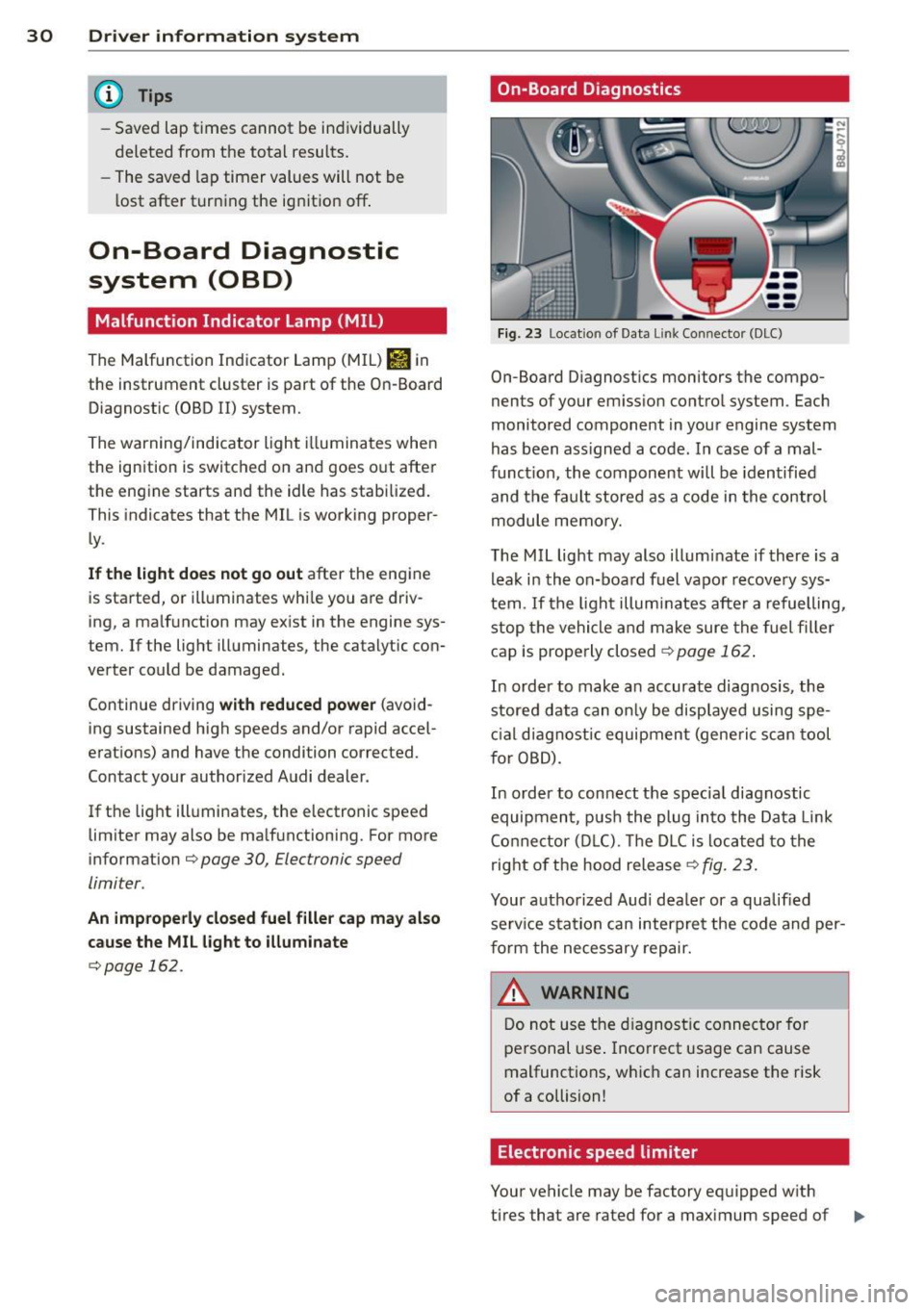
On-Board Diagnostics
Fig. 23 Location of Data Lin k Co nn ector (DLC)
On-Board D iagnostics monitors the compo
nents of your emission control system . Each
monitored component in your engine system
has been ass igned a code. In case of a mal
funct ion, the component will be identified
and the fault stored as a code in the control
module memory.
The MIL light may also illuminate if there is a
leak in the on-board fuel vapor recovery sys
tem .
If the light illuminates after a refuelling,
stop the vehicle and make sure the fuel filler
cap is properly closed¢
page 162 .
In order to make a n accurate diagnosis, the
stored data can only be displayed using spe
cial diagn ostic equipment (generi c scan tool
f or OBD).
In order to connect the spec ial diagnostic
equipment , push the plug into the Data Link
Connector (DLC). Th e DLC is located to the
right of the hood release
¢fig. 23.
Your authorized Audi dealer or a qualified
service s ta tion can interpret the code and per
form the necessary repair.
~ARNING
Do not use the diagnostic connector for
personal use . Incorrect usage can cause
malfunctions, which can increase the risk
of a collision!
Electronic speed limiter
Your vehicle may be factory equipped w ith
-
tires that are rated for a maximum speed of .,..